SharePoint Online MCP Server
SharePoint Online MCP 服务器
这是 Claude Desktop 的 MCP 服务器,允许您使用 SharePoint REST API 与 SharePoint Online 进行交互。它旨在与Claude Desktop应用配合使用,但也可供其他 MCP 客户端使用。
执行
成分 | 手术 | 可用的 |
用户 | ❌ | |
获取用户 | ❌ | |
站点 | ❌ | |
列出站点 | ❌ | |
获取站点详细信息 | ✅ | |
创建子网站 | ❌ | |
删除站点 | ❌ | |
列表 | ❌ | |
获取所有列表 | ✅ | |
创建列表 | ❌ | |
阅读列表 | ❌ | |
添加至列表 | ❌ | |
更新列表 | ❌ | |
删除列表 | ❌ | |
列表项 | ❌ | |
获取所有列表项 | ✅ | |
添加模拟项目 | ✅ | |
添加列表项 | ❌ | |
更新列表项 | ❌ | |
删除列表项 | ❌ |
Related MCP server: SharePoint MCP Server
配置步骤
⚠️ 您需要成为 SharePoint 租户管理员或全局管理员才能创建 SharePoint 应用程序。
允许仅限 SharePoint 的应用程序
从这里下载并安装 SharePoint Online 命令行管理程序。
打开 PowerShell 并运行以下命令以确保仅 SharePoint 应用程序已启用:
Connect-SPOService -Url https://<your-tenant>-admin.sharepoint.com/
Set-SPOTenant -DisableCustomAppAuthentication $false创建仅限 SharePoint 的应用程序
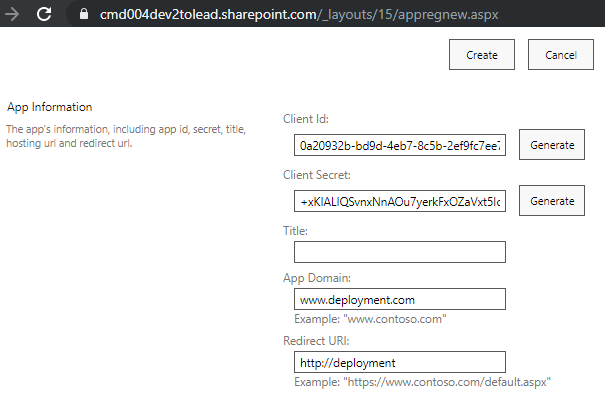
单击
Generate以创建新的客户端 ID 和密钥。填写以下字段:
应用程序域:
www.example.com(或您拥有的任何域名)重定向 URL:
http://example.com
单击
Create以创建应用程序。将
Client ID和Client Secret值复制到安全的地方。稍后您将需要它们。
授予应用程序权限
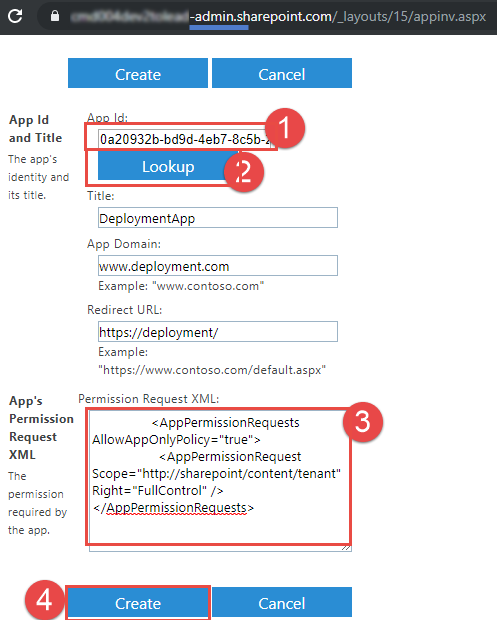
将
Client ID值粘贴到App Id字段中,然后单击Lookup。
将以下 XML 粘贴到
App Permission Request XML字段中:
<AppPermissionRequests AllowAppOnlyPolicy="true">
<AppPermissionRequest Scope="http://sharepoint/content/tenant" Right="FullControl" />
</AppPermissionRequests>单击
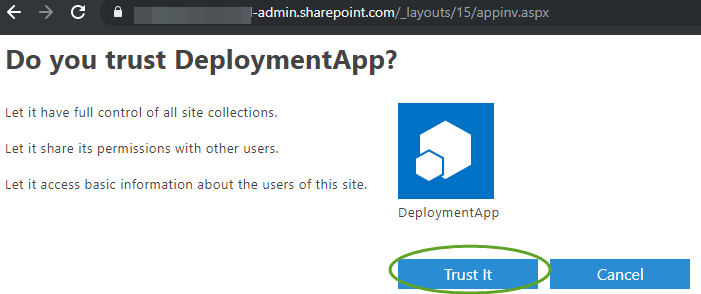
Create,然后Trust It以授予应用程序权限。

安装 Node.js
安装node.js版本: 22.14.0或更高版本
安装并配置 Claude Desktop
下载Claude Desktop并安装它。
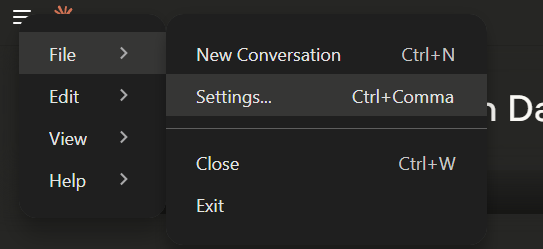
在 Claude Desktop 中,转到
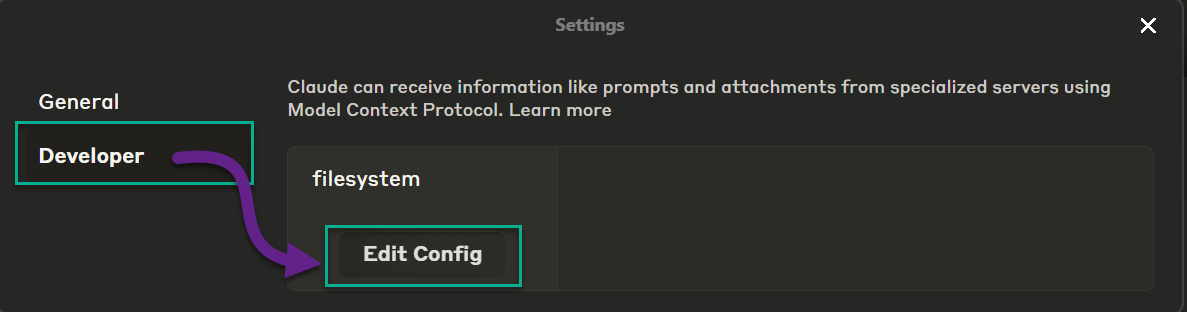
File>Settings>Developer。
单击编辑配置

在编辑器中打开 claude_desktop_config.json 配置文件。
将以下内容粘贴到配置中并使用您自己的值更新
mcpServers部分:
{
"mcpServers": {
"server-sharepoint": {
"command": "npx",
"args": [
"-y",
"server-sharepoint"
],
"env": {
"SHAREPOINT_CLIENT_ID": "<your-client-id>",
"SHAREPOINT_CLIENT_SECRET": "<your-client-secret>",
"SHAREPOINT_TENANT_ID": "<your-tenant-id>"
}
}
}
}
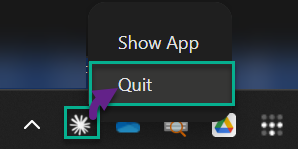
保存配置文件并重启 Claude Desktop。确保通过任务栏图标彻底关闭应用:

如何与 MCP 服务器“对话”
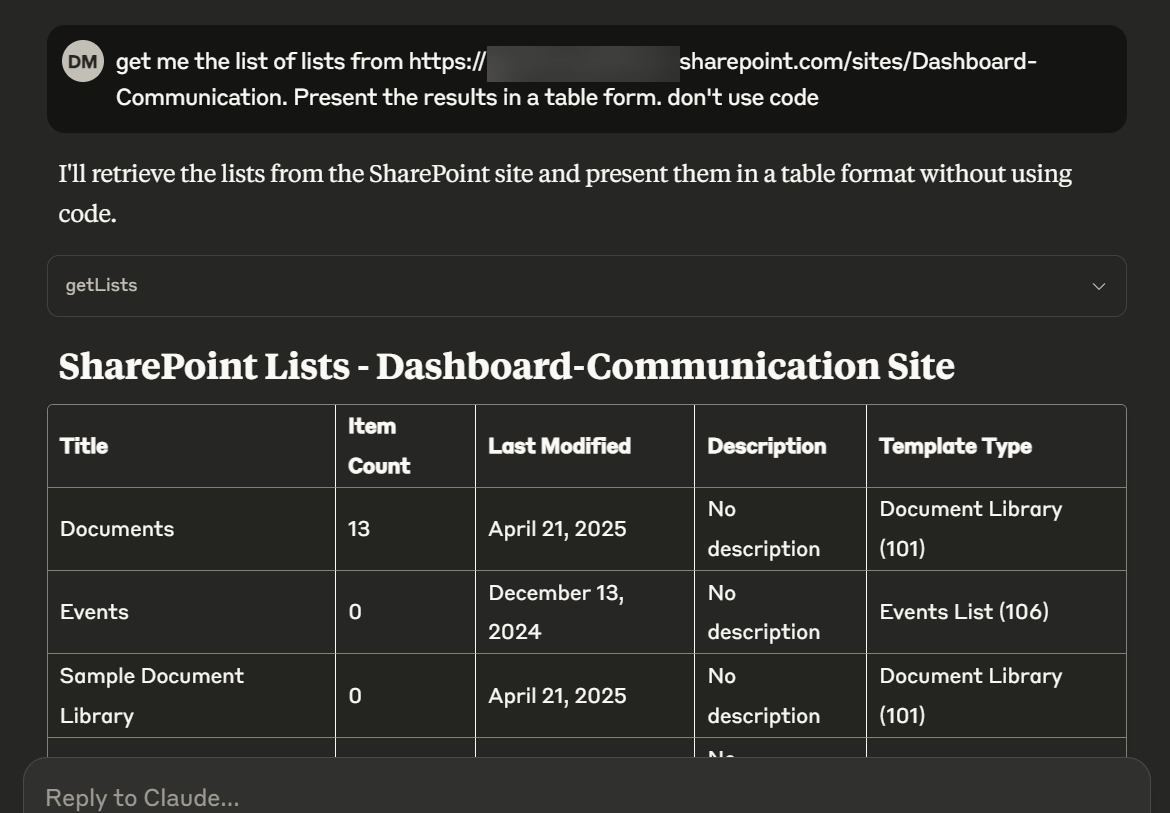
打开 Claude Desktop 并提出类似以下问题
Get me the list of lists from https://<your-tenant>.sharepoint.com/sites/Dashboard-Communication. Present the results in a table form. don't use code。

对于贡献者
构建一个新的 npm 包
npm run build
npm publish
npx clear-npx-cache
npm cache clean --force在本地运行 MCP Inspector
npx @modelcontextprotocol/inspector 节点构建/index.js
Maintenance
Resources
Unclaimed servers have limited discoverability.
Looking for Admin?
If you are the server author, to access and configure the admin panel.
Related MCP Servers
- AlicenseNot gradedqualityDmaintenanceEnables interaction with Microsoft SharePoint sites, document libraries, and files through the Microsoft Graph API. Supports browsing, searching, uploading/downloading files, managing lists, and creating sharing links with secure OAuth authentication.2MIT
- AlicenseNot gradedqualityDmaintenanceEnables browsing and interacting with Microsoft SharePoint sites and documents through Microsoft Graph API, supporting file search, site listing, document library browsing, and file content retrieval with OAuth2 authentication.3810MIT
- AlicenseAqualityDmaintenanceProvides Claude with access to Microsoft SharePoint via the Microsoft Graph API, enabling folder management, document operations (upload, download, read, update, delete), and metadata management with secure OAuth 2.0 authentication.16MIT
- FlicenseAqualityDmaintenanceEnables AI agents to manage SharePoint Online resources including lists, libraries, columns, views, and files through the SharePoint REST API. It supports comprehensive data operations, schema management, and file transfers using secure MSAL authentication.21
Related MCP Connectors
Read, edit, publish, and preview your pepita websites from Claude.
Live SEO workflow tools for Claude Code, Codex, and AI agents.
Official Microsoft MCP Server to query Microsoft Entra data using natural language
Appeared in Searches
Latest Blog Posts
- Who's Calling? MCP Hosts Are an Identity Blind Spot (And the Spec Knows It)By Om-Shree-0709 on .mcpAgent IdentityOAuth 2.1
- Your AI Chatbot Just Exposed Your CEO's Salary to an InternBy Om-Shree-0709 on .Agent IdentityMCP SecurityOAuth Delegation
- Why MCP Servers Need Execution Sandboxing (And Why Your Current Stack Isn't Enough)By Om-Shree-0709 on .Agentic AiPrompt InjectionWebAssembly
MCP directory API
We provide all the information about MCP servers via our MCP API.
curl -X GET 'https://glama.ai/api/mcp/v1/servers/Zerg00s/server-sharepoint'
If you have feedback or need assistance with the MCP directory API, please join our Discord server