SharePoint Online MCP Server
SharePoint Online MCP 서버
Claude Desktop용 MCP 서버로, SharePoint REST API를 사용하여 SharePoint Online과 상호 작용할 수 있습니다. Claude Desktop 앱과 함께 사용하도록 설계되었지만 다른 MCP 클라이언트에서도 사용할 수 있습니다.
구현
요소 | 작업 | 사용 가능 |
사용자 | ❌ | |
사용자 가져오기 | ❌ | |
사이트 | ❌ | |
사이트 목록 | ❌ | |
사이트 세부 정보 가져오기 | ✅ | |
하위 사이트 만들기 | ❌ | |
사이트 삭제 | ❌ | |
기울기 | ❌ | |
모든 목록 가져오기 | ✅ | |
목록 만들기 | ❌ | |
읽기 목록 | ❌ | |
목록에 추가 | ❌ | |
업데이트 목록 | ❌ | |
목록 삭제 | ❌ | |
목록 항목 | ❌ | |
모든 목록 항목 가져오기 | ✅ | |
모의 항목 추가 | ✅ | |
목록 항목 추가 | ❌ | |
목록 항목 업데이트 | ❌ | |
목록 항목 삭제 | ❌ |
Related MCP server: SharePoint MCP Server
구성 단계
⚠️ SharePoint 앱을 만들려면 SharePoint 테넌트 관리자 또는 글로벌 관리자여야 합니다.
SharePoint 전용 앱 허용
여기 에서 SharePoint Online 관리 셸을 다운로드하여 설치하세요.
PowerShell을 열고 다음 명령을 실행하여 SharePoint 전용 앱이 활성화되어 있는지 확인하세요.
지엑스피1
SharePoint 전용 앱 만들기
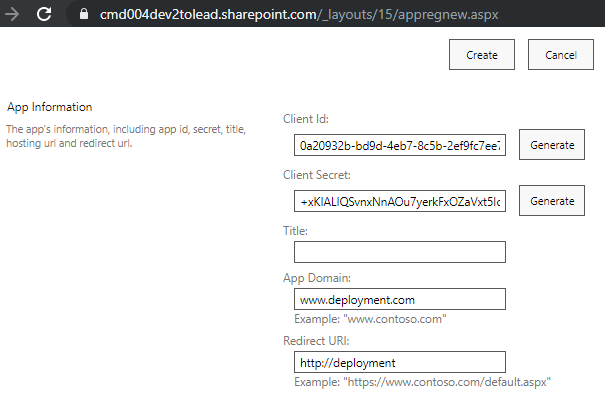
Generate클릭하여 새로운 클라이언트 ID와 비밀번호를 만듭니다.다음 필드를 채워주세요:
앱 도메인:
www.example.com(또는 귀하가 소유한 도메인)리디렉션 URL:
http://example.com
앱을 만들려면
Create클릭하세요.Client ID와Client Secret값을 안전한 곳에 복사해 두세요. 나중에 필요합니다.
앱 권한 부여
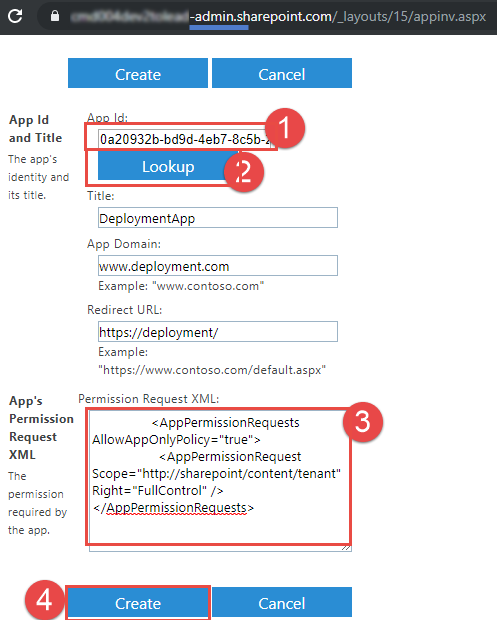
App Id필드에Client ID값을 붙여넣고Lookup클릭합니다.
다음 XML을
App Permission Request XML필드에 붙여넣습니다.
<AppPermissionRequests AllowAppOnlyPolicy="true">
<AppPermissionRequest Scope="http://sharepoint/content/tenant" Right="FullControl" />
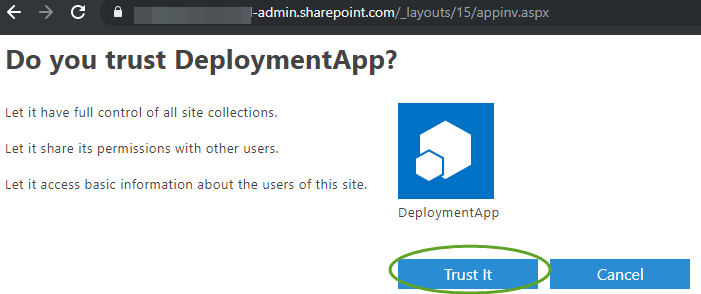
</AppPermissionRequests>Create클릭한 다음Trust It클릭하여 앱 권한을 부여합니다.

Node.js 설치
node.js 버전 설치: 22.14.0 이상
Claude Desktop 설치 및 구성
Claude Desktop을 다운로드하여 설치하세요.
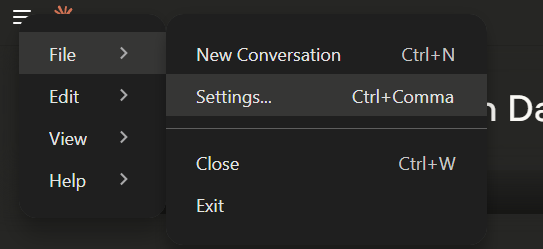
Claude Desktop에서
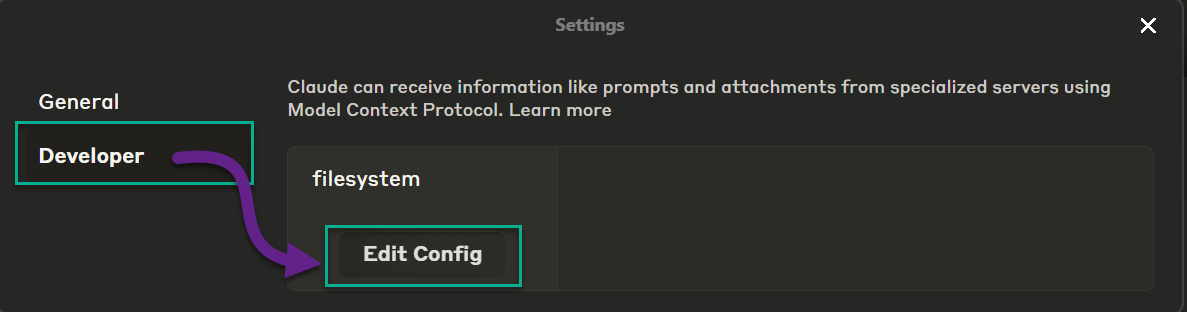
File>Settings>Developer로 이동합니다.
구성 편집을 클릭하세요

편집기에서 claude_desktop_config.json 구성 파일을 엽니다.
다음을 config에 붙여넣고
mcpServers섹션을 원하는 값으로 업데이트하세요.
{
"mcpServers": {
"server-sharepoint": {
"command": "npx",
"args": [
"-y",
"server-sharepoint"
],
"env": {
"SHAREPOINT_CLIENT_ID": "<your-client-id>",
"SHAREPOINT_CLIENT_SECRET": "<your-client-secret>",
"SHAREPOINT_TENANT_ID": "<your-tenant-id>"
}
}
}
}
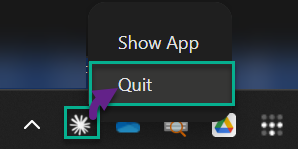
구성 파일을 저장하고 Claude Desktop을 다시 시작하세요. 작업 트레이 아이콘을 통해 앱을 완전히 종료하세요.

MCP 서버와 "대화"하는 방법
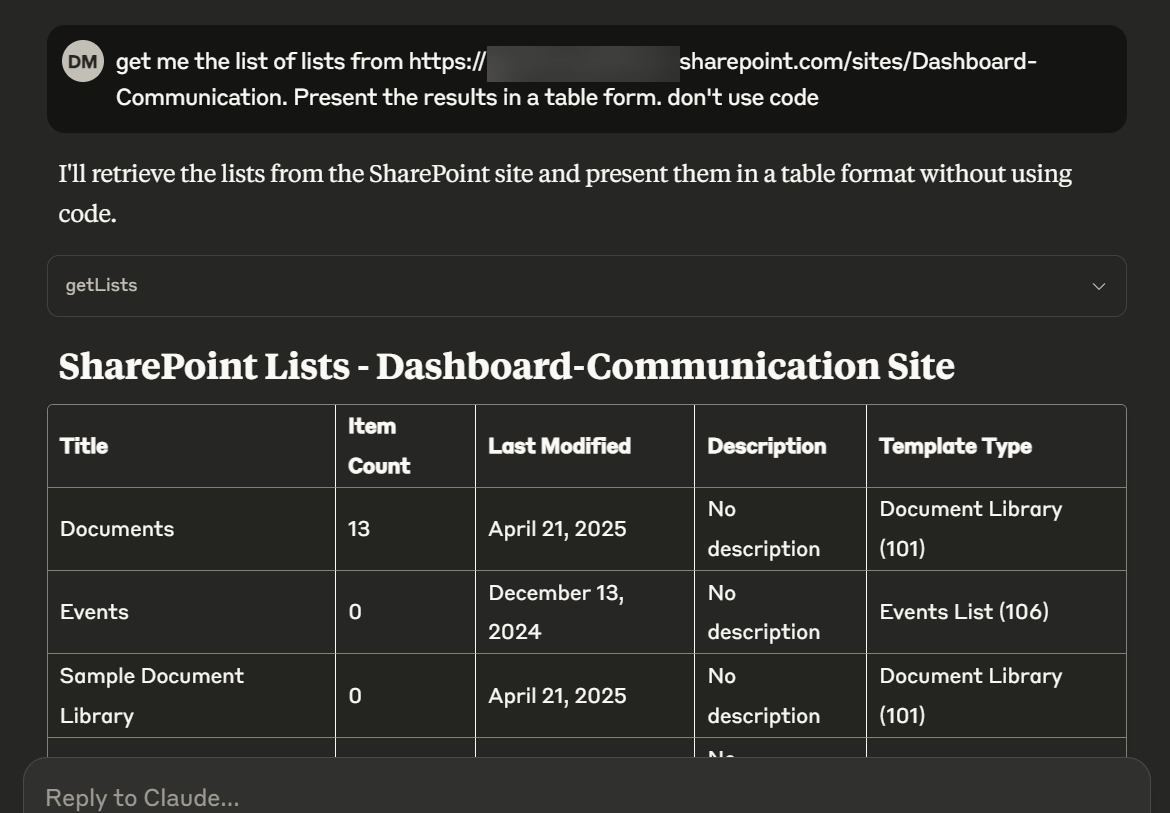
Claude Desktop을 열고
Get me the list of lists from https://<your-tenant>.sharepoint.com/sites/Dashboard-Communication. Present the results in a table form. don't use code.

기여자를 위한
새로운 npm 패키지 빌드
npm run build
npm publish
npx clear-npx-cache
npm cache clean --forceMCP Inspector를 로컬에서 실행하세요
npx @modelcontextprotocol/inspector 노드 빌드/index.js
Maintenance
Resources
Unclaimed servers have limited discoverability.
Looking for Admin?
If you are the server author, to access and configure the admin panel.
Related MCP Servers
- AlicenseNot gradedqualityDmaintenanceEnables interaction with Microsoft SharePoint sites, document libraries, and files through the Microsoft Graph API. Supports browsing, searching, uploading/downloading files, managing lists, and creating sharing links with secure OAuth authentication.2MIT
- AlicenseNot gradedqualityDmaintenanceEnables browsing and interacting with Microsoft SharePoint sites and documents through Microsoft Graph API, supporting file search, site listing, document library browsing, and file content retrieval with OAuth2 authentication.3810MIT
- AlicenseAqualityDmaintenanceProvides Claude with access to Microsoft SharePoint via the Microsoft Graph API, enabling folder management, document operations (upload, download, read, update, delete), and metadata management with secure OAuth 2.0 authentication.16MIT
- FlicenseAqualityDmaintenanceEnables AI agents to manage SharePoint Online resources including lists, libraries, columns, views, and files through the SharePoint REST API. It supports comprehensive data operations, schema management, and file transfers using secure MSAL authentication.21
Related MCP Connectors
Read, edit, publish, and preview your pepita websites from Claude.
Live SEO workflow tools for Claude Code, Codex, and AI agents.
Official Microsoft MCP Server to query Microsoft Entra data using natural language
Appeared in Searches
Latest Blog Posts
- Who's Calling? MCP Hosts Are an Identity Blind Spot (And the Spec Knows It)By Om-Shree-0709 on .mcpAgent IdentityOAuth 2.1
- Your AI Chatbot Just Exposed Your CEO's Salary to an InternBy Om-Shree-0709 on .Agent IdentityMCP SecurityOAuth Delegation
- Why MCP Servers Need Execution Sandboxing (And Why Your Current Stack Isn't Enough)By Om-Shree-0709 on .Agentic AiPrompt InjectionWebAssembly
MCP directory API
We provide all the information about MCP servers via our MCP API.
curl -X GET 'https://glama.ai/api/mcp/v1/servers/Zerg00s/server-sharepoint'
If you have feedback or need assistance with the MCP directory API, please join our Discord server