-

tavily-mcp
by StevenFengLi
Tavily MCP 服务器🚀
🔌与Cline 、 Cursor 、 Claude Desktop以及任何其他 MCP 客户端兼容!
Tavily MCP 也与任何 MCP 客户端兼容
📚 有关将 Tavily MCP 与 Neo4j MCP 服务器相结合的教程!
📚 教程:在 VS Code 中将 Tavily MCP 与 Cline 集成(演示 + 示例用例)
模型上下文协议 (MCP) 是一种开放标准,使 AI 系统能够与各种数据源和工具无缝交互,促进安全的双向连接。
由 Anthropic 开发的模型上下文协议 (MCP) 使 Claude 等 AI 助手能够与 Tavily 的高级搜索和数据提取功能无缝集成。这种集成使 AI 模型能够实时访问网络信息,并配备完善的过滤选项和特定领域的搜索功能。
Tavily MCP 服务器提供:
与 tavily-search 和 tavily-extract 工具无缝交互
通过 tavily-search 工具实现实时网络搜索功能
通过 tavily-extract 工具从网页智能提取数据
先决条件🔧
在开始之前,请确保您已:
如果您没有 Tavily API 密钥,您可以在此处注册免费帐户
Node.js (v20 或更高版本)
您可以通过运行以下命令来验证您的 Node.js 安装:
node --version
已安装Git (仅在使用 Git 安装方法时才需要)
在 macOS 上:
brew install git在 Linux 上:
Debian/Ubuntu:
sudo apt install gitRedHat/CentOS:
sudo yum install git
在 Windows 上:下载适用于 Windows 的 Git
Related MCP server: powerbi-tabular-mcp
Tavily MCP 服务器安装⚡
使用 NPX 运行
npx -y tavily-mcp@0.1.4 通过 Smithery 安装
要通过Smithery自动为 Claude Desktop 安装 Tavily MCP Server:
npx -y @smithery/cli install @tavily-ai/tavily-mcp --client claude虽然您可以单独启动服务器,但单独使用并没有太大用处。您应该将其集成到 MCP 客户端中。以下是如何配置 Claude Desktop 应用与 tavily-mcp 服务器配合使用的示例。
配置 MCP 客户端 ⚙️
该存储库将解释如何配置Cursor和Claude Desktop以与 tavily-mcp 服务器协同工作。
配置 Cline 🤖
在 Cline 中设置 Tavily MCP 服务器的最简单方法是通过市场单击一下:
在 VS Code 中打开 Cline
点击侧边栏中的 Cline 图标
导航到“MCP 服务器”选项卡(4 个方块)
搜索“Tavily”并点击“安装”
出现提示时,输入您的 Tavily API 密钥
或者,您可以在 Cline 中手动设置 Tavily MCP 服务器:
打开 Cline MCP 设置文件:
对于 macOS:
# Using Visual Studio Code
code ~/Library/Application\ Support/Code/User/globalStorage/saoudrizwan.claude-dev/settings/cline_mcp_settings.json

# Or using TextEdit
open -e ~/Library/Application\ Support/Code/User/globalStorage/saoudrizwan.claude-dev/settings/cline_mcp_settings.json
对于 Windows:
code %APPDATA%\Code\User\globalStorage\saoudrizwan.claude-dev\settings\cline_mcp_settings.json将 Tavily 服务器配置添加到文件中:
将
your-api-key-here替换为您实际的Tavily API 密钥。{ "mcpServers": { "tavily-mcp": { "command": "npx", "args": ["-y", "tavily-mcp@0.1.4"], "env": { "TAVILY_API_KEY": "your-api-key-here" }, "disabled": false, "autoApprove": [] } } }如果 Cline 已运行,请保存文件并重新启动它。
使用 Cline 时,您现在可以访问 Tavily MCP 工具。您可以直接在对话中让 Cline 使用 tavily-search 和 tavily-extract 工具。
配置光标🖥️
注意:需要 Cursor 版本 0.45.6 或更高版本
要在 Cursor 中设置 Tavily MCP 服务器:
打开游标设置
导航至“功能”>“MCP 服务器”
点击“+ 添加新的 MCP 服务器”按钮
填写以下信息:
名称:输入服务器的昵称(例如“tavily-mcp”)
类型:选择“命令”作为类型
命令:输入运行服务器的命令:
env TAVILY_API_KEY=your-api-key npx -y tavily-mcp@0.1.4重要提示:请将
your-api-key替换为您的 Tavily API 密钥。您可以在app.tavily.com/home获取。
添加服务器后,它将出现在 MCP 服务器列表中。您可能需要手动点击 MCP 服务器右上角的刷新按钮来刷新工具列表。
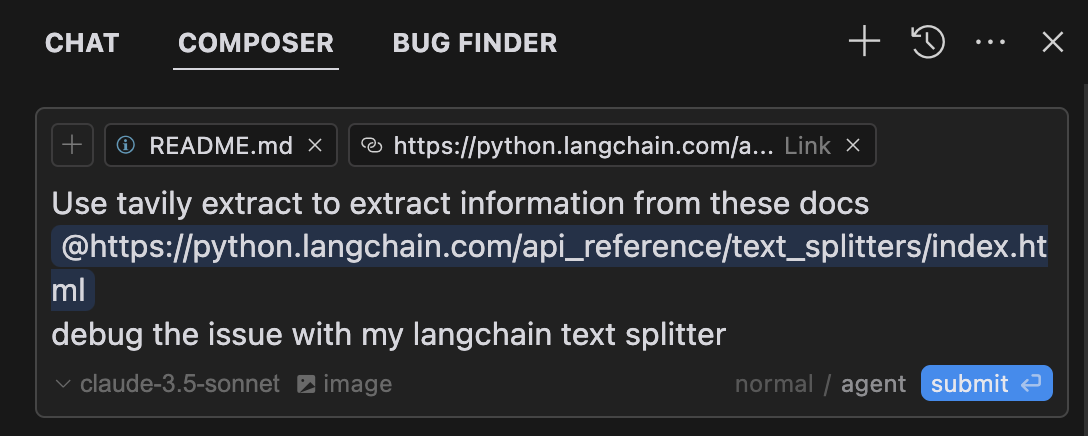
当与您的查询相关时,Composer Agent 将自动使用 Tavily MCP 工具。最好明确请求使用这些工具,并描述您的操作(例如,“使用 tavily-search 在网络上搜索有关 AI 的最新新闻”)。在 Mac 上,按 Command + L 打开聊天,选择屏幕顶部的 Composer 选项,在“提交”按钮旁边选择 Agent,并在准备好后提交查询。
配置 Claude 桌面应用程序🖥️
对于 macOS:
# Create the config file if it doesn't exist
touch "$HOME/Library/Application Support/Claude/claude_desktop_config.json"

# Opens the config file in TextEdit
open -e "$HOME/Library/Application Support/Claude/claude_desktop_config.json"

# Alternative method using Visual Studio Code (requires VS Code to be installed)
code "$HOME/Library/Application Support/Claude/claude_desktop_config.json"
对于 Windows:
code %APPDATA%\Claude\claude_desktop_config.json添加 Tavily 服务器配置:
将your-api-key-here替换为您实际的Tavily API 密钥。
{
  "mcpServers": {
    "tavily-mcp": {
      "command": "npx",
      "args": ["-y", "tavily-mcp@0.1.2"],
      "env": {
        "TAVILY_API_KEY": "your-api-key-here"
      }
    }
  }
}
2. Git 安装
克隆存储库:
git clone https://github.com/tavily-ai/tavily-mcp.git
cd tavily-mcp
安装依赖项:
npm install构建项目:
npm run build配置 Claude 桌面应用程序⚙️
按照上面配置 Claude 桌面应用程序部分中概述的配置步骤,使用以下 JSON 配置。
将your-api-key-here替换为您实际的Tavily API 密钥,将/path/to/tavily-mcp替换为您在系统上克隆存储库的实际路径。
{
  "mcpServers": {
    "tavily": {
      "command": "npx",
      "args": ["/path/to/tavily-mcp/build/index.js"],
      "env": {
        "TAVILY_API_KEY": "your-api-key-here"
      }
    }
  }
}
在 Claude 桌面应用程序中的使用
安装完成并配置好 Claude 桌面应用程序后,您必须完全关闭并重新打开 Claude 桌面应用程序才能查看 tavily-mcp 服务器。您应该在应用程序左下方看到一个锤子图标,表示可用的 MCP 工具,您可以点击锤子图标查看有关 tavily-search 和 tavily-extract 工具的更多详细信息。
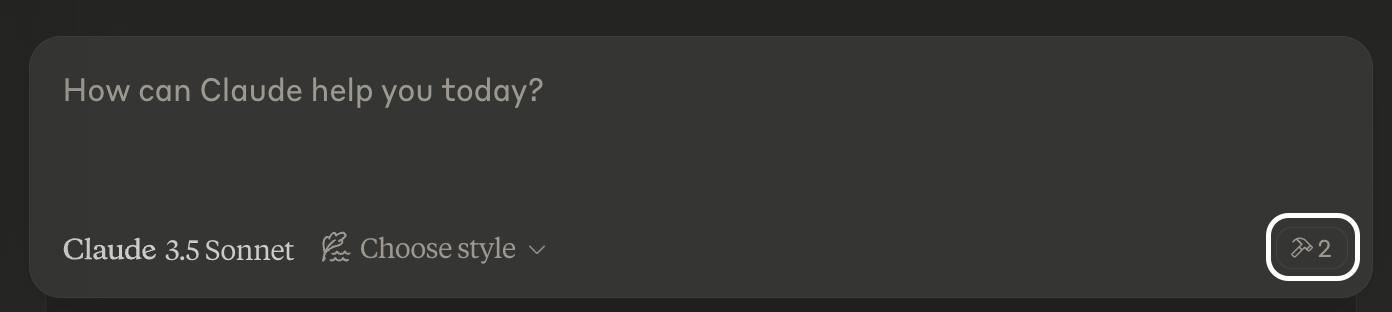
现在,Claude 将拥有 tavily-mcp 服务器的完整访问权限,包括 tavily-search 和 tavily-extract 工具。如果您将以下示例代码插入 Claude 桌面应用程序,您将看到 tavily-mcp 服务器工具的运行。
塔维利搜索示例
常规网页搜索:
Can you search for recent developments in quantum computing?新闻搜索:
Search for news articles about AI startups from the last 7 days.特定领域搜索:
Search for climate change research on nature.com and sciencedirect.comTavily 提取物示例
摘录文章内容:
Extract the main content from this article: https://example.com/article✨ 合并搜索和提取 ✨
您还可以结合使用 tavily-search 和 tavily-extract 工具来执行更复杂的任务。
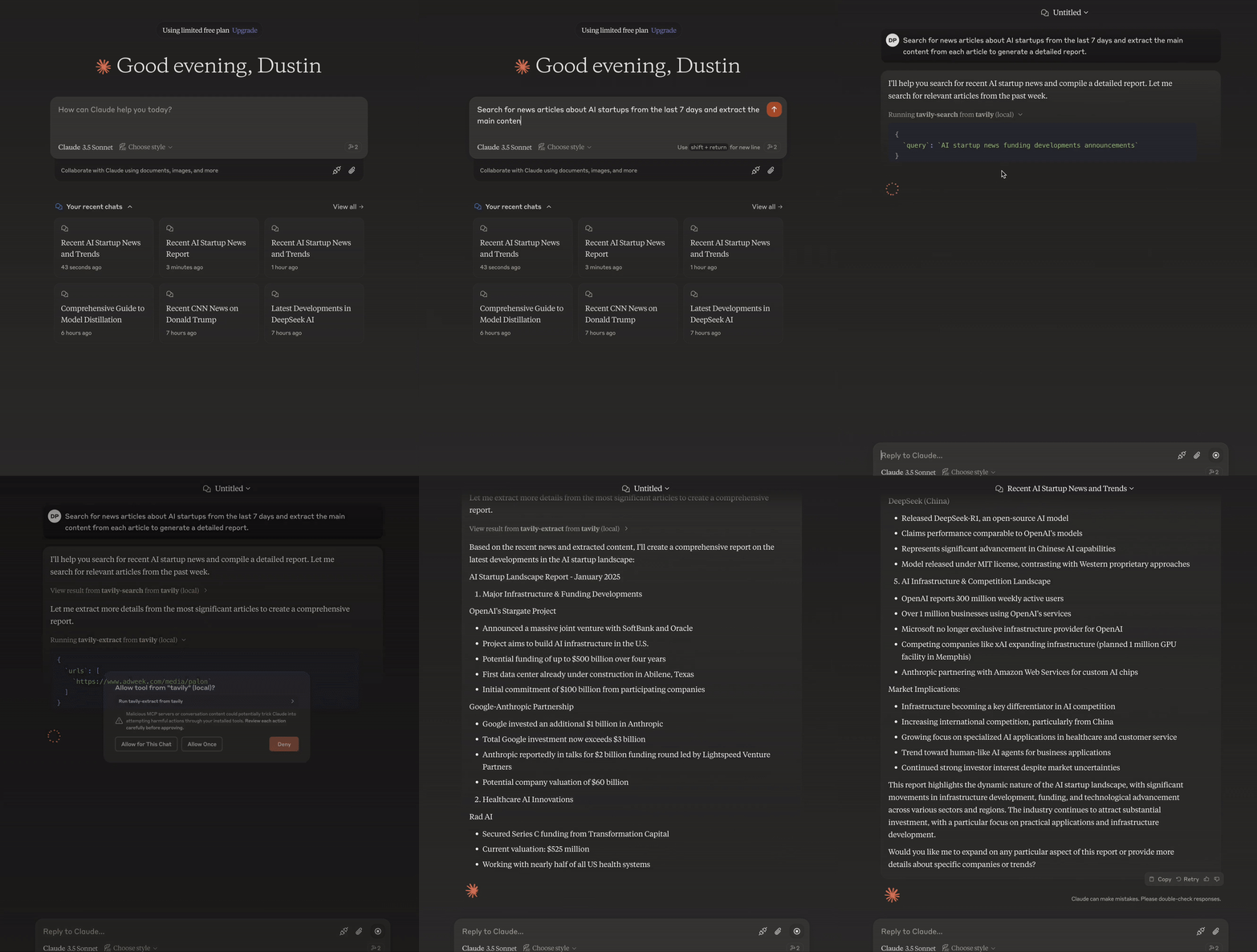
Search for news articles about AI startups from the last 7 days and extract the main content from each article to generate a detailed report.故障排除🛠️
常见问题
未找到服务器
通过运行
npm --verison来验证 npm 安装通过运行
code ~/Library/Application\ Support/Claude/claude_desktop_config.json检查 Claude Desktop 配置语法通过运行
node --version确保正确安装了 Node.js
NPX 相关问题
如果遇到与
npx相关的错误,则可能需要使用 npx 可执行文件的完整路径。您可以通过在终端中运行
which npx来找到此路径,然后在配置中将"command": "npx"行替换为"command": "/full/path/to/npx"。
API 密钥问题
确认您的 Tavily API 密钥有效
检查配置中的 API 密钥是否正确设置
验证 API 密钥周围没有空格或引号
致谢✨
Available Tools
2 toolstavily-extractC
A powerful web content extraction tool that retrieves and processes raw content from specified URLs, ideal for data collection, content analysis, and research tasks.
ParametersJSON Schema
| Name | Required | Description | Default |
|---|---|---|---|
| urls | Yes | List of URLs to extract content from | |
| extract_depth | No | Depth of extraction - 'basic' or 'advanced', if usrls are linkedin use 'advanced' or if explicitly told to use advanced | basic |
| include_images | No | Include a list of images extracted from the urls in the response |
TDQS
C2.9/5.0
Behavior2/5
Does the description disclose side effects, auth requirements, rate limits, or destructive behavior?
With no annotations provided, the description carries the full burden of behavioral disclosure. It mentions 'retrieves and processes raw content' but lacks details on rate limits, authentication needs, error handling, or what 'processes' entails (e.g., formatting, cleaning). For a web extraction tool with potential complexities, this leaves significant gaps in understanding its behavior beyond basic functionality.
Agents need to know what a tool does to the world before calling it. Descriptions should go beyond structured annotations to explain consequences.
Conciseness4/5
Is the description appropriately sized, front-loaded, and free of redundancy?
The description is a single, efficient sentence that front-loads the core purpose ('retrieves and processes raw content from specified URLs') and adds value with ideal use cases. There's no wasted wording, though it could be slightly more structured by separating functional description from usage contexts.
Shorter descriptions cost fewer tokens and are easier for agents to parse. Every sentence should earn its place.
Completeness2/5
Given the tool's complexity, does the description cover enough for an agent to succeed on first attempt?
Given the tool's complexity (web content extraction with processing), lack of annotations, and no output schema, the description is incomplete. It doesn't explain what 'processes' means, the format or structure of returned content, potential limitations (e.g., site restrictions), or how it differs from siblings. For a tool with three parameters and no structured behavioral hints, more context is needed.
Complex tools with many parameters or behaviors need more documentation. Simple tools need less. This dimension scales expectations accordingly.
Parameters3/5
Does the description clarify parameter syntax, constraints, interactions, or defaults beyond what the schema provides?
The input schema has 100% description coverage, clearly documenting all three parameters. The description adds no parameter-specific information beyond what the schema provides, such as examples or contextual usage tips. However, since the schema is comprehensive, a baseline score of 3 is appropriate as the description doesn't need to compensate for gaps.
Input schemas describe structure but not intent. Descriptions should explain non-obvious parameter relationships and valid value ranges.
Purpose4/5
Does the description clearly state what the tool does and how it differs from similar tools?
The description clearly states the tool's purpose as 'retrieves and processes raw content from specified URLs' with specific verbs and resources. It distinguishes itself from potential siblings by focusing on extraction rather than crawling, mapping, or searching, though it doesn't explicitly name alternatives. The description is specific but could be more precise about what 'processes' entails.
Agents choose between tools based on descriptions. A clear purpose with a specific verb and resource helps agents select the right tool.
Usage Guidelines2/5
Does the description explain when to use this tool, when not to, or what alternatives exist?
The description provides minimal guidance with 'ideal for data collection, content analysis, and research tasks,' but offers no explicit when-to-use rules, exclusions, or comparisons to sibling tools like tavily-crawl, tavily-map, or tavily-search. There's no mention of prerequisites, limitations, or scenarios where this tool is preferred over alternatives.
Agents often have multiple tools that could apply. Explicit usage guidance like "use X instead of Y when Z" prevents misuse.
tavily-searchA
A powerful web search tool that provides comprehensive, real-time results using Tavily's AI search engine. Returns relevant web content with customizable parameters for result count, content type, and domain filtering. Ideal for gathering current information, news, and detailed web content analysis.
ParametersJSON Schema
| Name | Required | Description | Default |
|---|---|---|---|
| query | Yes | Search query | |
| search_depth | No | The depth of the search. It can be 'basic' or 'advanced' | basic |
| topic | No | The category of the search. This will determine which of our agents will be used for the search | general |
| days | No | The number of days back from the current date to include in the search results. This specifies the time frame of data to be retrieved. Please note that this feature is only available when using the 'news' search topic | |
| time_range | No | The time range back from the current date to include in the search results. This feature is available for both 'general' and 'news' search topics | |
| max_results | No | The maximum number of search results to return | |
| include_images | No | Include a list of query-related images in the response | |
| include_image_descriptions | No | Include a list of query-related images and their descriptions in the response | |
| include_raw_content | No | Include the cleaned and parsed HTML content of each search result | |
| include_domains | No | A list of domains to specifically include in the search results, if the user asks to search on specific sites set this to the domain of the site | |
| exclude_domains | No | List of domains to specifically exclude, if the user asks to exclude a domain set this to the domain of the site |
TDQS
A3.9/5.0
Behavior3/5
Does the description disclose side effects, auth requirements, rate limits, or destructive behavior?
With no annotations provided, the description carries the full burden of behavioral disclosure. It mentions 'real-time results' and 'customizable parameters' which are useful, but doesn't cover important aspects like rate limits, authentication requirements, error conditions, or what the response structure looks like. The description provides basic behavioral context but leaves significant gaps.
Agents need to know what a tool does to the world before calling it. Descriptions should go beyond structured annotations to explain consequences.
Conciseness5/5
Is the description appropriately sized, front-loaded, and free of redundancy?
The description is efficiently structured in two sentences that each earn their place. The first sentence establishes the core functionality and key features, while the second sentence provides usage context. There's zero wasted language or redundancy.
Shorter descriptions cost fewer tokens and are easier for agents to parse. Every sentence should earn its place.
Completeness3/5
Given the tool's complexity, does the description cover enough for an agent to succeed on first attempt?
For a complex tool with 11 parameters and no output schema, the description provides adequate but incomplete context. It covers the purpose and high-level capabilities well, but given the parameter complexity and absence of annotations, it should do more to explain behavioral aspects like response format, error handling, or performance characteristics.
Complex tools with many parameters or behaviors need more documentation. Simple tools need less. This dimension scales expectations accordingly.
Parameters3/5
Does the description clarify parameter syntax, constraints, interactions, or defaults beyond what the schema provides?
With 100% schema description coverage, the schema already documents all 11 parameters thoroughly. The description mentions 'customizable parameters for result count, content type, and domain filtering' which aligns with some parameters but doesn't add meaningful semantic context beyond what the schema provides. The baseline score of 3 is appropriate when the schema does the heavy lifting.
Input schemas describe structure but not intent. Descriptions should explain non-obvious parameter relationships and valid value ranges.
Purpose5/5
Does the description clearly state what the tool does and how it differs from similar tools?
The description clearly states the tool performs 'web search' using 'Tavily's AI search engine' and returns 'relevant web content', which is a specific verb+resource combination. It distinguishes from sibling tools by focusing on search rather than crawling, extraction, or mapping operations mentioned in the sibling list.
Agents choose between tools based on descriptions. A clear purpose with a specific verb and resource helps agents select the right tool.
Usage Guidelines4/5
Does the description explain when to use this tool, when not to, or what alternatives exist?
The description provides clear context for when to use this tool ('gathering current information, news, and detailed web content analysis'), but doesn't explicitly state when not to use it or mention alternatives like the sibling tools (tavily-crawl, tavily-extract, tavily-map). The guidance is helpful but lacks explicit exclusion criteria.
Agents often have multiple tools that could apply. Explicit usage guidance like "use X instead of Y when Z" prevents misuse.
Tool Schema Changelog
Recent tool additions, removals, and schema changes observed during successful MCP inspections.
2 tool updates
- First observed
tavily-extract - First observed
tavily-search
TDQS
A3.6/5.0
Scored across 2 tools
Disambiguation5/5
The two tools have clearly distinct purposes: tavily-extract is for extracting content from specific URLs, while tavily-search is for performing web searches with customizable parameters. There is no overlap or ambiguity between them.
Naming Consistency5/5
Both tools follow a consistent 'tavily-verb' pattern (tavily-extract and tavily-search), making them predictable and easy to identify. The naming is uniform and follows the same style throughout.
Tool Count2/5
With only 2 tools, the server feels thin for a web content and search domain. While the tools cover extraction and search, the scope suggests more operations (e.g., filtering, summarization, or advanced querying) could be included to provide a more complete surface.
Completeness3/5
The server covers basic web content retrieval (extract and search), but there are notable gaps. For example, it lacks tools for processing or analyzing the extracted content (e.g., summarization, translation, or sentiment analysis), which could limit agent workflows in research or data analysis tasks.
Maintenance
ActivityInactive
ResponsivenessNo issues
Related MCP Connectors
Related MCP Servers
- -
- MIT
- FlicenseAqualityDmaintenanceTavily MCP Server implementation that uses fastmcp and supports both sse and stdio transports. It also supports more up to date functionalities of Tavily.41-