-

tavily-mcp
by StevenFengLi
Servidor Tavily MCP 🚀
🔌 ¡ Compatible con Cline , Cursor , Claude Desktop y cualquier otro cliente MCP!
Tavily MCP también es compatible con cualquier cliente MCP
¡ Tutorial sobre cómo combinar Tavily MCP con el servidor Neo4j MCP!
Tutorial de integración de Tavily MCP con Cline en VS Code (demostración + ejemplos de casos de uso)
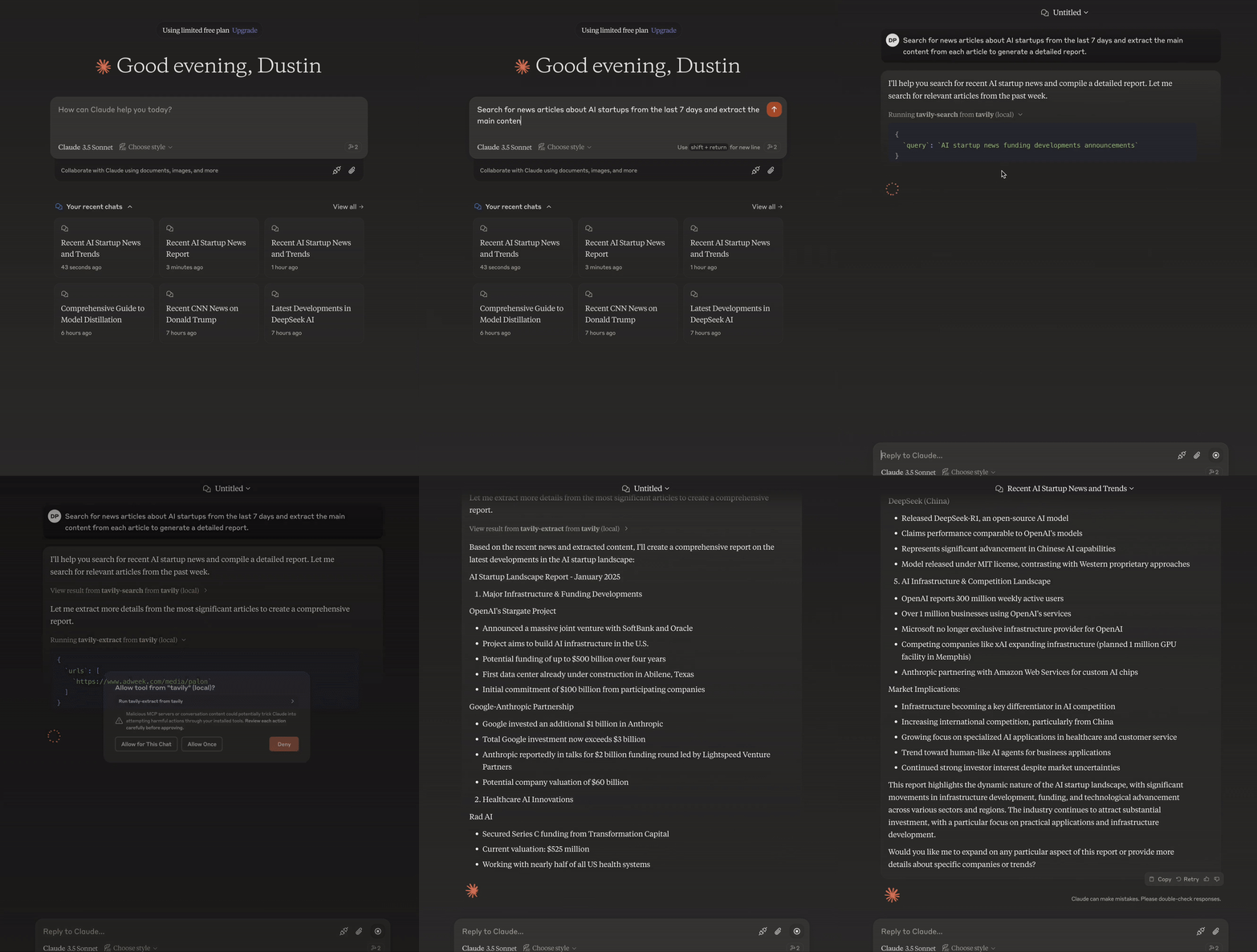
El Protocolo de Contexto de Modelo (MCP) es un estándar abierto que permite que los sistemas de IA interactúen sin problemas con diversas fuentes de datos y herramientas, lo que facilita conexiones bidireccionales seguras.
Desarrollado por Anthropic, el Protocolo de Contexto de Modelo (MCP) permite que asistentes de IA como Claude se integren a la perfección con las funciones avanzadas de búsqueda y extracción de datos de Tavily. Esta integración proporciona a los modelos de IA acceso en tiempo real a la información web, con sofisticadas opciones de filtrado y funciones de búsqueda específicas para cada dominio.
El servidor Tavily MCP proporciona:
Interacción fluida con las herramientas tavily-search y tavily-extract
Capacidades de búsqueda web en tiempo real a través de la herramienta de búsqueda Tavily
Extracción inteligente de datos de páginas web mediante la herramienta tavily-extract
Prerrequisitos 🔧
Antes de comenzar, asegúrese de tener:
Si no tienes una clave API de Tavily, puedes registrarte para obtener una cuenta gratuita aquí
Escritorio o cursor de Claude
Node.js (v20 o superior)
Puede verificar su instalación de Node.js ejecutando:
node --version
Git instalado (solo es necesario si se utiliza el método de instalación Git)
En macOS:
brew install gitEn Linux:
Debian/Ubuntu:
sudo apt install gitRedHat/CentOS:
sudo yum install git
En Windows: Descargar Git para Windows
Related MCP server: powerbi-tabular-mcp
Instalación del servidor Tavily MCP ⚡
Corriendo con NPX
npx -y tavily-mcp@0.1.4 Instalación mediante herrería
Para instalar Tavily MCP Server para Claude Desktop automáticamente a través de Smithery :
npx -y @smithery/cli install @tavily-ai/tavily-mcp --client claudeAunque puedes iniciar un servidor por sí solo, no es especialmente útil por sí solo. En su lugar, deberías integrarlo en un cliente MCP. A continuación, se muestra un ejemplo de cómo configurar la aplicación Claude Desktop para que funcione con el servidor tavily-mcp.
Configuración de clientes MCP ⚙️
Este repositorio explicará cómo configurar Cursor y Claude Desktop para que funcionen con el servidor tavily-mcp.
Configurando Cline 🤖
La forma más sencilla de configurar el servidor Tavily MCP en Cline es a través del mercado con un solo clic:
Abrir Cline en VS Code
Haga clic en el icono de Cline en la barra lateral
Vaya a la pestaña "Servidores MCP" (4 cuadrados)
Busca "Tavily" y haz clic en "instalar".
Cuando se le solicite, ingrese su clave API de Tavily
Alternativamente, puede configurar manualmente el servidor Tavily MCP en Cline:
Abra el archivo de configuración de Cline MCP:
Para macOS:
# Using Visual Studio Code
code ~/Library/Application\ Support/Code/User/globalStorage/saoudrizwan.claude-dev/settings/cline_mcp_settings.json

# Or using TextEdit
open -e ~/Library/Application\ Support/Code/User/globalStorage/saoudrizwan.claude-dev/settings/cline_mcp_settings.json
Para Windows:
code %APPDATA%\Code\User\globalStorage\saoudrizwan.claude-dev\settings\cline_mcp_settings.jsonAgregue la configuración del servidor Tavily al archivo:
Reemplace
your-api-key-herecon su clave API de Tavily real.{ "mcpServers": { "tavily-mcp": { "command": "npx", "args": ["-y", "tavily-mcp@0.1.4"], "env": { "TAVILY_API_KEY": "your-api-key-here" }, "disabled": false, "autoApprove": [] } } }Guarde el archivo y reinicie Cline si ya está ejecutándose.
Al usar Cline, ahora tendrás acceso a las herramientas de Tavily MCP. Puedes pedirle a Cline que use las herramientas de búsqueda y extracción de Tavily directamente en tus conversaciones.
Configurando el cursor 🖥️
Nota : Requiere la versión de Cursor 0.45.6 o superior
Para configurar el servidor Tavily MCP en Cursor:
Abrir configuración del cursor
Vaya a Características > Servidores MCP
Haga clic en el botón "+ Agregar nuevo servidor MCP"
Complete la siguiente información:
Nombre : Ingrese un apodo para el servidor (por ejemplo, "tavily-mcp")
Tipo : Seleccione "comando" como tipo
Comando : Ingrese el comando para ejecutar el servidor:
env TAVILY_API_KEY=your-api-key npx -y tavily-mcp@0.1.4Importante : Reemplace
your-api-keycon su clave API de Tavily. Puede obtenerla en app.tavily.com/home.
Después de agregar el servidor, debería aparecer en la lista de servidores MCP. Es posible que deba presionar manualmente el botón de actualización en la esquina superior derecha del servidor MCP para completar la lista de herramientas.
El Agente de Composer usará automáticamente las herramientas de Tavily MCP cuando sea relevante para sus consultas. Es mejor solicitar explícitamente el uso de las herramientas describiendo lo que desea hacer (por ejemplo, "Usar tavily-search para buscar en la web las últimas noticias sobre IA"). En Mac, presione Comando + L para abrir el chat, seleccione la opción de Composer en la parte superior de la pantalla, junto al botón de envío, seleccione el agente y envíe la consulta cuando esté lista.
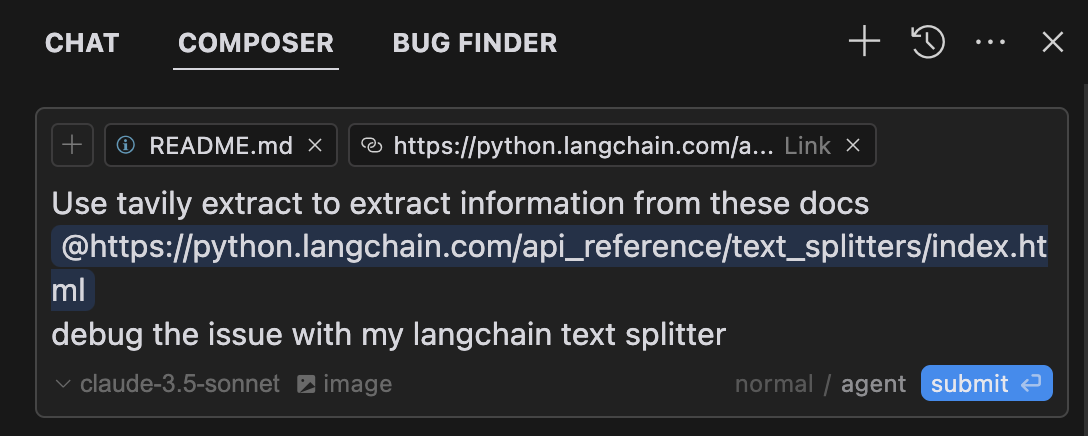
Configurando la aplicación Claude Desktop 🖥️
Para macOS:
# Create the config file if it doesn't exist
touch "$HOME/Library/Application Support/Claude/claude_desktop_config.json"

# Opens the config file in TextEdit
open -e "$HOME/Library/Application Support/Claude/claude_desktop_config.json"

# Alternative method using Visual Studio Code (requires VS Code to be installed)
code "$HOME/Library/Application Support/Claude/claude_desktop_config.json"
Para Windows:
code %APPDATA%\Claude\claude_desktop_config.jsonAgregue la configuración del servidor Tavily:
Reemplace your-api-key-here con su clave API de Tavily real.
{
  "mcpServers": {
    "tavily-mcp": {
      "command": "npx",
      "args": ["-y", "tavily-mcp@0.1.2"],
      "env": {
        "TAVILY_API_KEY": "your-api-key-here"
      }
    }
  }
}
2. Instalación de Git
Clonar el repositorio:
git clone https://github.com/tavily-ai/tavily-mcp.git
cd tavily-mcp
Instalar dependencias:
npm installConstruir el proyecto:
npm run buildConfiguración de la aplicación Claude Desktop ⚙️
Siga los pasos de configuración descritos en la sección Configuración de la aplicación Claude Desktop anterior, utilizando la siguiente configuración JSON.
Reemplace your-api-key-here con su clave API de Tavily real y /path/to/tavily-mcp con la ruta real donde clonó el repositorio en su sistema.
{
  "mcpServers": {
    "tavily": {
      "command": "npx",
      "args": ["/path/to/tavily-mcp/build/index.js"],
      "env": {
        "TAVILY_API_KEY": "your-api-key-here"
      }
    }
  }
}
Uso en la aplicación de escritorio Claude 🎯
Una vez completada la instalación y configurada la aplicación de escritorio de Claude, debe cerrarla por completo y volver a abrirla para ver el servidor Tavily-MCP. Debería ver un icono de martillo en la esquina inferior izquierda de la aplicación, que indica las herramientas MCP disponibles. Puede hacer clic en él para obtener más información sobre las herramientas Tavily-search y Tavily-extract.
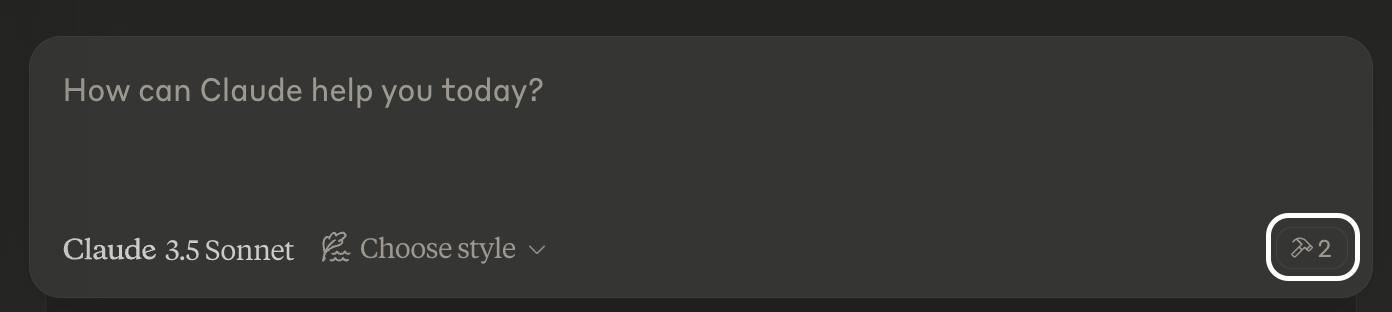
Ahora Claude tendrá acceso completo al servidor Tavily-MCP, incluyendo las herramientas Tavily-Search y Tavily-Extract. Si inserta los siguientes ejemplos en la aplicación de escritorio de Claude, debería ver las herramientas del servidor Tavily-MCP en acción.
Ejemplos de búsqueda de Tavily
Búsqueda web general :
Can you search for recent developments in quantum computing?Búsqueda de noticias :
Search for news articles about AI startups from the last 7 days.Búsqueda específica de dominio :
Search for climate change research on nature.com and sciencedirect.comEjemplos de extractos de Tavily
Extraer el contenido del artículo :
Extract the main content from this article: https://example.com/article✨ Combinar búsqueda y extracción ✨
También puede combinar las herramientas tavily-search y tavily-extract para realizar tareas más complejas.
Search for news articles about AI startups from the last 7 days and extract the main content from each article to generate a detailed report.Solución de problemas 🛠️
Problemas comunes
Servidor no encontrado
Verifique la instalación de npm ejecutando
npm --verisonVerifique la sintaxis de configuración de Claude Desktop ejecutando
code ~/Library/Application\ Support/Claude/claude_desktop_config.jsonAsegúrese de que Node.js esté instalado correctamente ejecutando
node --version
Problemas relacionados con NPX
Si encuentra errores relacionados con
npx, es posible que deba utilizar la ruta completa al ejecutable npx.Puede encontrar esta ruta ejecutando
which npxen su terminal, luego reemplace la línea"command": "npx"con"command": "/full/path/to/npx"en su configuración.
Problemas con la clave API
Confirme que su clave API de Tavily es válida
Compruebe que la clave API esté configurada correctamente en la configuración
Verifique que no haya espacios ni comillas alrededor de la clave API
Agradecimientos ✨
Protocolo de contexto de modelo para la especificación MCP
Antrópico para Claude Desktop
Available Tools
2 toolstavily-extractC
A powerful web content extraction tool that retrieves and processes raw content from specified URLs, ideal for data collection, content analysis, and research tasks.
ParametersJSON Schema
| Name | Required | Description | Default |
|---|---|---|---|
| urls | Yes | List of URLs to extract content from | |
| extract_depth | No | Depth of extraction - 'basic' or 'advanced', if usrls are linkedin use 'advanced' or if explicitly told to use advanced | basic |
| include_images | No | Include a list of images extracted from the urls in the response |
TDQS
C2.9/5.0
Behavior2/5
Does the description disclose side effects, auth requirements, rate limits, or destructive behavior?
With no annotations provided, the description carries the full burden of behavioral disclosure. It mentions 'retrieves and processes raw content' but lacks details on rate limits, authentication needs, error handling, or what 'processes' entails (e.g., formatting, cleaning). For a web extraction tool with potential complexities, this leaves significant gaps in understanding its behavior beyond basic functionality.
Agents need to know what a tool does to the world before calling it. Descriptions should go beyond structured annotations to explain consequences.
Conciseness4/5
Is the description appropriately sized, front-loaded, and free of redundancy?
The description is a single, efficient sentence that front-loads the core purpose ('retrieves and processes raw content from specified URLs') and adds value with ideal use cases. There's no wasted wording, though it could be slightly more structured by separating functional description from usage contexts.
Shorter descriptions cost fewer tokens and are easier for agents to parse. Every sentence should earn its place.
Completeness2/5
Given the tool's complexity, does the description cover enough for an agent to succeed on first attempt?
Given the tool's complexity (web content extraction with processing), lack of annotations, and no output schema, the description is incomplete. It doesn't explain what 'processes' means, the format or structure of returned content, potential limitations (e.g., site restrictions), or how it differs from siblings. For a tool with three parameters and no structured behavioral hints, more context is needed.
Complex tools with many parameters or behaviors need more documentation. Simple tools need less. This dimension scales expectations accordingly.
Parameters3/5
Does the description clarify parameter syntax, constraints, interactions, or defaults beyond what the schema provides?
The input schema has 100% description coverage, clearly documenting all three parameters. The description adds no parameter-specific information beyond what the schema provides, such as examples or contextual usage tips. However, since the schema is comprehensive, a baseline score of 3 is appropriate as the description doesn't need to compensate for gaps.
Input schemas describe structure but not intent. Descriptions should explain non-obvious parameter relationships and valid value ranges.
Purpose4/5
Does the description clearly state what the tool does and how it differs from similar tools?
The description clearly states the tool's purpose as 'retrieves and processes raw content from specified URLs' with specific verbs and resources. It distinguishes itself from potential siblings by focusing on extraction rather than crawling, mapping, or searching, though it doesn't explicitly name alternatives. The description is specific but could be more precise about what 'processes' entails.
Agents choose between tools based on descriptions. A clear purpose with a specific verb and resource helps agents select the right tool.
Usage Guidelines2/5
Does the description explain when to use this tool, when not to, or what alternatives exist?
The description provides minimal guidance with 'ideal for data collection, content analysis, and research tasks,' but offers no explicit when-to-use rules, exclusions, or comparisons to sibling tools like tavily-crawl, tavily-map, or tavily-search. There's no mention of prerequisites, limitations, or scenarios where this tool is preferred over alternatives.
Agents often have multiple tools that could apply. Explicit usage guidance like "use X instead of Y when Z" prevents misuse.
tavily-searchA
A powerful web search tool that provides comprehensive, real-time results using Tavily's AI search engine. Returns relevant web content with customizable parameters for result count, content type, and domain filtering. Ideal for gathering current information, news, and detailed web content analysis.
ParametersJSON Schema
| Name | Required | Description | Default |
|---|---|---|---|
| query | Yes | Search query | |
| search_depth | No | The depth of the search. It can be 'basic' or 'advanced' | basic |
| topic | No | The category of the search. This will determine which of our agents will be used for the search | general |
| days | No | The number of days back from the current date to include in the search results. This specifies the time frame of data to be retrieved. Please note that this feature is only available when using the 'news' search topic | |
| time_range | No | The time range back from the current date to include in the search results. This feature is available for both 'general' and 'news' search topics | |
| max_results | No | The maximum number of search results to return | |
| include_images | No | Include a list of query-related images in the response | |
| include_image_descriptions | No | Include a list of query-related images and their descriptions in the response | |
| include_raw_content | No | Include the cleaned and parsed HTML content of each search result | |
| include_domains | No | A list of domains to specifically include in the search results, if the user asks to search on specific sites set this to the domain of the site | |
| exclude_domains | No | List of domains to specifically exclude, if the user asks to exclude a domain set this to the domain of the site |
TDQS
A3.9/5.0
Behavior3/5
Does the description disclose side effects, auth requirements, rate limits, or destructive behavior?
With no annotations provided, the description carries the full burden of behavioral disclosure. It mentions 'real-time results' and 'customizable parameters' which are useful, but doesn't cover important aspects like rate limits, authentication requirements, error conditions, or what the response structure looks like. The description provides basic behavioral context but leaves significant gaps.
Agents need to know what a tool does to the world before calling it. Descriptions should go beyond structured annotations to explain consequences.
Conciseness5/5
Is the description appropriately sized, front-loaded, and free of redundancy?
The description is efficiently structured in two sentences that each earn their place. The first sentence establishes the core functionality and key features, while the second sentence provides usage context. There's zero wasted language or redundancy.
Shorter descriptions cost fewer tokens and are easier for agents to parse. Every sentence should earn its place.
Completeness3/5
Given the tool's complexity, does the description cover enough for an agent to succeed on first attempt?
For a complex tool with 11 parameters and no output schema, the description provides adequate but incomplete context. It covers the purpose and high-level capabilities well, but given the parameter complexity and absence of annotations, it should do more to explain behavioral aspects like response format, error handling, or performance characteristics.
Complex tools with many parameters or behaviors need more documentation. Simple tools need less. This dimension scales expectations accordingly.
Parameters3/5
Does the description clarify parameter syntax, constraints, interactions, or defaults beyond what the schema provides?
With 100% schema description coverage, the schema already documents all 11 parameters thoroughly. The description mentions 'customizable parameters for result count, content type, and domain filtering' which aligns with some parameters but doesn't add meaningful semantic context beyond what the schema provides. The baseline score of 3 is appropriate when the schema does the heavy lifting.
Input schemas describe structure but not intent. Descriptions should explain non-obvious parameter relationships and valid value ranges.
Purpose5/5
Does the description clearly state what the tool does and how it differs from similar tools?
The description clearly states the tool performs 'web search' using 'Tavily's AI search engine' and returns 'relevant web content', which is a specific verb+resource combination. It distinguishes from sibling tools by focusing on search rather than crawling, extraction, or mapping operations mentioned in the sibling list.
Agents choose between tools based on descriptions. A clear purpose with a specific verb and resource helps agents select the right tool.
Usage Guidelines4/5
Does the description explain when to use this tool, when not to, or what alternatives exist?
The description provides clear context for when to use this tool ('gathering current information, news, and detailed web content analysis'), but doesn't explicitly state when not to use it or mention alternatives like the sibling tools (tavily-crawl, tavily-extract, tavily-map). The guidance is helpful but lacks explicit exclusion criteria.
Agents often have multiple tools that could apply. Explicit usage guidance like "use X instead of Y when Z" prevents misuse.
Tool Schema Changelog
Recent tool additions, removals, and schema changes observed during successful MCP inspections.
2 tool updates
- First observed
tavily-extract - First observed
tavily-search
TDQS
A3.6/5.0
Scored across 2 tools
Disambiguation5/5
The two tools have clearly distinct purposes: tavily-extract is for extracting content from specific URLs, while tavily-search is for performing web searches with customizable parameters. There is no overlap or ambiguity between them.
Naming Consistency5/5
Both tools follow a consistent 'tavily-verb' pattern (tavily-extract and tavily-search), making them predictable and easy to identify. The naming is uniform and follows the same style throughout.
Tool Count2/5
With only 2 tools, the server feels thin for a web content and search domain. While the tools cover extraction and search, the scope suggests more operations (e.g., filtering, summarization, or advanced querying) could be included to provide a more complete surface.
Completeness3/5
The server covers basic web content retrieval (extract and search), but there are notable gaps. For example, it lacks tools for processing or analyzing the extracted content (e.g., summarization, translation, or sentiment analysis), which could limit agent workflows in research or data analysis tasks.
Maintenance
ActivityInactive
ResponsivenessNo issues
Related MCP Connectors
Related MCP Servers
- -
- MIT
- FlicenseAqualityDmaintenanceTavily MCP Server implementation that uses fastmcp and supports both sse and stdio transports. It also supports more up to date functionalities of Tavily.41-