-

tavily-mcp
by StevenFengLi
Tavily MCP サーバー 🚀
🔌 Cline 、 Cursor 、 Claude Desktop 、およびその他の MCP クライアントと互換性があります。
Tavily MCPはどのMCPクライアントとも互換性があります
📚 Tavily MCP と Neo4j MCP サーバーを組み合わせるチュートリアル!
📚 VS Code で Tavily MCP と Cline を統合するチュートリアル(デモ + 使用例)
モデル コンテキスト プロトコル (MCP) は、AI システムがさまざまなデータ ソースやツールとシームレスに対話し、安全な双方向接続を実現できるようにするオープン スタンダードです。
Anthropicが開発したモデルコンテキストプロトコル(MCP)により、ClaudeのようなAIアシスタントはTavilyの高度な検索・データ抽出機能とシームレスに統合できます。この統合により、AIモデルはWeb情報へのリアルタイムアクセスが可能になり、高度なフィルタリングオプションやドメイン固有の検索機能も利用できます。
Tavily MCP サーバーは以下を提供します。
tavily-search および tavily-extract ツールとのシームレスなインタラクション
tavily-searchツールによるリアルタイムウェブ検索機能
tavily-extractツールによるWebページからのインテリジェントなデータ抽出
前提条件🔧
始める前に、次のものを用意してください。
Tavily APIキーをお持ちでない場合は、こちらから無料アカウントを登録できます。
Node.js (v20以上)
次のコマンドを実行して、Node.js のインストールを確認できます。
node --version
Gitがインストールされている (Git インストール方法を使用する場合のみ必要)
macOSの場合:
brew install gitLinuxの場合:
Debian/Ubuntu:
sudo apt install gitRedHat/CentOS:
sudo yum install git
Windowsの場合: Git for Windowsをダウンロード
Related MCP server: powerbi-tabular-mcp
Tavily MCP サーバーのインストール ⚡
NPXで実行
npx -y tavily-mcp@0.1.4 Smithery経由でインストール
Smithery経由で Claude Desktop 用の Tavily MCP Server を自動的にインストールするには:
npx -y @smithery/cli install @tavily-ai/tavily-mcp --client claudeサーバーを単独で起動することもできますが、単独では特に役に立ちません。代わりに、MCPクライアントに統合することをお勧めします。以下は、Claudeデスクトップアプリをtavily-mcpサーバーと連携するように設定する方法の例です。
MCP クライアントの設定 ⚙️
このリポジトリでは、 CursorとClaude Desktop の両方を tavily-mcp サーバーで動作するように構成する方法について説明します。
Cline の設定 🤖
Cline で Tavily MCP サーバーをセットアップする最も簡単な方法は、マーケットプレイスから 1 回のクリックでセットアップすることです。
VS CodeでClineを開く
サイドバーのClineアイコンをクリックします
「MCPサーバー」タブ(4つの四角)に移動します
「Tavily」を検索し、「インストール」をクリックします
プロンプトが表示されたら、Tavily APIキーを入力してください。
あるいは、Cline で Tavily MCP サーバーを手動で設定することもできます。
Cline MCP 設定ファイルを開きます。
macOSの場合:
# Using Visual Studio Code
code ~/Library/Application\ Support/Code/User/globalStorage/saoudrizwan.claude-dev/settings/cline_mcp_settings.json

# Or using TextEdit
open -e ~/Library/Application\ Support/Code/User/globalStorage/saoudrizwan.claude-dev/settings/cline_mcp_settings.json
Windowsの場合:
code %APPDATA%\Code\User\globalStorage\saoudrizwan.claude-dev\settings\cline_mcp_settings.jsonTavily サーバーの構成をファイルに追加します。
your-api-key-here実際のTavily API キーに置き換えます。{ "mcpServers": { "tavily-mcp": { "command": "npx", "args": ["-y", "tavily-mcp@0.1.4"], "env": { "TAVILY_API_KEY": "your-api-key-here" }, "disabled": false, "autoApprove": [] } } }ファイルを保存し、Cline がすでに実行されている場合は再起動します。
Cline をご利用の際に、Tavily MCP ツールにアクセスできるようになりました。会話の中で、Cline に tavily-search ツールと tavily-extract ツールを直接使用するよう指示できます。
カーソルの設定 🖥️
注: カーソルバージョン0.45.6以上が必要です
Cursor で Tavily MCP サーバーを設定するには:
カーソル設定を開く
機能 > MCP サーバーに移動します
「+新しいMCPサーバーを追加」ボタンをクリックします。
以下の情報を入力してください。
名前: サーバーのニックネームを入力します(例:「tavily-mcp」)
タイプ: タイプとして「コマンド」を選択
コマンド: サーバーを実行するコマンドを入力します。
env TAVILY_API_KEY=your-api-key npx -y tavily-mcp@0.1.4重要:
your-api-keyTavily APIキーに置き換えてください。app.tavily.com/ homeで取得できます。
サーバーを追加すると、MCPサーバーのリストに表示されます。ツールリストを更新するには、MCPサーバーの右上にある更新ボタンを手動で押す必要がある場合があります。
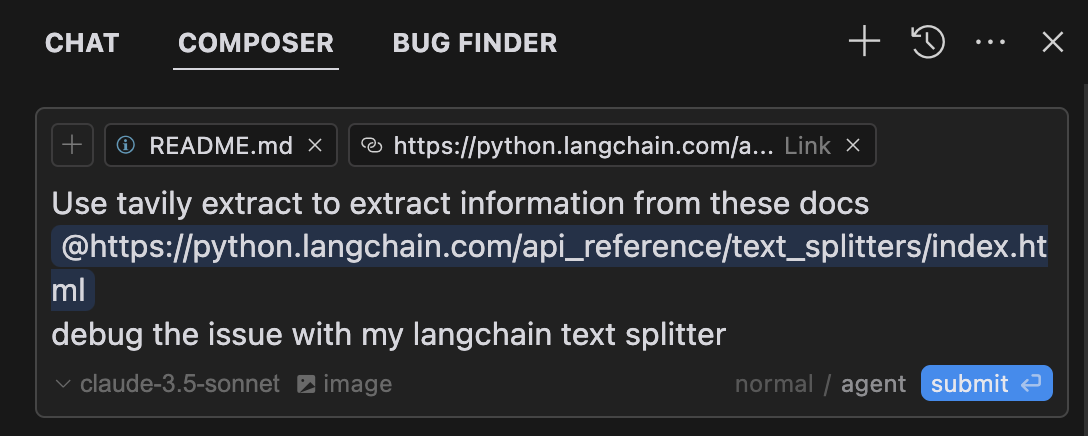
Composer Agentは、クエリに関連する場合、自動的にTavily MCPツールを使用します。ツールの使用を明示的にリクエストする場合は、何をしたいのかを具体的に記述することをお勧めします(例:「AIに関する最新ニュースをWebで検索するには、ユーザーtavily-search」)。Macの場合は、command + Lを押してチャットを開き、画面上部のComposerオプションを選択します。送信ボタンの横にあるエージェントを選択し、準備ができたらクエリを送信してください。
Claude デスクトップ アプリの設定 🖥️
macOSの場合:
# Create the config file if it doesn't exist
touch "$HOME/Library/Application Support/Claude/claude_desktop_config.json"

# Opens the config file in TextEdit
open -e "$HOME/Library/Application Support/Claude/claude_desktop_config.json"

# Alternative method using Visual Studio Code (requires VS Code to be installed)
code "$HOME/Library/Application Support/Claude/claude_desktop_config.json"
Windowsの場合:
code %APPDATA%\Claude\claude_desktop_config.jsonTavily サーバー構成を追加します。
your-api-key-here実際のTavily API キーに置き換えます。
{
  "mcpServers": {
    "tavily-mcp": {
      "command": "npx",
      "args": ["-y", "tavily-mcp@0.1.2"],
      "env": {
        "TAVILY_API_KEY": "your-api-key-here"
      }
    }
  }
}
2. Gitのインストール
リポジトリをクローンします。
git clone https://github.com/tavily-ai/tavily-mcp.git
cd tavily-mcp
依存関係をインストールします:
npm installプロジェクトをビルドします。
npm run buildClaude デスクトップ アプリの設定 ⚙️
以下の JSON 構成を使用して、上記の「Claude デスクトップ アプリの構成」セクションで概説されている構成手順に従います。
your-api-key-hereを実際のTavily API キーに置き換え、 /path/to/tavily-mcpをシステム上でリポジトリをクローンした実際のパスに置き換えます。
{
  "mcpServers": {
    "tavily": {
      "command": "npx",
      "args": ["/path/to/tavily-mcp/build/index.js"],
      "env": {
        "TAVILY_API_KEY": "your-api-key-here"
      }
    }
  }
}
Claude デスクトップアプリでの使用 🎯
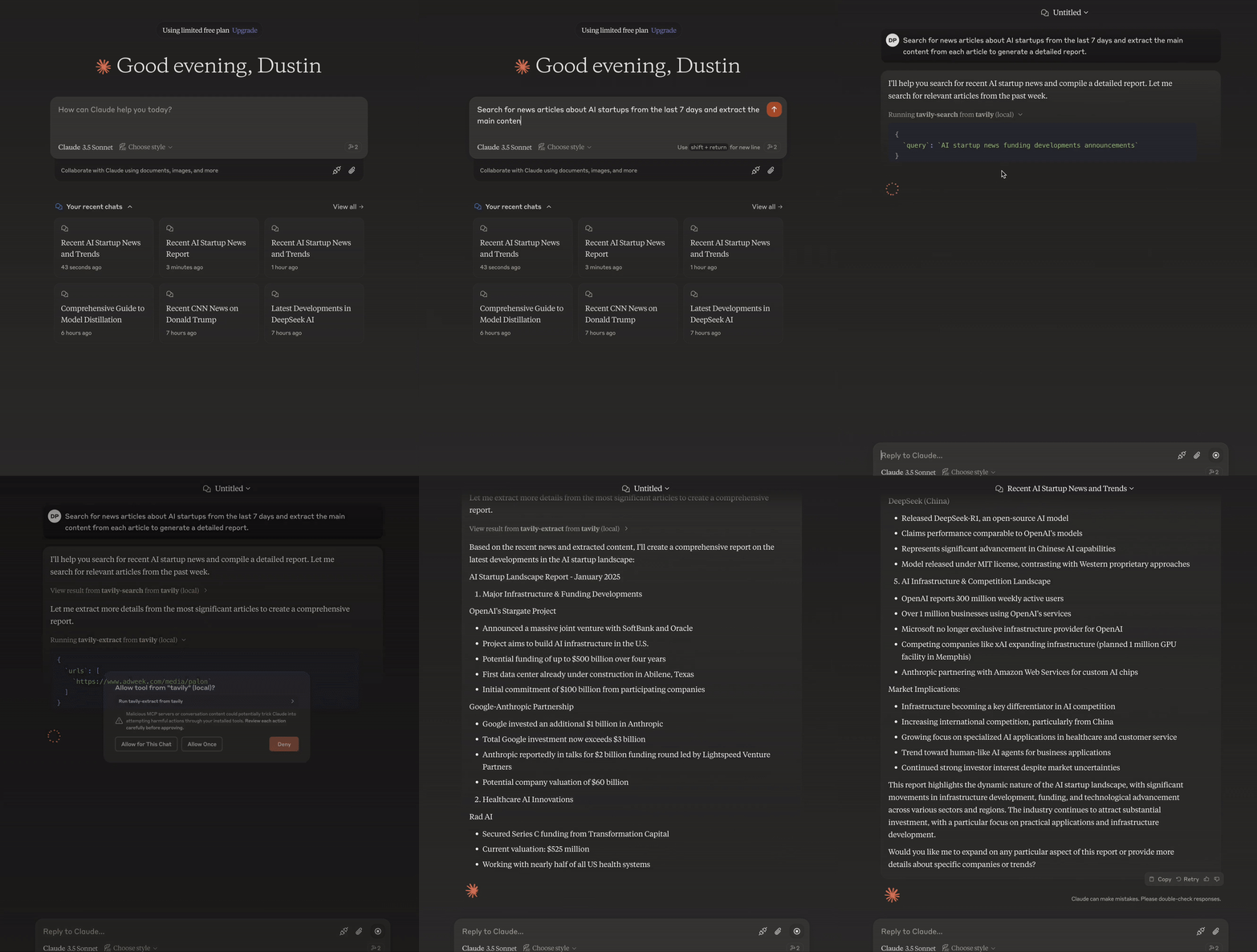
インストールが完了し、Claude デスクトップアプリの設定が完了したら、Claude デスクトップアプリを完全に閉じて再度開き、tavily-mcp サーバーを確認してください。アプリの左下にハンマーアイコンが表示され、利用可能な MCP ツールが表示されます。ハンマーアイコンをクリックすると、tavily-search ツールと tavily-extract ツールの詳細が表示されます。
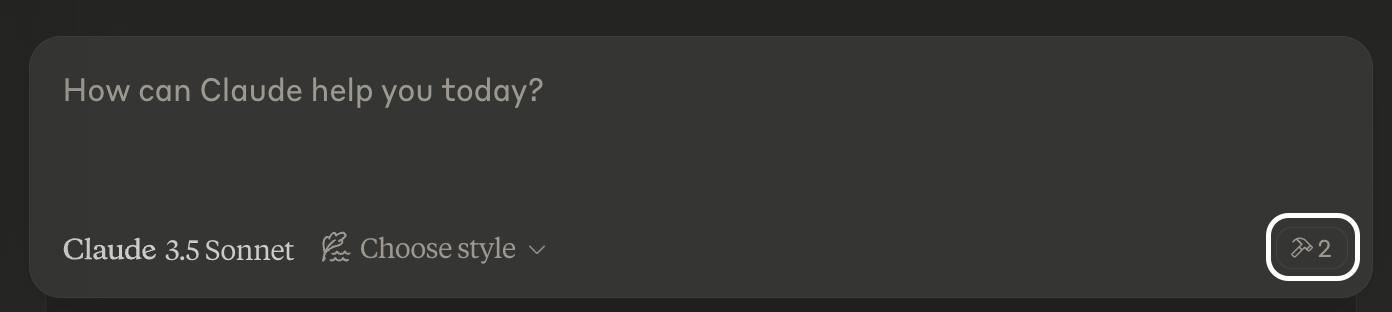
これで、claude は tavily-mcp サーバーへの完全なアクセス権(tavily-search ツールと tavily-extract ツールを含む)を取得できるようになります。以下の例を Claude デスクトップアプリに挿入すると、tavily-mcp サーバーツールの動作を確認できます。
Tavily検索の例
一般的なウェブ検索:
Can you search for recent developments in quantum computing?ニュース検索:
Search for news articles about AI startups from the last 7 days.ドメイン固有の検索:
Search for climate change research on nature.com and sciencedirect.comTavily抽出例
記事の内容を抽出:
Extract the main content from this article: https://example.com/article✨ 検索と抽出を組み合わせる ✨
tavily-search ツールと tavily-extract ツールを組み合わせて、より複雑なタスクを実行することもできます。
Search for news articles about AI startups from the last 7 days and extract the main content from each article to generate a detailed report.トラブルシューティング 🛠️
よくある問題
サーバーが見つかりません
npm --verisonを実行して npm のインストールを確認します。code ~/Library/Application\ Support/Claude/claude_desktop_config.jsonを実行して、Claude Desktop の構成構文を確認します。node --versionを実行して Node.js が正しくインストールされていることを確認します。
NPX関連の問題
npxに関連するエラーが発生した場合は、代わりに npx 実行可能ファイルへのフルパスを使用する必要がある場合があります。このパスを見つけるには、ターミナルで
which npxを実行し、構成内の"command": "npx"行を"command": "/full/path/to/npx"に置き換えます。
APIキーの問題
Tavily APIキーが有効であることを確認してください
APIキーが設定で正しく設定されていることを確認してください
APIキーの周囲にスペースや引用符がないことを確認してください
謝辞✨
MCP仕様のモデルコンテキストプロトコル
クロード・デスクトップのAnthropic
Available Tools
2 toolstavily-extractC
A powerful web content extraction tool that retrieves and processes raw content from specified URLs, ideal for data collection, content analysis, and research tasks.
ParametersJSON Schema
| Name | Required | Description | Default |
|---|---|---|---|
| urls | Yes | List of URLs to extract content from | |
| extract_depth | No | Depth of extraction - 'basic' or 'advanced', if usrls are linkedin use 'advanced' or if explicitly told to use advanced | basic |
| include_images | No | Include a list of images extracted from the urls in the response |
TDQS
C2.9/5.0
Behavior2/5
Does the description disclose side effects, auth requirements, rate limits, or destructive behavior?
With no annotations provided, the description carries the full burden of behavioral disclosure. It mentions 'retrieves and processes raw content' but lacks details on rate limits, authentication needs, error handling, or what 'processes' entails (e.g., formatting, cleaning). For a web extraction tool with potential complexities, this leaves significant gaps in understanding its behavior beyond basic functionality.
Agents need to know what a tool does to the world before calling it. Descriptions should go beyond structured annotations to explain consequences.
Conciseness4/5
Is the description appropriately sized, front-loaded, and free of redundancy?
The description is a single, efficient sentence that front-loads the core purpose ('retrieves and processes raw content from specified URLs') and adds value with ideal use cases. There's no wasted wording, though it could be slightly more structured by separating functional description from usage contexts.
Shorter descriptions cost fewer tokens and are easier for agents to parse. Every sentence should earn its place.
Completeness2/5
Given the tool's complexity, does the description cover enough for an agent to succeed on first attempt?
Given the tool's complexity (web content extraction with processing), lack of annotations, and no output schema, the description is incomplete. It doesn't explain what 'processes' means, the format or structure of returned content, potential limitations (e.g., site restrictions), or how it differs from siblings. For a tool with three parameters and no structured behavioral hints, more context is needed.
Complex tools with many parameters or behaviors need more documentation. Simple tools need less. This dimension scales expectations accordingly.
Parameters3/5
Does the description clarify parameter syntax, constraints, interactions, or defaults beyond what the schema provides?
The input schema has 100% description coverage, clearly documenting all three parameters. The description adds no parameter-specific information beyond what the schema provides, such as examples or contextual usage tips. However, since the schema is comprehensive, a baseline score of 3 is appropriate as the description doesn't need to compensate for gaps.
Input schemas describe structure but not intent. Descriptions should explain non-obvious parameter relationships and valid value ranges.
Purpose4/5
Does the description clearly state what the tool does and how it differs from similar tools?
The description clearly states the tool's purpose as 'retrieves and processes raw content from specified URLs' with specific verbs and resources. It distinguishes itself from potential siblings by focusing on extraction rather than crawling, mapping, or searching, though it doesn't explicitly name alternatives. The description is specific but could be more precise about what 'processes' entails.
Agents choose between tools based on descriptions. A clear purpose with a specific verb and resource helps agents select the right tool.
Usage Guidelines2/5
Does the description explain when to use this tool, when not to, or what alternatives exist?
The description provides minimal guidance with 'ideal for data collection, content analysis, and research tasks,' but offers no explicit when-to-use rules, exclusions, or comparisons to sibling tools like tavily-crawl, tavily-map, or tavily-search. There's no mention of prerequisites, limitations, or scenarios where this tool is preferred over alternatives.
Agents often have multiple tools that could apply. Explicit usage guidance like "use X instead of Y when Z" prevents misuse.
tavily-searchA
A powerful web search tool that provides comprehensive, real-time results using Tavily's AI search engine. Returns relevant web content with customizable parameters for result count, content type, and domain filtering. Ideal for gathering current information, news, and detailed web content analysis.
ParametersJSON Schema
| Name | Required | Description | Default |
|---|---|---|---|
| query | Yes | Search query | |
| search_depth | No | The depth of the search. It can be 'basic' or 'advanced' | basic |
| topic | No | The category of the search. This will determine which of our agents will be used for the search | general |
| days | No | The number of days back from the current date to include in the search results. This specifies the time frame of data to be retrieved. Please note that this feature is only available when using the 'news' search topic | |
| time_range | No | The time range back from the current date to include in the search results. This feature is available for both 'general' and 'news' search topics | |
| max_results | No | The maximum number of search results to return | |
| include_images | No | Include a list of query-related images in the response | |
| include_image_descriptions | No | Include a list of query-related images and their descriptions in the response | |
| include_raw_content | No | Include the cleaned and parsed HTML content of each search result | |
| include_domains | No | A list of domains to specifically include in the search results, if the user asks to search on specific sites set this to the domain of the site | |
| exclude_domains | No | List of domains to specifically exclude, if the user asks to exclude a domain set this to the domain of the site |
TDQS
A3.9/5.0
Behavior3/5
Does the description disclose side effects, auth requirements, rate limits, or destructive behavior?
With no annotations provided, the description carries the full burden of behavioral disclosure. It mentions 'real-time results' and 'customizable parameters' which are useful, but doesn't cover important aspects like rate limits, authentication requirements, error conditions, or what the response structure looks like. The description provides basic behavioral context but leaves significant gaps.
Agents need to know what a tool does to the world before calling it. Descriptions should go beyond structured annotations to explain consequences.
Conciseness5/5
Is the description appropriately sized, front-loaded, and free of redundancy?
The description is efficiently structured in two sentences that each earn their place. The first sentence establishes the core functionality and key features, while the second sentence provides usage context. There's zero wasted language or redundancy.
Shorter descriptions cost fewer tokens and are easier for agents to parse. Every sentence should earn its place.
Completeness3/5
Given the tool's complexity, does the description cover enough for an agent to succeed on first attempt?
For a complex tool with 11 parameters and no output schema, the description provides adequate but incomplete context. It covers the purpose and high-level capabilities well, but given the parameter complexity and absence of annotations, it should do more to explain behavioral aspects like response format, error handling, or performance characteristics.
Complex tools with many parameters or behaviors need more documentation. Simple tools need less. This dimension scales expectations accordingly.
Parameters3/5
Does the description clarify parameter syntax, constraints, interactions, or defaults beyond what the schema provides?
With 100% schema description coverage, the schema already documents all 11 parameters thoroughly. The description mentions 'customizable parameters for result count, content type, and domain filtering' which aligns with some parameters but doesn't add meaningful semantic context beyond what the schema provides. The baseline score of 3 is appropriate when the schema does the heavy lifting.
Input schemas describe structure but not intent. Descriptions should explain non-obvious parameter relationships and valid value ranges.
Purpose5/5
Does the description clearly state what the tool does and how it differs from similar tools?
The description clearly states the tool performs 'web search' using 'Tavily's AI search engine' and returns 'relevant web content', which is a specific verb+resource combination. It distinguishes from sibling tools by focusing on search rather than crawling, extraction, or mapping operations mentioned in the sibling list.
Agents choose between tools based on descriptions. A clear purpose with a specific verb and resource helps agents select the right tool.
Usage Guidelines4/5
Does the description explain when to use this tool, when not to, or what alternatives exist?
The description provides clear context for when to use this tool ('gathering current information, news, and detailed web content analysis'), but doesn't explicitly state when not to use it or mention alternatives like the sibling tools (tavily-crawl, tavily-extract, tavily-map). The guidance is helpful but lacks explicit exclusion criteria.
Agents often have multiple tools that could apply. Explicit usage guidance like "use X instead of Y when Z" prevents misuse.
Tool Schema Changelog
Recent tool additions, removals, and schema changes observed during successful MCP inspections.
2 tool updates
- First observed
tavily-extract - First observed
tavily-search
TDQS
A3.6/5.0
Scored across 2 tools
Disambiguation5/5
The two tools have clearly distinct purposes: tavily-extract is for extracting content from specific URLs, while tavily-search is for performing web searches with customizable parameters. There is no overlap or ambiguity between them.
Naming Consistency5/5
Both tools follow a consistent 'tavily-verb' pattern (tavily-extract and tavily-search), making them predictable and easy to identify. The naming is uniform and follows the same style throughout.
Tool Count2/5
With only 2 tools, the server feels thin for a web content and search domain. While the tools cover extraction and search, the scope suggests more operations (e.g., filtering, summarization, or advanced querying) could be included to provide a more complete surface.
Completeness3/5
The server covers basic web content retrieval (extract and search), but there are notable gaps. For example, it lacks tools for processing or analyzing the extracted content (e.g., summarization, translation, or sentiment analysis), which could limit agent workflows in research or data analysis tasks.
Maintenance
ActivityInactive
ResponsivenessNo issues
Related MCP Connectors
Related MCP Servers
- -
- MIT
- FlicenseAqualityDmaintenanceTavily MCP Server implementation that uses fastmcp and supports both sse and stdio transports. It also supports more up to date functionalities of Tavily.41-