-

tavily-mcp
by StevenFengLi
타빌리 MCP 서버 🚀
🔌 Cline , Cursor , Claude Desktop 및 기타 MCP 클라이언트와 호환됩니다!
Tavily MCP는 모든 MCP 클라이언트와도 호환됩니다.
📚 Tavily MCP와 Neo4j MCP 서버를 결합하는 방법에 대한 튜토리얼 !
📚 VS Code에서 Tavily MCP와 Cline 통합하기 튜토리얼 (데모 + 예시 사용 사례)
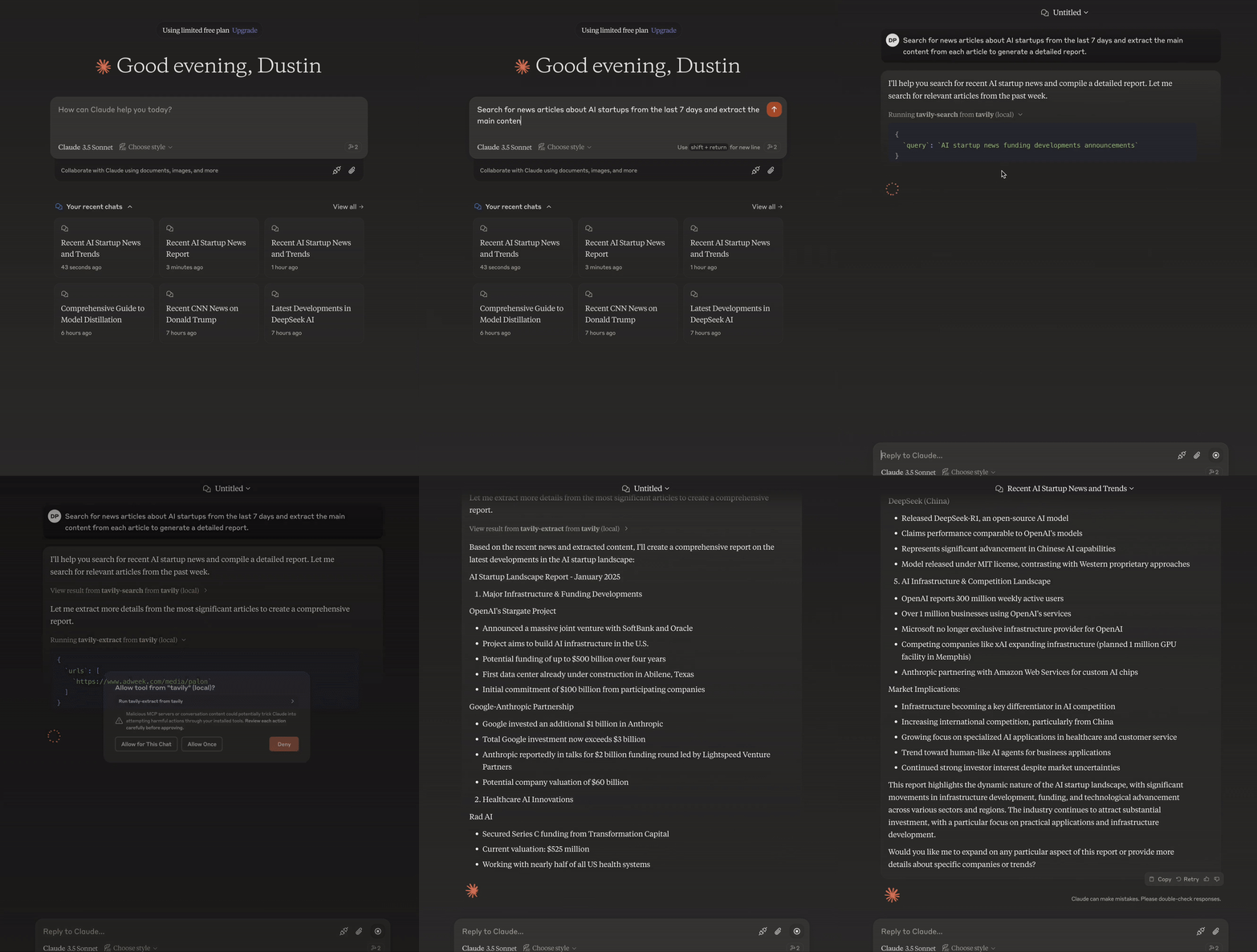
MCP(Model Context Protocol)는 AI 시스템이 다양한 데이터 소스 및 도구와 원활하게 상호 작용할 수 있도록 하는 개방형 표준으로, 안전한 양방향 연결을 용이하게 합니다.
Anthropic에서 개발한 모델 컨텍스트 프로토콜(MCP)은 Claude와 같은 AI 비서가 Tavily의 고급 검색 및 데이터 추출 기능과 원활하게 통합될 수 있도록 지원합니다. 이러한 통합을 통해 AI 모델은 정교한 필터링 옵션과 도메인별 검색 기능을 갖춘 웹 정보에 실시간으로 접근할 수 있습니다.
Tavily MCP 서버는 다음을 제공합니다.
tavily-search 및 tavily-extract 도구와의 원활한 상호 작용
tavily-search 도구를 통한 실시간 웹 검색 기능
tavily-extract 도구를 통한 웹 페이지에서 지능형 데이터 추출
필수 조건 🔧
시작하기 전에 다음 사항을 확인하세요.
Tavily API 키가 없으면 여기에서 무료 계정에 가입할 수 있습니다.
Node.js (v20 이상)
다음을 실행하여 Node.js 설치를 확인할 수 있습니다.
node --version
Git 설치됨(Git 설치 방법을 사용하는 경우에만 필요)
macOS에서:
brew install gitLinux의 경우:
Debian/Ubuntu:
sudo apt install gitRedHat/CentOS:
sudo yum install git
Windows에서: Windows용 Git 다운로드
Related MCP server: powerbi-tabular-mcp
Tavily MCP 서버 설치 ⚡
NPX로 실행
지엑스피1
Smithery를 통해 설치
Smithery를 통해 Claude Desktop에 Tavily MCP Server를 자동으로 설치하려면:
npx -y @smithery/cli install @tavily-ai/tavily-mcp --client claude서버를 단독으로 실행할 수는 있지만, 단독으로는 그다지 유용하지 않습니다. 대신 MCP 클라이언트에 통합하는 것이 좋습니다. 아래는 Claude Desktop 앱을 tavily-mcp 서버와 함께 사용하도록 구성하는 방법의 예입니다.
MCP 클라이언트 구성 ⚙️
이 저장소에서는 tavily-mcp 서버와 함께 작동하도록 Cursor 와 Claude Desktop을 구성하는 방법을 설명합니다.
Cline 구성 🤖
클라인에 Tavily MCP 서버를 설정하는 가장 쉬운 방법은 마켓플레이스를 통해 한 번의 클릭으로 설정하는 것입니다.
VS Code에서 Cline 열기
사이드바에서 Cline 아이콘을 클릭하세요
"MCP 서버" 탭으로 이동합니다(4개의 사각형)
"Tavily"를 검색하고 "설치"를 클릭하세요.
메시지가 표시되면 Tavily API 키를 입력하세요.
또는 Cline에서 Tavily MCP 서버를 수동으로 설정할 수 있습니다.
Cline MCP 설정 파일을 엽니다.
macOS의 경우:
# Using Visual Studio Code
code ~/Library/Application\ Support/Code/User/globalStorage/saoudrizwan.claude-dev/settings/cline_mcp_settings.json

# Or using TextEdit
open -e ~/Library/Application\ Support/Code/User/globalStorage/saoudrizwan.claude-dev/settings/cline_mcp_settings.json
Windows의 경우:
code %APPDATA%\Code\User\globalStorage\saoudrizwan.claude-dev\settings\cline_mcp_settings.jsonTavily 서버 구성을 파일에 추가합니다.
your-api-key-here실제 Tavily API 키로 바꾸세요.{ "mcpServers": { "tavily-mcp": { "command": "npx", "args": ["-y", "tavily-mcp@0.1.4"], "env": { "TAVILY_API_KEY": "your-api-key-here" }, "disabled": false, "autoApprove": [] } } }파일을 저장하고 Cline이 이미 실행 중이면 다시 시작합니다.
Cline을 사용하면 이제 Tavily MCP 도구를 이용할 수 있습니다. Cline에게 대화에서 tavily-search 및 tavily-extract 도구를 직접 사용해 달라고 요청할 수 있습니다.
커서 구성 🖥️
참고 : 커서 버전 0.45.6 이상이 필요합니다.
Cursor에서 Tavily MCP 서버를 설정하려면:
커서 설정 열기
기능 > MCP 서버로 이동
"+ 새 MCP 서버 추가" 버튼을 클릭하세요
다음 정보를 입력하세요:
이름 : 서버의 별명을 입력하세요(예: "tavily-mcp")
유형 : 유형으로 "명령"을 선택하세요
명령어 : 서버를 실행하기 위한 명령어를 입력하세요:
env TAVILY_API_KEY=your-api-key npx -y tavily-mcp@0.1.4중요 :
your-api-keyTavily API 키로 바꾸세요. app.tavily.com/home 에서 발급받으실 수 있습니다.
서버를 추가하면 MCP 서버 목록에 나타납니다. 도구 목록을 채우려면 MCP 서버 오른쪽 상단에 있는 새로 고침 버튼을 직접 눌러야 할 수도 있습니다.
Composer Agent는 귀하의 질의와 관련이 있을 경우 Tavily MCP 도구를 자동으로 사용합니다. 도구 사용을 요청하려면 원하는 작업을 명확하게 설명하는 것이 좋습니다(예: "웹에서 AI 관련 최신 뉴스를 검색하려면 tavily-search를 사용하세요"). Mac에서는 Command + L을 눌러 채팅을 열고, 화면 상단의 Composer 옵션을 선택한 후 제출 버튼 옆의 Agent를 선택하고 준비가 되면 질의를 제출하세요.
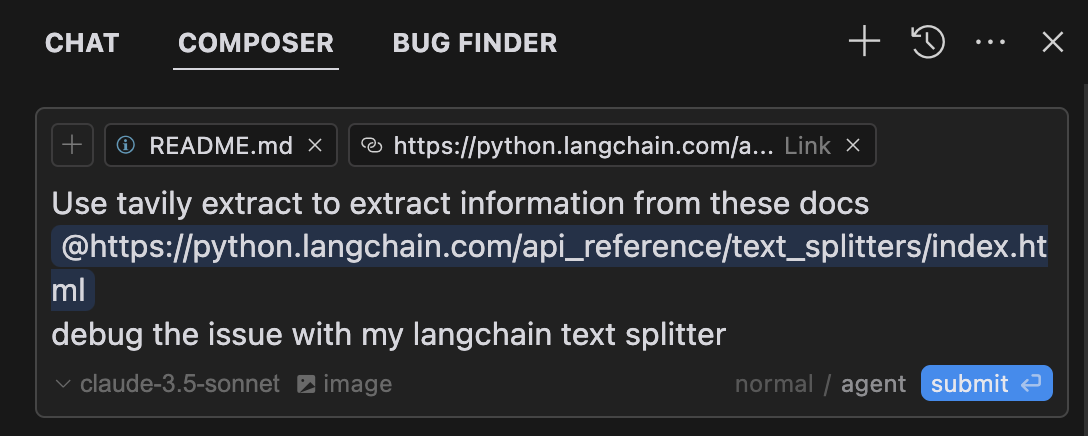
Claude Desktop 앱 구성하기 🖥️
macOS의 경우:
# Create the config file if it doesn't exist
touch "$HOME/Library/Application Support/Claude/claude_desktop_config.json"

# Opens the config file in TextEdit
open -e "$HOME/Library/Application Support/Claude/claude_desktop_config.json"

# Alternative method using Visual Studio Code (requires VS Code to be installed)
code "$HOME/Library/Application Support/Claude/claude_desktop_config.json"
Windows의 경우:
code %APPDATA%\Claude\claude_desktop_config.jsonTavily 서버 구성을 추가합니다.
your-api-key-here 실제 Tavily API 키로 바꾸세요.
{
  "mcpServers": {
    "tavily-mcp": {
      "command": "npx",
      "args": ["-y", "tavily-mcp@0.1.2"],
      "env": {
        "TAVILY_API_KEY": "your-api-key-here"
      }
    }
  }
}
2. Git 설치
저장소를 복제합니다.
git clone https://github.com/tavily-ai/tavily-mcp.git
cd tavily-mcp
종속성 설치:
npm install프로젝트를 빌드하세요:
npm run buildClaude Desktop 앱 구성 ⚙️
위의 Claude Desktop 앱 구성 섹션에 설명된 구성 단계를 따르고 아래 JSON 구성을 사용하세요.
your-api-key-here 실제 Tavily API 키로 바꾸고 /path/to/tavily-mcp 시스템에서 저장소를 복제한 실제 경로로 바꾸세요.
{
  "mcpServers": {
    "tavily": {
      "command": "npx",
      "args": ["/path/to/tavily-mcp/build/index.js"],
      "env": {
        "TAVILY_API_KEY": "your-api-key-here"
      }
    }
  }
}
Claude 데스크톱 앱에서의 사용법 🎯
설치가 완료되고 Claude 데스크톱 앱 구성이 완료되면 Claude 데스크톱 앱을 완전히 닫았다가 다시 열어야 tavily-mcp 서버를 확인할 수 있습니다. 앱 왼쪽 하단에 사용 가능한 MCP 도구를 나타내는 망치 아이콘이 표시됩니다. 망치 아이콘을 클릭하면 tavily-search 및 tavily-extract 도구에 대한 자세한 내용을 확인할 수 있습니다.
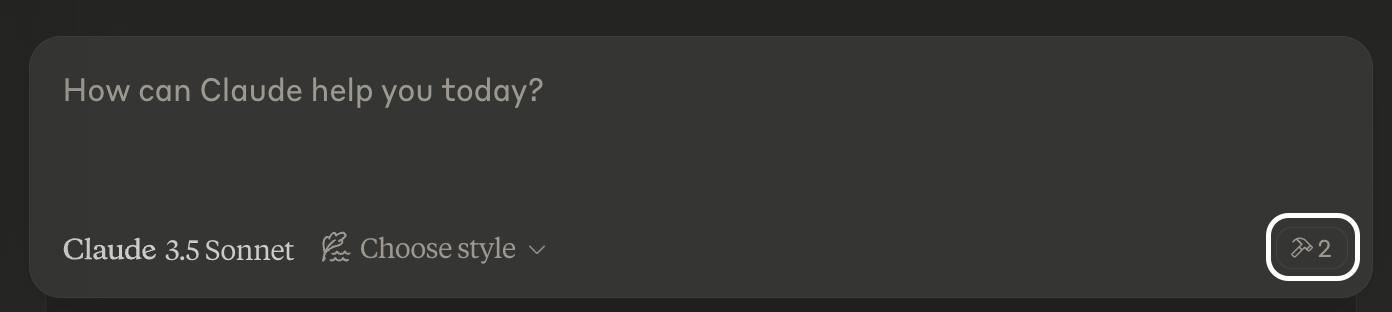
이제 Claude는 tavily-search 및 tavily-extract 도구를 포함하여 tavily-mcp 서버에 완전히 접근할 수 있습니다. 아래 예제를 Claude 데스크톱 앱에 삽입하면 tavily-mcp 서버 도구가 작동하는 모습을 볼 수 있습니다.
Tavily 검색 예시
일반 웹 검색 :
Can you search for recent developments in quantum computing?뉴스 검색 :
Search for news articles about AI startups from the last 7 days.도메인별 검색 :
Search for climate change research on nature.com and sciencedirect.comTavily 추출물 예시
기사 내용 추출 :
Extract the main content from this article: https://example.com/article✨ 검색 및 추출 결합 ✨
또한, tavily-search와 tavily-extract 도구를 결합하여 더욱 복잡한 작업을 수행할 수 있습니다.
Search for news articles about AI startups from the last 7 days and extract the main content from each article to generate a detailed report.문제 해결 🛠️
일반적인 문제
서버를 찾을 수 없습니다
npm --verison실행하여 npm 설치를 확인하세요.code ~/Library/Application\ Support/Claude/claude_desktop_config.json실행하여 Claude Desktop 구성 구문을 확인하세요.node --version실행하여 Node.js가 제대로 설치되었는지 확인하세요.
NPX 관련 문제
npx와 관련된 오류가 발생하는 경우, 대신 npx 실행 파일의 전체 경로를 사용해야 할 수 있습니다.터미널에서
which npx실행한 다음 구성에서"command": "npx"줄을"command": "/full/path/to/npx"로 바꾸면 이 경로를 찾을 수 있습니다.
API 키 문제
Tavily API 키가 유효한지 확인하세요
구성에서 API 키가 올바르게 설정되었는지 확인하세요.
API 키 주위에 공백이나 따옴표가 없는지 확인하세요.
감사의 말 ✨
MCP 사양을 위한 모델 컨텍스트 프로토콜
클로드 데스크탑을 위한 인류학
Available Tools
2 toolstavily-extractC
A powerful web content extraction tool that retrieves and processes raw content from specified URLs, ideal for data collection, content analysis, and research tasks.
ParametersJSON Schema
| Name | Required | Description | Default |
|---|---|---|---|
| urls | Yes | List of URLs to extract content from | |
| extract_depth | No | Depth of extraction - 'basic' or 'advanced', if usrls are linkedin use 'advanced' or if explicitly told to use advanced | basic |
| include_images | No | Include a list of images extracted from the urls in the response |
TDQS
C2.9/5.0
Behavior2/5
Does the description disclose side effects, auth requirements, rate limits, or destructive behavior?
With no annotations provided, the description carries the full burden of behavioral disclosure. It mentions 'retrieves and processes raw content' but lacks details on rate limits, authentication needs, error handling, or what 'processes' entails (e.g., formatting, cleaning). For a web extraction tool with potential complexities, this leaves significant gaps in understanding its behavior beyond basic functionality.
Agents need to know what a tool does to the world before calling it. Descriptions should go beyond structured annotations to explain consequences.
Conciseness4/5
Is the description appropriately sized, front-loaded, and free of redundancy?
The description is a single, efficient sentence that front-loads the core purpose ('retrieves and processes raw content from specified URLs') and adds value with ideal use cases. There's no wasted wording, though it could be slightly more structured by separating functional description from usage contexts.
Shorter descriptions cost fewer tokens and are easier for agents to parse. Every sentence should earn its place.
Completeness2/5
Given the tool's complexity, does the description cover enough for an agent to succeed on first attempt?
Given the tool's complexity (web content extraction with processing), lack of annotations, and no output schema, the description is incomplete. It doesn't explain what 'processes' means, the format or structure of returned content, potential limitations (e.g., site restrictions), or how it differs from siblings. For a tool with three parameters and no structured behavioral hints, more context is needed.
Complex tools with many parameters or behaviors need more documentation. Simple tools need less. This dimension scales expectations accordingly.
Parameters3/5
Does the description clarify parameter syntax, constraints, interactions, or defaults beyond what the schema provides?
The input schema has 100% description coverage, clearly documenting all three parameters. The description adds no parameter-specific information beyond what the schema provides, such as examples or contextual usage tips. However, since the schema is comprehensive, a baseline score of 3 is appropriate as the description doesn't need to compensate for gaps.
Input schemas describe structure but not intent. Descriptions should explain non-obvious parameter relationships and valid value ranges.
Purpose4/5
Does the description clearly state what the tool does and how it differs from similar tools?
The description clearly states the tool's purpose as 'retrieves and processes raw content from specified URLs' with specific verbs and resources. It distinguishes itself from potential siblings by focusing on extraction rather than crawling, mapping, or searching, though it doesn't explicitly name alternatives. The description is specific but could be more precise about what 'processes' entails.
Agents choose between tools based on descriptions. A clear purpose with a specific verb and resource helps agents select the right tool.
Usage Guidelines2/5
Does the description explain when to use this tool, when not to, or what alternatives exist?
The description provides minimal guidance with 'ideal for data collection, content analysis, and research tasks,' but offers no explicit when-to-use rules, exclusions, or comparisons to sibling tools like tavily-crawl, tavily-map, or tavily-search. There's no mention of prerequisites, limitations, or scenarios where this tool is preferred over alternatives.
Agents often have multiple tools that could apply. Explicit usage guidance like "use X instead of Y when Z" prevents misuse.
tavily-searchA
A powerful web search tool that provides comprehensive, real-time results using Tavily's AI search engine. Returns relevant web content with customizable parameters for result count, content type, and domain filtering. Ideal for gathering current information, news, and detailed web content analysis.
ParametersJSON Schema
| Name | Required | Description | Default |
|---|---|---|---|
| query | Yes | Search query | |
| search_depth | No | The depth of the search. It can be 'basic' or 'advanced' | basic |
| topic | No | The category of the search. This will determine which of our agents will be used for the search | general |
| days | No | The number of days back from the current date to include in the search results. This specifies the time frame of data to be retrieved. Please note that this feature is only available when using the 'news' search topic | |
| time_range | No | The time range back from the current date to include in the search results. This feature is available for both 'general' and 'news' search topics | |
| max_results | No | The maximum number of search results to return | |
| include_images | No | Include a list of query-related images in the response | |
| include_image_descriptions | No | Include a list of query-related images and their descriptions in the response | |
| include_raw_content | No | Include the cleaned and parsed HTML content of each search result | |
| include_domains | No | A list of domains to specifically include in the search results, if the user asks to search on specific sites set this to the domain of the site | |
| exclude_domains | No | List of domains to specifically exclude, if the user asks to exclude a domain set this to the domain of the site |
TDQS
A3.9/5.0
Behavior3/5
Does the description disclose side effects, auth requirements, rate limits, or destructive behavior?
With no annotations provided, the description carries the full burden of behavioral disclosure. It mentions 'real-time results' and 'customizable parameters' which are useful, but doesn't cover important aspects like rate limits, authentication requirements, error conditions, or what the response structure looks like. The description provides basic behavioral context but leaves significant gaps.
Agents need to know what a tool does to the world before calling it. Descriptions should go beyond structured annotations to explain consequences.
Conciseness5/5
Is the description appropriately sized, front-loaded, and free of redundancy?
The description is efficiently structured in two sentences that each earn their place. The first sentence establishes the core functionality and key features, while the second sentence provides usage context. There's zero wasted language or redundancy.
Shorter descriptions cost fewer tokens and are easier for agents to parse. Every sentence should earn its place.
Completeness3/5
Given the tool's complexity, does the description cover enough for an agent to succeed on first attempt?
For a complex tool with 11 parameters and no output schema, the description provides adequate but incomplete context. It covers the purpose and high-level capabilities well, but given the parameter complexity and absence of annotations, it should do more to explain behavioral aspects like response format, error handling, or performance characteristics.
Complex tools with many parameters or behaviors need more documentation. Simple tools need less. This dimension scales expectations accordingly.
Parameters3/5
Does the description clarify parameter syntax, constraints, interactions, or defaults beyond what the schema provides?
With 100% schema description coverage, the schema already documents all 11 parameters thoroughly. The description mentions 'customizable parameters for result count, content type, and domain filtering' which aligns with some parameters but doesn't add meaningful semantic context beyond what the schema provides. The baseline score of 3 is appropriate when the schema does the heavy lifting.
Input schemas describe structure but not intent. Descriptions should explain non-obvious parameter relationships and valid value ranges.
Purpose5/5
Does the description clearly state what the tool does and how it differs from similar tools?
The description clearly states the tool performs 'web search' using 'Tavily's AI search engine' and returns 'relevant web content', which is a specific verb+resource combination. It distinguishes from sibling tools by focusing on search rather than crawling, extraction, or mapping operations mentioned in the sibling list.
Agents choose between tools based on descriptions. A clear purpose with a specific verb and resource helps agents select the right tool.
Usage Guidelines4/5
Does the description explain when to use this tool, when not to, or what alternatives exist?
The description provides clear context for when to use this tool ('gathering current information, news, and detailed web content analysis'), but doesn't explicitly state when not to use it or mention alternatives like the sibling tools (tavily-crawl, tavily-extract, tavily-map). The guidance is helpful but lacks explicit exclusion criteria.
Agents often have multiple tools that could apply. Explicit usage guidance like "use X instead of Y when Z" prevents misuse.
Tool Schema Changelog
Recent tool additions, removals, and schema changes observed during successful MCP inspections.
2 tool updates
- First observed
tavily-extract - First observed
tavily-search
TDQS
A3.6/5.0
Scored across 2 tools
Disambiguation5/5
The two tools have clearly distinct purposes: tavily-extract is for extracting content from specific URLs, while tavily-search is for performing web searches with customizable parameters. There is no overlap or ambiguity between them.
Naming Consistency5/5
Both tools follow a consistent 'tavily-verb' pattern (tavily-extract and tavily-search), making them predictable and easy to identify. The naming is uniform and follows the same style throughout.
Tool Count2/5
With only 2 tools, the server feels thin for a web content and search domain. While the tools cover extraction and search, the scope suggests more operations (e.g., filtering, summarization, or advanced querying) could be included to provide a more complete surface.
Completeness3/5
The server covers basic web content retrieval (extract and search), but there are notable gaps. For example, it lacks tools for processing or analyzing the extracted content (e.g., summarization, translation, or sentiment analysis), which could limit agent workflows in research or data analysis tasks.
Maintenance
ActivityInactive
ResponsivenessNo issues
Related MCP Connectors
Related MCP Servers
- -
- MIT
- FlicenseAqualityDmaintenanceTavily MCP Server implementation that uses fastmcp and supports both sse and stdio transports. It also supports more up to date functionalities of Tavily.41-