Glama
SammySnake-d

Fast Context MCP

by SammySnake-d

Fast Context MCP

AI 驱动的语义代码搜索 MCP 工具 — 基于 Windsurf 逆向工程的 SWE-grep 协议。

任何兼容 MCP 的客户端(Claude Code、Claude Desktop、Cursor 等)都可以使用它通过自然语言查询搜索代码库。所有工具都通过 npm 捆绑 — 无需系统级依赖(通过 @vscode/ripgrep 提供 ripgrep,通过 tree-node-cli 提供 tree)。支持 macOS、Windows 和 Linux。

工作原理

You: "where is the authentication logic?"
         │
         ▼
┌─────────────────────────┐
│  Fast Context MCP       │
│  (local MCP server)     │
│                         │
│  1. Maps project → /codebase
│  2. Sends query to Windsurf Devstral API
│  3. AI generates rg/readfile/tree commands
│  4. Executes commands locally (built-in rg)
│  5. Returns results to AI
│  6. Repeats for N rounds
│  7. Returns file paths + line ranges
│     + suggested search keywords
└─────────────────────────┘
         │
         ▼
Found 3 relevant files.
  [1/3] /project/src/auth/handler.py (L10-60)
  [2/3] /project/src/middleware/jwt.py (L1-40)
  [3/3] /project/src/models/user.py (L20-80)

Suggested search keywords:
  authenticate, jwt.*verify, session.*token

Related MCP server: code-rag

前提条件

  • Node.js >= 18

  • Windsurf 账户 — 免费版即可(获取 API 密钥需要)

无需安装 ripgrep — 它已通过 @vscode/ripgrep 捆绑。

安装

方式一:npm(推荐)

# Latest stable release
npm install @sammysnake/fast-context-mcp

# Or beta/next release
npm install @sammysnake/fast-context-mcp@next

方式二:从源码安装

git clone https://github.com/SammySnake-d/fast-context-mcp.git
cd fast-context-mcp
npm install

配置

1. 获取你的 Windsurf/Devin API 密钥

服务器会自动从 Devin CLI/Desktop 或旧版 Windsurf 安装中提取 API 密钥。你也可以在配置后使用 extract_windsurf_key MCP 工具,或手动设置 WINDSURF_API_KEY。

桌面端凭据按以下顺序发现:Devin、旧版 Deviv,然后 Windsurf。

平台

路径

macOS

~/Library/Application Support/Devin/User/globalStorage/state.vscdb

Windows

%APPDATA%/Devin/User/globalStorage/state.vscdb

Linux

~/.config/Devin/User/globalStorage/state.vscdb

在 WSL/Linux 上,服务器首先检查 ~/.local/share/devin/credentials.toml 中的 Devin CLI 凭据。如果在 WSL 内使用 Windows 提取的密钥返回 403,请在 WSL 内运行 devin login 并重试。

2. 配置 MCP 客户端

Claude Code

在 ~/.claude.json 的 mcpServers 下添加:

{
  "fast-context": {
    "command": "npx",
    "args": ["-y", "--prefer-online", "@sammysnake/fast-context-mcp"],
    "env": {
      "WINDSURF_API_KEY": "sk-ws-01-xxxxx"
    }
  }
}

对于 beta/next 版本:

{
  "fast-context": {
    "command": "npx",
    "args": ["-y", "--prefer-online", "@sammysnake/fast-context-mcp@next"],
    "env": {
      "WINDSURF_API_KEY": "sk-ws-01-xxxxx"
    }
  }
}

Claude Desktop

在 claude_desktop_config.json 的 mcpServers 下添加:

{
  "fast-context": {
    "command": "npx",
    "args": ["-y", "--prefer-online", "@sammysnake/fast-context-mcp"],
    "env": {
      "WINDSURF_API_KEY": "sk-ws-01-xxxxx"
    }
  }
}

对于 beta/next 版本:

{
  "fast-context": {
    "command": "npx",
    "args": ["-y", "--prefer-online", "@sammysnake/fast-context-mcp@next"],
    "env": {
      "WINDSURF_API_KEY": "sk-ws-01-xxxxx"
    }
  }
}

如果省略 WINDSURF_API_KEY,服务器会自动从你的本地 Windsurf 安装中自动发现它。

环境变量

变量

默认值

描述

WINDSURF_API_KEY

(自动发现)

Windsurf API 密钥

FC_MAX_TURNS

3

每次查询的搜索轮数(越多越深入,但更慢)

FC_MAX_COMMANDS

8

每轮最大并行命令数

FC_TIMEOUT_MS

30000

流式请求的连接超时时间(毫秒)

FC_HIDE_EXTRACT_WINDSURF_KEY_TOOL

false

设为 1、true、yes 或 on 时,从 MCP 工具中隐藏 extract_windsurf_key

FC_RESULT_MAX_LINES

50

每条命令输出的最大行数(截断)

FC_LINE_MAX_CHARS

250

每行输出的最大字符数(截断)

FC_CACHE_DISABLED

(未设置)

使用 1、true、yes 或 on 禁用内存结果缓存

FC_CACHE_TTL_MS

300000

结果缓存 TTL;<=0 表示禁用缓存

FC_CACHE_MAX_ENTRIES

200

内存缓存的最大条目数

FC_ALLOW_INSECURE_TLS

(未设置)

仅在受信任的企业代理要求禁用 TLS 验证时设为 1

WS_MODEL

MODEL_SWE_1_6_FAST

Windsurf 模型名称

WS_APP_VER

1.48.2

Windsurf 应用版本(协议元数据)

WS_LS_VER

1.9544.35

Windsurf 语言服务器版本(协议元数据)

可用模型

可以通过设置 WS_MODEL 来更改模型(参见上面的环境变量)。
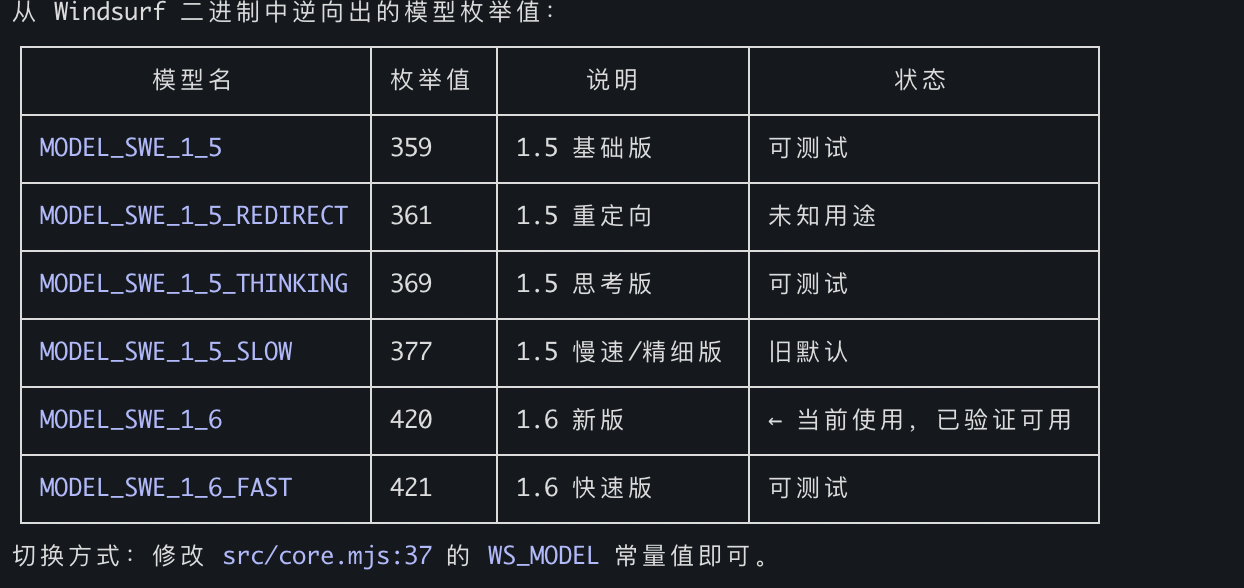
Available Models

默认值:MODEL_SWE_1_6_FAST — 速度最快、grep 关键词最丰富、定位粒度最细。

MCP 工具

具有可调参数的 AI 驱动语义代码搜索。

参数

类型

必填

默认值

描述

query

string

是

—

自然语言搜索查询

project_path

string

否

cwd

项目根的绝对路径

tree_depth

integer

否

3

仓库映射的目录树深度(1-6)。越高上下文越多,但载荷越大。如果树超过 250KB,会自动回退到较低深度。大型 monorepo(>5000 个文件)使用 1-2,大多数项目使用 3,小型项目使用 4-6。

max_turns

integer

否

3

搜索轮数(1-5)。越多搜索越深入,但速度越慢。简单查找使用 1-2,大多数查询使用 3,复杂分析使用 4-5。

max_results

integer

否

10

返回的最大文件数(1-30)。越小越聚焦,越大探索范围越广。

exclude_paths

string[]

否

[]

从仓库映射和搜索上下文中排除的目录/文件模式。

返回值:

  1. 相关文件及其行范围

  2. 建议的搜索关键词(AI 搜索过程中使用的 rg 模式)

  3. 诊断元数据([config] 行显示实际使用的 tree_depth、树大小以及是否发生了回退)

示例输出:

Found 3 relevant files.

  [1/3] /project/src/auth/handler.py (L10-60, L120-180)
  [2/3] /project/src/middleware/jwt.py (L1-40)
  [3/3] /project/src/models/user.py (L20-80)

grep keywords: authenticate, jwt.*verify, session.*token

[config] tree_depth=3, tree_size=12.5KB, max_turns=3

错误输出包含特定状态提示:

Error: Request failed: HTTP 403

[hint] 403 Forbidden: Authentication failed. The API key may be expired or revoked.
Try re-extracting with extract_windsurf_key, or set a fresh WINDSURF_API_KEY env var.
If you are running inside WSL, run `devin login` inside WSL so `~/.local/share/devin/credentials.toml` exists.
Error: Request failed: HTTP 413

[diagnostic] tree_depth_used=3, tree_size=280.0KB (auto fell back from requested depth)
[hint] If the error is payload-related, try a lower tree_depth value.

extract_windsurf_key

从本地安装中提取 Windsurf API 密钥。无参数。

在 MCP 服务器启动时设置 FC_HIDE_EXTRACT_WINDSURF_KEY_TOOL=1,可从 tools/list 中隐藏此工具。这不会禁用 fast_context_search 的内部 API 密钥自动发现。

项目结构

fast-context-mcp/
├── package.json
├── src/
│   ├── server.mjs        # MCP server entry point
│   ├── core.mjs          # Auth, message building, streaming, search loop
│   ├── executor.mjs      # Tool executor: rg, readfile, tree, ls, glob
│   ├── extract-key.mjs   # Windsurf API Key extraction (SQLite)
│   ├── path-safety.mjs   # Project-root confinement for model-selected paths
│   ├── response-repair.mjs # Malformed response repair and evidence salvage
│   ├── shared.mjs        # Repository map, answer parser, prompt builder
│   ├── cache.mjs         # In-memory search-result cache
│   └── protobuf.mjs      # Protobuf encoder/decoder + Connect-RPC frames
├── test/                 # Unit and MCP stdio integration tests
├── README.md
└── LICENSE

搜索工作原理

  1. 项目目录映射到虚拟 /codebase 路径

  2. 按请求的深度生成目录树(默认 L=3),如果树超过 250KB,自动回退到较低深度

  3. 查询 + 目录树通过 Connect-RPC/Protobuf 发送给 Windsurf 的 Devstral 模型

  4. Devstral 生成工具命令(ripgrep、文件读取、tree、ls、glob)

  5. 命令在本地并行执行(每轮最多 FC_MAX_COMMANDS 条)

  6. 结果发送回 Devstral 进行下一轮

  7. 经过 max_turns 轮后,Devstral 返回文件路径 + 行范围

  8. 搜索过程中使用的所有 rg 模式被收集为建议关键词

  9. 附加诊断元数据,帮助调用方 AI 调整参数

技术细节

  • 协议:基于 HTTP/1.1 的 Connect-RPC,Protobuf 编码,gzip 压缩

  • 模型:Devstral(MODEL_SWE_1_6_FAST,可配置)

  • 本地工具:rg(通过 @vscode/ripgrep 捆绑)、readfile(Node.js fs)、tree(tree-node-cli)、ls(Node.js fs)、glob(Node.js fs)

  • 认证:API 密钥 → JWT(每个会话自动获取)

  • 运行时:Node.js >= 18(ESM)

依赖

包

用途

@modelcontextprotocol/sdk

MCP 服务器框架

@vscode/ripgrep

捆绑的 ripgrep 二进制文件(跨平台)

tree-node-cli

跨平台目录树(替代系统 tree)

sql.js

无需原生构建步骤即可读取 Devin/Windsurf 的本地 SQLite 数据库

zod (^3.25.76)

模式验证;避免某些 npm 镜像提供的不完整 3.25.0 tarball

友情链接

许可证

MIT

Available Tools

2 tools
extract_windsurf_keyA

Extract Windsurf API Key from local installation. Auto-detects OS (macOS/Windows/Linux) and reads the API key from Windsurf's local database. Set the result as WINDSURF_API_KEY env var.

ParametersJSON Schema
NameRequiredDescriptionDefault

No parameters

TDQS

A4.4/5.0
Behavior4/5

Does the description disclose side effects, auth requirements, rate limits, or destructive behavior?

No annotations are provided, so the description carries the burden. It discloses OS auto-detection, reading from the local database, and setting the result as an env var. It does not mention error cases or prerequisites, but it is transparent about its main side effect.

Agents need to know what a tool does to the world before calling it. Descriptions should go beyond structured annotations to explain consequences.

Conciseness5/5

Is the description appropriately sized, front-loaded, and free of redundancy?

The description is two sentences, front-loaded with the primary action, and every sentence adds value without redundancy.

Shorter descriptions cost fewer tokens and are easier for agents to parse. Every sentence should earn its place.

Completeness4/5

Given the tool's complexity, does the description cover enough for an agent to succeed on first attempt?

For a zero-parameter tool with no output schema, the description covers the core function and side effect. It lacks mention of failure cases or requirements, but is otherwise complete for its simplicity.

Complex tools with many parameters or behaviors need more documentation. Simple tools need less. This dimension scales expectations accordingly.

Parameters4/5

Does the description clarify parameter syntax, constraints, interactions, or defaults beyond what the schema provides?

The tool has zero parameters and 100% schema coverage (empty), so the baseline is 4. No additional parameter explanation is needed.

Input schemas describe structure but not intent. Descriptions should explain non-obvious parameter relationships and valid value ranges.

Purpose5/5

Does the description clearly state what the tool does and how it differs from similar tools?

The description clearly states 'Extract Windsurf API Key from local installation', a specific verb+resource with source. It distinguishes itself from the unrelated sibling fast_context_search.

Agents choose between tools based on descriptions. A clear purpose with a specific verb and resource helps agents select the right tool.

Usage Guidelines4/5

Does the description explain when to use this tool, when not to, or what alternatives exist?

The description provides clear context for when to use the tool (to get the API key and set it as an env var), and the sibling tool is unrelated, so no exclusions are needed. It does not explicitly list alternatives, but usage is apparent.

Agents often have multiple tools that could apply. Explicit usage guidance like "use X instead of Y when Z" prevents misuse.

Tool Schema Changelog

Recent tool additions, removals, and schema changes observed during successful MCP inspections.

  1. 1 tool updatev1.2.1
    • Changedfast_context_search4 fields changed
      • addedInput schema / properties / exclude_paths
        Added value: +{
        +  "default": [],
        +  "description": "Directory/file patterns to exclude from tree and search context. Useful for reducing payload size on large repos. Examples: ['node_modules', 'dist', '.git', 'build', 'coverage', '*.min.*']",
        +  "items": {
        +    "type": "string"
        +  },
        +  "type": "array"
        +}
      • addedInput schema / properties / max_results
        Added value: +{
        +  "default": 10,
        +  "description": "Maximum number of files to return. Default 10. Use a smaller value (3-5) for focused queries. Use a larger value (15-30) for broad exploration queries.",
        +  "maximum": 30,
        +  "minimum": 1,
        +  "type": "integer"
        +}
      • addedInput schema / properties / max_turns
        Added value: +{
        +  "default": 3,
        +  "description": "Number of search rounds. Each round: remote AI generates search commands → local execution → results sent back. Default 3. Use 1 for quick simple lookups. Use 4-5 for complex queries requiring deep tracing across many files. More rounds = better results but slower and uses more API quota.",
        +  "maximum": 5,
        +  "minimum": 1,
        +  "type": "integer"
        +}
      • addedInput schema / properties / tree_depth
        Added value: +{
        +  "default": 3,
        +  "description": "Directory tree depth for the initial repo map sent to the remote AI. Default 3. Use 1-2 for huge monorepos (>5000 files) or if you get payload size errors. Use 4-6 for small projects (<200 files) where you want the AI to see deeper structure. Auto falls back to a lower depth if tree output exceeds 250KB.",
        +  "maximum": 6,
        +  "minimum": 1,
        +  "type": "integer"
        +}
  2. 2 tool updatesv1.0.0
    • First observedextract_windsurf_key
    • First observedfast_context_search

TDQS

A4.1/5.0

Scored across 2 tools

Disambiguation5/5

The two tools have completely distinct purposes: one extracts an API key from a local installation, the other performs semantic code search. No overlap or ambiguity exists.

Naming Consistency4/5

Both tools use snake_case and follow a descriptive pattern (extract_* and fast_*). Although the verb style differs slightly (command vs. brand adjective), the naming is clear and consistent in format.

Tool Count3/5

With only two tools, the server feels minimal. While the tools are focused, the count is on the low end of what is typically expected, making it borderline appropriate.

Completeness2/5

The server covers API key extraction and semantic search, but lacks related operations like API key management, file content retrieval, or result navigation. Significant gaps exist for a context-focused server.

Maintenance

ActivityMaintained
ResponsivenessWithin a week

Related MCP Connectors

Related MCP Servers

  • A
    license
    A
    quality
    D
    maintenance
    Enables AI-driven semantic code search using Windsurf's reverse-engineered SWE-grep protocol to query local codebases with natural language. It executes local search tools like ripgrep and tree-node-cli to return relevant file paths and line ranges to MCP-compatible clients.
    2
    134 npm
    MIT
  • F
    license
    Not graded
    quality
    C
    maintenance
    A semantic code search MCP server that enables natural language queries against your codebase, supporting features like related file discovery and context expansion, all running locally.
    2
    -
  • A
    license
    A
    quality
    C
    maintenance
    Semantic code search MCP server that reduces token usage by ~95% by returning top relevant code chunks instead of full files.
    8
    9
    MIT