Fast Context MCP
Fast Context MCP
KI-gestützte semantische Codesuche als MCP-Tool – basierend auf Windsurfs reverse-engineertem SWE-grep-Protokoll.
Jeder MCP-kompatible Client (Claude Code, Claude Desktop, Cursor usw.) kann damit Codebasen mit natürlichsprachlichen Abfragen durchsuchen. Alle Tools werden über npm gebündelt – keine Systemabhängigkeiten erforderlich (ripgrep über @vscode/ripgrep, tree über tree-node-cli). Funktioniert unter macOS, Windows und Linux.
So funktioniert's
You: "where is the authentication logic?"
│
▼
┌─────────────────────────┐
│ Fast Context MCP │
│ (local MCP server) │
│ │
│ 1. Maps project → /codebase
│ 2. Sends query to Windsurf Devstral API
│ 3. AI generates rg/readfile/tree commands
│ 4. Executes commands locally (built-in rg)
│ 5. Returns results to AI
│ 6. Repeats for N rounds
│ 7. Returns file paths + line ranges
│ + suggested search keywords
└─────────────────────────┘
│
▼
Found 3 relevant files.
[1/3] /project/src/auth/handler.py (L10-60)
[2/3] /project/src/middleware/jwt.py (L1-40)
[3/3] /project/src/models/user.py (L20-80)
Suggested search keywords:
authenticate, jwt.*verify, session.*tokenRelated MCP server: code-rag
Voraussetzungen
Node.js >= 18
Windsurf-Konto – kostenlose Stufe funktioniert (für API-Schlüssel erforderlich)
ripgrep muss nicht installiert werden – es wird über @vscode/ripgrep gebündelt.
Installation
Option 1: npm (empfohlen)
# Latest stable release
npm install @sammysnake/fast-context-mcp
# Or beta/next release
npm install @sammysnake/fast-context-mcp@nextOption 2: Aus dem Quellcode
git clone https://github.com/SammySnake-d/fast-context-mcp.git
cd fast-context-mcp
npm installEinrichtung
1. Holen Sie sich Ihren Windsurf/Devin-API-Schlüssel
Der Server extrahiert den API-Schlüssel automatisch aus Devin CLI/Desktop oder einer älteren Windsurf-Installation. Sie können nach der Einrichtung auch das MCP-Tool extract_windsurf_key verwenden oder WINDSURF_API_KEY manuell setzen.
Desktop-Anmeldedaten werden in dieser Reihenfolge erkannt: Devin, älteres Deviv, dann Windsurf.
Plattform | Pfad |
macOS |
|
Windows |
|
Linux |
|
Unter WSL/Linux prüft der Server zuerst die Devin-CLI-Anmeldedaten unter ~/.local/share/devin/credentials.toml. Wenn ein unter Windows extrahierter Schlüssel in WSL einen 403-Fehler zurückgibt, führen Sie devin login in WSL aus und versuchen Sie es erneut.
2. MCP-Client konfigurieren
Claude Code
Fügen Sie zu ~/.claude.json unter mcpServers hinzu:
{
"fast-context": {
"command": "npx",
"args": ["-y", "--prefer-online", "@sammysnake/fast-context-mcp"],
"env": {
"WINDSURF_API_KEY": "sk-ws-01-xxxxx"
}
}
}Für Beta/Next-Release:
{
"fast-context": {
"command": "npx",
"args": ["-y", "--prefer-online", "@sammysnake/fast-context-mcp@next"],
"env": {
"WINDSURF_API_KEY": "sk-ws-01-xxxxx"
}
}
}Claude Desktop
Fügen Sie zu claude_desktop_config.json unter mcpServers hinzu:
{
"fast-context": {
"command": "npx",
"args": ["-y", "--prefer-online", "@sammysnake/fast-context-mcp"],
"env": {
"WINDSURF_API_KEY": "sk-ws-01-xxxxx"
}
}
}Für Beta/Next-Release:
{
"fast-context": {
"command": "npx",
"args": ["-y", "--prefer-online", "@sammysnake/fast-context-mcp@next"],
"env": {
"WINDSURF_API_KEY": "sk-ws-01-xxxxx"
}
}
}Wenn
WINDSURF_API_KEYweggelassen wird, erkennt der Server ihn automatisch aus Ihrer lokalen Windsurf-Installation.
Umgebungsvariablen
Variable | Standard | Beschreibung |
| (automatisch erkannt) | Windsurf-API-Schlüssel |
|
| Suchrunden pro Abfrage (mehr = tiefergehend, aber langsamer) |
|
| Maximale parallele Befehle pro Runde |
|
| Connect-Timeout-Ms für Streaming-Anfragen |
|
| Blendet |
|
| Maximale Zeilen pro Befehlsausgabe (Kürzung) |
|
| Maximale Zeichen pro Ausgabezeile (Kürzung) |
| (nicht gesetzt) | Deaktiviert den In-Memory-Ergebniscache mit |
|
| TTL des Ergebniscaches; |
|
| Maximale Anzahl von In-Memory-Cache-Einträgen |
| (nicht gesetzt) | Nur auf |
|
| Name des Windsurf-Modells |
|
| Windsurf-App-Version (Protokoll-Metadaten) |
|
| Windsurf-Sprachserver-Version (Protokoll-Metadaten) |
Verfügbare Modelle
Das Modell kann durch Setzen von WS_MODEL geändert werden (siehe Umgebungsvariablen oben).
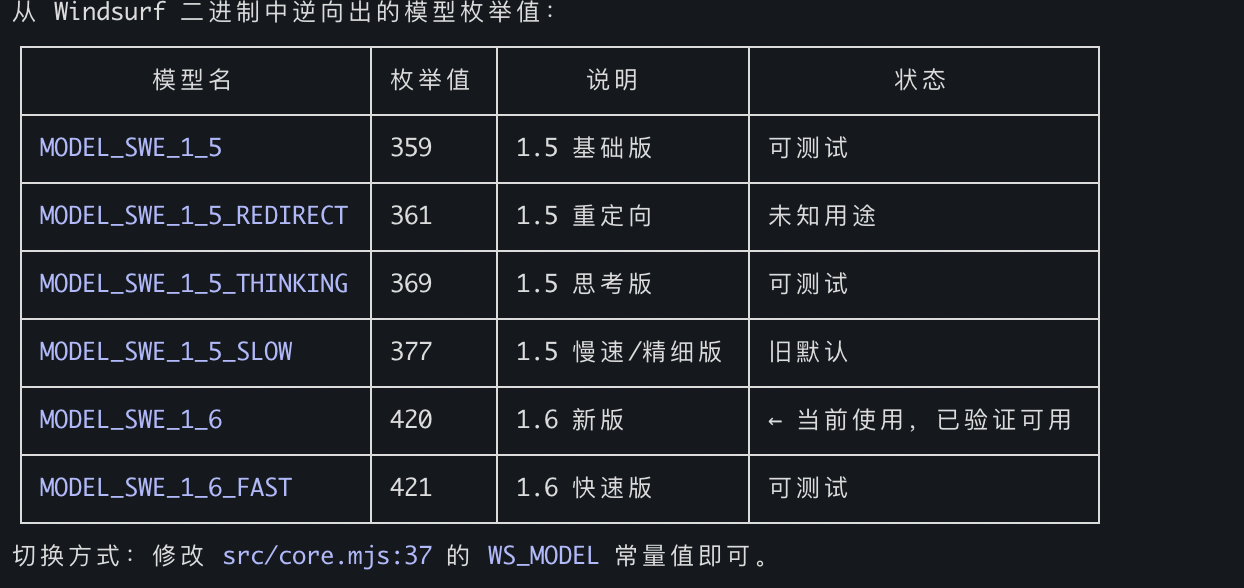
Standard: MODEL_SWE_1_6_FAST – schnellste Geschwindigkeit, umfangreichste grep-Schlüsselwörter, feinste Granularität der Fundstellen.
MCP-Tools
fast_context_search
KI-gestützte semantische Codesuche mit einstellbaren Parametern.
Parameter | Typ | Erforderlich | Standard | Beschreibung |
| string | Ja | — | Abfrage in natürlicher Sprache |
| string | Nein | cwd | Absoluter Pfad zum Projektstammverzeichnis |
| integer | Nein |
| Tiefe des Verzeichnisbaums für die Repository-Karte (1-6). Höher = mehr Kontext, aber größere Nutzlast. Fällt automatisch auf eine geringere Tiefe zurück, wenn der Baum 250 KB überschreitet. Verwenden Sie 1-2 für große Monorepos (>5000 Dateien), 3 für die meisten Projekte, 4-6 für kleine Projekte. |
| integer | Nein |
| Suchrunden (1-5). Mehr = tiefere Suche, aber langsamer. Verwenden Sie 1-2 für einfache Abfragen, 3 für die meisten Suchanfragen, 4-5 für komplexe Analysen. |
| integer | Nein |
| Maximale Anzahl zurückzugebender Dateien (1-30). Kleiner = fokussierter, größer = breitere Erkundung. |
| string[] | Nein |
| Verzeichnis-/Dateimuster, die von der Repository-Karte und dem Suchkontext ausgeschlossen sind. |
Rückgabewerte:
Relevante Dateien mit Zeilenbereichen
Vorgeschlagene Suchschlüsselwörter (während der KI-Suche verwendete rg-Muster)
Diagnose-Metadaten (
[config]-Zeile, die die tatsächlich verwendete tree_depth, die Baumgröße und das Auftreten eines Fallbacks anzeigt)
Beispielausgabe:
Found 3 relevant files.
[1/3] /project/src/auth/handler.py (L10-60, L120-180)
[2/3] /project/src/middleware/jwt.py (L1-40)
[3/3] /project/src/models/user.py (L20-80)
grep keywords: authenticate, jwt.*verify, session.*token
[config] tree_depth=3, tree_size=12.5KB, max_turns=3Fehlerausgabe enthält statusspezifische Hinweise:
Error: Request failed: HTTP 403
[hint] 403 Forbidden: Authentication failed. The API key may be expired or revoked.
Try re-extracting with extract_windsurf_key, or set a fresh WINDSURF_API_KEY env var.
If you are running inside WSL, run `devin login` inside WSL so `~/.local/share/devin/credentials.toml` exists.Error: Request failed: HTTP 413
[diagnostic] tree_depth_used=3, tree_size=280.0KB (auto fell back from requested depth)
[hint] If the error is payload-related, try a lower tree_depth value.extract_windsurf_key
Windsurf-API-Schlüssel aus der lokalen Installation extrahieren. Keine Parameter.
Setzen Sie FC_HIDE_EXTRACT_WINDSURF_KEY_TOOL=1 beim Start des MCP-Servers, um dieses Tool aus tools/list auszublenden. Dies deaktiviert die interne automatische API-Schlüsselerkennung für fast_context_search nicht.
Projektstruktur
fast-context-mcp/
├── package.json
├── src/
│ ├── server.mjs # MCP server entry point
│ ├── core.mjs # Auth, message building, streaming, search loop
│ ├── executor.mjs # Tool executor: rg, readfile, tree, ls, glob
│ ├── extract-key.mjs # Windsurf API Key extraction (SQLite)
│ ├── path-safety.mjs # Project-root confinement for model-selected paths
│ ├── response-repair.mjs # Malformed response repair and evidence salvage
│ ├── shared.mjs # Repository map, answer parser, prompt builder
│ ├── cache.mjs # In-memory search-result cache
│ └── protobuf.mjs # Protobuf encoder/decoder + Connect-RPC frames
├── test/ # Unit and MCP stdio integration tests
├── README.md
└── LICENSESo funktioniert die Suche
Das Projektverzeichnis wird auf den virtuellen Pfad
/codebaseabgebildetDer Verzeichnisbaum wird in der angeforderten Tiefe erstellt (Standard L=3), mit automatischem Fallback auf eine geringere Tiefe, falls der Baum 250 KB überschreitet
Abfrage + Verzeichnisbaum werden über Connect-RPC/Protobuf an das Devstral-Modell von Windsurf gesendet
Devstral generiert Tool-Befehle (ripgrep, Dateilesevorgänge, tree, ls, glob)
Befehle werden lokal parallel ausgeführt (bis zu
FC_MAX_COMMANDSpro Runde)Ergebnisse werden für die nächste Runde an Devstral zurückgesendet
Nach
max_turnsRunden gibt Devstral Dateipfade + Zeilenbereiche zurückAlle während der Suche verwendeten rg-Muster werden als vorgeschlagene Schlüsselwörter gesammelt
Diagnose-Metadaten werden angehängt, um der aufrufenden KI beim Optimieren der Parameter zu helfen
Technische Details
Protokoll: Connect-RPC über HTTP/1.1, Protobuf-Kodierung, gzip-Komprimierung
Modell: Devstral (
MODEL_SWE_1_6_FAST, konfigurierbar)Lokale Tools:
rg(über @vscode/ripgrep gebündelt),readfile(Node.js fs),tree(tree-node-cli),ls(Node.js fs),glob(Node.js fs)Authentifizierung: API-Schlüssel → JWT (automatisch pro Sitzung abgerufen)
Laufzeit: Node.js >= 18 (ESM)
Abhängigkeiten
Paket | Zweck |
| MCP-Server-Framework |
| Gebündelte ripgrep-Binärdatei (plattformübergreifend) |
| Plattformübergreifender Verzeichnisbaum (ersetzt das System- |
| Lokale SQLite-Datenbank von Devin/Windsurf ohne nativen Build-Schritt lesen |
| Schema-Validierung; vermeidet das unvollständige |
Freundliche Links
Lizenz
MIT
Available Tools
2 toolsextract_windsurf_keyA
Extract Windsurf API Key from local installation. Auto-detects OS (macOS/Windows/Linux) and reads the API key from Windsurf's local database. Set the result as WINDSURF_API_KEY env var.
| Name | Required | Description | Default |
|---|---|---|---|
No parameters | |||
TDQS
Does the description disclose side effects, auth requirements, rate limits, or destructive behavior?
No annotations are provided, so the description carries the burden. It discloses OS auto-detection, reading from the local database, and setting the result as an env var. It does not mention error cases or prerequisites, but it is transparent about its main side effect.
Agents need to know what a tool does to the world before calling it. Descriptions should go beyond structured annotations to explain consequences.
Is the description appropriately sized, front-loaded, and free of redundancy?
The description is two sentences, front-loaded with the primary action, and every sentence adds value without redundancy.
Shorter descriptions cost fewer tokens and are easier for agents to parse. Every sentence should earn its place.
Given the tool's complexity, does the description cover enough for an agent to succeed on first attempt?
For a zero-parameter tool with no output schema, the description covers the core function and side effect. It lacks mention of failure cases or requirements, but is otherwise complete for its simplicity.
Complex tools with many parameters or behaviors need more documentation. Simple tools need less. This dimension scales expectations accordingly.
Does the description clarify parameter syntax, constraints, interactions, or defaults beyond what the schema provides?
The tool has zero parameters and 100% schema coverage (empty), so the baseline is 4. No additional parameter explanation is needed.
Input schemas describe structure but not intent. Descriptions should explain non-obvious parameter relationships and valid value ranges.
Does the description clearly state what the tool does and how it differs from similar tools?
The description clearly states 'Extract Windsurf API Key from local installation', a specific verb+resource with source. It distinguishes itself from the unrelated sibling fast_context_search.
Agents choose between tools based on descriptions. A clear purpose with a specific verb and resource helps agents select the right tool.
Does the description explain when to use this tool, when not to, or what alternatives exist?
The description provides clear context for when to use the tool (to get the API key and set it as an env var), and the sibling tool is unrelated, so no exclusions are needed. It does not explicitly list alternatives, but usage is apparent.
Agents often have multiple tools that could apply. Explicit usage guidance like "use X instead of Y when Z" prevents misuse.
fast_context_searchA
AI-driven semantic code search using Windsurf's Devstral model. Searches a codebase with natural language and returns relevant file paths with line ranges, plus suggested grep keywords for follow-up searches. Parameter tuning guide:
tree_depth: Controls how much directory structure the remote AI sees before searching. If you get a payload/size error, REDUCE this value. If search results are too shallow (missing files in deep subdirectories), INCREASE this value.
max_turns: Controls how many search-execute-feedback rounds the remote AI gets. If results are incomplete or the AI didn't find enough files, INCREASE this value. If you want a quick rough answer, use 1. Response includes a [config] line showing actual parameters used — use this to decide adjustments on retry.
| Name | Required | Description | Default |
|---|---|---|---|
| query | Yes | Natural language search query (e.g. "where is auth handled", "database connection pool") | |
| project_path | No | Absolute path to project root. Empty = current working directory. | |
| tree_depth | No | Directory tree depth for the initial repo map sent to the remote AI. Default 3. Use 1-2 for huge monorepos (>5000 files) or if you get payload size errors. Use 4-6 for small projects (<200 files) where you want the AI to see deeper structure. Auto falls back to a lower depth if tree output exceeds 250KB. | |
| max_turns | No | Number of search rounds. Each round: remote AI generates search commands → local execution → results sent back. Default 3. Use 1 for quick simple lookups. Use 4-5 for complex queries requiring deep tracing across many files. More rounds = better results but slower and uses more API quota. | |
| max_results | No | Maximum number of files to return. Default 10. Use a smaller value (3-5) for focused queries. Use a larger value (15-30) for broad exploration queries. | |
| exclude_paths | No | Directory/file patterns to exclude from tree and search context. Useful for reducing payload size on large repos. Examples: ['node_modules', 'dist', '.git', 'build', 'coverage', '*.min.*'] |
TDQS
Does the description disclose side effects, auth requirements, rate limits, or destructive behavior?
With no annotations provided, the description fully explains the search process: rounds of search-execute-feedback, auto fallback for tree depth if payload exceeds 250KB, and mentions API quota usage for more rounds. This provides comprehensive behavioral insight.
Agents need to know what a tool does to the world before calling it. Descriptions should go beyond structured annotations to explain consequences.
Is the description appropriately sized, front-loaded, and free of redundancy?
The description is well-structured with a main overview and a parameter tuning guide. It is concise overall but the tuning guide could be slightly more compact. Still, it is clear and front-loaded with key purpose.
Shorter descriptions cost fewer tokens and are easier for agents to parse. Every sentence should earn its place.
Given the tool's complexity, does the description cover enough for an agent to succeed on first attempt?
Given 6 parameters, 100% schema coverage, no output schema, and only one sibling, the description covers purpose, behavior, tuning, and response content (including [config] line). It provides sufficient context for an agent to use the tool effectively.
Complex tools with many parameters or behaviors need more documentation. Simple tools need less. This dimension scales expectations accordingly.
Does the description clarify parameter syntax, constraints, interactions, or defaults beyond what the schema provides?
Schema description coverage is 100%, so baseline is 3. The description adds valuable tuning context for tree_depth and max_turns beyond the schema, explaining payload/size errors and result completeness. For other parameters, the schema already suffices. Thus, a 4 is warranted.
Input schemas describe structure but not intent. Descriptions should explain non-obvious parameter relationships and valid value ranges.
Does the description clearly state what the tool does and how it differs from similar tools?
The description clearly states the tool performs AI-driven semantic code search, returns file paths with line ranges and grep keywords. It distinguishes itself from the only sibling, extract_windsurf_key, which extracts a key.
Agents choose between tools based on descriptions. A clear purpose with a specific verb and resource helps agents select the right tool.
Does the description explain when to use this tool, when not to, or what alternatives exist?
The description includes a parameter tuning guide that explains when to adjust tree_depth and max_turns based on errors or shallow results. It also advises using the [config] line in responses for retry decisions. However, it does not explicitly state when not to use this tool, but given only one dissimilar sibling, this is acceptable.
Agents often have multiple tools that could apply. Explicit usage guidance like "use X instead of Y when Z" prevents misuse.
Tool Schema Changelog
Recent tool additions, removals, and schema changes observed during successful MCP inspections.
1 tool update
v1.2.1- Changed
fast_context_search4 fields changed- added
Input schema / properties / exclude_pathsAdded value: +{ + "default": [], + "description": "Directory/file patterns to exclude from tree and search context. Useful for reducing payload size on large repos. Examples: ['node_modules', 'dist', '.git', 'build', 'coverage', '*.min.*']", + "items": { + "type": "string" + }, + "type": "array" +} - added
Input schema / properties / max_resultsAdded value: +{ + "default": 10, + "description": "Maximum number of files to return. Default 10. Use a smaller value (3-5) for focused queries. Use a larger value (15-30) for broad exploration queries.", + "maximum": 30, + "minimum": 1, + "type": "integer" +} - added
Input schema / properties / max_turnsAdded value: +{ + "default": 3, + "description": "Number of search rounds. Each round: remote AI generates search commands → local execution → results sent back. Default 3. Use 1 for quick simple lookups. Use 4-5 for complex queries requiring deep tracing across many files. More rounds = better results but slower and uses more API quota.", + "maximum": 5, + "minimum": 1, + "type": "integer" +} - added
Input schema / properties / tree_depthAdded value: +{ + "default": 3, + "description": "Directory tree depth for the initial repo map sent to the remote AI. Default 3. Use 1-2 for huge monorepos (>5000 files) or if you get payload size errors. Use 4-6 for small projects (<200 files) where you want the AI to see deeper structure. Auto falls back to a lower depth if tree output exceeds 250KB.", + "maximum": 6, + "minimum": 1, + "type": "integer" +}
2 tool updates
v1.0.0- First observed
extract_windsurf_key - First observed
fast_context_search
TDQS
Scored across 2 tools
The two tools have completely distinct purposes: one extracts an API key from a local installation, the other performs semantic code search. No overlap or ambiguity exists.
Both tools use snake_case and follow a descriptive pattern (extract_* and fast_*). Although the verb style differs slightly (command vs. brand adjective), the naming is clear and consistent in format.
With only two tools, the server feels minimal. While the tools are focused, the count is on the low end of what is typically expected, making it borderline appropriate.
The server covers API key extraction and semantic search, but lacks related operations like API key management, file content retrieval, or result navigation. Significant gaps exist for a context-focused server.
Maintenance
Related MCP Connectors
Search your AI chat history (ChatGPT, Claude, Codex) from any MCP client. Remote, private, read-only
An MCP server that gives your AI access to the source code and docs of all public github repos
Driflyte MCP server which lets AI assistants query topic-specific knowledge from web and GitHub.
Related MCP Servers
- AlicenseAqualityDmaintenanceEnables AI-driven semantic code search using Windsurf's reverse-engineered SWE-grep protocol to query local codebases with natural language. It executes local search tools like ripgrep and tree-node-cli to return relevant file paths and line ranges to MCP-compatible clients.2134 npmMIT
- FlicenseNot gradedqualityCmaintenanceA semantic code search MCP server that enables natural language queries against your codebase, supporting features like related file discovery and context expansion, all running locally.2-
- AlicenseAqualityDmaintenanceLocal-first MCP server for semantic + keyword hybrid code search. Zero external services, no API keys required.2MIT
- AlicenseAqualityCmaintenanceSemantic code search MCP server that reduces token usage by ~95% by returning top relevant code chunks instead of full files.89MIT