Fast Context MCP
Fast Context MCP
AI 기반 시맨틱 코드 검색 MCP 도구 — Windsurf의 리버스 엔지니어링된 SWE-grep 프로토콜을 기반으로 합니다.
MCP 호환 클라이언트(Claude Code, Claude Desktop, Cursor 등)는 자연어 쿼리로 코드베이스를 검색하는 데 이 도구를 사용할 수 있습니다. 모든 도구는 npm을 통해 번들로 제공되므로 시스템 수준 종속성이 필요하지 않습니다 (@vscode/ripgrep을 통한 ripgrep, tree-node-cli를 통한 tree). macOS, Windows, Linux에서 작동합니다.
작동 방식
You: "where is the authentication logic?"
│
▼
┌─────────────────────────┐
│ Fast Context MCP │
│ (local MCP server) │
│ │
│ 1. Maps project → /codebase
│ 2. Sends query to Windsurf Devstral API
│ 3. AI generates rg/readfile/tree commands
│ 4. Executes commands locally (built-in rg)
│ 5. Returns results to AI
│ 6. Repeats for N rounds
│ 7. Returns file paths + line ranges
│ + suggested search keywords
└─────────────────────────┘
│
▼
Found 3 relevant files.
[1/3] /project/src/auth/handler.py (L10-60)
[2/3] /project/src/middleware/jwt.py (L1-40)
[3/3] /project/src/models/user.py (L20-80)
Suggested search keywords:
authenticate, jwt.*verify, session.*tokenRelated MCP server: code-rag
사전 요구 사항
Node.js >= 18
Windsurf 계정 — 무료 티어로 충분합니다 (API 키 필요)
ripgrep을 설치할 필요가 없습니다 — @vscode/ripgrep을 통해 번들로 제공됩니다.
설치
방법 1: npm (권장)
# Latest stable release
npm install @sammysnake/fast-context-mcp
# Or beta/next release
npm install @sammysnake/fast-context-mcp@next방법 2: 소스에서
git clone https://github.com/SammySnake-d/fast-context-mcp.git
cd fast-context-mcp
npm install설정
1. Windsurf/Devin API 키 가져오기
서버는 Devin CLI/Desktop 또는 레거시 Windsurf 설치에서 API 키를 자동으로 추출합니다. 설정 후 extract_windsurf_key MCP 도구를 사용하거나 WINDSURF_API_KEY를 수동으로 설정할 수도 있습니다.
데스크톱 자격 증명은 Devin, 레거시 Deviv, 그 다음 Windsurf 순서로 발견됩니다.
플랫폼 | 경로 |
macOS |
|
Windows |
|
Linux |
|
WSL/Linux에서 서버는 먼저 ~/.local/share/devin/credentials.toml의 Devin CLI 자격 증명을 확인합니다. Windows에서 추출한 키가 WSL 내부에서 403을 반환하면 WSL에서 devin login을 실행하고 다시 시도하세요.
2. MCP 클라이언트 구성
Claude Code
mcpServers 아래의 ~/.claude.json에 추가하세요:
{
"fast-context": {
"command": "npx",
"args": ["-y", "--prefer-online", "@sammysnake/fast-context-mcp"],
"env": {
"WINDSURF_API_KEY": "sk-ws-01-xxxxx"
}
}
}베타/다음 릴리스의 경우:
{
"fast-context": {
"command": "npx",
"args": ["-y", "--prefer-online", "@sammysnake/fast-context-mcp@next"],
"env": {
"WINDSURF_API_KEY": "sk-ws-01-xxxxx"
}
}
}Claude Desktop
mcpServers 아래의 claude_desktop_config.json에 추가하세요:
{
"fast-context": {
"command": "npx",
"args": ["-y", "--prefer-online", "@sammysnake/fast-context-mcp"],
"env": {
"WINDSURF_API_KEY": "sk-ws-01-xxxxx"
}
}
}베타/다음 릴리스의 경우:
{
"fast-context": {
"command": "npx",
"args": ["-y", "--prefer-online", "@sammysnake/fast-context-mcp@next"],
"env": {
"WINDSURF_API_KEY": "sk-ws-01-xxxxx"
}
}
}
WINDSURF_API_KEY가 생략되면 서버가 로컬 Windsurf 설치에서 자동으로 발견합니다.
환경 변수
변수 | 기본값 | 설명 |
| (자동 발견) | Windsurf API 키 |
|
| 쿼리당 검색 라운드 수 (많을수록 더 깊지만 느림) |
|
| 라운드당 최대 병렬 명령 수 |
|
| 스트리밍 요청에 대한 연결 제한 시간(ms) |
|
|
|
|
| 명령 출력당 최대 줄 수 (잘림) |
|
| 출력 줄당 최대 문자 수 (잘림) |
| (설정 안 됨) |
|
|
| 결과 캐시 TTL; |
|
| 메모리 내 캐시 최대 항목 수 |
| (설정 안 됨) | 신뢰할 수 있는 기업 프록시가 TLS 검증 비활성화를 요구하는 경우에만 |
|
| Windsurf 모델 이름 |
|
| Windsurf 앱 버전 (프로토콜 메타데이터) |
|
| Windsurf 언어 서버 버전 (프로토콜 메타데이터) |
사용 가능한 모델
WS_MODEL을 설정하여 모델을 변경할 수 있습니다 (위 환경 변수 참조).
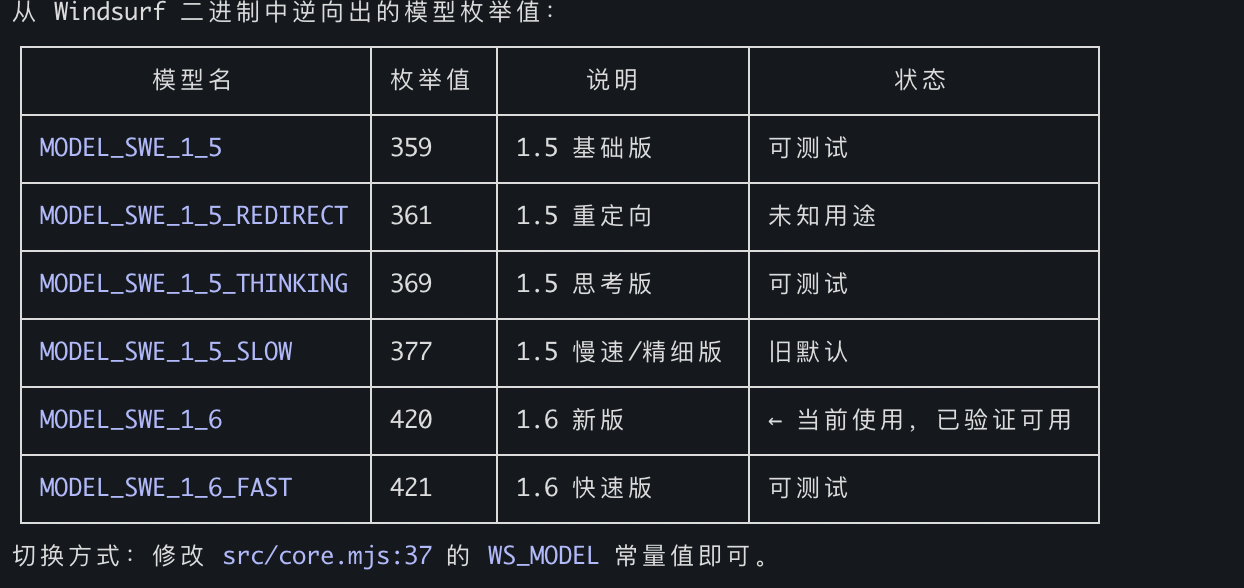
기본값: MODEL_SWE_1_6_FAST — 가장 빠른 속도, 가장 풍부한 grep 키워드, 가장 세밀한 위치 정밀도.
MCP 도구
fast_context_search
조정 가능한 매개변수를 갖춘 AI 기반 시맨틱 코드 검색.
매개변수 | 유형 | 필수 | 기본값 | 설명 |
| string | 예 | — | 자연어 검색 쿼리 |
| string | 아니요 | cwd | 프로젝트 루트의 절대 경로 |
| integer | 아니요 |
| 저장소 맵을 위한 디렉터리 트리 깊이 (1-6). 높을수록 더 많은 컨텍스트를 제공하지만 페이로드가 커집니다. 트리가 250KB를 초과하면 자동으로 더 낮은 깊이로 폴백합니다. 대규모 모노레포(>5000개 파일)에는 1-2, 대부분의 프로젝트에는 3, 소규모 프로젝트에는 4-6을 사용하세요. |
| integer | 아니요 |
| 검색 라운드 (1-5). 많을수록 더 깊게 검색하지만 느립니다. 단순 조회에는 1-2, 대부분의 쿼리에는 3, 복잡한 분석에는 4-5를 사용하세요. |
| integer | 아니요 |
| 반환할 최대 파일 수 (1-30). 작을수록 더 집중되고, 클수록 더 광범위하게 탐색합니다. |
| string[] | 아니요 |
| 저장소 맵과 검색 컨텍스트에서 제외되는 디렉터리/파일 패턴. |
반환:
관련 파일 (줄 범위 포함)
제안된 검색 키워드 (AI 검색 중 사용된 rg 패턴)
진단 메타데이터 (
[config]줄에 실제 사용된 tree_depth, 트리 크기, 폴백 발생 여부 표시)
예제 출력:
Found 3 relevant files.
[1/3] /project/src/auth/handler.py (L10-60, L120-180)
[2/3] /project/src/middleware/jwt.py (L1-40)
[3/3] /project/src/models/user.py (L20-80)
grep keywords: authenticate, jwt.*verify, session.*token
[config] tree_depth=3, tree_size=12.5KB, max_turns=3오류 출력에는 상태별 힌트가 포함됩니다:
Error: Request failed: HTTP 403
[hint] 403 Forbidden: Authentication failed. The API key may be expired or revoked.
Try re-extracting with extract_windsurf_key, or set a fresh WINDSURF_API_KEY env var.
If you are running inside WSL, run `devin login` inside WSL so `~/.local/share/devin/credentials.toml` exists.Error: Request failed: HTTP 413
[diagnostic] tree_depth_used=3, tree_size=280.0KB (auto fell back from requested depth)
[hint] If the error is payload-related, try a lower tree_depth value.extract_windsurf_key
로컬 설치에서 Windsurf API 키를 추출합니다. 매개변수가 없습니다.
MCP 서버 시작 시 FC_HIDE_EXTRACT_WINDSURF_KEY_TOOL=1로 설정하면 tools/list에서 이 도구를 숨깁니다. 이것은 fast_context_search의 내부 API 키 자동 발견을 비활성화하지 않습니다.
프로젝트 구조
fast-context-mcp/
├── package.json
├── src/
│ ├── server.mjs # MCP server entry point
│ ├── core.mjs # Auth, message building, streaming, search loop
│ ├── executor.mjs # Tool executor: rg, readfile, tree, ls, glob
│ ├── extract-key.mjs # Windsurf API Key extraction (SQLite)
│ ├── path-safety.mjs # Project-root confinement for model-selected paths
│ ├── response-repair.mjs # Malformed response repair and evidence salvage
│ ├── shared.mjs # Repository map, answer parser, prompt builder
│ ├── cache.mjs # In-memory search-result cache
│ └── protobuf.mjs # Protobuf encoder/decoder + Connect-RPC frames
├── test/ # Unit and MCP stdio integration tests
├── README.md
└── LICENSE검색 작동 방식
프로젝트 디렉터리가 가상
/codebase경로에 매핑됩니다요청된 깊이(기본 L=3)로 디렉터리 트리가 생성되며, 트리가 250KB를 초과하면 자동 폴백으로 더 낮은 깊이가 사용됩니다
쿼리와 디렉터리 트리가 Connect-RPC/Protobuf를 통해 Windsurf의 Devstral 모델로 전송됩니다
Devstral이 도구 명령(ripgrep, 파일 읽기, tree, ls, glob)을 생성합니다
명령이 로컬에서 병렬로 실행됩니다 (라운드당 최대
FC_MAX_COMMANDS)결과가 다음 라운드를 위해 Devstral로 다시 전송됩니다
max_turns라운드 후 Devstral이 파일 경로와 줄 범위를 반환합니다검색 중 사용된 모든 rg 패턴이 제안된 키워드로 수집됩니다
호출 AI가 매개변수를 조정할 수 있도록 진단 메타데이터가 추가됩니다
기술 세부 사항
프로토콜: HTTP/1.1을 통한 Connect-RPC, Protobuf 인코딩, gzip 압축
모델: Devstral (
MODEL_SWE_1_6_FAST, 구성 가능)로컬 도구:
rg(@vscode/ripgrep을 통해 번들),readfile(Node.js fs),tree(tree-node-cli),ls(Node.js fs),glob(Node.js fs)인증: API 키 → JWT (세션별 자동 가져오기)
런타임: Node.js >= 18 (ESM)
의존성
패키지 | 용도 |
| MCP 서버 프레임워크 |
| 번들된 ripgrep 바이너리 (크로스 플랫폼) |
| 크로스 플랫폼 디렉터리 트리 (시스템 |
| 네이티브 빌드 단계 없이 Devin/Windsurf의 로컬 SQLite DB를 읽습니다 |
| 스키마 검증; 일부 npm 미러가 제공하는 불완전한 |
관련 링크
라이선스
MIT
Available Tools
2 toolsextract_windsurf_keyA
Extract Windsurf API Key from local installation. Auto-detects OS (macOS/Windows/Linux) and reads the API key from Windsurf's local database. Set the result as WINDSURF_API_KEY env var.
| Name | Required | Description | Default |
|---|---|---|---|
No parameters | |||
TDQS
Does the description disclose side effects, auth requirements, rate limits, or destructive behavior?
No annotations are provided, so the description carries the burden. It discloses OS auto-detection, reading from the local database, and setting the result as an env var. It does not mention error cases or prerequisites, but it is transparent about its main side effect.
Agents need to know what a tool does to the world before calling it. Descriptions should go beyond structured annotations to explain consequences.
Is the description appropriately sized, front-loaded, and free of redundancy?
The description is two sentences, front-loaded with the primary action, and every sentence adds value without redundancy.
Shorter descriptions cost fewer tokens and are easier for agents to parse. Every sentence should earn its place.
Given the tool's complexity, does the description cover enough for an agent to succeed on first attempt?
For a zero-parameter tool with no output schema, the description covers the core function and side effect. It lacks mention of failure cases or requirements, but is otherwise complete for its simplicity.
Complex tools with many parameters or behaviors need more documentation. Simple tools need less. This dimension scales expectations accordingly.
Does the description clarify parameter syntax, constraints, interactions, or defaults beyond what the schema provides?
The tool has zero parameters and 100% schema coverage (empty), so the baseline is 4. No additional parameter explanation is needed.
Input schemas describe structure but not intent. Descriptions should explain non-obvious parameter relationships and valid value ranges.
Does the description clearly state what the tool does and how it differs from similar tools?
The description clearly states 'Extract Windsurf API Key from local installation', a specific verb+resource with source. It distinguishes itself from the unrelated sibling fast_context_search.
Agents choose between tools based on descriptions. A clear purpose with a specific verb and resource helps agents select the right tool.
Does the description explain when to use this tool, when not to, or what alternatives exist?
The description provides clear context for when to use the tool (to get the API key and set it as an env var), and the sibling tool is unrelated, so no exclusions are needed. It does not explicitly list alternatives, but usage is apparent.
Agents often have multiple tools that could apply. Explicit usage guidance like "use X instead of Y when Z" prevents misuse.
fast_context_searchA
AI-driven semantic code search using Windsurf's Devstral model. Searches a codebase with natural language and returns relevant file paths with line ranges, plus suggested grep keywords for follow-up searches. Parameter tuning guide:
tree_depth: Controls how much directory structure the remote AI sees before searching. If you get a payload/size error, REDUCE this value. If search results are too shallow (missing files in deep subdirectories), INCREASE this value.
max_turns: Controls how many search-execute-feedback rounds the remote AI gets. If results are incomplete or the AI didn't find enough files, INCREASE this value. If you want a quick rough answer, use 1. Response includes a [config] line showing actual parameters used — use this to decide adjustments on retry.
| Name | Required | Description | Default |
|---|---|---|---|
| query | Yes | Natural language search query (e.g. "where is auth handled", "database connection pool") | |
| project_path | No | Absolute path to project root. Empty = current working directory. | |
| tree_depth | No | Directory tree depth for the initial repo map sent to the remote AI. Default 3. Use 1-2 for huge monorepos (>5000 files) or if you get payload size errors. Use 4-6 for small projects (<200 files) where you want the AI to see deeper structure. Auto falls back to a lower depth if tree output exceeds 250KB. | |
| max_turns | No | Number of search rounds. Each round: remote AI generates search commands → local execution → results sent back. Default 3. Use 1 for quick simple lookups. Use 4-5 for complex queries requiring deep tracing across many files. More rounds = better results but slower and uses more API quota. | |
| max_results | No | Maximum number of files to return. Default 10. Use a smaller value (3-5) for focused queries. Use a larger value (15-30) for broad exploration queries. | |
| exclude_paths | No | Directory/file patterns to exclude from tree and search context. Useful for reducing payload size on large repos. Examples: ['node_modules', 'dist', '.git', 'build', 'coverage', '*.min.*'] |
TDQS
Does the description disclose side effects, auth requirements, rate limits, or destructive behavior?
With no annotations provided, the description fully explains the search process: rounds of search-execute-feedback, auto fallback for tree depth if payload exceeds 250KB, and mentions API quota usage for more rounds. This provides comprehensive behavioral insight.
Agents need to know what a tool does to the world before calling it. Descriptions should go beyond structured annotations to explain consequences.
Is the description appropriately sized, front-loaded, and free of redundancy?
The description is well-structured with a main overview and a parameter tuning guide. It is concise overall but the tuning guide could be slightly more compact. Still, it is clear and front-loaded with key purpose.
Shorter descriptions cost fewer tokens and are easier for agents to parse. Every sentence should earn its place.
Given the tool's complexity, does the description cover enough for an agent to succeed on first attempt?
Given 6 parameters, 100% schema coverage, no output schema, and only one sibling, the description covers purpose, behavior, tuning, and response content (including [config] line). It provides sufficient context for an agent to use the tool effectively.
Complex tools with many parameters or behaviors need more documentation. Simple tools need less. This dimension scales expectations accordingly.
Does the description clarify parameter syntax, constraints, interactions, or defaults beyond what the schema provides?
Schema description coverage is 100%, so baseline is 3. The description adds valuable tuning context for tree_depth and max_turns beyond the schema, explaining payload/size errors and result completeness. For other parameters, the schema already suffices. Thus, a 4 is warranted.
Input schemas describe structure but not intent. Descriptions should explain non-obvious parameter relationships and valid value ranges.
Does the description clearly state what the tool does and how it differs from similar tools?
The description clearly states the tool performs AI-driven semantic code search, returns file paths with line ranges and grep keywords. It distinguishes itself from the only sibling, extract_windsurf_key, which extracts a key.
Agents choose between tools based on descriptions. A clear purpose with a specific verb and resource helps agents select the right tool.
Does the description explain when to use this tool, when not to, or what alternatives exist?
The description includes a parameter tuning guide that explains when to adjust tree_depth and max_turns based on errors or shallow results. It also advises using the [config] line in responses for retry decisions. However, it does not explicitly state when not to use this tool, but given only one dissimilar sibling, this is acceptable.
Agents often have multiple tools that could apply. Explicit usage guidance like "use X instead of Y when Z" prevents misuse.
Tool Schema Changelog
Recent tool additions, removals, and schema changes observed during successful MCP inspections.
1 tool update
v1.2.1- Changed
fast_context_search4 fields changed- added
Input schema / properties / exclude_pathsAdded value: +{ + "default": [], + "description": "Directory/file patterns to exclude from tree and search context. Useful for reducing payload size on large repos. Examples: ['node_modules', 'dist', '.git', 'build', 'coverage', '*.min.*']", + "items": { + "type": "string" + }, + "type": "array" +} - added
Input schema / properties / max_resultsAdded value: +{ + "default": 10, + "description": "Maximum number of files to return. Default 10. Use a smaller value (3-5) for focused queries. Use a larger value (15-30) for broad exploration queries.", + "maximum": 30, + "minimum": 1, + "type": "integer" +} - added
Input schema / properties / max_turnsAdded value: +{ + "default": 3, + "description": "Number of search rounds. Each round: remote AI generates search commands → local execution → results sent back. Default 3. Use 1 for quick simple lookups. Use 4-5 for complex queries requiring deep tracing across many files. More rounds = better results but slower and uses more API quota.", + "maximum": 5, + "minimum": 1, + "type": "integer" +} - added
Input schema / properties / tree_depthAdded value: +{ + "default": 3, + "description": "Directory tree depth for the initial repo map sent to the remote AI. Default 3. Use 1-2 for huge monorepos (>5000 files) or if you get payload size errors. Use 4-6 for small projects (<200 files) where you want the AI to see deeper structure. Auto falls back to a lower depth if tree output exceeds 250KB.", + "maximum": 6, + "minimum": 1, + "type": "integer" +}
2 tool updates
v1.0.0- First observed
extract_windsurf_key - First observed
fast_context_search
TDQS
Scored across 2 tools
The two tools have completely distinct purposes: one extracts an API key from a local installation, the other performs semantic code search. No overlap or ambiguity exists.
Both tools use snake_case and follow a descriptive pattern (extract_* and fast_*). Although the verb style differs slightly (command vs. brand adjective), the naming is clear and consistent in format.
With only two tools, the server feels minimal. While the tools are focused, the count is on the low end of what is typically expected, making it borderline appropriate.
The server covers API key extraction and semantic search, but lacks related operations like API key management, file content retrieval, or result navigation. Significant gaps exist for a context-focused server.
Maintenance
Related MCP Connectors
Search your AI chat history (ChatGPT, Claude, Codex) from any MCP client. Remote, private, read-only
An MCP server that gives your AI access to the source code and docs of all public github repos
Driflyte MCP server which lets AI assistants query topic-specific knowledge from web and GitHub.
Related MCP Servers
- AlicenseAqualityDmaintenanceEnables AI-driven semantic code search using Windsurf's reverse-engineered SWE-grep protocol to query local codebases with natural language. It executes local search tools like ripgrep and tree-node-cli to return relevant file paths and line ranges to MCP-compatible clients.2134 npmMIT
- FlicenseNot gradedqualityCmaintenanceA semantic code search MCP server that enables natural language queries against your codebase, supporting features like related file discovery and context expansion, all running locally.2-
- AlicenseAqualityDmaintenanceLocal-first MCP server for semantic + keyword hybrid code search. Zero external services, no API keys required.2MIT
- AlicenseAqualityCmaintenanceSemantic code search MCP server that reduces token usage by ~95% by returning top relevant code chunks instead of full files.89MIT