Fast Context MCP
Семантический поиск по коду на базе ИИ в виде MCP-инструмента — на основе реверс-инжиниринга протокола SWE-grep от Windsurf.
Любой MCP-совместимый клиент (Claude Code, Claude Desktop, Cursor и т.д.) может использовать его для поиска по кодовым базам с помощью запросов на естественном языке. Все инструменты поставляются через npm — системные зависимости не требуются (ripgrep через @vscode/ripgrep, tree через tree-node-cli). Работает на macOS, Windows и Linux.
Как это работает
You: "where is the authentication logic?"
         │
         ▼
┌─────────────────────────┐
│  Fast Context MCP       │
│  (local MCP server)     │
│                         │
│  1. Maps project → /codebase
│  2. Sends query to Windsurf Devstral API
│  3. AI generates rg/readfile/tree commands
│  4. Executes commands locally (built-in rg)
│  5. Returns results to AI
│  6. Repeats for N rounds
│  7. Returns file paths + line ranges
│     + suggested search keywords
└─────────────────────────┘
         │
         ▼
Found 3 relevant files.
  [1/3] /project/src/auth/handler.py (L10-60)
  [2/3] /project/src/middleware/jwt.py (L1-40)
  [3/3] /project/src/models/user.py (L20-80)

Suggested search keywords:
  authenticate, jwt.*verify, session.*token
Related MCP server: code-rag
Предварительные требования
Устанавливать ripgrep не нужно — он поставляется вместе с @vscode/ripgrep.
Установка
Вариант 1: npm (рекомендуется)
# Latest stable release
npm install @sammysnake/fast-context-mcp

# Or beta/next release
npm install @sammysnake/fast-context-mcp@next
Вариант 2: из исходников
git clone https://github.com/SammySnake-d/fast-context-mcp.git
cd fast-context-mcp
npm install
Настройка
1. Получите свой API-ключ Windsurf/Devin
Сервер автоматически извлекает API-ключ из Devin CLI/Desktop или из устаревшей установки Windsurf. Также вы можете использовать MCP-инструмент extract_windsurf_key после настройки или задать WINDSURF_API_KEY вручную.
Учётные данные Desktop обнаруживаются в следующем порядке: Devin, устаревший Deviv, затем Windsurf.
Платформа | Путь |
macOS | ~/Library/Application Support/Devin/User/globalStorage/state.vscdb
|
Windows | %APPDATA%/Devin/User/globalStorage/state.vscdb
|
Linux | ~/.config/Devin/User/globalStorage/state.vscdb
|
В WSL/Linux сервер сначала проверяет учётные данные Devin CLI в ~/.local/share/devin/credentials.toml. Если ключ, извлечённый в Windows, возвращает 403 внутри WSL, выполните devin login внутри WSL и повторите попытку.
2. Настройка MCP-клиента
Claude Code
Добавьте в ~/.claude.json в раздел mcpServers:
{
  "fast-context": {
    "command": "npx",
    "args": ["-y", "--prefer-online", "@sammysnake/fast-context-mcp"],
    "env": {
      "WINDSURF_API_KEY": "sk-ws-01-xxxxx"
    }
  }
}
Для бета/следующего релиза:
{
  "fast-context": {
    "command": "npx",
    "args": ["-y", "--prefer-online", "@sammysnake/fast-context-mcp@next"],
    "env": {
      "WINDSURF_API_KEY": "sk-ws-01-xxxxx"
    }
  }
}
Claude Desktop
Добавьте в claude_desktop_config.json в раздел mcpServers:
{
  "fast-context": {
    "command": "npx",
    "args": ["-y", "--prefer-online", "@sammysnake/fast-context-mcp"],
    "env": {
      "WINDSURF_API_KEY": "sk-ws-01-xxxxx"
    }
  }
}
Для бета/следующего релиза:
{
  "fast-context": {
    "command": "npx",
    "args": ["-y", "--prefer-online", "@sammysnake/fast-context-mcp@next"],
    "env": {
      "WINDSURF_API_KEY": "sk-ws-01-xxxxx"
    }
  }
}
Если WINDSURF_API_KEY не задан, сервер автоматически определит его из вашей локальной установки Windsurf.
Переменные окружения
Переменная | По умолчанию | Описание |
WINDSURF_API_KEY
| (автоопределение) | API-ключ Windsurf |
FC_MAX_TURNS
| 3
| Раундов поиска на запрос (больше = глубже, но медленнее) |
FC_MAX_COMMANDS
| 8
| Макс. параллельных команд за раунд |
FC_TIMEOUT_MS
| 30000
| Connect-Timeout-Ms для потоковых запросов |
FC_HIDE_EXTRACT_WINDSURF_KEY_TOOL
| false
| Скрывает extract_windsurf_key из MCP-инструментов, если задано 1, true, yes или on |
FC_RESULT_MAX_LINES
| 50
| Макс. строк в выводе команды (усечение) |
FC_LINE_MAX_CHARS
| 250
| Макс. символов в строке вывода (усечение) |
FC_CACHE_DISABLED
| (не задано) | Отключает кэш результатов в памяти с помощью 1, true, yes или on |
FC_CACHE_TTL_MS
| 300000
| TTL кэша результатов; <=0 отключает кэширование |
FC_CACHE_MAX_ENTRIES
| 200
| Максимальное количество записей в кэше в памяти |
FC_ALLOW_INSECURE_TLS
| (не задано) | Устанавливайте 1 только когда доверенный корпоративный прокси требует отключённой проверки TLS |
WS_MODEL
| MODEL_SWE_1_6_FAST
| Название модели Windsurf |
WS_APP_VER
| 1.48.2
| Версия приложения Windsurf (метаданные протокола) |
WS_LS_VER
| 1.9544.35
| Версия языкового сервера Windsurf (метаданные протокола) |
Доступные модели
Модель можно изменить, задав WS_MODEL (см. переменные окружения выше).
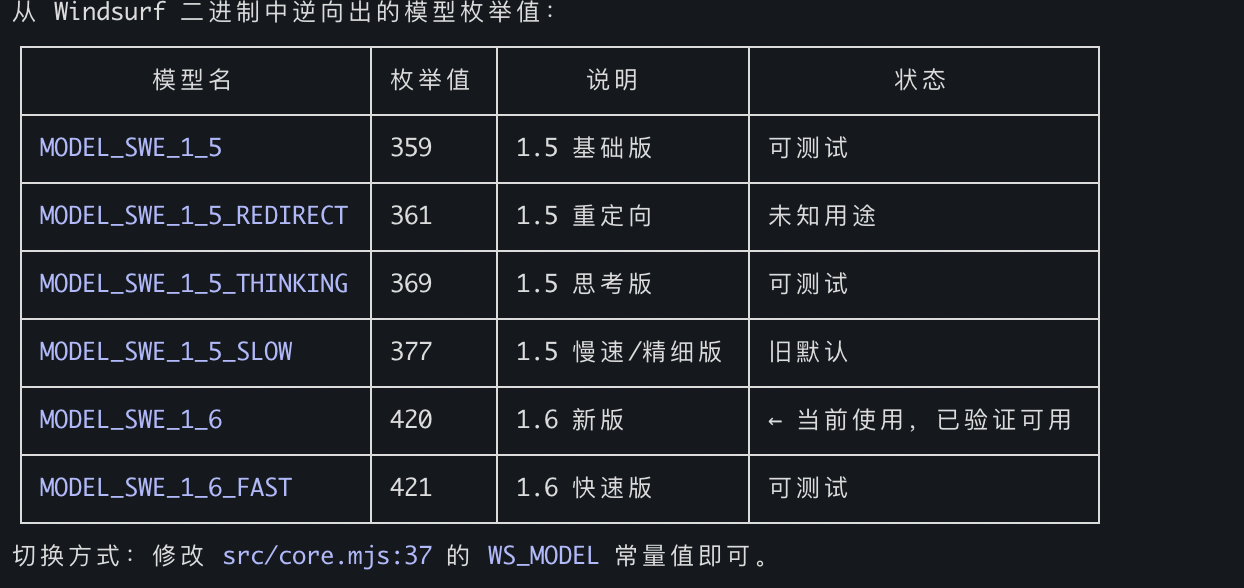
По умолчанию: MODEL_SWE_1_6_FAST — максимальная скорость, самые богатые ключевые слова grep, наилучшая гранулярность местоположений.
MCP-инструменты
fast_context_search
Семантический поиск по коду на базе ИИ с настраиваемыми параметрами.
Параметр | Тип | Обязательный | По умолчанию | Описание |
query
| string | Да | — | Поисковый запрос на естественном языке |
project_path
| string | Нет | cwd | Абсолютный путь к корню проекта |
tree_depth
| integer | Нет | 3
| Глубина дерева каталогов для карты репозитория (1-6). Больше = больше контекста, но больше полезная нагрузка. Автоматически откатывается на меньшую глубину, если дерево превышает 250 КБ. Используйте 1-2 для огромных монорепозиториев (>5000 файлов), 3 для большинства проектов, 4-6 для небольших проектов. |
max_turns
| integer | Нет | 3
| Раундов поиска (1-5). Больше = глубже поиск, но медленнее. Используйте 1-2 для простых запросов, 3 для большинства запросов, 4-5 для сложного анализа. |
max_results
| integer | Нет | 10
| Максимальное количество файлов для возврата (1-30). Меньше = более сфокусированно, больше = более широкое исследование. |
exclude_paths
| string[] | Нет | []
| Шаблоны каталогов/файлов, исключённые из карты репозитория и контекста поиска. |
Возвращает:
Релевантные файлы с диапазонами строк
Предлагаемые ключевые слова для поиска (паттерны rg, использованные при ИИ-поиске)
Диагностические метаданные (строка [config], показывающая фактическую использованную tree_depth, размер дерева и произошёл ли откат)
Пример вывода:
Found 3 relevant files.

  [1/3] /project/src/auth/handler.py (L10-60, L120-180)
  [2/3] /project/src/middleware/jwt.py (L1-40)
  [3/3] /project/src/models/user.py (L20-80)

grep keywords: authenticate, jwt.*verify, session.*token

[config] tree_depth=3, tree_size=12.5KB, max_turns=3
Вывод ошибок содержит подсказки, зависящие от статуса:
Error: Request failed: HTTP 403

[hint] 403 Forbidden: Authentication failed. The API key may be expired or revoked.
Try re-extracting with extract_windsurf_key, or set a fresh WINDSURF_API_KEY env var.
If you are running inside WSL, run `devin login` inside WSL so `~/.local/share/devin/credentials.toml` exists.
Error: Request failed: HTTP 413

[diagnostic] tree_depth_used=3, tree_size=280.0KB (auto fell back from requested depth)
[hint] If the error is payload-related, try a lower tree_depth value.
Извлекает API-ключ Windsurf из локальной установки. Без параметров.
Установите FC_HIDE_EXTRACT_WINDSURF_KEY_TOOL=1 при запуске MCP-сервера, чтобы скрыть этот инструмент из tools/list. Это не отключает внутреннее автоматическое определение API-ключа для fast_context_search.
Структура проекта
fast-context-mcp/
├── package.json
├── src/
│   ├── server.mjs        # MCP server entry point
│   ├── core.mjs          # Auth, message building, streaming, search loop
│   ├── executor.mjs      # Tool executor: rg, readfile, tree, ls, glob
│   ├── extract-key.mjs   # Windsurf API Key extraction (SQLite)
│   ├── path-safety.mjs   # Project-root confinement for model-selected paths
│   ├── response-repair.mjs # Malformed response repair and evidence salvage
│   ├── shared.mjs        # Repository map, answer parser, prompt builder
│   ├── cache.mjs         # In-memory search-result cache
│   └── protobuf.mjs      # Protobuf encoder/decoder + Connect-RPC frames
├── test/                 # Unit and MCP stdio integration tests
├── README.md
└── LICENSE
Как работает поиск
Каталог проекта сопоставляется с виртуальным путём /codebase
Дерево каталогов генерируется на запрошенной глубине (по умолчанию L=3), с автоматическим откатом на меньшую глубину, если дерево превышает 250 КБ
Запрос + дерево каталогов отправляются модели Devstral от Windsurf через Connect-RPC/Protobuf
Devstral генерирует команды инструментов (ripgrep, чтение файлов, tree, ls, glob)
Команды выполняются локально параллельно (до FC_MAX_COMMANDS за раунд)
Результаты отправляются обратно Devstral для следующего раунда
После max_turns раундов Devstral возвращает пути к файлам + диапазоны строк
Все паттерны rg, использованные во время поиска, собираются как предлагаемые ключевые слова
Добавляются диагностические метаданные, чтобы помочь вызывающему ИИ настроить параметры
Технические детали
Протокол: Connect-RPC через HTTP/1.1, кодирование Protobuf, сжатие gzip
Модель: Devstral (MODEL_SWE_1_6_FAST, настраивается)
Локальные инструменты: rg (поставляется через @vscode/ripgrep), readfile (Node.js fs), tree (tree-node-cli), ls (Node.js fs), glob (Node.js fs)
Аутентификация: API-ключ → JWT (автоматически получается для каждой сессии)
Среда выполнения: Node.js >= 18 (ESM)
Зависимости
Пакет | Назначение |
@modelcontextprotocol/sdk
| Каркас MCP-сервера |
@vscode/ripgrep
| Встроенный бинарный файл ripgrep (кроссплатформенный) |
tree-node-cli
| Кроссплатформенное дерево каталогов (заменяет системный tree) |
sql.js
| Чтение локальной SQLite-базы Devin/Windsurf без нативного этапа сборки |
zod (^3.25.76)
| Проверка схемы; позволяет избежать неполного tar-архива 3.25.0, который отдают некоторые зеркала npm |
Дружественные ссылки
Лицензия
MIT


