Fast Context MCP
AI-driven semantic code search as an MCP tool — powered by Windsurf's reverse-engineered SWE-grep protocol.
Any MCP-compatible client (Claude Code, Claude Desktop, Cursor, etc.) can use this to search codebases with natural language queries. All tools are bundled via npm — no system-level dependencies needed (ripgrep via @vscode/ripgrep, tree via tree-node-cli). Works on macOS, Windows, and Linux.
How It Works
You: "where is the authentication logic?"
         │
         ▼
┌─────────────────────────┐
│  Fast Context MCP       │
│  (local MCP server)     │
│                         │
│  1. Maps project → /codebase
│  2. Sends query to Windsurf Devstral API
│  3. AI generates rg/readfile/tree commands
│  4. Executes commands locally (built-in rg)
│  5. Returns results to AI
│  6. Repeats for N rounds
│  7. Returns file paths + line ranges
│     + suggested search keywords
└─────────────────────────┘
         │
         ▼
Found 3 relevant files.
  [1/3] /project/src/auth/handler.py (L10-60)
  [2/3] /project/src/middleware/jwt.py (L1-40)
  [3/3] /project/src/models/user.py (L20-80)

Suggested search keywords:
  authenticate, jwt.*verify, session.*token
Related MCP server: code-rag
Prerequisites
No need to install ripgrep — it's bundled via @vscode/ripgrep.
Installation
git clone https://github.com/SammySnake-d/fast-context-mcp.git
cd fast-context-mcp
npm install
Setup
1. Get Your Windsurf API Key
The server auto-extracts the API key from your local Windsurf installation. You can also use the extract_windsurf_key MCP tool after setup, or set WINDSURF_API_KEY manually.
Key is stored in Windsurf's local SQLite database:
Platform | Path |
macOS | ~/Library/Application Support/Windsurf/User/globalStorage/state.vscdb
|
Windows | %APPDATA%/Windsurf/User/globalStorage/state.vscdb
|
Linux | ~/.config/Windsurf/User/globalStorage/state.vscdb
|
2. Configure MCP Client
Claude Code
Add to ~/.claude.json under mcpServers:
{
  "fast-context": {
    "command": "node",
    "args": ["/absolute/path/to/fast-context-mcp/src/server.mjs"],
    "env": {
      "WINDSURF_API_KEY": "sk-ws-01-xxxxx"
    }
  }
}
Claude Desktop
Add to claude_desktop_config.json under mcpServers:
{
  "fast-context": {
    "command": "node",
    "args": ["/absolute/path/to/fast-context-mcp/src/server.mjs"],
    "env": {
      "WINDSURF_API_KEY": "sk-ws-01-xxxxx"
    }
  }
}
If WINDSURF_API_KEY is omitted, the server auto-discovers it from your local Windsurf installation.
Environment Variables
Variable | Default | Description |
WINDSURF_API_KEY
| (auto-discover) | Windsurf API key |
FC_MAX_TURNS
| 3
| Search rounds per query (more = deeper but slower) |
FC_MAX_COMMANDS
| 8
| Max parallel commands per round |
FC_TIMEOUT_MS
| 30000
| Connect-Timeout-Ms for streaming requests |
FC_RESULT_MAX_LINES
| 50
| Max lines per command output (truncation) |
FC_LINE_MAX_CHARS
| 250
| Max characters per output line (truncation) |
WS_MODEL
| MODEL_SWE_1_6_FAST
| Windsurf model name |
WS_APP_VER
| 1.48.2
| Windsurf app version (protocol metadata) |
WS_LS_VER
| 1.9544.35
| Windsurf language server version (protocol metadata) |
Available Models
The model can be changed by setting WS_MODEL (see environment variables above).
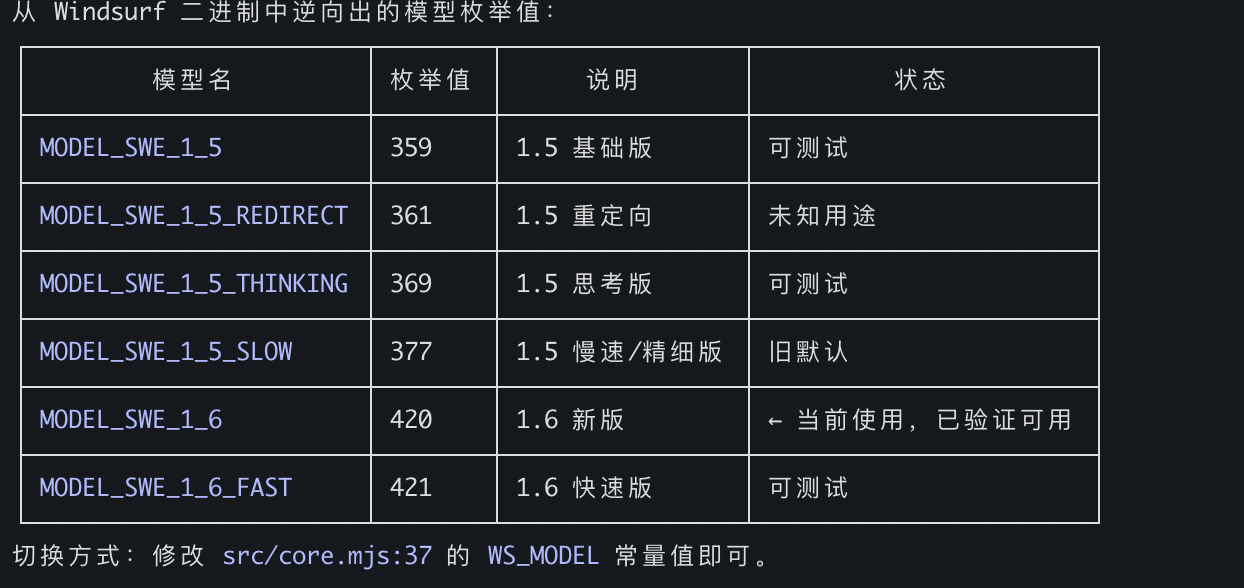
Default: MODEL_SWE_1_6_FAST — fastest speed, richest grep keywords, finest location granularity.
MCP Tools
fast_context_search
AI-driven semantic code search with tunable parameters.
Parameter | Type | Required | Default | Description |
query
| string | Yes | — | Natural language search query |
project_path
| string | No | cwd | Absolute path to project root |
tree_depth
| integer | No | 3
| Directory tree depth for repo map (1-6). Higher = more context but larger payload. Auto falls back to lower depth if tree exceeds 250KB. Use 1-2 for huge monorepos (>5000 files), 3 for most projects, 4-6 for small projects. |
max_turns
| integer | No | 3
| Search rounds (1-5). More = deeper search but slower. Use 1-2 for simple lookups, 3 for most queries, 4-5 for complex analysis. |
max_results
| integer | No | 10
| Maximum number of files to return (1-30). Smaller = more focused, larger = broader exploration. |
Returns:
Relevant files with line ranges
Suggested search keywords (rg patterns used during AI search)
Diagnostic metadata ([config] line showing actual tree_depth used, tree size, and whether fallback occurred)
Example output:
Found 3 relevant files.

  [1/3] /project/src/auth/handler.py (L10-60, L120-180)
  [2/3] /project/src/middleware/jwt.py (L1-40)
  [3/3] /project/src/models/user.py (L20-80)

grep keywords: authenticate, jwt.*verify, session.*token

[config] tree_depth=3, tree_size=12.5KB, max_turns=3
Error output includes status-specific hints:
Error: Request failed: HTTP 403

[hint] 403 Forbidden: Authentication failed. The API key may be expired or revoked.
Try re-extracting with extract_windsurf_key, or set a fresh WINDSURF_API_KEY env var.
Error: Request failed: HTTP 413

[diagnostic] tree_depth_used=3, tree_size=280.0KB (auto fell back from requested depth)
[hint] If the error is payload-related, try a lower tree_depth value.
Extract Windsurf API Key from local installation. No parameters.
Project Structure
fast-context-mcp/
├── package.json
├── src/
│   ├── server.mjs        # MCP server entry point
│   ├── core.mjs          # Auth, message building, streaming, search loop
│   ├── executor.mjs      # Tool executor: rg, readfile, tree, ls, glob
│   ├── extract-key.mjs   # Windsurf API Key extraction (SQLite)
│   └── protobuf.mjs      # Protobuf encoder/decoder + Connect-RPC frames
├── README.md
└── LICENSE
How the Search Works
Project directory is mapped to virtual /codebase path
Directory tree generated at requested depth (default L=3), with automatic fallback to lower depth if tree exceeds 250KB
Query + directory tree sent to Windsurf's Devstral model via Connect-RPC/Protobuf
Devstral generates tool commands (ripgrep, file reads, tree, ls, glob)
Commands executed locally in parallel (up to FC_MAX_COMMANDS per round)
Results sent back to Devstral for the next round
After max_turns rounds, Devstral returns file paths + line ranges
All rg patterns used during search are collected as suggested keywords
Diagnostic metadata appended to help the calling AI tune parameters
Technical Details
Protocol: Connect-RPC over HTTP/1.1, Protobuf encoding, gzip compression
Model: Devstral (MODEL_SWE_1_6_FAST, configurable)
Local tools: rg (bundled via @vscode/ripgrep), readfile (Node.js fs), tree (tree-node-cli), ls (Node.js fs), glob (Node.js fs)
Auth: API Key → JWT (auto-fetched per session)
Runtime: Node.js >= 18 (ESM)
Dependencies
Package | Purpose |
@modelcontextprotocol/sdk
| MCP server framework |
@vscode/ripgrep
| Bundled ripgrep binary (cross-platform) |
tree-node-cli
| Cross-platform directory tree (replaces system tree) |
better-sqlite3
| Read Windsurf's local SQLite DB |
zod
| Schema validation (MCP SDK requirement) |
License
MIT


