Fast Context MCP
Fast Context MCP
Búsqueda semántica de código impulsada por IA como herramienta MCP — basada en el protocolo SWE-grep de Windsurf, diseñado mediante ingeniería inversa.
Cualquier cliente compatible con MCP (Claude Code, Claude Desktop, Cursor, etc.) puede usarlo para buscar en bases de código con consultas en lenguaje natural. Todas las herramientas se agrupan mediante npm — no se necesitan dependencias a nivel de sistema (ripgrep a través de @vscode/ripgrep, tree mediante tree-node-cli). Funciona en macOS, Windows y Linux.
Cómo funciona
You: "where is the authentication logic?"
│
▼
┌─────────────────────────┐
│ Fast Context MCP │
│ (local MCP server) │
│ │
│ 1. Maps project → /codebase
│ 2. Sends query to Windsurf Devstral API
│ 3. AI generates rg/readfile/tree commands
│ 4. Executes commands locally (built-in rg)
│ 5. Returns results to AI
│ 6. Repeats for N rounds
│ 7. Returns file paths + line ranges
│ + suggested search keywords
└─────────────────────────┘
│
▼
Found 3 relevant files.
[1/3] /project/src/auth/handler.py (L10-60)
[2/3] /project/src/middleware/jwt.py (L1-40)
[3/3] /project/src/models/user.py (L20-80)
Suggested search keywords:
authenticate, jwt.*verify, session.*tokenRelated MCP server: code-rag
Requisitos previos
Node.js >= 18
Cuenta de Windsurf — el plan gratuito funciona (necesaria para la clave de API).
No es necesario instalar ripgrep — viene incluido a través de @vscode/ripgrep.
Instalación
Opción 1: npm (recomendada)
# Latest stable release
npm install @sammysnake/fast-context-mcp
# Or beta/next release
npm install @sammysnake/fast-context-mcp@nextOpción 2: desde el código fuente
git clone https://github.com/SammySnake-d/fast-context-mcp.git
cd fast-context-mcp
npm installConfiguración
1. Obtén tu clave de API de Windsurf/Devin
El servidor extrae automáticamente la clave de API de Devin CLI/Desktop o de una instalación heredada de Windsurf. También puedes usar la herramienta MCP extract_windsurf_key después de la configuración, o establecer WINDSURF_API_KEY manualmente.
Las credenciales de escritorio se descubren en este orden: Devin, Deviv heredado y luego Windsurf.
Plataforma | Ruta |
macOS |
|
Windows |
|
Linux |
|
En WSL/Linux, el servidor comprueba primero las credenciales de Devin CLI en ~/.local/share/devin/credentials.toml. Si una clave extraída en Windows devuelve 403 dentro de WSL, ejecuta devin login dentro de WSL y reinténtalo.
2. Configura el cliente MCP
Claude Code
Añade a ~/.claude.json en mcpServers:
{
"fast-context": {
"command": "npx",
"args": ["-y", "--prefer-online", "@sammysnake/fast-context-mcp"],
"env": {
"WINDSURF_API_KEY": "sk-ws-01-xxxxx"
}
}
}Para la versión beta/siguiente:
{
"fast-context": {
"command": "npx",
"args": ["-y", "--prefer-online", "@sammysnake/fast-context-mcp@next"],
"env": {
"WINDSURF_API_KEY": "sk-ws-01-xxxxx"
}
}
}Claude Desktop
Añade a claude_desktop_config.json en mcpServers:
{
"fast-context": {
"command": "npx",
"args": ["-y", "--prefer-online", "@sammysnake/fast-context-mcp"],
"env": {
"WINDSURF_API_KEY": "sk-ws-01-xxxxx"
}
}
}Para la versión beta/siguiente:
{
"fast-context": {
"command": "npx",
"args": ["-y", "--prefer-online", "@sammysnake/fast-context-mcp@next"],
"env": {
"WINDSURF_API_KEY": "sk-ws-01-xxxxx"
}
}
}Si se omite
WINDSURF_API_KEY, el servidor la descubre automáticamente desde tu instalación local de Windsurf.
Variables de entorno
Variable | Por defecto | Descripción |
| (auto-discover) | Clave de API de Windsurf |
|
| Rondas de búsqueda por consulta (más = más profundo pero más lento) |
|
| Máximo de comandos en paralelo por ronda |
|
| Connect-Timeout-Ms para solicitudes de streaming |
|
| Oculta |
|
| Máximo de líneas por salida de comando (truncamiento) |
|
| Máximo de caracteres por línea de salida (truncamiento) |
| (unset) | Desactiva la caché de resultados en memoria con |
|
| TTL de la caché de resultados; |
|
| Máximo de entradas en la caché en memoria |
| (unset) | Establécelo en |
|
| Nombre del modelo de Windsurf |
|
| Versión de la aplicación Windsurf (metadatos del protocolo) |
|
| Versión del servidor de lenguaje de Windsurf (metadatos del protocolo) |
Modelos disponibles
El modelo se puede cambiar estableciendo WS_MODEL (consulta las variables de entorno anteriores).
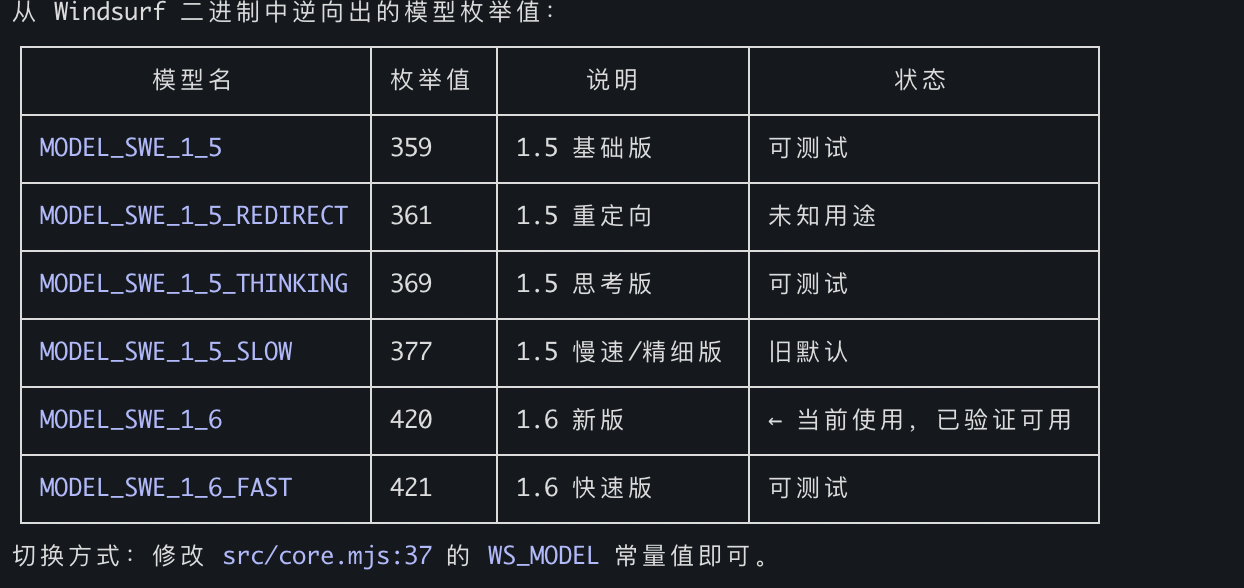
Por defecto: MODEL_SWE_1_6_FAST — máxima velocidad, las palabras clave grep más ricas y la granularidad de ubicación más fina.
Herramientas MCP
fast_context_search
Búsqueda semántica de código impulsada por IA con parámetros ajustables.
Parámetro | Tipo | Obligatorio | Por defecto | Descripción |
| string | Sí | — | Consulta de búsqueda en lenguaje natural |
| string | No | cwd | Ruta absoluta a la raíz del proyecto |
| integer | No |
| Profundidad del árbol de directorios para el mapa del repositorio (1-6). Cuanto mayor, más contexto pero mayor carga útil. Si el árbol supera los 250KB, se reduce automáticamente a una profundidad menor. Usa 1-2 para monorepos enormes (>5000 archivos), 3 para la mayoría de proyectos, 4-6 para proyectos pequeños. |
| integer | No |
| Rondas de búsqueda (1-5). Cuantas más, más profunda pero más lenta será la búsqueda. Usa 1-2 para búsquedas simples, 3 para la mayoría de consultas, 4-5 para análisis complejos. |
| integer | No |
| Número máximo de archivos a devolver (1-30). Cuanto menor, más centrado; cuanto mayor, exploración más amplia. |
| string[] | No |
| Patrones de directorio/archivo excluidos del mapa del repositorio y del contexto de búsqueda. |
Devuelve:
Archivos relevantes con rangos de líneas
Palabras clave de búsqueda sugeridas (patrones rg utilizados durante la búsqueda con IA)
Metadatos de diagnóstico (línea
[config]que muestra el tree_depth real utilizado, el tamaño del árbol y si se produjo la reducción)
Ejemplo de salida:
Found 3 relevant files.
[1/3] /project/src/auth/handler.py (L10-60, L120-180)
[2/3] /project/src/middleware/jwt.py (L1-40)
[3/3] /project/src/models/user.py (L20-80)
grep keywords: authenticate, jwt.*verify, session.*token
[config] tree_depth=3, tree_size=12.5KB, max_turns=3La salida de error incluye pistas específicas según el estado:
Error: Request failed: HTTP 403
[hint] 403 Forbidden: Authentication failed. The API key may be expired or revoked.
Try re-extracting with extract_windsurf_key, or set a fresh WINDSURF_API_KEY env var.
If you are running inside WSL, run `devin login` inside WSL so `~/.local/share/devin/credentials.toml` exists.Error: Request failed: HTTP 413
[diagnostic] tree_depth_used=3, tree_size=280.0KB (auto fell back from requested depth)
[hint] If the error is payload-related, try a lower tree_depth value.extract_windsurf_key
Extrae la clave de API de Windsurf de la instalación local. Sin parámetros.
Establece FC_HIDE_EXTRACT_WINDSURF_KEY_TOOL=1 al iniciar el servidor MCP para ocultar esta herramienta de tools/list. Esto no desactiva el descubrimiento automático interno de la clave de API para fast_context_search.
Estructura del proyecto
fast-context-mcp/
├── package.json
├── src/
│ ├── server.mjs # MCP server entry point
│ ├── core.mjs # Auth, message building, streaming, search loop
│ ├── executor.mjs # Tool executor: rg, readfile, tree, ls, glob
│ ├── extract-key.mjs # Windsurf API Key extraction (SQLite)
│ ├── path-safety.mjs # Project-root confinement for model-selected paths
│ ├── response-repair.mjs # Malformed response repair and evidence salvage
│ ├── shared.mjs # Repository map, answer parser, prompt builder
│ ├── cache.mjs # In-memory search-result cache
│ └── protobuf.mjs # Protobuf encoder/decoder + Connect-RPC frames
├── test/ # Unit and MCP stdio integration tests
├── README.md
└── LICENSECómo funciona la búsqueda
El directorio del proyecto se asigna a la ruta virtual
/codebaseSe genera el árbol de directorios con la profundidad solicitada (por defecto L=3), con reducción automática a una profundidad menor si el árbol supera los 250KB
La consulta y el árbol de directorios se envían al modelo Devstral de Windsurf mediante Connect-RPC/Protobuf
Devstral genera comandos de herramientas (ripgrep, lectura de archivos, tree, ls, glob)
Los comandos se ejecutan localmente en paralelo (hasta
FC_MAX_COMMANDSpor ronda)Los resultados se envían de vuelta a Devstral para la siguiente ronda
Después de
max_turnsrondas, Devstral devuelve rutas de archivo y rangos de líneasTodos los patrones rg utilizados durante la búsqueda se recopilan como palabras clave sugeridas
Se añaden metadatos de diagnóstico para ayudar a la IA llamante a ajustar parámetros
Detalles técnicos
Protocolo: Connect-RPC sobre HTTP/1.1, codificación Protobuf, compresión gzip
Modelo: Devstral (
MODEL_SWE_1_6_FAST, configurable)Herramientas locales:
rg(incluido a través de @vscode/ripgrep),readfile(fs de Node.js),tree(tree-node-cli),ls(fs de Node.js),glob(fs de Node.js)Autenticación: clave de API → JWT (se obtiene automáticamente por sesión)
Entorno de ejecución: Node.js >= 18 (ESM)
Dependencias
Paquete | Propósito |
| Framework de servidor MCP |
| Binario de ripgrep incluido (multiplataforma) |
| Árbol de directorios multiplataforma (reemplaza al |
| Lee la base de datos SQLite local de Devin/Windsurf sin un paso de compilación nativa |
| Validación de esquemas; evita el tarball incompleto |
Enlaces amigos
Licencia
MIT
Available Tools
2 toolsextract_windsurf_keyA
Extract Windsurf API Key from local installation. Auto-detects OS (macOS/Windows/Linux) and reads the API key from Windsurf's local database. Set the result as WINDSURF_API_KEY env var.
| Name | Required | Description | Default |
|---|---|---|---|
No parameters | |||
TDQS
Does the description disclose side effects, auth requirements, rate limits, or destructive behavior?
No annotations are provided, so the description carries the burden. It discloses OS auto-detection, reading from the local database, and setting the result as an env var. It does not mention error cases or prerequisites, but it is transparent about its main side effect.
Agents need to know what a tool does to the world before calling it. Descriptions should go beyond structured annotations to explain consequences.
Is the description appropriately sized, front-loaded, and free of redundancy?
The description is two sentences, front-loaded with the primary action, and every sentence adds value without redundancy.
Shorter descriptions cost fewer tokens and are easier for agents to parse. Every sentence should earn its place.
Given the tool's complexity, does the description cover enough for an agent to succeed on first attempt?
For a zero-parameter tool with no output schema, the description covers the core function and side effect. It lacks mention of failure cases or requirements, but is otherwise complete for its simplicity.
Complex tools with many parameters or behaviors need more documentation. Simple tools need less. This dimension scales expectations accordingly.
Does the description clarify parameter syntax, constraints, interactions, or defaults beyond what the schema provides?
The tool has zero parameters and 100% schema coverage (empty), so the baseline is 4. No additional parameter explanation is needed.
Input schemas describe structure but not intent. Descriptions should explain non-obvious parameter relationships and valid value ranges.
Does the description clearly state what the tool does and how it differs from similar tools?
The description clearly states 'Extract Windsurf API Key from local installation', a specific verb+resource with source. It distinguishes itself from the unrelated sibling fast_context_search.
Agents choose between tools based on descriptions. A clear purpose with a specific verb and resource helps agents select the right tool.
Does the description explain when to use this tool, when not to, or what alternatives exist?
The description provides clear context for when to use the tool (to get the API key and set it as an env var), and the sibling tool is unrelated, so no exclusions are needed. It does not explicitly list alternatives, but usage is apparent.
Agents often have multiple tools that could apply. Explicit usage guidance like "use X instead of Y when Z" prevents misuse.
fast_context_searchA
AI-driven semantic code search using Windsurf's Devstral model. Searches a codebase with natural language and returns relevant file paths with line ranges, plus suggested grep keywords for follow-up searches. Parameter tuning guide:
tree_depth: Controls how much directory structure the remote AI sees before searching. If you get a payload/size error, REDUCE this value. If search results are too shallow (missing files in deep subdirectories), INCREASE this value.
max_turns: Controls how many search-execute-feedback rounds the remote AI gets. If results are incomplete or the AI didn't find enough files, INCREASE this value. If you want a quick rough answer, use 1. Response includes a [config] line showing actual parameters used — use this to decide adjustments on retry.
| Name | Required | Description | Default |
|---|---|---|---|
| query | Yes | Natural language search query (e.g. "where is auth handled", "database connection pool") | |
| project_path | No | Absolute path to project root. Empty = current working directory. | |
| tree_depth | No | Directory tree depth for the initial repo map sent to the remote AI. Default 3. Use 1-2 for huge monorepos (>5000 files) or if you get payload size errors. Use 4-6 for small projects (<200 files) where you want the AI to see deeper structure. Auto falls back to a lower depth if tree output exceeds 250KB. | |
| max_turns | No | Number of search rounds. Each round: remote AI generates search commands → local execution → results sent back. Default 3. Use 1 for quick simple lookups. Use 4-5 for complex queries requiring deep tracing across many files. More rounds = better results but slower and uses more API quota. | |
| max_results | No | Maximum number of files to return. Default 10. Use a smaller value (3-5) for focused queries. Use a larger value (15-30) for broad exploration queries. | |
| exclude_paths | No | Directory/file patterns to exclude from tree and search context. Useful for reducing payload size on large repos. Examples: ['node_modules', 'dist', '.git', 'build', 'coverage', '*.min.*'] |
TDQS
Does the description disclose side effects, auth requirements, rate limits, or destructive behavior?
With no annotations provided, the description fully explains the search process: rounds of search-execute-feedback, auto fallback for tree depth if payload exceeds 250KB, and mentions API quota usage for more rounds. This provides comprehensive behavioral insight.
Agents need to know what a tool does to the world before calling it. Descriptions should go beyond structured annotations to explain consequences.
Is the description appropriately sized, front-loaded, and free of redundancy?
The description is well-structured with a main overview and a parameter tuning guide. It is concise overall but the tuning guide could be slightly more compact. Still, it is clear and front-loaded with key purpose.
Shorter descriptions cost fewer tokens and are easier for agents to parse. Every sentence should earn its place.
Given the tool's complexity, does the description cover enough for an agent to succeed on first attempt?
Given 6 parameters, 100% schema coverage, no output schema, and only one sibling, the description covers purpose, behavior, tuning, and response content (including [config] line). It provides sufficient context for an agent to use the tool effectively.
Complex tools with many parameters or behaviors need more documentation. Simple tools need less. This dimension scales expectations accordingly.
Does the description clarify parameter syntax, constraints, interactions, or defaults beyond what the schema provides?
Schema description coverage is 100%, so baseline is 3. The description adds valuable tuning context for tree_depth and max_turns beyond the schema, explaining payload/size errors and result completeness. For other parameters, the schema already suffices. Thus, a 4 is warranted.
Input schemas describe structure but not intent. Descriptions should explain non-obvious parameter relationships and valid value ranges.
Does the description clearly state what the tool does and how it differs from similar tools?
The description clearly states the tool performs AI-driven semantic code search, returns file paths with line ranges and grep keywords. It distinguishes itself from the only sibling, extract_windsurf_key, which extracts a key.
Agents choose between tools based on descriptions. A clear purpose with a specific verb and resource helps agents select the right tool.
Does the description explain when to use this tool, when not to, or what alternatives exist?
The description includes a parameter tuning guide that explains when to adjust tree_depth and max_turns based on errors or shallow results. It also advises using the [config] line in responses for retry decisions. However, it does not explicitly state when not to use this tool, but given only one dissimilar sibling, this is acceptable.
Agents often have multiple tools that could apply. Explicit usage guidance like "use X instead of Y when Z" prevents misuse.
Tool Schema Changelog
Recent tool additions, removals, and schema changes observed during successful MCP inspections.
1 tool update
v1.2.1- Changed
fast_context_search4 fields changed- added
Input schema / properties / exclude_pathsAdded value: +{ + "default": [], + "description": "Directory/file patterns to exclude from tree and search context. Useful for reducing payload size on large repos. Examples: ['node_modules', 'dist', '.git', 'build', 'coverage', '*.min.*']", + "items": { + "type": "string" + }, + "type": "array" +} - added
Input schema / properties / max_resultsAdded value: +{ + "default": 10, + "description": "Maximum number of files to return. Default 10. Use a smaller value (3-5) for focused queries. Use a larger value (15-30) for broad exploration queries.", + "maximum": 30, + "minimum": 1, + "type": "integer" +} - added
Input schema / properties / max_turnsAdded value: +{ + "default": 3, + "description": "Number of search rounds. Each round: remote AI generates search commands → local execution → results sent back. Default 3. Use 1 for quick simple lookups. Use 4-5 for complex queries requiring deep tracing across many files. More rounds = better results but slower and uses more API quota.", + "maximum": 5, + "minimum": 1, + "type": "integer" +} - added
Input schema / properties / tree_depthAdded value: +{ + "default": 3, + "description": "Directory tree depth for the initial repo map sent to the remote AI. Default 3. Use 1-2 for huge monorepos (>5000 files) or if you get payload size errors. Use 4-6 for small projects (<200 files) where you want the AI to see deeper structure. Auto falls back to a lower depth if tree output exceeds 250KB.", + "maximum": 6, + "minimum": 1, + "type": "integer" +}
2 tool updates
v1.0.0- First observed
extract_windsurf_key - First observed
fast_context_search
TDQS
Scored across 2 tools
The two tools have completely distinct purposes: one extracts an API key from a local installation, the other performs semantic code search. No overlap or ambiguity exists.
Both tools use snake_case and follow a descriptive pattern (extract_* and fast_*). Although the verb style differs slightly (command vs. brand adjective), the naming is clear and consistent in format.
With only two tools, the server feels minimal. While the tools are focused, the count is on the low end of what is typically expected, making it borderline appropriate.
The server covers API key extraction and semantic search, but lacks related operations like API key management, file content retrieval, or result navigation. Significant gaps exist for a context-focused server.
Maintenance
Related MCP Connectors
Search your AI chat history (ChatGPT, Claude, Codex) from any MCP client. Remote, private, read-only
An MCP server that gives your AI access to the source code and docs of all public github repos
Driflyte MCP server which lets AI assistants query topic-specific knowledge from web and GitHub.
Related MCP Servers
- AlicenseAqualityDmaintenanceEnables AI-driven semantic code search using Windsurf's reverse-engineered SWE-grep protocol to query local codebases with natural language. It executes local search tools like ripgrep and tree-node-cli to return relevant file paths and line ranges to MCP-compatible clients.2134 npmMIT
- FlicenseNot gradedqualityCmaintenanceA semantic code search MCP server that enables natural language queries against your codebase, supporting features like related file discovery and context expansion, all running locally.2-
- AlicenseAqualityDmaintenanceLocal-first MCP server for semantic + keyword hybrid code search. Zero external services, no API keys required.2MIT
- AlicenseAqualityCmaintenanceSemantic code search MCP server that reduces token usage by ~95% by returning top relevant code chunks instead of full files.89MIT