

A
licenseB
qualityD
maintenanceA simple template for creating custom tools for Cursor IDE using Model Context Protocol, deployable via Heroku, Docker, or directly within Cursor IDE.
2
5
MIT

一个使用模型上下文协议 (MCP) 为 Cursor IDE 创建自定义工具的简单模板。您可以使用此模板创建自己的代码库,修改工具并将其连接到您的 Cursor IDE。
点击“部署到 Heroku”按钮

部署完成后,配置Cursor:
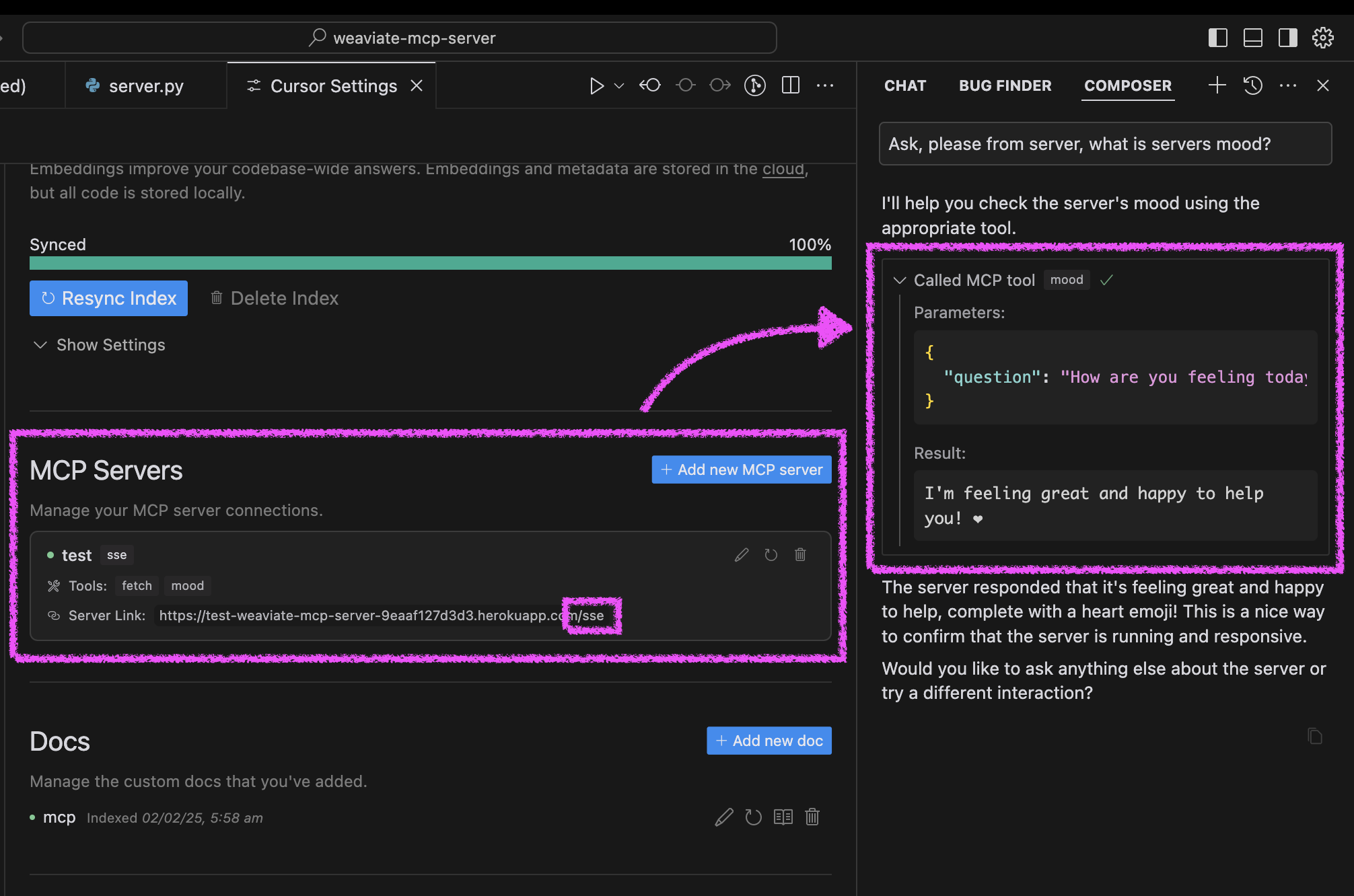
打开游标设置 → 功能
添加新的 MCP 服务器
使用带有/sse路径的 Heroku URL(例如https://<your-app-name>.herokuapp.com/sse )
在 Cursor 中测试您的代理的心情:
询问您的代理“请询问我们的服务器状况并让我知道情况如何。”
服务器将回复一条欢快的消息和一颗心❤️
Related MCP server: MCP Server Template for Cursor IDE
您可以通过三种方式运行服务器:使用 Docker、传统 Python 设置或直接在 Cursor IDE 中运行。
该项目包括 Docker 支持,可轻松部署:
初始设置:
# Clone the repository
git clone https://github.com/kirill-markin/weaviate-mcp-server.git
cd weaviate-mcp-server

# Create environment file
cp .env.example .env
使用 Docker Compose 构建并运行:
# Build and start the server
docker compose up --build -d

# View logs
docker compose logs -f

# Check server status
docker compose ps

# Stop the server
docker compose down
该服务器将在以下位置可用:
SSE 端点: http://localhost:8000/sse
快速测试:
# Test the server endpoint
curl -i http://localhost:8000/sse
连接到 Cursor IDE:
打开游标设置 → 功能
添加新的 MCP 服务器
类型:选择“sse”
网址:输入http://localhost:8000/sse
首先,安装 uv 包管理器:
# Install uv on macOS
brew install uv
# Or install via pip (any OS)
pip install uv
使用 stdio(默认)或 SSE 传输启动服务器:
# Install the package with development dependencies
uv pip install -e ".[dev]"

# Using stdio transport (default)
uv run mcp-simple-tool

# Using SSE transport on custom port
uv run mcp-simple-tool --transport sse --port 8000

# Run tests
uv run pytest -v
安装完成后,您可以将服务器直接连接到Cursor IDE:
在 Cursor 中右键单击cursor-run-mcp-server.sh文件
选择“复制路径”复制绝对路径
打开光标设置(齿轮图标)
导航至“功能”选项卡
向下滚动到“MCP 服务器”
点击“添加新的 MCP 服务器”
填写表格:
名称:选择任意名称(例如“my-mcp-server-1”)
类型:选择“stdio”(而不是“sse”,因为我们在本地运行服务器)
命令:粘贴您之前复制的cursor-run-mcp-server.sh的绝对路径。例如: /Users/kirillmarkin/weaviate-mcp-server/cursor-run-mcp-server.sh
可用的环境变量(可以在.env中设置):
MCP_SERVER_PORT (默认值:8000)- 运行服务器的端口
MCP_SERVER_HOST (默认值:0.0.0.0)- 绑定服务器的主机
DEBUG (默认值:false)-启用调试模式
MCP_USER_AGENT - 用于网站抓取的自定义用户代理
要通过Smithery自动安装用于 Claude Desktop 的 Cursor IDE 的 MCP 服务器模板:
npx -y @smithery/cli install @kirill-markin/example-mcp-server --client claudeRecent tool additions, removals, and schema changes observed during successful MCP inspections.
Loading tool schema changelog…
Scored across 2 tools
The two tools have completely distinct purposes: one fetches website content, while the other returns a static mood response. There is no overlap or ambiguity between them, making it easy for an agent to select the correct tool for each task.
The tools use different naming conventions: 'mcp_fetch' follows a prefix_verb pattern, while 'mood' is a simple noun. This mixed style lacks a predictable pattern, though both names are readable and descriptive of their functions.
With only two tools, the server feels thin and under-scoped for a template intended for Cursor IDE, which typically involves more complex operations. This minimal set may not adequately cover common IDE-related tasks, suggesting a mismatch in scope.
Inferred as a template for IDE integration, the tool surface is severely incomplete. It lacks core functionalities like file manipulation, code analysis, or project management, leaving significant gaps that would hinder agent workflows in an IDE context.
Build your own tools from chat: design, test and host them on a shareable MCP server URL.
A comprehensive Model Context Protocol (MCP) server that enables AI assistants to interact with yo…
Kliv is an AI web-app builder. It hosts each app with its own database, edge functions, commerce and email. Connect Claude Code or Cursor to Kliv's MCP server, sign in with your Kliv account, and your AI tool can work on your apps with the same tools the Kliv builder uses. It can edit an app's files, change the database, write and run edge functions, set up products and subscriptions, and run your tests. Then it can build and publish the app. Other MCP clients connect the same way. Your AI tool runs on your own AI subscription, so this work doesn't use your Kliv usage. Kliv still hosts the app and everything behind it. Each person signs in as themselves and reaches only the apps they can edit. The account owner sees every connected tool and can remove one at any time. The address is https://mcp.kliv.dev/mcp for everyone. Sign-in is OAuth in your browser, with your Kliv account. There are no API keys. Setup guide: https://docs.kliv.dev/integrations/mcp
Build and publish Overskill apps from Cursor, Claude, ChatGPT, or any MCP client.