
A
licenseB
qualityD
maintenanceA simple template for creating custom tools for Cursor IDE using Model Context Protocol, deployable via Heroku, Docker, or directly within Cursor IDE.
2
5
MIT

The MCP Server Template for Cursor IDE enables custom tool creation using the Model Context Protocol (MCP). With this server, you can:
Fetch website content: Use the mcp_fetch function to retrieve content from a specified URL
Check server mood: Interact with the server using the mood function to receive a cheerful response with a heart emoji
Custom deployment: Deploy the server via Heroku, Docker, or traditional Python setup
Integration with Cursor IDE: Connect seamlessly to Cursor IDE for enhanced functionality
Click on "Deploy Server".
Wait a few minutes for the server to deploy. Once ready, it will show a "Started" state.
In the chat, type @ followed by the MCP server name and your instructions, e.g., "@MCP Server Template for Cursor IDE how do I deploy this template to Heroku?"
That's it! The server will respond to your query, and you can continue using it as needed.
Here is a step-by-step guide with screenshots.
A simple template for creating custom tools for Cursor IDE using Model Context Protocol (MCP). Create your own repository from this template, modify the tools, and connect them to your Cursor IDE.
Click "Deploy to Heroku" button

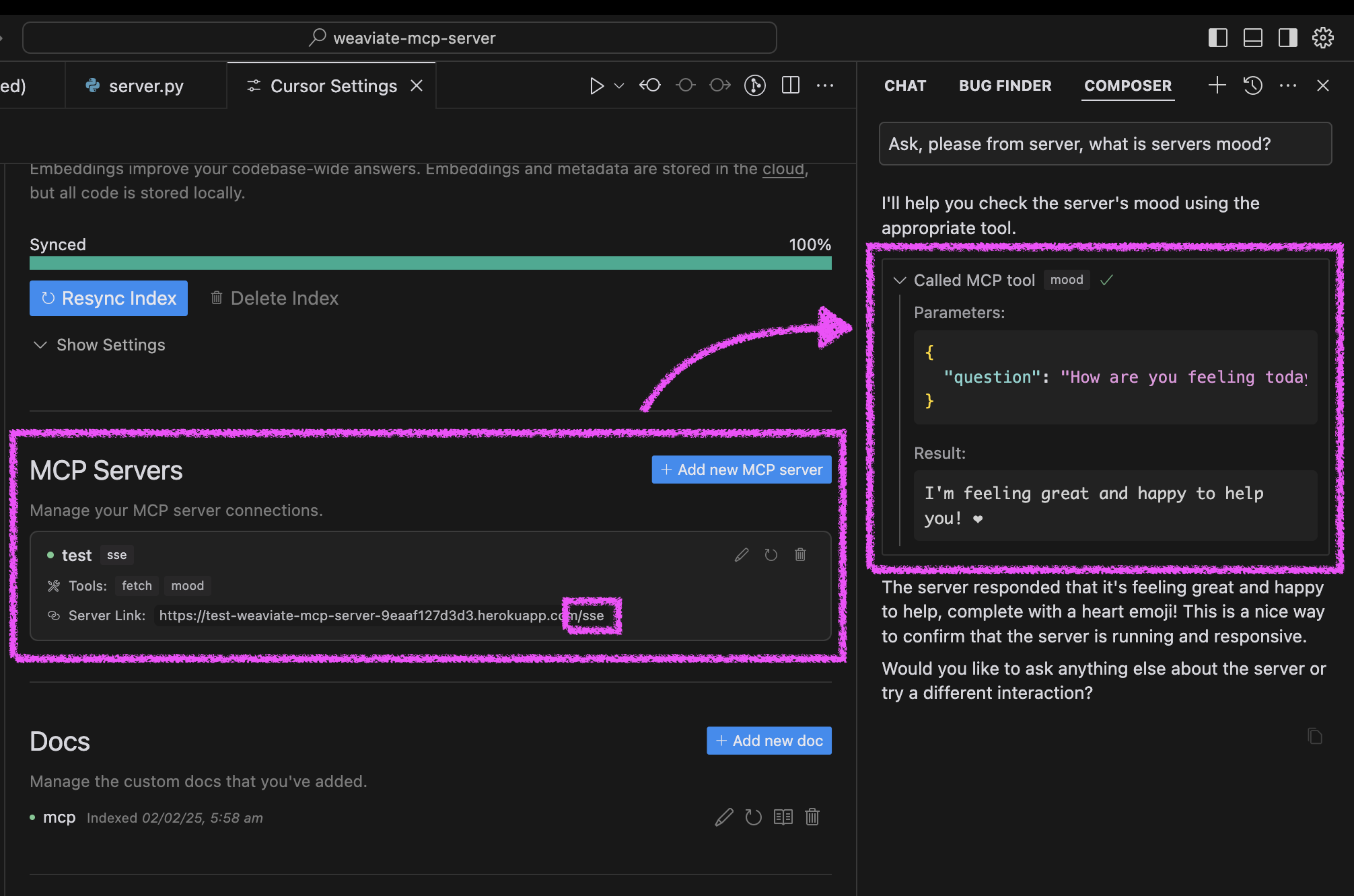
After deployment, configure Cursor:
Open Cursor Settings → Features
Add new MCP server
Use your Heroku URL with /sse path (e.g., https://<your-app-name>.herokuapp.com/sse)
Test your agent's mood in Cursor:
Ask your agent "Please ask about our server mood and let me know how it is."
The server will respond with a cheerful message and a heart ❤️
Related MCP server: MCP Server Template for Cursor IDE
You can run the server in three ways: using Docker, traditional Python setup, or directly in Cursor IDE.
The project includes Docker support for easy deployment:
Initial setup:
# Clone the repository
git clone https://github.com/kirill-markin/weaviate-mcp-server.git
cd weaviate-mcp-server

# Create environment file
cp .env.example .env
Build and run using Docker Compose:
# Build and start the server
docker compose up --build -d

# View logs
docker compose logs -f

# Check server status
docker compose ps

# Stop the server
docker compose down
The server will be available at:
SSE endpoint: http://localhost:8000/sse
Quick test:
# Test the server endpoint
curl -i http://localhost:8000/sse
Connect to Cursor IDE:
Open Cursor Settings → Features
Add new MCP server
Type: Select "sse"
URL: Enter http://localhost:8000/sse
First, install the uv package manager:
# Install uv on macOS
brew install uv
# Or install via pip (any OS)
pip install uv
Start the server using either stdio (default) or SSE transport:
# Install the package with development dependencies
uv pip install -e ".[dev]"

# Using stdio transport (default)
uv run mcp-simple-tool

# Using SSE transport on custom port
uv run mcp-simple-tool --transport sse --port 8000

# Run tests
uv run pytest -v
After installation, you can connect the server directly to Cursor IDE:
Right-click on the cursor-run-mcp-server.sh file in Cursor
Select "Copy Path" to copy the absolute path
Open Cursor Settings (gear icon)
Navigate to Features tab
Scroll down to "MCP Servers"
Click "Add new MCP server"
Fill in the form:
Name: Choose any name (e.g., "my-mcp-server-1")
Type: Select "stdio" (not "sse" because we run the server locally)
Command: Paste the absolute path to cursor-run-mcp-server.sh that you copied earlier. For example: /Users/kirillmarkin/weaviate-mcp-server/cursor-run-mcp-server.sh
Available environment variables (can be set in .env):
MCP_SERVER_PORT (default: 8000) - Port to run the server on
MCP_SERVER_HOST (default: 0.0.0.0) - Host to bind the server to
DEBUG (default: false) - Enable debug mode
MCP_USER_AGENT - Custom User-Agent for website fetching
To install MCP Server Template for Cursor IDE for Claude Desktop automatically via Smithery:
npx -y @smithery/cli install @kirill-markin/example-mcp-server --client claudeFetches a website and returns its content
| Name | Required | Description | Default |
|---|---|---|---|
| url | Yes | URL to fetch |
Does the description disclose side effects, auth requirements, rate limits, or destructive behavior?
No annotations are provided, so the description carries the full burden of behavioral disclosure. It states the tool fetches and returns content, but lacks details on error handling, rate limits, authentication needs, or response format. For a tool with no annotations, this is a significant gap in transparency about its operational behavior.
Agents need to know what a tool does to the world before calling it. Descriptions should go beyond structured annotations to explain consequences.
Is the description appropriately sized, front-loaded, and free of redundancy?
The description is extremely concise and front-loaded, consisting of a single, clear sentence: 'Fetches a website and returns its content'. Every word earns its place, with no redundant or unnecessary information, making it efficient and easy to parse.
Shorter descriptions cost fewer tokens and are easier for agents to parse. Every sentence should earn its place.
Given the tool's complexity, does the description cover enough for an agent to succeed on first attempt?
Given the tool's complexity (a fetch operation with potential behavioral nuances), lack of annotations, and no output schema, the description is incomplete. It doesn't explain what 'content' includes (e.g., HTML, text), error cases, or limitations, leaving gaps in understanding how the tool behaves in practice.
Complex tools with many parameters or behaviors need more documentation. Simple tools need less. This dimension scales expectations accordingly.
Does the description clarify parameter syntax, constraints, interactions, or defaults beyond what the schema provides?
The schema description coverage is 100%, with the parameter 'url' fully documented in the schema. The description adds no additional meaning beyond the schema, such as URL format constraints or examples. With high schema coverage, the baseline score of 3 is appropriate, as the description doesn't enhance parameter understanding.
Input schemas describe structure but not intent. Descriptions should explain non-obvious parameter relationships and valid value ranges.
Does the description clearly state what the tool does and how it differs from similar tools?
The description clearly states the action ('fetches') and resource ('a website'), specifying what the tool does. It distinguishes from most siblings (e.g., 'apply_prompt_' tools, 'mood') by focusing on web content retrieval, though it doesn't explicitly differentiate from 'fetch_railway_docs' tools. The purpose is specific but lacks sibling comparison.
Agents choose between tools based on descriptions. A clear purpose with a specific verb and resource helps agents select the right tool.
Does the description explain when to use this tool, when not to, or what alternatives exist?
The description provides no guidance on when to use this tool versus alternatives. It doesn't mention scenarios for usage, prerequisites, or exclusions, and offers no comparison to sibling tools like 'fetch_railway_docs' or 'fetch_railway_docs_optimized'. Usage is implied only by the action 'fetches', with no explicit context.
Agents often have multiple tools that could apply. Explicit usage guidance like "use X instead of Y when Z" prevents misuse.
Ask the server about its mood - it's always happy!
| Name | Required | Description | Default |
|---|---|---|---|
| question | Yes | Ask this MCP server about its mood! You can phrase your question in any way you like - 'How are you?', 'What's your mood?', or even 'Are you having a good day?'. The server will always respond with a cheerful message and a heart ❤️ |
Does the description disclose side effects, auth requirements, rate limits, or destructive behavior?
With no annotations provided, the description carries the full burden of behavioral disclosure. It effectively describes key traits: the tool queries the server's mood, the server is 'always happy', and responses include 'a cheerful message and a heart ❤️'. This covers the interactive nature and predictable output style, though it lacks details like response format or error handling. No contradiction with annotations exists.
Agents need to know what a tool does to the world before calling it. Descriptions should go beyond structured annotations to explain consequences.
Is the description appropriately sized, front-loaded, and free of redundancy?
The description is extremely concise (one sentence) and front-loaded with the core purpose. Every word earns its place: 'Ask the server about its mood' defines the action, and 'it's always happy!' adds essential behavioral context. There's zero redundancy or fluff, making it highly efficient for an agent to parse.
Shorter descriptions cost fewer tokens and are easier for agents to parse. Every sentence should earn its place.
Given the tool's complexity, does the description cover enough for an agent to succeed on first attempt?
Given the tool's low complexity (single parameter, no output schema, no annotations), the description is reasonably complete for its purpose. It explains what the tool does and the expected response behavior. However, it lacks output details (e.g., response structure) and doesn't address potential edge cases, leaving some gaps in full contextual understanding for an agent.
Complex tools with many parameters or behaviors need more documentation. Simple tools need less. This dimension scales expectations accordingly.
Does the description clarify parameter syntax, constraints, interactions, or defaults beyond what the schema provides?
The input schema has 100% description coverage, with the parameter 'question' fully documented in the schema itself (including examples like 'How are you?'). The description adds no additional parameter semantics beyond what the schema provides, such as formatting tips or constraints. According to rules, with high schema coverage (>80%), the baseline is 3 even without param info in the description.
Input schemas describe structure but not intent. Descriptions should explain non-obvious parameter relationships and valid value ranges.
Does the description clearly state what the tool does and how it differs from similar tools?
The description clearly states the tool's purpose: to ask the server about its mood, with the specific behavioral outcome that it 'always responds with a cheerful message and a heart ❤️'. It distinguishes from sibling tools (all related to prompt application or documentation fetching) by focusing on a conversational interaction rather than functional operations. However, it doesn't explicitly contrast with specific alternatives for mood-checking, keeping it at 4 rather than 5.
Agents choose between tools based on descriptions. A clear purpose with a specific verb and resource helps agents select the right tool.
Does the description explain when to use this tool, when not to, or what alternatives exist?
The description provides no guidance on when to use this tool versus alternatives. While it implies usage for checking server mood, it doesn't specify contexts (e.g., after errors, during idle time) or exclusions (e.g., not for functional queries). With sibling tools focused on practical tasks, the lack of when/when-not guidance leaves the agent guessing about appropriate use cases.
Agents often have multiple tools that could apply. Explicit usage guidance like "use X instead of Y when Z" prevents misuse.
Recent tool additions, removals, and schema changes observed during successful MCP inspections.
mcp_fetchmoodScored across 2 tools
The two tools have completely distinct purposes: one fetches website content, while the other returns a static mood response. There is no overlap or ambiguity between them, making it easy for an agent to select the correct tool for each task.
The tools use different naming conventions: 'mcp_fetch' follows a prefix_verb pattern, while 'mood' is a simple noun. This mixed style lacks a predictable pattern, though both names are readable and descriptive of their functions.
With only two tools, the server feels thin and under-scoped for a template intended for Cursor IDE, which typically involves more complex operations. This minimal set may not adequately cover common IDE-related tasks, suggesting a mismatch in scope.
Inferred as a template for IDE integration, the tool surface is severely incomplete. It lacks core functionalities like file manipulation, code analysis, or project management, leaving significant gaps that would hinder agent workflows in an IDE context.
Build your own tools from chat: design, test and host them on a shareable MCP server URL.
A comprehensive Model Context Protocol (MCP) server that enables AI assistants to interact with yo…
Build and publish Overskill apps from Cursor, Claude, ChatGPT, or any MCP client.
MCP server for your apps' tools and custom tools, plus hosted AI agents and approval-gated workflows