

A
licenseB
qualityD
maintenanceA simple template for creating custom tools for Cursor IDE using Model Context Protocol, deployable via Heroku, Docker, or directly within Cursor IDE.
2
5
MIT

モデルコンテキストプロトコル(MCP)を使用してCursor IDE用のカスタムツールを作成するためのシンプルなテンプレートです。このテンプレートから独自のリポジトリを作成し、ツールを変更してCursor IDEに接続します。
「Herokuにデプロイ」ボタンをクリックします

デプロイ後、カーソルを構成します。
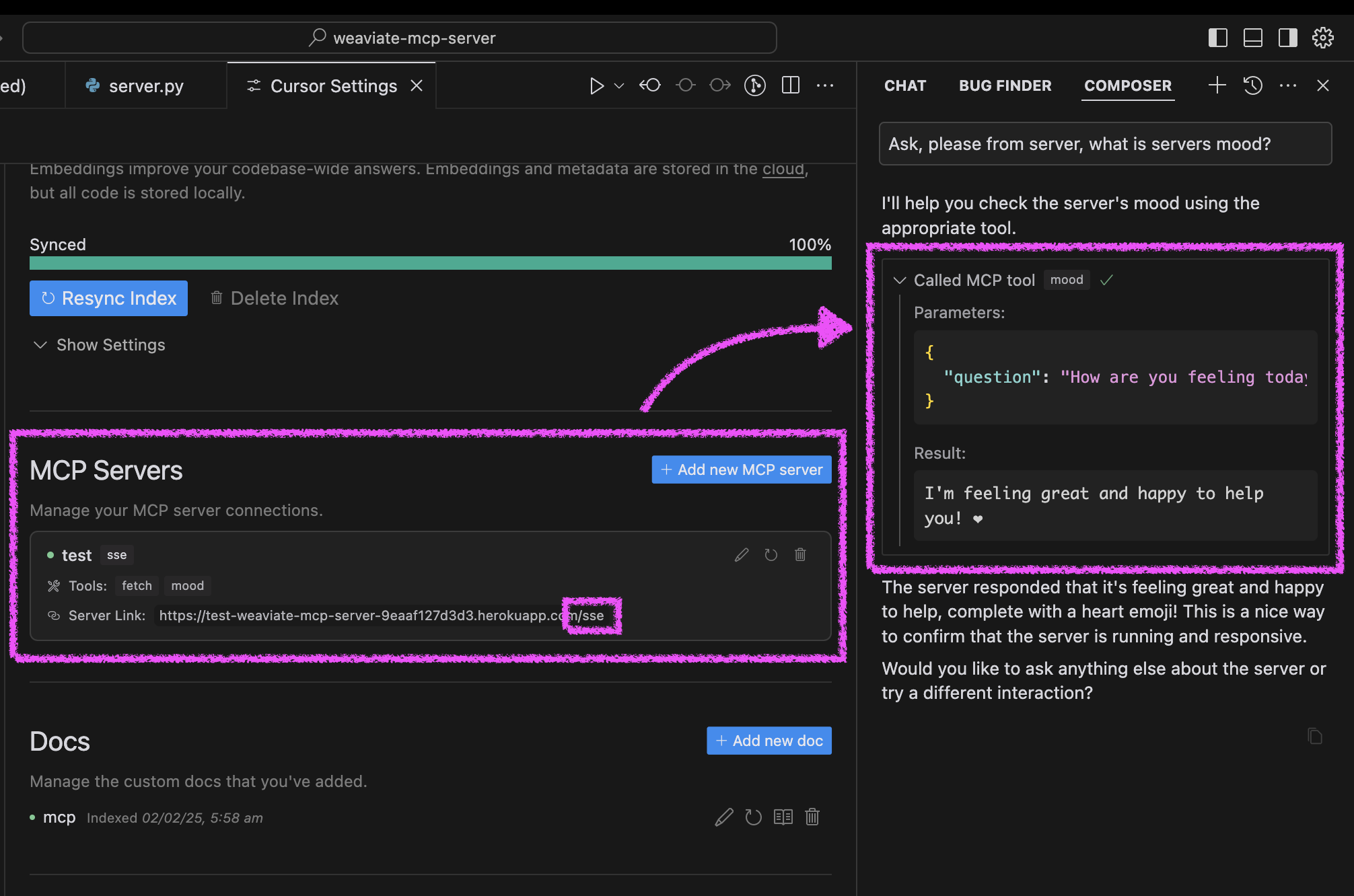
カーソル設定を開く→機能
新しいMCPサーバーを追加する
Heroku URL を/sseパスとともに使用します (例: https://<your-app-name>.herokuapp.com/sse )
カーソルでエージェントの気分をテストします。
エージェントに「サーバーの雰囲気についてお聞きして、どうなっているか教えてください」と依頼してください。
サーバーは明るいメッセージとハートで応答します❤️
Related MCP server: MCP Server Template for Cursor IDE
サーバーは、Docker を使用するか、従来の Python セットアップを使用するか、Cursor IDE で直接実行するかの 3 つの方法で実行できます。
このプロジェクトには、簡単に導入できる Docker サポートが含まれています。
初期設定:
# Clone the repository
git clone https://github.com/kirill-markin/weaviate-mcp-server.git
cd weaviate-mcp-server

# Create environment file
cp .env.example .env
Docker Compose を使用してビルドおよび実行します。
# Build and start the server
docker compose up --build -d

# View logs
docker compose logs -f

# Check server status
docker compose ps

# Stop the server
docker compose down
サーバーは次の場所で利用できます:
SSEエンドポイント: http://localhost:8000/sse
クイックテスト:
# Test the server endpoint
curl -i http://localhost:8000/sse
カーソル IDE に接続します。
カーソル設定を開く→機能
新しいMCPサーバーを追加する
タイプ: 「sse」を選択
URL: http://localhost:8000/sseと入力します
まず、uv パッケージ マネージャーをインストールします。
# Install uv on macOS
brew install uv
# Or install via pip (any OS)
pip install uv
stdio (デフォルト) または SSE トランスポートのいずれかを使用してサーバーを起動します。
# Install the package with development dependencies
uv pip install -e ".[dev]"

# Using stdio transport (default)
uv run mcp-simple-tool

# Using SSE transport on custom port
uv run mcp-simple-tool --transport sse --port 8000

# Run tests
uv run pytest -v
インストール後、サーバーを Cursor IDE に直接接続できます。
カーソル内のcursor-run-mcp-server.shファイルを右クリックします。
「パスをコピー」を選択して絶対パスをコピーします
カーソル設定を開く(歯車アイコン)
機能タブに移動する
「MCPサーバー」までスクロールします。
「新しいMCPサーバーを追加」をクリックします
フォームに記入してください:
名前: 任意の名前を選択します (例: "my-mcp-server-1")
タイプ: 「stdio」を選択します (サーバーをローカルで実行するため、「sse」ではありません)
コマンド: 先ほどコピーしたcursor-run-mcp-server.shへの絶対パスを貼り付けます。例: /Users/kirillmarkin/weaviate-mcp-server/cursor-run-mcp-server.sh
利用可能な環境変数( .envで設定できます):
MCP_SERVER_PORT (デフォルト: 8000) - サーバーを実行するポート
MCP_SERVER_HOST (デフォルト: 0.0.0.0) - サーバーをバインドするホスト
DEBUG (デフォルト: false) - デバッグモードを有効にする
MCP_USER_AGENT - ウェブサイト取得用のカスタム ユーザー エージェント
Smithery経由で Claude Desktop の Cursor IDE 用の MCP サーバー テンプレートを自動的にインストールするには:
npx -y @smithery/cli install @kirill-markin/example-mcp-server --client claudeRecent tool additions, removals, and schema changes observed during successful MCP inspections.
Loading tool schema changelog…
Scored across 2 tools
The two tools have completely distinct purposes: one fetches website content, while the other returns a static mood response. There is no overlap or ambiguity between them, making it easy for an agent to select the correct tool for each task.
The tools use different naming conventions: 'mcp_fetch' follows a prefix_verb pattern, while 'mood' is a simple noun. This mixed style lacks a predictable pattern, though both names are readable and descriptive of their functions.
With only two tools, the server feels thin and under-scoped for a template intended for Cursor IDE, which typically involves more complex operations. This minimal set may not adequately cover common IDE-related tasks, suggesting a mismatch in scope.
Inferred as a template for IDE integration, the tool surface is severely incomplete. It lacks core functionalities like file manipulation, code analysis, or project management, leaving significant gaps that would hinder agent workflows in an IDE context.
Build your own tools from chat: design, test and host them on a shareable MCP server URL.
A comprehensive Model Context Protocol (MCP) server that enables AI assistants to interact with yo…
Kliv is an AI web-app builder. It hosts each app with its own database, edge functions, commerce and email. Connect Claude Code or Cursor to Kliv's MCP server, sign in with your Kliv account, and your AI tool can work on your apps with the same tools the Kliv builder uses. It can edit an app's files, change the database, write and run edge functions, set up products and subscriptions, and run your tests. Then it can build and publish the app. Other MCP clients connect the same way. Your AI tool runs on your own AI subscription, so this work doesn't use your Kliv usage. Kliv still hosts the app and everything behind it. Each person signs in as themselves and reaches only the apps they can edit. The account owner sees every connected tool and can remove one at any time. The address is https://mcp.kliv.dev/mcp for everyone. Sign-in is OAuth in your browser, with your Kliv account. There are no API keys. Setup guide: https://docs.kliv.dev/integrations/mcp
Build and publish Overskill apps from Cursor, Claude, ChatGPT, or any MCP client.