MCTS MCP-Server
Ein Model Context Protocol (MCP)-Server, der eine Advanced Bayesian Monte Carlo Tree Search (MCTS)-Engine für KI-gestützte Analysen und Schlussfolgerungen bereitstellt.
Überblick
Dieser MCP-Server ermöglicht Claude die Nutzung von Monte-Carlo-Tree-Search-Algorithmen (MCTS) für eine tiefgehende, explorative Analyse von Themen, Fragen oder Texteingaben. Der MCTS-Algorithmus nutzt einen Bayes-Ansatz, um systematisch verschiedene Blickwinkel und Interpretationen zu untersuchen und so aufschlussreiche Analysen zu erstellen, die sich über mehrere Iterationen hinweg weiterentwickeln.
Related MCP server: mcp-server-tree-sitter
Merkmale
Bayesian MCTS : Verwendet einen probabilistischen Ansatz, um Exploration und Ausbeutung während der Analyse auszugleichen
Multi-Iterations-Analyse : Unterstützt mehrere Denkiterationen mit mehreren Simulationen pro Iteration
Zustandspersistenz : Merkt sich wichtige Ergebnisse, ungeeignete Ansätze und Vorkenntnisse zwischen den Runden im selben Chat
Ansatz-Taxonomie : Klassifiziert generierte Gedanken in verschiedene philosophische Ansätze und Familien
Thompson-Sampling : Kann Thompson-Sampling oder UCT zur Knotenauswahl verwenden
Überraschungserkennung : Identifiziert überraschende oder neuartige Analyserichtungen
Intent-Klassifizierung : Versteht, wann Benutzer eine neue Analyse starten oder eine vorherige fortsetzen möchten
Verwendung
Der Server stellt Ihrem LLM die vielen unten aufgeführten Tools in einem kopier- und einfügbaren Format für Ihre Systemeingabeaufforderung bereit.
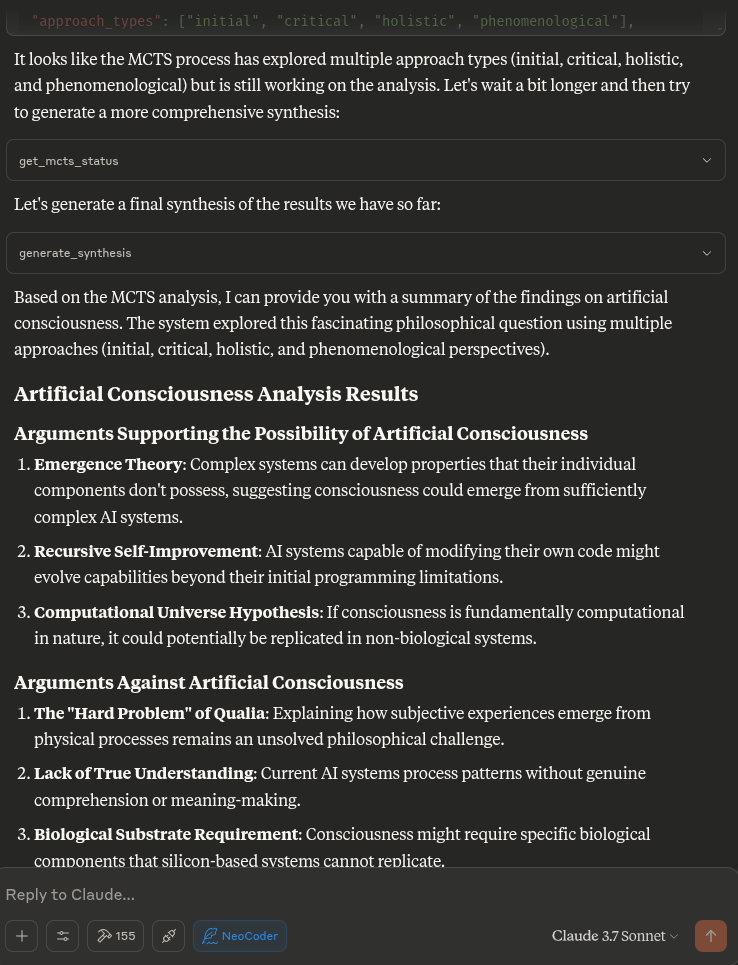
Wenn Sie Claude bitten, eine gründliche Analyse zu einem Thema oder einer Frage durchzuführen, nutzt er diese Tools automatisch, um mithilfe des MCTS-Algorithmus und der Analysetools verschiedene Blickwinkel zu erkunden.
Wie es funktioniert
Der MCTS MCP-Server verwendet einen lokalen Inferenzansatz, anstatt das LLM direkt aufzurufen. Dies ist mit dem MCP-Protokoll kompatibel, das dafür konzipiert ist, dass Tools von einem KI-Assistenten (wie Claude) aufgerufen werden, anstatt dass die Tools das KI-Modell selbst aufrufen.
Wenn Claude den Server auffordert, eine Analyse durchzuführen, führt der Server Folgendes aus:
Initialisiert das MCTS-System mit der Frage
Führt mehrere Iterationen der Exploration mithilfe des MCTS-Algorithmus aus
Generiert deterministische Antworten für verschiedene analytische Aufgaben
Gibt die beste Analyse zurück, die während der Suche gefunden wurde
Installation
Klonen Sie das Repository:
Das Setup verwendet UV (Astral UV), eine schnellere Alternative zu Pip, die eine verbesserte Abhängigkeitsauflösung bietet.
Stellen Sie sicher, dass Sie Python 3.10+ installiert haben
Führen Sie das Setup-Skript aus:
Dies wird:
Installieren Sie UV, falls es noch nicht installiert ist
Erstellen Sie eine virtuelle Umgebung mit UV
Installieren Sie die erforderlichen Pakete mit UV
Erstellen Sie das erforderliche Statusverzeichnis
Alternativ können Sie Folgendes manuell einrichten:
# Install UV if not already installed
curl -fsSL https://astral.sh/uv/install.sh | bash
# Create and activate a virtual environment
uv venv .venv
source .venv/bin/activate
# Install dependencies
uv pip install -r requirements.txt
Claude Desktop Integration
So integrieren Sie es mit Claude Desktop:
Kopieren Sie den Inhalt von claude_desktop_config.json aus diesem Repository
Fügen Sie es Ihrer Claude Desktop-Konfiguration hinzu (normalerweise unter ~/.claude/claude_desktop_config.json )
Wenn die Konfigurationsdatei noch nicht existiert, erstellen Sie sie und fügen Sie den Inhalt aus der claude_desktop_config.json dieses Projekts hinzu
Starten Sie Claude Desktop neu
Beispielkonfiguration:
{
"mcpServers": {
"MCTSServer": {
"command": "uv",
"args": [
"run",
"--directory", "/home/ty/Repositories/ai_workspace/mcts-mcp-server/src/mcts_mcp_server",
"server.py"
],
"env": {
"PYTHONPATH": "/home/ty/Repositories/ai_workspace/mcts-mcp-server"
}
}
}
}
Stellen Sie sicher, dass Sie die Pfade aktualisieren, damit sie mit dem Speicherort des MCTS MCP-Servers auf Ihrem System übereinstimmen.
Vorgeschlagene Systemaufforderung und aktualisierte Tools, einschließlich Ollama-Integration, d. h. platzieren Sie den folgenden Block in Ihren Projektanweisungen:
MCTS server and usage instructions:
MCTS server and usage instructions:
list_ollama_models() # Check what models are available
set_ollama_model("cogito:latest") # Set the model you want to use
initialize_mcts(question="Your question here", chat_id="unique_id") # Initialize analysis
run_mcts(iterations=1, simulations_per_iteration=5) # Run the analysis
After run_mcts is called it can take wuite a long time ie minutes to hours
- so you may discuss any ideas or questions or await user confirmation of the process finishing,
- then proceed to synthesis and analysis tools on resumption of chat.
## MCTS-MCP Tools Overview
### Core MCTS Tools:
- `initialize_mcts`: Start a new MCTS analysis with a specific question
- `run_mcts`: Run the MCTS algorithm for a set number of iterations/simulations
- `generate_synthesis`: Generate a final summary of the MCTS results
- `get_config`: View current MCTS configuration parameters
- `update_config`: Update MCTS configuration parameters
- `get_mcts_status`: Check the current status of the MCTS system
Default configuration prioritizes speed and exploration, but you can customize parameters like exploration_weight, beta_prior_alpha/beta, surprise_threshold.
## Configuration
You can customize the MCTS parameters in the config dictionary or through Claude's `update_config` tool. Key parameters include:
- `max_iterations`: Number of MCTS iterations to run
- `simulations_per_iteration`: Number of simulations per iteration
- `exploration_weight`: Controls exploration vs. exploitation balance (in UCT)
- `early_stopping`: Whether to stop early if a high-quality solution is found
- `use_bayesian_evaluation`: Whether to use Bayesian evaluation for node scores
- `use_thompson_sampling`: Whether to use Thompson sampling for selection
Articulating Specific Pathways:
Delving into the best_path nodes (using mcts_instance.get_best_path_nodes() if you have the instance) and examining the sequence of thought and content
at each step can provide a fascinating micro-narrative of how the core insight evolved.
Visualizing the tree (even a simplified version based on export_tree_summary) could also be illuminating and I will try to set up this feature.
Modifying Parameters: This is a great way to test the robustness of the finding or explore different "cognitive biases" of the system.
Increasing Exploration Weight: Might lead to more diverse, less obviously connected ideas.
Decreasing Exploration Weight: Might lead to deeper refinement of the initial dominant pathways.
Changing Priors (if Bayesian): You could bias the system towards certain approaches (e.g., increase alpha for 'pragmatic') to see how it influences the
outcome.
More Iterations/Simulations: Would allow for potentially deeper convergence or exploration of more niche pathways.
### Ollama Integration Tools:
- `list_ollama_models`: Show all available local Ollama models
- `set_ollama_model`: Select which Ollama model to use for MCTS
- `run_model_comparison`: Run the same MCTS process across multiple models
### Results Collection:
- Automatically stores results in `/home/ty/Repositories/ai_workspace/mcts-mcp-server/results`
- Organizes by model name and run ID
- Stores metrics, progress info, and final outputs
# MCTS Analysis Tools
This extension adds powerful analysis tools to the MCTS-MCP Server, making it easy to extract insights and understand results from your MCTS runs.
The MCTS Analysis Tools provide a suite of integrated functions to:
1. List and browse MCTS runs
2. Extract key concepts, arguments, and conclusions
3. Generate comprehensive reports
4. Compare results across different runs
5. Suggest improvements for better performance
## Available Run Analysis Tools
### Browsing and Basic Information
- `list_mcts_runs(count=10, model=None)`: List recent MCTS runs with key metadata
- `get_mcts_run_details(run_id)`: Get detailed information about a specific run
- `get_mcts_solution(run_id)`: Get the best solution from a run
### Analysis and Insights
- `analyze_mcts_run(run_id)`: Perform a comprehensive analysis of a run
- `get_mcts_insights(run_id, max_insights=5)`: Extract key insights from a run
- `extract_mcts_conclusions(run_id)`: Extract conclusions from a run
- `suggest_mcts_improvements(run_id)`: Get suggestions for improvement
### Reporting and Comparison
- `get_mcts_report(run_id, format='markdown')`: Generate a comprehensive report (formats: 'markdown', 'text', 'html')
- `get_best_mcts_runs(count=5, min_score=7.0)`: Get the best runs based on score
- `compare_mcts_runs(run_ids)`: Compare multiple runs to identify similarities and differences
## Usage Examples
# To list your recent MCTS runs:
list_mcts_runs()
# To get details about a specific run:
get_mcts_run_details('cogito:latest_1745979984')
### Extracting Insights
# To get key insights from a run:
get_mcts_insights(run_id='cogito:latest_1745979984')
### Generating Reports
# To generate a comprehensive markdown report:
get_mcts_report(run_id='cogito:latest_1745979984', format='markdown')
### Improving Results
# To get suggestions for improving a run:
suggest_mcts_improvements(run_id='cogito:latest_1745979984')
### Comparing Runs
To compare multiple runs:
compare_mcts_runs(['cogito:latest_1745979984', 'qwen3:0.6b_1745979584'])
## Understanding the Results
The analysis tools extract several key elements from MCTS runs:
1. **Key Concepts**: The core ideas and frameworks in the analysis
2. **Arguments For/Against**: The primary arguments on both sides of a question
3. **Conclusions**: The synthesized conclusions or insights from the analysis
4. **Tags**: Automatically generated topic tags from the content
## Troubleshooting
If you encounter any issues with the analysis tools:
1. Check that your MCTS run completed successfully (status: "completed")
2. Verify that the run ID you're using exists and is correct
3. Try listing all runs to see what's available: `list_mcts_runs()`
4. Make sure the `.best_solution.txt` file exists in the run's directory
## Advanced Example Usage
### Customizing Reports
You can generate reports in different formats:
# Generate a markdown report
report = get_mcts_report(run_id='cogito:latest_1745979984', format='markdown')
# Generate a text report
report = get_mcts_report(run_id='cogito:latest_1745979984', format='text')
# Generate an HTML report
report = get_mcts_report(run_id='cogito:latest_1745979984', format='html')
### Finding the Best Runs
To find your best-performing runs:
best_runs = get_best_mcts_runs(count=3, min_score=8.0)
This returns the top 3 runs with a score of at least 8.0.
## Simple Usage Instructions
1. **Changing Models**:
list_ollama_models() # See available models
set_ollama_model("qwen3:0.6b") # Set to fast small model
2. **Starting a New Analysis**:
initialize_mcts(question="Your question here", chat_id="unique_identifier")
3. **Running the Analysis**:
run_mcts(iterations=3, simulations_per_iteration=10)
4. **Comparing Performance**:
run_model_comparison(question="Your question", iterations=2)
5. **Getting Results**:
generate_synthesis() # Final summary of results
get_mcts_status() # Current status and metrics
Beispiel-Eingabeaufforderungen
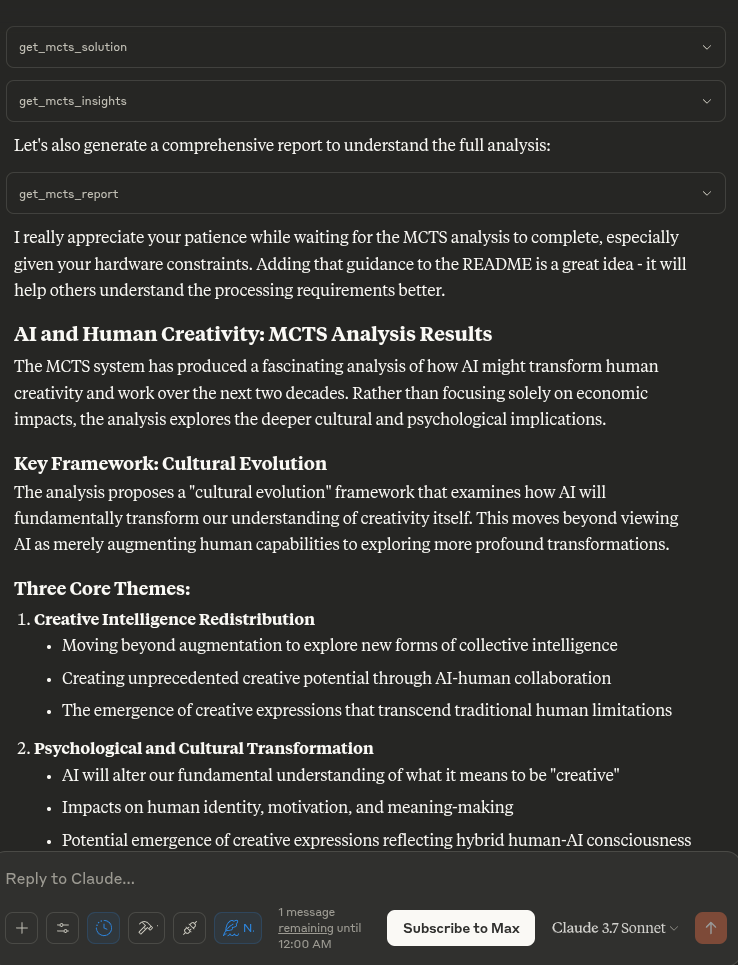
„Analysieren Sie die Auswirkungen künstlicher Intelligenz auf die menschliche Kreativität“
„Die ethischen Dimensionen dieses Themas weiter erforschen“
„Was war die beste Analyse, die Sie beim letzten Durchlauf gefunden haben?“
„Wie funktioniert dieser MCTS-Prozess?“
„Zeigen Sie mir die aktuelle MCTS-Konfiguration“
Für Entwickler
# Activate virtual environment
source .venv/bin/activate
# Run the server directly (for testing)
uv run server.py
# OR use the MCP CLI tools
uv run -m mcp dev server.py
Testen des Servers
So testen Sie, ob der Server ordnungsgemäß funktioniert:
# Activate the virtual environment
source .venv/bin/activate
# Run the test script
python test_server.py
Dadurch wird der LLM-Adapter getestet, um sicherzustellen, dass er ordnungsgemäß funktioniert.
Beitragen
Beiträge zur Verbesserung des MCTS MCP-Servers sind willkommen. Einige Bereiche für mögliche Verbesserungen:
Verbesserung des lokalen Inferenzadapters für anspruchsvollere Analysen
Hinzufügen ausgefeilterer Denkmuster und Bewertungsstrategien
Verbesserung der Baumvisualisierung und Ergebnisberichterstattung
Optimierung der MCTS-Algorithmusparameter
Lizenz: MIT


