Glama

Figma MCP (Model Context Protocol)

A complete solution for creating and modifying Figma designs through Cursor Agent using the Model Context Protocol.

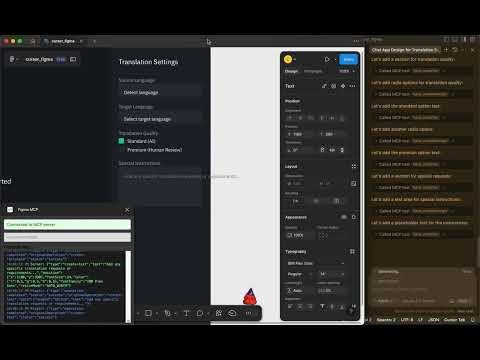
Blog: https://xflux.us/2025/04/06/ai-powered-design-automation-building-a-figma-mcp-with-cursor/ IMAGE ALT TEXT HERE

Overview

This project enables AI-powered design creation in Figma using natural language prompts through Cursor Agent. It consists of two main components:

  1. MCP Server: A Bun + TypeScript server that implements the Model Context Protocol and communicates with the Figma plugin via WebSockets.

  2. Figma Plugin: A plugin that runs in Figma and executes design operations based on instructions from the MCP server.

With this integration, you can use natural language to:

  • Create basic design elements (shapes, text, etc.)

  • Design complete page layouts with multiple sections

  • Modify existing designs

Related MCP server: Figma MCP Server

Repository Structure

  • figma-mcp-server/: The MCP server implementation

  • figma-plugin/: The Figma plugin for executing design operations

Quick Start

1. Set up the MCP Server

cd figma-mcp-server
cp .env.example .env  # Edit this file to add your Figma token
bun install
bun run index.ts

2. Set up the Figma Plugin

cd figma-plugin
npm install
npm run build

Then import the plugin into Figma:

  1. Open Figma

  2. Go to Plugins > Development > Import plugin from manifest

  3. Select the figma-plugin/manifest.json file

3. Connect to Cursor Agent

In Cursor:

  1. Go to Settings > Agent > MCP Servers

  2. Add a new server with URL: http://localhost:3000/api/mcp/schema

Detailed Documentation

For more detailed instructions, see:

Example Usage

Once everything is set up, you can use Cursor Agent to create designs with prompts like:

Create a landing page with a header, hero section with heading "Our Product" and subheading "The best solution for your needs", 3 features in the features section, and a footer with contact information.

How It Works

  1. Cursor Agent receives a natural language prompt

  2. It sends a structured MCP request to the MCP server

  3. The MCP server processes the request and sends instructions to the Figma plugin via WebSocket

  4. The Figma plugin executes the design operations in Figma

License

MIT

Available Tools

5 tools
add_figma_fileC

Add a Figma file to your context

ParametersJSON Schema
NameRequiredDescriptionDefault
urlYesThe URL of the Figma file to add

TDQS

C2.6/5.0
Behavior2/5

Does the description disclose side effects, auth requirements, rate limits, or destructive behavior?

With no annotations, the description carries the full burden but provides minimal behavioral insight. It hints at a mutation ('add'), but doesn't disclose if this requires permissions, affects existing data, or has side effects like rate limits. No output format or error handling is described, leaving key behaviors opaque.

Agents need to know what a tool does to the world before calling it. Descriptions should go beyond structured annotations to explain consequences.

Conciseness4/5

Is the description appropriately sized, front-loaded, and free of redundancy?

The description is a single, efficient sentence with no wasted words. It's front-loaded with the core action, though it could be more specific. The structure is clear, but the brevity contributes to underspecification rather than optimal clarity.

Shorter descriptions cost fewer tokens and are easier for agents to parse. Every sentence should earn its place.

Completeness2/5

Given the tool's complexity, does the description cover enough for an agent to succeed on first attempt?

For a mutation tool with no annotations and no output schema, the description is incomplete. It doesn't explain what 'add to your context' entails, such as whether it returns a file ID or confirmation, or how it integrates with sibling tools. More detail is needed to guide effective use.

Complex tools with many parameters or behaviors need more documentation. Simple tools need less. This dimension scales expectations accordingly.

Parameters3/5

Does the description clarify parameter syntax, constraints, interactions, or defaults beyond what the schema provides?

The schema description coverage is 100%, with the 'url' parameter fully documented in the schema. The description adds no additional meaning beyond implying the URL is for a Figma file, which is already clear from the tool name. Baseline 3 is appropriate as the schema handles parameter documentation adequately.

Input schemas describe structure but not intent. Descriptions should explain non-obvious parameter relationships and valid value ranges.

Purpose3/5

Does the description clearly state what the tool does and how it differs from similar tools?

The description states the action ('add') and resource ('Figma file'), but it's vague about what 'add to your context' means operationally. It doesn't distinguish from sibling tools like 'view_node' or 'post_comment', which might involve similar file interactions. The purpose is understandable but lacks specificity about the outcome.

Agents choose between tools based on descriptions. A clear purpose with a specific verb and resource helps agents select the right tool.

Usage Guidelines2/5

Does the description explain when to use this tool, when not to, or what alternatives exist?

No guidance is provided on when to use this tool versus alternatives. It doesn't mention prerequisites, such as needing a valid Figma URL or authentication, nor does it compare to siblings like 'view_node' for viewing files. The description offers no context for usage decisions.

Agents often have multiple tools that could apply. Explicit usage guidance like "use X instead of Y when Z" prevents misuse.

post_commentC

Post a comment on a node in a Figma file

ParametersJSON Schema
NameRequiredDescriptionDefault
file_keyYesThe key of the Figma file
messageYesThe comment message
node_idNoThe ID of the node to comment on. Node ids have the format `<number>:<number>`
xYesThe x coordinate of the comment pin
yYesThe y coordinate of the comment pin

TDQS

C2.9/5.0
Behavior2/5

Does the description disclose side effects, auth requirements, rate limits, or destructive behavior?

With no annotations provided, the description carries the full burden of behavioral disclosure. It mentions the action ('Post a comment') which implies a write operation, but fails to disclose critical behavioral traits such as authentication requirements, rate limits, whether comments are editable/deletable, or what happens on success/failure. This leaves significant gaps for a mutation tool.

Agents need to know what a tool does to the world before calling it. Descriptions should go beyond structured annotations to explain consequences.

Conciseness5/5

Is the description appropriately sized, front-loaded, and free of redundancy?

The description is a single, efficient sentence that directly states the tool's purpose without any unnecessary words. It's appropriately sized and front-loaded, making it easy to understand at a glance.

Shorter descriptions cost fewer tokens and are easier for agents to parse. Every sentence should earn its place.

Completeness2/5

Given the tool's complexity, does the description cover enough for an agent to succeed on first attempt?

For a mutation tool with no annotations and no output schema, the description is insufficiently complete. It doesn't explain what happens after posting (e.g., success response, error conditions, comment visibility) or address behavioral aspects like permissions. Given the complexity of a write operation, more contextual information is needed.

Complex tools with many parameters or behaviors need more documentation. Simple tools need less. This dimension scales expectations accordingly.

Parameters3/5

Does the description clarify parameter syntax, constraints, interactions, or defaults beyond what the schema provides?

The input schema has 100% description coverage, thoroughly documenting all 5 parameters. The description adds no additional parameter semantics beyond what's already in the schema, so it meets the baseline score of 3 where the schema does the heavy lifting.

Input schemas describe structure but not intent. Descriptions should explain non-obvious parameter relationships and valid value ranges.

Purpose4/5

Does the description clearly state what the tool does and how it differs from similar tools?

The description clearly states the action ('Post a comment') and the target resource ('on a node in a Figma file'), providing a specific verb+resource combination. However, it doesn't differentiate from sibling tools like 'reply_to_comment' or 'read_comments', which would require explicit comparison to achieve a score of 5.

Agents choose between tools based on descriptions. A clear purpose with a specific verb and resource helps agents select the right tool.

Usage Guidelines2/5

Does the description explain when to use this tool, when not to, or what alternatives exist?

The description offers no guidance on when to use this tool versus alternatives like 'reply_to_comment' or 'read_comments', nor does it mention prerequisites such as file access permissions. It simply states what the tool does without contextual usage information.

Agents often have multiple tools that could apply. Explicit usage guidance like "use X instead of Y when Z" prevents misuse.

read_commentsB

Get all comments on a Figma file

ParametersJSON Schema
NameRequiredDescriptionDefault
file_keyYesThe key of the Figma file

TDQS

B3.1/5.0
Behavior2/5

Does the description disclose side effects, auth requirements, rate limits, or destructive behavior?

With no annotations provided, the description carries the full burden of behavioral disclosure. It states the tool retrieves comments but doesn't describe key behaviors: whether it requires authentication, returns paginated results, includes metadata (e.g., timestamps, authors), or handles errors (e.g., invalid file keys). This leaves significant gaps for a read operation.

Agents need to know what a tool does to the world before calling it. Descriptions should go beyond structured annotations to explain consequences.

Conciseness5/5

Is the description appropriately sized, front-loaded, and free of redundancy?

The description is a single, efficient sentence that front-loads the core purpose ('Get all comments on a Figma file') with zero wasted words. It's appropriately sized for a simple tool with one parameter and no complex behaviors to explain.

Shorter descriptions cost fewer tokens and are easier for agents to parse. Every sentence should earn its place.

Completeness3/5

Given the tool's complexity, does the description cover enough for an agent to succeed on first attempt?

Given the tool's low complexity (one parameter, no output schema, no annotations), the description is minimally adequate but incomplete. It covers the basic action and resource but lacks context on usage, behavioral traits, or output details. For a read operation with no structured safety hints, more guidance would improve completeness.

Complex tools with many parameters or behaviors need more documentation. Simple tools need less. This dimension scales expectations accordingly.

Parameters3/5

Does the description clarify parameter syntax, constraints, interactions, or defaults beyond what the schema provides?

The description adds no parameter-specific information beyond what the input schema provides. Since schema description coverage is 100% (the 'file_key' parameter is documented as 'The key of the Figma file'), the baseline score is 3. The description doesn't compensate with additional details like format examples or constraints.

Input schemas describe structure but not intent. Descriptions should explain non-obvious parameter relationships and valid value ranges.

Purpose4/5

Does the description clearly state what the tool does and how it differs from similar tools?

The description clearly states the action ('Get all comments') and the target resource ('on a Figma file'), making the purpose immediately understandable. It doesn't explicitly differentiate from sibling tools like 'post_comment' or 'reply_to_comment', but the verb 'Get' versus 'post'/'reply' provides some implicit distinction. The description avoids tautology by not just restating the tool name.

Agents choose between tools based on descriptions. A clear purpose with a specific verb and resource helps agents select the right tool.

Usage Guidelines2/5

Does the description explain when to use this tool, when not to, or what alternatives exist?

The description provides no guidance on when to use this tool versus alternatives. It doesn't mention prerequisites (e.g., needing a valid file key), exclusions (e.g., not for filtered comments), or direct comparisons to siblings like 'view_node' (which might show nodes without comments). Usage is implied by the action but lacks explicit context.

Agents often have multiple tools that could apply. Explicit usage guidance like "use X instead of Y when Z" prevents misuse.

reply_to_commentC

Reply to an existing comment in a Figma file

ParametersJSON Schema
NameRequiredDescriptionDefault
comment_idYesThe ID of the comment to reply to. Comment ids have the format `<number>`
file_keyYesThe key of the Figma file
messageYesThe reply message

TDQS

C2.9/5.0
Behavior2/5

Does the description disclose side effects, auth requirements, rate limits, or destructive behavior?

With no annotations provided, the description carries full burden for behavioral disclosure. It states the action ('Reply to') but doesn't cover critical aspects like required permissions, whether this is a write operation, potential rate limits, or what happens on success/failure. This leaves significant gaps for a mutation tool.

Agents need to know what a tool does to the world before calling it. Descriptions should go beyond structured annotations to explain consequences.

Conciseness5/5

Is the description appropriately sized, front-loaded, and free of redundancy?

The description is a single, efficient sentence that directly states the tool's purpose without unnecessary words. It's appropriately sized and front-loaded, making it easy to parse quickly.

Shorter descriptions cost fewer tokens and are easier for agents to parse. Every sentence should earn its place.

Completeness2/5

Given the tool's complexity, does the description cover enough for an agent to succeed on first attempt?

For a mutation tool with no annotations and no output schema, the description is incomplete. It doesn't address behavioral traits (e.g., side effects, error conditions) or provide context about the reply's impact (e.g., notifications, threading). The high schema coverage helps, but overall context is lacking.

Complex tools with many parameters or behaviors need more documentation. Simple tools need less. This dimension scales expectations accordingly.

Parameters3/5

Does the description clarify parameter syntax, constraints, interactions, or defaults beyond what the schema provides?

The description adds no parameter-specific information beyond what's already in the schema (which has 100% coverage). It doesn't explain relationships between parameters (e.g., that 'comment_id' must correspond to a comment in the specified 'file_key') or provide usage examples, so it meets the baseline but adds no extra value.

Input schemas describe structure but not intent. Descriptions should explain non-obvious parameter relationships and valid value ranges.

Purpose4/5

Does the description clearly state what the tool does and how it differs from similar tools?

The description clearly states the action ('Reply to') and resource ('an existing comment in a Figma file'), making the purpose immediately understandable. However, it doesn't explicitly differentiate from sibling tools like 'post_comment' (which might create a new comment rather than reply to an existing one), preventing a perfect score.

Agents choose between tools based on descriptions. A clear purpose with a specific verb and resource helps agents select the right tool.

Usage Guidelines2/5

Does the description explain when to use this tool, when not to, or what alternatives exist?

The description provides no guidance on when to use this tool versus alternatives like 'post_comment' or 'read_comments'. It mentions replying to 'an existing comment' but doesn't specify prerequisites (e.g., needing the comment ID) or exclusions, leaving usage context unclear.

Agents often have multiple tools that could apply. Explicit usage guidance like "use X instead of Y when Z" prevents misuse.

view_nodeC

Get a thumbnail for a specific node in a Figma file

ParametersJSON Schema
NameRequiredDescriptionDefault
file_keyYesThe key of the Figma file
node_idYesThe ID of the node to view. Node ids have the format `<number>:<number>`

TDQS

C2.9/5.0
Behavior2/5

Does the description disclose side effects, auth requirements, rate limits, or destructive behavior?

With no annotations provided, the description carries the full burden of behavioral disclosure. It mentions retrieving a thumbnail but doesn't specify aspects like authentication needs, rate limits, error conditions, or the format/quality of the thumbnail. This leaves significant gaps in understanding how the tool behaves in practice.

Agents need to know what a tool does to the world before calling it. Descriptions should go beyond structured annotations to explain consequences.

Conciseness5/5

Is the description appropriately sized, front-loaded, and free of redundancy?

The description is a single, direct sentence that efficiently conveys the core function without any unnecessary words. It is front-loaded and appropriately sized for the tool's complexity, making it easy to parse quickly.

Shorter descriptions cost fewer tokens and are easier for agents to parse. Every sentence should earn its place.

Completeness2/5

Given the tool's complexity, does the description cover enough for an agent to succeed on first attempt?

Given the lack of annotations and output schema, the description is incomplete. It doesn't address behavioral traits, return values, or usage context, which are critical for a tool that likely involves API calls and image retrieval. More information is needed to fully understand its operation.

Complex tools with many parameters or behaviors need more documentation. Simple tools need less. This dimension scales expectations accordingly.

Parameters3/5

Does the description clarify parameter syntax, constraints, interactions, or defaults beyond what the schema provides?

The input schema has 100% description coverage, clearly documenting both parameters ('file_key' and 'node_id') with their types and purposes. The description adds no additional semantic details beyond what the schema provides, so it meets the baseline for adequate but not enhanced parameter understanding.

Input schemas describe structure but not intent. Descriptions should explain non-obvious parameter relationships and valid value ranges.

Purpose4/5

Does the description clearly state what the tool does and how it differs from similar tools?

The description clearly states the action ('Get a thumbnail') and resource ('for a specific node in a Figma file'), making the purpose immediately understandable. However, it doesn't explicitly differentiate this tool from its siblings (e.g., 'add_figma_file', 'post_comment'), which are unrelated operations, so it doesn't reach the highest score.

Agents choose between tools based on descriptions. A clear purpose with a specific verb and resource helps agents select the right tool.

Usage Guidelines2/5

Does the description explain when to use this tool, when not to, or what alternatives exist?

The description provides no guidance on when to use this tool versus alternatives or any contextual prerequisites. It simply states what the tool does without indicating scenarios, exclusions, or relationships to sibling tools, leaving usage unclear beyond the basic function.

Agents often have multiple tools that could apply. Explicit usage guidance like "use X instead of Y when Z" prevents misuse.

TDQS

B3.4/5.0
Disambiguation5/5

Each tool has a clearly distinct purpose with no overlap: adding files, posting comments, reading comments, replying to comments, and viewing nodes. The descriptions make it easy to differentiate between these operations, eliminating any risk of misselection.

Naming Consistency5/5

All tool names follow a consistent verb_noun pattern using snake_case, such as 'add_figma_file', 'post_comment', and 'view_node'. This uniformity makes the tool set predictable and easy to understand at a glance.

Tool Count5/5

With 5 tools, this server is well-scoped for handling Figma files, comments, and nodes. Each tool serves a specific, necessary function without being excessive or insufficient for the domain, fitting the typical 3-15 tool range perfectly.

Completeness4/5

The tool set covers core workflows for file management and comment interactions, but there are minor gaps such as updating or deleting comments, or more advanced file operations like editing nodes. Agents can likely work around these with the provided tools.

Maintenance

ActivityInactive
ResponsivenessNo issues

Resources

Unclaimed servers have limited discoverability.

Looking for Admin?

If you are the server author, to access and configure the admin panel.

Related MCP Connectors

Related MCP Servers

Latest Blog Posts

MCP directory API

We provide all the information about MCP servers via our MCP API.

curl -X GET 'https://glama.ai/api/mcp/v1/servers/xxflux/figma_MCP'

If you have feedback or need assistance with the MCP directory API, please join our Discord server