Figma MCP Server
Figma MCP(モデルコンテキストプロトコル)
モデル コンテキスト プロトコルを使用して、カーソル エージェントを通じて Figma デザインを作成および変更するための完全なソリューションです。
ブログ: https://xflux.us/2025/04/06/ai-powered-design-automation-building-a-figma-mcp-with-cursor/ 
概要
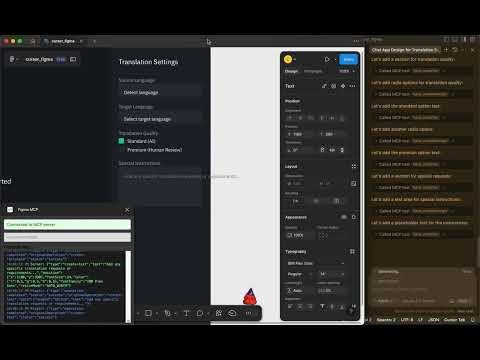
このプロジェクトは、Cursor Agent を介した自然言語プロンプトを用いて、Figma で AI を活用したデザイン作成を可能にします。このプロジェクトは、主に以下の 2 つのコンポーネントで構成されています。
MCP サーバー: モデル コンテキスト プロトコルを実装し、WebSocket 経由で Figma プラグインと通信する Bun + TypeScript サーバー。
Figma プラグイン:Figma 内で動作し、MCP サーバーからの指示に基づいてデザイン操作を実行するプラグイン。
この統合により、自然言語を使用して次のことが可能になります。
基本的なデザイン要素(図形、テキストなど)を作成する
複数のセクションを含む完全なページレイアウトを設計する
既存のデザインを変更する
Related MCP server: Figma MCP Server
リポジトリ構造
figma-mcp-server/ : MCPサーバーの実装
figma-plugin/ : デザイン操作を実行するためのFigmaプラグイン
クイックスタート
1. MCPサーバーをセットアップする
cd figma-mcp-server
cp .env.example .env # Edit this file to add your Figma token
bun install
bun run index.ts2. Figmaプラグインを設定する
cd figma-plugin
npm install
npm run build次に、プラグインを Figma にインポートします。
Figmaを開く
プラグイン > 開発 > マニフェストからプラグインをインポートに移動します
figma-plugin/manifest.jsonファイルを選択する
3. カーソルエージェントに接続する
カーソル内:
設定 > エージェント > MCP サーバーに移動します
URL:
http://localhost:3000/api/mcp/schemaで新しいサーバーを追加します。
詳細なドキュメント
詳細な手順については、以下を参照してください。
使用例
すべての設定が完了したら、Cursor Agent を使用して次のようなプロンプトを含むデザインを作成できます。
Create a landing page with a header, hero section with heading "Our Product" and subheading "The best solution for your needs", 3 features in the features section, and a footer with contact information.仕組み
カーソルエージェントは自然言語プロンプトを受け取ります
構造化されたMCPリクエストをMCPサーバーに送信する
MCPサーバーはリクエストを処理し、WebSocket経由でFigmaプラグインに指示を送信します。
FigmaプラグインはFigmaのデザイン操作を実行します
ライセンス
マサチューセッツ工科大学
Resources
Unclaimed servers have limited discoverability.
Looking for Admin?
If you are the server author, to access and configure the admin panel.
Latest Blog Posts
MCP directory API
We provide all the information about MCP servers via our MCP API.
curl -X GET 'https://glama.ai/api/mcp/v1/servers/xxflux/figma_MCP'
If you have feedback or need assistance with the MCP directory API, please join our Discord server