Glama

Figma MCP(模型上下文协议)

使用模型上下文协议通过 Cursor Agent 创建和修改 Figma 设计的完整解决方案。

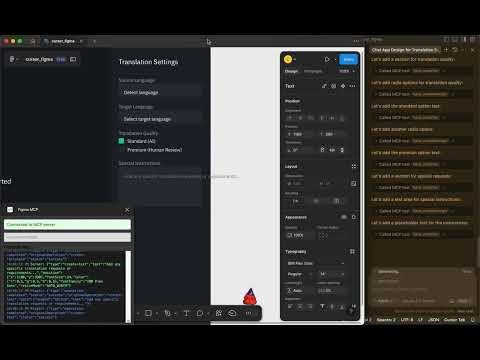
博客: https ://xflux.us/2025/04/06/ai-powered-design-automation-building-a-figma-mcp-with-cursor/ 此处添加图片替代文本

概述

该项目通过 Cursor Agent 使用自然语言提示,在 Figma 中实现 AI 驱动的设计创作。它由两个主要组件组成:

  1. MCP 服务器:一个实现模型上下文协议并通过 WebSockets 与 Figma 插件通信的 Bun + TypeScript 服务器。

  2. Figma 插件:在 Figma 中运行并根据 MCP 服务器的指令执行设计操作的插件。

通过这种集成,您可以使用自然语言来:

  • 创建基本设计元素(形状、文本等)

  • 设计包含多个部分的完整页面布局

  • 修改现有设计

Related MCP server: Figma MCP Server

存储库结构

  • figma-mcp-server/ :MCP 服务器实现

  • figma-plugin/ :用于执行设计操作的 Figma 插件

快速入门

1. 设置 MCP 服务器

cd figma-mcp-server
cp .env.example .env  # Edit this file to add your Figma token
bun install
bun run index.ts

2.设置 Figma 插件

cd figma-plugin
npm install
npm run build

然后将插件导入 Figma:

  1. 打开 Figma

  2. 转到插件>开发>从清单导入插件

  3. 选择figma-plugin/manifest.json文件

3. 连接到游标代理

在光标中:

  1. 转至设置 > 代理 > MCP 服务器

  2. 添加一个新服务器,URL 为: http://localhost:3000/api/mcp/schema

详细文档

有关更详细的说明,请参阅:

示例用法

一切设置完成后,您可以使用 Cursor Agent 创建带有如下提示的设计:

Create a landing page with a header, hero section with heading "Our Product" and subheading "The best solution for your needs", 3 features in the features section, and a footer with contact information.

工作原理

  1. 光标代理接收自然语言提示

  2. 它向 MCP 服务器发送结构化的 MCP 请求

  3. MCP 服务器处理请求并通过 WebSocket 向 Figma 插件发送指令

  4. Figma插件在Figma中执行设计操作

执照

麻省理工学院

Install Server
F
license - not found
B
quality
C
maintenance

Resources

Unclaimed servers have limited discoverability.

Looking for Admin?

If you are the server author, to access and configure the admin panel.

Latest Blog Posts

MCP directory API

We provide all the information about MCP servers via our MCP API.

curl -X GET 'https://glama.ai/api/mcp/v1/servers/xxflux/figma_MCP'

If you have feedback or need assistance with the MCP directory API, please join our Discord server