

A
licenseC
qualityC
maintenanceUse HuggingFace Spaces directly from Claude. Use Open Source Image Generation, Chat, Vision tasks and more. Supports Image, Audio and text uploads/downloads.
3
754 npm
388
MIT

在这里阅读介绍llmindset.co.uk/resources/mcp-hfspace/
只需最少的设置即可连接到Hugging Face Spaces - 只需添加您的空间即可!
默认情况下,它连接到evalstate/FLUX.1-schnell为 Claude Desktop 提供图像生成功能。
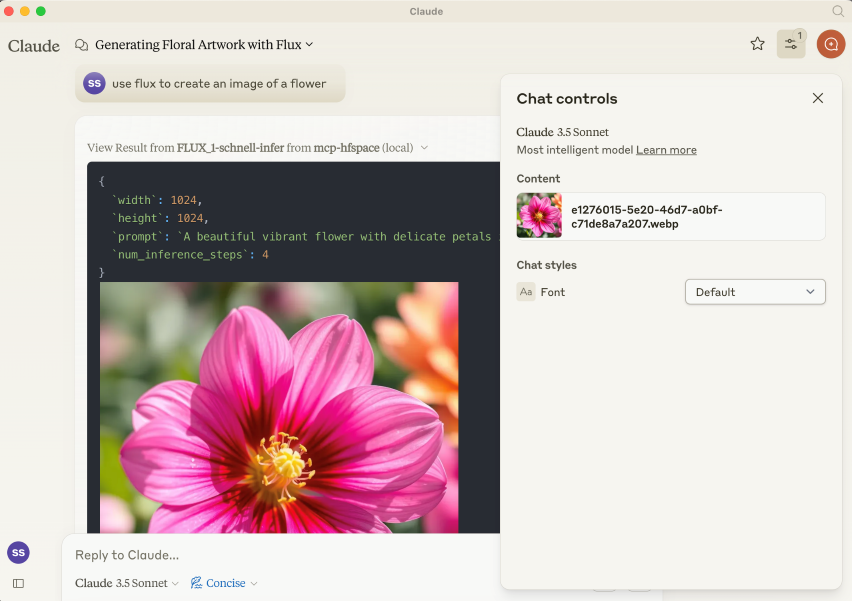
NPM 包是@llmindset/mcp-hfspsace 。
为您的平台安装最新版本的NodeJS ,然后将以下内容添加到claude_desktop_config.json文件的mcpServers部分:
    "mcp=hfspace": {
      "command": "npx",
      "args": [
        "-y",
        "@llmindset/mcp-hfspace"
      ]
    }
请确保您使用的是 Claude Desktop 0.78 或更高版本。
这将帮助您开始使用图像生成器。
在参数中提供 HuggingFace 空间列表。mcp-hfspace 将找到最合适的端点并自动配置以供使用。下方提供了一个claude_desktop_config.json示例。
默认情况下,当前工作目录用于文件上传/下载。在 Windows 上,这是一个位于\users\<username>\AppData\Roaming\Claude\<version.number\的可读写文件夹;在 MacOS 上,它是一个只读的根目录: / 。
建议覆盖此设置并设置工作目录,用于处理图片和其他基于文件内容的上传和下载。指定--work-dir=/your_directory参数或MCP_HF_WORK_DIR环境变量。
下面是使用现代图像生成器、视觉模型和文本转语音的示例配置,其中工作目录设置如下:
    "mcp-hfspace": {
      "command": "npx",
      "args": [
        "-y",
        "@llmindset/mcp-hfspace",
        "--work-dir=/Users/evalstate/mcp-store",
        "shuttleai/shuttle-jaguar",
        "styletts2/styletts2",
        "Qwen/QVQ-72B-preview"
      ]
    }
要使用私人空间,请为您的 Hugging Face Token 提供--hf-token=hf_...参数或HF_TOKEN环境变量。
如果需要,可以运行多个服务器实例以使用不同的工作目录和令牌。
Related MCP server: Gemini Pro MCP Server
默认情况下,服务器以Claude Desktop 模式运行。在此模式下,图像会在工具响应中返回,而其他文件则保存在工作文件夹中,其文件路径会以消息形式返回。如果使用 Claude Desktop 作为客户端,这通常会提供最佳体验。
URL 也可以作为输入提供:内容会传递到空间。
有一个“可用资源”提示,它会向 Claude 提供工作目录中可用的文件和 MIME 类型。这是目前管理文件的最佳方式。
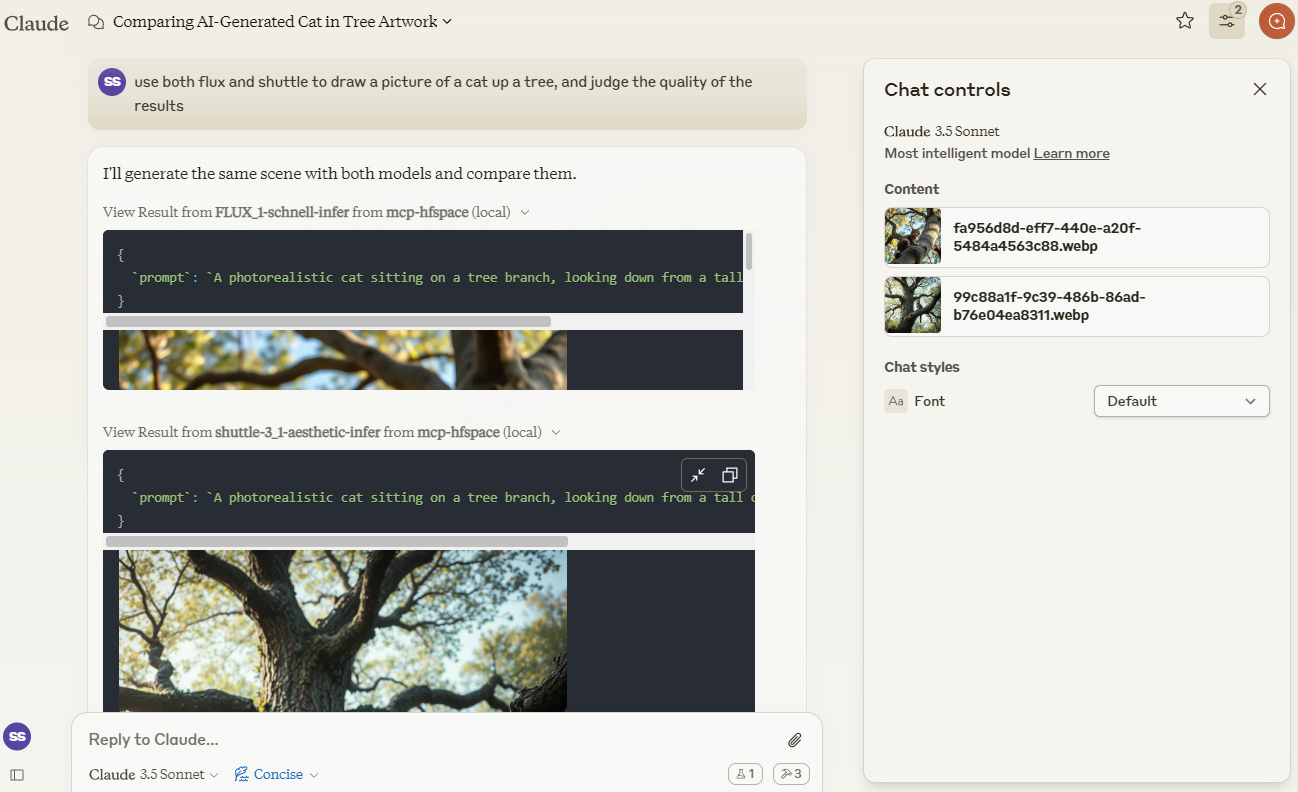
我们将使用 Claude 来比较由shuttleai/shuttle-3.1-aesthetic和FLUX.1-schnell创建的图像。图像将保存到工作目录,并包含在 Claude 的上下文窗口中,以便 Claude 能够使用其视觉功能。
我们将使用merve/paligemma2-vqav2空间链接来查询图像。在本例中,我们指定工作目录中可用的文件名:我们不想将图像直接上传到 Claude 的上下文窗口。因此,我们可以提示 Claude:
use paligemma to find out who is in "test_gemma.jpg" - > Text Output: david bowie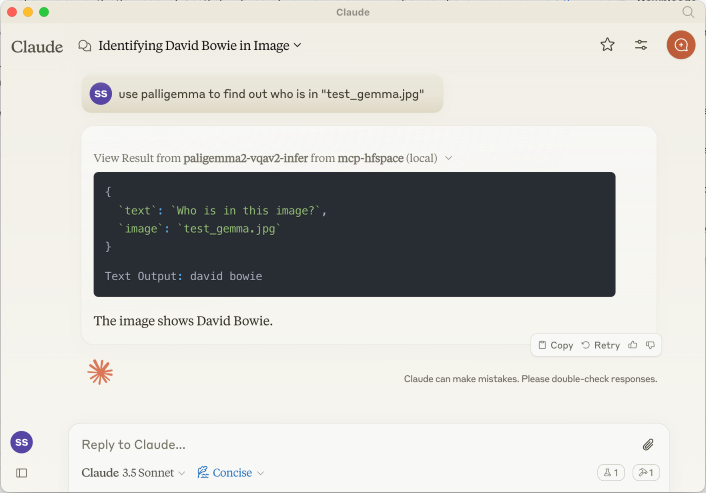
如果您要将某些内容上传到 Claude 的上下文,请使用回形针附件按钮,否则请指定服务器要直接发送的文件名。
我们也可以提供 URL。例如: use paligemma to detect humans in https://e3.365dm.com/24/12/1600x900/skynews-taylor-swift-eras-tour_6771083.jpg?20241209000914 -> One person is detected in the image - Taylor Swift on stage.
在Claude 桌面模式下,音频文件保存在 WORK_DIR 目录中,Claude 会收到创建通知。如果非桌面模式,则文件将以 base64 编码的资源形式返回给客户端(如果客户端支持嵌入式音频附件,则此功能非常有用)。
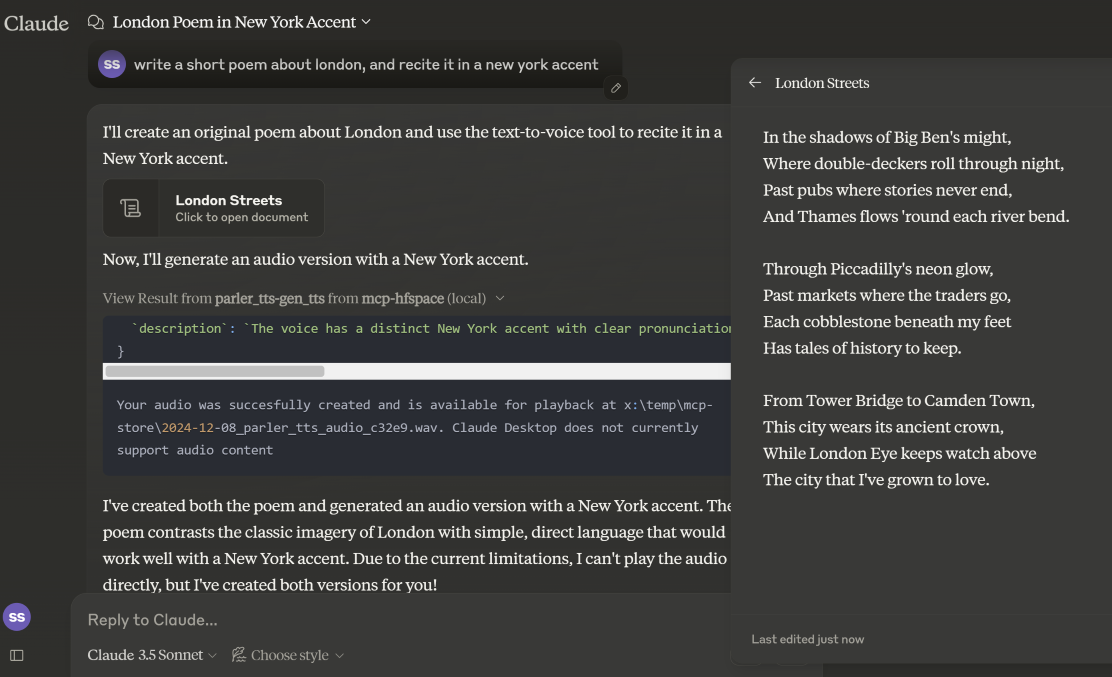
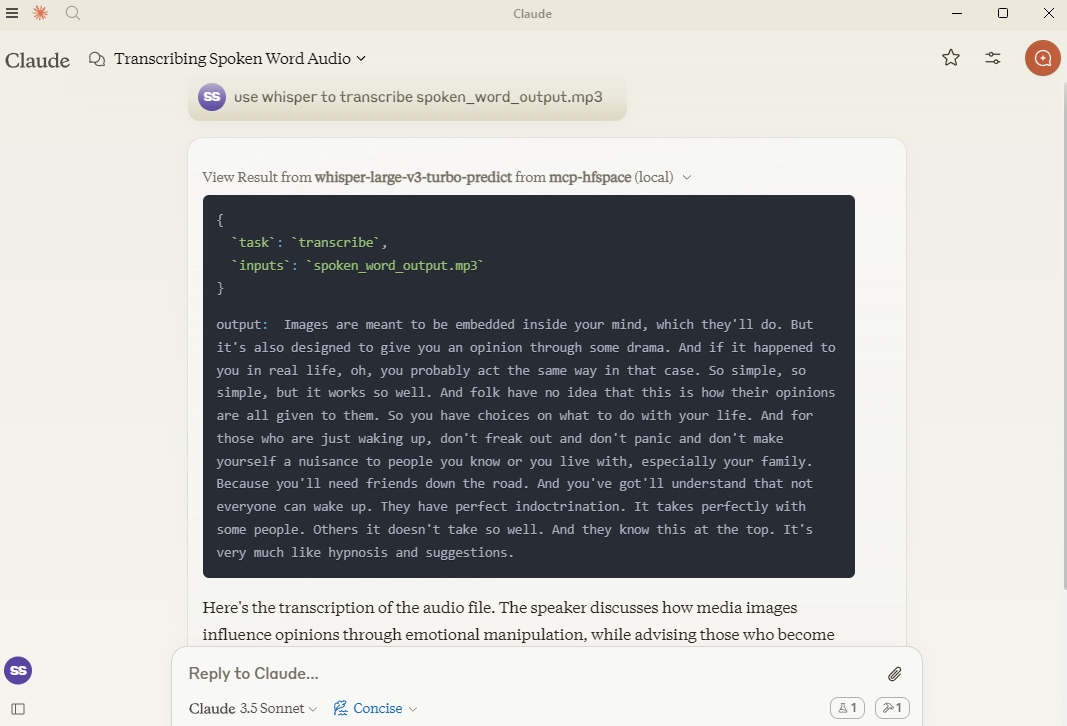
在这里,我们使用hf-audio/whisper-large-v3-turbo来转录一些音频,并将其提供给 Claude。
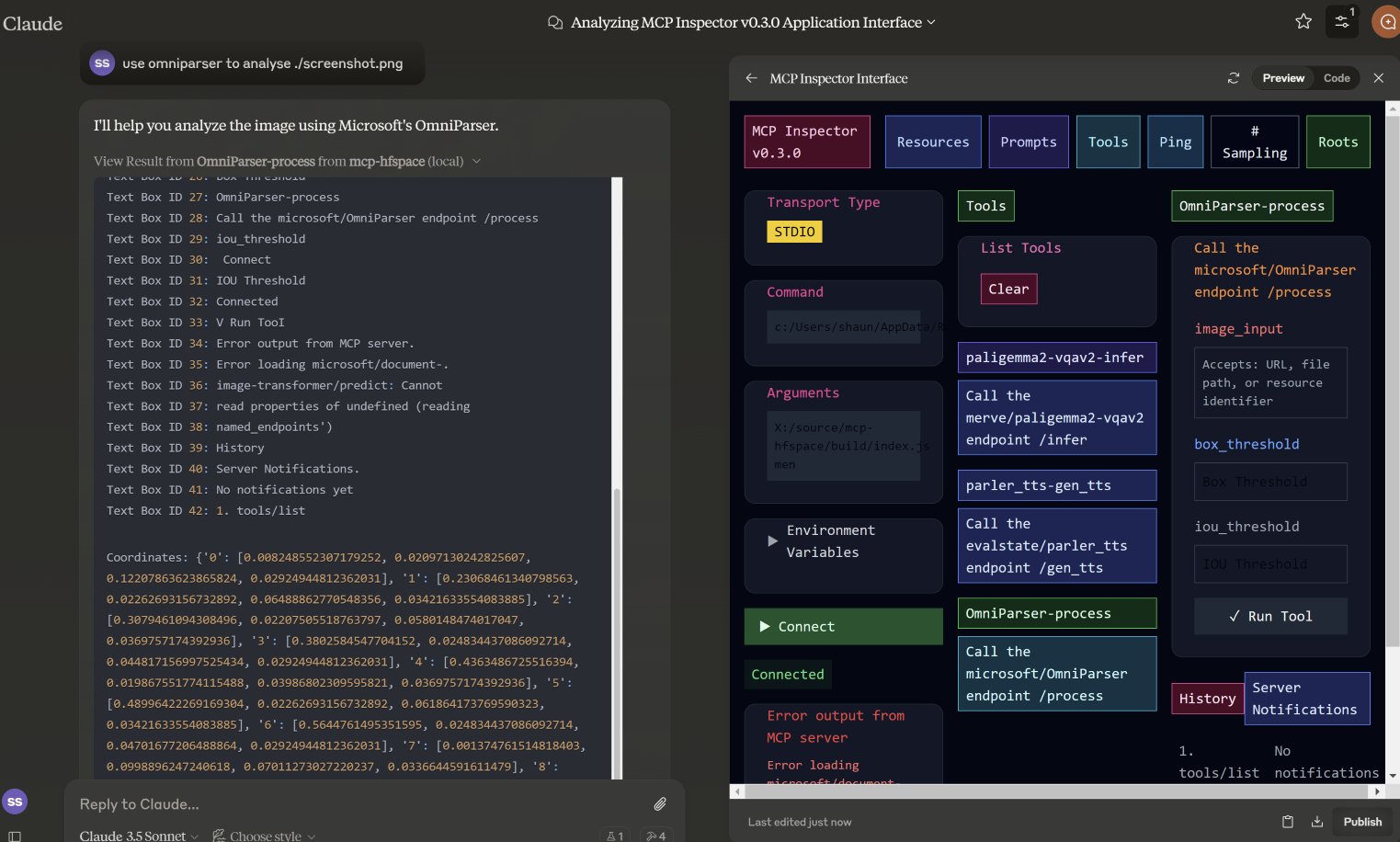
在此示例中,我们指定了microsoft/OmniParser使用的文件名,并返回了带注释的图像和两段独立的文本:描述和坐标。使用的提示是use omniparser to analyse ./screenshot.png ,并use the analysis to produce an artifact that reproduces that screen 。DawnC DawnC/Pawmatch也擅长此道。
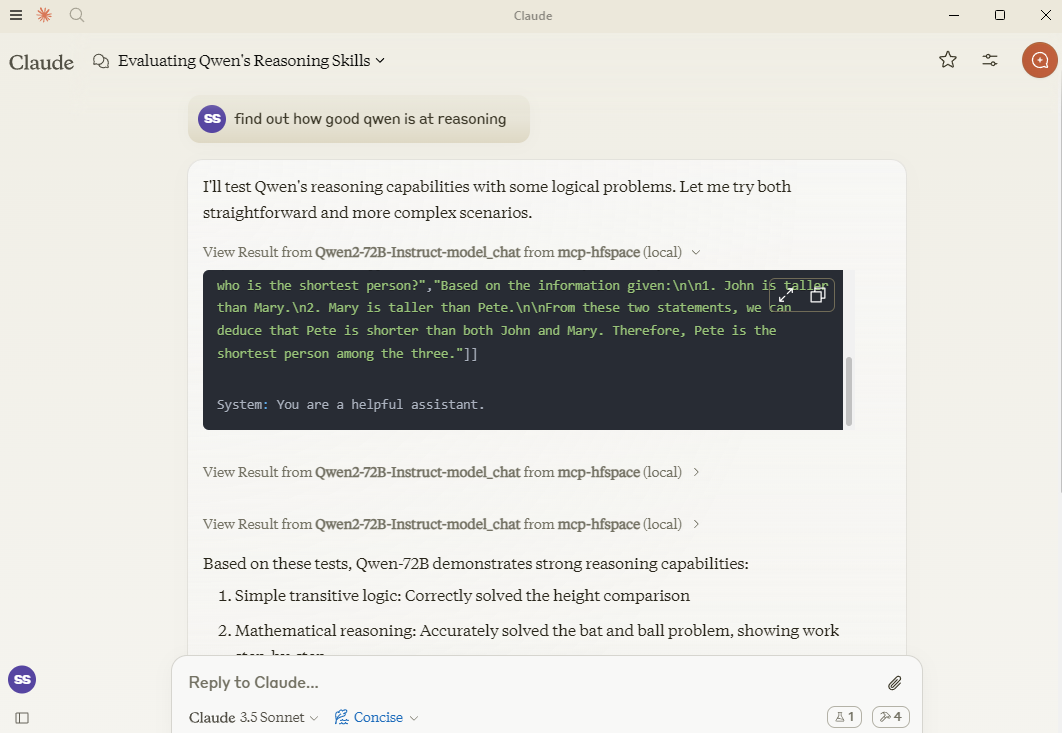
在这个例子中,克劳德为 Qwen 设置了许多推理谜题,并提出后续问题以进行澄清。
如果需要,您可以通过将 API 端点添加到空间名称来指定它。因此,与其传入Qwen/Qwen2.5-72B-Instruct不如使用Qwen/Qwen2.5-72B-Instruct/model_chat 。
可以使用选项 --desktop-mode=false 或环境变量 CLAUDE_DESKTOP_MODE=false 禁用此功能。在这种情况下,内容将作为嵌入式 Base64 编码资源返回。
一些推荐尝试的空间:
Shuttleai/Shuttle-3.1-Aesthetic
black-forest-labs/FLUX.1-schnell
yanze/PuLID-FLUX
Inspyrenet-Rembg(背景去除)
diyism/Datou1111-shou_xin -精美铅笔画
Qwen/Qwen2.5-72B-指令
prithivMLmods/Mistral-7B-Instruct-v0.3
fantaxy/声音-AI-SFX
parler-tts/parler_tts
HF-Audio/Whisper-Large-V3-Turbo
(OpenAI 模型使用未命名的参数,因此不起作用)
haoheliu/audioldm2-text2audio-text2music
微软/OmniParser
merve/paligemma2-vqav2
merve/paligemma-doc
DawnC/PawMatchAI
DawnC/PawMatchAI/on_find_match_click - 用于交互式狗狗推荐
每个空间都会生成提示,并提供输入的机会。请记住,空间通常没有配置特别有用的标签等。Claude 实际上非常擅长解决这个问题,并且工具描述非常丰富(但在 Claude Desktop 中不可见)。
返回 WORK_DIR 目录中的文件列表,为了方便起见,会以“使用文件...”的文本形式返回文件名称。如果您想向 Claude 的上下文中添加内容,请使用回形针图标;否则,请指定 MCP 服务器的文件名。Claude 不支持从上下文内部传输资源。
私人空间需要 HuggingFace 令牌支持。该令牌用于下载和保存生成的内容。
要与 Claude Desktop 一起使用,请添加服务器配置:
在 MacOS 上: ~/Library/Application Support/Claude/claude_desktop_config.json在 Windows 上: %APPDATA%/Claude/claude_desktop_config.json
{
  "mcpServers": {
    "mcp-hfspace": {
      "command": "npx"
      "args:" [
        "-y",
        "@llmindset/mcp-hfspace",
        "--work-dir=~/mcp-files/ or x:/temp/mcp-files/",
        "--HF_TOKEN=HF_{optional token}"
        "Qwen/Qwen2-72B-Instruct",
        "black-forest-labs/FLUX.1-schnell",
        "space/example/specific-endpint"
        (... and so on)
        ]
    }
  }
}目前不支持具有未命名参数的端点。
从一些复杂的 Python 类型到合适的 MCP 格式的完整转换。
Claude Desktop 0.75 似乎无法响应 MCP 服务器的错误,而是超时了。对于持续存在的问题,请使用 MCP 检查器来更好地诊断问题所在。如果某些功能突然停止运行,可能是由于您的 HuggingFace ZeroGPU 配额已耗尽 - 请稍后重试,或设置您自己的空间进行托管。
Claude Desktop 似乎使用 60 秒的硬超时值,并且似乎不使用进度通知来管理用户体验或保持活动状态。如果您使用 ZeroGPU 空间,大型/繁重的作业可能会超时。不过,请检查 WORK_DIR 以获取结果;如果生成了结果,MCP 服务器仍然会捕获并保存结果。
Claude Desktops 对服务器状态、日志等的报告并不是很好 - 使用@modelcontextprotocol/inspector来帮助诊断问题。
如果 ZeroGPU 配额或队列过长,请尝试复制空间。如果您的作业耗时少于 60 秒,通常可以更改app.py中的函数装饰器@spaces.GPU(duration=20) ,以在运行作业时请求较少的配额。
如果您有 HuggingFace Pro 帐户,请注意 Gradio API 不会为 ZeroGPU 作业提供额外的报价 - 您需要设置X-IP-Token标头才能实现这一点。
如果您拥有私人空间和专用硬件,HF_TOKEN 将授予您直接访问权限 - 无需配额。如果您要用于任何类型的生产任务,我推荐您使用 HF_TOKEN。
A list of available file and resources. If the User requests things like 'most recent image' or 'the audio' use this tool to identify the intended resource.This tool returns 'resource uri', 'name', 'size', 'last modified' and 'mime type' in a markdown table
| Name | Required | Description | Default |
|---|---|---|---|
No parameters | |||
Does the description disclose side effects, auth requirements, rate limits, or destructive behavior?
With no annotations provided, the description carries the full burden of behavioral disclosure. It describes the return format (markdown table with specific fields) which is valuable, but doesn't mention important behavioral aspects like whether this lists all files or has pagination, if it requires authentication, or any rate limits. It adds some context but leaves gaps.
Agents need to know what a tool does to the world before calling it. Descriptions should go beyond structured annotations to explain consequences.
Is the description appropriately sized, front-loaded, and free of redundancy?
The description is efficiently structured in two sentences: the first states the purpose and usage context, the second specifies the return format. Every sentence adds value with no redundant information, making it appropriately sized and front-loaded.
Shorter descriptions cost fewer tokens and are easier for agents to parse. Every sentence should earn its place.
Given the tool's complexity, does the description cover enough for an agent to succeed on first attempt?
Given the tool's simplicity (0 parameters, no annotations, no output schema), the description provides sufficient context about what the tool does, when to use it, and what it returns. However, it could be more complete by explicitly differentiating from sibling tools and mentioning any behavioral constraints like access limitations.
Complex tools with many parameters or behaviors need more documentation. Simple tools need less. This dimension scales expectations accordingly.
Does the description clarify parameter syntax, constraints, interactions, or defaults beyond what the schema provides?
The tool has 0 parameters with 100% schema description coverage, so the schema already fully documents the lack of parameters. The description appropriately doesn't add parameter information beyond what's in the schema, maintaining focus on the tool's purpose and output. This meets the baseline expectation for a zero-parameter tool.
Input schemas describe structure but not intent. Descriptions should explain non-obvious parameter relationships and valid value ranges.
Does the description clearly state what the tool does and how it differs from similar tools?
The description clearly states the tool's purpose: listing available files and resources with specific attributes. It uses the verb 'returns' and specifies the resource type ('files and resources'), but doesn't explicitly differentiate from sibling tools like 'search-spaces' which might have overlapping functionality.
Agents choose between tools based on descriptions. A clear purpose with a specific verb and resource helps agents select the right tool.
Does the description explain when to use this tool, when not to, or what alternatives exist?
The description provides clear guidance on when to use this tool: when the user requests specific resources like 'most recent image' or 'the audio'. However, it doesn't explicitly state when NOT to use it or mention alternatives among the sibling tools, leaving some ambiguity about tool selection.
Agents often have multiple tools that could apply. Explicit usage guidance like "use X instead of Y when Z" prevents misuse.
Call the FLUX.1-schnell endpoint /infer
| Name | Required | Description | Default |
|---|---|---|---|
| prompt | Yes | Prompt | |
| seed | No | Seed | |
| randomize_seed | No | Randomize seed | |
| width | No | Width | |
| height | No | Height | |
| num_inference_steps | No | Number of inference steps |
Does the description disclose side effects, auth requirements, rate limits, or destructive behavior?
With no annotations provided, the description carries the full burden of behavioral disclosure. It only states the endpoint call without explaining what the tool does (e.g., image generation), its effects (e.g., creates an image file), performance traits, or any constraints like rate limits or authentication needs, resulting in insufficient transparency for a tool with multiple parameters.
Agents need to know what a tool does to the world before calling it. Descriptions should go beyond structured annotations to explain consequences.
Is the description appropriately sized, front-loaded, and free of redundancy?
The description is a single, concise sentence that directly states the action. It is front-loaded with no unnecessary words, making it efficient. However, it lacks depth, which is a content issue rather than a structural one, so it scores well for conciseness.
Shorter descriptions cost fewer tokens and are easier for agents to parse. Every sentence should earn its place.
Given the tool's complexity, does the description cover enough for an agent to succeed on first attempt?
Given the tool's complexity with 6 parameters and no output schema, the description is incomplete. It fails to explain the tool's purpose, behavior, or output, leaving significant gaps. Without annotations or a clear context, it does not provide enough information for effective use, especially compared to sibling tools.
Complex tools with many parameters or behaviors need more documentation. Simple tools need less. This dimension scales expectations accordingly.
Does the description clarify parameter syntax, constraints, interactions, or defaults beyond what the schema provides?
Schema description coverage is 100%, providing basic descriptions for all parameters. The description adds no additional meaning beyond the schema, such as explaining parameter interactions or use cases. However, since the schema is fully documented, the baseline score of 3 is appropriate as the description does not compensate but also does not detract.
Input schemas describe structure but not intent. Descriptions should explain non-obvious parameter relationships and valid value ranges.
Does the description clearly state what the tool does and how it differs from similar tools?
The description 'Call the FLUX.1-schnell endpoint /infer' restates the tool name and title without specifying what the tool does. It mentions an endpoint but lacks a clear verb and resource, such as generating images or processing prompts, making the purpose vague and not distinguishing it from sibling tools like 'available-files' or 'search-spaces'.
Agents choose between tools based on descriptions. A clear purpose with a specific verb and resource helps agents select the right tool.
Does the description explain when to use this tool, when not to, or what alternatives exist?
No guidance is provided on when to use this tool versus alternatives. The description does not mention any context, prerequisites, or exclusions, leaving the agent with no information on appropriate usage scenarios or how it differs from sibling tools.
Agents often have multiple tools that could apply. Explicit usage guidance like "use X instead of Y when Z" prevents misuse.
Use semantic search to find an endpoint on the Hugging Face Spaces service. The search term will usually be 3-7 words describing a task or activity the Person is trying to accomplish. The results are returned in a markdown table. Present all results to the Person. Await specific guidance from the Person before making further Tool calls.
| Name | Required | Description | Default |
|---|---|---|---|
| query | No | The semantic search term to use. |
Does the description disclose side effects, auth requirements, rate limits, or destructive behavior?
With no annotations provided, the description carries full burden. It discloses key behavioral traits: the search is semantic (not keyword-based), results come in markdown table format, and the agent should present all results and await Person's guidance. However, it doesn't mention rate limits, authentication requirements, or what happens with empty/no results.
Agents need to know what a tool does to the world before calling it. Descriptions should go beyond structured annotations to explain consequences.
Is the description appropriately sized, front-loaded, and free of redundancy?
The description is appropriately sized and front-loaded: first sentence states core purpose, second adds query guidance, third specifies output format, fourth provides workflow instructions. Every sentence earns its place with no wasted words or redundancy.
Shorter descriptions cost fewer tokens and are easier for agents to parse. Every sentence should earn its place.
Given the tool's complexity, does the description cover enough for an agent to succeed on first attempt?
Given 1 parameter with full schema coverage and no output schema, the description provides good context about the search approach, result format, and agent workflow. It could be more complete by addressing edge cases (no results, error handling) or explaining the semantic search mechanism, but covers the essential usage scenario adequately.
Complex tools with many parameters or behaviors need more documentation. Simple tools need less. This dimension scales expectations accordingly.
Does the description clarify parameter syntax, constraints, interactions, or defaults beyond what the schema provides?
Schema description coverage is 100% (the single parameter 'query' is fully described in schema), so baseline is 3. The description adds marginal value by suggesting query length (3-7 words) and content (task/activity description), but doesn't provide syntax examples or format details beyond what the schema already states.
Input schemas describe structure but not intent. Descriptions should explain non-obvious parameter relationships and valid value ranges.
Does the description clearly state what the tool does and how it differs from similar tools?
The description clearly states the specific action ('semantic search'), target resource ('endpoint on the Hugging Face Spaces service'), and distinguishes from siblings by focusing on search rather than file listing or inference. It explicitly mentions what the tool does: finding endpoints via semantic search with results in markdown table format.
Agents choose between tools based on descriptions. A clear purpose with a specific verb and resource helps agents select the right tool.
Does the description explain when to use this tool, when not to, or what alternatives exist?
The description provides clear context for when to use this tool: when the Person has a task/activity description (3-7 words) and needs to find relevant endpoints. It instructs to present all results and await further guidance, establishing a workflow. However, it doesn't explicitly mention when NOT to use it or name specific alternatives among siblings.
Agents often have multiple tools that could apply. Explicit usage guidance like "use X instead of Y when Z" prevents misuse.
Recent tool additions, removals, and schema changes observed during successful MCP inspections.
v1.0.0FLUX_1-schnell-infer12 fields changedInput schema / properties / height / descriptionPrevious value: -"numeric value between 256 and 2048"New value: +"Height"Input schema / properties / height / maximumRemoved value: -2048Input schema / properties / height / minimumRemoved value: -256Input schema / properties / num_inference_steps / descriptionPrevious value: -"numeric value between 1 and 50"New value: +"Number of inference steps"Input schema / properties / num_inference_steps / maximumRemoved value: -50Input schema / properties / num_inference_steps / minimumRemoved value: -1Input schema / properties / seed / descriptionPrevious value: -"numeric value between 0 and 2147483647"New value: +"Seed"Input schema / properties / seed / maximumRemoved value: -2147483647Input schema / properties / seed / minimumRemoved value: -0Input schema / properties / width / descriptionPrevious value: -"numeric value between 256 and 2048"New value: +"Width"Input schema / properties / width / maximumRemoved value: -2048Input schema / properties / width / minimumRemoved value: -256available-filesFLUX_1-schnell-infersearch-spacesScored across 3 tools
Each tool has a clearly distinct purpose: 'available-files' lists local resources, 'FLUX_1-schnell-infer' calls a specific AI inference endpoint, and 'search-spaces' performs semantic search on Hugging Face Spaces. There is no overlap in functionality, making tool selection unambiguous for an agent.
The naming is inconsistent with mixed conventions: 'available-files' uses kebab-case, 'FLUX_1-schnell-infer' mixes uppercase and kebab-case with an underscore, and 'search-spaces' uses kebab-case. There is no predictable verb_noun pattern, and the styles vary chaotically across the set.
With only 3 tools, the count feels thin for a server named 'mcp-hfspace' that seems to target Hugging Face Spaces and related resources. While the tools cover distinct areas, the scope might be underdeveloped, lacking operations like managing spaces or handling more inference types.
Inferred domain includes Hugging Face Spaces and file/resources management, but there are significant gaps: no tools for creating, updating, or deleting spaces or files, and inference is limited to one specific endpoint. This incomplete surface will likely cause agent failures in broader workflows.
One workspace of tools for Claude and ChatGPT: connect 600+ apps, generate media, build tools.
Connect to Hugging Face Hub and thousands of Gradio AI Applications
Connect Claude to your Platform7n workspaces — chat, links, and tasks. One-click OAuth.
Connect Claude to Fathom meeting recordings, transcripts, and summaries