

A
licenseC
qualityC
maintenanceUse HuggingFace Spaces directly from Claude. Use Open Source Image Generation, Chat, Vision tasks and more. Supports Image, Audio and text uploads/downloads.
3
754 npm
388
MIT

Lea la introducción aquí llmindset.co.uk/resources/mcp-hfspace/
Conéctese a Hugging Face Spaces con una configuración mínima: ¡simplemente agregue sus espacios y listo!
De forma predeterminada, se conecta a evalstate/FLUX.1-schnell y proporciona capacidades de generación de imágenes a Claude Desktop.
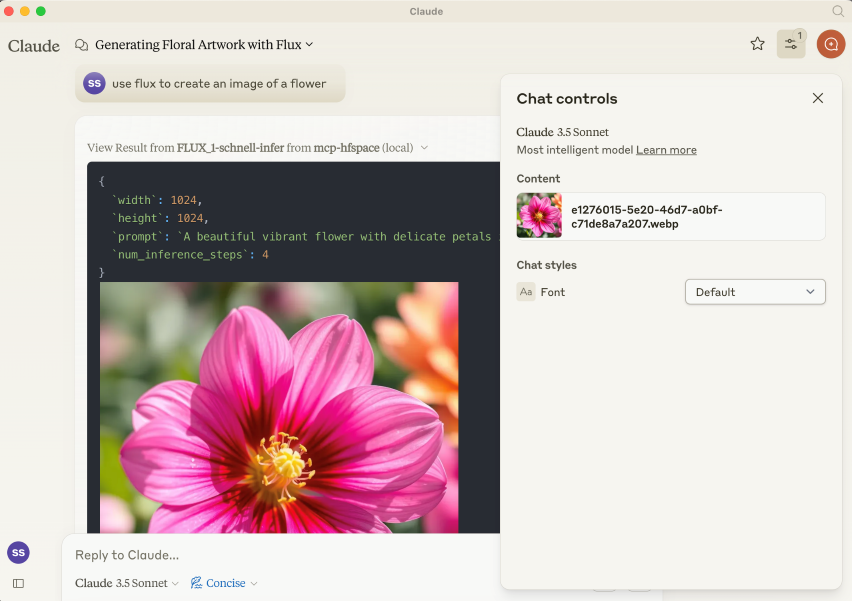
El paquete NPM es @llmindset/mcp-hfspsace .
Instale una versión reciente de NodeJS para su plataforma, luego agregue lo siguiente a la sección mcpServers de su archivo claude_desktop_config.json :
    "mcp=hfspace": {
      "command": "npx",
      "args": [
        "-y",
        "@llmindset/mcp-hfspace"
      ]
    }
Asegúrese de estar utilizando Claude Desktop 0.78 o superior.
Esto le permitirá comenzar a utilizar un generador de imágenes.
Proporcione una lista de espacios HuggingFace en los argumentos. mcp-hfspace encontrará el punto final más adecuado y lo configurará automáticamente para su uso. A continuación se proporciona un ejemplo claude_desktop_config.json .
De forma predeterminada, el directorio de trabajo actual se utiliza para la carga y descarga de archivos. En Windows, esta carpeta es de lectura y escritura en \users\<username>\AppData\Roaming\Claude\<version.number\ , y en macOS es la raíz de solo lectura: / .
Se recomienda anular esto y configurar un directorio de trabajo para gestionar la carga y descarga de imágenes y otro contenido basado en archivos. Especifique el argumento --work-dir=/your_directory o la variable de entorno MCP_HF_WORK_DIR .
A continuación se muestra un ejemplo de configuración para utilizar un generador de imágenes moderno, un modelo de visión y texto a voz con un directorio de trabajo configurado como se muestra a continuación:
    "mcp-hfspace": {
      "command": "npx",
      "args": [
        "-y",
        "@llmindset/mcp-hfspace",
        "--work-dir=/Users/evalstate/mcp-store",
        "shuttleai/shuttle-jaguar",
        "styletts2/styletts2",
        "Qwen/QVQ-72B-preview"
      ]
    }
Para utilizar espacios privados, proporcione a su token Hugging Face el argumento --hf-token=hf_... o la variable de entorno HF_TOKEN .
Es posible ejecutar múltiples instancias de servidor para utilizar diferentes directorios de trabajo y tokens si es necesario.
Related MCP server: Gemini Pro MCP Server
De forma predeterminada, el servidor funciona en modo Claude Desktop . En este modo, las imágenes se devuelven en las respuestas de la herramienta, mientras que otros archivos se guardan en la carpeta de trabajo y su ruta se devuelve como un mensaje. Esto suele ofrecer la mejor experiencia si se utiliza Claude Desktop como cliente.
Las URL también se pueden proporcionar como entradas: el contenido se pasa al espacio.
Hay un mensaje de "Recursos disponibles" que le indica a Claude los archivos y tipos MIME disponibles en su directorio de trabajo. Actualmente, esta es la mejor manera de administrar archivos.
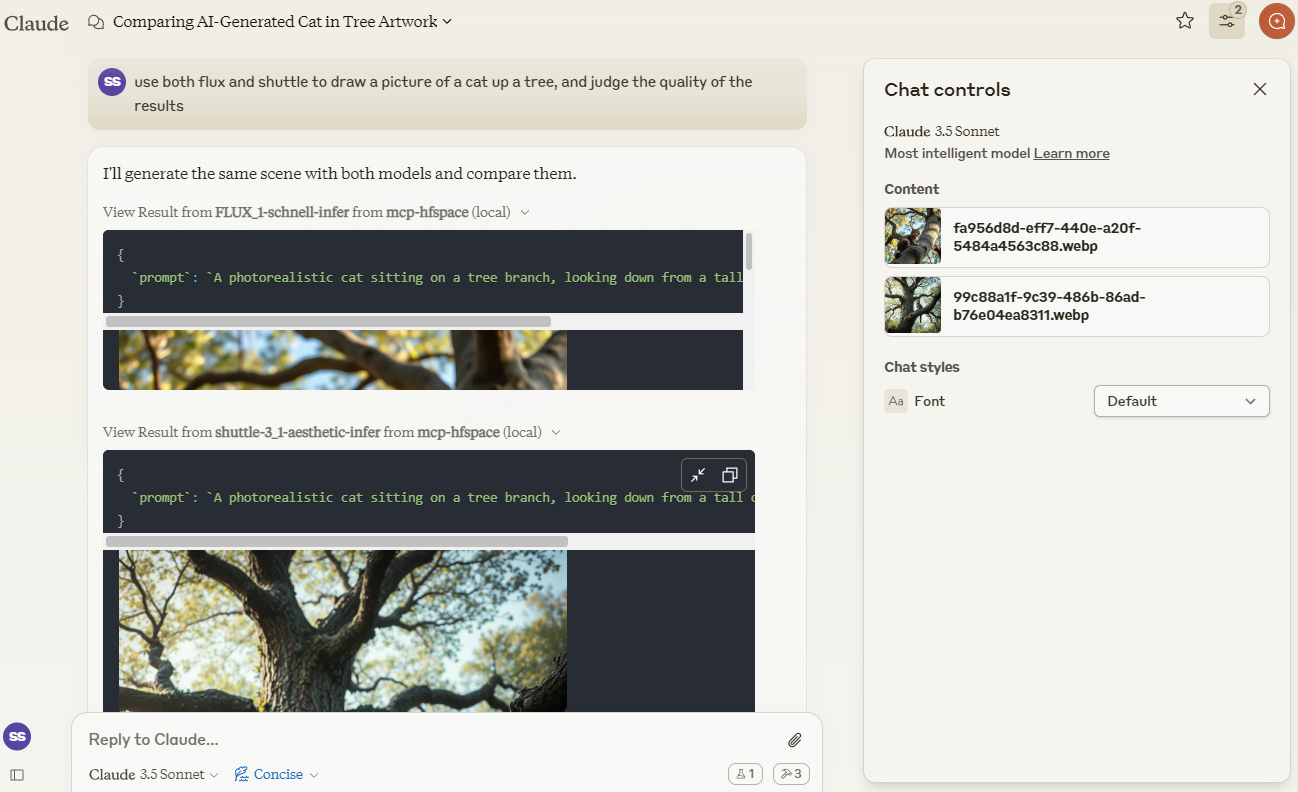
Usaremos Claude para comparar imágenes creadas por shuttleai/shuttle-3.1-aesthetic y FLUX.1-schnell . Las imágenes se guardan en el directorio de trabajo y se incluyen en la ventana contextual de Claude, para que este pueda usar sus funciones de visión.
Usaremos el enlace espacial merve/paligemma2-vqav2 para consultar una imagen. En este caso, especificamos el nombre del archivo disponible en el directorio de trabajo: no queremos subir la imagen directamente a la ventana contextual de Claude. Por lo tanto, podemos indicarle a Claude:
use paligemma to find out who is in "test_gemma.jpg" -> Text Output: david bowie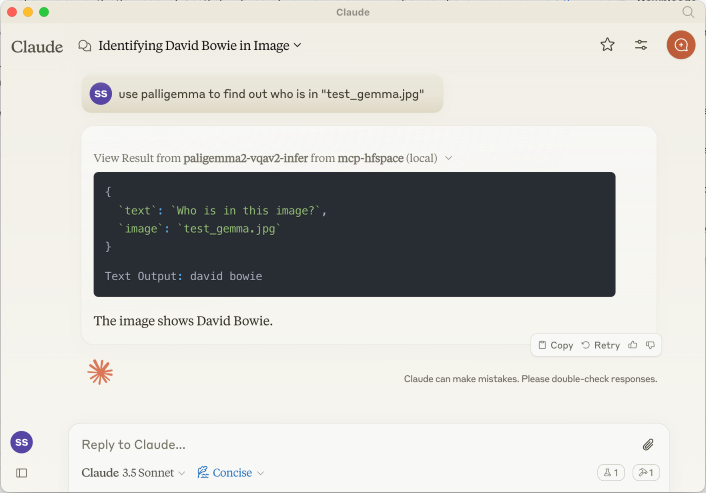
Si está cargando algo en el contexto de Claude, utilice el botón Adjunto de clip; de lo contrario, especifique el nombre del archivo para que el servidor lo envíe directamente.
También podemos proporcionar una URL. Por ejemplo: use paligemma to detect humans in https://e3.365dm.com/24/12/1600x900/skynews-taylor-swift-eras-tour_6771083.jpg?20241209000914 -> One person is detected in the image - Taylor Swift on stage.
En el modo de escritorio de Claude , el archivo de audio se guarda en WORK_DIR y se notifica a Claude sobre su creación. Si no está en modo de escritorio, el archivo se devuelve al cliente como un recurso codificado en base64 (útil si admite archivos adjuntos de audio incrustados).
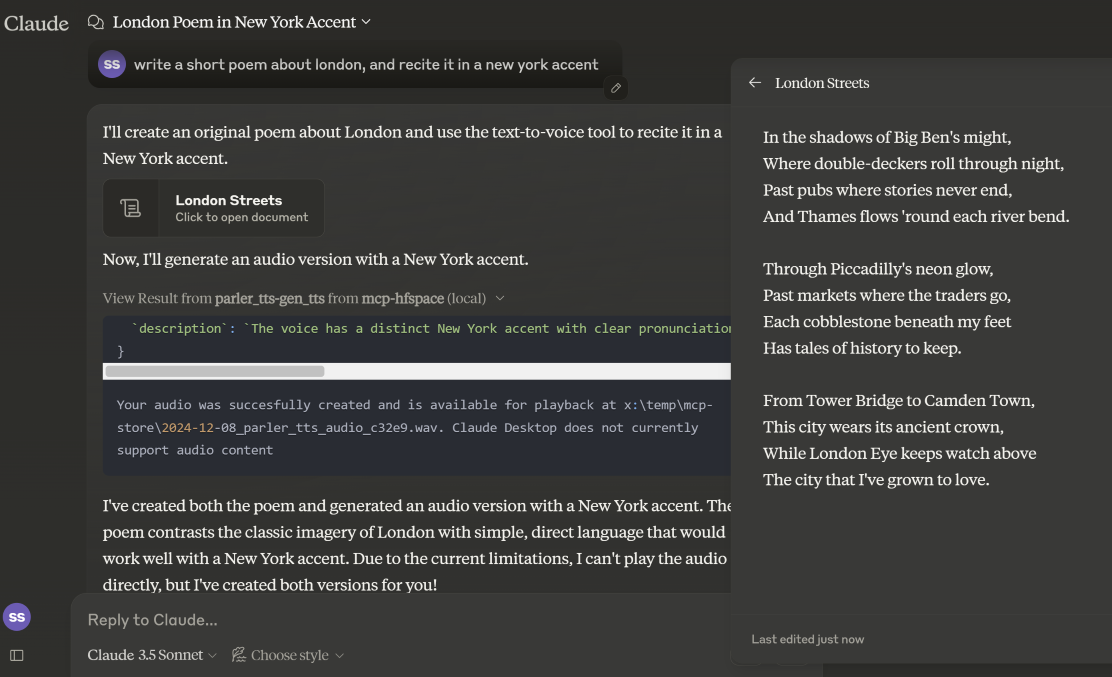
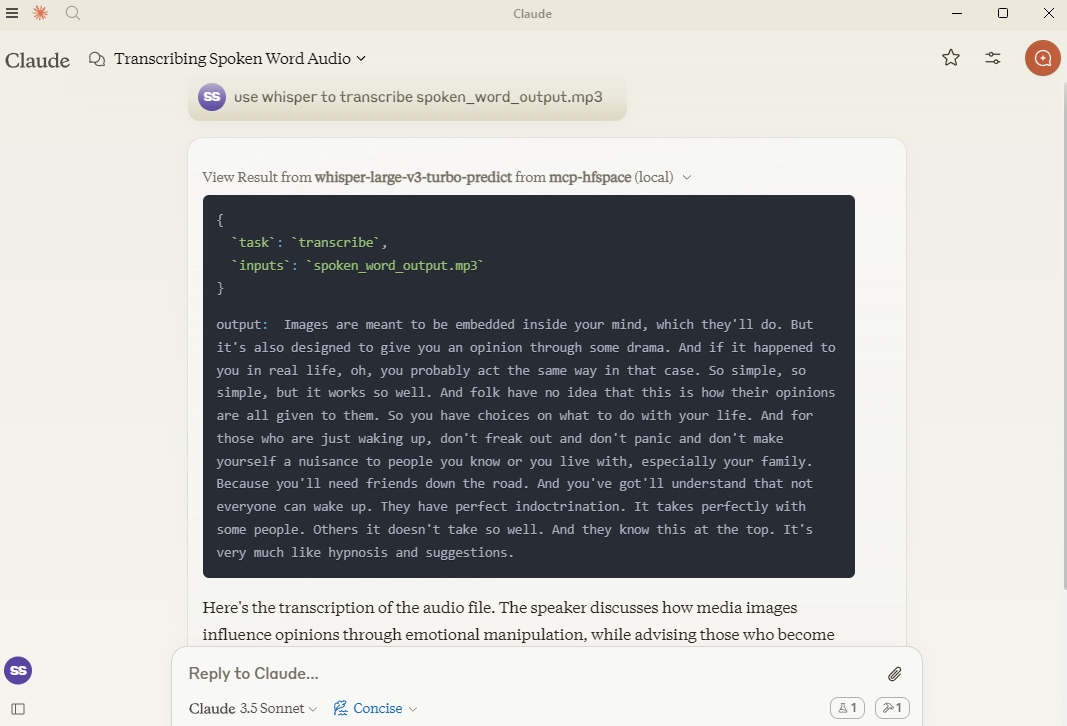
Aquí, usamos hf-audio/whisper-large-v3-turbo para transcribir algo de audio y ponerlo a disposición de Claude.
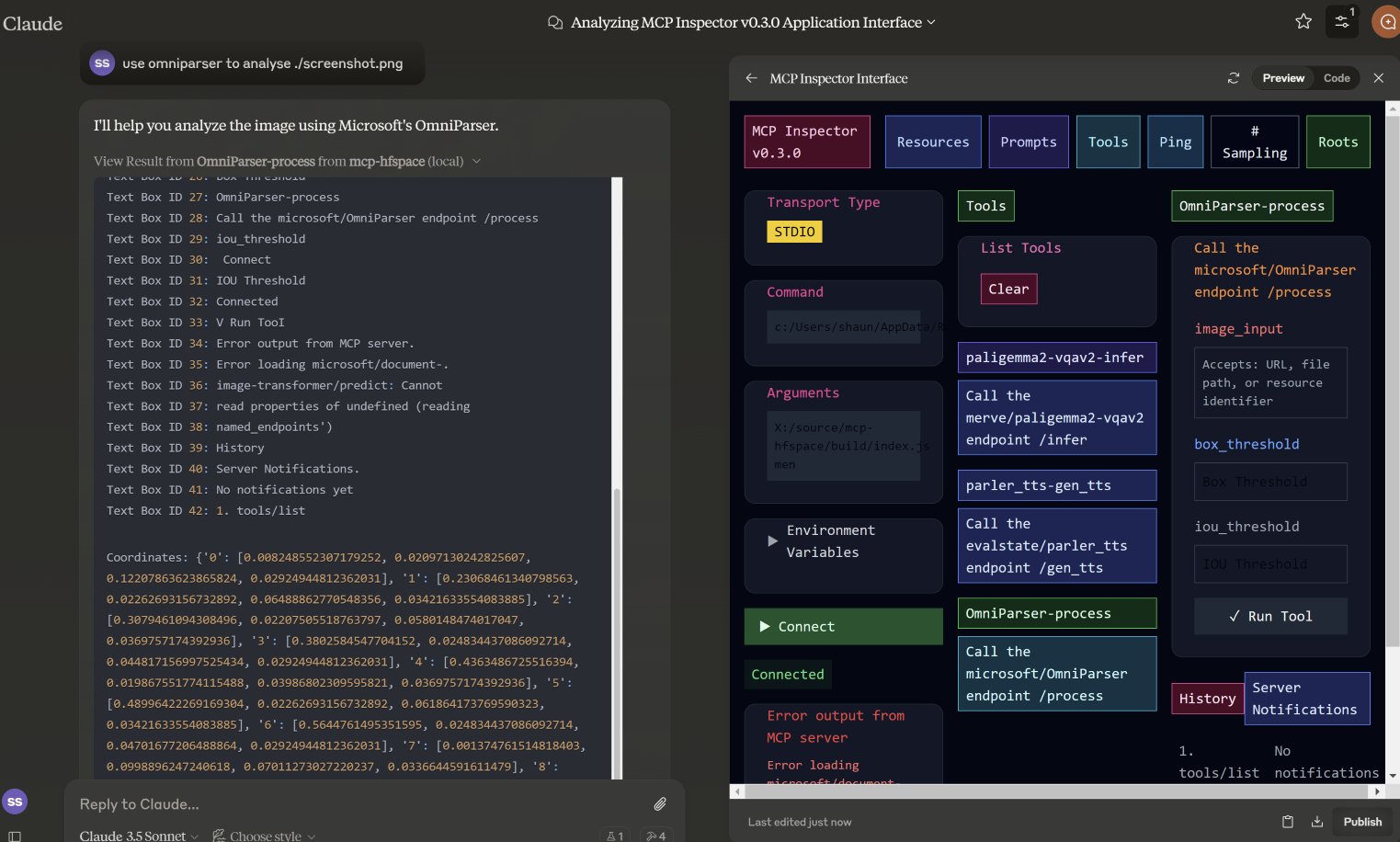
En este ejemplo, especificamos el nombre de archivo que usará microsoft/OmniParser y obtenemos una imagen anotada y dos fragmentos de texto separados: descripciones y coordenadas. El mensaje utilizado fue use omniparser to analyse ./screenshot.png y use the analysis to produce an artifact that reproduces that screen . DawnC/Pawmatch también es eficaz en esto.
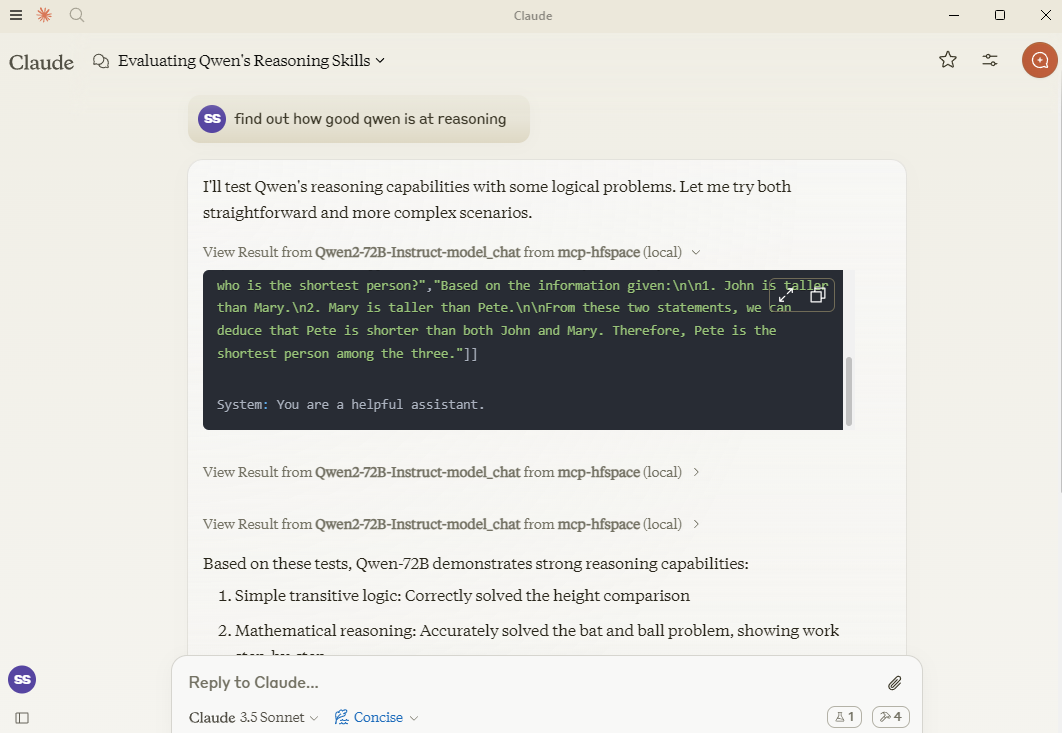
En este ejemplo, Claude propone una serie de acertijos de razonamiento para Qwen y formula preguntas de seguimiento para aclararlos.
Si lo necesita, puede especificar un punto final de API específico añadiéndolo al nombre del espacio. Por lo tanto, en lugar de pasar Qwen/Qwen2.5-72B-Instruct debería usar Qwen/Qwen2.5-72B-Instruct/model_chat .
Esto se puede desactivar con la opción --desktop-mode=false o la variable de entorno CLAUDE_DESKTOP_MODE=false. En este caso, el contenido se devuelve como un recurso incrustado codificado en Base64.
Algunos espacios recomendados para probar:
shuttleai/shuttle-3.1-estética
laboratorios de la selva negra/FLUX.1-schnell
yanze/PuLID-FLUX
Inspyrenet-Rembg (Eliminación de fondo)
diyism/Datou1111-shou_xin - Hermosos dibujos a lápiz
Qwen/Qwen2.5-72B-Instrucciones
prithivMLmods/Mistral-7B-Instruct-v0.3
fantasía/Sonido-AI-SFX
parler-tts/parler_tts
hf-audio/whisper-large-v3-turbo
(los modelos openai usan parámetros sin nombre, por lo que no funcionarán)
haoheliu/audioldm2-texto2audio-texto2música
microsoft/OmniParser
merve/paligemma2-vqav2
merve/paligemma-doc
DawnC/PawMatchAI
DawnC/PawMatchAI/on_find_match_click - para recomendaciones interactivas de perros
Se generan indicaciones para cada espacio que permiten introducir información. Tenga en cuenta que, a menudo, los espacios no se configuran con etiquetas útiles. Claude es muy hábil para resolver este problema, y la descripción de la herramienta es bastante completa (aunque no está visible en Claude Desktop).
Se devuelve una lista de archivos en WORK_DIR y, para mayor comodidad, el nombre se devuelve como texto "Usar el archivo...". Si desea agregar algo al contexto de Claude, utilice el clip; de lo contrario, especifique el nombre del archivo para el servidor MCP. Claude no admite la transmisión de recursos desde el contexto.
Los espacios privados se respaldan con un token HuggingFace. Este token se utiliza para descargar y guardar el contenido generado.
Para utilizar con Claude Desktop, agregue la configuración del servidor:
En MacOS: ~/Library/Application Support/Claude/claude_desktop_config.json En Windows: %APPDATA%/Claude/claude_desktop_config.json
{
  "mcpServers": {
    "mcp-hfspace": {
      "command": "npx"
      "args:" [
        "-y",
        "@llmindset/mcp-hfspace",
        "--work-dir=~/mcp-files/ or x:/temp/mcp-files/",
        "--HF_TOKEN=HF_{optional token}"
        "Qwen/Qwen2-72B-Instruct",
        "black-forest-labs/FLUX.1-schnell",
        "space/example/specific-endpint"
        (... and so on)
        ]
    }
  }
}Los puntos finales con parámetros sin nombre no son compatibles por el momento.
Traducción completa de algunos tipos complejos de Python a formatos MCP adecuados.
Claude Desktop 0.75 no parece responder a los errores del servidor MCP, sino que se agota el tiempo de espera. Si persisten los problemas, use el Inspector de MCP para diagnosticar mejor el problema. Si algo deja de funcionar repentinamente, probablemente se deba a que se agotó su cuota de HuggingFace ZeroGPU. Inténtelo de nuevo después de un rato o configure su propio espacio de alojamiento.
Claude Desktop parece usar un tiempo de espera fijo de 60 s y no parece usar notificaciones de progreso para gestionar la experiencia de usuario ni el mantenimiento de la actividad. Si utiliza espacios con cero GPU, es posible que se agote el tiempo de espera de los trabajos grandes o pesados. Sin embargo, revise WORK_DIR para ver los resultados; el servidor MCP capturará y guardará el resultado si se generó.
Los informes de Claude Desktops sobre el estado del servidor, el registro, etc. no son muy buenos: use @modelcontextprotocol/inspector para ayudar a diagnosticar problemas.
Si las cuotas o colas de ZeroGPU son demasiado largas, intente duplicar el espacio. Si su trabajo tarda menos de sesenta segundos, generalmente puede cambiar el decorador de funciones @spaces.GPU(duration=20) en app.py para solicitar menos cuota al ejecutar el trabajo.
Si tiene una cuenta HuggingFace Pro, tenga en cuenta que la API de Gradio no le ofrece una cotización adicional para trabajos ZeroGPU: deberá configurar un encabezado X-IP-Token para lograrlo.
Si tienes un espacio privado y hardware dedicado, tu HF_TOKEN te dará acceso directo a él, sin cuotas. Lo recomiendo si lo usas para cualquier tarea de producción.
A list of available file and resources. If the User requests things like 'most recent image' or 'the audio' use this tool to identify the intended resource.This tool returns 'resource uri', 'name', 'size', 'last modified' and 'mime type' in a markdown table
| Name | Required | Description | Default |
|---|---|---|---|
No parameters | |||
Does the description disclose side effects, auth requirements, rate limits, or destructive behavior?
With no annotations provided, the description carries the full burden of behavioral disclosure. It describes the return format (markdown table with specific fields) which is valuable, but doesn't mention important behavioral aspects like whether this lists all files or has pagination, if it requires authentication, or any rate limits. It adds some context but leaves gaps.
Agents need to know what a tool does to the world before calling it. Descriptions should go beyond structured annotations to explain consequences.
Is the description appropriately sized, front-loaded, and free of redundancy?
The description is efficiently structured in two sentences: the first states the purpose and usage context, the second specifies the return format. Every sentence adds value with no redundant information, making it appropriately sized and front-loaded.
Shorter descriptions cost fewer tokens and are easier for agents to parse. Every sentence should earn its place.
Given the tool's complexity, does the description cover enough for an agent to succeed on first attempt?
Given the tool's simplicity (0 parameters, no annotations, no output schema), the description provides sufficient context about what the tool does, when to use it, and what it returns. However, it could be more complete by explicitly differentiating from sibling tools and mentioning any behavioral constraints like access limitations.
Complex tools with many parameters or behaviors need more documentation. Simple tools need less. This dimension scales expectations accordingly.
Does the description clarify parameter syntax, constraints, interactions, or defaults beyond what the schema provides?
The tool has 0 parameters with 100% schema description coverage, so the schema already fully documents the lack of parameters. The description appropriately doesn't add parameter information beyond what's in the schema, maintaining focus on the tool's purpose and output. This meets the baseline expectation for a zero-parameter tool.
Input schemas describe structure but not intent. Descriptions should explain non-obvious parameter relationships and valid value ranges.
Does the description clearly state what the tool does and how it differs from similar tools?
The description clearly states the tool's purpose: listing available files and resources with specific attributes. It uses the verb 'returns' and specifies the resource type ('files and resources'), but doesn't explicitly differentiate from sibling tools like 'search-spaces' which might have overlapping functionality.
Agents choose between tools based on descriptions. A clear purpose with a specific verb and resource helps agents select the right tool.
Does the description explain when to use this tool, when not to, or what alternatives exist?
The description provides clear guidance on when to use this tool: when the user requests specific resources like 'most recent image' or 'the audio'. However, it doesn't explicitly state when NOT to use it or mention alternatives among the sibling tools, leaving some ambiguity about tool selection.
Agents often have multiple tools that could apply. Explicit usage guidance like "use X instead of Y when Z" prevents misuse.
Call the FLUX.1-schnell endpoint /infer
| Name | Required | Description | Default |
|---|---|---|---|
| prompt | Yes | Prompt | |
| seed | No | Seed | |
| randomize_seed | No | Randomize seed | |
| width | No | Width | |
| height | No | Height | |
| num_inference_steps | No | Number of inference steps |
Does the description disclose side effects, auth requirements, rate limits, or destructive behavior?
With no annotations provided, the description carries the full burden of behavioral disclosure. It only states the endpoint call without explaining what the tool does (e.g., image generation), its effects (e.g., creates an image file), performance traits, or any constraints like rate limits or authentication needs, resulting in insufficient transparency for a tool with multiple parameters.
Agents need to know what a tool does to the world before calling it. Descriptions should go beyond structured annotations to explain consequences.
Is the description appropriately sized, front-loaded, and free of redundancy?
The description is a single, concise sentence that directly states the action. It is front-loaded with no unnecessary words, making it efficient. However, it lacks depth, which is a content issue rather than a structural one, so it scores well for conciseness.
Shorter descriptions cost fewer tokens and are easier for agents to parse. Every sentence should earn its place.
Given the tool's complexity, does the description cover enough for an agent to succeed on first attempt?
Given the tool's complexity with 6 parameters and no output schema, the description is incomplete. It fails to explain the tool's purpose, behavior, or output, leaving significant gaps. Without annotations or a clear context, it does not provide enough information for effective use, especially compared to sibling tools.
Complex tools with many parameters or behaviors need more documentation. Simple tools need less. This dimension scales expectations accordingly.
Does the description clarify parameter syntax, constraints, interactions, or defaults beyond what the schema provides?
Schema description coverage is 100%, providing basic descriptions for all parameters. The description adds no additional meaning beyond the schema, such as explaining parameter interactions or use cases. However, since the schema is fully documented, the baseline score of 3 is appropriate as the description does not compensate but also does not detract.
Input schemas describe structure but not intent. Descriptions should explain non-obvious parameter relationships and valid value ranges.
Does the description clearly state what the tool does and how it differs from similar tools?
The description 'Call the FLUX.1-schnell endpoint /infer' restates the tool name and title without specifying what the tool does. It mentions an endpoint but lacks a clear verb and resource, such as generating images or processing prompts, making the purpose vague and not distinguishing it from sibling tools like 'available-files' or 'search-spaces'.
Agents choose between tools based on descriptions. A clear purpose with a specific verb and resource helps agents select the right tool.
Does the description explain when to use this tool, when not to, or what alternatives exist?
No guidance is provided on when to use this tool versus alternatives. The description does not mention any context, prerequisites, or exclusions, leaving the agent with no information on appropriate usage scenarios or how it differs from sibling tools.
Agents often have multiple tools that could apply. Explicit usage guidance like "use X instead of Y when Z" prevents misuse.
Use semantic search to find an endpoint on the Hugging Face Spaces service. The search term will usually be 3-7 words describing a task or activity the Person is trying to accomplish. The results are returned in a markdown table. Present all results to the Person. Await specific guidance from the Person before making further Tool calls.
| Name | Required | Description | Default |
|---|---|---|---|
| query | No | The semantic search term to use. |
Does the description disclose side effects, auth requirements, rate limits, or destructive behavior?
With no annotations provided, the description carries full burden. It discloses key behavioral traits: the search is semantic (not keyword-based), results come in markdown table format, and the agent should present all results and await Person's guidance. However, it doesn't mention rate limits, authentication requirements, or what happens with empty/no results.
Agents need to know what a tool does to the world before calling it. Descriptions should go beyond structured annotations to explain consequences.
Is the description appropriately sized, front-loaded, and free of redundancy?
The description is appropriately sized and front-loaded: first sentence states core purpose, second adds query guidance, third specifies output format, fourth provides workflow instructions. Every sentence earns its place with no wasted words or redundancy.
Shorter descriptions cost fewer tokens and are easier for agents to parse. Every sentence should earn its place.
Given the tool's complexity, does the description cover enough for an agent to succeed on first attempt?
Given 1 parameter with full schema coverage and no output schema, the description provides good context about the search approach, result format, and agent workflow. It could be more complete by addressing edge cases (no results, error handling) or explaining the semantic search mechanism, but covers the essential usage scenario adequately.
Complex tools with many parameters or behaviors need more documentation. Simple tools need less. This dimension scales expectations accordingly.
Does the description clarify parameter syntax, constraints, interactions, or defaults beyond what the schema provides?
Schema description coverage is 100% (the single parameter 'query' is fully described in schema), so baseline is 3. The description adds marginal value by suggesting query length (3-7 words) and content (task/activity description), but doesn't provide syntax examples or format details beyond what the schema already states.
Input schemas describe structure but not intent. Descriptions should explain non-obvious parameter relationships and valid value ranges.
Does the description clearly state what the tool does and how it differs from similar tools?
The description clearly states the specific action ('semantic search'), target resource ('endpoint on the Hugging Face Spaces service'), and distinguishes from siblings by focusing on search rather than file listing or inference. It explicitly mentions what the tool does: finding endpoints via semantic search with results in markdown table format.
Agents choose between tools based on descriptions. A clear purpose with a specific verb and resource helps agents select the right tool.
Does the description explain when to use this tool, when not to, or what alternatives exist?
The description provides clear context for when to use this tool: when the Person has a task/activity description (3-7 words) and needs to find relevant endpoints. It instructs to present all results and await further guidance, establishing a workflow. However, it doesn't explicitly mention when NOT to use it or name specific alternatives among siblings.
Agents often have multiple tools that could apply. Explicit usage guidance like "use X instead of Y when Z" prevents misuse.
Recent tool additions, removals, and schema changes observed during successful MCP inspections.
v1.0.0FLUX_1-schnell-infer12 fields changedInput schema / properties / height / descriptionPrevious value: -"numeric value between 256 and 2048"New value: +"Height"Input schema / properties / height / maximumRemoved value: -2048Input schema / properties / height / minimumRemoved value: -256Input schema / properties / num_inference_steps / descriptionPrevious value: -"numeric value between 1 and 50"New value: +"Number of inference steps"Input schema / properties / num_inference_steps / maximumRemoved value: -50Input schema / properties / num_inference_steps / minimumRemoved value: -1Input schema / properties / seed / descriptionPrevious value: -"numeric value between 0 and 2147483647"New value: +"Seed"Input schema / properties / seed / maximumRemoved value: -2147483647Input schema / properties / seed / minimumRemoved value: -0Input schema / properties / width / descriptionPrevious value: -"numeric value between 256 and 2048"New value: +"Width"Input schema / properties / width / maximumRemoved value: -2048Input schema / properties / width / minimumRemoved value: -256available-filesFLUX_1-schnell-infersearch-spacesScored across 3 tools
Each tool has a clearly distinct purpose: 'available-files' lists local resources, 'FLUX_1-schnell-infer' calls a specific AI inference endpoint, and 'search-spaces' performs semantic search on Hugging Face Spaces. There is no overlap in functionality, making tool selection unambiguous for an agent.
The naming is inconsistent with mixed conventions: 'available-files' uses kebab-case, 'FLUX_1-schnell-infer' mixes uppercase and kebab-case with an underscore, and 'search-spaces' uses kebab-case. There is no predictable verb_noun pattern, and the styles vary chaotically across the set.
With only 3 tools, the count feels thin for a server named 'mcp-hfspace' that seems to target Hugging Face Spaces and related resources. While the tools cover distinct areas, the scope might be underdeveloped, lacking operations like managing spaces or handling more inference types.
Inferred domain includes Hugging Face Spaces and file/resources management, but there are significant gaps: no tools for creating, updating, or deleting spaces or files, and inference is limited to one specific endpoint. This incomplete surface will likely cause agent failures in broader workflows.
One workspace of tools for Claude and ChatGPT: connect 600+ apps, generate media, build tools.
Connect to Hugging Face Hub and thousands of Gradio AI Applications
Connect Claude to your Platform7n workspaces — chat, links, and tasks. One-click OAuth.
Connect Claude to Fathom meeting recordings, transcripts, and summaries