

A
licenseC
qualityC
maintenanceUse HuggingFace Spaces directly from Claude. Use Open Source Image Generation, Chat, Vision tasks and more. Supports Image, Audio and text uploads/downloads.
3
211 npm
389
MIT

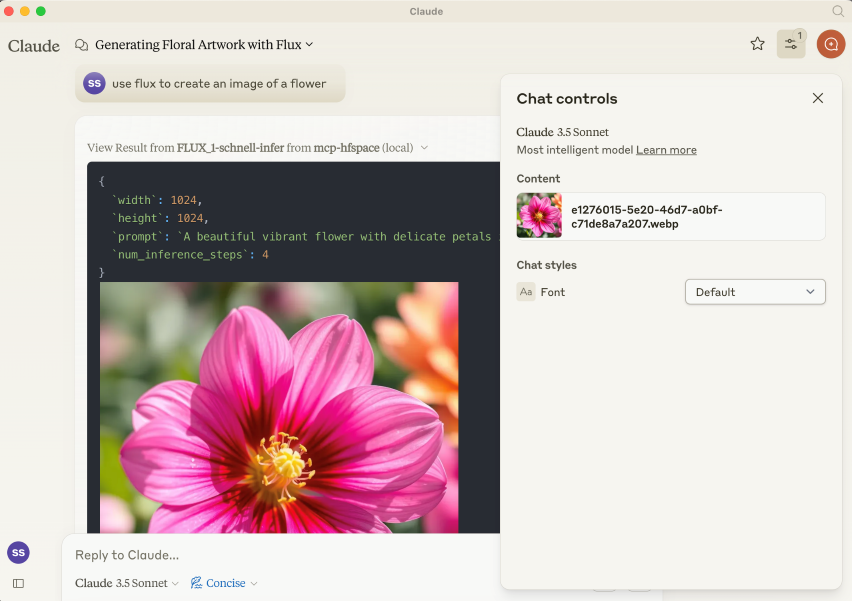
Provides integration with FLUX.1-schnell image generation model through Hugging Face, enabling image creation capabilities.
Interacts with Gradio-based Hugging Face Spaces APIs to access various AI capabilities through a standardized interface.
Connects to Hugging Face Spaces, enabling access to various AI models and capabilities including image generation, vision tasks, text-to-speech, speech-to-text, and chat functionality with minimal setup.
Connects to shuttle-jaguar image generation model for producing high-quality AI-generated images.
Click on "Deploy Server".
Wait a few minutes for the server to deploy. Once ready, it will show a "Started" state.
In the chat, type @ followed by the MCP server name and your instructions, e.g., "@mcp-hfspace MCP Server generate an image of a futuristic city skyline at sunset"
That's it! The server will respond to your query, and you can continue using it as needed.
Here is a step-by-step guide with screenshots.
Read the introduction here llmindset.co.uk/resources/mcp-hfspace/
Connect to Hugging Face Spaces with minimal setup needed - simply add your spaces and go!
By default, it connects to evalstate/FLUX.1-schnell providing Image Generation capabilities to Claude Desktop.
NPM Package is @llmindset/mcp-hfspsace.
Install a recent version of NodeJS for your platform, then add the following to the mcpServers section of your claude_desktop_config.json file:
    "mcp=hfspace": {
      "command": "npx",
      "args": [
        "-y",
        "@llmindset/mcp-hfspace"
      ]
    }
Please make sure you are using Claude Desktop 0.78 or greater.
This will get you started with an Image Generator.
Supply a list of HuggingFace spaces in the arguments. mcp-hfspace will find the most appropriate endpoint and automatically configure it for usage. An example claude_desktop_config.json is supplied below.
By default the current working directory is used for file upload/download. On Windows this is a read/write folder at \users\<username>\AppData\Roaming\Claude\<version.number\, and on MacOS it is the is the read-only root: /.
It is recommended to override this and set a Working Directory for handling the upload and download of images and other file-based content. Specify either the --work-dir=/your_directory argument or MCP_HF_WORK_DIR environment variable.
An example configuration for using a modern image generator, vision model and text to speech is below with a working directory set is below:
    "mcp-hfspace": {
      "command": "npx",
      "args": [
        "-y",
        "@llmindset/mcp-hfspace",
        "--work-dir=/Users/evalstate/mcp-store",
        "shuttleai/shuttle-jaguar",
        "styletts2/styletts2",
        "Qwen/QVQ-72B-preview"
      ]
    }
To use private spaces, supply your Hugging Face Token with either the --hf-token=hf_... argument or HF_TOKEN environment variable.
It's possible to run multiple server instances to use different working directories and tokens if needed.
Related MCP server: Gemini Pro MCP Server
By default, the Server operates in Claude Desktop Mode. In this mode, Images are returned in the tool responses, while other files are saved in the working folder, their file path is returned as a message. This will usually give the best experience if using Claude Desktop as the client.
URLs can also be supplied as inputs: the content gets passed to the Space.
There is an "Available Resources" prompt that gives Claude the available files and mime types from your working directory. This is currently the best way to manage files.
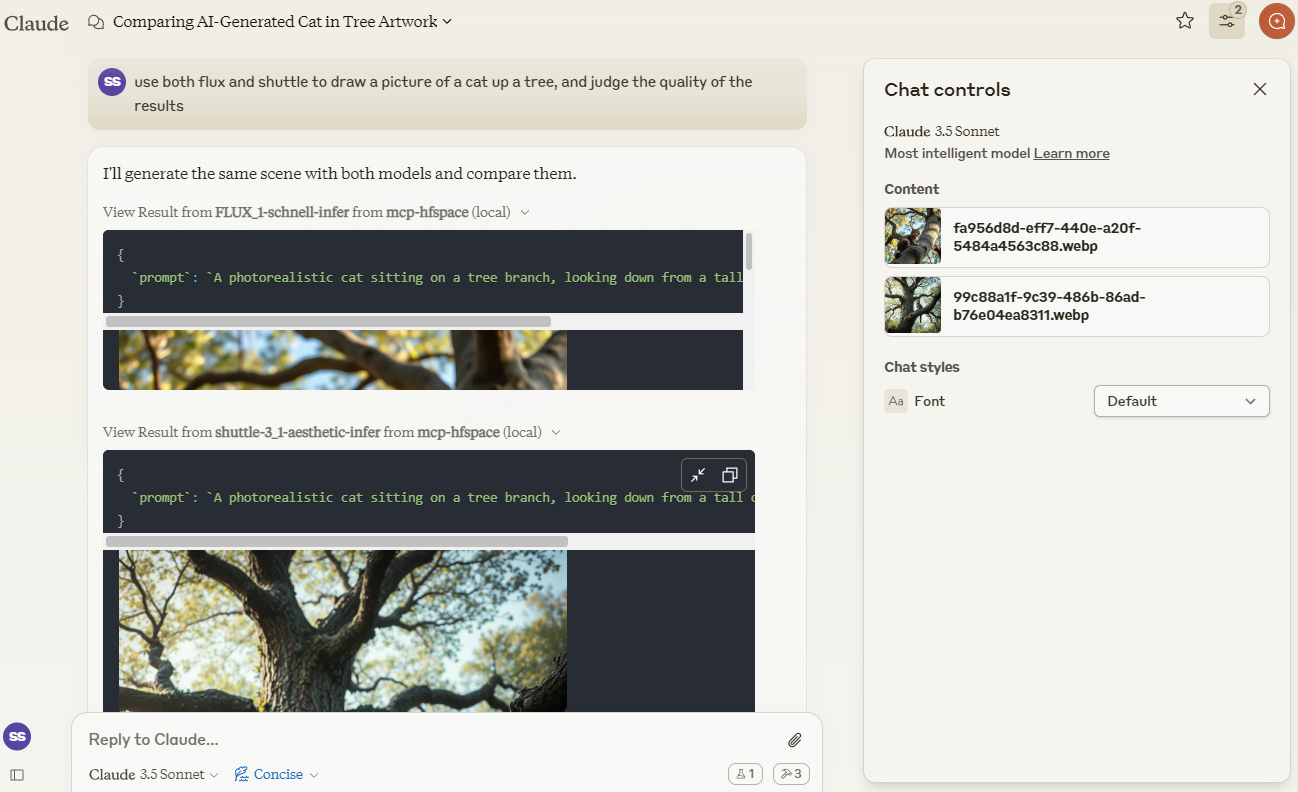
We'll use Claude to compare images created by shuttleai/shuttle-3.1-aesthetic and FLUX.1-schnell. The images gets saved to the Work Directory, as well as included in Claude's context window - so Claude can use its vision capabilities.
We'll use merve/paligemma2-vqav2 space link to query an image. In this case, we specify the filename which is available in the Working Directory: we don't want to upload the Image directly to Claude's context window. So, we can prompt Claude:
use paligemma to find out who is in "test_gemma.jpg" -> Text Output: david bowie
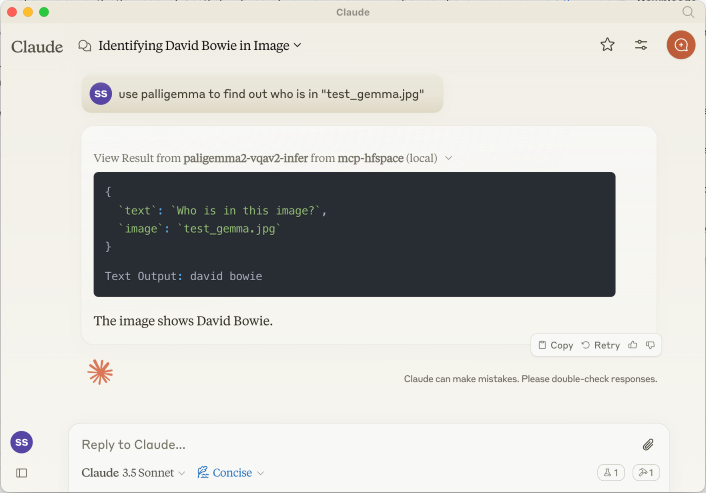
If you are uploading something to Claude's context use the Paperclip Attachment button, otherwise specify the filename for the Server to send directly.
We can also supply a URL. For example : use paligemma to detect humans in https://e3.365dm.com/24/12/1600x900/skynews-taylor-swift-eras-tour_6771083.jpg?20241209000914 -> One person is detected in the image - Taylor Swift on stage.
In Claude Desktop Mode, the audio file is saved in the WORK_DIR, and Claude is notified of the creation. If not in desktop mode, the file is returned as a base64 encoded resource to the Client (useful if it supports embedded Audio attachments).
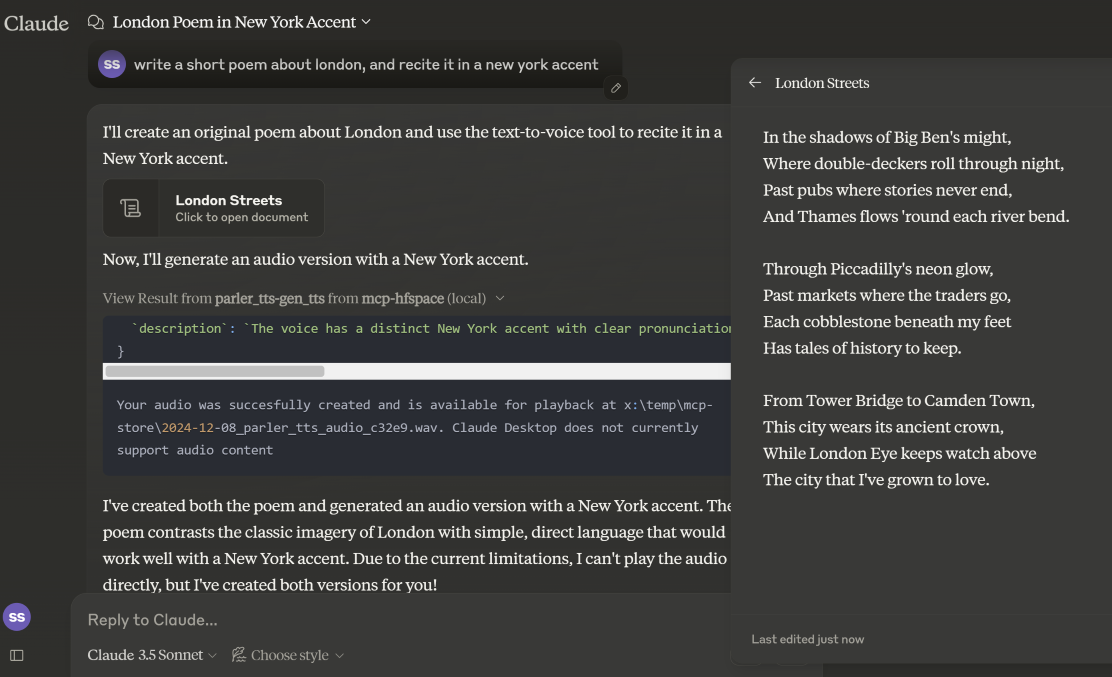
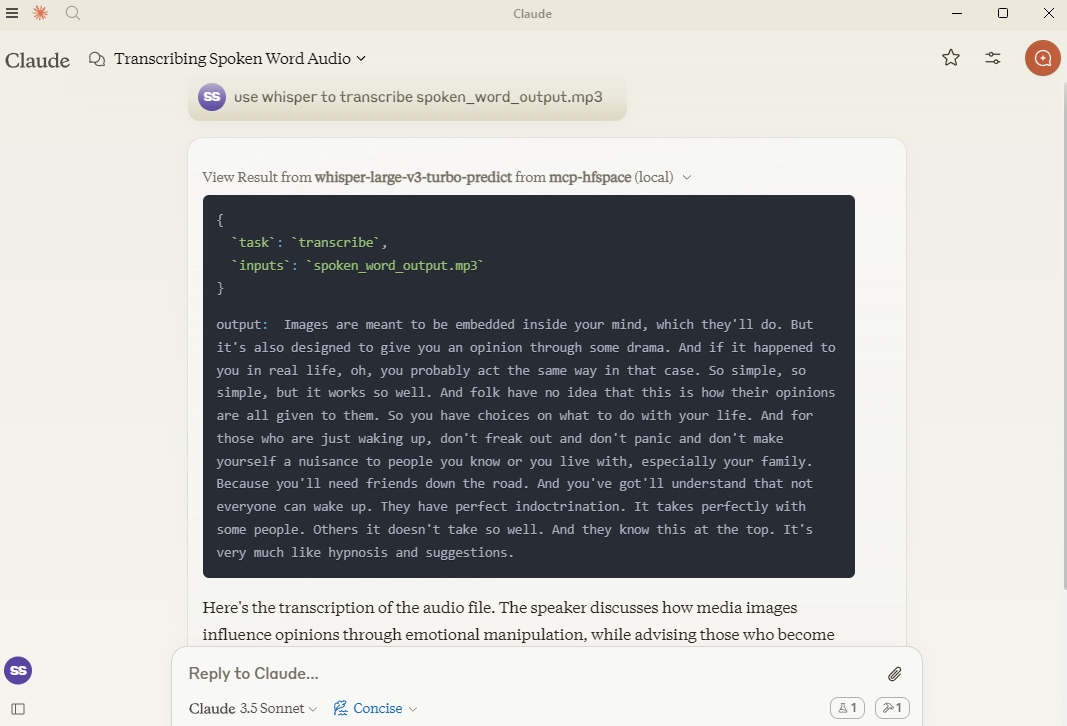
Here, we use hf-audio/whisper-large-v3-turbo to transcribe some audio, and make it available to Claude.
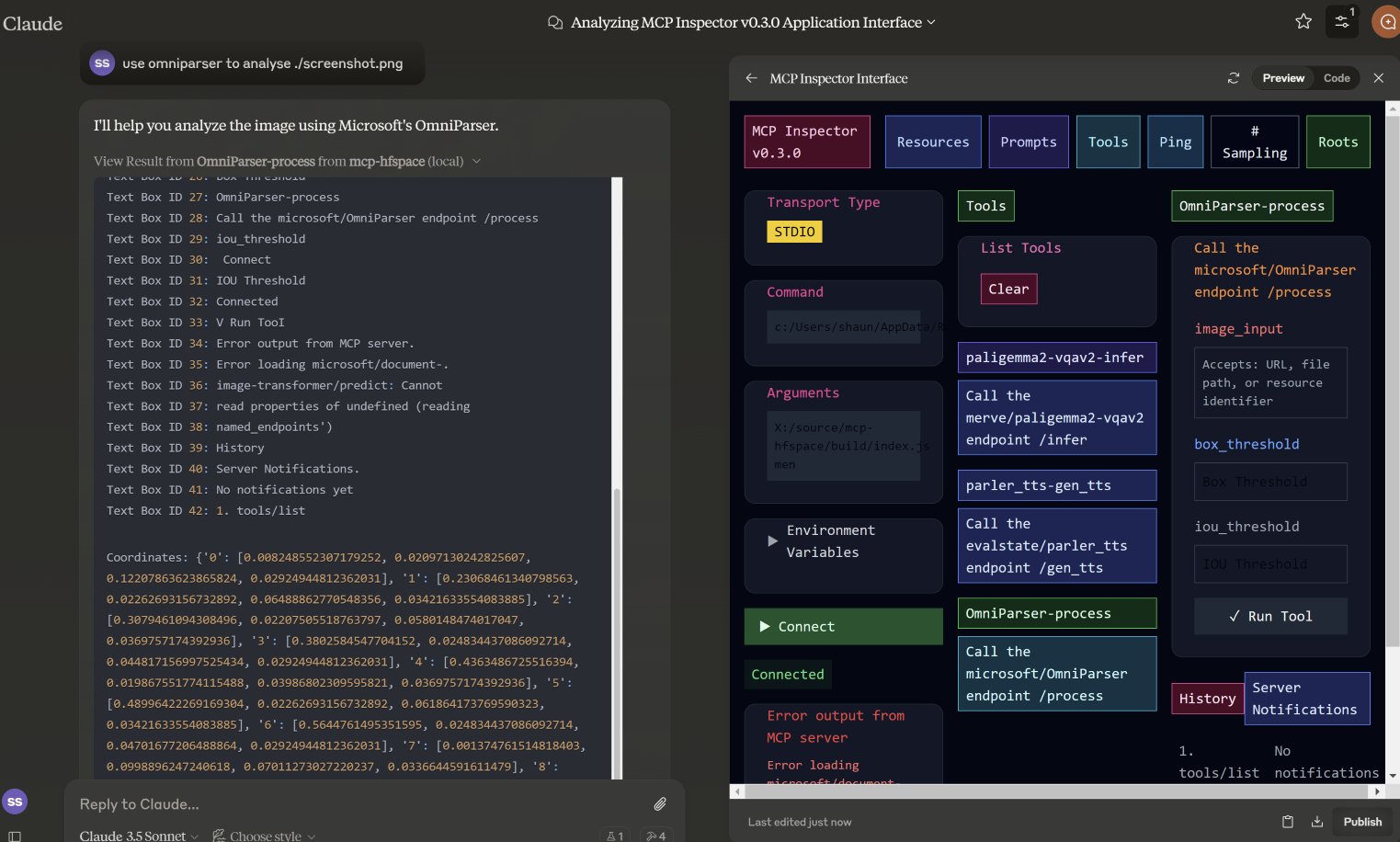
In this example, we specify the filename for microsoft/OmniParser to use, and get returned an annotated Image and 2 separate pieces of text: descriptions and coordinates. The prompt used was use omniparser to analyse ./screenshot.png and use the analysis to produce an artifact that reproduces that screen. DawnC/Pawmatch is also good at this.
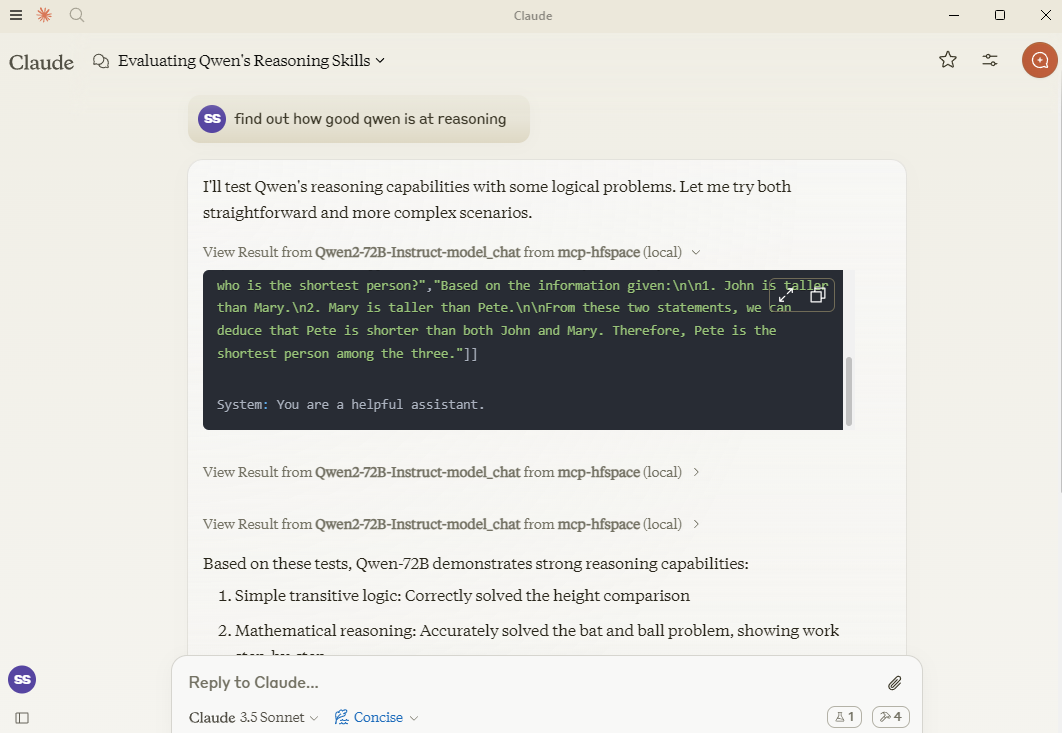
In this example, Claude sets a number of reasoning puzzles for Qwen, and asks follow-up questions for clarification.
If you need, you can specify a specific API Endpoint by adding it to the spacename. So rather than passing in Qwen/Qwen2.5-72B-Instruct you would use Qwen/Qwen2.5-72B-Instruct/model_chat.
This can be disabled with the option --desktop-mode=false or the environment variable CLAUDE_DESKTOP_MODE=false. In this case, content as returned as an embedded Base64 encoded Resource.
Some recommended spaces to try:
shuttleai/shuttle-3.1-aesthetic
black-forest-labs/FLUX.1-schnell
yanze/PuLID-FLUX
Inspyrenet-Rembg (Background Removal)
diyism/Datou1111-shou_xin - Beautiful Pencil Drawings
Qwen/Qwen2.5-72B-Instruct
prithivMLmods/Mistral-7B-Instruct-v0.3
fantaxy/Sound-AI-SFX
parler-tts/parler_tts
hf-audio/whisper-large-v3-turbo
(the openai models use unnamed parameters so will not work)
haoheliu/audioldm2-text2audio-text2music
microsoft/OmniParser
merve/paligemma2-vqav2
merve/paligemma-doc
DawnC/PawMatchAI
DawnC/PawMatchAI/on_find_match_click - for interactive dog recommendations
Prompts for each Space are generated, and provide an opportunity to input. Bear in mind that often Spaces aren't configured with particularly helpful labels etc. Claude is actually very good at figuring this out, and the Tool description is quite rich (but not visible in Claude Desktop).
A list of files in the WORK_DIR is returned, and as a convenience returns the name as "Use the file..." text. If you want to add something to Claude's context, use the paperclip - otherwise specify the filename for the MCP Server. Claude does not support transmitting resources from within Context.
Private Spaces are supported with a HuggingFace token. The Token is used to download and save generated content.
To use with Claude Desktop, add the server config:
On MacOS: ~/Library/Application Support/Claude/claude_desktop_config.json
On Windows: %APPDATA%/Claude/claude_desktop_config.json
{
  "mcpServers": {
    "mcp-hfspace": {
      "command": "npx"
      "args:" [
        "-y",
        "@llmindset/mcp-hfspace",
        "--work-dir=~/mcp-files/ or x:/temp/mcp-files/",
        "--HF_TOKEN=HF_{optional token}"
        "Qwen/Qwen2-72B-Instruct",
        "black-forest-labs/FLUX.1-schnell",
        "space/example/specific-endpint"
        (... and so on)
        ]
    }
  }
}Endpoints with unnamed parameters are unsupported for the moment.
Full translation from some complex Python types to suitable MCP formats.
Claude Desktop 0.75 doesn't seem to respond to errors from the MCP Server, timing out instead. For persistent issues, use the MCP Inspector to get a better look at diagnosing what's going wrong. If something suddenly stops working, it's probably due to exhausting your HuggingFace ZeroGPU quota - try again after a short period, or set up your own Space for hosting.
Claude Desktop seems to use a hard timeout value of 60s, and doesn't appear to use Progress Notifications to manage UX or keep-alive. If you are using ZeroGPU spaces, large/heavy jobs may timeout. Check the WORK_DIR for results though; the MCP Server will still capture and save the result if it was produced.
Claude Desktops reporting of Server Status, logging etc. isn't great - use @modelcontextprotocol/inspector to help diagnose issues.
If ZeroGPU quotas or queues are too long, try duplicating the space. If your job takes less than sixty seconds, you can usually change the function decorator @spaces.GPU(duration=20) in app.py to request less quota when running the job.
If you have a HuggingFace Pro account, please note that The Gradio API does not your additional quote for ZeroGPU jobs - you will need to set an X-IP-Token header to achieve that.
If you have a private space, and dedicated hardware your HF_TOKEN will give you direct access to that - no quota's apply. I recommend this if you are using for any kind of Production task.
A list of available file and resources. If the User requests things like 'most recent image' or 'the audio' use this tool to identify the intended resource.This tool returns 'resource uri', 'name', 'size', 'last modified' and 'mime type' in a markdown table
| Name | Required | Description | Default |
|---|---|---|---|
No parameters | |||
Does the description disclose side effects, auth requirements, rate limits, or destructive behavior?
With no annotations provided, the description carries the full burden of behavioral disclosure. It describes the return format (markdown table with specific fields) which is valuable, but doesn't mention important behavioral aspects like whether this lists all files or has pagination, if it requires authentication, or any rate limits. It adds some context but leaves gaps.
Agents need to know what a tool does to the world before calling it. Descriptions should go beyond structured annotations to explain consequences.
Is the description appropriately sized, front-loaded, and free of redundancy?
The description is efficiently structured in two sentences: the first states the purpose and usage context, the second specifies the return format. Every sentence adds value with no redundant information, making it appropriately sized and front-loaded.
Shorter descriptions cost fewer tokens and are easier for agents to parse. Every sentence should earn its place.
Given the tool's complexity, does the description cover enough for an agent to succeed on first attempt?
Given the tool's simplicity (0 parameters, no annotations, no output schema), the description provides sufficient context about what the tool does, when to use it, and what it returns. However, it could be more complete by explicitly differentiating from sibling tools and mentioning any behavioral constraints like access limitations.
Complex tools with many parameters or behaviors need more documentation. Simple tools need less. This dimension scales expectations accordingly.
Does the description clarify parameter syntax, constraints, interactions, or defaults beyond what the schema provides?
The tool has 0 parameters with 100% schema description coverage, so the schema already fully documents the lack of parameters. The description appropriately doesn't add parameter information beyond what's in the schema, maintaining focus on the tool's purpose and output. This meets the baseline expectation for a zero-parameter tool.
Input schemas describe structure but not intent. Descriptions should explain non-obvious parameter relationships and valid value ranges.
Does the description clearly state what the tool does and how it differs from similar tools?
The description clearly states the tool's purpose: listing available files and resources with specific attributes. It uses the verb 'returns' and specifies the resource type ('files and resources'), but doesn't explicitly differentiate from sibling tools like 'search-spaces' which might have overlapping functionality.
Agents choose between tools based on descriptions. A clear purpose with a specific verb and resource helps agents select the right tool.
Does the description explain when to use this tool, when not to, or what alternatives exist?
The description provides clear guidance on when to use this tool: when the user requests specific resources like 'most recent image' or 'the audio'. However, it doesn't explicitly state when NOT to use it or mention alternatives among the sibling tools, leaving some ambiguity about tool selection.
Agents often have multiple tools that could apply. Explicit usage guidance like "use X instead of Y when Z" prevents misuse.
Call the FLUX.1-schnell endpoint /infer
| Name | Required | Description | Default |
|---|---|---|---|
| prompt | Yes | Prompt | |
| seed | No | Seed | |
| randomize_seed | No | Randomize seed | |
| width | No | Width | |
| height | No | Height | |
| num_inference_steps | No | Number of inference steps |
Does the description disclose side effects, auth requirements, rate limits, or destructive behavior?
With no annotations provided, the description carries the full burden of behavioral disclosure. It only states the endpoint call without explaining what the tool does (e.g., image generation), its effects (e.g., creates an image file), performance traits, or any constraints like rate limits or authentication needs, resulting in insufficient transparency for a tool with multiple parameters.
Agents need to know what a tool does to the world before calling it. Descriptions should go beyond structured annotations to explain consequences.
Is the description appropriately sized, front-loaded, and free of redundancy?
The description is a single, concise sentence that directly states the action. It is front-loaded with no unnecessary words, making it efficient. However, it lacks depth, which is a content issue rather than a structural one, so it scores well for conciseness.
Shorter descriptions cost fewer tokens and are easier for agents to parse. Every sentence should earn its place.
Given the tool's complexity, does the description cover enough for an agent to succeed on first attempt?
Given the tool's complexity with 6 parameters and no output schema, the description is incomplete. It fails to explain the tool's purpose, behavior, or output, leaving significant gaps. Without annotations or a clear context, it does not provide enough information for effective use, especially compared to sibling tools.
Complex tools with many parameters or behaviors need more documentation. Simple tools need less. This dimension scales expectations accordingly.
Does the description clarify parameter syntax, constraints, interactions, or defaults beyond what the schema provides?
Schema description coverage is 100%, providing basic descriptions for all parameters. The description adds no additional meaning beyond the schema, such as explaining parameter interactions or use cases. However, since the schema is fully documented, the baseline score of 3 is appropriate as the description does not compensate but also does not detract.
Input schemas describe structure but not intent. Descriptions should explain non-obvious parameter relationships and valid value ranges.
Does the description clearly state what the tool does and how it differs from similar tools?
The description 'Call the FLUX.1-schnell endpoint /infer' restates the tool name and title without specifying what the tool does. It mentions an endpoint but lacks a clear verb and resource, such as generating images or processing prompts, making the purpose vague and not distinguishing it from sibling tools like 'available-files' or 'search-spaces'.
Agents choose between tools based on descriptions. A clear purpose with a specific verb and resource helps agents select the right tool.
Does the description explain when to use this tool, when not to, or what alternatives exist?
No guidance is provided on when to use this tool versus alternatives. The description does not mention any context, prerequisites, or exclusions, leaving the agent with no information on appropriate usage scenarios or how it differs from sibling tools.
Agents often have multiple tools that could apply. Explicit usage guidance like "use X instead of Y when Z" prevents misuse.
Use semantic search to find an endpoint on the Hugging Face Spaces service. The search term will usually be 3-7 words describing a task or activity the Person is trying to accomplish. The results are returned in a markdown table. Present all results to the Person. Await specific guidance from the Person before making further Tool calls.
| Name | Required | Description | Default |
|---|---|---|---|
| query | No | The semantic search term to use. |
Does the description disclose side effects, auth requirements, rate limits, or destructive behavior?
With no annotations provided, the description carries full burden. It discloses key behavioral traits: the search is semantic (not keyword-based), results come in markdown table format, and the agent should present all results and await Person's guidance. However, it doesn't mention rate limits, authentication requirements, or what happens with empty/no results.
Agents need to know what a tool does to the world before calling it. Descriptions should go beyond structured annotations to explain consequences.
Is the description appropriately sized, front-loaded, and free of redundancy?
The description is appropriately sized and front-loaded: first sentence states core purpose, second adds query guidance, third specifies output format, fourth provides workflow instructions. Every sentence earns its place with no wasted words or redundancy.
Shorter descriptions cost fewer tokens and are easier for agents to parse. Every sentence should earn its place.
Given the tool's complexity, does the description cover enough for an agent to succeed on first attempt?
Given 1 parameter with full schema coverage and no output schema, the description provides good context about the search approach, result format, and agent workflow. It could be more complete by addressing edge cases (no results, error handling) or explaining the semantic search mechanism, but covers the essential usage scenario adequately.
Complex tools with many parameters or behaviors need more documentation. Simple tools need less. This dimension scales expectations accordingly.
Does the description clarify parameter syntax, constraints, interactions, or defaults beyond what the schema provides?
Schema description coverage is 100% (the single parameter 'query' is fully described in schema), so baseline is 3. The description adds marginal value by suggesting query length (3-7 words) and content (task/activity description), but doesn't provide syntax examples or format details beyond what the schema already states.
Input schemas describe structure but not intent. Descriptions should explain non-obvious parameter relationships and valid value ranges.
Does the description clearly state what the tool does and how it differs from similar tools?
The description clearly states the specific action ('semantic search'), target resource ('endpoint on the Hugging Face Spaces service'), and distinguishes from siblings by focusing on search rather than file listing or inference. It explicitly mentions what the tool does: finding endpoints via semantic search with results in markdown table format.
Agents choose between tools based on descriptions. A clear purpose with a specific verb and resource helps agents select the right tool.
Does the description explain when to use this tool, when not to, or what alternatives exist?
The description provides clear context for when to use this tool: when the Person has a task/activity description (3-7 words) and needs to find relevant endpoints. It instructs to present all results and await further guidance, establishing a workflow. However, it doesn't explicitly mention when NOT to use it or name specific alternatives among siblings.
Agents often have multiple tools that could apply. Explicit usage guidance like "use X instead of Y when Z" prevents misuse.
Recent tool additions, removals, and schema changes observed during successful MCP inspections.
v1.0.0FLUX_1-schnell-infer12 fields changedInput schema / properties / height / descriptionPrevious value: -"numeric value between 256 and 2048"New value: +"Height"Input schema / properties / height / maximumRemoved value: -2048Input schema / properties / height / minimumRemoved value: -256Input schema / properties / num_inference_steps / descriptionPrevious value: -"numeric value between 1 and 50"New value: +"Number of inference steps"Input schema / properties / num_inference_steps / maximumRemoved value: -50Input schema / properties / num_inference_steps / minimumRemoved value: -1Input schema / properties / seed / descriptionPrevious value: -"numeric value between 0 and 2147483647"New value: +"Seed"Input schema / properties / seed / maximumRemoved value: -2147483647Input schema / properties / seed / minimumRemoved value: -0Input schema / properties / width / descriptionPrevious value: -"numeric value between 256 and 2048"New value: +"Width"Input schema / properties / width / maximumRemoved value: -2048Input schema / properties / width / minimumRemoved value: -256available-filesFLUX_1-schnell-infersearch-spacesScored across 3 tools
Each tool has a clearly distinct purpose: 'available-files' lists local resources, 'FLUX_1-schnell-infer' calls a specific AI inference endpoint, and 'search-spaces' performs semantic search on Hugging Face Spaces. There is no overlap in functionality, making tool selection unambiguous for an agent.
The naming is inconsistent with mixed conventions: 'available-files' uses kebab-case, 'FLUX_1-schnell-infer' mixes uppercase and kebab-case with an underscore, and 'search-spaces' uses kebab-case. There is no predictable verb_noun pattern, and the styles vary chaotically across the set.
With only 3 tools, the count feels thin for a server named 'mcp-hfspace' that seems to target Hugging Face Spaces and related resources. While the tools cover distinct areas, the scope might be underdeveloped, lacking operations like managing spaces or handling more inference types.
Inferred domain includes Hugging Face Spaces and file/resources management, but there are significant gaps: no tools for creating, updating, or deleting spaces or files, and inference is limited to one specific endpoint. This incomplete surface will likely cause agent failures in broader workflows.
One workspace of tools for Claude and ChatGPT: connect 600+ apps, generate media, build tools.
Connect Claude to your Platform7n workspaces: chat, links, work and decks. One-click OAuth.
Connect AI assistants to your approved computer for files, commands, browser and desktop tasks.
Connect Claude to Fathom meeting recordings, transcripts, and summaries