

A
licenseC
qualityC
maintenanceUse HuggingFace Spaces directly from Claude. Use Open Source Image Generation, Chat, Vision tasks and more. Supports Image, Audio and text uploads/downloads.
3
754 npm
388
MIT

紹介文はこちらをご覧くださいllmindset.co.uk/resources/mcp-hfspace/
最小限の設定でHugging Face Spacesに接続できます。スペースを追加するだけですぐに使用できます。
デフォルトでは、 evalstate/FLUX.1-schnellに接続し、Claude Desktop にイメージ生成機能を提供します。
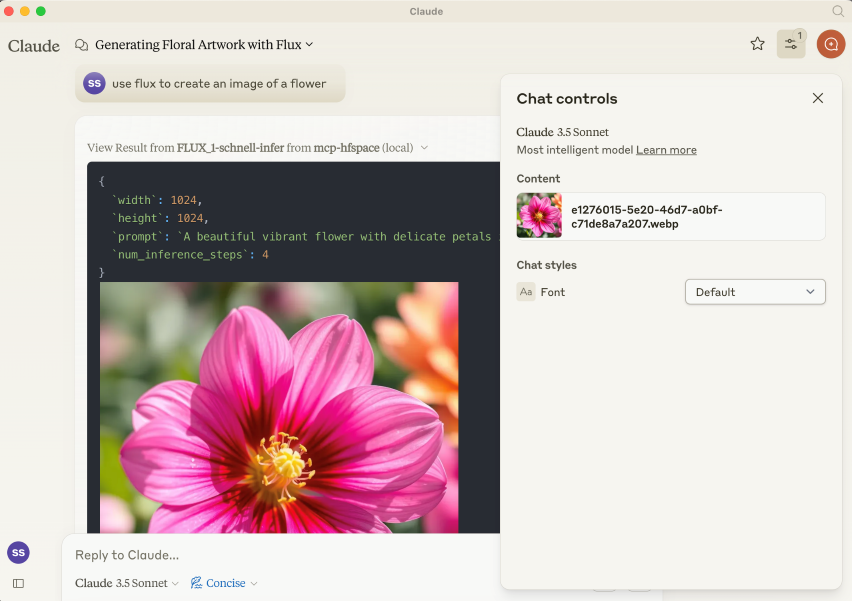
NPM パッケージは@llmindset/mcp-hfspsaceです。
お使いのプラットフォーム用の最新バージョンのNodeJSをインストールし、 claude_desktop_config.jsonファイルのmcpServersセクションに次のコードを追加します。
    "mcp=hfspace": {
      "command": "npx",
      "args": [
        "-y",
        "@llmindset/mcp-hfspace"
      ]
    }
Claude Desktop 0.78 以上を使用していることを確認してください。
これにより、画像ジェネレーターの使用を開始できます。
引数にHuggingFaceスペースのリストを指定してください。mcp-hfspaceは最適なエンドポイントを見つけ、自動的に設定して使用できます。claude_desktop_config.json claude_desktop_config.json例を以下に示します。
デフォルトでは、ファイルのアップロード/ダウンロードには現在の作業ディレクトリが使用されます。Windowsでは、これは\users\<username>\AppData\Roaming\Claude\<version.number\にある読み取り/書き込み可能なフォルダです。MacOSでは、読み取り専用のルートディレクトリである/です。
画像やその他のファイルベースのコンテンツのアップロードとダウンロードを処理するための作業ディレクトリを設定することをお勧めします。-- --work-dir=/your_directory引数またはMCP_HF_WORK_DIR環境変数のいずれかを指定してください。
最新の画像ジェネレーター、ビジョン モデル、およびテキスト読み上げ機能を使用するための構成例と作業ディレクトリ セットを以下に示します。
    "mcp-hfspace": {
      "command": "npx",
      "args": [
        "-y",
        "@llmindset/mcp-hfspace",
        "--work-dir=/Users/evalstate/mcp-store",
        "shuttleai/shuttle-jaguar",
        "styletts2/styletts2",
        "Qwen/QVQ-72B-preview"
      ]
    }
プライベート スペースを使用するには、 --hf-token=hf_...引数またはHF_TOKEN環境変数のいずれかを使用して Hugging Face トークンを指定します。
必要に応じて、複数のサーバー インスタンスを実行して、異なる作業ディレクトリとトークンを使用することもできます。
Related MCP server: Gemini Pro MCP Server
デフォルトでは、サーバーはClaude Desktopモードで動作します。このモードでは、画像はツールのレスポンスで返され、その他のファイルは作業フォルダに保存され、ファイルパスはメッセージとして返されます。Claude Desktopをクライアントとして使用する場合、通常はこのモードが最適なエクスペリエンスを提供します。
URL を入力として提供することもできます。その場合、コンテンツがスペースに渡されます。
「利用可能なリソース」プロンプトがあり、作業ディレクトリにある利用可能なファイルとMIMEタイプをClaudeに表示します。これは現在、ファイル管理に最適な方法です。
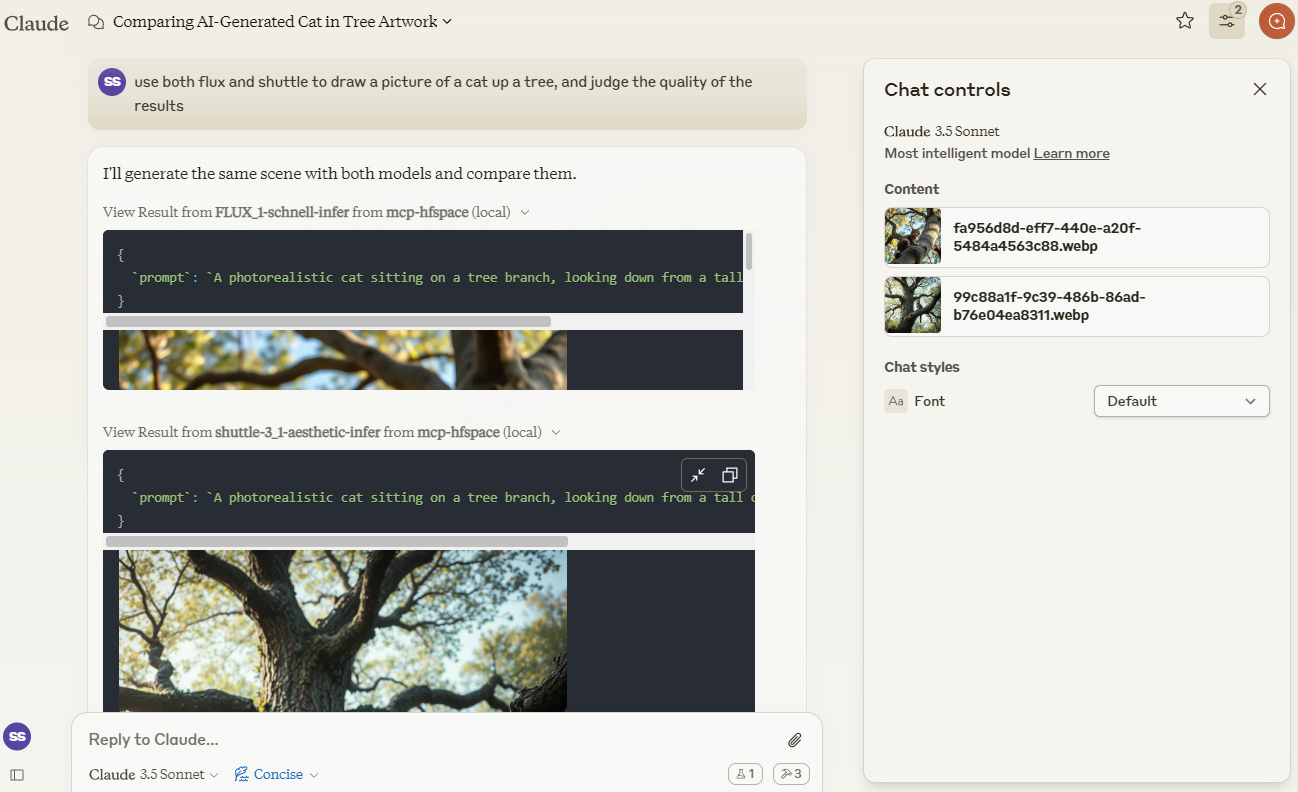
Claudeを使ってshuttleai/shuttle-3.1-aestheticとFLUX.1-schnellで作成された画像を比較します。画像は作業ディレクトリに保存され、Claudeのコンテキストウィンドウにも表示されるため、Claudeは視覚機能を利用できます。
merve/paligemma2-vqav2スペースリンクを使って画像をクエリします。今回は、作業ディレクトリにあるファイル名を指定します。Claude のコンテキストウィンドウに画像を直接アップロードしたくないためです。そこで、Claude に次のように指示します。
use paligemma to find out who is in "test_gemma.jpg" -> Text Output: david bowie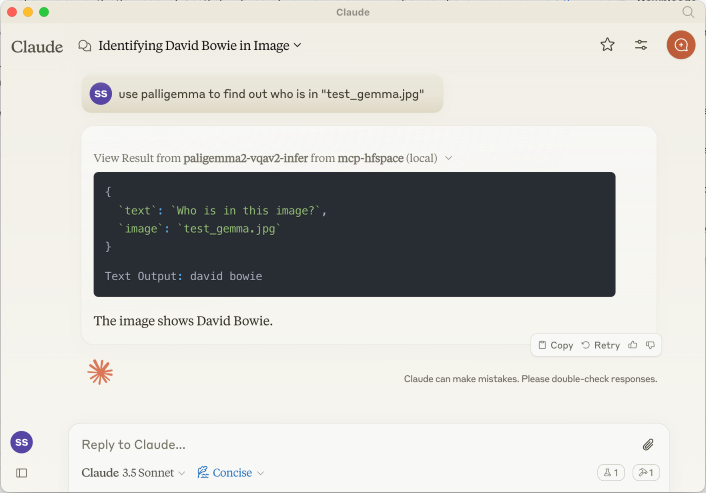
Claude のコンテキストに何かをアップロードする場合は、Paperclip Attachment ボタンを使用します。それ以外の場合は、サーバーが直接送信するファイル名を指定します。
URLを指定することもできます。例えば、 use paligemma to detect humans in https://e3.365dm.com/24/12/1600x900/skynews-taylor-swift-eras-tour_6771083.jpg?20241209000914 One person is detected in the image - Taylor Swift on stage.
Claudeデスクトップモードでは、オーディオファイルはWORK_DIRに保存され、Claudeに作成が通知されます。デスクトップモードでない場合は、ファイルはbase64エンコードされたリソースとしてクライアントに返されます(埋め込みオーディオ添付ファイルをサポートしている場合に便利です)。
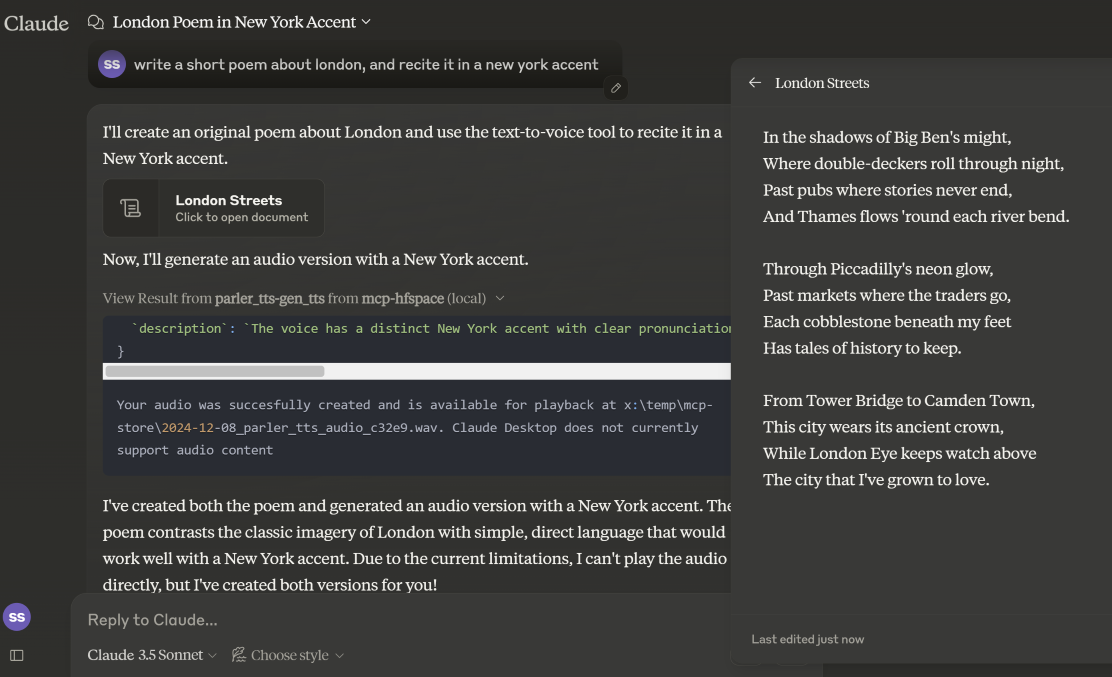
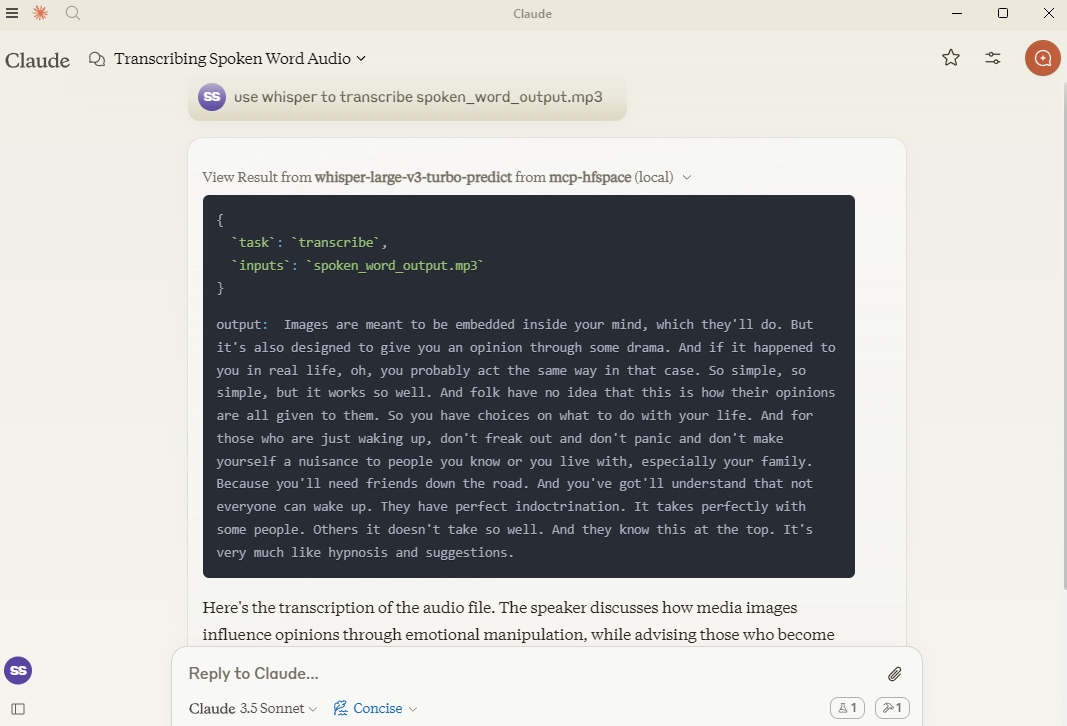
ここでは、 hf-audio/whisper-large-v3-turboを使用して音声を書き起こし、Claude が利用できるようにします。
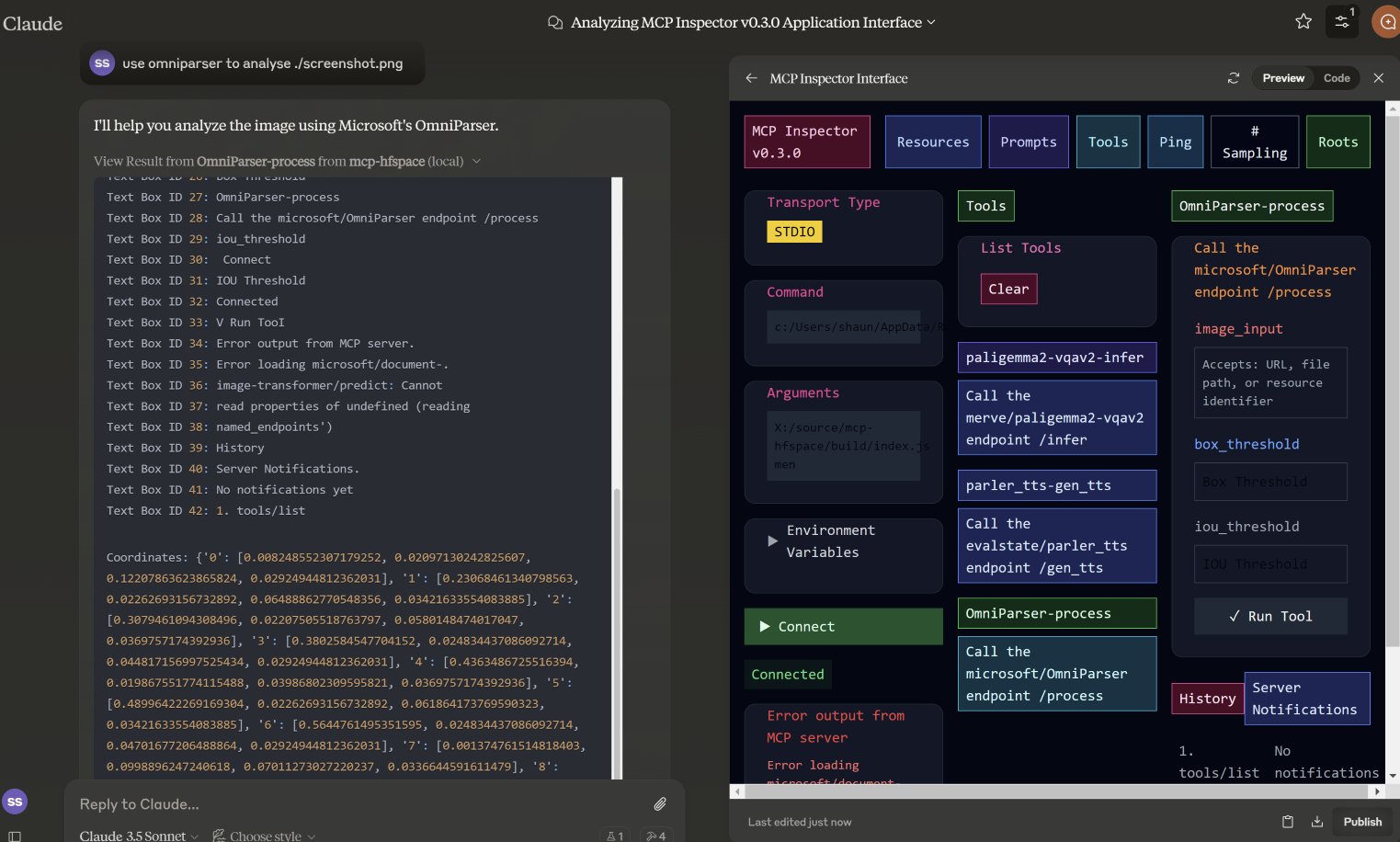
この例では、 microsoft/OmniParserで使用するファイル名を指定し、注釈付きの画像と、説明と座標という2つのテキストを返します。プロンプトはuse omniparser to analyse ./screenshot.png 、 use the analysis to produce an artifact that reproduces that screen 。DawnC DawnC/Pawmatchも同様に優れています。
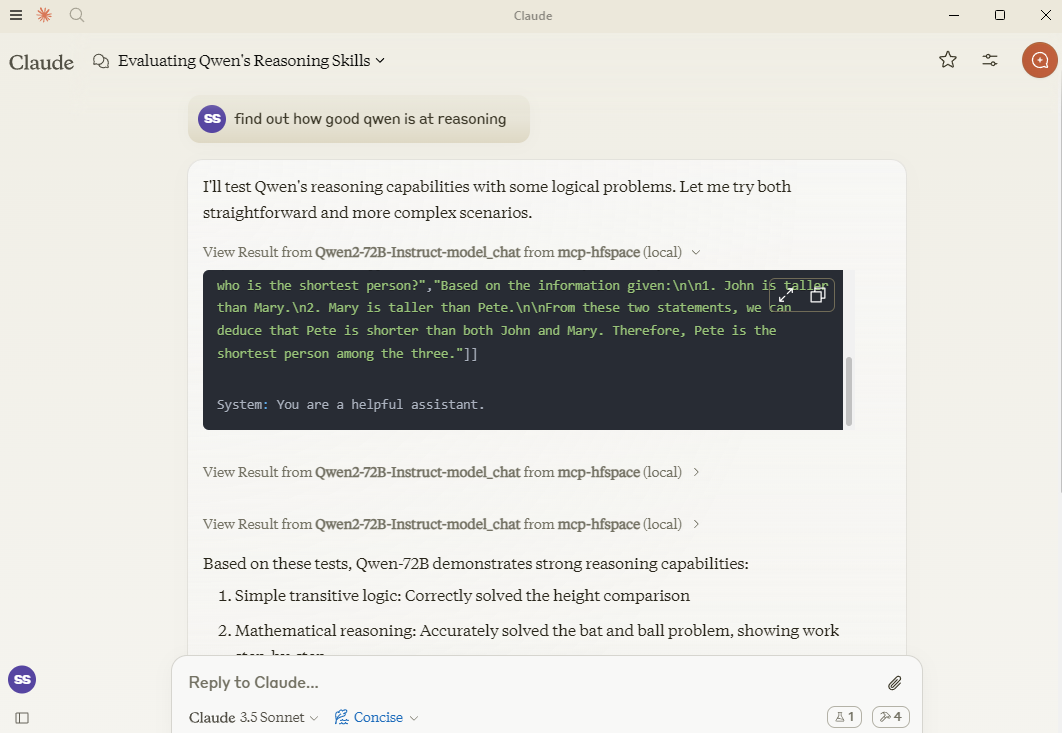
この例では、クロードはクウェンにいくつかの推論パズルを設定し、説明のために追加の質問をします。
必要であれば、スペース名にAPIエンドポイントを追加することで、特定のAPIエンドポイントを指定できます。つまりQwen/Qwen2.5-72B-Instructを渡す代わりに、 Qwen/Qwen2.5-72B-Instruct/model_chatを使用します。
これは、オプション --desktop-mode=false または環境変数 CLAUDE_DESKTOP_MODE=false で無効にできます。この場合、コンテンツは埋め込まれたBase64エンコードされたリソースとして返されます。
試してみるのにおすすめのスペース:
シャトルアイ/シャトル-3.1-美学
black-forest-labs/FLUX.1-schnell
yanze/PuLID-FLUX
Inspyrenet-Rembg(背景除去)
diyism/Datou1111-shou_xin -美しい鉛筆画
Qwen/Qwen2.5-72B-インストラクト
prithivMLmods/Mistral-7B-Instruct-v0.3
ファンタクシー/サウンドAISFX
parler-tts/parler_tts
HFオーディオ/ウィスパーラージV3ターボ
(OpenAIモデルは名前のないパラメータを使用するため動作しません)
haoheliu/audioldm2-text2audio-text2music
マイクロソフト/オムニパーサー
merve/paligemma2-vqav2
merve/paligemma-doc
ドーンC/パウマッチAI
DawnC/PawMatchAI/on_find_match_click - インタラクティブな犬のおすすめ
各スペースごとにプロンプトが生成され、入力の機会が提供されます。スペースには特に役立つラベルなどが設定されていないことが多いことにご注意ください。Claudeはこの点を非常にうまく理解しており、ツールの説明も非常に充実しています(ただし、Claude Desktopでは表示されません)。
WORK_DIR内のファイルのリストが返されます。便宜上、ファイル名は「Use the file...」というテキストで返されます。Claudeのコンテキストに何かを追加する場合は、ペーパークリップを使用してください。それ以外の場合は、MCPサーバーのファイル名を指定してください。Claudeは、コンテキスト内からのリソースの転送をサポートしていません。
プライベートスペースはHuggingFaceトークンでサポートされます。このトークンは、生成されたコンテンツをダウンロードして保存するために使用されます。
Claude Desktop で使用するには、サーバー設定を追加します。
MacOS の場合: ~/Library/Application Support/Claude/claude_desktop_config.json Windows の場合: %APPDATA%/Claude/claude_desktop_config.json
{
  "mcpServers": {
    "mcp-hfspace": {
      "command": "npx"
      "args:" [
        "-y",
        "@llmindset/mcp-hfspace",
        "--work-dir=~/mcp-files/ or x:/temp/mcp-files/",
        "--HF_TOKEN=HF_{optional token}"
        "Qwen/Qwen2-72B-Instruct",
        "black-forest-labs/FLUX.1-schnell",
        "space/example/specific-endpint"
        (... and so on)
        ]
    }
  }
}名前のないパラメータを持つエンドポイントは現時点ではサポートされていません。
いくつかの複雑な Python 型から適切な MCP 形式への完全な変換。
Claude Desktop 0.75 は MCP サーバーからのエラーに応答せず、タイムアウトしてしまうようです。問題が解決しない場合は、MCP Inspector を使用して、問題の原因をより詳しく診断してください。突然動作しなくなった場合は、HuggingFace ZeroGPU のクォータを使い果たした可能性があります。しばらくしてからもう一度お試しください。または、ホスティング用の独自のスペースを設定してください。
Claude Desktop は60秒のハードタイムアウト値を使用しているようで、UX やキープアライブの管理に Progress Notifications は使用していないようです。ZeroGPU スペースを使用している場合、大規模または高負荷のジョブはタイムアウトする可能性があります。ただし、WORK_DIR で結果を確認してください。MCP サーバーは、生成された結果を取得して保存します。
Claude Desktops のサーバー ステータスやログなどのレポートはあまり優れていません。問題の診断には@modelcontextprotocol/inspectorを使用してください。
ZeroGPUのクォータやキューが長すぎる場合は、スペースを複製してみてください。ジョブの実行時間が60秒未満であれば、通常はapp.pyの関数デコレータ@spaces.GPU(duration=20)を変更することで、ジョブ実行時にクォータを少なく要求できます。
HuggingFace Pro アカウントをお持ちの場合は、Gradio API では ZeroGPU ジョブの追加見積もりは行われないことにご注意ください。これを実現するには、 X-IP-Tokenヘッダーを設定する必要があります。
プライベートスペースと専用ハードウェアをお持ちの場合は、HF_TOKEN を使用すると、クォータ制限なしで直接アクセスできます。本番環境のタスクに使用する場合は、HF_TOKEN の使用をお勧めします。
A list of available file and resources. If the User requests things like 'most recent image' or 'the audio' use this tool to identify the intended resource.This tool returns 'resource uri', 'name', 'size', 'last modified' and 'mime type' in a markdown table
| Name | Required | Description | Default |
|---|---|---|---|
No parameters | |||
Does the description disclose side effects, auth requirements, rate limits, or destructive behavior?
With no annotations provided, the description carries the full burden of behavioral disclosure. It describes the return format (markdown table with specific fields) which is valuable, but doesn't mention important behavioral aspects like whether this lists all files or has pagination, if it requires authentication, or any rate limits. It adds some context but leaves gaps.
Agents need to know what a tool does to the world before calling it. Descriptions should go beyond structured annotations to explain consequences.
Is the description appropriately sized, front-loaded, and free of redundancy?
The description is efficiently structured in two sentences: the first states the purpose and usage context, the second specifies the return format. Every sentence adds value with no redundant information, making it appropriately sized and front-loaded.
Shorter descriptions cost fewer tokens and are easier for agents to parse. Every sentence should earn its place.
Given the tool's complexity, does the description cover enough for an agent to succeed on first attempt?
Given the tool's simplicity (0 parameters, no annotations, no output schema), the description provides sufficient context about what the tool does, when to use it, and what it returns. However, it could be more complete by explicitly differentiating from sibling tools and mentioning any behavioral constraints like access limitations.
Complex tools with many parameters or behaviors need more documentation. Simple tools need less. This dimension scales expectations accordingly.
Does the description clarify parameter syntax, constraints, interactions, or defaults beyond what the schema provides?
The tool has 0 parameters with 100% schema description coverage, so the schema already fully documents the lack of parameters. The description appropriately doesn't add parameter information beyond what's in the schema, maintaining focus on the tool's purpose and output. This meets the baseline expectation for a zero-parameter tool.
Input schemas describe structure but not intent. Descriptions should explain non-obvious parameter relationships and valid value ranges.
Does the description clearly state what the tool does and how it differs from similar tools?
The description clearly states the tool's purpose: listing available files and resources with specific attributes. It uses the verb 'returns' and specifies the resource type ('files and resources'), but doesn't explicitly differentiate from sibling tools like 'search-spaces' which might have overlapping functionality.
Agents choose between tools based on descriptions. A clear purpose with a specific verb and resource helps agents select the right tool.
Does the description explain when to use this tool, when not to, or what alternatives exist?
The description provides clear guidance on when to use this tool: when the user requests specific resources like 'most recent image' or 'the audio'. However, it doesn't explicitly state when NOT to use it or mention alternatives among the sibling tools, leaving some ambiguity about tool selection.
Agents often have multiple tools that could apply. Explicit usage guidance like "use X instead of Y when Z" prevents misuse.
Call the FLUX.1-schnell endpoint /infer
| Name | Required | Description | Default |
|---|---|---|---|
| prompt | Yes | Prompt | |
| seed | No | Seed | |
| randomize_seed | No | Randomize seed | |
| width | No | Width | |
| height | No | Height | |
| num_inference_steps | No | Number of inference steps |
Does the description disclose side effects, auth requirements, rate limits, or destructive behavior?
With no annotations provided, the description carries the full burden of behavioral disclosure. It only states the endpoint call without explaining what the tool does (e.g., image generation), its effects (e.g., creates an image file), performance traits, or any constraints like rate limits or authentication needs, resulting in insufficient transparency for a tool with multiple parameters.
Agents need to know what a tool does to the world before calling it. Descriptions should go beyond structured annotations to explain consequences.
Is the description appropriately sized, front-loaded, and free of redundancy?
The description is a single, concise sentence that directly states the action. It is front-loaded with no unnecessary words, making it efficient. However, it lacks depth, which is a content issue rather than a structural one, so it scores well for conciseness.
Shorter descriptions cost fewer tokens and are easier for agents to parse. Every sentence should earn its place.
Given the tool's complexity, does the description cover enough for an agent to succeed on first attempt?
Given the tool's complexity with 6 parameters and no output schema, the description is incomplete. It fails to explain the tool's purpose, behavior, or output, leaving significant gaps. Without annotations or a clear context, it does not provide enough information for effective use, especially compared to sibling tools.
Complex tools with many parameters or behaviors need more documentation. Simple tools need less. This dimension scales expectations accordingly.
Does the description clarify parameter syntax, constraints, interactions, or defaults beyond what the schema provides?
Schema description coverage is 100%, providing basic descriptions for all parameters. The description adds no additional meaning beyond the schema, such as explaining parameter interactions or use cases. However, since the schema is fully documented, the baseline score of 3 is appropriate as the description does not compensate but also does not detract.
Input schemas describe structure but not intent. Descriptions should explain non-obvious parameter relationships and valid value ranges.
Does the description clearly state what the tool does and how it differs from similar tools?
The description 'Call the FLUX.1-schnell endpoint /infer' restates the tool name and title without specifying what the tool does. It mentions an endpoint but lacks a clear verb and resource, such as generating images or processing prompts, making the purpose vague and not distinguishing it from sibling tools like 'available-files' or 'search-spaces'.
Agents choose between tools based on descriptions. A clear purpose with a specific verb and resource helps agents select the right tool.
Does the description explain when to use this tool, when not to, or what alternatives exist?
No guidance is provided on when to use this tool versus alternatives. The description does not mention any context, prerequisites, or exclusions, leaving the agent with no information on appropriate usage scenarios or how it differs from sibling tools.
Agents often have multiple tools that could apply. Explicit usage guidance like "use X instead of Y when Z" prevents misuse.
Use semantic search to find an endpoint on the Hugging Face Spaces service. The search term will usually be 3-7 words describing a task or activity the Person is trying to accomplish. The results are returned in a markdown table. Present all results to the Person. Await specific guidance from the Person before making further Tool calls.
| Name | Required | Description | Default |
|---|---|---|---|
| query | No | The semantic search term to use. |
Does the description disclose side effects, auth requirements, rate limits, or destructive behavior?
With no annotations provided, the description carries full burden. It discloses key behavioral traits: the search is semantic (not keyword-based), results come in markdown table format, and the agent should present all results and await Person's guidance. However, it doesn't mention rate limits, authentication requirements, or what happens with empty/no results.
Agents need to know what a tool does to the world before calling it. Descriptions should go beyond structured annotations to explain consequences.
Is the description appropriately sized, front-loaded, and free of redundancy?
The description is appropriately sized and front-loaded: first sentence states core purpose, second adds query guidance, third specifies output format, fourth provides workflow instructions. Every sentence earns its place with no wasted words or redundancy.
Shorter descriptions cost fewer tokens and are easier for agents to parse. Every sentence should earn its place.
Given the tool's complexity, does the description cover enough for an agent to succeed on first attempt?
Given 1 parameter with full schema coverage and no output schema, the description provides good context about the search approach, result format, and agent workflow. It could be more complete by addressing edge cases (no results, error handling) or explaining the semantic search mechanism, but covers the essential usage scenario adequately.
Complex tools with many parameters or behaviors need more documentation. Simple tools need less. This dimension scales expectations accordingly.
Does the description clarify parameter syntax, constraints, interactions, or defaults beyond what the schema provides?
Schema description coverage is 100% (the single parameter 'query' is fully described in schema), so baseline is 3. The description adds marginal value by suggesting query length (3-7 words) and content (task/activity description), but doesn't provide syntax examples or format details beyond what the schema already states.
Input schemas describe structure but not intent. Descriptions should explain non-obvious parameter relationships and valid value ranges.
Does the description clearly state what the tool does and how it differs from similar tools?
The description clearly states the specific action ('semantic search'), target resource ('endpoint on the Hugging Face Spaces service'), and distinguishes from siblings by focusing on search rather than file listing or inference. It explicitly mentions what the tool does: finding endpoints via semantic search with results in markdown table format.
Agents choose between tools based on descriptions. A clear purpose with a specific verb and resource helps agents select the right tool.
Does the description explain when to use this tool, when not to, or what alternatives exist?
The description provides clear context for when to use this tool: when the Person has a task/activity description (3-7 words) and needs to find relevant endpoints. It instructs to present all results and await further guidance, establishing a workflow. However, it doesn't explicitly mention when NOT to use it or name specific alternatives among siblings.
Agents often have multiple tools that could apply. Explicit usage guidance like "use X instead of Y when Z" prevents misuse.
Recent tool additions, removals, and schema changes observed during successful MCP inspections.
v1.0.0FLUX_1-schnell-infer12 fields changedInput schema / properties / height / descriptionPrevious value: -"numeric value between 256 and 2048"New value: +"Height"Input schema / properties / height / maximumRemoved value: -2048Input schema / properties / height / minimumRemoved value: -256Input schema / properties / num_inference_steps / descriptionPrevious value: -"numeric value between 1 and 50"New value: +"Number of inference steps"Input schema / properties / num_inference_steps / maximumRemoved value: -50Input schema / properties / num_inference_steps / minimumRemoved value: -1Input schema / properties / seed / descriptionPrevious value: -"numeric value between 0 and 2147483647"New value: +"Seed"Input schema / properties / seed / maximumRemoved value: -2147483647Input schema / properties / seed / minimumRemoved value: -0Input schema / properties / width / descriptionPrevious value: -"numeric value between 256 and 2048"New value: +"Width"Input schema / properties / width / maximumRemoved value: -2048Input schema / properties / width / minimumRemoved value: -256available-filesFLUX_1-schnell-infersearch-spacesScored across 3 tools
Each tool has a clearly distinct purpose: 'available-files' lists local resources, 'FLUX_1-schnell-infer' calls a specific AI inference endpoint, and 'search-spaces' performs semantic search on Hugging Face Spaces. There is no overlap in functionality, making tool selection unambiguous for an agent.
The naming is inconsistent with mixed conventions: 'available-files' uses kebab-case, 'FLUX_1-schnell-infer' mixes uppercase and kebab-case with an underscore, and 'search-spaces' uses kebab-case. There is no predictable verb_noun pattern, and the styles vary chaotically across the set.
With only 3 tools, the count feels thin for a server named 'mcp-hfspace' that seems to target Hugging Face Spaces and related resources. While the tools cover distinct areas, the scope might be underdeveloped, lacking operations like managing spaces or handling more inference types.
Inferred domain includes Hugging Face Spaces and file/resources management, but there are significant gaps: no tools for creating, updating, or deleting spaces or files, and inference is limited to one specific endpoint. This incomplete surface will likely cause agent failures in broader workflows.
One workspace of tools for Claude and ChatGPT: connect 600+ apps, generate media, build tools.
Connect to Hugging Face Hub and thousands of Gradio AI Applications
Connect Claude to your Platform7n workspaces — chat, links, and tasks. One-click OAuth.
Connect Claude to Fathom meeting recordings, transcripts, and summaries