

A
licenseC
qualityC
maintenanceUse HuggingFace Spaces directly from Claude. Use Open Source Image Generation, Chat, Vision tasks and more. Supports Image, Audio and text uploads/downloads.
3
754 npm
388
MIT

여기에서 소개를 읽어보세요 llmindset.co.uk/resources/mcp-hfspace/
최소한의 설정만으로 Hugging Face Spaces 에 연결하세요. 간단히 공간을 추가하고 시작하세요!
기본적으로 evalstate/FLUX.1-schnell 에 연결하여 Claude Desktop에 이미지 생성 기능을 제공합니다.
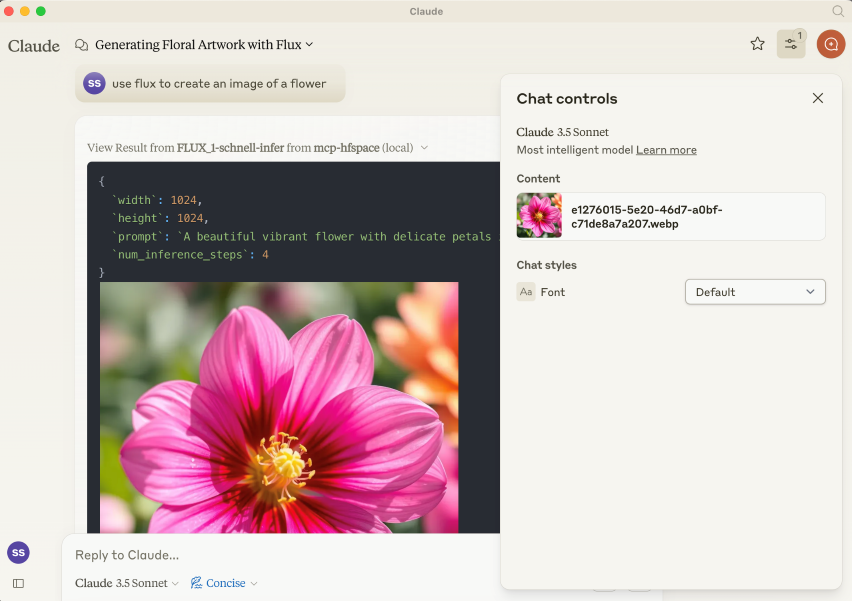
NPM 패키지는 @llmindset/mcp-hfspsace 입니다.
플랫폼에 맞는 최신 버전의 NodeJS를 설치한 다음 claude_desktop_config.json 파일의 mcpServers 섹션에 다음을 추가합니다.
지엑스피1
Claude Desktop 0.78 이상을 사용하고 있는지 확인하세요.
이렇게 하면 이미지 생성기를 시작할 수 있습니다.
인수에 HuggingFace 공간 목록을 제공하세요. mcp-hfspace는 가장 적합한 엔드포인트를 찾아 자동으로 사용하도록 구성합니다. 아래에 claude_desktop_config.json 의 예가 나와 있습니다.
기본적으로 현재 작업 디렉터리는 파일 업로드/다운로드에 사용됩니다. Windows에서는 \users\<username>\AppData\Roaming\Claude\<version.number\ 에 읽기/쓰기 권한이 있는 폴더가 있고, MacOS에서는 읽기 전용 루트인 / 에 있습니다.
이 설정을 재정의하고 이미지 및 기타 파일 기반 콘텐츠의 업로드 및 다운로드를 처리할 작업 디렉터리를 설정하는 것이 좋습니다. --work-dir=/your_directory 인수 또는 MCP_HF_WORK_DIR 환경 변수를 지정하세요.
최신 이미지 생성기, 비전 모델 및 텍스트 음성 변환을 사용하기 위한 구성 예는 아래와 같으며 작업 디렉토리 세트는 아래와 같습니다.
    "mcp-hfspace": {
      "command": "npx",
      "args": [
        "-y",
        "@llmindset/mcp-hfspace",
        "--work-dir=/Users/evalstate/mcp-store",
        "shuttleai/shuttle-jaguar",
        "styletts2/styletts2",
        "Qwen/QVQ-72B-preview"
      ]
    }
개인 공간을 사용하려면 --hf-token=hf_... 인수나 HF_TOKEN 환경 변수와 함께 Hugging Face Token을 제공하세요.
필요한 경우 다른 작업 디렉토리와 토큰을 사용하기 위해 여러 서버 인스턴스를 실행할 수 있습니다.
Related MCP server: Gemini Pro MCP Server
기본적으로 서버는 Claude Desktop 모드 로 작동합니다. 이 모드에서 이미지는 도구 응답으로 반환되고, 다른 파일은 작업 폴더에 저장되며, 파일 경로는 메시지로 반환됩니다. Claude Desktop을 클라이언트로 사용할 경우 일반적으로 이 모드가 최상의 환경을 제공합니다.
URL을 입력으로 제공할 수도 있습니다. 콘텐츠는 Space로 전달됩니다.
Claude에게 작업 디렉터리에서 사용 가능한 파일과 MIME 유형을 알려주는 "사용 가능한 리소스" 프롬프트가 있습니다. 현재로서는 이것이 파일을 관리하는 가장 좋은 방법입니다.
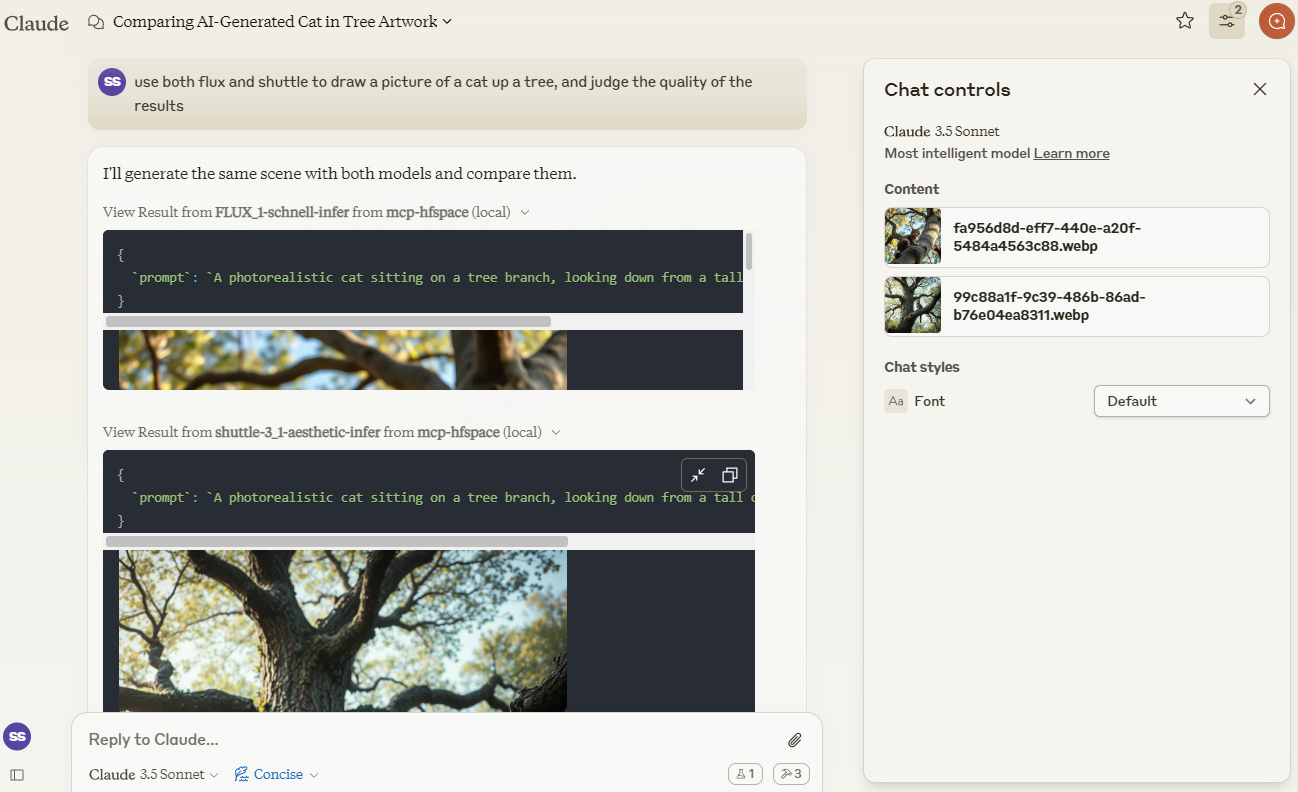
Claude를 사용하여 shuttleai/shuttle-3.1-aesthetic 과 FLUX.1-schnell 로 생성된 이미지를 비교해 보겠습니다. 이미지는 작업 디렉터리에 저장되고 Claude의 컨텍스트 창에도 포함되어 Claude가 비전 기능을 사용할 수 있도록 합니다.
merve/paligemma2-vqav2 공간 링크를 사용하여 이미지를 쿼리하겠습니다. 이 경우 작업 디렉터리에서 사용 가능한 파일 이름을 지정합니다. 이미지를 Claude의 컨텍스트 창에 직접 업로드하지 않기 때문입니다. 따라서 Claude에게 다음과 같이 묻습니다.
use paligemma to find out who is in "test_gemma.jpg" -> Text Output: david bowie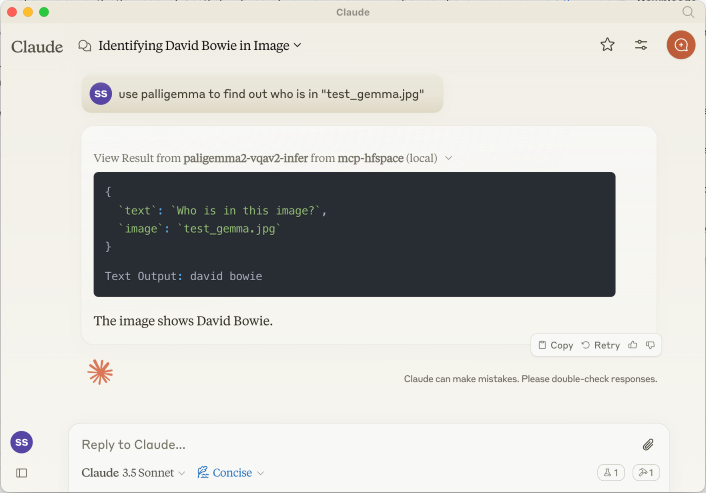
Claude의 컨텍스트에 무언가를 업로드하는 경우 Paperclip Attachment 버튼을 사용하고, 그렇지 않은 경우 서버에서 직접 보낼 파일 이름을 지정하세요.
URL도 제공해 드릴 수 있습니다. 예: use paligemma to detect humans in https://e3.365dm.com/24/12/1600x900/skynews-taylor-swift-eras-tour_6771083.jpg?20241209000914 -> One person is detected in the image - Taylor Swift on stage.
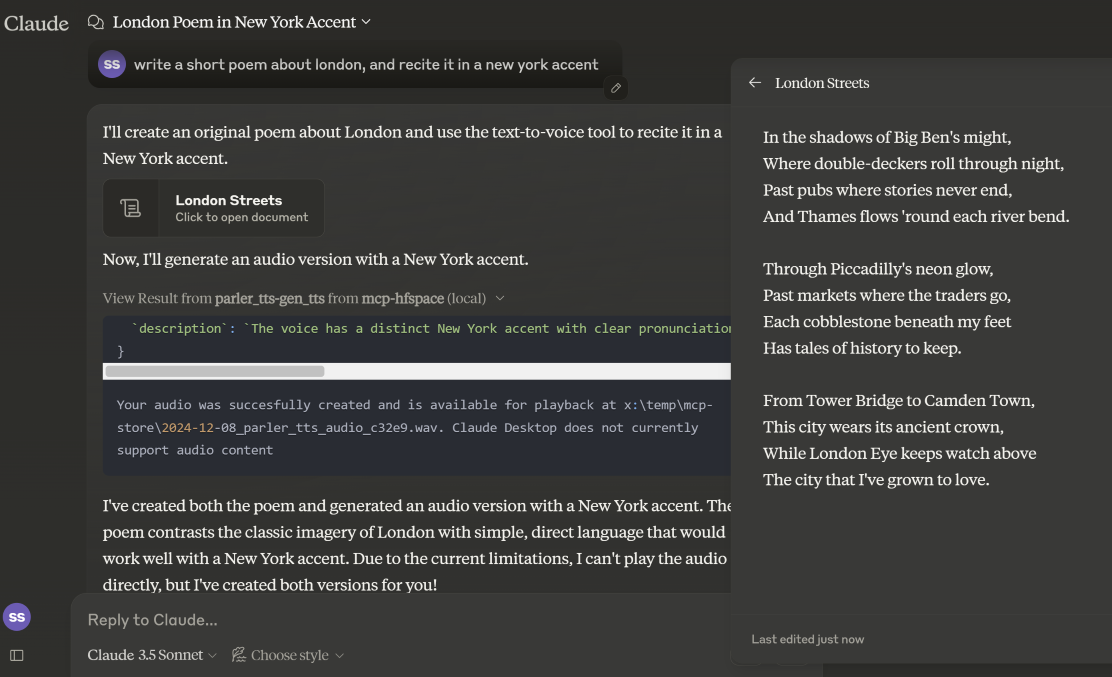
Claude 데스크톱 모드 에서는 오디오 파일이 WORK_DIR에 저장되고 Claude에게 생성 알림이 전송됩니다. 데스크톱 모드가 아닌 경우, 파일은 base64로 인코딩된 리소스 형태로 클라이언트에 반환됩니다(임베디드 오디오 첨부 파일을 지원하는 경우 유용함).
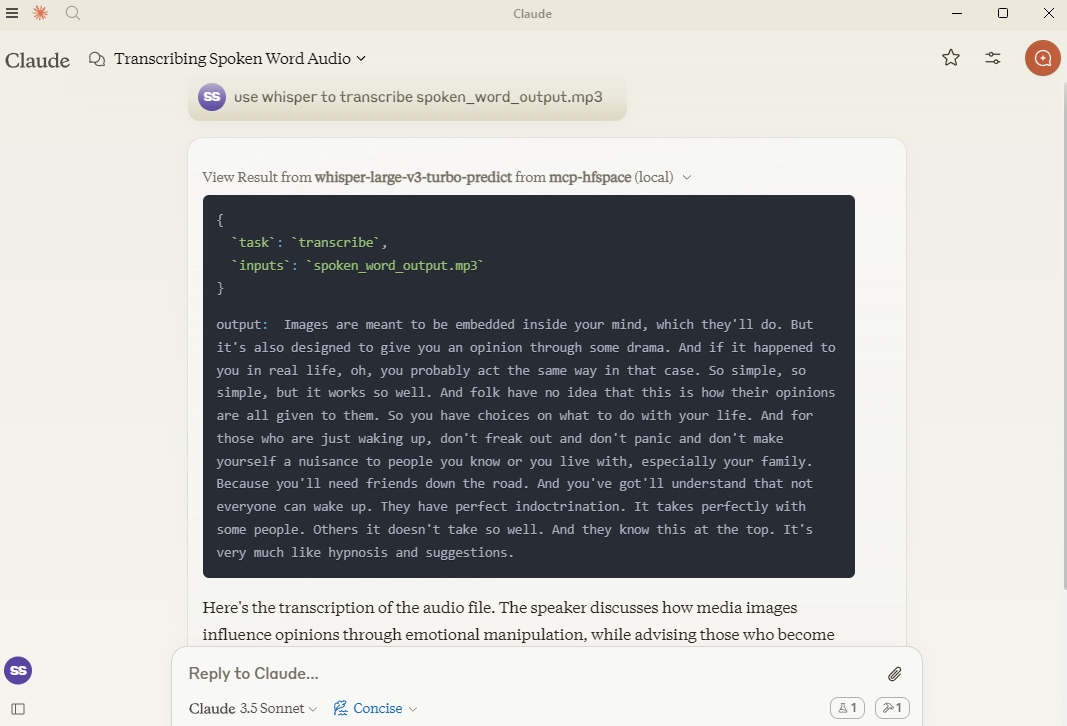
여기에서는 hf-audio/whisper-large-v3-turbo 사용하여 일부 오디오를 필사하여 Claude가 사용할 수 있도록 합니다.
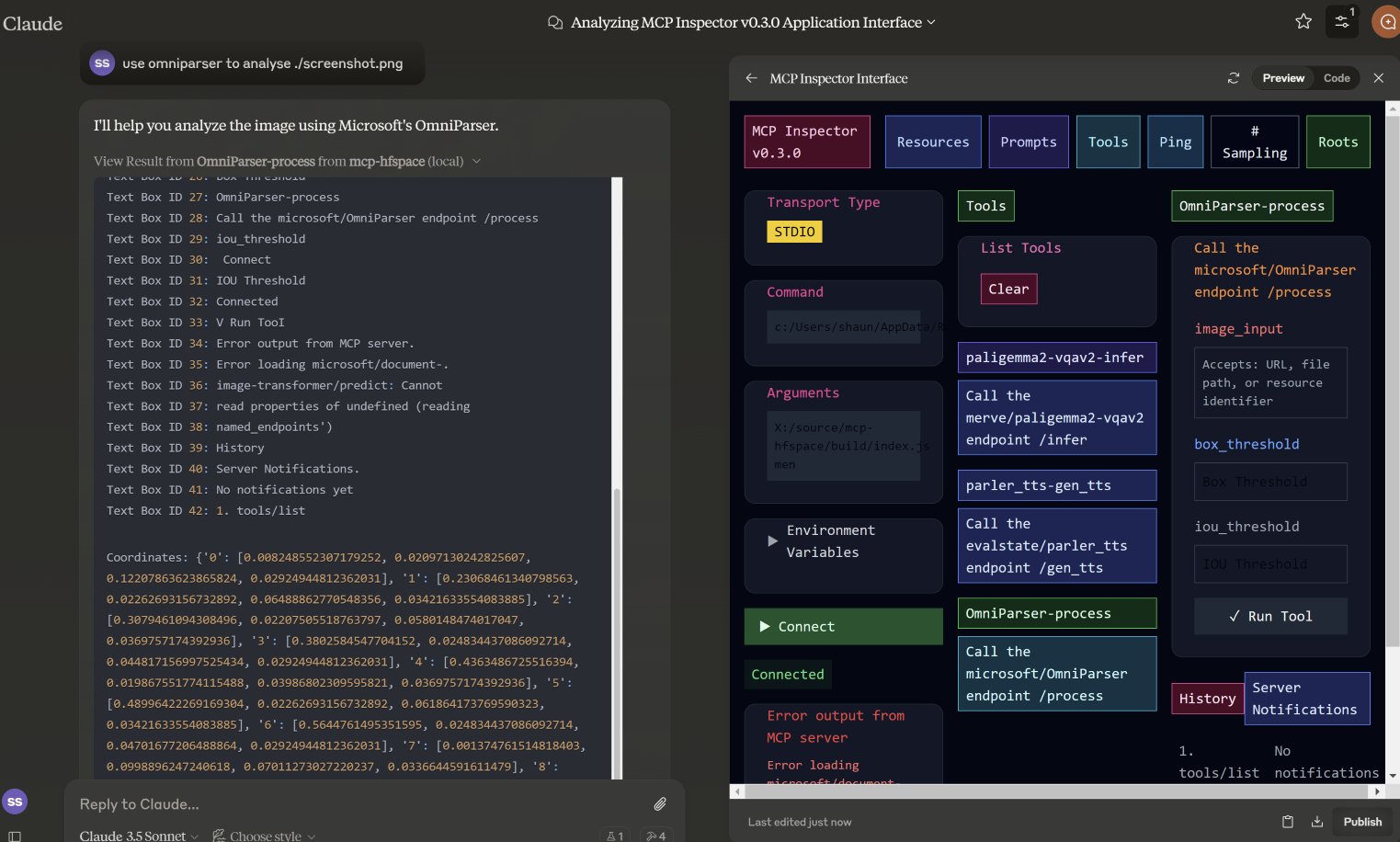
이 예제에서는 microsoft/OmniParser 에서 사용할 파일 이름을 지정하고, 주석이 달린 이미지와 설명 및 좌표라는 두 개의 별도 텍스트를 반환합니다. 사용된 프롬프트는 use omniparser to analyse ./screenshot.png , use the analysis to produce an artifact that reproduces that screen 었습니다. DawnC/Pawmatch 도 이 작업에 능숙합니다.
이 예에서 클로드는 웬에게 여러 가지 추론 퍼즐을 제시하고, 이를 명확히 하기 위해 후속 질문을 합니다.
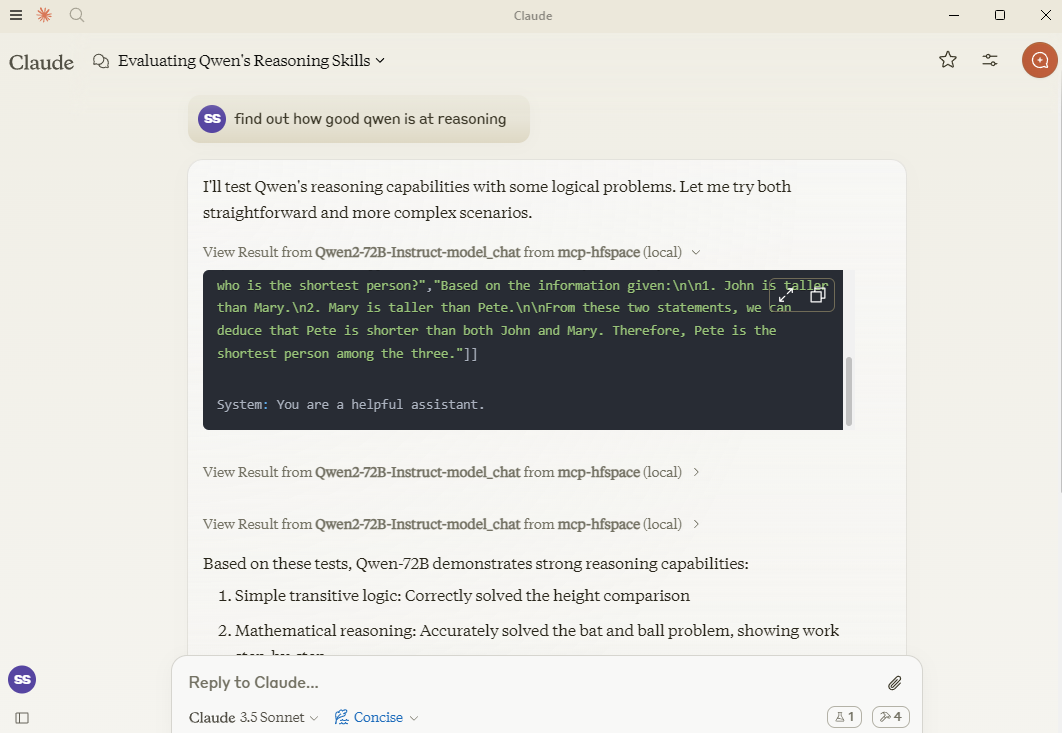
필요한 경우, spacename에 특정 API 엔드포인트를 추가하여 지정할 수 있습니다. 따라서 Qwen/Qwen2.5-72B-Instruct 전달하는 대신 Qwen/Qwen2.5-72B-Instruct/model_chat 사용하면 됩니다.
이 기능은 --desktop-mode=false 옵션이나 CLAUDE_DESKTOP_MODE=false 환경 변수를 사용하여 비활성화할 수 있습니다. 이 경우 콘텐츠는 Base64로 인코딩된 임베디드 리소스로 반환됩니다.
시도해 볼 만한 추천 공간:
셔틀AI/셔틀-3.1-에스테틱
블랙포레스트랩스/FLUX.1-슈넬
얀제/풀리드-플럭스
Inspyrenet-Rembg(배경 제거)
diyism/Datou1111-shou_xin - 아름다운 연필 드로잉
Qwen/Qwen2.5-72B-지시
prithivMLmods/Mistral-7B-Instruct-v0.3
판타지/사운드-AI-SFX
파러-tts/파러_tts
hf-오디오/위스퍼-라지-v3-터보
(openai 모델은 이름이 지정되지 않은 매개변수를 사용하므로 작동하지 않습니다)
하오헤리우/audioldm2-text2audio-text2music
마이크로소프트/옴니파서
메르베/팔리젬마2-vqav2
메르베/팔리젬마-닥
DawnC/PawMatchAI
DawnC/PawMatchAI/on_find_match_click - 대화형 반려견 추천
각 스페이스에 대한 프롬프트가 생성되어 입력할 수 있습니다. 스페이스가 특별히 유용한 라벨 등으로 구성되어 있지 않은 경우가 많다는 점을 유의하세요. Claude는 이 부분을 매우 잘 이해하고 있으며, 도구 설명도 매우 풍부합니다(하지만 Claude Desktop에서는 표시되지 않습니다).
WORK_DIR에 있는 파일 목록이 반환되고, 편의상 파일 이름이 "파일 사용..." 텍스트로 반환됩니다. Claude의 컨텍스트에 무언가를 추가하려면 클립을 사용하고, 그렇지 않으면 MCP 서버의 파일 이름을 지정하세요. Claude는 컨텍스트 내에서 리소스 전송을 지원하지 않습니다.
프라이빗 스페이스는 HuggingFace 토큰으로 지원됩니다. 이 토큰은 생성된 콘텐츠를 다운로드하고 저장하는 데 사용됩니다.
Claude Desktop과 함께 사용하려면 서버 구성을 추가하세요.
MacOS의 경우: ~/Library/Application Support/Claude/claude_desktop_config.json Windows의 경우: %APPDATA%/Claude/claude_desktop_config.json
{
  "mcpServers": {
    "mcp-hfspace": {
      "command": "npx"
      "args:" [
        "-y",
        "@llmindset/mcp-hfspace",
        "--work-dir=~/mcp-files/ or x:/temp/mcp-files/",
        "--HF_TOKEN=HF_{optional token}"
        "Qwen/Qwen2-72B-Instruct",
        "black-forest-labs/FLUX.1-schnell",
        "space/example/specific-endpint"
        (... and so on)
        ]
    }
  }
}현재로선 이름이 지정되지 않은 매개변수가 있는 엔드포인트는 지원되지 않습니다.
일부 복잡한 Python 유형을 적합한 MCP 형식으로 완전히 번역합니다.
Claude Desktop 0.75가 MCP 서버 오류에 응답하지 않고 시간 초과가 발생하는 것 같습니다. 문제가 지속되는 경우 MCP Inspector를 사용하여 문제 원인을 자세히 진단해 보세요. 갑자기 작동이 중단되면 HuggingFace ZeroGPU 할당량이 소진되었을 가능성이 높습니다. 잠시 후 다시 시도하거나 호스팅을 위한 자체 공간을 설정하세요.
Claude Desktop은 60초의 고정 시간 초과 값을 사용하는 것으로 보이며, UX 관리나 Keep-Alive를 위해 진행률 알림을 사용하지 않는 것으로 보입니다. ZeroGPU 공간을 사용하는 경우, 크고 무거운 작업이 시간 초과될 수 있습니다. 하지만 WORK_DIR에서 결과를 확인하세요. MCP 서버는 생성된 결과를 캡처하여 저장합니다.
Claude Desktops에서 서버 상태, 로깅 등을 보고하는 기능은 그다지 좋지 않습니다. @modelcontextprotocol/inspector를 사용하여 문제를 진단해 보세요.
ZeroGPU 할당량이나 대기열이 너무 길면 공간을 복제해 보세요. 작업 시간이 60초 미만이면 일반적으로 app.py 에서 함수 데코레이터 @spaces.GPU(duration=20) 변경하여 작업 실행 시 할당량을 줄일 수 있습니다.
HuggingFace Pro 계정이 있는 경우 Gradio API는 ZeroGPU 작업에 대한 추가 견적을 제공하지 않습니다. 이를 위해서는 X-IP-Token 헤더를 설정해야 합니다.
개인 공간과 전용 하드웨어가 있는 경우, HF_TOKEN을 통해 해당 공간에 직접 접근할 수 있으며 할당량도 적용되지 않습니다. 어떤 종류의 프로덕션 작업에든 이 기능을 사용하는 것을 권장합니다.
A list of available file and resources. If the User requests things like 'most recent image' or 'the audio' use this tool to identify the intended resource.This tool returns 'resource uri', 'name', 'size', 'last modified' and 'mime type' in a markdown table
| Name | Required | Description | Default |
|---|---|---|---|
No parameters | |||
Does the description disclose side effects, auth requirements, rate limits, or destructive behavior?
With no annotations provided, the description carries the full burden of behavioral disclosure. It describes the return format (markdown table with specific fields) which is valuable, but doesn't mention important behavioral aspects like whether this lists all files or has pagination, if it requires authentication, or any rate limits. It adds some context but leaves gaps.
Agents need to know what a tool does to the world before calling it. Descriptions should go beyond structured annotations to explain consequences.
Is the description appropriately sized, front-loaded, and free of redundancy?
The description is efficiently structured in two sentences: the first states the purpose and usage context, the second specifies the return format. Every sentence adds value with no redundant information, making it appropriately sized and front-loaded.
Shorter descriptions cost fewer tokens and are easier for agents to parse. Every sentence should earn its place.
Given the tool's complexity, does the description cover enough for an agent to succeed on first attempt?
Given the tool's simplicity (0 parameters, no annotations, no output schema), the description provides sufficient context about what the tool does, when to use it, and what it returns. However, it could be more complete by explicitly differentiating from sibling tools and mentioning any behavioral constraints like access limitations.
Complex tools with many parameters or behaviors need more documentation. Simple tools need less. This dimension scales expectations accordingly.
Does the description clarify parameter syntax, constraints, interactions, or defaults beyond what the schema provides?
The tool has 0 parameters with 100% schema description coverage, so the schema already fully documents the lack of parameters. The description appropriately doesn't add parameter information beyond what's in the schema, maintaining focus on the tool's purpose and output. This meets the baseline expectation for a zero-parameter tool.
Input schemas describe structure but not intent. Descriptions should explain non-obvious parameter relationships and valid value ranges.
Does the description clearly state what the tool does and how it differs from similar tools?
The description clearly states the tool's purpose: listing available files and resources with specific attributes. It uses the verb 'returns' and specifies the resource type ('files and resources'), but doesn't explicitly differentiate from sibling tools like 'search-spaces' which might have overlapping functionality.
Agents choose between tools based on descriptions. A clear purpose with a specific verb and resource helps agents select the right tool.
Does the description explain when to use this tool, when not to, or what alternatives exist?
The description provides clear guidance on when to use this tool: when the user requests specific resources like 'most recent image' or 'the audio'. However, it doesn't explicitly state when NOT to use it or mention alternatives among the sibling tools, leaving some ambiguity about tool selection.
Agents often have multiple tools that could apply. Explicit usage guidance like "use X instead of Y when Z" prevents misuse.
Call the FLUX.1-schnell endpoint /infer
| Name | Required | Description | Default |
|---|---|---|---|
| prompt | Yes | Prompt | |
| seed | No | Seed | |
| randomize_seed | No | Randomize seed | |
| width | No | Width | |
| height | No | Height | |
| num_inference_steps | No | Number of inference steps |
Does the description disclose side effects, auth requirements, rate limits, or destructive behavior?
With no annotations provided, the description carries the full burden of behavioral disclosure. It only states the endpoint call without explaining what the tool does (e.g., image generation), its effects (e.g., creates an image file), performance traits, or any constraints like rate limits or authentication needs, resulting in insufficient transparency for a tool with multiple parameters.
Agents need to know what a tool does to the world before calling it. Descriptions should go beyond structured annotations to explain consequences.
Is the description appropriately sized, front-loaded, and free of redundancy?
The description is a single, concise sentence that directly states the action. It is front-loaded with no unnecessary words, making it efficient. However, it lacks depth, which is a content issue rather than a structural one, so it scores well for conciseness.
Shorter descriptions cost fewer tokens and are easier for agents to parse. Every sentence should earn its place.
Given the tool's complexity, does the description cover enough for an agent to succeed on first attempt?
Given the tool's complexity with 6 parameters and no output schema, the description is incomplete. It fails to explain the tool's purpose, behavior, or output, leaving significant gaps. Without annotations or a clear context, it does not provide enough information for effective use, especially compared to sibling tools.
Complex tools with many parameters or behaviors need more documentation. Simple tools need less. This dimension scales expectations accordingly.
Does the description clarify parameter syntax, constraints, interactions, or defaults beyond what the schema provides?
Schema description coverage is 100%, providing basic descriptions for all parameters. The description adds no additional meaning beyond the schema, such as explaining parameter interactions or use cases. However, since the schema is fully documented, the baseline score of 3 is appropriate as the description does not compensate but also does not detract.
Input schemas describe structure but not intent. Descriptions should explain non-obvious parameter relationships and valid value ranges.
Does the description clearly state what the tool does and how it differs from similar tools?
The description 'Call the FLUX.1-schnell endpoint /infer' restates the tool name and title without specifying what the tool does. It mentions an endpoint but lacks a clear verb and resource, such as generating images or processing prompts, making the purpose vague and not distinguishing it from sibling tools like 'available-files' or 'search-spaces'.
Agents choose between tools based on descriptions. A clear purpose with a specific verb and resource helps agents select the right tool.
Does the description explain when to use this tool, when not to, or what alternatives exist?
No guidance is provided on when to use this tool versus alternatives. The description does not mention any context, prerequisites, or exclusions, leaving the agent with no information on appropriate usage scenarios or how it differs from sibling tools.
Agents often have multiple tools that could apply. Explicit usage guidance like "use X instead of Y when Z" prevents misuse.
Use semantic search to find an endpoint on the Hugging Face Spaces service. The search term will usually be 3-7 words describing a task or activity the Person is trying to accomplish. The results are returned in a markdown table. Present all results to the Person. Await specific guidance from the Person before making further Tool calls.
| Name | Required | Description | Default |
|---|---|---|---|
| query | No | The semantic search term to use. |
Does the description disclose side effects, auth requirements, rate limits, or destructive behavior?
With no annotations provided, the description carries full burden. It discloses key behavioral traits: the search is semantic (not keyword-based), results come in markdown table format, and the agent should present all results and await Person's guidance. However, it doesn't mention rate limits, authentication requirements, or what happens with empty/no results.
Agents need to know what a tool does to the world before calling it. Descriptions should go beyond structured annotations to explain consequences.
Is the description appropriately sized, front-loaded, and free of redundancy?
The description is appropriately sized and front-loaded: first sentence states core purpose, second adds query guidance, third specifies output format, fourth provides workflow instructions. Every sentence earns its place with no wasted words or redundancy.
Shorter descriptions cost fewer tokens and are easier for agents to parse. Every sentence should earn its place.
Given the tool's complexity, does the description cover enough for an agent to succeed on first attempt?
Given 1 parameter with full schema coverage and no output schema, the description provides good context about the search approach, result format, and agent workflow. It could be more complete by addressing edge cases (no results, error handling) or explaining the semantic search mechanism, but covers the essential usage scenario adequately.
Complex tools with many parameters or behaviors need more documentation. Simple tools need less. This dimension scales expectations accordingly.
Does the description clarify parameter syntax, constraints, interactions, or defaults beyond what the schema provides?
Schema description coverage is 100% (the single parameter 'query' is fully described in schema), so baseline is 3. The description adds marginal value by suggesting query length (3-7 words) and content (task/activity description), but doesn't provide syntax examples or format details beyond what the schema already states.
Input schemas describe structure but not intent. Descriptions should explain non-obvious parameter relationships and valid value ranges.
Does the description clearly state what the tool does and how it differs from similar tools?
The description clearly states the specific action ('semantic search'), target resource ('endpoint on the Hugging Face Spaces service'), and distinguishes from siblings by focusing on search rather than file listing or inference. It explicitly mentions what the tool does: finding endpoints via semantic search with results in markdown table format.
Agents choose between tools based on descriptions. A clear purpose with a specific verb and resource helps agents select the right tool.
Does the description explain when to use this tool, when not to, or what alternatives exist?
The description provides clear context for when to use this tool: when the Person has a task/activity description (3-7 words) and needs to find relevant endpoints. It instructs to present all results and await further guidance, establishing a workflow. However, it doesn't explicitly mention when NOT to use it or name specific alternatives among siblings.
Agents often have multiple tools that could apply. Explicit usage guidance like "use X instead of Y when Z" prevents misuse.
Recent tool additions, removals, and schema changes observed during successful MCP inspections.
v1.0.0FLUX_1-schnell-infer12 fields changedInput schema / properties / height / descriptionPrevious value: -"numeric value between 256 and 2048"New value: +"Height"Input schema / properties / height / maximumRemoved value: -2048Input schema / properties / height / minimumRemoved value: -256Input schema / properties / num_inference_steps / descriptionPrevious value: -"numeric value between 1 and 50"New value: +"Number of inference steps"Input schema / properties / num_inference_steps / maximumRemoved value: -50Input schema / properties / num_inference_steps / minimumRemoved value: -1Input schema / properties / seed / descriptionPrevious value: -"numeric value between 0 and 2147483647"New value: +"Seed"Input schema / properties / seed / maximumRemoved value: -2147483647Input schema / properties / seed / minimumRemoved value: -0Input schema / properties / width / descriptionPrevious value: -"numeric value between 256 and 2048"New value: +"Width"Input schema / properties / width / maximumRemoved value: -2048Input schema / properties / width / minimumRemoved value: -256available-filesFLUX_1-schnell-infersearch-spacesScored across 3 tools
Each tool has a clearly distinct purpose: 'available-files' lists local resources, 'FLUX_1-schnell-infer' calls a specific AI inference endpoint, and 'search-spaces' performs semantic search on Hugging Face Spaces. There is no overlap in functionality, making tool selection unambiguous for an agent.
The naming is inconsistent with mixed conventions: 'available-files' uses kebab-case, 'FLUX_1-schnell-infer' mixes uppercase and kebab-case with an underscore, and 'search-spaces' uses kebab-case. There is no predictable verb_noun pattern, and the styles vary chaotically across the set.
With only 3 tools, the count feels thin for a server named 'mcp-hfspace' that seems to target Hugging Face Spaces and related resources. While the tools cover distinct areas, the scope might be underdeveloped, lacking operations like managing spaces or handling more inference types.
Inferred domain includes Hugging Face Spaces and file/resources management, but there are significant gaps: no tools for creating, updating, or deleting spaces or files, and inference is limited to one specific endpoint. This incomplete surface will likely cause agent failures in broader workflows.
One workspace of tools for Claude and ChatGPT: connect 600+ apps, generate media, build tools.
Connect to Hugging Face Hub and thousands of Gradio AI Applications
Connect Claude to your Platform7n workspaces — chat, links, and tasks. One-click OAuth.
Connect Claude to Fathom meeting recordings, transcripts, and summaries