IT Tools MCP Server
The IT Tools MCP Server provides a comprehensive suite of 70+ IT tools and utilities for developers, system administrators, and IT professionals, accessible programmatically or interactively via Model Context Protocol (MCP).
Key capabilities include:
Encoding & Decoding: Base64, URL, HTML entities, text-to-binary, Unicode
Data Format: JSON, XML, YAML, SQL, TOML, Markdown/HTML conversion
Security & Crypto: Hashing (MD5, SHA variants), HMAC, JWT, bcrypt, password generation
Text Processing: Case conversion, statistics, diff tools, ASCII art, NATO alphabet
Network & Web: IPv4/IPv6 subnet calculations, URL parsing, MAC addresses, phone formatting
Math & Calculations: Expression evaluation, base conversion, temperature, timestamps
ID & Code Generators: UUID, ULID, QR codes, WiFi QR codes, SVG placeholders
Development Tools: Regex testing, cron expressions, color conversion, MIME types
It integrates with AI tools like Claude Desktop and VS Code's Copilot Chat through the MCP protocol.
Offers containerized deployment of the IT tools suite, with support for persistent data volumes and programmatic usage through Docker containers
Implements CI/CD pipeline for automated building and publishing of the IT tools container to Docker Hub
Enables conversion between Markdown and HTML formats with dedicated tools
Offers SVG placeholder generation with customizable dimensions, text, and colors
Supports conversion between JSON and TOML formats
Built with TypeScript for robust, type-safe operation of all tools
Provides text-to-Unicode conversion and vice versa
Provides XML formatting capabilities with configurable indentation
Offers YAML formatting functionality for structured data
Implements input validation across all 76 tools using Zod schemas
Click on "Deploy Server".
Wait a few minutes for the server to deploy. Once ready, it will show a "Started" state.
In the chat, type
@followed by the MCP server name and your instructions, e.g., "@IT Tools MCP Server convert this JSON to YAML"
That's it! The server will respond to your query, and you can continue using it as needed.
Here is a step-by-step guide with screenshots.
IT Tools MCP Server
This project is deprecated and no longer maintained.
It was built as a learning exercise to explore AI-assisted development and the Model Context Protocol (MCP). No further updates, bug fixes, or pull requests will be accepted. The repository is kept for reference only.
If you need an actively maintained MCP server with IT utilities, look for community alternatives.
📝 Note: A condensed version of this README is automatically synced to Docker Hub due to character limits.
A comprehensive Model Context Protocol (MCP) server that provides access to over 121 IT tools and utilities commonly used by developers, system administrators, and IT professionals. This server exposes a complete set of tools for encoding/decoding, text manipulation, hashing, network utilities, and many other common development and IT tasks.
Star History
Related MCP server: Playwright MCP Server
📦 Installation & Setup
Using with VS Code
Quick Install:
Install:
Open VS Code
Press
Ctrl+Shift+P(orCmd+Shift+Pon Mac)Type "MCP" and select "MCP: Add Server"
Choose "NPM Package" and enter:
it-tools-mcp
Or manually add to your VS Code settings.json:
Node
{
"mcp": {
"servers": {
"it-tools": {
"command": "npx",
"args": ["it-tools-mcp"],
"env": {}
}
}
}
}Docker
{
"mcp": {
"servers": {
"it-tools": {
"command": "docker",
"args": [
"run",
"-i",
"--rm",
"--init",
"--security-opt", "no-new-privileges:true",
"--cap-drop", "ALL",
"--read-only",
"--user", "1001:1001",
"--memory=256m",
"--cpus=0.5",
"--name", "it-tools-mcp",
"wrenchpilot/it-tools-mcp:latest"
]
}
}
}Interactive Mode
docker run -it --rm wrenchpilot/it-tools-mcp:latestProgrammatic Usage
# Generate a UUID
echo '{"jsonrpc":"2.0","id":1,"method":"tools/call","params":{"name":"generate_uuid","arguments":{}}}' | \
docker run -i --rm wrenchpilot/it-tools-mcp:latest
# Encode text to Base64
echo '{"jsonrpc":"2.0","id":2,"method":"tools/call","params":{"name":"encode_base64","arguments":{"text":"Hello World"}}}' | \
docker run -i --rm wrenchpilot/it-tools-mcp:latest� MCP Logging Capabilities
This server includes full MCP logging support with the following features:
Log Levels
debug (0): Detailed debug information
info (1): General information messages
notice (2): Normal but significant events
warning (3): Warning conditions
error (4): Error conditions
critical (5): Critical conditions
alert (6): Action must be taken immediately
emergency (7): System is unusable
Logging Tools
logging_setLevel: Change the minimum logging level at runtimelogging_status: View current logging configuration and available levels
Environment-Aware Behavior
Development Mode: Debug level by default, enhanced console output
Production Mode: Info level by default, clean output for MCP compliance
Automatic Fallback: Console logging when MCP transport isn't ready
Usage Examples
# Check current logging status
echo '{"jsonrpc":"2.0","id":1,"method":"tools/call","params":{"name":"logging_status","arguments":{}}}' | npx it-tools-mcp
# Change log level to debug
echo '{"jsonrpc":"2.0","id":2,"method":"tools/call","params":{"name":"logging_setLevel","arguments":{"level":"debug"}}}' | npx it-tools-mcp
# Change log level to error (only show errors and above)
echo '{"jsonrpc":"2.0","id":3,"method":"tools/call","params":{"name":"logging_setLevel","arguments":{"level":"error"}}}' | npx it-tools-mcp🔧 MCP Protocol Utilities
This server implements the complete MCP 2025-06-18 specification including advanced utilities:
Ping Utility
Health Checking: Use
pingrequests to verify connection statusAutomatic Response: Server responds promptly with empty result per MCP spec
Connection Monitoring: Implement periodic health checks
Progress Tracking
Long-Running Operations: Receive progress updates for time-consuming tasks
Progress Tokens: Include
_meta.progressTokenin requests to enable progress notificationsNotifications: Server sends
notifications/progresswith current status
Request Cancellation
Graceful Cancellation: Send
notifications/cancelledto abort in-progress requestsResource Cleanup: Server properly frees resources when requests are cancelled
Race Condition Handling: Robust handling of timing edge cases
Sampling Support
LLM Integration: Server can request LLM completions from clients using
sampling/createMessageModel Preferences: Support for model selection hints and capability priorities (cost, speed, intelligence)
Content Types: Support for text, image, and audio content in sampling requests
Agentic Workflows: Enable AI-powered tool operations through nested LLM calls
Client Control: Clients maintain full control over model access and user approval
Protocol Examples
# Test connection health with ping
echo '{"jsonrpc":"2.0","id":1,"method":"ping"}' | npx it-tools-mcp
# Request with progress tracking
echo '{"jsonrpc":"2.0","id":2,"method":"tools/call","params":{"name":"some_tool","arguments":{},"_meta":{"progressToken":"track123"}}}' | npx it-tools-mcp
# Cancel a request (send as notification)
echo '{"jsonrpc":"2.0","method":"notifications/cancelled","params":{"requestId":"2","reason":"User cancelled"}}' | npx it-tools-mcp
# Test sampling capabilities
echo '{"jsonrpc":"2.0","id":4,"method":"tools/call","params":{"name":"mcp_sampling_demo","arguments":{"message":"What is the capital of France?","modelPreference":"claude","systemPrompt":"You are a helpful assistant.","maxTokens":100}}}' | npx it-tools-mcp
# Demo MCP utilities
echo '{"jsonrpc":"2.0","id":3,"method":"tools/call","params":{"name":"mcp_utilities_demo","arguments":{"operation":"ping"}}}' | npx it-tools-mcp�🛠️ Tool Categories
This MCP server provides over 121 tools across 14 categories:
� Ansible Tools (5 tools): Vault encryption/decryption, inventory parser, playbook validator, reference
🎨 Color Tools (2 tools): Hex ↔ RGB conversion
📝 Data Format (12 tools): JSON, XML, YAML, SQL, TOML, Markdown ↔ HTML conversion, phone formatting
�️ Development Tools (6 tools): Regex testing, cron generation, list conversion, code prettifiers, markdown TOC
🐳 Docker Tools (5 tools): Compose validation, conversion tools, Traefik generator, reference
🔧 Encoding & Decoding (8 tools): Base64, URL, HTML entities, text-to-binary
🔍 Forensic Tools (3 tools): File type identification, safelink decoding, URL fanger
🆔 ID & Code Generators (4 tools: UUID, ULID, QR codes, SVG placeholders
🔢 Math & Calculations (6 tools): Expression evaluation, base conversion, temperature, percentages, Unix timestamps, Roman numerals
🌐 Network & System (23 tools): IPv4/IPv6 subnets, URL parsing, MAC addresses, ps, top, cat, head, tail, grep, ping, nslookup, telnet, dig, ssh, scp, curl, IBAN validation
⚡ Physics (3 tools): Angle, energy, and power unit conversions
🔐 Security & Crypto (12 tools): Hashing (MD5, SHA1, SHA256, SHA512), HMAC, JWT, bcrypt, passwords, tokens, OTP, BIP39
✨ Text Processing (19 tools): Case conversion, stats, diff, ASCII art, NATO alphabet, slugify, Unicode
🛠️ Utility Tools (7 tools): Email normalization, MIME types, HTTP status codes, device info, CSS prettifier, rem/px converter
📸 Screenshot Examples
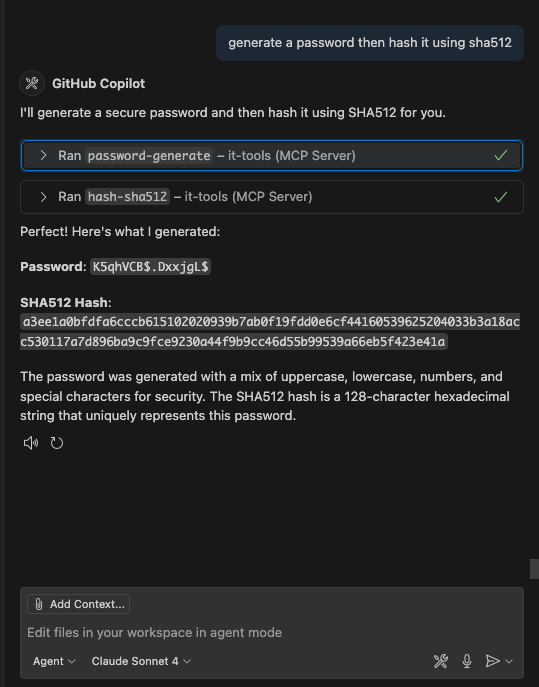
Password Hash Generation Example

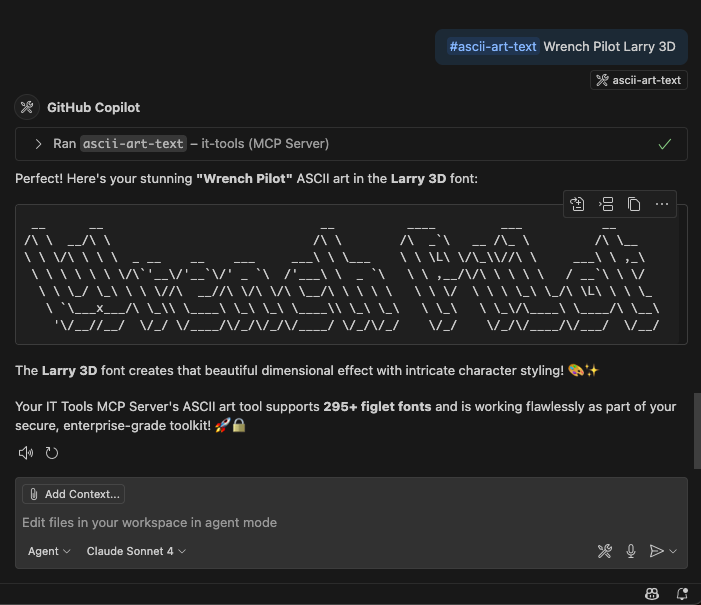
ASCII Art Text Generation Example

Examples of using the IT Tools MCP server with VS Code Copilot Chat for secure password hashing and creative ASCII art generation.
Available Tools
Tool | Description | Parameters |
Ansible Tools | ||
| Parse Ansible inventory |
|
| Generate Ansible inventory |
|
| Validate Ansible playbook YAML |
|
| Ansible syntax and module reference |
|
| Decrypt Ansible Vault data |
|
| Encrypt data with Ansible Vault |
|
Color Tools | ||
| Convert HEX to RGB |
|
| Convert RGB to HEX |
|
Data Format | ||
| Convert HTML to Markdown |
|
| Compare JSON objects |
|
| Format and validate JSON |
|
| Minify JSON |
|
| Convert JSON to CSV |
|
| Convert JSON to TOML |
|
| Convert Markdown to HTML |
|
| Parse and format phone numbers |
|
| Format SQL |
|
| Convert TOML to JSON |
|
| Format XML |
|
| Format YAML |
|
Development Tools | ||
| Generate cron expressions |
|
| Format and prettify HTML |
|
| Format and prettify JavaScript |
|
| Convert list formats |
|
| Generate table of contents for Markdown |
|
| Test regular expressions |
|
Docker Tools | ||
| Convert Compose to Docker run command |
|
| Validate Docker Compose YAML |
|
| Docker command and syntax reference |
|
| Convert Docker run to Compose |
|
| Generate Traefik Docker Compose |
|
Encoding & Decoding | ||
| Decode Base64 text |
|
| Encode text to Base64 |
|
| Decode HTML entities |
|
| Encode HTML entities |
|
| Extended HTML entity encoding/decoding |
|
| Convert text to binary and vice versa |
|
| Convert text to Unicode and vice versa |
|
| URL decode text |
|
| URL encode text |
|
Forensic Tools | ||
| Identify file type from content |
|
| Decode Microsoft SafeLinks |
|
| Fang and defang URLs for analysis |
|
ID & Code Generators | ||
| Generate QR codes for any content |
|
| Generate SVG placeholder |
|
| Generate ULID | None |
| Generate UUID v4 | None |
Math & Calculations | ||
| Evaluate expressions |
|
| Convert number bases |
|
| Calculate percentages |
|
| Convert Roman numerals |
|
| Convert temperatures |
|
| Convert timestamps |
|
Network & System | ||
| Display file content |
|
| HTTP client (GET, POST, etc.) |
|
| DNS query (custom type) |
|
| Search for pattern in file |
|
| Show first N lines of file |
|
| Validate IBAN |
|
| Calculate IPv4 subnet |
|
| Enhanced IPv4 subnet calc |
|
| Generate IPv6 ULA |
|
| Generate MAC address |
|
| DNS lookup (A/AAAA/CNAME) |
|
| Ping a host |
|
| List running processes | None |
| Generate random ports |
|
| Copy files to/from remote host (SFTP) |
|
| SSH command execution |
|
| Show last N lines of file |
|
| Test TCP connectivity |
|
| Show top processes (by CPU) | None |
| Parse URL components |
|
Physics | ||
| Convert angle units |
|
| Convert energy units |
|
| Convert power units |
|
Security & Crypto | ||
| Generate Basic Auth header |
|
| Generate/verify bcrypt hash |
|
| Generate BIP39 mnemonic |
|
| Generate MD5 hash |
|
| Generate SHA1 hash |
|
| Generate SHA256 hash |
|
| Generate SHA512 hash |
|
| Generate HMAC |
|
| Decode JWT token |
|
| Generate TOTP codes |
|
| Generate secure password |
|
| Generate secure token |
|
Text Processing | ||
| Generate ASCII art |
|
| Extract unique words from text |
|
| Search emojis |
|
| Generate Lorem Ipsum |
|
| Generate numeronyms |
|
| Convert to URL slug |
|
| Obfuscate text |
|
| Convert to camelCase |
|
| Capitalize words |
|
| Compare texts |
|
| Convert to kebab-case |
|
| Convert to lowercase |
|
| Convert to PascalCase |
|
| Convert to snake_case |
|
| Get text statistics |
|
| Convert to NATO alphabet |
|
| Convert text to Unicode character names |
|
| Convert to uppercase |
|
Utility Tools | ||
| Format and prettify CSS |
|
| Get system information | None |
| Normalize email addresses |
|
| HTTP status reference |
|
| Look up MIME types |
|
| Look up port number assignments |
|
| Convert between REM and PX units |
|
🏗️ Architecture & Development
Built with TypeScript, Zod validation, and MCP SDK for robust, type-safe operation.
🤖 AI-Assisted Development
This project was developed using VS Code, Copilot Chat Agent, Playwright MCP, and the Claude Sonnet 4 Model, demonstrating the power of AI-assisted software development:
Intelligent Code Generation: Claude Sonnet analyzed requirements and generated comprehensive tool implementations
Schema Validation: Automatically identified and resolved JSON schema validation issues across tools
Docker Optimization: Created production-ready Docker workflows and multi-stage builds
Documentation: Generated comprehensive README with examples and tool reference tables
Testing: Implemented robust error handling and validation throughout the codebase
Key AI Contributions:
🔧 Tool Implementation: All tools designed and implemented with AI assistance
📦 Docker Setup: Complete containerization with GitHub Actions CI/CD pipeline
🔍 Schema Cleanup: Systematic removal of unsupported Zod keywords from all tool definitions
📚 Documentation: Comprehensive README with usage examples and tool catalogs
🚀 Production Ready: Docker Hub publishing, badges, and professional deployment setup
This showcases how AI can accelerate development while maintaining code quality, proper architecture, and comprehensive testing.
Adding New Tools
Create a tool directory in appropriate category under
src/tools/Define tool with input schema using Zod in its
index.tsExport registration function for dynamic loading
Rebuild with
npm run build
Project Structure
src/
├── index.ts # Main MCP server with dynamic tool loading
└── tools/ # Modular tool categories
├── ansible/ # 5 Ansible automation tools
├── color/ # 2 Color conversion tools
├── crypto/ # 9 Cryptographic & security tools
├── dataFormat/ # 12 Data format conversion tools
├── development/ # 6 Development utilities
├── docker/ # 5 Docker & containerization tools
├── encoding/ # 8 Encoding/decoding tools
├── forensic/ # 3 Digital forensics tools
├── idGenerators/ # 4 ID & code generation tools
├── math/ # 6 Mathematical operation tools
├── network/ # 23 Network utilities
├── physics/ # 3 Physics calculation tools
├── text/ # 19 Text manipulation tools
└── utility/ # 7 General utility tools🤝 Contributing
This project is no longer accepting contributions. It is archived for reference purposes only. The guidelines below are preserved for historical context.
Commit Message Format
This project uses Conventional Commits for clear, consistent commit messages.
Version Management:
🤖 Automatic version bumping - Git hooks automatically bump versions based on commit message types
🤖 Automatic publishing - CI/CD detects changes and publishes automatically
🏷️ Git tags - Created automatically based on conventional commit messages
Examples:
git commit -m "feat: add new encryption tool" # → minor version bump
git commit -m "fix: resolve base64 decoding issue" # → patch version bump
git commit -m "docs: improve README examples" # → patch version bump
git commit -m "feat!: breaking API change" # → major version bump
# Version is automatically bumped and committed by git hooks
# No manual npm version commands needed!
git push📖 See COMMIT_TEMPLATE_SETUP.md for setup instructions.
Development Process
Fork the repository
Run
./setup-commit-template.sh(recommended)Create a feature branch
Make your changes following the project structure
Use conventional commit messages
Submit a Pull Request
The CI/CD pipeline will automatically:
✅ Build and test your changes
🏷️ Bump version based on commit messages (on merge to main)
📦 Publish to Docker Hub and NPM
🚀 Create GitHub releases
📄 License
MIT License - see LICENSE for details.
🔗 Related
Inspired by IT Tools - online tools for developers.
This project incorporates select tools from the @sharevb fork which extends IT Tools with additional utilities and enhancements.
Available Tools
119 toolsanalyze_distinct_wordsARead-only
Count distinct words in text and show their frequency
Inputs: text (required).
analyze_text_statsARead-only
Get statistics about text (character count, word count, etc.)
Inputs: text (required).
calculate_ip_subnetB
Calculate subnet information for IPv4
Inputs: ip (required), cidr (required).
calculate_ipv4_subnetC
Calculate IPv4 subnet information
Inputs: cidr (required).
calculate_ipv6_subnetC
Calculate IPv6 subnet information
Inputs: ipv6 (required), newPrefix.
calculate_percentageC
Calculate percentages, percentage of a number, or percentage change
Inputs: operation (required), value1 (required), value2 (required).
capitalize_textA
Capitalize first letter of each word
Inputs: text (required).
catC
Display content of a file
Inputs: file (required).
compare_jsonC
Compare two JSON objects and show differences
Inputs: json1 (required), json2 (required).
compare_textC
Compare two texts and show differences
Inputs: text1 (required), text2 (required).
convert_angleB
Convert between different angle units
Inputs: value (required), fromUnit (required), toUnit (required).
convert_cidr_to_ip_rangeA
Convert CIDR notation to IP address range
Inputs: cidr (required).
convert_docker_compose_to_runB
Convert Docker Compose files to docker run commands
Inputs: content (required).
convert_docker_run_to_composeB
Convert docker run commands to Docker Compose format
Inputs: commands (required).
convert_energyB
Convert between different energy units
Inputs: value (required), fromUnit (required), toUnit (required).
convert_hex_to_rgbB
Convert HEX color to RGB
Inputs: hex (required).
convert_html_to_markdownB
Convert HTML to Markdown
Inputs: html (required).
convert_ip_range_to_cidrB
Convert IP address range to CIDR notation(s)
Inputs: startIP (required), endIP (required).
convert_json_to_csvC
Convert JSON to CSV format
Inputs: json (required), delimiter.
convert_json_to_tomlB
Convert JSON to TOML format
Inputs: json (required).
convert_listB
Convert between different list formats (comma-separated, line-separated, etc.)
Inputs: list (required), inputFormat (required), outputFormat (required), trim.
convert_markdown_to_htmlB
Convert Markdown to HTML
Inputs: markdown (required).
convert_number_baseA
Convert numbers between different bases (binary, octal, decimal, hexadecimal)
Inputs: number (required), fromBase (required), toBase (required).
convert_powerB
Convert between different power units
Inputs: value (required), fromUnit (required), toUnit (required).
convert_rem_pxA
Convert between REM and PX units for CSS. Example: Convert 1.5rem to pixels, or 24px to rem units.
Inputs: value (required), fromUnit (required), rootFontSize.
convert_rgb_to_hexA
Convert RGB color to HEX
Inputs: r (required), g (required), b (required).
convert_roman_numeralsC
Convert between Arabic numbers and Roman numerals
Inputs: input (required).
convert_temperatureB
Convert temperatures between Celsius, Fahrenheit, and Kelvin
Inputs: temperature (required), from (required), to (required).
convert_text_to_binaryB
Convert text to binary and vice versa
Inputs: input (required), operation (required).
convert_text_to_camelcaseA
Convert text to camelCase format. Example: 'hello world' → 'helloWorld', 'my-variable-name' → 'myVariableName'
Inputs: text (required).
convert_text_to_kebabcaseA
Convert text to kebab-case
Inputs: text (required).
convert_text_to_lowercaseA
Convert text to lowercase
Inputs: text (required).
convert_text_to_natoB
Convert text to NATO phonetic alphabet
Inputs: text (required), language.
convert_text_to_pascalcaseC
Convert text to PascalCase
Inputs: text (required).
convert_text_to_unicodeB
Convert text to Unicode code points and vice versa
Inputs: input (required), operation (required).
convert_text_to_uppercaseC
Convert text to uppercase
Inputs: text (required).
convert_toml_to_jsonB
Convert TOML to JSON format
Inputs: toml (required).
convert_unix_timestampB
Convert between Unix timestamps and human-readable dates
Inputs: input (required).
curlA
Make HTTP requests to web endpoints. Example: GET request to an API or POST data to a server
Inputs: url (required), method, headers, body.
decode_base64A
Decode Base64 text back to original text. Example: "SGVsbG8gV29ybGQ=" → "Hello World"
Inputs: text (required).
decode_htmlA
Decode HTML entities
Inputs: text (required).
decode_jwtB
Decode JWT token (header and payload only)
Inputs: token (required).
decode_safelinkC
Decode Microsoft Outlook SafeLink URLs
Inputs: safelink (required).
decode_urlA
URL decode text
Inputs: text (required).
decrypt_ansible_vaultA
Decrypt Ansible Vault encrypted text
Inputs: encryptedText (required), password (required).
digB
Perform DNS lookup with dig command
Inputs: target (required), type.
encode_base64A
Encode text to Base64 format. Example: "Hello World" → "SGVsbG8gV29ybGQ="
Inputs: text (required).
encode_htmlB
Encode HTML entities
Inputs: text (required).
encode_html_entitiesC
Extended HTML entity encoding/decoding
Inputs: text (required), operation (required).
encode_urlB
URL encode text
Inputs: text (required).
encrypt_ansible_vaultC
Encrypt text using Ansible Vault format
Inputs: text (required), password (required), vaultId.
evaluate_mathA
Safely evaluate mathematical expressions
Inputs: expression (required).
fang_urlA
Defang or refang URLs for safe sharing (security analysis)
Inputs: text (required), operation (required).
format_cssB
Format and prettify CSS code
Inputs: css (required), indentSize.
format_htmlB
Format and beautify HTML code
Inputs: html (required), indentSize.
format_javascriptC
Format and beautify JavaScript/CSS code
Inputs: code (required), type (required), indentSize.
format_jsonB
Format and prettify JSON with proper indentation. Example: {"a":1,"b":2} → formatted JSON with customizable spacing
Inputs: json (required), indent.
format_phoneA
Parse and format phone numbers
Inputs: phoneNumber (required), countryCode.
format_sqlB
Format and prettify SQL queries
Inputs: sql (required), dialect.
format_xmlC
Format and prettify XML
Inputs: xml (required), indent.
format_yamlB
Format and prettify YAML
Inputs: yaml (required).
generate_ansible_inventoryB
Parse and validate Ansible inventory files
Inputs: inventory (required).
generate_ascii_artA
Generate ASCII art text using figlet fonts. Example: 'Hello' → stylized ASCII text art, supports 295+ fonts
Inputs: text (required), font.
generate_basic_authB
Generate HTTP Basic Authentication header
Inputs: username (required), password (required).
generate_bip39B
Generate BIP39 mnemonic phrases
Inputs: wordCount.
generate_crontabC
Generate crontab expressions
Inputs: minute, hour, dayOfMonth, month, +1 more.
generate_hmacC
Generate HMAC (Hash-based Message Authentication Code)
Inputs: message (required), key (required), algorithm.
generate_ipv6_ulaA
Generate IPv6 Unique Local Address (ULA) prefix
Inputs: globalId.
generate_lorem_ipsumB
Generate Lorem Ipsum placeholder text
Inputs: count, type.
generate_mac_addressA
Generate random MAC address
Inputs: prefix, separator.
generate_markdown_tocB
Generate a table of contents from Markdown headers
Inputs: markdown (required), maxLevel, generateAnchors.
generate_numeronymB
Generate numeronyms (abbreviations with numbers) from text
Inputs: text (required).
generate_otpB
Generate Time-based One-Time Password (TOTP) codes
Inputs: secret (required), digits, period.
generate_passwordC
Generate a secure password
Inputs: length, includeUppercase, includeLowercase, includeNumbers, +1 more.
generate_qr_codeB
Generate QR code for any text including URLs, WiFi networks, contact info, etc.
Inputs: text (required), size.
generate_random_portB
Generate random port numbers
Inputs: count, min, max, exclude.
generate_svg_placeholderB
Generate SVG placeholder images
Inputs: width, height, backgroundColor, textColor, +1 more.
generate_tokenC
Generate secure random tokens
Inputs: length, charset, customChars.
generate_traefik_composeB
Generate Traefik Docker Compose configuration
Inputs: domain, email, network, serviceName, +1 more.
generate_ulidA
Generate Universally Unique Lexicographically Sortable Identifier (ULID). Example: creates time-sortable unique IDs like '01ARZ3NDEKTSV4RRFFQ69G5FAV'
Inputs: no named parameters.
generate_uuidA
Generate a universally unique identifier (UUID). Example: generates "550e8400-e29b-41d4-a716-446655440000"
Inputs: no named parameters.
grepC
Search for patterns in files
Inputs: pattern (required), file (required).
hash_bcryptA
Generate bcrypt hash or verify password against hash
Inputs: password (required), rounds, hash.
hash_md5A
Generate MD5 hash
Inputs: text (required).
hash_sha1B
Generate SHA1 hash
Inputs: text (required).
hash_sha256A
Generate SHA256 hash of input text. Example: "hello" → "2cf24dba4f21d..."
Inputs: text (required).
hash_sha512A
Generate SHA512 hash
Inputs: text (required).
headB
Display the beginning of a file
Inputs: file (required), lines.
identify_file_typeB
Identify file type based on magic numbers/file signatures
Inputs: data (required), format (required).
logging_setLevelA
Set the minimum logging level for MCP logging notifications. Available levels: debug, info, notice, warning, error, critical, alert, emergency
Inputs: level (required).
logging_statusA
Get current MCP logging configuration and status
Inputs: no named parameters.
lookup_http_statusBRead-only
Get information about HTTP status codes
Inputs: code.
lookup_mime_typesCRead-only
Look up MIME types for file extensions
Inputs: input (required), lookupType.
lookup_port_numbersARead-only
Look up common TCP/UDP port numbers and their services
Inputs: query (required).
minify_jsonA
Minify JSON by removing whitespace and unnecessary characters. Example: formatted JSON → compact single-line JSON
Inputs: json (required).
normalize_emailA
Normalize email addresses (remove dots, plus aliases, etc.)
Inputs: email (required).
nslookupA
Perform DNS lookup on a hostname or IP address
Inputs: target (required).
obfuscate_stringA
Obfuscate text by replacing characters with their HTML entities or other representations
Inputs: text (required), method.
parse_ansible_inventoryC
Parse and validate Ansible inventory files
Inputs: inventory (required).
parse_urlC
Parse URL into components
Inputs: url (required).
pingB
Test network connectivity to a host. Example: ping google.com to check if it's reachable
Inputs: target (required), count.
psB
List running processes
Inputs: no named parameters.
scpA
Copy files to or from a remote host using SFTP (SCP-like)
Inputs: target (required), user (required), direction (required), localPath (required), +2 more.
search_emojiC
Search for emojis by name or category
Inputs: query (required).
show_ansible_referenceARead-only
Get Ansible commands reference and cheatsheet
Inputs: no named parameters.
show_device_infoARead-only
Get basic device/system information
Inputs: no named parameters.
show_docker_referenceARead-only
Get Docker commands reference and cheatsheet
Inputs: no named parameters.
show_unicode_namesARead-only
Convert text to Unicode character names
Inputs: text (required).
slugify_textB
Convert text to URL-friendly slug format
Inputs: text (required), separator, lowercase.
sshC
Connect to a target via SSH
Inputs: target (required), user (required), command (required), privateKey.
system_infoARead-only
Get comprehensive system information, server details, available tool categories, and resource usage. Example: system information, tool categories, installation guide
Inputs: include_tools, category.
tailB
Display the end of a file
Inputs: file (required), lines.
telnetB
Test TCP connectivity to a host and port
Inputs: target (required), port (required).
test_regexB
Test regular expressions against text
Inputs: pattern (required), text (required), flags.
text_snakecaseB
Convert text to snake_case
Inputs: text (required).
topB
Display system processes (snapshot)
Inputs: no named parameters.
validate_ansible_playbookB
Validate Ansible playbook syntax and structure
Inputs: playbook (required).
validate_docker_composeB
Validate Docker Compose files for syntax errors, compatibility issues, and best practices. Example: check YAML syntax, service configuration, network setup
Inputs: content (required).
validate_ibanB
Validate and parse IBAN (International Bank Account Number)
Inputs: iban (required).
Tool Schema Changelog
Recent tool additions, removals, and schema changes observed during successful MCP inspections.
Loading tool schema changelog…
TDQS
Scored across 119 tools
Most tools have distinct purposes, but there are a few overlapping pairs (e.g., calculate_ip_subnet vs calculate_ipv4_subnet, encode_html vs encode_html_entities) that could cause confusion. The large number of conversion tools are generally distinguishable by their target format, but the boundary between some text manipulation tools is blurry.
Tool names follow a mix of conventions: some are short Unix commands (cat, grep, ping), others use verb_noun with underscores (convert_temperature, generate_password). While each name is descriptive, the lack of a uniform pattern (e.g., some start with 'convert_', others with 'format_') reduces predictability.
With 119 tools, the count is excessively high for typical MCP server usage. Although the server aims to be a comprehensive IT toolkit, this many tools can overwhelm agents and decrease performance. The rubric suggests 25+ is already too many.
The tool surface is remarkably comprehensive, covering text processing, unit conversions, network diagnostics, file operations, format transformations, hashing, Docker/Ansible utilities, and many niche features (e.g., BIP39, emoji search). There are no obvious missing tools for a general-purpose IT assistant.
Maintenance
Related MCP Connectors
A comprehensive Model Context Protocol (MCP) server that enables AI assistants to interact with yo…
238+ dev tools via MCP: JSON, QR, PDF, DNS, hash, UUID, code review, JWT, SSL, WHOIS, and more
MCP server for progressive tool usage at any scale (see https://klavis.ai)
Model Context Protocol server for the Apideck Unified API. Connect any MCP-compatible agent framework to 100+ accounting systems, HRIS platforms, file storage providers, and more through one integration. More information https://www.apideck.com/mcp-server
Related MCP Servers
- AlicenseAqualityBmaintenanceA Model Context Protocol server that provides LLM Agents with a comprehensive toolset for IP geolocation, network diagnostics, system monitoring, cryptographic operations, and QR code generation.5385 npm20Apache 2.0

Playwright MCP Serverofficial
AlicenseBqualityAmaintenanceA Model Context Protocol server that enables LLMs to interact with web pages through structured accessibility snapshots without requiring vision models or screenshots.102510,733,245 npm40,176Apache 2.0- AlicenseNot gradedqualityDmaintenanceA Model Context Protocol server providing 150+ mathematical functions across arithmetic, trigonometry, statistics, unit conversions, and more, consolidated into 15 powerful tools for seamless integration with VS Code Copilot and other MCP-compatible clients.MIT
- AlicenseNot gradedqualityFmaintenanceA comprehensive MCP server integrating OpenAI GPT models for AI-powered tasks like code analysis, generation, and translation, along with system utilities, Docker management, network diagnostics, and web tools.MIT