Glama
webreactiva-devs

MCP Character Counter

MCP 字符计数器

轻量级模型上下文协议 (MCP) 服务器,为文本提供详细的字符分析。此工具计算总字符数、不带空格的字符、字母、数字和符号。

特征

  • 计算文本中的字符总数

  • 统计字符数(不包括空格)

  • 统计字母数量(az,AZ)

  • 计数数字(0-9)

  • 计数符号(非字母数字字符)

  • 角色类型的详细分类

图像

Related MCP server: File Analysis MCP Server

安装

先决条件

设置

  1. 克隆存储库:

    git clone https://github.com/webreactiva-devs/mcp-character-counter.git
    cd mcp-character-counter
  2. 安装依赖项:

    npm install

与 Claude Desktop 一起使用

  1. 打开您的 Claude Desktop 配置:

    macOS 系统:

    code ~/Library/Application\ Support/Claude/claude_desktop_config.json

    窗户:

    code %APPDATA%\Claude\claude_desktop_config.json
  2. 将字符计数器添加到您的 MCP 服务器:

    {
      "mcpServers": {
        "character-counter": {
          "command": "node",
          "args": [
            "/ABSOLUTE/PATH/TO/webreactiva-devs/mcp-character-counter/mcp/character-counter.js"
          ]
        }
      }
    }

    将/ABSOLUTE/PATH/TO/替换为系统上的当前路径。

  3. 重新启动 Claude Desktop 以加载新的 MCP 服务器。

  4. 在输入框中查找锤子图标,它表示可用的 MCP 工具。

  5. 要求 Claude 分析文本字符数,例如:

    • “统计本段字符数”

    • “‘123 Main St, Apt 45B’这段文字中有多少个数字?”

    • “分析我的电子邮件地址的字符组成”

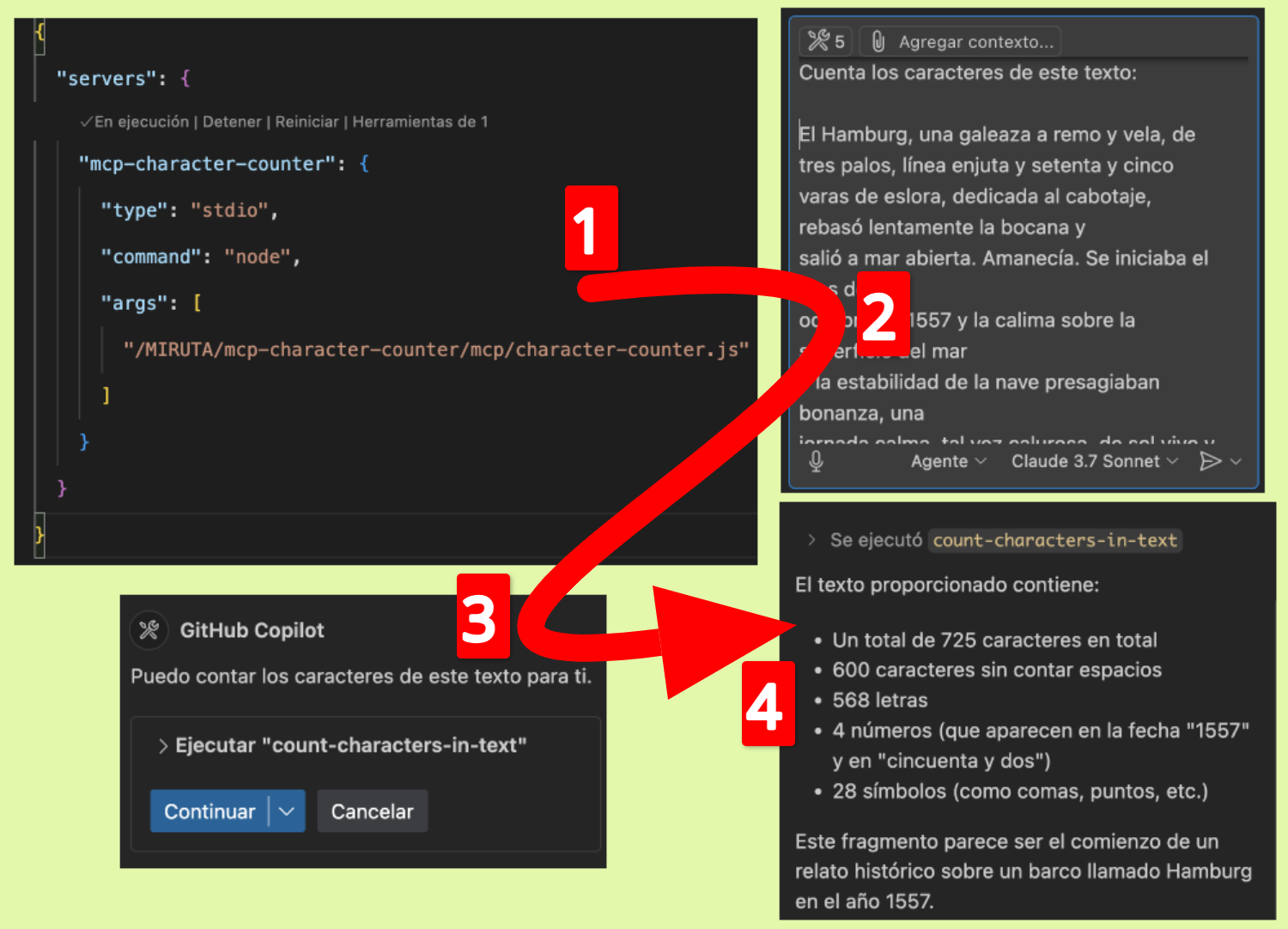
与 GitHub Copilot 一起使用

要将此 MCP 服务器与 GitHub Copilot 一起使用:

  1. 确保您的 VS Code 或其他兼容 IDE 中安装了 GitHub Copilot。

  2. 打开 VS Code 设置并搜索“Copilot MCP”。

  3. 添加新的 MCP 服务器配置:

    "github.copilot.advanced": {
      "mcp.servers": [
        {
          "id": "character-counter",
          "name": "Character Counter",
          "transport": "stdio",
          "command": "node",
          "args": ["/path/to/webreactiva-devs/mcp-character-counter/mcp/character-counter.js"]
        }
      ]
    }
  4. 重新启动 VS Code。

  5. 您现在可以使用字符计数器和 Copilot Chat 命令,例如:

    • /mcp count-characters-in-text This is the text I want to analyze

发展

要修改或扩展此 MCP 服务器:

  1. 对character-counter.js进行修改

  2. 在 MCP 客户端中重新启动服务器

工作原理

该 MCP 服务器实现了一个名为count-characters-in-text的单一工具,它接受文本输入并返回字符组成的详细分析。服务器使用模型上下文协议向兼容的 AI 助手公开此功能。

执照

麻省理工学院

贡献

欢迎投稿!请随时提交拉取请求。


MCP 字符计数器

轻量级模型上下文协议 (MCP) 服务器,提供文本中的详细字符分析。此工具计算总字符数、不带空格的字符、字母、数字和符号。

特征

  • 计算文本中的字符总数

  • 统计字符数(不包括空格)

  • 信件计数器(az,AZ)

  • 计数数字(0-9)

  • 计数符号(非字母数字字符)

  • 角色类型的详细分类

设施

先决条件

配置

  1. 克隆存储库:

    git clone https://github.com/webreactiva-devs/mcp-character-counter.git
    cd mcp-character-counter
  2. 安装依赖项:

    npm install

与 Claude Desktop 一起使用

  1. 打开Claude桌面设置:

    macOS 系统:

    code ~/Library/Application\ Support/Claude/claude_desktop_config.json

    窗户:

    code %APPDATA%\Claude\claude_desktop_config.json
  2. 将字符计数器添加到您的 MCP 服务器:

    {
      "mcpServers": {
        "character-counter": {
          "command": "node",
          "args": [
            "/RUTA/ABSOLUTA/A/webreactiva-devs/mcp-character-counter/mcp/character-counter.js"
          ]
        }
      }
    }

    将/RUTA/ABSOLUTA/A/替换为系统上的当前路径。

  3. 重新启动 Claude Desktop 以加载新的 MCP 服务器。

  4. 在输入框中查找锤子图标,它表示可用的 MCP 工具。

  5. 要求 Claude 分析文本中的字符数,例如:

    • “统计本段字符数”

    • “‘123 Calle Principal, Apto 45B’这段文字中有多少个数字?”

    • “分析我的电子邮件地址的字符集”

与 GitHub Copilot 一起使用

要将此 MCP 服务器与 GitHub Copilot 一起使用:

  1. 确保您已在 VS Code 或其他受支持的 IDE 中安装了 GitHub Copilot。

  2. 打开 VS Code 设置并搜索“Copilot MCP”。

  3. 添加新的 MCP 服务器配置:

    "github.copilot.advanced": {
      "mcp.servers": [
        {
          "id": "character-counter",
          "name": "Character Counter",
          "transport": "stdio",
          "command": "node",
          "args": ["/ruta/a/webreactiva-devs/mcp-character-counter/mcp/character-counter.js"]
        }
      ]
    }
  4. 重新启动 VS Code。

  5. 您现在可以使用字符计数器和 Copilot Chat 命令,例如:

    • /mcp count-characters-in-text Este es el texto que quiero analizar

发展

要修改或扩展此 MCP 服务器:

  1. 对character-counter.js进行修改

  2. 在 MCP 客户端上重新启动服务器

工作原理

该 MCP 服务器实现了一个名为count-characters-in-text的单一工具,它接受文本作为输入并返回字符组成的详细分析。服务器使用模型上下文协议向兼容的 AI 助手公开此功能。

执照

麻省理工学院

贡献

欢迎投稿!请随时提交拉取请求。

版权页

由🧡为 webreactiva.com 的 Malandriner 社区创建

Available Tools

1 tool
count-characters-in-textC

Count characters in a text

ParametersJSON Schema
NameRequiredDescriptionDefault
textYesThe text whose characters you want to count

TDQS

C2.7/5.0
Behavior1/5

Does the description disclose side effects, auth requirements, rate limits, or destructive behavior?

No annotations are provided, so the description carries the full burden of behavioral disclosure. The description only states the basic function without mentioning any behavioral traits such as performance characteristics, error handling, or output format. This is inadequate for a tool with no annotation support.

Agents need to know what a tool does to the world before calling it. Descriptions should go beyond structured annotations to explain consequences.

Conciseness5/5

Is the description appropriately sized, front-loaded, and free of redundancy?

The description is extremely concise—a single, clear sentence that directly states the tool's purpose without any unnecessary words. It is front-loaded and efficiently communicates the core function, making it easy for an agent to parse quickly.

Shorter descriptions cost fewer tokens and are easier for agents to parse. Every sentence should earn its place.

Completeness2/5

Given the tool's complexity, does the description cover enough for an agent to succeed on first attempt?

Given the lack of annotations and output schema, the description is incomplete. It fails to address behavioral aspects, output format, or any contextual nuances. While the tool is simple, the description does not provide enough information for an agent to fully understand how to use it effectively beyond the basic function.

Complex tools with many parameters or behaviors need more documentation. Simple tools need less. This dimension scales expectations accordingly.

Parameters3/5

Does the description clarify parameter syntax, constraints, interactions, or defaults beyond what the schema provides?

Schema description coverage is 100%, with the schema fully documenting the single 'text' parameter. The description adds no additional meaning beyond what the schema provides, such as examples or edge cases. The baseline score of 3 reflects adequate coverage by the schema alone.

Input schemas describe structure but not intent. Descriptions should explain non-obvious parameter relationships and valid value ranges.

Purpose4/5

Does the description clearly state what the tool does and how it differs from similar tools?

The description 'Count characters in a text' clearly states the verb ('count') and resource ('characters in a text'), making the purpose immediately understandable. It's not a tautology since it elaborates beyond the tool name. However, with no sibling tools mentioned, there's no opportunity to differentiate from alternatives, preventing a perfect score.

Agents choose between tools based on descriptions. A clear purpose with a specific verb and resource helps agents select the right tool.

Usage Guidelines2/5

Does the description explain when to use this tool, when not to, or what alternatives exist?

The description provides no guidance on when to use this tool versus alternatives, prerequisites, or contextual constraints. It simply states what the tool does without any usage context, leaving the agent to infer applicability based solely on the tool name and description.

Agents often have multiple tools that could apply. Explicit usage guidance like "use X instead of Y when Z" prevents misuse.

Tool Schema Changelog

Recent tool additions, removals, and schema changes observed during successful MCP inspections.

  1. 1 tool updatev1.0.0
    • First observedcount-characters-in-text

TDQS

B3/5.0

Scored across 1 tool

Disambiguation5/5

With only one tool, there is no possibility of confusion or overlap between tools. The tool's purpose is singular and clearly defined, eliminating any ambiguity in selection.

Naming Consistency5/5

The single tool name follows a clear verb_noun pattern (count-characters-in-text), and with only one tool, consistency is inherently perfect as there are no other names to compare against.

Tool Count2/5

A single tool is too few for most practical server purposes, making the server feel thin and limited. While it might suffice for a trivial utility, it lacks the depth expected for broader functionality.

Completeness3/5

The tool covers its stated purpose of counting characters, but the server's scope is minimal. There are no obvious gaps for this narrow domain, but the surface is inherently limited and may not support more complex workflows.

Maintenance

ActivityInactive
ResponsivenessNo issues

Related MCP Connectors

Related MCP Servers

  • A
    license
    B
    quality
    D
    maintenance
    A Model Context Protocol server that provides tools for analyzing text documents, including counting words and characters. This server helps LLMs perform text analysis tasks by exposing simple document statistics functionality.
    1
    30 npm
    10
    Apache 2.0
  • A
    license
    Not graded
    quality
    D
    maintenance
    Provides tools for text file analysis, including metrics like word counts and character frequencies, alongside file reading and directory browsing capabilities. This server enables LLMs to interact with and process local file content securely through the Model Context Protocol.
    MIT
  • F
    license
    A
    quality
    D
    maintenance
    A lightweight MCP server providing utility tools for math, text processing, data conversion, and URL fetching. It supports both STDIO and SSE communication modes for seamless integration with Claude Desktop and remote AI agents.
    5
    1
    -
  • A
    license
    Not graded
    quality
    D
    maintenance
    Provides tools for AI models to count characters and words in text, supporting English and other space-delimited languages.
    1
    MIT