MCP 캐릭터 카운터
텍스트에 대한 자세한 문자 분석을 제공하는 가벼운 모델 컨텍스트 프로토콜(MCP) 서버입니다. 이 도구는 공백을 제외한 총 문자 수, 문자, 숫자, 기호를 계산합니다.
특징
텍스트의 총 문자 수 세기
공백을 제외한 문자 수 세기
글자 세기 (az, AZ)
숫자 세기 (0~9)
카운트 기호(영숫자가 아닌 문자)
캐릭터 유형에 대한 자세한 분석
Related MCP server: File Analysis MCP Server
설치
필수 조건
설정
저장소를 복제합니다.
지엑스피1
종속성 설치:
Claude Desktop과 함께 사용
Claude Desktop 구성을 엽니다.
맥OS :
code ~/Library/Application\ Support/Claude/claude_desktop_config.json
윈도우 :
code %APPDATA%\Claude\claude_desktop_config.json
MCP 서버에 캐릭터 카운터를 추가하세요:
{
  "mcpServers": {
    "character-counter": {
      "command": "node",
      "args": [
        "/ABSOLUTE/PATH/TO/webreactiva-devs/mcp-character-counter/mcp/character-counter.js"
      ]
    }
  }
}
/ABSOLUTE/PATH/TO/ 시스템의 현재 경로로 바꾸세요.
새로운 MCP 서버를 로드하려면 Claude Desktop을 다시 시작하세요.
입력 상자에서 망치 아이콘을 찾으세요. 이 아이콘은 사용 가능한 MCP 도구를 나타냅니다.
예를 들어 Claude에게 텍스트 문자 수를 분석해 달라고 요청하세요.
GitHub Copilot 사용
이 MCP 서버를 GitHub Copilot과 함께 사용하려면:
VS Code나 다른 호환 IDE에 GitHub Copilot이 설치되어 있는지 확인하세요.
VS Code 설정을 열고 "Copilot MCP"를 검색합니다.
새로운 MCP 서버 구성을 추가합니다.
"github.copilot.advanced": {
  "mcp.servers": [
    {
      "id": "character-counter",
      "name": "Character Counter",
      "transport": "stdio",
      "command": "node",
      "args": ["/path/to/webreactiva-devs/mcp-character-counter/mcp/character-counter.js"]
    }
  ]
}
VS Code를 다시 시작합니다.
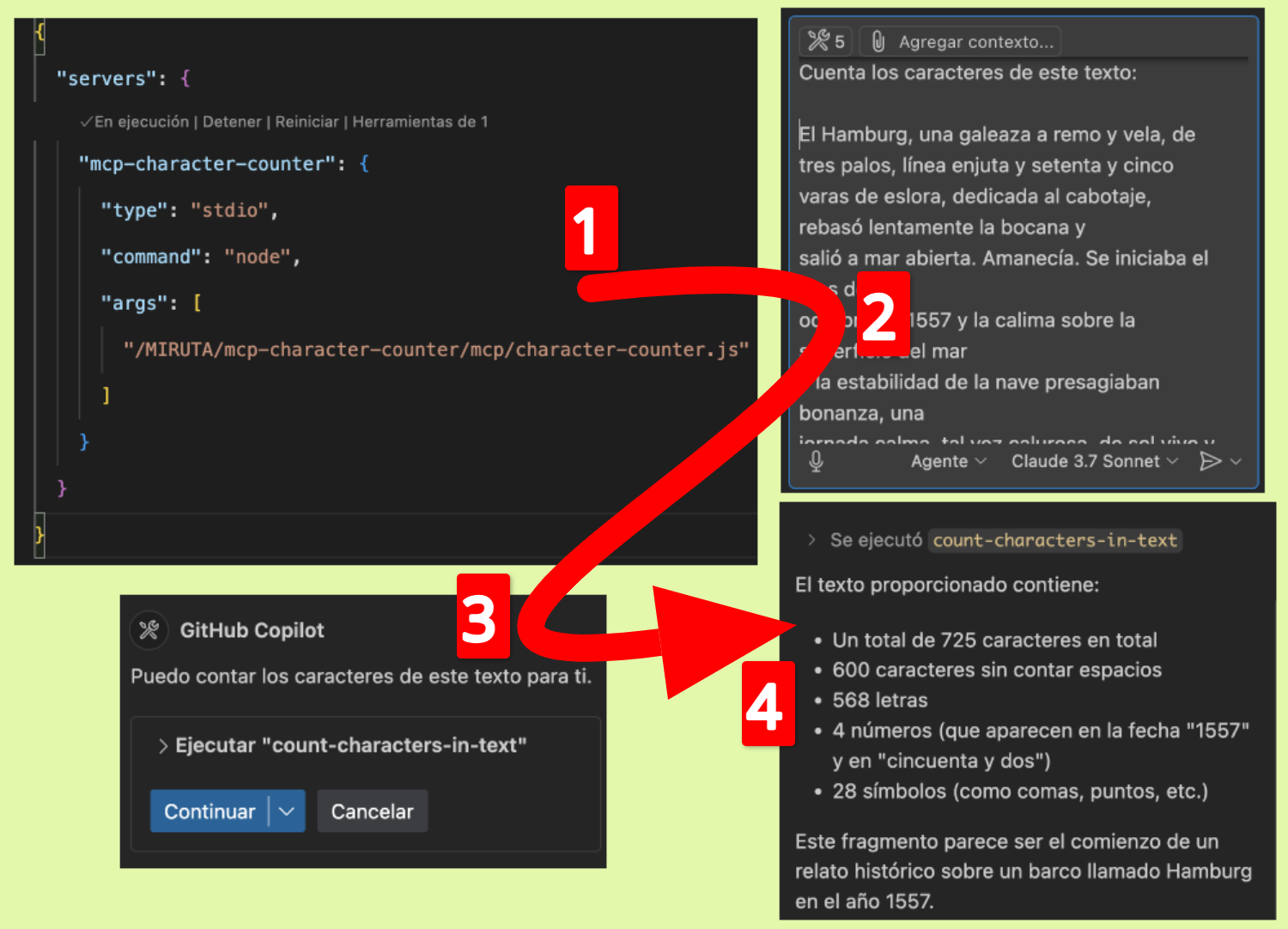
이제 다음과 같은 Copilot Chat 명령과 함께 문자 카운터를 사용할 수 있습니다.
개발
이 MCP 서버를 수정하거나 확장하려면:
character-counter.js 를 변경하세요
MCP 클라이언트에서 서버를 다시 시작하세요.
작동 원리
이 MCP 서버는 텍스트 입력을 받고 문자 구성에 대한 자세한 분석을 반환하는 count-characters-in-text 라는 단일 도구를 구현합니다. 서버는 모델 컨텍스트 프로토콜을 사용하여 이 기능을 호환되는 AI 어시스턴트에 제공합니다.
특허
MIT
기여하다
기여를 환영합니다! 자유롭게 풀 리퀘스트를 제출해 주시기 바랍니다.
MCP 캐릭터 카운터
텍스트에서 자세한 문자 분석을 제공하는 가벼운 모델 컨텍스트 프로토콜(MCP) 서버입니다. 이 도구는 공백을 제외한 총 문자, 문자, 숫자, 기호를 계산합니다.
형질
텍스트의 총 문자 수를 센다
공백을 제외한 문자 수 세기
문자 카운터(az, AZ)
숫자 세기 (0~9)
카운트 기호(영숫자가 아닌 문자)
캐릭터 유형에 대한 자세한 분석
시설
필수 조건
구성
저장소를 복제합니다.
git clone https://github.com/webreactiva-devs/mcp-character-counter.git
cd mcp-character-counter
종속성을 설치합니다.
Claude Desktop과 함께 사용
Claude Desktop 설정 열기:
맥OS :
code ~/Library/Application\ Support/Claude/claude_desktop_config.json
윈도우 :
code %APPDATA%\Claude\claude_desktop_config.json
MCP 서버에 캐릭터 카운터를 추가하세요:
{
  "mcpServers": {
    "character-counter": {
      "command": "node",
      "args": [
        "/RUTA/ABSOLUTA/A/webreactiva-devs/mcp-character-counter/mcp/character-counter.js"
      ]
    }
  }
}
/RUTA/ABSOLUTA/A/ 시스템의 현재 경로로 바꾸세요.
새로운 MCP 서버를 로드하려면 Claude Desktop을 다시 시작하세요.
입력 상자에서 망치 아이콘을 찾으세요. 이 아이콘은 사용 가능한 MCP 도구를 나타냅니다.
예를 들어 Claude에게 텍스트의 문자 수를 분석해 달라고 요청하세요.
GitHub Copilot과 함께 사용
이 MCP 서버를 GitHub Copilot과 함께 사용하려면:
VS Code나 다른 지원되는 IDE에 GitHub Copilot이 설치되어 있는지 확인하세요.
VS Code 설정을 열고 "Copilot MCP"를 검색합니다.
새로운 MCP 서버 구성을 추가합니다.
"github.copilot.advanced": {
  "mcp.servers": [
    {
      "id": "character-counter",
      "name": "Character Counter",
      "transport": "stdio",
      "command": "node",
      "args": ["/ruta/a/webreactiva-devs/mcp-character-counter/mcp/character-counter.js"]
    }
  ]
}
VS Code를 다시 시작합니다.
이제 다음과 같은 Copilot Chat 명령으로 문자 카운터를 사용할 수 있습니다.
개발
이 MCP 서버를 수정하거나 확장하려면:
character-counter.js 를 변경하세요
MCP 클라이언트에서 서버를 다시 시작하세요.
작동 원리
이 MCP 서버는 텍스트를 입력으로 받고 문자 구성에 대한 자세한 분석을 반환하는 count-characters-in-text 라는 단일 도구를 구현합니다. 서버는 모델 컨텍스트 프로토콜을 사용하여 이 기능을 호환되는 AI 어시스턴트에 제공합니다.
특허
MIT
기여하다
기여를 환영합니다! 자유롭게 풀 리퀘스트를 제출해 주시기 바랍니다.
출판사 마크
webreactiva.com의 Malandriner 커뮤니티를 위해 🧡로 제작되었습니다.

