MCP Character Counter
A lightweight Model Context Protocol (MCP) server that provides detailed character analysis for text. This tool counts total characters, characters without spaces, letters, numbers, and symbols.
Features
Count total characters in text
Count characters excluding spaces
Count letters (az, AZ)
Count numbers (0-9)
Count symbols (non-alphanumeric characters)
Detailed breakdown of character types
Related MCP server: File Analysis MCP Server
Installation
Prerequisites
Setup
Clone the repository:
git clone https://github.com/webreactiva-devs/mcp-character-counter.git
cd mcp-character-counter
Install dependencies:
Usage with Claude Desktop
Open your Claude Desktop configuration:
macOS :
code ~/Library/Application\ Support/Claude/claude_desktop_config.json
Windows :
code %APPDATA%\Claude\claude_desktop_config.json
Add the character counter to your MCP servers:
{
  "mcpServers": {
    "character-counter": {
      "command": "node",
      "args": [
        "/ABSOLUTE/PATH/TO/webreactiva-devs/mcp-character-counter/mcp/character-counter.js"
      ]
    }
  }
}
Replace /ABSOLUTE/PATH/TO/ with the current path on your system.
Restart Claude Desktop to load the new MCP server.
Look for the hammer icon in the input box, which indicates available MCP tools.
Ask Claude to analyze text character counts, for example:
"Count the characters in this paragraph"
"How many numbers are in this text: '123 Main St, Apt 45B'?"
"Analyze the character composition of my email address"
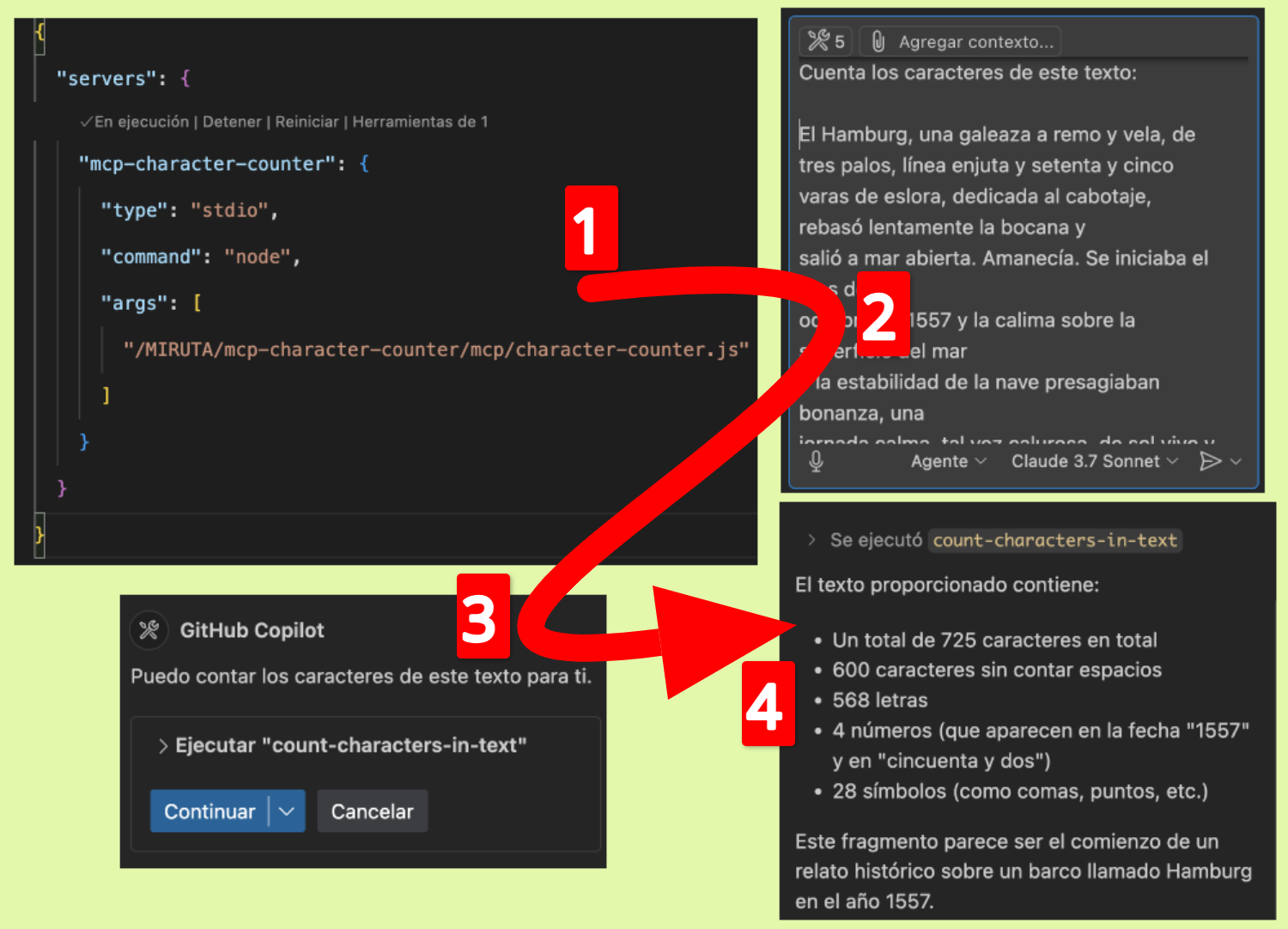
Usage with GitHub Copilot
To use this MCP server with GitHub Copilot:
Make sure you have GitHub Copilot installed in your VS Code or other compatible IDE.
Open VS Code settings and search for "Copilot MCP".
Add a new MCP server configuration:
"github.copilot.advanced": {
  "mcp.servers": [
    {
      "id": "character-counter",
      "name": "Character Counter",
      "transport": "stdio",
      "command": "node",
      "args": ["/path/to/webreactiva-devs/mcp-character-counter/mcp/character-counter.js"]
    }
  ]
}
Restart VS Code.
You can now use the character counter with Copilot Chat commands like:
Development
To modify or extend this MCP server:
Make your changes to character-counter.js
Restart the server in your MCP client
How It Works
This MCP server implements a single tool called count-characters-in-text that accepts text input and returns a detailed analysis of character composition. The server uses the Model Context Protocol to expose this functionality to compatible AI assistants.
License
MIT
Contributing
Contributions are welcome! Please feel free to submit a Pull Request.
MCP Character Counter
A lightweight Model Context Protocol (MCP) server that provides detailed character analysis of text. This tool counts total characters, non-space characters, letters, numbers, and symbols.
Characteristics
Counts the total number of characters in a text
Count characters excluding spaces
Letter counter (az, AZ)
Count numbers (0-9)
Count symbols (non-alphanumeric characters)
Detailed breakdown of character types
Facility
Prerequisites
Configuration
Clone the repository:
git clone https://github.com/webreactiva-devs/mcp-character-counter.git
cd mcp-character-counter
Install the dependencies:
Use with Claude Desktop
Open Claude Desktop settings:
macOS :
code ~/Library/Application\ Support/Claude/claude_desktop_config.json
Windows :
code %APPDATA%\Claude\claude_desktop_config.json
Add the character counter to your MCP servers:
{
  "mcpServers": {
    "character-counter": {
      "command": "node",
      "args": [
        "/RUTA/ABSOLUTA/A/webreactiva-devs/mcp-character-counter/mcp/character-counter.js"
      ]
    }
  }
}
Replace /RUTA/ABSOLUTA/A/ with the current path on your system.
Restart Claude Desktop to load the new MCP server.
Look for the hammer icon in the input box, which indicates the available MCP tools.
Ask Claude to analyze the character count in a text, for example:
"Count the characters in this paragraph"
"How many numbers are in this text: '123 Calle Principal, Apto 45B'?"
"Analyze the character set of my email address"
Use with GitHub Copilot
To use this MCP server with GitHub Copilot:
Make sure you have GitHub Copilot installed in VS Code or another supported IDE.
Open VS Code settings and search for "Copilot MCP".
Add a new MCP server configuration:
"github.copilot.advanced": {
  "mcp.servers": [
    {
      "id": "character-counter",
      "name": "Character Counter",
      "transport": "stdio",
      "command": "node",
      "args": ["/ruta/a/webreactiva-devs/mcp-character-counter/mcp/character-counter.js"]
    }
  ]
}
Restart VS Code.
You can now use the character counter with Copilot Chat commands like:
Development
To modify or extend this MCP server:
Make your changes to character-counter.js
Restart the server on your MCP client
How it works
This MCP server implements a single tool called count-characters-in-text that accepts text as input and returns a detailed analysis of the character composition. The server uses the Model Context Protocol to expose this functionality to compatible AI assistants.
License
MIT
Contribute
Contributions are welcome! Please feel free to submit a Pull Request.
Colophon
Created with 🧡 for the Malandriner Community of webreactiva.com
