MCP文字カウンター
テキストの詳細な文字分析を提供する軽量の Model Context Protocol (MCP) サーバー。このツールは、文字数の合計、スペースのない文字数、文字、数字、記号をカウントします。
特徴
テキスト内の文字数をカウントする
スペースを除いた文字数を数える
文字を数える(az、AZ)
数字を数える(0~9)
記号(英数字以外の文字)を数える
キャラクタータイプの詳細な内訳
Related MCP server: File Analysis MCP Server
インストール
前提条件
設定
リポジトリをクローンします。
git clone https://github.com/webreactiva-devs/mcp-character-counter.git
cd mcp-character-counter
依存関係をインストールします:
Claude Desktopでの使用
Claude デスクトップ構成を開きます。
macOS :
code ~/Library/Application\ Support/Claude/claude_desktop_config.json
ウィンドウズ:
code %APPDATA%\Claude\claude_desktop_config.json
MCP サーバーに文字カウンターを追加します。
{
  "mcpServers": {
    "character-counter": {
      "command": "node",
      "args": [
        "/ABSOLUTE/PATH/TO/webreactiva-devs/mcp-character-counter/mcp/character-counter.js"
      ]
    }
  }
}
/ABSOLUTE/PATH/TO/システム上の現在のパスに置き換えます。
新しい MCP サーバーをロードするには、Claude Desktop を再起動します。
入力ボックスで、利用可能な MCP ツールを示すハンマー アイコンを探します。
Claude にテキストの文字数を分析してもらいます。例:
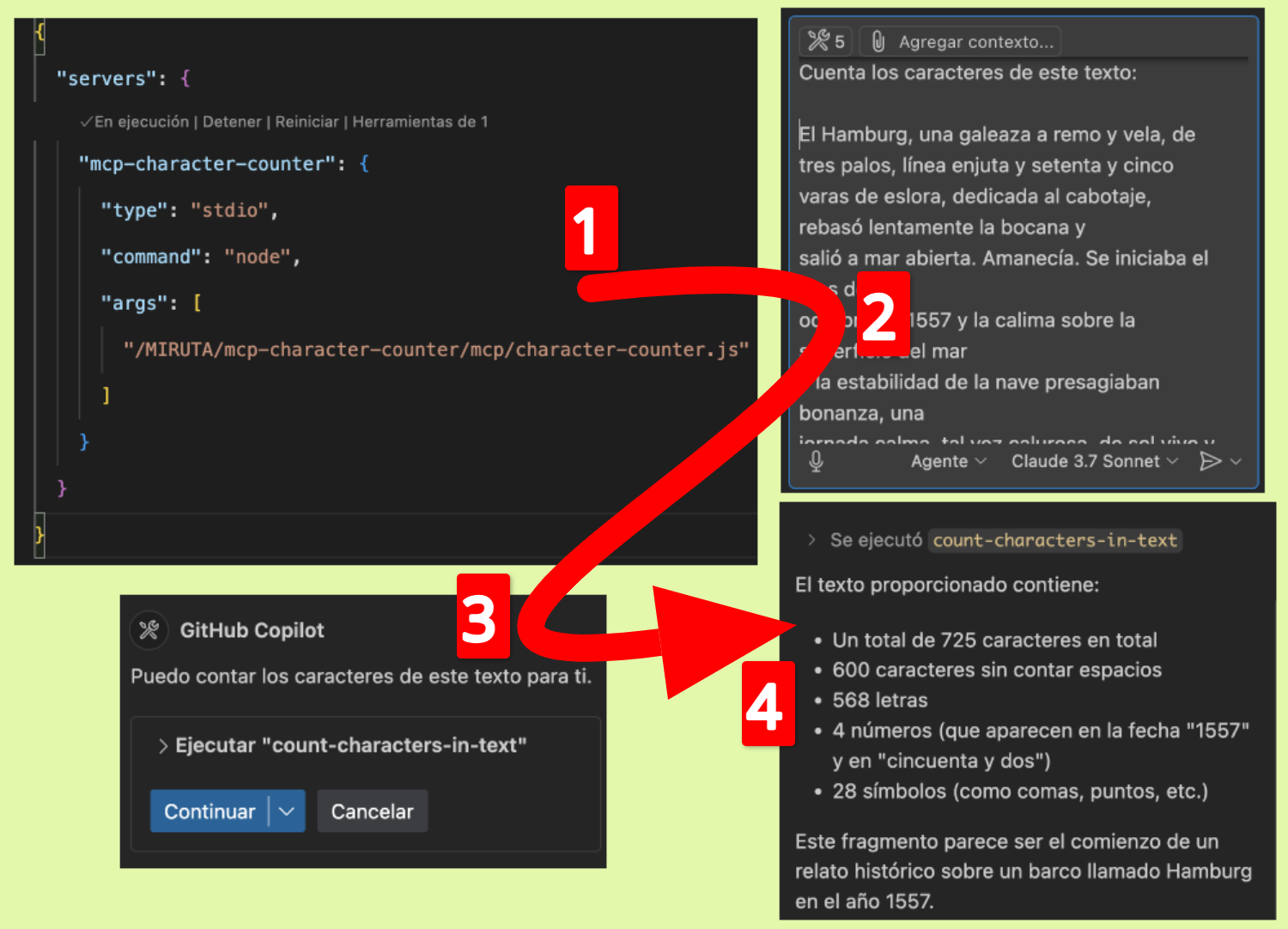
GitHub Copilot での使用
この MCP サーバーを GitHub Copilot で使用するには:
VS Code またはその他の互換性のある IDE に GitHub Copilot がインストールされていることを確認してください。
VS Code 設定を開き、「Copilot MCP」を検索します。
新しい MCP サーバー構成を追加します。
"github.copilot.advanced": {
  "mcp.servers": [
    {
      "id": "character-counter",
      "name": "Character Counter",
      "transport": "stdio",
      "command": "node",
      "args": ["/path/to/webreactiva-devs/mcp-character-counter/mcp/character-counter.js"]
    }
  ]
}
VS Code を再起動します。
次のような Copilot Chat コマンドで文字数カウンターを使用できるようになりました。
発達
この MCP サーバーを変更または拡張するには:
character-counter.jsに変更を加えます
MCPクライアントでサーバーを再起動します
仕組み
この MCP サーバーは、テキスト入力を受け入れて文字構成の詳細な分析を返すcount-characters-in-textと呼ばれる単一のツールを実装します。サーバーはモデルコンテキストプロトコルを使用して、この機能を互換性のある AI アシスタントに公開します。
ライセンス
マサチューセッツ工科大学
貢献
貢献を歓迎します!お気軽にプルリクエストを送信してください。
MCP文字カウンター
テキスト内の詳細な文字分析を提供する軽量の Model Context Protocol (MCP) サーバー。このツールは、文字数の合計、スペースのない文字数、文字、数字、記号をカウントします。
特徴
テキスト内の文字数を数える
スペースを除いた文字数を数える
文字カウンター(az、AZ)
数字を数える(0~9)
記号(英数字以外の文字)を数える
キャラクタータイプの詳細な内訳
施設
前提条件
構成
リポジトリをクローンします。
git clone https://github.com/webreactiva-devs/mcp-character-counter.git
cd mcp-character-counter
依存関係をインストールします。
Claude Desktop で使用する
Claude デスクトップの設定を開きます:
macOS :
code ~/Library/Application\ Support/Claude/claude_desktop_config.json
ウィンドウズ:
code %APPDATA%\Claude\claude_desktop_config.json
MCP サーバーに文字カウンターを追加します。
{
  "mcpServers": {
    "character-counter": {
      "command": "node",
      "args": [
        "/RUTA/ABSOLUTA/A/webreactiva-devs/mcp-character-counter/mcp/character-counter.js"
      ]
    }
  }
}
/RUTA/ABSOLUTA/A/システム上の現在のパスに置き換えます。
新しい MCP サーバーをロードするには、Claude Desktop を再起動します。
入力ボックスで、使用可能な MCP ツールを示すハンマー アイコンを探します。
Claude にテキスト内の文字数を分析してもらいます。例:
GitHub Copilot と併用する
この MCP サーバーを GitHub Copilot で使用するには:
VS Code またはサポートされている別の IDE に GitHub Copilot がインストールされていることを確認してください。
VS Code 設定を開き、「Copilot MCP」を検索します。
新しい MCP サーバー構成を追加します。
"github.copilot.advanced": {
  "mcp.servers": [
    {
      "id": "character-counter",
      "name": "Character Counter",
      "transport": "stdio",
      "command": "node",
      "args": ["/ruta/a/webreactiva-devs/mcp-character-counter/mcp/character-counter.js"]
    }
  ]
}
VS Code を再起動します。
次のような Copilot Chat コマンドで文字数カウンターを使用できるようになりました。
発達
この MCP サーバーを変更または拡張するには:
character-counter.jsに変更を加えます
MCPクライアントでサーバーを再起動します
仕組み
この MCP サーバーは、テキストを入力として受け入れ、文字構成の詳細な分析を返すcount-characters-in-textと呼ばれる単一のツールを実装します。サーバーはモデルコンテキストプロトコルを使用して、この機能を互換性のある AI アシスタントに公開します。
ライセンス
マサチューセッツ工科大学
貢献する
貢献を歓迎します!お気軽にプルリクエストを送信してください。
奥付
webreactiva.com の Malandriner コミュニティのために 🧡 で作成されました

