replicant-mcp
replicant-mcp
让 AI 构建、测试和调试你的 Android 应用。
replicant-mcp 是一个 Model Context Protocol 服务器,它赋予了像 Claude 这样的 AI 助手与你的 Android 开发环境进行交互的能力。通过自然对话,即可构建 APK、启动模拟器、安装应用、导航 UI 以及调试崩溃。
演示
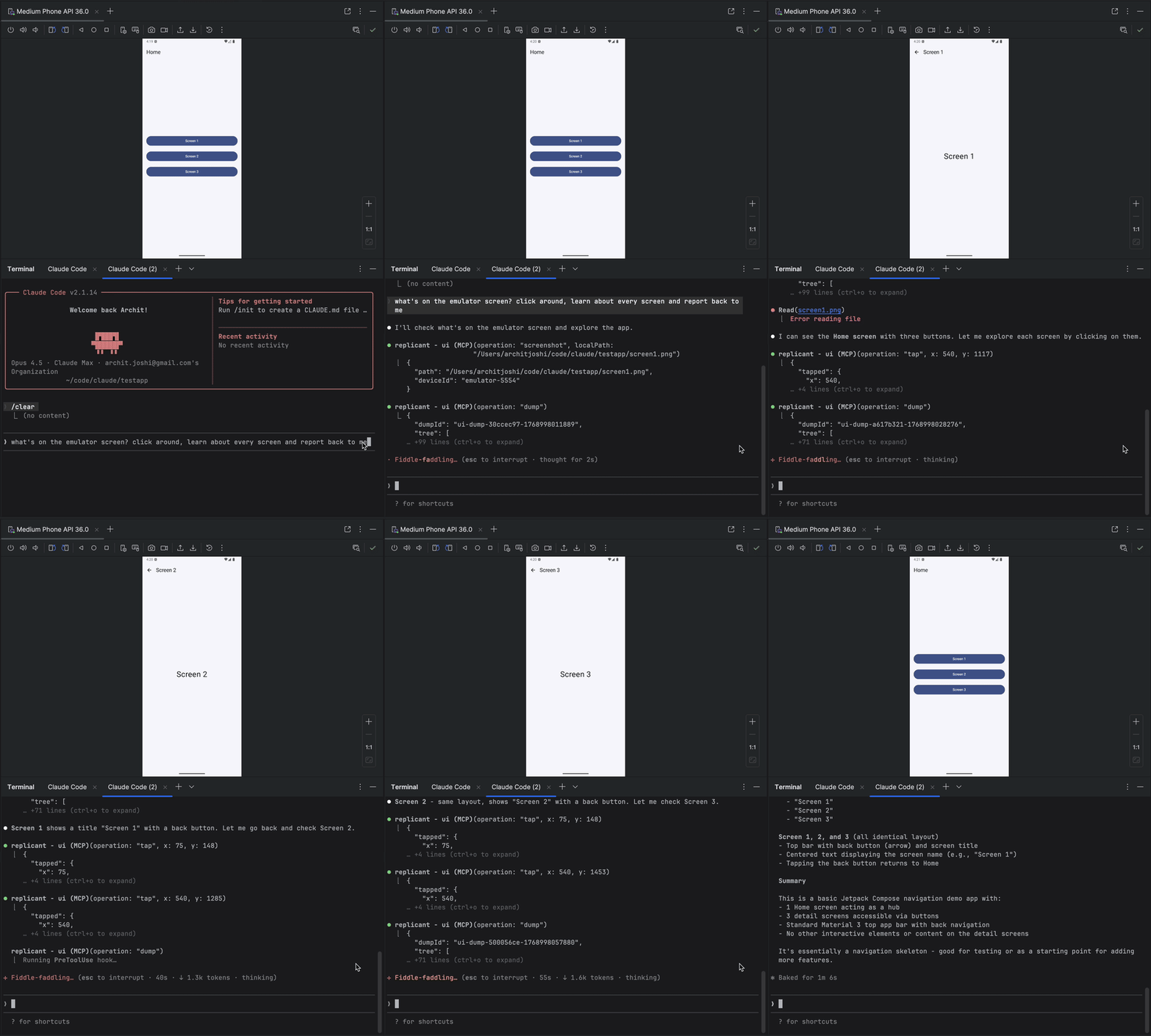
Related MCP server: android-adb-mcp
为什么选择 replicant-mcp?
不使用 replicant-mcp | 使用 replicant-mcp |
“运行 | “构建并运行应用” |
复制粘贴 logcat 输出,丢失上下文 | AI 直接读取过滤后的日志 |
截图 → 描述 UI → 猜测坐标 | AI 查看辅助功能树,通过文本点击元素 |
5,000 token 的原始 Gradle 输出 | 50 token 的摘要 + 按需获取详细信息 |
功能特性
类别 | 功能 |
构建与测试 | 构建 APK/bundle,运行单元测试和仪器测试,列出模块/变体/任务,通过基准比较进行回归测试检测 |
模拟器 | 创建、启动、停止、擦除模拟器;保存/加载/删除快照 |
设备控制 | 列出已连接设备,选择活动设备,查询设备属性 |
应用管理 | 安装、卸载、启动、停止应用;清除应用数据 |
日志分析 | 按包名、标签、级别、时间过滤 logcat |
UI 自动化 | 优先使用辅助功能查找元素,空间邻近搜索,点击,文本输入,截图 |
诊断 | 通过 |
即将推出
自定义构建命令(项目特定的覆盖,自动检测 gradlew)
视频录制(开始/停止录制,基于时长的捕获)
快速入门
先决条件
Node.js 18+
Android SDK,且
adb和emulator在你的 PATH 中包含
gradlew的 Android 项目(用于构建工具)
node --version # Should be 18+
adb --version # Should show Android Debug Bridge version
emulator -version # Should show Android emulator version安装
npm install -g replicant-mcp安装完成后,运行内置诊断程序以验证你的环境:
replicant doctor更新
npm update -g replicant-mcp设置
Claude Desktop
添加到 ~/Library/Application Support/Claude/claude_desktop_config.json (macOS) 或 %APPDATA%\Claude\claude_desktop_config.json (Windows):
{
"mcpServers": {
"replicant": {
"command": "npx",
"args": ["-y", "replicant-mcp"]
}
}
}Claude Code
claude mcp add replicant -- npx -y replicant-mcpCursor
添加到 ~/.cursor/mcp.json (全局) 或 .cursor/mcp.json (项目):
{
"mcpServers": {
"replicant": {
"command": "npx",
"args": ["-y", "replicant-mcp"]
}
}
}Windsurf
添加到 ~/.codeium/windsurf/mcp_config.json:
{
"mcpServers": {
"replicant": {
"command": "npx",
"args": ["-y", "replicant-mcp"]
}
}
}OpenAI Codex CLI
添加到 ~/.codex/config.toml:
[mcp_servers.replicant]
command = "npx"
args = ["-y", "replicant-mcp"]或通过 CLI:
codex mcp add replicant -- npx -y replicant-mcp注意: 确保
adb和emulator在你的 PATH 中,或者设置ANDROID_HOME环境变量。在 macOS 上:~/Library/Android/sdk,在 Linux 上:~/Android/Sdk。
示例
You: "I just changed the checkout flow. Build the app, go through checkout
with a test product, and make sure the confirmation screen shows up."
Claude: [Builds debug APK, installs on emulator, launches app]
[Taps "Electronics" category → "Wireless Headphones" → "Add to Cart"]
[Navigates to cart, taps "Checkout"]
[Fills shipping form, taps "Place Order"]
Confirmation screen is showing:
- Order #38291
- "Wireless Headphones" × 1
- Total: $79.99
- Estimated delivery: Jan 30
The flow works. Want me to test the edge cases—empty cart,
invalid address, payment failure?设计
replicant-mcp 使用渐进式披露(先摘要,按需提供详细信息)来最小化 token 使用量,并采用优先使用辅助功能的 UI 自动化,相比基于截图的方法,其交互速度更快、成本更低且更可靠。详情请参阅 docs/architecture.md。
更多信息
配置: 设置
REPLICANT_CONFIG以获取高级选项。请参阅 docs/configuration.md。日志记录: 设置
REPLICANT_LOG_LEVEL(error,warn,info,debug) 和REPLICANT_LOG_FORMAT(json用于结构化输出) 以控制服务器日志记录。日志写入 stderr。故障排除: 常见问题及解决方案请参阅 docs/troubleshooting.md。
工具文档: 让 Claude 调用
rtfm并传入类别,如 "build"、"adb"、"emulator" 或 "ui"。
文档
文档 | 描述 |
设计概述和渐进式披露模式 | |
配置文件参考、环境变量、Gradle 设置 | |
工具 API 版本控制策略和弃用流程 | |
adb-shell 安全模型、命令黑名单、威胁边界 | |
已测试的操作系统、Node.js、Android SDK 和模拟器版本 | |
辅助功能缺失、超时、单设备焦点等 | |
| |
常见问题及解决方案 | |
版本历史 | |
漏洞报告流程 | |
如何报告错误和提问 | |
开发设置和指南 |
贡献
请参阅 CONTRIBUTING.md 获取开发设置和指南。
致谢
灵感来源于 iOS 的 xc-mcp
基于 Model Context Protocol 构建
许可证
有问题吗? 提交 issue
Available Tools
14 toolsadb-appCDestructive
Manage applications.
Inputs: operation (required), apkPath, packageName, limit, +2 more.
adb-deviceC
Manage device connections.
Inputs: operation (required), deviceId.
adb-logcatCRead-onlyIdempotent
Read device logs. Returns summary with logId.
Inputs: lines (required), package, tags, level, +2 more.
adb-shellCDestructive
Execute shell commands with safety guards.
Inputs: command (required), timeout, maxChars, summaryOnly, +1 more.
cacheDDestructive
Manage the cache. See rtfm for details.
Inputs: operation (required), key, config.
emulator-deviceCDestructive
Manage Android emulators.
Inputs: operation (required), avdName, device, systemImage, +2 more.
gradle-buildD
Build. Returns summary with buildId.
Inputs: operation (required), module, flavor.
gradle-get-detailsCRead-onlyIdempotent
Fetch full output for a previous build/test by ID.
Inputs: id (required), detailType (required), maxChars, summaryOnly, +1 more.
gradle-listBRead-onlyIdempotent
Introspect project structure.
Inputs: operation (required), module.
gradle-testADestructive
Run tests. Returns summary with testId. With baseline, auto-detects regressions.
Inputs: operation (required), module, filter, taskName.
rtfmARead-onlyIdempotent
Get documentation. Pass category ('build'|'adb'|'emulator'|'ui'|'cache'|'index') or tool (tool name like 'ui-query').
Inputs: category, tool.
ui-actionADestructive
Interact with app UI: tap, input, scroll. Use selector or coords.
Inputs: operation (required), x, y, elementIndex, +5 more.
ui-captureC
Capture screenshots or visual snapshots.
Inputs: operation (required), localPath, inline, maxDimension, +1 more.
ui-queryCRead-onlyIdempotent
Query app UI. Accessibility-first.
Inputs: operation (required), selector, debug, maxTier, +5 more.
Tool Schema Changelog
Recent tool additions, removals, and schema changes observed during successful MCP inspections.
Loading tool schema changelog…
TDQS
Scored across 14 tools
Each tool has a clearly distinct purpose: adb-* for device management, gradle-* for build/test, ui-* for UI interaction, and separate tools for cache, docs, and emulators. No functional overlap.
Names consistently use domain prefixes (adb-, gradle-, ui-), but gradle-get-details introduces a hyphenated verb-noun while others use single verbs or nouns, a minor inconsistency.
14 tools is well-scoped for an Android development/testing MCP, covering ADB, Gradle, emulators, UI, cache, and documentation without being overwhelming.
Covers essential Android development operations (device management, build/test, UI interaction). Missing some niche ADB commands (e.g., port forwarding) but core workflows are present.
Maintenance
Related MCP Connectors
MCP server that lets your AI assistant build and deploy apps, hosting each one at a live URL.
Nifty's MCP server — exposes tasks, projects, messages, and files as tools for AI agents.
MCP server for building and testing AI agents with multi-model experimentation and insights.
Official MCP server for Agentwork — delegate tasks to AI agents with human-in-the-loop
Related MCP Servers
- FlicenseNot gradedqualityDmaintenanceA powerful MCP server that provides comprehensive Android device automation capabilities through ADB, enabling AI agents to interact with Android devices for testing, automation, and device control tasks.1-
- AlicenseNot gradedqualityDmaintenanceAn MCP server that wraps Android ADB functionality into AI assistant tools, enabling device management, shell execution, file operations, app management, media capture, and log analysis via natural language.3MIT
- FlicenseAqualityDmaintenanceAn MCP server designed for Android development, enabling AI assistants to directly control Android devices for screenshots, UI analysis, app management, and more.19-
- AlicenseBqualityCmaintenanceA comprehensive MCP server for Android Debug Bridge, enabling AI agents to control Android devices through structured tools like launching apps, UI automation, file operations, and log capture.907MIT