Glama

replicant-mcp

AIにAndroidアプリの構築、テスト、デバッグを任せましょう。

CI npm Node.js License: MIT Ask DeepWiki replicant-mcp MCP server

replicant-mcpは、ClaudeのようなAIアシスタントがあなたのAndroid開発環境とやり取りできるようにするModel Context Protocolサーバーです。APKのビルド、エミュレーターの起動、アプリのインストール、UIの操作、クラッシュのデバッグなどを、すべて自然な会話を通じて行えます。


デモ
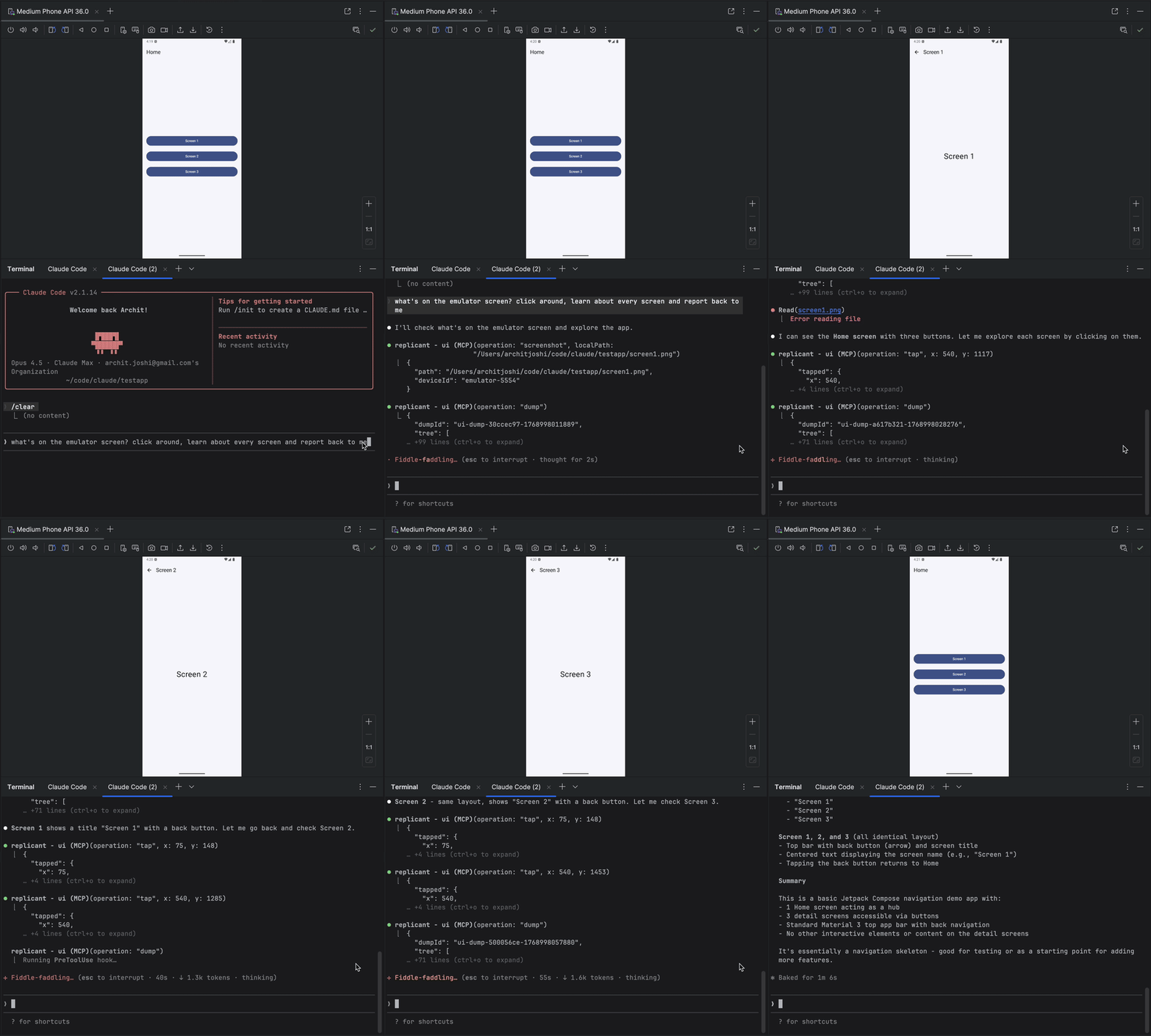
replicant-mcp demo


Related MCP server: android-adb-mcp

なぜreplicant-mcpなのか?

replicant-mcpなし

replicant-mcpあり

「./gradlew assembleDebugを実行し、次にadb install、そしてadb shell am start...」

「アプリをビルドして実行して」

logcat出力をコピー&ペーストし、コンテキストを失う

AIがフィルタリングされたログを直接読み取る

スクリーンショット → UIを説明 → 座標を推測

AIがアクセシビリティツリーを確認し、テキストで要素をタップ

5,000トークンの生のGradle出力

50トークンの要約 + 必要に応じて詳細を表示


機能

カテゴリ

機能

ビルド&テスト

APK/バンドルのビルド、ユニットテストおよびインストゥルメンテーションテストの実行、モジュール/バリアント/タスクのリスト表示、ベースライン比較による回帰テスト検出

エミュレーター

エミュレーターの作成、起動、停止、ワイプ、スナップショットの保存/読み込み/削除

デバイス制御

接続済みデバイスのリスト表示、アクティブデバイスの選択、デバイスプロパティのクエリ

アプリ管理

アプリのインストール、アンインストール、起動、停止、アプリデータの消去

ログ分析

パッケージ、タグ、レベル、時間によるlogcatのフィルタリング

UI自動化

アクセシビリティ優先の要素検索、空間近接検索、タップ、テキスト入力、スクリーンショット

診断

replicant doctorによる環境健全性チェック、設定可能なレベルと形式による構造化ログ


今後の予定

  • カスタムビルドコマンド(プロジェクト固有のオーバーライド、gradlewの自動検出)

  • ビデオキャプチャ(録画の開始/停止、時間指定キャプチャ)


クイックスタート

前提条件

  • Node.js 18+

  • Android SDK(PATHにadbとemulatorが含まれていること)

  • gradlewを含むAndroidプロジェクト(ビルドツール用)

node --version      # Should be 18+
adb --version       # Should show Android Debug Bridge version
emulator -version   # Should show Android emulator version

インストール

npm install -g replicant-mcp

インストール後、組み込みの診断を実行して環境を確認してください:

replicant doctor

アップデート

npm update -g replicant-mcp

セットアップ

Claude Desktop

~/Library/Application Support/Claude/claude_desktop_config.json (macOS) または %APPDATA%\Claude\claude_desktop_config.json (Windows) に追加します:

{
  "mcpServers": {
    "replicant": {
      "command": "npx",
      "args": ["-y", "replicant-mcp"]
    }
  }
}

Claude Code

claude mcp add replicant -- npx -y replicant-mcp

Cursor

~/.cursor/mcp.json (グローバル) または .cursor/mcp.json (プロジェクト) に追加します:

{
  "mcpServers": {
    "replicant": {
      "command": "npx",
      "args": ["-y", "replicant-mcp"]
    }
  }
}

Windsurf

~/.codeium/windsurf/mcp_config.json に追加します:

{
  "mcpServers": {
    "replicant": {
      "command": "npx",
      "args": ["-y", "replicant-mcp"]
    }
  }
}

OpenAI Codex CLI

~/.codex/config.toml に追加します:

[mcp_servers.replicant]
command = "npx"
args = ["-y", "replicant-mcp"]

またはCLI経由:

codex mcp add replicant -- npx -y replicant-mcp

注意: adbとemulatorがPATHに含まれていることを確認するか、ANDROID_HOME環境変数を設定してください。macOSの場合: ~/Library/Android/sdk、Linuxの場合: ~/Android/Sdk。


例

You: "I just changed the checkout flow. Build the app, go through checkout
      with a test product, and make sure the confirmation screen shows up."

Claude: [Builds debug APK, installs on emulator, launches app]
        [Taps "Electronics" category → "Wireless Headphones" → "Add to Cart"]
        [Navigates to cart, taps "Checkout"]
        [Fills shipping form, taps "Place Order"]

        Confirmation screen is showing:
        - Order #38291
        - "Wireless Headphones" × 1
        - Total: $79.99
        - Estimated delivery: Jan 30

        The flow works. Want me to test the edge cases—empty cart,
        invalid address, payment failure?

設計

replicant-mcpは、トークン使用量を最小限に抑えるために段階的開示(要約を先に、詳細は必要に応じて)を採用しており、スクリーンショットベースのアプローチよりも高速で安価、かつ信頼性の高いインタラクションを実現するためにアクセシビリティ優先のUI自動化を行っています。詳細はdocs/architecture.mdを参照してください。


詳細情報

  • 設定: 高度なオプションについてはREPLICANT_CONFIGを設定してください。docs/configuration.mdを参照してください。

  • ログ: サーバーのログを制御するには、REPLICANT_LOG_LEVEL (error, warn, info, debug) と REPLICANT_LOG_FORMAT (jsonで構造化出力) を設定してください。ログはstderrに書き込まれます。

  • トラブルシューティング: 一般的な問題と解決策はdocs/troubleshooting.mdにあります。

  • ツールドキュメント: Claudeに「build」、「adb」、「emulator」、「ui」などのカテゴリを指定してrtfmを呼び出すよう依頼してください。


ドキュメント

ドキュメント

説明

アーキテクチャ

設計の概要と段階的開示パターン

設定

設定ファイルのリファレンス、環境変数、Gradle設定

APIの安定性

ツールAPIのバージョン管理ポリシーと非推奨化プロセス

セキュリティモデル

adb-shellの安全モデル、コマンド拒否リスト、脅威境界

サポートマトリックス

テスト済みのOS、Node.js、Android SDK、エミュレーターのバージョン

既知の制限事項

アクセシビリティの欠落、タイムアウト、単一デバイスへのフォーカスなど

アーティファクト

.replicant/ディレクトリの内容とプライバシーに関する考慮事項

トラブルシューティング

一般的な問題と解決策

変更履歴

バージョン履歴

セキュリティポリシー

脆弱性報告プロセス

サポート / ヘルプ

バグ報告と質問の方法

貢献

開発環境のセットアップとガイドライン


貢献

開発環境のセットアップとガイドラインについてはCONTRIBUTING.mdを参照してください。


謝辞


ライセンス

MIT


質問がありますか? Issueを作成してください

Available Tools

14 tools
adb-appC
Destructive

Manage applications.

Inputs: operation (required), apkPath, packageName, limit, +2 more.

adb-deviceC

Manage device connections.

Inputs: operation (required), deviceId.

adb-logcatC
Read-onlyIdempotent

Read device logs. Returns summary with logId.

Inputs: lines (required), package, tags, level, +2 more.

adb-shellC
Destructive

Execute shell commands with safety guards.

Inputs: command (required), timeout, maxChars, summaryOnly, +1 more.

cacheD
Destructive

Manage the cache. See rtfm for details.

Inputs: operation (required), key, config.

emulator-deviceC
Destructive

Manage Android emulators.

Inputs: operation (required), avdName, device, systemImage, +2 more.

gradle-buildD

Build. Returns summary with buildId.

Inputs: operation (required), module, flavor.

gradle-get-detailsC
Read-onlyIdempotent

Fetch full output for a previous build/test by ID.

Inputs: id (required), detailType (required), maxChars, summaryOnly, +1 more.

gradle-listB
Read-onlyIdempotent

Introspect project structure.

Inputs: operation (required), module.

gradle-testA
Destructive

Run tests. Returns summary with testId. With baseline, auto-detects regressions.

Inputs: operation (required), module, filter, taskName.

rtfmA
Read-onlyIdempotent

Get documentation. Pass category ('build'|'adb'|'emulator'|'ui'|'cache'|'index') or tool (tool name like 'ui-query').

Inputs: category, tool.

ui-actionA
Destructive

Interact with app UI: tap, input, scroll. Use selector or coords.

Inputs: operation (required), x, y, elementIndex, +5 more.

ui-captureC

Capture screenshots or visual snapshots.

Inputs: operation (required), localPath, inline, maxDimension, +1 more.

ui-queryC
Read-onlyIdempotent

Query app UI. Accessibility-first.

Inputs: operation (required), selector, debug, maxTier, +5 more.

Tool Schema Changelog

Recent tool additions, removals, and schema changes observed during successful MCP inspections.

Loading tool schema changelog…

    TDQS

    B3/5.0

    Scored across 14 tools

    Disambiguation5/5

    Each tool has a clearly distinct purpose: adb-* for device management, gradle-* for build/test, ui-* for UI interaction, and separate tools for cache, docs, and emulators. No functional overlap.

    Naming Consistency4/5

    Names consistently use domain prefixes (adb-, gradle-, ui-), but gradle-get-details introduces a hyphenated verb-noun while others use single verbs or nouns, a minor inconsistency.

    Tool Count5/5

    14 tools is well-scoped for an Android development/testing MCP, covering ADB, Gradle, emulators, UI, cache, and documentation without being overwhelming.

    Completeness4/5

    Covers essential Android development operations (device management, build/test, UI interaction). Missing some niche ADB commands (e.g., port forwarding) but core workflows are present.

    Maintenance

    ActivityNo data
    ResponsivenessOutdated data

    Related MCP Connectors

    Related MCP Servers

    • F
      license
      Not graded
      quality
      D
      maintenance
      A powerful MCP server that provides comprehensive Android device automation capabilities through ADB, enabling AI agents to interact with Android devices for testing, automation, and device control tasks.
      1
      -
    • A
      license
      Not graded
      quality
      D
      maintenance
      An MCP server that wraps Android ADB functionality into AI assistant tools, enabling device management, shell execution, file operations, app management, media capture, and log analysis via natural language.
      3
      MIT
    • A
      license
      B
      quality
      C
      maintenance
      A comprehensive MCP server for Android Debug Bridge, enabling AI agents to control Android devices through structured tools like launching apps, UI automation, file operations, and log capture.
      90
      7
      MIT