Glama

replicant-mcp

AI가 Android 앱을 빌드, 테스트 및 디버그하도록 하세요.

CI npm Node.js License: MIT Ask DeepWiki replicant-mcp MCP server

replicant-mcp는 Claude와 같은 AI 어시스턴트가 사용자의 Android 개발 환경과 상호작용할 수 있도록 하는 Model Context Protocol 서버입니다. 자연스러운 대화를 통해 APK 빌드, 에뮬레이터 실행, 앱 설치, UI 탐색 및 충돌 디버깅을 수행하세요.


데모
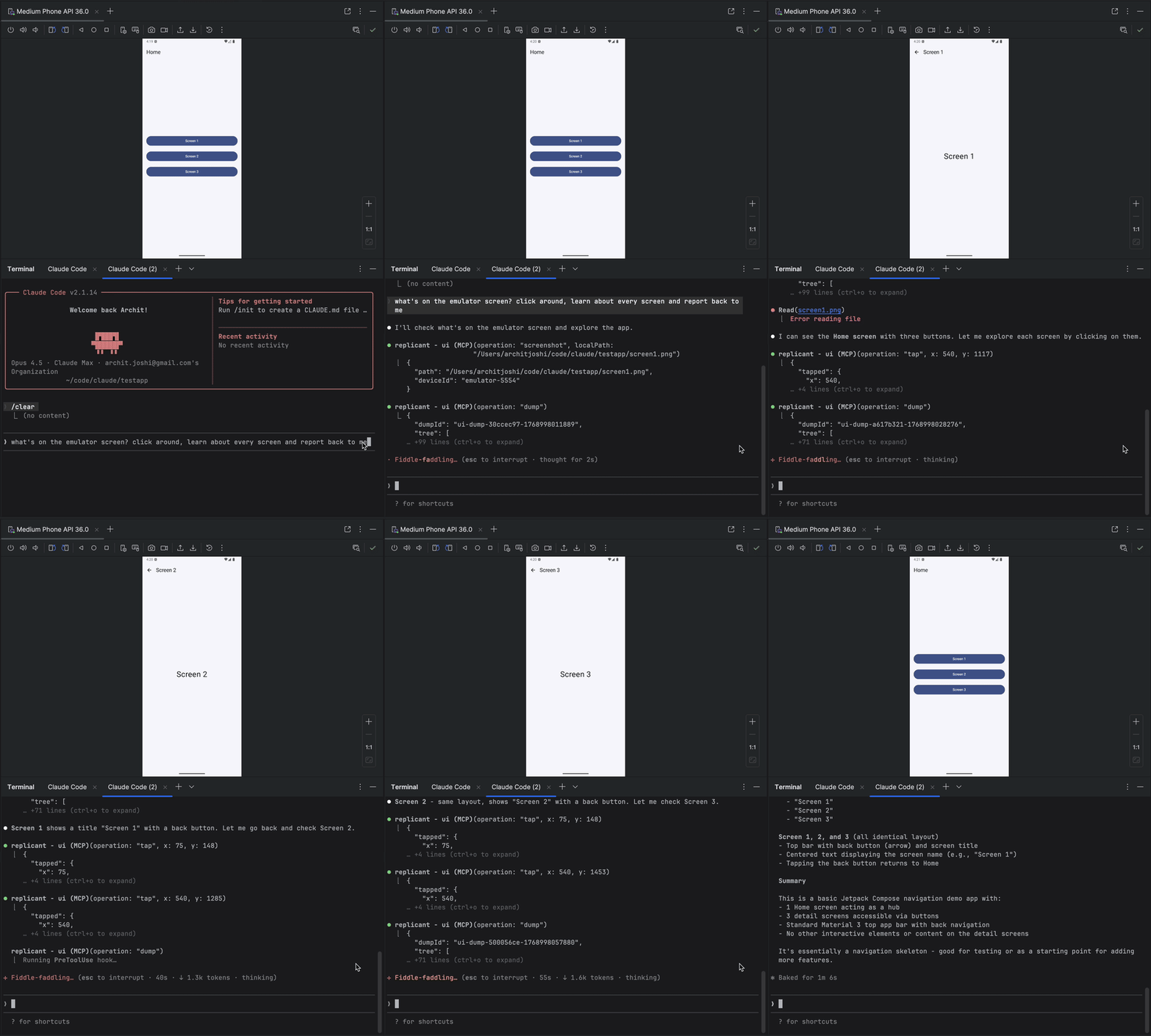
replicant-mcp 데모


Related MCP server: android-adb-mcp

왜 replicant-mcp인가요?

replicant-mcp 없이

replicant-mcp와 함께

"./gradlew assembleDebug 실행 후 adb install, 그 다음 adb shell am start..."

"앱 빌드 및 실행"

logcat 출력을 복사-붙여넣기하고 컨텍스트를 잃음

AI가 필터링된 로그를 직접 읽음

스크린샷 → UI 설명 → 좌표 추측

AI가 접근성 트리를 보고 텍스트로 요소를 탭함

5,000 토큰의 원시 Gradle 출력

50 토큰 요약 + 필요 시 상세 정보


기능

카테고리

기능

빌드 및 테스트

APK/번들 빌드, 단위 및 계측 테스트 실행, 모듈/변형/작업 나열, 기준 비교를 통한 회귀 테스트 감지

에뮬레이터

에뮬레이터 생성, 시작, 중지, 초기화; 스냅샷 저장/로드/삭제

장치 제어

연결된 장치 나열, 활성 장치 선택, 장치 속성 쿼리

앱 관리

앱 설치, 제거, 실행, 중지; 앱 데이터 삭제

로그 분석

패키지, 태그, 레벨, 시간별 logcat 필터링

UI 자동화

접근성 우선 요소 찾기, 공간 근접성 검색, 탭, 텍스트 입력, 스크린샷

진단

replicant doctor를 통한 환경 상태 점검; 구성 가능한 레벨 및 형식을 갖춘 구조화된 로깅


곧 출시 예정

  • 사용자 지정 빌드 명령 (프로젝트별 재정의, gradlew 자동 감지)

  • 비디오 캡처 (녹화 시작/중지, 시간 기반 캡처)


빠른 시작

사전 요구 사항

  • Node.js 18+

  • PATH에 adb 및 emulator가 포함된 Android SDK

  • gradlew가 포함된 Android 프로젝트 (빌드 도구용)

node --version      # Should be 18+
adb --version       # Should show Android Debug Bridge version
emulator -version   # Should show Android emulator version

설치

npm install -g replicant-mcp

설치 후, 내장된 진단을 실행하여 환경을 확인하세요:

replicant doctor

업데이트

npm update -g replicant-mcp

설정

Claude Desktop

~/Library/Application Support/Claude/claude_desktop_config.json(macOS) 또는 %APPDATA%\Claude\claude_desktop_config.json(Windows)에 추가하세요:

{
  "mcpServers": {
    "replicant": {
      "command": "npx",
      "args": ["-y", "replicant-mcp"]
    }
  }
}

Claude Code

claude mcp add replicant -- npx -y replicant-mcp

Cursor

~/.cursor/mcp.json(전역) 또는 .cursor/mcp.json(프로젝트)에 추가하세요:

{
  "mcpServers": {
    "replicant": {
      "command": "npx",
      "args": ["-y", "replicant-mcp"]
    }
  }
}

Windsurf

~/.codeium/windsurf/mcp_config.json에 추가하세요:

{
  "mcpServers": {
    "replicant": {
      "command": "npx",
      "args": ["-y", "replicant-mcp"]
    }
  }
}

OpenAI Codex CLI

~/.codex/config.toml에 추가하세요:

[mcp_servers.replicant]
command = "npx"
args = ["-y", "replicant-mcp"]

또는 CLI를 통해:

codex mcp add replicant -- npx -y replicant-mcp

참고: adb 및 emulator가 PATH에 있는지 확인하거나 ANDROID_HOME 환경 변수를 설정하세요. macOS의 경우 ~/Library/Android/sdk, Linux의 경우 ~/Android/Sdk입니다.


예시

You: "I just changed the checkout flow. Build the app, go through checkout
      with a test product, and make sure the confirmation screen shows up."

Claude: [Builds debug APK, installs on emulator, launches app]
        [Taps "Electronics" category → "Wireless Headphones" → "Add to Cart"]
        [Navigates to cart, taps "Checkout"]
        [Fills shipping form, taps "Place Order"]

        Confirmation screen is showing:
        - Order #38291
        - "Wireless Headphones" × 1
        - Total: $79.99
        - Estimated delivery: Jan 30

        The flow works. Want me to test the edge cases—empty cart,
        invalid address, payment failure?

설계

replicant-mcp는 토큰 사용량을 최소화하기 위해 점진적 공개(요약 우선, 필요 시 상세 정보) 방식을 사용하며, 스크린샷 기반 접근 방식보다 더 빠르고 저렴하며 안정적인 상호작용을 위해 접근성 우선 UI 자동화를 사용합니다. 자세한 내용은 docs/architecture.md를 참조하세요.


추가 정보

  • 구성: 고급 옵션은 REPLICANT_CONFIG를 설정하세요. docs/configuration.md를 참조하세요.

  • 로깅: REPLICANT_LOG_LEVEL(error, warn, info, debug) 및 REPLICANT_LOG_FORMAT(json은 구조화된 출력)을 설정하여 서버 로깅을 제어하세요. 로그는 stderr에 기록됩니다.

  • 문제 해결: 일반적인 문제와 해결 방법은 docs/troubleshooting.md에 있습니다.

  • 도구 문서: Claude에게 "build", "adb", "emulator" 또는 "ui"와 같은 카테고리로 rtfm을 호출하도록 요청하세요.


문서

문서

설명

아키텍처

설계 개요 및 점진적 공개 패턴

구성

구성 파일 참조, 환경 변수, Gradle 설정

API 안정성

도구 API 버전 관리 정책 및 지원 중단 프로세스

보안 모델

adb-shell 안전 모델, 명령 차단 목록, 위협 경계

지원 매트릭스

테스트된 OS, Node.js, Android SDK 및 에뮬레이터 버전

알려진 제한 사항

접근성 격차, 시간 초과, 단일 장치 초점 등

아티팩트

.replicant/ 디렉토리 내용 및 개인정보 보호 고려 사항

문제 해결

일반적인 문제와 해결 방법

변경 로그

버전 기록

보안 정책

취약점 보고 프로세스

지원 / 도움말

버그 보고 및 질문 방법

기여

개발 설정 및 가이드라인


기여

개발 설정 및 가이드라인은 CONTRIBUTING.md를 참조하세요.


감사의 말


라이선스

MIT


질문이 있으신가요? 이슈 열기

Available Tools

14 tools
adb-appC
Destructive

Manage applications.

Inputs: operation (required), apkPath, packageName, limit, +2 more.

adb-deviceC

Manage device connections.

Inputs: operation (required), deviceId.

adb-logcatC
Read-onlyIdempotent

Read device logs. Returns summary with logId.

Inputs: lines (required), package, tags, level, +2 more.

adb-shellC
Destructive

Execute shell commands with safety guards.

Inputs: command (required), timeout, maxChars, summaryOnly, +1 more.

cacheD
Destructive

Manage the cache. See rtfm for details.

Inputs: operation (required), key, config.

emulator-deviceC
Destructive

Manage Android emulators.

Inputs: operation (required), avdName, device, systemImage, +2 more.

gradle-buildD

Build. Returns summary with buildId.

Inputs: operation (required), module, flavor.

gradle-get-detailsC
Read-onlyIdempotent

Fetch full output for a previous build/test by ID.

Inputs: id (required), detailType (required), maxChars, summaryOnly, +1 more.

gradle-listB
Read-onlyIdempotent

Introspect project structure.

Inputs: operation (required), module.

gradle-testA
Destructive

Run tests. Returns summary with testId. With baseline, auto-detects regressions.

Inputs: operation (required), module, filter, taskName.

rtfmA
Read-onlyIdempotent

Get documentation. Pass category ('build'|'adb'|'emulator'|'ui'|'cache'|'index') or tool (tool name like 'ui-query').

Inputs: category, tool.

ui-actionA
Destructive

Interact with app UI: tap, input, scroll. Use selector or coords.

Inputs: operation (required), x, y, elementIndex, +5 more.

ui-captureC

Capture screenshots or visual snapshots.

Inputs: operation (required), localPath, inline, maxDimension, +1 more.

ui-queryC
Read-onlyIdempotent

Query app UI. Accessibility-first.

Inputs: operation (required), selector, debug, maxTier, +5 more.

Tool Schema Changelog

Recent tool additions, removals, and schema changes observed during successful MCP inspections.

Loading tool schema changelog…

    TDQS

    B3/5.0

    Scored across 14 tools

    Disambiguation5/5

    Each tool has a clearly distinct purpose: adb-* for device management, gradle-* for build/test, ui-* for UI interaction, and separate tools for cache, docs, and emulators. No functional overlap.

    Naming Consistency4/5

    Names consistently use domain prefixes (adb-, gradle-, ui-), but gradle-get-details introduces a hyphenated verb-noun while others use single verbs or nouns, a minor inconsistency.

    Tool Count5/5

    14 tools is well-scoped for an Android development/testing MCP, covering ADB, Gradle, emulators, UI, cache, and documentation without being overwhelming.

    Completeness4/5

    Covers essential Android development operations (device management, build/test, UI interaction). Missing some niche ADB commands (e.g., port forwarding) but core workflows are present.

    Maintenance

    ActivityNo data
    ResponsivenessOutdated data

    Related MCP Connectors

    Related MCP Servers

    • F
      license
      Not graded
      quality
      D
      maintenance
      A powerful MCP server that provides comprehensive Android device automation capabilities through ADB, enabling AI agents to interact with Android devices for testing, automation, and device control tasks.
      1
      -
    • A
      license
      Not graded
      quality
      D
      maintenance
      An MCP server that wraps Android ADB functionality into AI assistant tools, enabling device management, shell execution, file operations, app management, media capture, and log analysis via natural language.
      3
      MIT
    • A
      license
      B
      quality
      C
      maintenance
      A comprehensive MCP server for Android Debug Bridge, enabling AI agents to control Android devices through structured tools like launching apps, UI automation, file operations, and log capture.
      90
      7
      MIT