Glama

replicant-mcp

Lassen Sie KI Ihre Android-Apps erstellen, testen und debuggen.

CI npm Node.js License: MIT Ask DeepWiki replicant-mcp MCP server

replicant-mcp ist ein Model Context Protocol-Server, der KI-Assistenten wie Claude die Möglichkeit gibt, mit Ihrer Android-Entwicklungsumgebung zu interagieren. Erstellen Sie APKs, starten Sie Emulatoren, installieren Sie Apps, navigieren Sie durch Benutzeroberflächen und debuggen Sie Abstürze – alles durch natürliche Konversation.


Demo
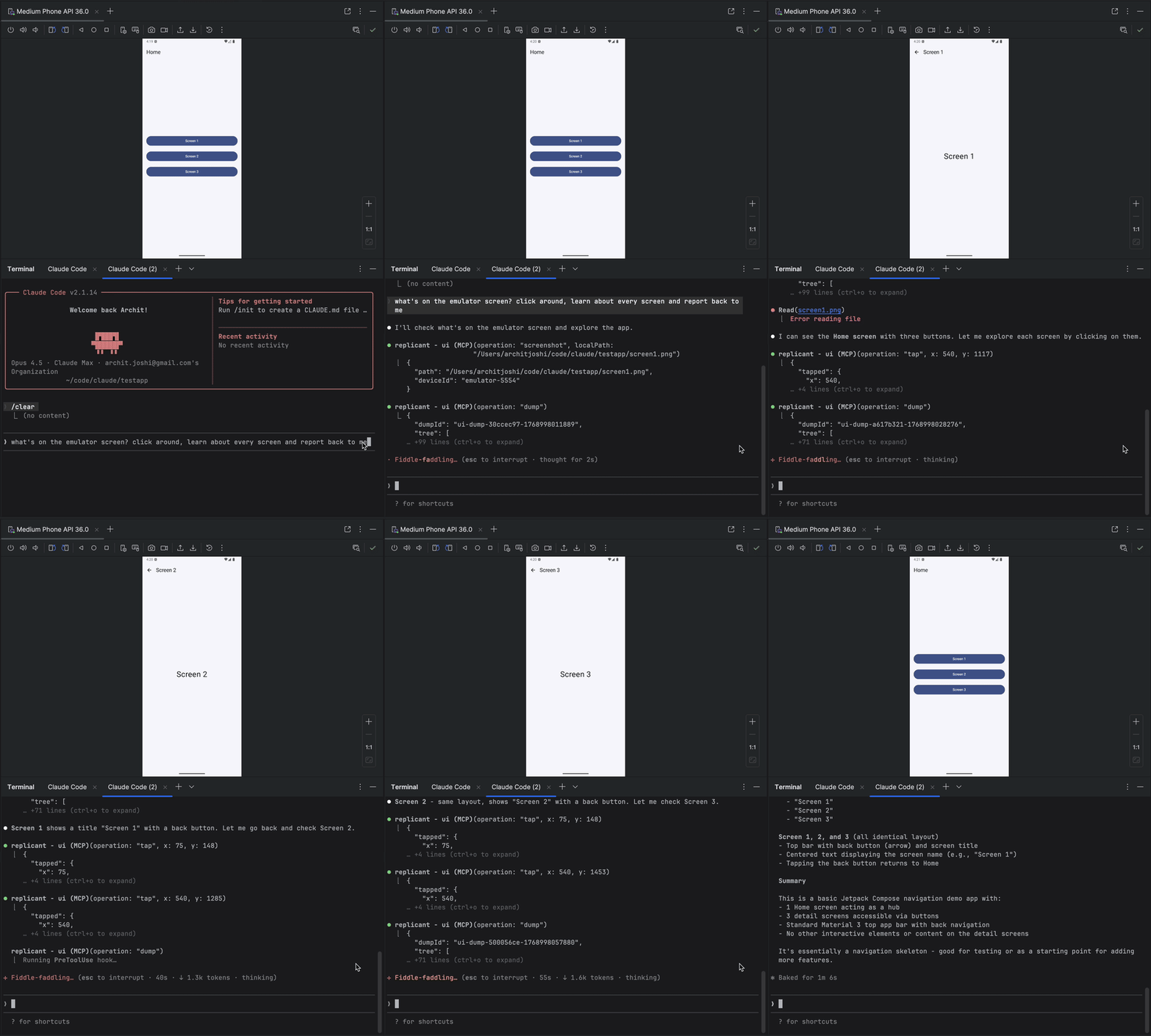
replicant-mcp demo


Related MCP server: android-adb-mcp

Warum replicant-mcp?

Ohne replicant-mcp

Mit replicant-mcp

"Führe ./gradlew assembleDebug aus, dann adb install, dann adb shell am start..."

"Erstelle und starte die App"

Kopiere Logcat-Ausgabe, verliere Kontext

KI liest gefilterte Logs direkt

Screenshot → beschreibe UI → rate Koordinaten

KI sieht Accessibility-Tree, tippt Elemente per Text an

5.000 Token rohe Gradle-Ausgabe

50-Token-Zusammenfassung + Details bei Bedarf


Funktionen

Kategorie

Fähigkeiten

Erstellen & Testen

Erstelle APKs/Bundles, führe Unit- und instrumentierte Tests aus, liste Module/Varianten/Tasks auf, teste Regressionserkennung mit Baseline-Vergleich

Emulator

Erstelle, starte, stoppe, lösche Emulatoren; speichere/lade/lösche Snapshots

Gerätesteuerung

Liste verbundene Geräte auf, wähle aktives Gerät aus, frage Geräteeigenschaften ab

App-Verwaltung

Installiere, deinstalliere, starte, stoppe Apps; lösche App-Daten

Log-Analyse

Filtere Logcat nach Paket, Tag, Level, Zeit

UI-Automatisierung

Accessibility-basierte Elementfindung, räumliche Suche, Tippen, Texteingabe, Screenshots

Diagnose

System-Gesundheitschecks via replicant doctor; strukturierte Protokollierung mit konfigurierbarem Level und Format


Demnächst verfügbar

  • Benutzerdefinierte Build-Befehle (projektspezifische Überschreibungen, automatische Erkennung von gradlew)

  • Videoaufnahme (Aufnahme starten/stoppen, dauerbasierte Aufnahme)


Schnellstart

Voraussetzungen

  • Node.js 18+

  • Android SDK mit adb und emulator in Ihrem PATH

  • Ein Android-Projekt mit gradlew (für Build-Tools)

node --version      # Should be 18+
adb --version       # Should show Android Debug Bridge version
emulator -version   # Should show Android emulator version

Installation

npm install -g replicant-mcp

Führen Sie nach der Installation die integrierte Diagnose aus, um Ihre Umgebung zu überprüfen:

replicant doctor

Aktualisierung

npm update -g replicant-mcp

Einrichtung

Claude Desktop

Hinzufügen zu ~/Library/Application Support/Claude/claude_desktop_config.json (macOS) oder %APPDATA%\Claude\claude_desktop_config.json (Windows):

{
  "mcpServers": {
    "replicant": {
      "command": "npx",
      "args": ["-y", "replicant-mcp"]
    }
  }
}

Claude Code

claude mcp add replicant -- npx -y replicant-mcp

Cursor

Hinzufügen zu ~/.cursor/mcp.json (global) oder .cursor/mcp.json (Projekt):

{
  "mcpServers": {
    "replicant": {
      "command": "npx",
      "args": ["-y", "replicant-mcp"]
    }
  }
}

Windsurf

Hinzufügen zu ~/.codeium/windsurf/mcp_config.json:

{
  "mcpServers": {
    "replicant": {
      "command": "npx",
      "args": ["-y", "replicant-mcp"]
    }
  }
}

OpenAI Codex CLI

Hinzufügen zu ~/.codex/config.toml:

[mcp_servers.replicant]
command = "npx"
args = ["-y", "replicant-mcp"]

Oder via CLI:

codex mcp add replicant -- npx -y replicant-mcp

Hinweis: Stellen Sie sicher, dass adb und emulator in Ihrem PATH enthalten sind, oder setzen Sie die Umgebungsvariable ANDROID_HOME. Unter macOS: ~/Library/Android/sdk, unter Linux: ~/Android/Sdk.


Beispiel

You: "I just changed the checkout flow. Build the app, go through checkout
      with a test product, and make sure the confirmation screen shows up."

Claude: [Builds debug APK, installs on emulator, launches app]
        [Taps "Electronics" category → "Wireless Headphones" → "Add to Cart"]
        [Navigates to cart, taps "Checkout"]
        [Fills shipping form, taps "Place Order"]

        Confirmation screen is showing:
        - Order #38291
        - "Wireless Headphones" × 1
        - Total: $79.99
        - Estimated delivery: Jan 30

        The flow works. Want me to test the edge cases—empty cart,
        invalid address, payment failure?

Design

replicant-mcp verwendet progressive Offenlegung (Zusammenfassungen zuerst, Details bei Bedarf), um den Token-Verbrauch zu minimieren, sowie Accessibility-basierte UI-Automatisierung für schnellere, kostengünstigere und zuverlässigere Interaktionen als screenshot-basierte Ansätze. Siehe docs/architecture.md für Details.


Weitere Informationen

  • Konfiguration: Setzen Sie REPLICANT_CONFIG für erweiterte Optionen. Siehe docs/configuration.md.

  • Protokollierung: Setzen Sie REPLICANT_LOG_LEVEL (error, warn, info, debug) und REPLICANT_LOG_FORMAT (json für strukturierte Ausgabe), um die Server-Protokollierung zu steuern. Logs werden in stderr geschrieben.

  • Fehlerbehebung: Häufige Probleme und Lösungen in docs/troubleshooting.md.

  • Tool-Dokumentation: Bitten Sie Claude, rtfm mit einer Kategorie wie "build", "adb", "emulator" oder "ui" aufzurufen.


Dokumentation

Dokument

Beschreibung

Architektur

Design-Übersicht und Muster der progressiven Offenlegung

Konfiguration

Referenz der Konfigurationsdatei, Umgebungsvariablen, Gradle-Setup

API-Stabilität

Richtlinie zur Tool-API-Versionierung und Veraltungsprozess

Sicherheitsmodell

adb-shell Sicherheitsmodell, Befehls-Denylist, Bedrohungsgrenzen

Support-Matrix

Getestete OS-, Node.js-, Android SDK- und Emulator-Versionen

Bekannte Einschränkungen

Accessibility-Lücken, Timeouts, Fokus auf ein einzelnes Gerät und mehr

Artefakte

Inhalte des .replicant/-Verzeichnisses und Datenschutzaspekte

Fehlerbehebung

Häufige Probleme und Lösungen

Changelog

Versionsverlauf

Sicherheitsrichtlinie

Prozess zur Meldung von Schwachstellen

Support / Hilfe erhalten

Wie man Fehler meldet und Fragen stellt

Mitwirken

Entwicklungs-Setup und Richtlinien


Mitwirken

Siehe CONTRIBUTING.md für Entwicklungs-Setup und Richtlinien.


Danksagungen


Lizenz

MIT


Fragen? Öffnen Sie ein Issue

Available Tools

14 tools
adb-appC
Destructive

Manage applications.

Inputs: operation (required), apkPath, packageName, limit, +2 more.

adb-deviceC

Manage device connections.

Inputs: operation (required), deviceId.

adb-logcatC
Read-onlyIdempotent

Read device logs. Returns summary with logId.

Inputs: lines (required), package, tags, level, +2 more.

adb-shellC
Destructive

Execute shell commands with safety guards.

Inputs: command (required), timeout, maxChars, summaryOnly, +1 more.

cacheD
Destructive

Manage the cache. See rtfm for details.

Inputs: operation (required), key, config.

emulator-deviceC
Destructive

Manage Android emulators.

Inputs: operation (required), avdName, device, systemImage, +2 more.

gradle-buildD

Build. Returns summary with buildId.

Inputs: operation (required), module, flavor.

gradle-get-detailsC
Read-onlyIdempotent

Fetch full output for a previous build/test by ID.

Inputs: id (required), detailType (required), maxChars, summaryOnly, +1 more.

gradle-listB
Read-onlyIdempotent

Introspect project structure.

Inputs: operation (required), module.

gradle-testA
Destructive

Run tests. Returns summary with testId. With baseline, auto-detects regressions.

Inputs: operation (required), module, filter, taskName.

rtfmA
Read-onlyIdempotent

Get documentation. Pass category ('build'|'adb'|'emulator'|'ui'|'cache'|'index') or tool (tool name like 'ui-query').

Inputs: category, tool.

ui-actionA
Destructive

Interact with app UI: tap, input, scroll. Use selector or coords.

Inputs: operation (required), x, y, elementIndex, +5 more.

ui-captureC

Capture screenshots or visual snapshots.

Inputs: operation (required), localPath, inline, maxDimension, +1 more.

ui-queryC
Read-onlyIdempotent

Query app UI. Accessibility-first.

Inputs: operation (required), selector, debug, maxTier, +5 more.

Tool Schema Changelog

Recent tool additions, removals, and schema changes observed during successful MCP inspections.

Loading tool schema changelog…

    TDQS

    B3/5.0

    Scored across 14 tools

    Disambiguation5/5

    Each tool has a clearly distinct purpose: adb-* for device management, gradle-* for build/test, ui-* for UI interaction, and separate tools for cache, docs, and emulators. No functional overlap.

    Naming Consistency4/5

    Names consistently use domain prefixes (adb-, gradle-, ui-), but gradle-get-details introduces a hyphenated verb-noun while others use single verbs or nouns, a minor inconsistency.

    Tool Count5/5

    14 tools is well-scoped for an Android development/testing MCP, covering ADB, Gradle, emulators, UI, cache, and documentation without being overwhelming.

    Completeness4/5

    Covers essential Android development operations (device management, build/test, UI interaction). Missing some niche ADB commands (e.g., port forwarding) but core workflows are present.

    Maintenance

    ActivityNo data
    ResponsivenessOutdated data

    Related MCP Connectors

    Related MCP Servers

    • F
      license
      Not graded
      quality
      D
      maintenance
      A powerful MCP server that provides comprehensive Android device automation capabilities through ADB, enabling AI agents to interact with Android devices for testing, automation, and device control tasks.
      1
      -
    • A
      license
      Not graded
      quality
      D
      maintenance
      An MCP server that wraps Android ADB functionality into AI assistant tools, enabling device management, shell execution, file operations, app management, media capture, and log analysis via natural language.
      3
      MIT
    • A
      license
      B
      quality
      C
      maintenance
      A comprehensive MCP server for Android Debug Bridge, enabling AI agents to control Android devices through structured tools like launching apps, UI automation, file operations, and log capture.
      90
      7
      MIT