
F
licenseNot graded
qualityD
maintenanceEnables interaction with Tecton clusters through MCP, allowing management of feature stores, execution of Tecton CLI commands, and retrieval of feature store configurations via natural language.
-

Utilizes Python as the runtime environment with specific version requirements (>=3.10)
Click on "Deploy Server".
Wait a few minutes for the server to deploy. Once ready, it will show a "Started" state.
In the chat, type @ followed by the MCP server name and your instructions, e.g., "@Tecton MCP Server find code examples for batch feature pipelines"
That's it! The server will respond to your query, and you can continue using it as needed.
Here is a step-by-step guide with screenshots.
Tecton's Co-Pilot consists of an MCP Server rules for MCP clients such as Cursor and Claude Code. Read this blog to learn much more.
ℹ️ Info: This guide will walk you through setting up the Tecton MCP server with this repository and configuring your feature repository to use it while developing features with Tecton.
Related MCP server: feast-mcp
The Tecton MCP server exposes the following tools that can be used by an MCP client such as Cursor or Claude Code:
Tool Name | Description |
| Finds relevant Tecton code examples using a vector database. Helpful for finding usage patterns before writing new Tecton code. |
| Retrieves Tecton documentation snippets based on a query. Provides context directly from Tecton's official documentation. |
| Fetches the complete Tecton SDK reference, including all available classes and functions. Use when a broad overview of the SDK is needed. |
| Fetches the Tecton SDK reference for a specified list of classes or functions. Ideal for targeted information on specific SDK components. |
| Queries the Tecton Metrics API. Returns point-in-time system metrics in human-readable or raw OpenMetrics format. |
ℹ️ API-based Tools: If the MCP server is configured with a
TECTON_API_KEYenvironment variable, the MCP server will register additional API-based tools including Tecton Feature Services and the Metrics API tool. This makes it possible for agents to query online feature services for fresh features from batch, streaming and real-time data sources and access system metrics.
Install the uv package manager:
brew install uvClone this repository to your local machine:
git clone https://github.com/tecton-ai/tecton-mcp.git
cd tecton-mcp
pwd
Note: The directory where you just cloned the repository will be referred to as <path-to-local-clone> in the following steps.
Verify your installation by running the following command.
MCP_SMOKE_TEST=1 uv --directory <path-to-local-clone> run mcp run src/tecton_mcp/mcp_server/server.pyThe command should exit without any errors and print a message similar to MCP_SMOKE_TEST is set. Exiting after initialization.. This confirms that your local setup works correctly—Cursor will automatically spawn the MCP server as a subprocess when needed.
Log into your Tecton cluster to authenticate the Tecton SDK used by the Tecton MCP server:
tecton login yourcluster.tecton.aiConfigure Cursor (or any other MCP client) with the MCP server (see below)
Start AI-Assisted Feature Engineering :-)
Now you can go to your Feature Repository in Cursor and start using Tecton's Co-Pilot - directly integrated in Cursor.
View this Loom to see how you can use the integration to build new features: https://www.loom.com/share/3658f665668a41d2b0ea2355b433c616
The following is tested with Cursor 0.48 and above
Navigate to Cursor Settings -> MCP Tools and click the "Add a Custome MCP Server" button, which will open Cursor's mcp.json file.
Add the following configuration to this file. Make sure you modify the path <path-to-local-clone> to match the directory where you cloned the repository:
{
    "mcpServers": {
        "tecton": {
            "command": "uv",
            "args": [
                "--directory",
                "<path-to-local-clone>",
                "run",
                "mcp",
                "run",
                "src/tecton_mcp/mcp_server/server.py"
            ]
        }
    }
}Symlink the cursorrules from this repository's . cursor/rules folder into your feature repository. Using symlinks ensures that any updates to the original rules will automatically be picked up in your feature repository:
# Symlink the entire .cursor directory in your feature repo
ln -s <path-to-local-clone>/.cursor <path-to-tecton-feature-repo>/.cursorTo make sure that your integration works as expected, ask the Cursor Agent a question like the following and make sure it's properly invoking your Tecton MCP tools:
Query Tecton's Examples Index and tell me something about BatchFeatureViews and how they differ from StreamFeatureViews. Also look at the SDK Reference.
If no calls are made to Tecton MCP tools, you may need to restart Cursor or reload your Cursor window to ensure new tools are properly registered.
Navigate to your Tecton feature respoitory and run the following command.
claude mcp add-json tecton-mcp '{
  "command": "uv",
  "args": [
    "--directory",
    "<path-to-local-clone>",
    "run",
    "mcp",
    "run",
    "src/tecton_mcp/mcp_server/server.py"
  ]
}'
You should see the following message:
Added stdio MCP server tecton-mcp2 to local configNext, start claude and run /mcp to ensure tecton-mcp is connected.
claude "/mcp"You should see the following:
tecton-mcp ✔ connected · Enter to view detailsCLAUDE.md rulesSymlink the Tecton-recommended CLAUDE.md into your feature repository. Using symlinks ensures that any updates to the original rules will automatically be picked up in your feature repository:
ln -s <path-to-local-clone>/CLAUDE.md <path-to-tecton-feature-repo>/CLAUDE.mdYou can connect Tecton's MCP server to Augment to enable intelligent completion and responses tailored to Tecton's internal codebase.
You have this repository cloned locally.
You have an IDE with augment installed (e.g., PyChamrm,VSCode)
You are using latest version of Augment
Navigate to Augment -> Settings -> Tools -> MCP -> Import from JSON, and import the following configuration(updating <path-to-local-clone> to the path where you cloned this repository):
{
  "mcpServers": {
    "tecton": {
      "command": "uv",
      "args": [
        "--directory",
        "<path-to-local-clone>",
        "run",
        "mcp",
        "run",
        "src/tecton_mcp/mcp_server/server.py"
      ]
    }
  }
}
You should see the MCP server appear in Augment MCP settings.
Restart your IDE.
Ask a Tecton-specific quesiton in Augment
You should see completions and responses from Tecton's MCP server.
As of June 2025, the following is the stack ranked list of best performing Tecton feature engineering LLMs in Cursor; this list may evolve over time as new models are released:
Claude Sonnet 4
OpenAI o3
Gemini 2.5 pro exp (03-25)
The Tecton MCP integrates with LLM-powered editors like Cursor to provide tool-based context and assistance for feature engineering:
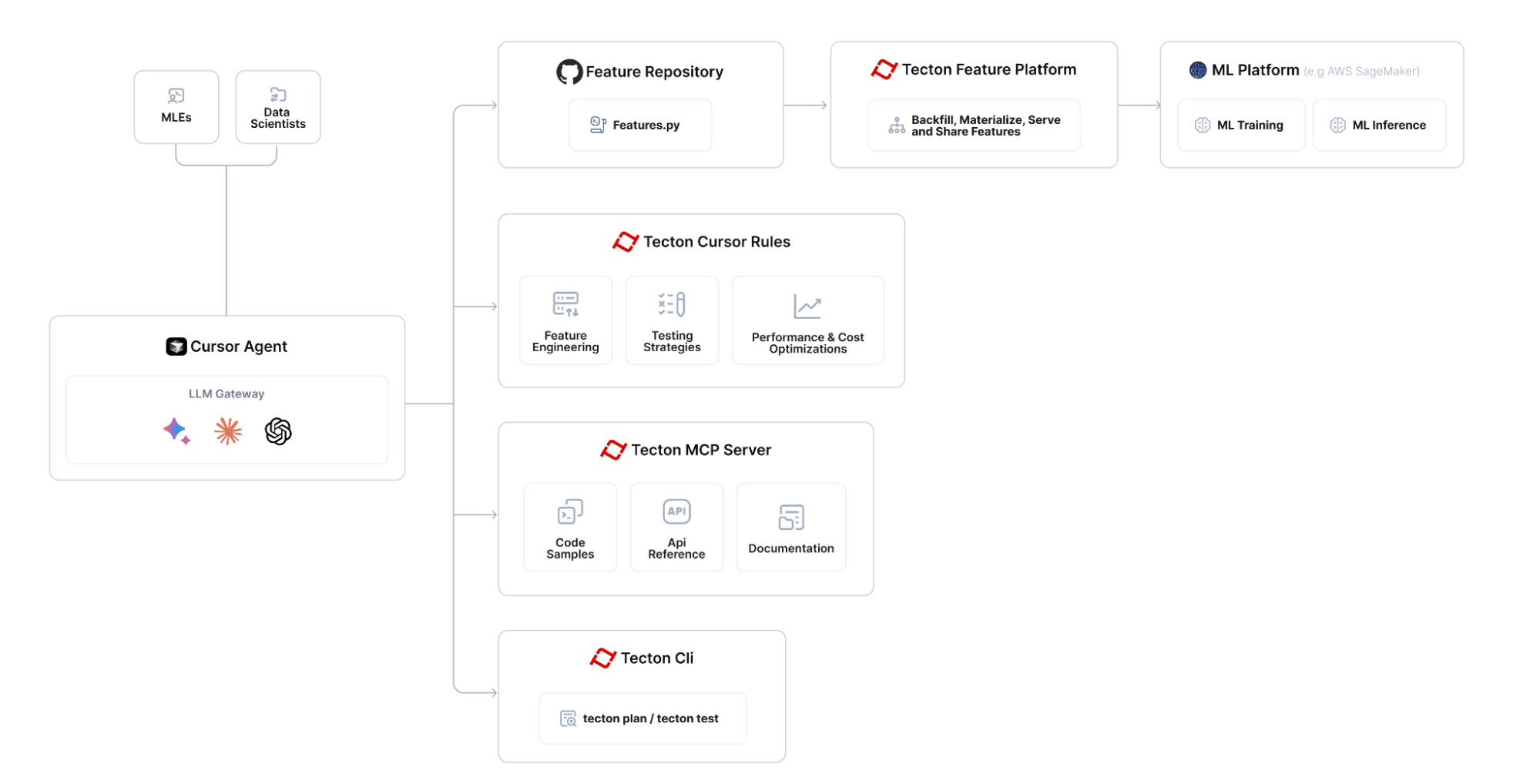
The overall flow for building features with Tecton MCP looks like:

To update the Tecton MCP server to the latest version:
Pull the latest changes from the repository:
cd <path-to-local-clone>
git pull
Close and restart Cursor to ensure the updated MCP server is loaded.
That's it! The MCP server runs as a subprocess spawned by Cursor, so there's no persistent background service to manually stop or restart. Cursor will automatically use the updated code the next time it needs to communicate with the MCP server.
By default, this tool provides guidance for the latest pre-release of the Tecton SDK. If you need the tools to align with a specific released version of Tecton (for example 1.0.34 or 1.1.10), follow these steps:
Pin the version in pyproject.toml. Open pyproject.toml and replace the existing dependency line
dependencies = [
  # ... other dependencies ...
  "tecton>=0.8.0a0"
]
with the exact version you want, e.g.
dependencies = [
  # ... other dependencies ...
  "tecton==1.1.10"
]
Remove the existing lock-file. Because uv.lock records the dependency graph, you must delete it so that uv can resolve the new Tecton version:
cd <path-to-local-clone>
rm uv.lock
Re-generate the lock-file by re-running Step 2 (the MCP_SMOKE_TEST=1 uv --directory command) of the Quick Start section. (This will download the pinned version into an isolated environment for MCP and re-create uv.lock.)
Restart Cursor so that the new Tecton version is loaded into the MCP virtual environment.
Supported versions: The tools currently support Tecton ≥ 1.0.0. Code examples are not versioned yet – they always use the latest stable SDK – however the documentation and SDK reference indices will now match the version you've pinned.
Make sure that Cursor shows "tecton" as an "Enabled" MCP server in "Cursor Settings -> MCP". If you don't see a "green dot", run the MCP server in Diagnostics mode (see below)
To debug the Tecton MCP Server you can run the following command. Replace <path-to-local-clone> with the actual path where you cloned the repository:
uv --directory <path-to-local-clone> run mcp dev src/tecton_mcp/mcp_server/server.pyNote: Launching Tecton's MCP Server will take a few seconds because it's loading an embedding model into memory that it uses to search for relevant code snippets.
Wait a few seconds until the stdout tells you that the MCP Inspector is up and running and then access it at the printed URL (something like http://localhost:5173)
Click "Connect" and then list tools. You should see the Tecton MCP Server tools and be able to query them.
This project is licensed under the MIT License.
Fetches the full Tecton SDK reference.
Use this only if you need to get the full SDK reference for all classes/functions.
If you care only about a subset, use the query_tecton_sdk_reference_tool tool instead.
Inputs: no named parameters.
Retrieves and formats Tecton documentation snippets based on a query.
Each snippet includes the TECTON DOCUMENTATION URL (Source URL),
the section header, and the relevant text chunk.

Tell the user what documentation URL they can open up to get more information.

Input query examples:
- "How do I unit test a Feature View?"
- "What are Entities in Tecton?"
- "Explain Batch Feature Views."
- "How to connect to a Kafka data source?"
- "Show me how to construct training data."
- "Tutorial for building realtime features."
- "How does `tecton apply` work?"
- "Information about Tecton data types."
- "What is a Feature Service?"
- "Scaling the online feature server."
- "Monitoring materialization jobs."
Inputs: query (required).
Finds relevant Tecton code examples using a vector database.
It is always helpful to query the examples retriever before generating Tecton code.

Input query examples:
- "examples of an Entity"
- "examples of a KinesisConfig"
- "examples of a KafkaConfig"
- "examples of a batch feature view"
- "examples of a count distinct aggregation feature view"
- "examples of a percentile aggregation feature view"
- "examples of a stream feature view"
- "examples of an aggregation stream feature view"
- "examples of a realtime feature view"
- "examples of a realtime feature view that transforms data from another feature view"
- "examples of a fraud feature"
- "examples of a recsys case"
- "examples of a test"

The output will be a collection of python code examples that use Tecton to implement features, ranked by relevance.
Inputs: query (required).
Fetches the Tecton SDK reference for a specific list of classes/functions.
IMPORTANT: The class_names list MUST only contain names from the 'Available classes/functions' list below.
Providing any names not in this list will result in an error or empty output.
Use this tool when you need information about specific Tecton components from the allowed list.
Output Format:
Starts with a bulleted list of the found public classes/functions matching the query.
Followed by details for each item, including:
Type (Class/Function)
Name
Recommended import path (e.g., tecton or tecton.types)
The definition header (e.g., class FeatureView(...) or def batch_feature_view(...))
The full docstring.
Available classes/functions: Aggregate, AggregationFunction, AggregationLeadingEdge, Array, Attribute, AutoscalingConfig, BatchFeatureView, BatchSource, BatchTriggerType, BigQueryConfig, BigtableConfig, CacheConfig, Calculation, ComputeMode, DataFrame, DataSource, DatabricksClusterConfig, DatabricksJsonClusterConfig, Dataset, DatetimePartitionColumn, DeltaConfig, DynamoConfig, EMRClusterConfig, EMRJsonClusterConfig, Embedding, Entity, FeatureServerGroup, FeatureService, FeatureTable, FeatureVector, FeatureView, Field, FileConfig, FilterContext, HiveConfig, IcebergConfig, KafkaConfig, KafkaOutputStream, KinesisConfig, KinesisOutputStream, LifetimeWindow, Map, MockContext, ModelConfig, OfflineStoreConfig, OnlineServingIndex, PandasBatchConfig, ParquetConfig, ProvisionedScalingConfig, PushConfig, PyArrowBatchConfig, RealtimeContext, RealtimeFeatureView, RedisConfig, RedshiftConfig, RequestSource, RiftBatchConfig, SdkDataType, Secret, SnowflakeConfig, SparkBatchConfig, SparkStreamConfig, StreamFeatureView, StreamProcessingMode, StreamSource, Struct, TectonDataFrame, TectonTimeConstant, TestRepo, TimeWindow, TimeWindowSeries, TransformServerGroup, Transformation, UnityCatalogAccessMode, UnityConfig, Workspace, approx_count_distinct, approx_percentile, batch_feature_view, const, first, first_distinct, last, last_distinct, materialization_context, pandas_batch_config, pyarrow_batch_config, realtime_feature_view, spark_batch_config, spark_stream_config, stream_feature_view, transformation
Inputs: class_names (required).
Recent tool additions, removals, and schema changes observed during successful MCP inspections.
Loading tool schema changelog…
Scored across 4 tools
Each tool targets a distinct retrieval source: code examples, documentation snippets, full SDK reference, and targeted SDK reference lookups. Even the two SDK tools are clearly separated by full vs. specific class/function queries.
Most tools follow a query_<target>_tool pattern, but get_full_tecton_sdk_reference_tool switches from query_ to get_. The names are still readable and predictable overall.
Four tools is a well-scoped set for a documentation/example retrieval server. Each tool has a clear purpose and none are redundant.
The tool surface covers the main knowledge needs for Tecton development: code examples, documentation, and SDK reference, with both full and targeted retrieval options. No significant gaps are apparent.
Read and write Mission Control state via MCP — projects, tasks, subtasks, templates, status updates.
Tailscale device, route, DNS, key, user, and ACL management over MCP and CLI.
Manage CloudPepper servers, Odoo instances, backups, and deployments over MCP.
Inspect RudderStack workspaces, pipelines, and schemas, and manage transformations and audiences.