Glama
tecton-ai

Tecton MCP Server

Official
by tecton-ai

Tecton MCP 서버 및 커서 규칙

Tecton의 Co-Pilot은 MCP 서버와 커서 규칙으로 구성됩니다. 더 자세한 내용은 이 블로그를 참조하세요.

ℹ️ 정보 : 이 가이드에서는 이 저장소를 사용하여 Tecton MCP 서버를 설정하고 Tecton으로 기능을 개발하는 동안 이를 사용하도록 기능 저장소를 구성하는 방법을 안내합니다.

목차

Related MCP server: tecton-mcp

빠른 시작

  1. 이 저장소를 로컬 컴퓨터에 복제하세요.

    지엑스피1

    참고: 방금 저장소를 복제한 디렉터리 경로는 다음 단계에서 <path-to-your-local-clone> 으로 표시됩니다. 마지막에 있는 pwd 명령어를 사용하면 전체 경로를 확인할 수 있습니다.

  2. uv 패키지 관리자를 설치하세요:

    brew install uv
  3. 다음 명령을 실행하여 설치를 확인하세요. <path-to-your-local-clone> 1단계에서 저장소를 복제한 경로로 바꾸세요.

    MCP_SMOKE_TEST=1 uv --directory <path-to-your-local-clone> run mcp run src/tecton_mcp/mcp_server/server.py

    명령이 오류 없이 종료되고 MCP_SMOKE_TEST is set. Exiting after initialization. "와 유사한 메시지가 표시됩니다. 이는 로컬 설정이 정상적으로 작동함을 확인합니다. 필요한 경우 Cursor가 자동으로 MCP 서버를 하위 프로세스로 생성합니다.

  4. MCP 서버로 커서(또는 다른 MCP 클라이언트)를 구성합니다(아래 참조)

  5. Tecton 클러스터에 로그인하세요.

    tecton login yourcluster.tecton.ai
  6. Cursor를 실행하고 Cursor에서 Tecton의 Co-Pilot을 사용하여 기능 개발을 시작하세요!

텍톤 MCP 도구

Tecton MCP 서버는 MCP 클라이언트(예: Cursor)에서 사용할 수 있는 다음 도구를 제공합니다.

도구 이름

설명

query_example_code_snippet_index_tool

벡터 데이터베이스를 사용하여 관련 Tecton 코드 예시를 찾습니다. 새로운 Tecton 코드를 작성하기 전에 사용 패턴을 찾는 데 유용합니다.

query_documentation_index_tool

쿼리를 기반으로 Tecton 문서 조각을 검색합니다. Tecton 공식 문서에서 직접 맥락을 제공합니다.

get_full_tecton_sdk_reference_tool

사용 가능한 모든 클래스와 함수를 포함하여 Tecton SDK 참조 전체를 가져옵니다. SDK에 대한 전반적인 개요가 필요할 때 사용하세요.

query_tecton_sdk_reference_tool

지정된 클래스 또는 함수 목록에 대한 Tecton SDK 참조를 가져옵니다. 특정 SDK 구성 요소에 대한 정보를 얻는 데 적합합니다.

건축학

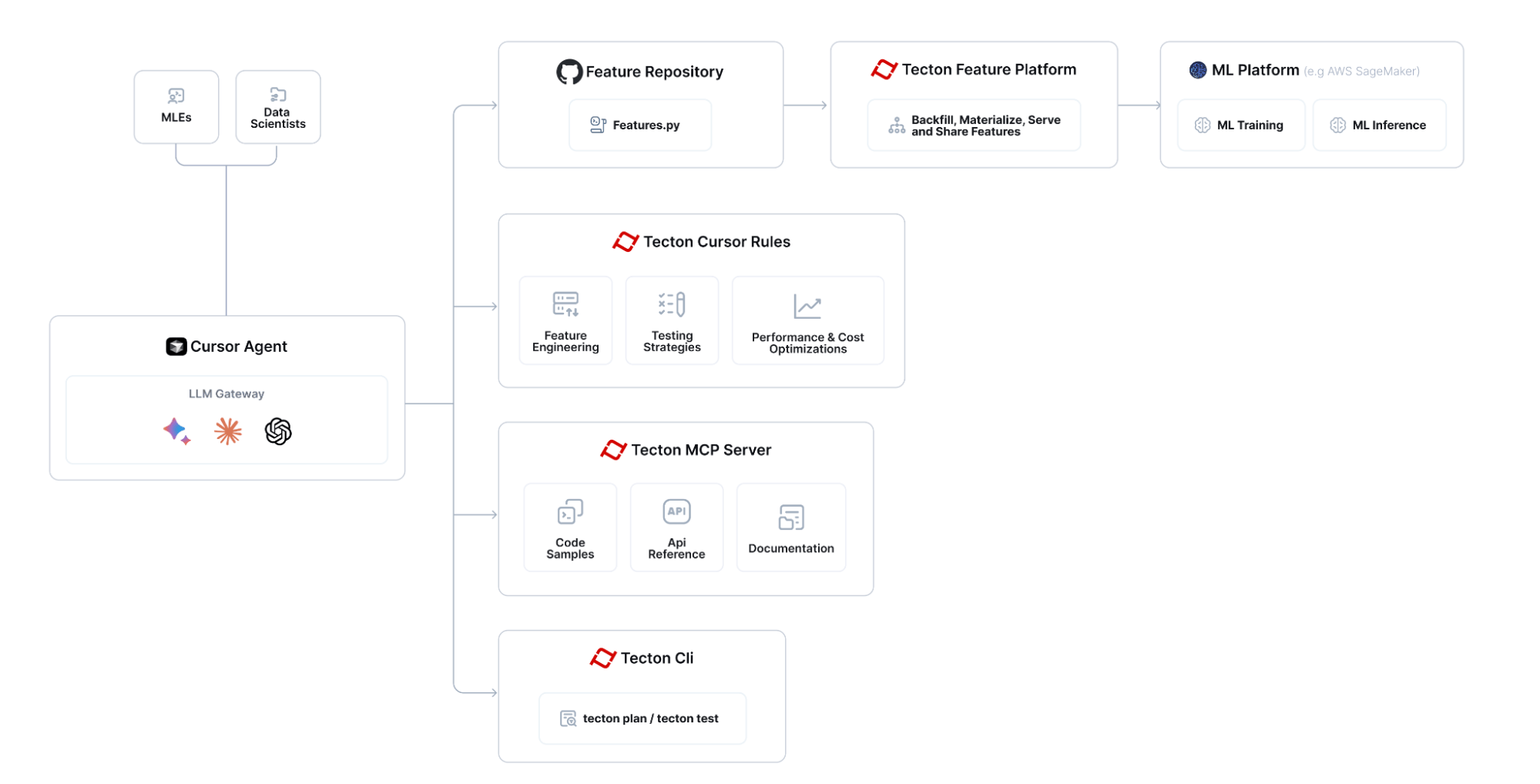
Tecton MCP는 Cursor와 같은 LLM 기반 편집기와 통합되어 기능 엔지니어링을 위한 도구 기반 컨텍스트와 지원을 제공합니다.

Tecton MCP 아키텍처

Tecton MCP를 사용하여 기능을 구축하는 전반적인 흐름은 다음과 같습니다.

Tecton MCP 흐름도

커서를 사용하여 Tecton 설정

다음은 Cursor 0.48 이상에서 테스트되었습니다.

커서에서 Tecton MCP 서버 구성

커서 설정 -> MCP로 이동하여 "새 글로벌 MCP 서버 추가" 버튼을 클릭하면 커서의 mcp.json 파일이 편집됩니다. Tecton을 MCP 서버로 추가합니다. 다음 설정을 시작점으로 사용할 수 있습니다. <path-to-your-local-clone> 경로를 저장소를 복제한 디렉터리와 일치하도록 수정해야 합니다.

{
    "mcpServers": {
        "tecton": {
            "command": "uv",
            "args": [
                "--directory",
                "<path-to-your-local-clone>",
                "run",
                "mcp",
                "run", 
                "src/tecton_mcp/mcp_server/server.py"
            ]
        }
    }
}

커서 규칙 추가

이 저장소의 .cursor/rules 폴더 에서 cursorrules를 기능 저장소 의 .cursor/rules 폴더로 복사합니다.

# Create the .cursor/rules directory structure in your feature repository
mkdir -p <path-to-your-feature-repo>/.cursor/rules

# Then copy the rules
cp -r <path-to-your-local-clone>/.cursor/rules/* <path-to-your-feature-repo>/.cursor/rules/

텍톤 로그인

Tecton 클러스터에 로그인하세요.

    tecton login yourcluster.tecton.ai

추천 LLM

4월 17일 현재, Cursor에서 가장 우수한 성과를 보인 Tecton 피처 엔지니어링 LLM의 스택 순위 목록은 다음과 같습니다.

  • 오픈AI o3

  • 제미니 2.5 프로 경험치 (03-25)

  • 소네트 3.7

커서 <> Tecton MCP 통합이 예상대로 작동하는지 확인하세요.

통합이 예상대로 작동하는지 확인하려면 커서 에이전트에 다음과 같은 질문을 하고 Tecton MCP 도구를 올바르게 호출하는지 확인하세요.

Tecton의 예제 인덱스를 쿼리하여 BatchFeatureViews에 대해, 그리고 StreamFeatureViews와 어떻게 다른지 알려주세요. SDK 참조도 참고해 주세요.

AI 지원 기능 엔지니어링을 시작하세요 :-)

이제 Cursor의 Feature Repository 로 가서 Cursor에 직접 통합된 Tecton의 Co-Pilot을 사용할 수 있습니다.

이 Loom을 보고 통합을 사용하여 새로운 기능을 구축하는 방법을 확인하세요: https://www.loom.com/share/3658f665668a41d2b0ea2355b433c616

특정 Tecton SDK 버전을 사용하는 방법

기본적으로 이 도구는 Tecton SDK의 최신 사전 릴리스 버전에 대한 지침을 제공합니다. 도구를 특정 Tecton 릴리스 버전(예: 1.0.34 또는 1.1.10 )과 맞춰야 하는 경우 다음 단계를 따르세요.

  1. pyproject.toml 에 버전을 고정합니다. pyproject.toml 열고 기존 종속성 줄을 바꿉니다.

dependencies = [
  # ... other dependencies ...
  "tecton>=0.8.0a0"
]

원하는 정확한 버전, 예:

dependencies = [
  # ... other dependencies ...
  "tecton==1.1.10"
]
  1. 기존 잠금 파일을 제거합니다. uv.lock 종속성 그래프를 기록하므로, uv 새 Tecton 버전을 확인할 수 있도록 uv.lock을 삭제해야 합니다.

cd <path-to-your-local-clone>
rm uv.lock
  1. 빠른 시작 섹션의 3단계 ( MCP_SMOKE_TEST=1 uv --directory 명령)를 다시 실행하여 잠금 파일을 다시 생성하세요 . (이렇게 하면 고정된 버전이 MCP의 격리된 환경에 다운로드되고 uv.lock 다시 생성됩니다.)

  2. 커서를 다시 시작하여 새로운 Tecton 버전이 MCP 가상 환경에 로드되도록 합니다.

지원 버전: 이 도구는 현재 Tecton ≥ 1.0.0을 지원합니다. 코드 예제는 아직 버전이 지정되지 않았으며, 항상 최신 안정형 SDK를 사용합니다. 하지만 문서 및 SDK 참조 인덱스는 이제 고정된 버전과 일치합니다.

문제 해결

커서 <-> Tecton MCP 서버 통합

커서 설정 -> MCP에서 "tecton"이 "활성화된" MCP 서버로 표시되는지 확인하세요. "녹색 점"이 표시되지 않으면 MCP 서버를 진단 모드로 실행하세요(아래 참조).

진단 모드에서 MCP 실행

Tecton MCP 서버를 디버깅하려면 다음 명령을 실행하세요. <path-to-your-local-clone> 저장소를 복제한 실제 경로로 바꾸세요.

uv --directory <path-to-your-local-clone> run mcp dev src/tecton_mcp/mcp_server/server.py

참고: Tecton의 MCP 서버를 실행하는 데는 몇 초가 걸립니다. 이는 관련 코드 조각을 검색하는 데 사용되는 임베딩 모델을 메모리에 로드하기 때문입니다.

MCP 검사기가 실행 중이라는 stdout 메시지가 나타날 때까지 몇 초간 기다린 다음 인쇄된 URL(예 : http://localhost:5173 )에서 액세스하세요.

"연결"을 클릭한 다음 도구 목록을 확인하세요. Tecton MCP 서버 도구가 표시되고 쿼리를 실행할 수 있습니다.

자원

특허

이 프로젝트는 MIT 라이선스 에 따라 라이선스가 부여되었습니다.

Available Tools

4 tools
get_full_tecton_sdk_reference_toolA

Fetches the full Tecton SDK reference. Use this only if you need to get the full SDK reference for all classes/functions. If you care only about a subset, use the query_tecton_sdk_reference_tool tool instead.

NameRequiredDescriptionDefault

No parameters

TDQS

A4.4/5.0
Behavior3/5

Does the description disclose side effects, auth requirements, rate limits, or destructive behavior?

No annotations are provided, so the description carries the behavioral disclosure burden. 'Fetches' implies a read operation and 'full SDK reference' indicates scope, but the description does not mention possible response size, structure, or any access requirements. This is acceptable but leaves gaps.

Agents need to know what a tool does to the world before calling it. Descriptions should go beyond structured annotations to explain consequences.

Conciseness5/5

Is the description appropriately sized, front-loaded, and free of redundancy?

Three short sentences each serve a purpose: what the tool does, when to use it, and when to use the alternative instead. There is minimal redundancy and the main point is front-loaded.

Shorter descriptions cost fewer tokens and are easier for agents to parse. Every sentence should earn its place.

Completeness4/5

Given the tool's complexity, does the description cover enough for an agent to succeed on first attempt?

For a no-argument fetch-all tool, the description clearly states the use case and directs subset users to the right sibling. It would be slightly more complete if it noted the likely size or format of the returned reference, but nothing critical is missing for invocation decisions.

Complex tools with many parameters or behaviors need more documentation. Simple tools need less. This dimension scales expectations accordingly.

Parameters4/5

Does the description clarify parameter syntax, constraints, interactions, or defaults beyond what the schema provides?

The tool has no parameters, so there is nothing for the schema or description to explain about arguments. The description adds useful contextual scope by contrasting full and subset behavior, matching the baseline for zero-parameter tools.

Input schemas describe structure but not intent. Descriptions should explain non-obvious parameter relationships and valid value ranges.

Purpose5/5

Does the description clearly state what the tool does and how it differs from similar tools?

The description uses a specific verb and resource ('Fetches the full Tecton SDK reference') and clarifies the scope as 'all classes/functions.' It differentiates from the sibling query tool by explicitly contrasting full versus subset access.

Agents choose between tools based on descriptions. A clear purpose with a specific verb and resource helps agents select the right tool.

Usage Guidelines5/5

Does the description explain when to use this tool, when not to, or what alternatives exist?

It explicitly says 'Use this only if you need to get the full SDK reference' and names the alternative for subset use, giving an agent a clear decision rule.

Agents often have multiple tools that could apply. Explicit usage guidance like "use X instead of Y when Z" prevents misuse.

query_documentation_index_toolA
Retrieves and formats Tecton documentation snippets based on a query.
Each snippet includes the TECTON DOCUMENTATION URL (Source URL), 
the section header, and the relevant text chunk.

Tell the user what documentation URL they can open up to get more information.

Input query examples:
- "How do I unit test a Feature View?"
- "What are Entities in Tecton?"
- "Explain Batch Feature Views."
- "How to connect to a Kafka data source?"
- "Show me how to construct training data."
- "Tutorial for building realtime features."
- "How does `tecton apply` work?"
- "Information about Tecton data types."
- "What is a Feature Service?"
- "Scaling the online feature server."
- "Monitoring materialization jobs."
NameRequiredDescriptionDefault
queryYes

TDQS

A4.3/5.0
Behavior4/5

Does the description disclose side effects, auth requirements, rate limits, or destructive behavior?

With no annotations provided, the description carries the full burden of behavioral disclosure. It explains that the tool retrieves and formats documentation snippets, enumerates the exact output fields, and instructs the agent to tell the user which documentation URL to open. It does not cover edge cases such as no matches found, but the core behavior is clear and accurate.

Agents need to know what a tool does to the world before calling it. Descriptions should go beyond structured annotations to explain consequences.

Conciseness4/5

Is the description appropriately sized, front-loaded, and free of redundancy?

The description front-loads the core behavior and output format before moving to user-facing instructions and examples. The list of examples is long but earns its place by serving as parameter guidance; there is no filler or redundant wording.

Shorter descriptions cost fewer tokens and are easier for agents to parse. Every sentence should earn its place.

Completeness4/5

Given the tool's complexity, does the description cover enough for an agent to succeed on first attempt?

Given the absence of an output schema and annotations, the description covers what the tool returns, how the agent should present the result, and how to phrase queries. The main gap is the lack of explicit guidance for choosing between this tool and its siblings, which is already reflected in the usage guidelines score.

Complex tools with many parameters or behaviors need more documentation. Simple tools need less. This dimension scales expectations accordingly.

Parameters4/5

Does the description clarify parameter syntax, constraints, interactions, or defaults beyond what the schema provides?

The schema provides no description for the 'query' parameter, so the description must compensate. It does so through a detailed 'Input query examples' section that illustrates the expected natural-language phrasing. For a single parameter, this gives an agent sufficient understanding of what to pass, even though explicit constraints like length or format are not stated.

Input schemas describe structure but not intent. Descriptions should explain non-obvious parameter relationships and valid value ranges.

Purpose5/5

Does the description clearly state what the tool does and how it differs from similar tools?

The description uses specific verbs ('Retrieves and formats') and clearly names the resource ('Tecton documentation snippets'). It also describes exactly what each snippet contains (Source URL, section header, relevant text chunk), which makes the tool's function unambiguous and distinguishable from sibling code-example and SDK-reference tools.

Agents choose between tools based on descriptions. A clear purpose with a specific verb and resource helps agents select the right tool.

Usage Guidelines4/5

Does the description explain when to use this tool, when not to, or what alternatives exist?

The description provides ten concrete input query examples that establish when the tool is appropriate, such as 'How do I unit test a Feature View?' and 'Explain Batch Feature Views.' It gives clear context on the kind of natural-language documentation questions to use, but it does not explicitly name alternatives or state when not to use this tool versus its siblings.

Agents often have multiple tools that could apply. Explicit usage guidance like "use X instead of Y when Z" prevents misuse.

query_example_code_snippet_index_toolA
Finds relevant Tecton code examples using a vector database.
It is always helpful to query the examples retriever before generating Tecton code.

Input query examples:
- "examples of an Entity"
- "examples of a KinesisConfig"
- "examples of a KafkaConfig"
- "examples of a batch feature view"
- "examples of a count distinct aggregation feature view"
- "examples of a percentile aggregation feature view"
- "examples of a stream feature view"
- "examples of an aggregation stream feature view"
- "examples of a realtime feature view"
- "examples of a realtime feature view that transforms data from another feature view"
- "examples of a fraud feature"
- "examples of a recsys case"
- "examples of a test"

The output will be a collection of python code examples that use Tecton to implement features, ranked by relevance.
NameRequiredDescriptionDefault
queryYes

TDQS

A4.3/5.0
Behavior4/5

Does the description disclose side effects, auth requirements, rate limits, or destructive behavior?

With no annotations, the description carries the disclosure burden, and it does disclose the retrieval mechanism ('vector database'), the output form ('collection of python code examples'), and the ranking ('ranked by relevance'). It could add failure or freshness caveats, but for a simple retrieval tool the core behavior is transparent.

Agents need to know what a tool does to the world before calling it. Descriptions should go beyond structured annotations to explain consequences.

Conciseness4/5

Is the description appropriately sized, front-loaded, and free of redundancy?

The main description is front-loaded and the output format is stated in one sentence. The 13 examples are long but earn their place because the schema provides no query guidance; little in the text is redundant.

Shorter descriptions cost fewer tokens and are easier for agents to parse. Every sentence should earn its place.

Completeness4/5

Given the tool's complexity, does the description cover enough for an agent to succeed on first attempt?

For a one-parameter retrieval tool with no output schema, the description covers what to send and what will come back. It lacks only edge-case behavior (e.g., empty results or non-Tecton queries), which is minor for this complexity.

Complex tools with many parameters or behaviors need more documentation. Simple tools need less. This dimension scales expectations accordingly.

Parameters4/5

Does the description clarify parameter syntax, constraints, interactions, or defaults beyond what the schema provides?

The schema gives only a bare 'query' string with no description (0% coverage), so the list of 13 concrete query examples is essential and largely compensates. It shows the expected phrasing and scope of queries, though it does not state an explicit 'describe the Tecton construct you need examples of' rule.

Input schemas describe structure but not intent. Descriptions should explain non-obvious parameter relationships and valid value ranges.

Purpose5/5

Does the description clearly state what the tool does and how it differs from similar tools?

The opening sentence uses a specific verb ('Finds'), a specific resource ('relevant Tecton code examples'), and a mechanism ('vector database'). Paired with sibling names like query_documentation_index_tool, this clearly marks the tool as the code-example retriever rather than a docs or SDK reference lookup.

Agents choose between tools based on descriptions. A clear purpose with a specific verb and resource helps agents select the right tool.

Usage Guidelines4/5

Does the description explain when to use this tool, when not to, or what alternatives exist?

The description gives an explicit condition: query the examples retriever before generating Tecton code. It does not explicitly name when to prefer documentation or SDK-reference siblings, so it stops short of full when-to-use/when-not-to-use guidance.

Agents often have multiple tools that could apply. Explicit usage guidance like "use X instead of Y when Z" prevents misuse.

query_tecton_sdk_reference_toolA

Fetches the Tecton SDK reference for a specific list of classes/functions.

IMPORTANT: The class_names list MUST only contain names from the 'Available classes/functions' list below. Providing any names not in this list will result in an error or empty output.

Use this tool when you need information about specific Tecton components from the allowed list.

Output Format:

  • Starts with a bulleted list of the found public classes/functions matching the query.

  • Followed by details for each item, including:

    • Type (Class/Function)

    • Name

    • Recommended import path (e.g., tecton or tecton.types)

    • The definition header (e.g., class FeatureView(...) or def batch_feature_view(...))

    • The full docstring.

Available classes/functions: Aggregate, AggregationFunction, AggregationLeadingEdge, Array, Attribute, AutoscalingConfig, BatchFeatureView, BatchSource, BatchTriggerType, BigQueryConfig, BigtableConfig, CacheConfig, Calculation, ComputeMode, DataFrame, DataSource, DatabricksClusterConfig, DatabricksJsonClusterConfig, Dataset, DatetimePartitionColumn, DeltaConfig, DynamoConfig, EMRClusterConfig, EMRJsonClusterConfig, Embedding, Entity, FeatureServerGroup, FeatureService, FeatureTable, FeatureVector, FeatureView, Field, FileConfig, FilterContext, HiveConfig, IcebergConfig, KafkaConfig, KafkaOutputStream, KinesisConfig, KinesisOutputStream, LifetimeWindow, Map, MockContext, ModelConfig, OfflineStoreConfig, OnlineServingIndex, PandasBatchConfig, ParquetConfig, ProvisionedScalingConfig, PushConfig, PyArrowBatchConfig, RealtimeContext, RealtimeFeatureView, RedisConfig, RedshiftConfig, RequestSource, RiftBatchConfig, SdkDataType, Secret, SnowflakeConfig, SparkBatchConfig, SparkStreamConfig, StreamFeatureView, StreamProcessingMode, StreamSource, Struct, TectonDataFrame, TectonTimeConstant, TestRepo, TimeWindow, TimeWindowSeries, TransformServerGroup, Transformation, UnityCatalogAccessMode, UnityConfig, Workspace, approx_count_distinct, approx_percentile, batch_feature_view, const, first, first_distinct, last, last_distinct, materialization_context, pandas_batch_config, pyarrow_batch_config, realtime_feature_view, spark_batch_config, spark_stream_config, stream_feature_view, transformation

NameRequiredDescriptionDefault
class_namesYes

TDQS

A4.6/5.0
Behavior5/5

Does the description disclose side effects, auth requirements, rate limits, or destructive behavior?

With no annotations present, the description carries the full burden, and it does this well. It warns that invalid names will 'result in an error or empty output,' and it details exactly what the returned output will include: a bulleted list, type, name, import path, definition header, and full docstring. This makes the tool's behavior predictable to an agent.

Agents need to know what a tool does to the world before calling it. Descriptions should go beyond structured annotations to explain consequences.

Conciseness4/5

Is the description appropriately sized, front-loaded, and free of redundancy?

The prose is concise and well-structured, with the critical constraint front-loaded and output format clearly sectioned. The description is long because of the extensive allowed classes/functions list, but that list is necessary to prevent invalid calls, so the length is justified.

Shorter descriptions cost fewer tokens and are easier for agents to parse. Every sentence should earn its place.

Completeness4/5

Given the tool's complexity, does the description cover enough for an agent to succeed on first attempt?

Since there is no output schema, the description appropriately documents the return structure, including details like import path and definition header. It also handles the main failure mode. However, it does not provide any guidance about close alternatives or mention the full-reference sibling, which would have made the context complete.

Complex tools with many parameters or behaviors need more documentation. Simple tools need less. This dimension scales expectations accordingly.

Parameters5/5

Does the description clarify parameter syntax, constraints, interactions, or defaults beyond what the schema provides?

The input schema provides only the parameter name and type, with 0% schema description coverage, so the description must fully explain class_names. It does, by requiring names to come from the provided 'Available classes/functions' list and by describing the consequence of violating that constraint. The exhaustive allowed-value list adds substantial semantic meaning beyond the raw schema.

Input schemas describe structure but not intent. Descriptions should explain non-obvious parameter relationships and valid value ranges.

Purpose5/5

Does the description clearly state what the tool does and how it differs from similar tools?

The description opens with a specific verb and resource: 'Fetches the Tecton SDK reference for a specific list of classes/functions.' This clearly distinguishes it from the sibling get_full_tecton_sdk_reference_tool, since this tool is scoped to a provided list rather than returning the entire reference.

Agents choose between tools based on descriptions. A clear purpose with a specific verb and resource helps agents select the right tool.

Usage Guidelines4/5

Does the description explain when to use this tool, when not to, or what alternatives exist?

The description explicitly states when to use it: 'Use this tool when you need information about specific Tecton components from the allowed list.' It does not explicitly mention when not to use it or name alternatives like query_documentation_index_tool, so it stops short of full routing guidance.

Agents often have multiple tools that could apply. Explicit usage guidance like "use X instead of Y when Z" prevents misuse.

Tool Schema Changelog

Recent tool additions, removals, and schema changes observed during successful MCP inspections.

  1. 4 tool updatesv0.1.0
    • First observedget_full_tecton_sdk_reference_tool
    • First observedquery_documentation_index_tool
    • First observedquery_example_code_snippet_index_tool
    • First observedquery_tecton_sdk_reference_tool

TDQS

A4.5/5.0

Scored across 4 tools

Disambiguation5/5

Each tool targets a distinct retrieval source: code examples, documentation snippets, full SDK reference, and targeted SDK reference lookups. Even the two SDK tools are clearly separated by full vs. specific class/function queries.

Naming Consistency4/5

Most tools follow a query_<target>_tool pattern, but get_full_tecton_sdk_reference_tool switches from query_ to get_. The names are still readable and predictable overall.

Tool Count5/5

Four tools is a well-scoped set for a documentation/example retrieval server. Each tool has a clear purpose and none are redundant.

Completeness5/5

The tool surface covers the main knowledge needs for Tecton development: code examples, documentation, and SDK reference, with both full and targeted retrieval options. No significant gaps are apparent.

Related MCP Connectors

Related MCP Servers

  • A
    license
    Not graded
    quality
    D
    maintenance
    Enables interaction with InfluxDB v3 (Core/Enterprise/Cloud Dedicated) through MCP clients. Supports database management, data querying and writing, schema inspection, and token administration operations.
    791 npm
    MIT
  • F
    license
    Not graded
    quality
    D
    maintenance
    Enables interaction with Tecton clusters through MCP, allowing management of feature stores, execution of Tecton CLI commands, and retrieval of feature store configurations via natural language.
    -
  • F
    license
    Not graded
    quality
    C
    maintenance
    Enables agents to connect to remote MCP servers once, access their tools through a compact MCP endpoint, pair a CLI inside sandboxes, and create watches that turn command or tool output into pollable structured events.
    2
    -