Tecton MCP Server
OfficialReglas del servidor y cursor de Tecton MCP
El Copiloto de Tecton consta de un servidor MCP y reglas de cursor. Lea este blog para obtener más información.
ℹ️ Información : Esta guía lo guiará a través de la configuración del servidor Tecton MCP con este repositorio y la configuración de su repositorio de funciones para usarlo mientras desarrolla funciones con Tecton.
Tabla de contenido
Related MCP server: tecton-mcp
Inicio rápido
Clone este repositorio en su máquina local:
git clone https://github.com/tecton-ai/tecton-mcp.git cd tecton-mcp pwdNota: La ruta al directorio donde acaba de clonar el repositorio se llamará
<path-to-your-local-clone>en los siguientes pasos. El comandopwdal final le indicará la ruta completa.Instalar el administrador de paquetes uv:
brew install uvVerifique su instalación ejecutando el siguiente comando. Reemplace
<path-to-your-local-clone>con la ruta donde clonó el repositorio en el paso 1:MCP_SMOKE_TEST=1 uv --directory <path-to-your-local-clone> run mcp run src/tecton_mcp/mcp_server/server.pyEl comando debería salir sin errores e imprimir un mensaje similar a
MCP_SMOKE_TEST is set. Exiting after initialization.. Esto confirma que la configuración local funciona correctamente: Cursor generará automáticamente el servidor MCP como subproceso cuando sea necesario.Configurar Cursor (o cualquier otro cliente MCP) con el servidor MCP (ver a continuación)
Inicie sesión en su clúster Tecton:
tecton login yourcluster.tecton.ai¡Ejecuta Cursor y comienza a desarrollar funciones con Co-Pilot de Tecton en Cursor!
Herramientas Tecton MCP
El servidor Tecton MCP expone las siguientes herramientas que pueden ser utilizadas por un cliente MCP (como Cursor):
Nombre de la herramienta | Descripción |
| Encuentra ejemplos de código Tecton relevantes mediante una base de datos vectorial. Útil para identificar patrones de uso antes de escribir nuevo código Tecton. |
| Recupera fragmentos de documentación de Tecton mediante una consulta. Proporciona contexto directamente de la documentación oficial de Tecton. |
| Obtiene la referencia completa del SDK de Tecton, incluyendo todas las clases y funciones disponibles. Úselo cuando se necesite una visión general del SDK. |
| Obtiene la referencia del SDK de Tecton para una lista específica de clases o funciones. Ideal para obtener información específica sobre componentes específicos del SDK. |
Arquitectura
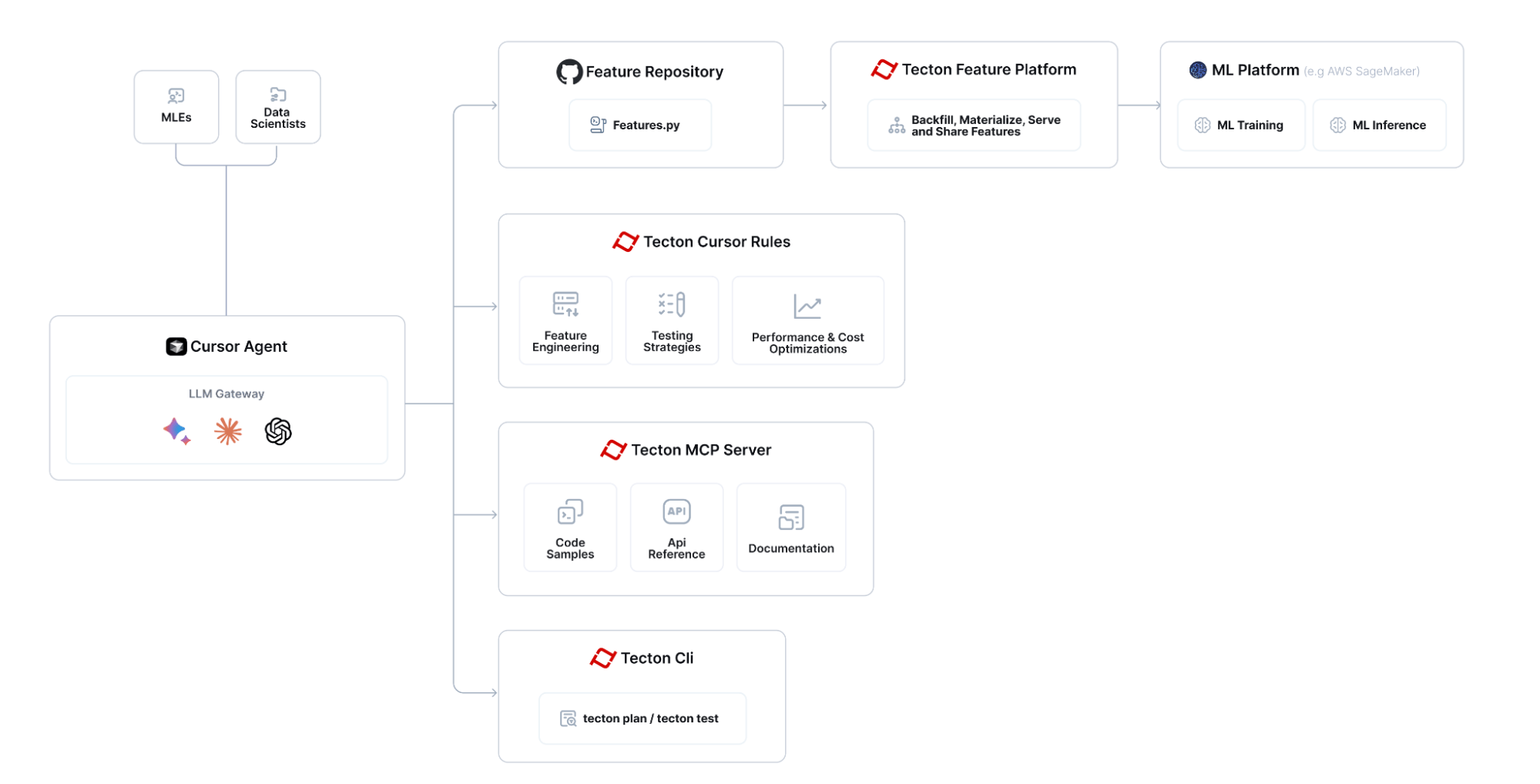
Tecton MCP se integra con editores potenciados por LLM como Cursor para brindar contexto basado en herramientas y asistencia para la ingeniería de funciones:

El flujo general para crear funciones con Tecton MCP se ve así:

Configurar Tecton con el cursor
Lo siguiente se prueba con Cursor 0.48 y superior
Configurar el servidor Tecton MCP en Cursor
Vaya a Configuración de Cursor -> MCP y haga clic en el botón "Añadir nuevo servidor MCP global". Esto editará el archivo mcp.json de Cursor. Añada Tecton como servidor MCP. Puede usar la siguiente configuración como punto de partida; asegúrese de modificar la ruta <path-to-your-local-clone> para que coincida con el directorio donde clonó el repositorio:
{
"mcpServers": {
"tecton": {
"command": "uv",
"args": [
"--directory",
"<path-to-your-local-clone>",
"run",
"mcp",
"run",
"src/tecton_mcp/mcp_server/server.py"
]
}
}
}Agregar reglas de cursor
Copie las reglas de cursor de la carpeta .cursor/rules de este repositorio a la carpeta .cursor/rules de su repositorio de funciones :
# Create the .cursor/rules directory structure in your feature repository
mkdir -p <path-to-your-feature-repo>/.cursor/rules
# Then copy the rules
cp -r <path-to-your-local-clone>/.cursor/rules/* <path-to-your-feature-repo>/.cursor/rules/Inicio de sesión en Tecton
Inicie sesión en su clúster Tecton:
tecton login yourcluster.tecton.aiLLM recomendado
Al 17 de abril, la siguiente es la lista clasificada por pila de los LLM de ingeniería de características de Tecton con mejor rendimiento en Cursor:
OpenAI o3
Experiencia profesional de Gemini 2.5 (25/03)
Soneto 3.7
Verifique que la integración Cursor <> Tecton MCP funcione como se espera
Para asegurarse de que su integración funcione como se espera, formule una pregunta como la siguiente al Agente Cursor y asegúrese de que invoque correctamente sus herramientas Tecton MCP:
Consulta el índice de ejemplos de Tecton y cuéntame algo sobre BatchFeatureViews y en qué se diferencian de StreamFeatureViews. Consulta también la referencia del SDK.
Comience la ingeniería de funciones asistida por IA :-)
Ahora puedes ir a tu Repositorio de funciones en Cursor y comenzar a utilizar Co-Pilot de Tecton, integrado directamente en Cursor.
Vea este Loom para ver cómo puede usar la integración para crear nuevas funciones: https://www.loom.com/share/3658f665668a41d2b0ea2355b433c616
Cómo utilizar una versión específica del SDK de Tecton
De forma predeterminada, esta herramienta proporciona orientación para la última versión preliminar del SDK de Tecton. Si necesita las herramientas para adaptarse a una versión específica de Tecton (por ejemplo, 1.0.34 o 1.1.10 ), siga estos pasos:
Fije la versión en
pyproject.toml. Abrapyproject.tomly reemplace la línea de dependencia existente.
dependencies = [
# ... other dependencies ...
"tecton>=0.8.0a0"
]con la versión exacta que quieras, por ejemplo
dependencies = [
# ... other dependencies ...
"tecton==1.1.10"
]Elimine el archivo de bloqueo existente. Dado que
uv.lockregistra el gráfico de dependencias, debe eliminarlo para queuvpueda resolver la nueva versión de Tecton:
cd <path-to-your-local-clone>
rm uv.lockRegenere el archivo de bloqueo ejecutando nuevamente el paso 3 (comando
MCP_SMOKE_TEST=1 uv --directory) de la sección de Inicio rápido . (Esto descargará la versión anclada en un entorno aislado para MCP y recrearáuv.lock).Reinicie Cursor para que la nueva versión de Tecton se cargue en el entorno virtual MCP.
Versiones compatibles: Las herramientas son compatibles actualmente con Tecton ≥ 1.0.0. Los ejemplos de código aún no tienen versiones; siempre usan el SDK estable más reciente. Sin embargo, la documentación y los índices de referencia del SDK ahora coincidirán con la versión que haya fijado.
Solución de problemas
Integración del servidor Cursor <-> Tecton MCP
Asegúrese de que el cursor muestre "tecton" como servidor MCP "Habilitado" en "Configuración del cursor -> MCP". Si no ve un punto verde, ejecute el servidor MCP en modo de diagnóstico (ver más abajo).
Ejecutar MCP en modo de diagnóstico
Para depurar el servidor Tecton MCP, ejecute el siguiente comando. Reemplace <path-to-your-local-clone> con la ruta donde clonó el repositorio:
uv --directory <path-to-your-local-clone> run mcp dev src/tecton_mcp/mcp_server/server.pyNota: El inicio del servidor MCP de Tecton tardará unos segundos porque está cargando un modelo de incrustación en la memoria que utiliza para buscar fragmentos de código relevantes.
Espere unos segundos hasta que la salida estándar le indique que el Inspector MCP está en funcionamiento y luego acceda a él en la URL impresa (algo así como http://localhost:5173 )
Haga clic en "Conectar" y luego en la lista de herramientas. Debería ver las herramientas del servidor Tecton MCP y poder consultarlas.
Recursos
Licencia
Este proyecto está licenciado bajo la licencia MIT .
Available Tools
4 toolsget_full_tecton_sdk_reference_toolA
Fetches the full Tecton SDK reference.
Use this only if you need to get the full SDK reference for all classes/functions.
If you care only about a subset, use the query_tecton_sdk_reference_tool tool instead.
| Name | Required | Description | Default |
|---|---|---|---|
No parameters | |||
TDQS
Does the description disclose side effects, auth requirements, rate limits, or destructive behavior?
No annotations are provided, so the description carries the behavioral disclosure burden. 'Fetches' implies a read operation and 'full SDK reference' indicates scope, but the description does not mention possible response size, structure, or any access requirements. This is acceptable but leaves gaps.
Agents need to know what a tool does to the world before calling it. Descriptions should go beyond structured annotations to explain consequences.
Is the description appropriately sized, front-loaded, and free of redundancy?
Three short sentences each serve a purpose: what the tool does, when to use it, and when to use the alternative instead. There is minimal redundancy and the main point is front-loaded.
Shorter descriptions cost fewer tokens and are easier for agents to parse. Every sentence should earn its place.
Given the tool's complexity, does the description cover enough for an agent to succeed on first attempt?
For a no-argument fetch-all tool, the description clearly states the use case and directs subset users to the right sibling. It would be slightly more complete if it noted the likely size or format of the returned reference, but nothing critical is missing for invocation decisions.
Complex tools with many parameters or behaviors need more documentation. Simple tools need less. This dimension scales expectations accordingly.
Does the description clarify parameter syntax, constraints, interactions, or defaults beyond what the schema provides?
The tool has no parameters, so there is nothing for the schema or description to explain about arguments. The description adds useful contextual scope by contrasting full and subset behavior, matching the baseline for zero-parameter tools.
Input schemas describe structure but not intent. Descriptions should explain non-obvious parameter relationships and valid value ranges.
Does the description clearly state what the tool does and how it differs from similar tools?
The description uses a specific verb and resource ('Fetches the full Tecton SDK reference') and clarifies the scope as 'all classes/functions.' It differentiates from the sibling query tool by explicitly contrasting full versus subset access.
Agents choose between tools based on descriptions. A clear purpose with a specific verb and resource helps agents select the right tool.
Does the description explain when to use this tool, when not to, or what alternatives exist?
It explicitly says 'Use this only if you need to get the full SDK reference' and names the alternative for subset use, giving an agent a clear decision rule.
Agents often have multiple tools that could apply. Explicit usage guidance like "use X instead of Y when Z" prevents misuse.
query_documentation_index_toolA
Retrieves and formats Tecton documentation snippets based on a query.
Each snippet includes the TECTON DOCUMENTATION URL (Source URL),
the section header, and the relevant text chunk.
Tell the user what documentation URL they can open up to get more information.
Input query examples:
- "How do I unit test a Feature View?"
- "What are Entities in Tecton?"
- "Explain Batch Feature Views."
- "How to connect to a Kafka data source?"
- "Show me how to construct training data."
- "Tutorial for building realtime features."
- "How does `tecton apply` work?"
- "Information about Tecton data types."
- "What is a Feature Service?"
- "Scaling the online feature server."
- "Monitoring materialization jobs."
| Name | Required | Description | Default |
|---|---|---|---|
| query | Yes |
TDQS
Does the description disclose side effects, auth requirements, rate limits, or destructive behavior?
With no annotations provided, the description carries the full burden of behavioral disclosure. It explains that the tool retrieves and formats documentation snippets, enumerates the exact output fields, and instructs the agent to tell the user which documentation URL to open. It does not cover edge cases such as no matches found, but the core behavior is clear and accurate.
Agents need to know what a tool does to the world before calling it. Descriptions should go beyond structured annotations to explain consequences.
Is the description appropriately sized, front-loaded, and free of redundancy?
The description front-loads the core behavior and output format before moving to user-facing instructions and examples. The list of examples is long but earns its place by serving as parameter guidance; there is no filler or redundant wording.
Shorter descriptions cost fewer tokens and are easier for agents to parse. Every sentence should earn its place.
Given the tool's complexity, does the description cover enough for an agent to succeed on first attempt?
Given the absence of an output schema and annotations, the description covers what the tool returns, how the agent should present the result, and how to phrase queries. The main gap is the lack of explicit guidance for choosing between this tool and its siblings, which is already reflected in the usage guidelines score.
Complex tools with many parameters or behaviors need more documentation. Simple tools need less. This dimension scales expectations accordingly.
Does the description clarify parameter syntax, constraints, interactions, or defaults beyond what the schema provides?
The schema provides no description for the 'query' parameter, so the description must compensate. It does so through a detailed 'Input query examples' section that illustrates the expected natural-language phrasing. For a single parameter, this gives an agent sufficient understanding of what to pass, even though explicit constraints like length or format are not stated.
Input schemas describe structure but not intent. Descriptions should explain non-obvious parameter relationships and valid value ranges.
Does the description clearly state what the tool does and how it differs from similar tools?
The description uses specific verbs ('Retrieves and formats') and clearly names the resource ('Tecton documentation snippets'). It also describes exactly what each snippet contains (Source URL, section header, relevant text chunk), which makes the tool's function unambiguous and distinguishable from sibling code-example and SDK-reference tools.
Agents choose between tools based on descriptions. A clear purpose with a specific verb and resource helps agents select the right tool.
Does the description explain when to use this tool, when not to, or what alternatives exist?
The description provides ten concrete input query examples that establish when the tool is appropriate, such as 'How do I unit test a Feature View?' and 'Explain Batch Feature Views.' It gives clear context on the kind of natural-language documentation questions to use, but it does not explicitly name alternatives or state when not to use this tool versus its siblings.
Agents often have multiple tools that could apply. Explicit usage guidance like "use X instead of Y when Z" prevents misuse.
query_example_code_snippet_index_toolA
Finds relevant Tecton code examples using a vector database.
It is always helpful to query the examples retriever before generating Tecton code.
Input query examples:
- "examples of an Entity"
- "examples of a KinesisConfig"
- "examples of a KafkaConfig"
- "examples of a batch feature view"
- "examples of a count distinct aggregation feature view"
- "examples of a percentile aggregation feature view"
- "examples of a stream feature view"
- "examples of an aggregation stream feature view"
- "examples of a realtime feature view"
- "examples of a realtime feature view that transforms data from another feature view"
- "examples of a fraud feature"
- "examples of a recsys case"
- "examples of a test"
The output will be a collection of python code examples that use Tecton to implement features, ranked by relevance.
| Name | Required | Description | Default |
|---|---|---|---|
| query | Yes |
TDQS
Does the description disclose side effects, auth requirements, rate limits, or destructive behavior?
With no annotations, the description carries the disclosure burden, and it does disclose the retrieval mechanism ('vector database'), the output form ('collection of python code examples'), and the ranking ('ranked by relevance'). It could add failure or freshness caveats, but for a simple retrieval tool the core behavior is transparent.
Agents need to know what a tool does to the world before calling it. Descriptions should go beyond structured annotations to explain consequences.
Is the description appropriately sized, front-loaded, and free of redundancy?
The main description is front-loaded and the output format is stated in one sentence. The 13 examples are long but earn their place because the schema provides no query guidance; little in the text is redundant.
Shorter descriptions cost fewer tokens and are easier for agents to parse. Every sentence should earn its place.
Given the tool's complexity, does the description cover enough for an agent to succeed on first attempt?
For a one-parameter retrieval tool with no output schema, the description covers what to send and what will come back. It lacks only edge-case behavior (e.g., empty results or non-Tecton queries), which is minor for this complexity.
Complex tools with many parameters or behaviors need more documentation. Simple tools need less. This dimension scales expectations accordingly.
Does the description clarify parameter syntax, constraints, interactions, or defaults beyond what the schema provides?
The schema gives only a bare 'query' string with no description (0% coverage), so the list of 13 concrete query examples is essential and largely compensates. It shows the expected phrasing and scope of queries, though it does not state an explicit 'describe the Tecton construct you need examples of' rule.
Input schemas describe structure but not intent. Descriptions should explain non-obvious parameter relationships and valid value ranges.
Does the description clearly state what the tool does and how it differs from similar tools?
The opening sentence uses a specific verb ('Finds'), a specific resource ('relevant Tecton code examples'), and a mechanism ('vector database'). Paired with sibling names like query_documentation_index_tool, this clearly marks the tool as the code-example retriever rather than a docs or SDK reference lookup.
Agents choose between tools based on descriptions. A clear purpose with a specific verb and resource helps agents select the right tool.
Does the description explain when to use this tool, when not to, or what alternatives exist?
The description gives an explicit condition: query the examples retriever before generating Tecton code. It does not explicitly name when to prefer documentation or SDK-reference siblings, so it stops short of full when-to-use/when-not-to-use guidance.
Agents often have multiple tools that could apply. Explicit usage guidance like "use X instead of Y when Z" prevents misuse.
query_tecton_sdk_reference_toolA
Fetches the Tecton SDK reference for a specific list of classes/functions.
IMPORTANT: The class_names list MUST only contain names from the 'Available classes/functions' list below.
Providing any names not in this list will result in an error or empty output.
Use this tool when you need information about specific Tecton components from the allowed list.
Output Format:
Starts with a bulleted list of the found public classes/functions matching the query.
Followed by details for each item, including:
Type (Class/Function)
Name
Recommended import path (e.g.,
tectonortecton.types)The definition header (e.g.,
class FeatureView(...)ordef batch_feature_view(...))The full docstring.
Available classes/functions: Aggregate, AggregationFunction, AggregationLeadingEdge, Array, Attribute, AutoscalingConfig, BatchFeatureView, BatchSource, BatchTriggerType, BigQueryConfig, BigtableConfig, CacheConfig, Calculation, ComputeMode, DataFrame, DataSource, DatabricksClusterConfig, DatabricksJsonClusterConfig, Dataset, DatetimePartitionColumn, DeltaConfig, DynamoConfig, EMRClusterConfig, EMRJsonClusterConfig, Embedding, Entity, FeatureServerGroup, FeatureService, FeatureTable, FeatureVector, FeatureView, Field, FileConfig, FilterContext, HiveConfig, IcebergConfig, KafkaConfig, KafkaOutputStream, KinesisConfig, KinesisOutputStream, LifetimeWindow, Map, MockContext, ModelConfig, OfflineStoreConfig, OnlineServingIndex, PandasBatchConfig, ParquetConfig, ProvisionedScalingConfig, PushConfig, PyArrowBatchConfig, RealtimeContext, RealtimeFeatureView, RedisConfig, RedshiftConfig, RequestSource, RiftBatchConfig, SdkDataType, Secret, SnowflakeConfig, SparkBatchConfig, SparkStreamConfig, StreamFeatureView, StreamProcessingMode, StreamSource, Struct, TectonDataFrame, TectonTimeConstant, TestRepo, TimeWindow, TimeWindowSeries, TransformServerGroup, Transformation, UnityCatalogAccessMode, UnityConfig, Workspace, approx_count_distinct, approx_percentile, batch_feature_view, const, first, first_distinct, last, last_distinct, materialization_context, pandas_batch_config, pyarrow_batch_config, realtime_feature_view, spark_batch_config, spark_stream_config, stream_feature_view, transformation

| Name | Required | Description | Default |
|---|---|---|---|
| class_names | Yes |
TDQS
Does the description disclose side effects, auth requirements, rate limits, or destructive behavior?
With no annotations present, the description carries the full burden, and it does this well. It warns that invalid names will 'result in an error or empty output,' and it details exactly what the returned output will include: a bulleted list, type, name, import path, definition header, and full docstring. This makes the tool's behavior predictable to an agent.
Agents need to know what a tool does to the world before calling it. Descriptions should go beyond structured annotations to explain consequences.
Is the description appropriately sized, front-loaded, and free of redundancy?
The prose is concise and well-structured, with the critical constraint front-loaded and output format clearly sectioned. The description is long because of the extensive allowed classes/functions list, but that list is necessary to prevent invalid calls, so the length is justified.
Shorter descriptions cost fewer tokens and are easier for agents to parse. Every sentence should earn its place.
Given the tool's complexity, does the description cover enough for an agent to succeed on first attempt?
Since there is no output schema, the description appropriately documents the return structure, including details like import path and definition header. It also handles the main failure mode. However, it does not provide any guidance about close alternatives or mention the full-reference sibling, which would have made the context complete.
Complex tools with many parameters or behaviors need more documentation. Simple tools need less. This dimension scales expectations accordingly.
Does the description clarify parameter syntax, constraints, interactions, or defaults beyond what the schema provides?
The input schema provides only the parameter name and type, with 0% schema description coverage, so the description must fully explain class_names. It does, by requiring names to come from the provided 'Available classes/functions' list and by describing the consequence of violating that constraint. The exhaustive allowed-value list adds substantial semantic meaning beyond the raw schema.
Input schemas describe structure but not intent. Descriptions should explain non-obvious parameter relationships and valid value ranges.
Does the description clearly state what the tool does and how it differs from similar tools?
The description opens with a specific verb and resource: 'Fetches the Tecton SDK reference for a specific list of classes/functions.' This clearly distinguishes it from the sibling get_full_tecton_sdk_reference_tool, since this tool is scoped to a provided list rather than returning the entire reference.
Agents choose between tools based on descriptions. A clear purpose with a specific verb and resource helps agents select the right tool.
Does the description explain when to use this tool, when not to, or what alternatives exist?
The description explicitly states when to use it: 'Use this tool when you need information about specific Tecton components from the allowed list.' It does not explicitly mention when not to use it or name alternatives like query_documentation_index_tool, so it stops short of full routing guidance.
Agents often have multiple tools that could apply. Explicit usage guidance like "use X instead of Y when Z" prevents misuse.
Tool Schema Changelog
Recent tool additions, removals, and schema changes observed during successful MCP inspections.
4 tool updates
v0.1.0- First observed
get_full_tecton_sdk_reference_tool - First observed
query_documentation_index_tool - First observed
query_example_code_snippet_index_tool - First observed
query_tecton_sdk_reference_tool
TDQS
Scored across 4 tools
Each tool targets a distinct retrieval source: code examples, documentation snippets, full SDK reference, and targeted SDK reference lookups. Even the two SDK tools are clearly separated by full vs. specific class/function queries.
Most tools follow a query_<target>_tool pattern, but get_full_tecton_sdk_reference_tool switches from query_ to get_. The names are still readable and predictable overall.
Four tools is a well-scoped set for a documentation/example retrieval server. Each tool has a clear purpose and none are redundant.
The tool surface covers the main knowledge needs for Tecton development: code examples, documentation, and SDK reference, with both full and targeted retrieval options. No significant gaps are apparent.
Maintenance
Related MCP Connectors
Read and write Mission Control state via MCP — projects, tasks, subtasks, templates, status updates.
Tailscale device, route, DNS, key, user, and ACL management over MCP and CLI.
Manage CloudPepper servers, Odoo instances, backups, and deployments over MCP.
Manage Jitsu data pipelines: destinations, streams, connections, functions, live events.
Related MCP Servers
- AlicenseNot gradedqualityDmaintenanceEnables interaction with InfluxDB v3 (Core/Enterprise/Cloud Dedicated) through MCP clients. Supports database management, data querying and writing, schema inspection, and token administration operations.137 npmMIT
- FlicenseNot gradedqualityDmaintenanceEnables interaction with Tecton clusters through MCP, allowing management of feature stores, execution of Tecton CLI commands, and retrieval of feature store configurations via natural language.-
- AlicenseNot gradedqualityBmaintenanceMCP server that proxies to a Feast feature server, exposing tools for online feature retrieval, vector search, push, and materialization while forwarding bearer tokens for authentication.Apache 2.0
- FlicenseNot gradedqualityCmaintenanceEnables agents to connect to remote MCP servers once, access their tools through a compact MCP endpoint, pair a CLI inside sandboxes, and create watches that turn command or tool output into pollable structured events.2-