Tecton MCP Server
OfficialTecton MCP 服务器和游标规则
Tecton 的 Co-Pilot 由 MCP 服务器和 Cursor 规则组成。阅读此博客了解更多信息。
ℹ️信息:本指南将引导您使用此存储库设置 Tecton MCP 服务器,并配置您的功能存储库以在使用 Tecton 开发功能时使用它。
目录
Related MCP server: tecton-mcp
快速入门
将此存储库克隆到您的本地机器:
git clone https://github.com/tecton-ai/tecton-mcp.git cd tecton-mcp pwd**注意:**您刚刚克隆仓库的目录路径在以下步骤中将被称为
<path-to-your-local-clone>。最后的pwd命令将告诉您完整的路径。安装 uv 包管理器:
brew install uv运行以下命令来验证您的安装。将
<path-to-your-local-clone>替换为您在步骤 1 中克隆存储库的路径:MCP_SMOKE_TEST=1 uv --directory <path-to-your-local-clone> run mcp run src/tecton_mcp/mcp_server/server.py该命令应该会正常退出,并且不会出现任何错误,并打印类似于
MCP_SMOKE_TEST is set. Exiting after initialization.消息。这确认您的本地设置已正确运行——Cursor 将在需要时自动将 MCP 服务器作为子进程启动。使用 MCP 服务器配置 Cursor(或任何其他 MCP 客户端)(见下文)
登录您的 Tecton 集群:
tecton login yourcluster.tecton.ai启动 Cursor 并开始使用 Cursor 中的 Tecton 的 Co-Pilot 开发功能!
Tecton MCP 工具
Tecton MCP 服务器公开了以下可供 MCP 客户端(如 Cursor)使用的工具:
工具名称 | 描述 |
| 使用矢量数据库查找相关的 Tecton 代码示例。有助于在编写新的 Tecton 代码之前找到使用模式。 |
| 根据查询检索 Tecton 文档片段。直接从 Tecton 官方文档提供上下文。 |
| 获取完整的 Tecton SDK 参考,包括所有可用的类和函数。当需要 SDK 的总体概述时使用。 |
| 获取指定类或函数列表的 Tecton SDK 参考。非常适合获取特定 SDK 组件的针对性信息。 |
建筑学
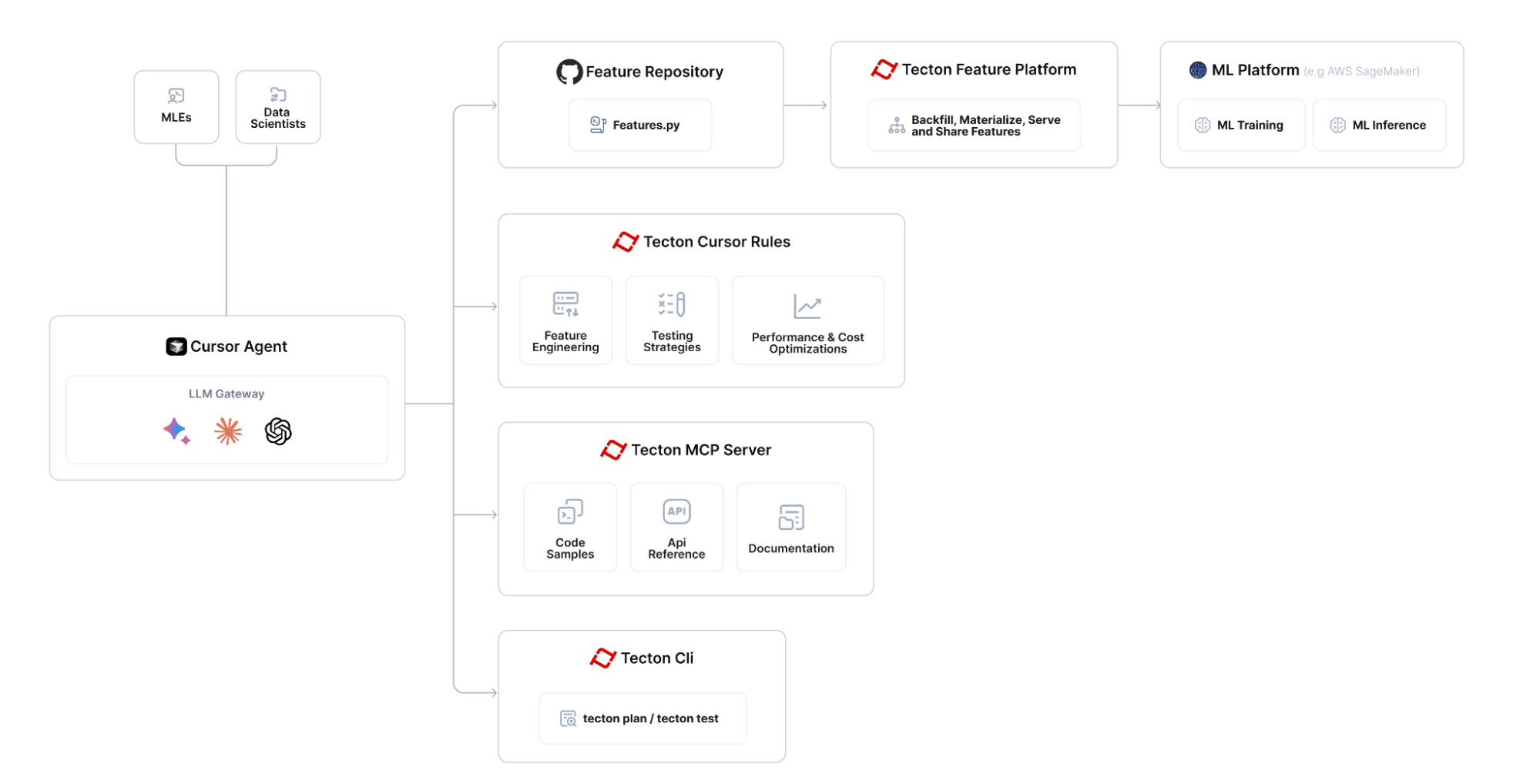
Tecton MCP 与 Cursor 等 LLM 支持的编辑器集成,为特征工程提供基于工具的上下文和帮助:

使用 Tecton MCP 构建功能的总体流程如下:

使用 Cursor 设置 Tecton
以下内容使用 Cursor 0.48 及以上版本进行测试
在 Cursor 中配置 Tecton MCP 服务器
导航至 Cursor 设置 -> MCP,然后点击“添加新的全局 MCP 服务器”按钮,这将编辑 Cursor 的mcp.json文件。添加 Tecton 作为 MCP 服务器。您可以使用以下配置作为起点 - 请确保修改路径<path-to-your-local-clone>以匹配您克隆存储库的目录:
{
"mcpServers": {
"tecton": {
"command": "uv",
"args": [
"--directory",
"<path-to-your-local-clone>",
"run",
"mcp",
"run",
"src/tecton_mcp/mcp_server/server.py"
]
}
}
}添加游标规则
将 cursorrules 从此存储库的.cursor/rules文件夹复制到功能存储库的.cursor/rules文件夹中:
# Create the .cursor/rules directory structure in your feature repository
mkdir -p <path-to-your-feature-repo>/.cursor/rules
# Then copy the rules
cp -r <path-to-your-local-clone>/.cursor/rules/* <path-to-your-feature-repo>/.cursor/rules/Tecton 登录
登录您的 Tecton 集群:
tecton login yourcluster.tecton.ai推荐法学硕士
截至 4 月 17 日,以下是 Cursor 中表现最佳的 Tecton 特征工程 LLM 的堆栈排名列表:
OpenAI o3
双子座 2.5 专业版 (03-25)
十四行诗 3.7
验证 Cursor <> Tecton MCP Integration 是否按预期工作
为了确保您的集成按预期工作,请向 Cursor Agent 询问如下问题,并确保它正确调用您的 Tecton MCP 工具:
查询 Tecton 的示例索引,并告诉我一些关于 BatchFeatureViews 的信息,以及它们与 StreamFeatureViews 的区别。另请参阅 SDK 参考。
开始 AI 辅助特征工程 :-)
现在您可以转到 Cursor 中的功能存储库并开始使用直接集成在 Cursor 中的 Tecton 的 Co-Pilot。
查看此 Loom 以了解如何使用集成来构建新功能: https://www.loom.com/share/3658f665668a41d2b0ea2355b433c616
如何使用特定的 Tecton SDK 版本
默认情况下,此工具会提供针对最新预发布版 Tecton SDK 的指导。如果您需要这些工具与特定发布的 Tecton 版本(例如1.0.34或1.1.10 )保持一致,请按照以下步骤操作:
**在
pyproject.toml中固定版本。**打开pyproject.toml并替换现有的依赖行
dependencies = [
# ... other dependencies ...
"tecton>=0.8.0a0"
]使用您想要的确切版本,例如
dependencies = [
# ... other dependencies ...
"tecton==1.1.10"
]**删除现有的锁文件。**由于
uv.lock记录了依赖关系图,因此必须删除它,以便uv能够解析新的 Tecton 版本:
cd <path-to-your-local-clone>
rm uv.lock重新运行“快速入门”部分中的步骤 3 (
MCP_SMOKE_TEST=1 uv --directory命令) ,重新生成锁文件。(这会将已锁定的版本下载到 MCP 的隔离环境中,并重新创建uv.lock。)重新启动Cursor,以便将新的 Tecton 版本加载到 MCP 虚拟环境中。
支持的版本:这些工具目前支持 Tecton ≥ 1.0.0。代码示例尚未进行版本控制,它们始终使用最新的稳定SDK,但文档和 SDK 参考索引现在将与您固定的版本匹配。
故障排除
光标<->Tecton MCP 服务器集成
确保在“Cursor 设置 -> MCP”中,Cursor 显示“tecton”为“已启用”的 MCP 服务器。如果您没有看到“绿点”,请在“诊断”模式下运行 MCP 服务器(见下文)。
在诊断模式下运行 MCP
要调试 Tecton MCP 服务器,您可以运行以下命令。将<path-to-your-local-clone>替换为您克隆存储库的实际路径:
uv --directory <path-to-your-local-clone> run mcp dev src/tecton_mcp/mcp_server/server.py注意:启动 Tecton 的 MCP 服务器需要几秒钟,因为它会将嵌入模型加载到内存中,并使用该模型来搜索相关的代码片段。
等待几秒钟,直到标准输出告诉您 MCP Inspector 已启动并正在运行,然后通过打印的 URL 访问它(例如http://localhost:5173 )
点击“连接”,然后列出工具。您应该会看到 Tecton MCP 服务器工具,并且可以查询它们。
资源
执照
该项目已获得MIT 许可。
Available Tools
4 toolsget_full_tecton_sdk_reference_toolA
Fetches the full Tecton SDK reference.
Use this only if you need to get the full SDK reference for all classes/functions.
If you care only about a subset, use the query_tecton_sdk_reference_tool tool instead.
| Name | Required | Description | Default |
|---|---|---|---|
No parameters | |||
TDQS
Does the description disclose side effects, auth requirements, rate limits, or destructive behavior?
No annotations are provided, so the description carries the behavioral disclosure burden. 'Fetches' implies a read operation and 'full SDK reference' indicates scope, but the description does not mention possible response size, structure, or any access requirements. This is acceptable but leaves gaps.
Agents need to know what a tool does to the world before calling it. Descriptions should go beyond structured annotations to explain consequences.
Is the description appropriately sized, front-loaded, and free of redundancy?
Three short sentences each serve a purpose: what the tool does, when to use it, and when to use the alternative instead. There is minimal redundancy and the main point is front-loaded.
Shorter descriptions cost fewer tokens and are easier for agents to parse. Every sentence should earn its place.
Given the tool's complexity, does the description cover enough for an agent to succeed on first attempt?
For a no-argument fetch-all tool, the description clearly states the use case and directs subset users to the right sibling. It would be slightly more complete if it noted the likely size or format of the returned reference, but nothing critical is missing for invocation decisions.
Complex tools with many parameters or behaviors need more documentation. Simple tools need less. This dimension scales expectations accordingly.
Does the description clarify parameter syntax, constraints, interactions, or defaults beyond what the schema provides?
The tool has no parameters, so there is nothing for the schema or description to explain about arguments. The description adds useful contextual scope by contrasting full and subset behavior, matching the baseline for zero-parameter tools.
Input schemas describe structure but not intent. Descriptions should explain non-obvious parameter relationships and valid value ranges.
Does the description clearly state what the tool does and how it differs from similar tools?
The description uses a specific verb and resource ('Fetches the full Tecton SDK reference') and clarifies the scope as 'all classes/functions.' It differentiates from the sibling query tool by explicitly contrasting full versus subset access.
Agents choose between tools based on descriptions. A clear purpose with a specific verb and resource helps agents select the right tool.
Does the description explain when to use this tool, when not to, or what alternatives exist?
It explicitly says 'Use this only if you need to get the full SDK reference' and names the alternative for subset use, giving an agent a clear decision rule.
Agents often have multiple tools that could apply. Explicit usage guidance like "use X instead of Y when Z" prevents misuse.
query_documentation_index_toolA
Retrieves and formats Tecton documentation snippets based on a query.
Each snippet includes the TECTON DOCUMENTATION URL (Source URL),
the section header, and the relevant text chunk.
Tell the user what documentation URL they can open up to get more information.
Input query examples:
- "How do I unit test a Feature View?"
- "What are Entities in Tecton?"
- "Explain Batch Feature Views."
- "How to connect to a Kafka data source?"
- "Show me how to construct training data."
- "Tutorial for building realtime features."
- "How does `tecton apply` work?"
- "Information about Tecton data types."
- "What is a Feature Service?"
- "Scaling the online feature server."
- "Monitoring materialization jobs."
| Name | Required | Description | Default |
|---|---|---|---|
| query | Yes |
TDQS
Does the description disclose side effects, auth requirements, rate limits, or destructive behavior?
With no annotations provided, the description carries the full burden of behavioral disclosure. It explains that the tool retrieves and formats documentation snippets, enumerates the exact output fields, and instructs the agent to tell the user which documentation URL to open. It does not cover edge cases such as no matches found, but the core behavior is clear and accurate.
Agents need to know what a tool does to the world before calling it. Descriptions should go beyond structured annotations to explain consequences.
Is the description appropriately sized, front-loaded, and free of redundancy?
The description front-loads the core behavior and output format before moving to user-facing instructions and examples. The list of examples is long but earns its place by serving as parameter guidance; there is no filler or redundant wording.
Shorter descriptions cost fewer tokens and are easier for agents to parse. Every sentence should earn its place.
Given the tool's complexity, does the description cover enough for an agent to succeed on first attempt?
Given the absence of an output schema and annotations, the description covers what the tool returns, how the agent should present the result, and how to phrase queries. The main gap is the lack of explicit guidance for choosing between this tool and its siblings, which is already reflected in the usage guidelines score.
Complex tools with many parameters or behaviors need more documentation. Simple tools need less. This dimension scales expectations accordingly.
Does the description clarify parameter syntax, constraints, interactions, or defaults beyond what the schema provides?
The schema provides no description for the 'query' parameter, so the description must compensate. It does so through a detailed 'Input query examples' section that illustrates the expected natural-language phrasing. For a single parameter, this gives an agent sufficient understanding of what to pass, even though explicit constraints like length or format are not stated.
Input schemas describe structure but not intent. Descriptions should explain non-obvious parameter relationships and valid value ranges.
Does the description clearly state what the tool does and how it differs from similar tools?
The description uses specific verbs ('Retrieves and formats') and clearly names the resource ('Tecton documentation snippets'). It also describes exactly what each snippet contains (Source URL, section header, relevant text chunk), which makes the tool's function unambiguous and distinguishable from sibling code-example and SDK-reference tools.
Agents choose between tools based on descriptions. A clear purpose with a specific verb and resource helps agents select the right tool.
Does the description explain when to use this tool, when not to, or what alternatives exist?
The description provides ten concrete input query examples that establish when the tool is appropriate, such as 'How do I unit test a Feature View?' and 'Explain Batch Feature Views.' It gives clear context on the kind of natural-language documentation questions to use, but it does not explicitly name alternatives or state when not to use this tool versus its siblings.
Agents often have multiple tools that could apply. Explicit usage guidance like "use X instead of Y when Z" prevents misuse.
query_example_code_snippet_index_toolA
Finds relevant Tecton code examples using a vector database.
It is always helpful to query the examples retriever before generating Tecton code.
Input query examples:
- "examples of an Entity"
- "examples of a KinesisConfig"
- "examples of a KafkaConfig"
- "examples of a batch feature view"
- "examples of a count distinct aggregation feature view"
- "examples of a percentile aggregation feature view"
- "examples of a stream feature view"
- "examples of an aggregation stream feature view"
- "examples of a realtime feature view"
- "examples of a realtime feature view that transforms data from another feature view"
- "examples of a fraud feature"
- "examples of a recsys case"
- "examples of a test"
The output will be a collection of python code examples that use Tecton to implement features, ranked by relevance.
| Name | Required | Description | Default |
|---|---|---|---|
| query | Yes |
TDQS
Does the description disclose side effects, auth requirements, rate limits, or destructive behavior?
With no annotations, the description carries the disclosure burden, and it does disclose the retrieval mechanism ('vector database'), the output form ('collection of python code examples'), and the ranking ('ranked by relevance'). It could add failure or freshness caveats, but for a simple retrieval tool the core behavior is transparent.
Agents need to know what a tool does to the world before calling it. Descriptions should go beyond structured annotations to explain consequences.
Is the description appropriately sized, front-loaded, and free of redundancy?
The main description is front-loaded and the output format is stated in one sentence. The 13 examples are long but earn their place because the schema provides no query guidance; little in the text is redundant.
Shorter descriptions cost fewer tokens and are easier for agents to parse. Every sentence should earn its place.
Given the tool's complexity, does the description cover enough for an agent to succeed on first attempt?
For a one-parameter retrieval tool with no output schema, the description covers what to send and what will come back. It lacks only edge-case behavior (e.g., empty results or non-Tecton queries), which is minor for this complexity.
Complex tools with many parameters or behaviors need more documentation. Simple tools need less. This dimension scales expectations accordingly.
Does the description clarify parameter syntax, constraints, interactions, or defaults beyond what the schema provides?
The schema gives only a bare 'query' string with no description (0% coverage), so the list of 13 concrete query examples is essential and largely compensates. It shows the expected phrasing and scope of queries, though it does not state an explicit 'describe the Tecton construct you need examples of' rule.
Input schemas describe structure but not intent. Descriptions should explain non-obvious parameter relationships and valid value ranges.
Does the description clearly state what the tool does and how it differs from similar tools?
The opening sentence uses a specific verb ('Finds'), a specific resource ('relevant Tecton code examples'), and a mechanism ('vector database'). Paired with sibling names like query_documentation_index_tool, this clearly marks the tool as the code-example retriever rather than a docs or SDK reference lookup.
Agents choose between tools based on descriptions. A clear purpose with a specific verb and resource helps agents select the right tool.
Does the description explain when to use this tool, when not to, or what alternatives exist?
The description gives an explicit condition: query the examples retriever before generating Tecton code. It does not explicitly name when to prefer documentation or SDK-reference siblings, so it stops short of full when-to-use/when-not-to-use guidance.
Agents often have multiple tools that could apply. Explicit usage guidance like "use X instead of Y when Z" prevents misuse.
query_tecton_sdk_reference_toolA
Fetches the Tecton SDK reference for a specific list of classes/functions.
IMPORTANT: The class_names list MUST only contain names from the 'Available classes/functions' list below.
Providing any names not in this list will result in an error or empty output.
Use this tool when you need information about specific Tecton components from the allowed list.
Output Format:
Starts with a bulleted list of the found public classes/functions matching the query.
Followed by details for each item, including:
Type (Class/Function)
Name
Recommended import path (e.g.,
tectonortecton.types)The definition header (e.g.,
class FeatureView(...)ordef batch_feature_view(...))The full docstring.
Available classes/functions: Aggregate, AggregationFunction, AggregationLeadingEdge, Array, Attribute, AutoscalingConfig, BatchFeatureView, BatchSource, BatchTriggerType, BigQueryConfig, BigtableConfig, CacheConfig, Calculation, ComputeMode, DataFrame, DataSource, DatabricksClusterConfig, DatabricksJsonClusterConfig, Dataset, DatetimePartitionColumn, DeltaConfig, DynamoConfig, EMRClusterConfig, EMRJsonClusterConfig, Embedding, Entity, FeatureServerGroup, FeatureService, FeatureTable, FeatureVector, FeatureView, Field, FileConfig, FilterContext, HiveConfig, IcebergConfig, KafkaConfig, KafkaOutputStream, KinesisConfig, KinesisOutputStream, LifetimeWindow, Map, MockContext, ModelConfig, OfflineStoreConfig, OnlineServingIndex, PandasBatchConfig, ParquetConfig, ProvisionedScalingConfig, PushConfig, PyArrowBatchConfig, RealtimeContext, RealtimeFeatureView, RedisConfig, RedshiftConfig, RequestSource, RiftBatchConfig, SdkDataType, Secret, SnowflakeConfig, SparkBatchConfig, SparkStreamConfig, StreamFeatureView, StreamProcessingMode, StreamSource, Struct, TectonDataFrame, TectonTimeConstant, TestRepo, TimeWindow, TimeWindowSeries, TransformServerGroup, Transformation, UnityCatalogAccessMode, UnityConfig, Workspace, approx_count_distinct, approx_percentile, batch_feature_view, const, first, first_distinct, last, last_distinct, materialization_context, pandas_batch_config, pyarrow_batch_config, realtime_feature_view, spark_batch_config, spark_stream_config, stream_feature_view, transformation

| Name | Required | Description | Default |
|---|---|---|---|
| class_names | Yes |
TDQS
Does the description disclose side effects, auth requirements, rate limits, or destructive behavior?
With no annotations present, the description carries the full burden, and it does this well. It warns that invalid names will 'result in an error or empty output,' and it details exactly what the returned output will include: a bulleted list, type, name, import path, definition header, and full docstring. This makes the tool's behavior predictable to an agent.
Agents need to know what a tool does to the world before calling it. Descriptions should go beyond structured annotations to explain consequences.
Is the description appropriately sized, front-loaded, and free of redundancy?
The prose is concise and well-structured, with the critical constraint front-loaded and output format clearly sectioned. The description is long because of the extensive allowed classes/functions list, but that list is necessary to prevent invalid calls, so the length is justified.
Shorter descriptions cost fewer tokens and are easier for agents to parse. Every sentence should earn its place.
Given the tool's complexity, does the description cover enough for an agent to succeed on first attempt?
Since there is no output schema, the description appropriately documents the return structure, including details like import path and definition header. It also handles the main failure mode. However, it does not provide any guidance about close alternatives or mention the full-reference sibling, which would have made the context complete.
Complex tools with many parameters or behaviors need more documentation. Simple tools need less. This dimension scales expectations accordingly.
Does the description clarify parameter syntax, constraints, interactions, or defaults beyond what the schema provides?
The input schema provides only the parameter name and type, with 0% schema description coverage, so the description must fully explain class_names. It does, by requiring names to come from the provided 'Available classes/functions' list and by describing the consequence of violating that constraint. The exhaustive allowed-value list adds substantial semantic meaning beyond the raw schema.
Input schemas describe structure but not intent. Descriptions should explain non-obvious parameter relationships and valid value ranges.
Does the description clearly state what the tool does and how it differs from similar tools?
The description opens with a specific verb and resource: 'Fetches the Tecton SDK reference for a specific list of classes/functions.' This clearly distinguishes it from the sibling get_full_tecton_sdk_reference_tool, since this tool is scoped to a provided list rather than returning the entire reference.
Agents choose between tools based on descriptions. A clear purpose with a specific verb and resource helps agents select the right tool.
Does the description explain when to use this tool, when not to, or what alternatives exist?
The description explicitly states when to use it: 'Use this tool when you need information about specific Tecton components from the allowed list.' It does not explicitly mention when not to use it or name alternatives like query_documentation_index_tool, so it stops short of full routing guidance.
Agents often have multiple tools that could apply. Explicit usage guidance like "use X instead of Y when Z" prevents misuse.
Tool Schema Changelog
Recent tool additions, removals, and schema changes observed during successful MCP inspections.
4 tool updates
v0.1.0- First observed
get_full_tecton_sdk_reference_tool - First observed
query_documentation_index_tool - First observed
query_example_code_snippet_index_tool - First observed
query_tecton_sdk_reference_tool
TDQS
Scored across 4 tools
Each tool targets a distinct retrieval source: code examples, documentation snippets, full SDK reference, and targeted SDK reference lookups. Even the two SDK tools are clearly separated by full vs. specific class/function queries.
Most tools follow a query_<target>_tool pattern, but get_full_tecton_sdk_reference_tool switches from query_ to get_. The names are still readable and predictable overall.
Four tools is a well-scoped set for a documentation/example retrieval server. Each tool has a clear purpose and none are redundant.
The tool surface covers the main knowledge needs for Tecton development: code examples, documentation, and SDK reference, with both full and targeted retrieval options. No significant gaps are apparent.
Related MCP Connectors
Deploy and diagnose applications in governed Kubernetes Preview Spaces through authenticated MCP.
Read and write Mission Control state via MCP — projects, tasks, subtasks, templates, status updates.
Tailscale device, route, DNS, key, user, and ACL management over MCP and CLI.
Manage CloudPepper servers, Odoo instances, backups, and deployments over MCP.
Related MCP Servers
- AlicenseNot gradedqualityDmaintenanceEnables interaction with InfluxDB v3 (Core/Enterprise/Cloud Dedicated) through MCP clients. Supports database management, data querying and writing, schema inspection, and token administration operations.518 npmMIT
- FlicenseNot gradedqualityDmaintenanceEnables interaction with Tecton clusters through MCP, allowing management of feature stores, execution of Tecton CLI commands, and retrieval of feature store configurations via natural language.-
- AlicenseNot gradedqualityBmaintenanceMCP server that proxies to a Feast feature server, exposing tools for online feature retrieval, vector search, push, and materialization while forwarding bearer tokens for authentication.Apache 2.0
- FlicenseNot gradedqualityCmaintenanceEnables agents to connect to remote MCP servers once, access their tools through a compact MCP endpoint, pair a CLI inside sandboxes, and create watches that turn command or tool output into pollable structured events.2-