ShipSwift
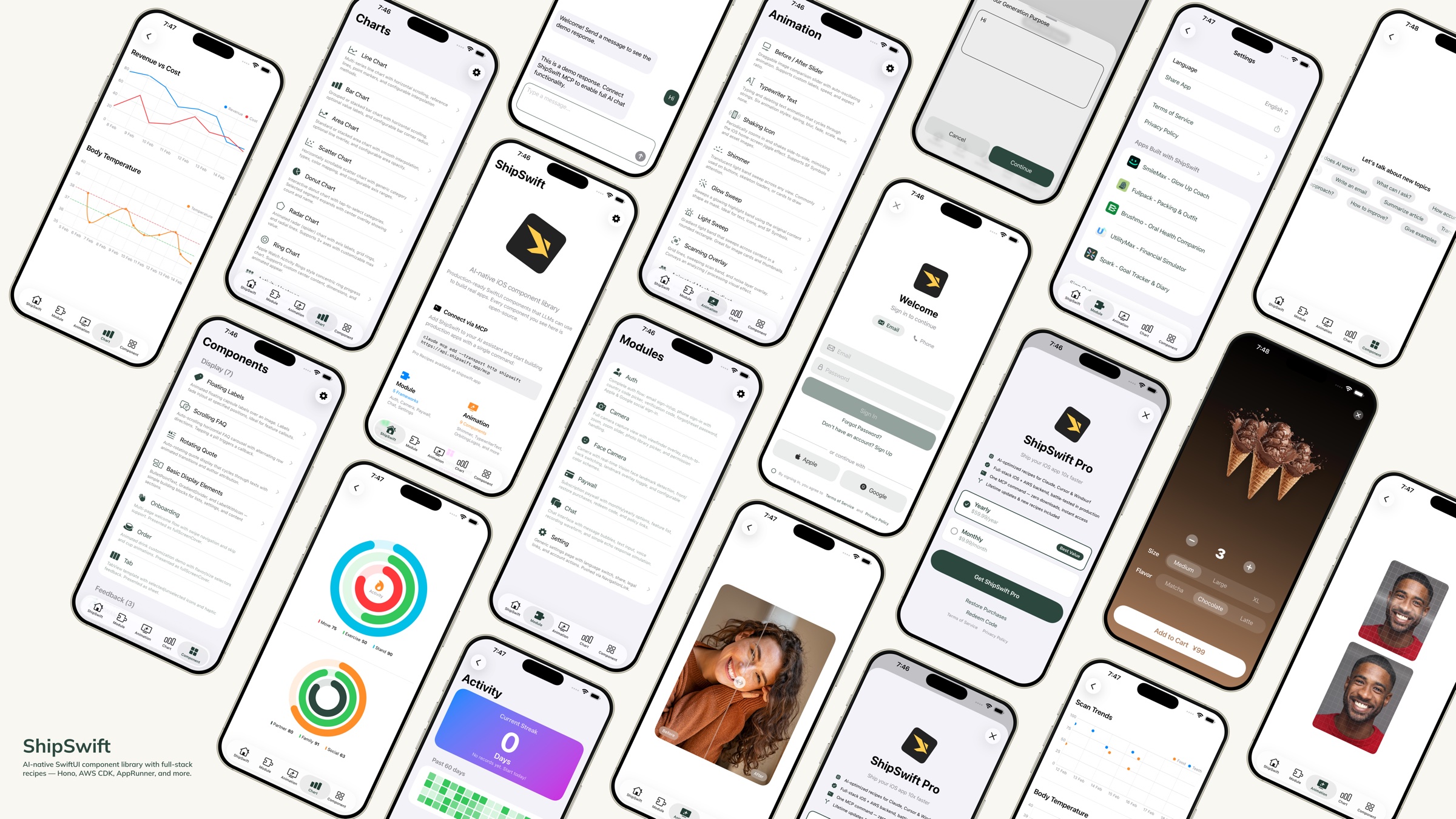
AI 原生 SwiftUI 组件库 —— 可供 LLM 用于构建真实应用的生产级代码。





快速开始 · 组件 · 目录结构 · 方案 · 贡献
什么是 ShipSwift?
只需一条指令,即可为你的 AI 提供所需的一切 —— 生产级 SwiftUI 组件、全栈方案,以及无需猜测即可构建真实应用的上下文。查看更多 MCP 方案。
下载 展示应用 以在你的设备上预览每个组件。
Related MCP server: axint
快速开始
选项 1:Skills + 方案服务器(推荐)
第 1 步 — 安装 ShipSwift Skills:
npx skills add signerlabs/shipswift-skills
第 2 步 — 连接方案服务器,以便你的 AI 可以获取方案:
# Claude Code
claude mcp add --transport http shipswift https://api.shipswift.app/mcp

# Gemini CLI
gemini mcp add --transport http shipswift https://api.shipswift.app/mcp
对于 Cursor、VS Code Copilot、Windsurf 及其他工具,请参阅 Skills 仓库 获取 MCP 设置说明。
第 3 步 — 向你的 AI 提问:
"添加一个微光加载动画"
"构建一个带有 Cognito 的身份验证流程"
"向我展示所有图表组件"
选项 2:本地 Skills(无需 MCP)
安装直接从本仓库读取源文件的 Skills —— 可离线工作,无需服务器:
npx skills add signerlabs/ShipSwift
你的 AI 随后可以浏览组件目录并本地读取源代码。尝试:
"探索 ShipSwift 方案"
"添加一个微光动画"
"构建一个聊天功能"
提示:如果你同时连接了 MCP 服务器(选项 1),你的 AI 将获得额外的 Pro 方案访问权限(后端指南、合规模板、避坑文档)。
选项 3:文件复制
克隆此仓库
将你需要的 ShipSwift/SWPackage/ 下的文件复制到你的 Xcode 项目中
SWAnimation/、SWChart/ 和 SWComponent/ 中的每个组件都是自包含的 —— 只需复制文件,必要时复制 SWUtil/
运行展示应用
git clone https://github.com/signerlabs/ShipSwift.git
cd ShipSwift
open ShipSwift.xcodeproj
选择一个模拟器或设备,然后按 Cmd+R 进行构建和运行。
组件
SWAnimation — 动画组件
BeforeAfterSlider · TypewriterText · ShakingIcon · Shimmer · GlowSweep · LightSweep · ScanningOverlay · AnimatedMeshGradient · OrbitingLogos
SWChart — 图表组件
LineChart · BarChart · AreaChart · DonutChart · RingChart · RadarChart · ScatterChart · ActivityHeatmap
SWComponent — UI 组件
展示: FloatingLabels · ScrollingFAQ · RotatingQuote · BulletPointText · GradientDivider · Label · MarkdownText · OnboardingView · OrderView · RootTabView · VideoPlayer
反馈: Alert · Loading · ThinkingIndicator
输入: TabButton · Stepper · AddSheet · SearchBar
SWModule — 多文件框架
SWAuth — 用户身份验证(Amplify/Cognito、社交登录、邮箱/密码、带国家代码选择器的手机号登录)
SWCamera — 带有取景器、缩放、照片选择器以及带有 Vision 地标追踪的人脸检测的相机拍摄功能
SWPaywall — 使用 StoreKit 2 的订阅付费墙 —— 包含免费的 iOS 客户端。全栈方案(后端 + 合规 + 避坑)→ Pro
SWChat — 一体化聊天视图,包含消息列表、文本输入和可选的语音识别(火山引擎 ASR)
SWSetting — 设置页面模板,包含语言切换、分享、法律链接、推荐应用
SWSubjectLifting — 使用 VisionKit ImageAnalysis 进行背景移除
SWTikTokTracking — 用于归因追踪的 TikTok Events API 集成 —— 包含免费的 iOS 客户端。全栈方案(后端 + 合规 + 避坑)→ Pro
SWUtil — 共享工具
DebugLog · String/Date/View 扩展 · LocationManager
目录结构
ShipSwift/
├── SWPackage/
│   ├── SWAnimation/          # Animation components
│   ├── SWChart/              # Chart components
│   ├── SWComponent/          # UI components
│   │   ├── Display/          #   Display components
│   │   ├── Feedback/         #   Feedback components
│   │   └── Input/            #   Input components
│   ├── SWModule/             # Multi-file frameworks
│   │   ├── SWAuth/           #   Authentication
│   │   ├── SWCamera/         #   Camera + face detection
│   │   ├── SWPaywall/        #   Subscription paywall
│   │   ├── SWChat/           #   Chat + voice input
│   │   ├── SWSetting/        #   Settings page
│   │   ├── SWSubjectLifting/ #   Background removal
│   │   └── SWTikTokTracking/ #   TikTok attribution
│   └── SWUtil/               # Shared utilities
├── View/                     # Showcase app views
├── Service/                  # App services
└── Component/                # Shared app components
命名规范
所有类型均使用 SW 前缀(例如 SWAlertManager,SWStoreManager)。
视图修饰符使用 .sw 小写前缀(例如 .swAlert(),.swPageLoading(),.swPrimary)。
依赖规则
SWUtil        ← no dependencies on other SWPackage directories
SWAnimation   ← may depend on SWUtil only
SWChart       ← may depend on SWUtil only
SWComponent   ← may depend on SWUtil only
SWModule      ← may depend on SWUtil and SWComponent
方案
ShipSwift 通过 Skills 提供 免费和 Pro 方案 —— 每个方案都包含完整的 SwiftUI 源代码、实现步骤和最佳实践。你的 AI 助手可以按需检索任何方案。
分类 | 示例 |
动画 | Shimmer, Typewriter, Orbiting Logos |
图表 | Line, Bar, Donut, Radar, Heatmap |
组件 | Alert, Onboarding, Stepper, FAQ |
模块 | Auth, Camera, Chat, Setting, Infra CDK, Subscription*, TikTok Tracking*, Export & Share* |
* Pro 方案 —— 包含完整的后端、合规模板和避坑指南。即将推出:推送通知、分析仪表板。
提供三种工具:listRecipes、getRecipe、searchRecipes。
了解更多信息请访问 shipswift.app · Skills 仓库:signerlabs/shipswift-skills
免费版 vs Pro 版
所有 iOS 客户端代码均在 MIT 许可下开源。Pro 方案增加了从原型到生产环境所需的一切。
| 免费版 (开源) | Pro 方案 |
iOS 客户端代码 | 完整源码 | 增强版本 |
后端实现 | — | Hono 路由、数据库模式、Webhook |
集成指南 | — | 端到端设置清单 |
合规模板 | — | 隐私清单、App Store 标签 |
已知避坑 | — | 每个方案 10+ 条实战经验 |
更多 Pro 方案即将推出:推送通知、分析仪表板。
详情请参阅 定价。
技术栈
SwiftUI + Swift
StoreKit 2
Amplify SDK (Cognito)
AVFoundation + Vision
SpriteKit
火山引擎 ASR
贡献
欢迎贡献!请遵循以下步骤:
Fork 本仓库
创建功能分支 (git checkout -b feature/amazing-feature)
提交你的更改 (git commit -m 'Add amazing feature')
推送到分支 (git push origin feature/amazing-feature)
发起 Pull Request
代码风格
许可
本项目采用 MIT 许可协议 —— 详情请参阅 LICENSE 文件。
Star 历史
Made with ❤️ by SignerLabs


