ShipSwift
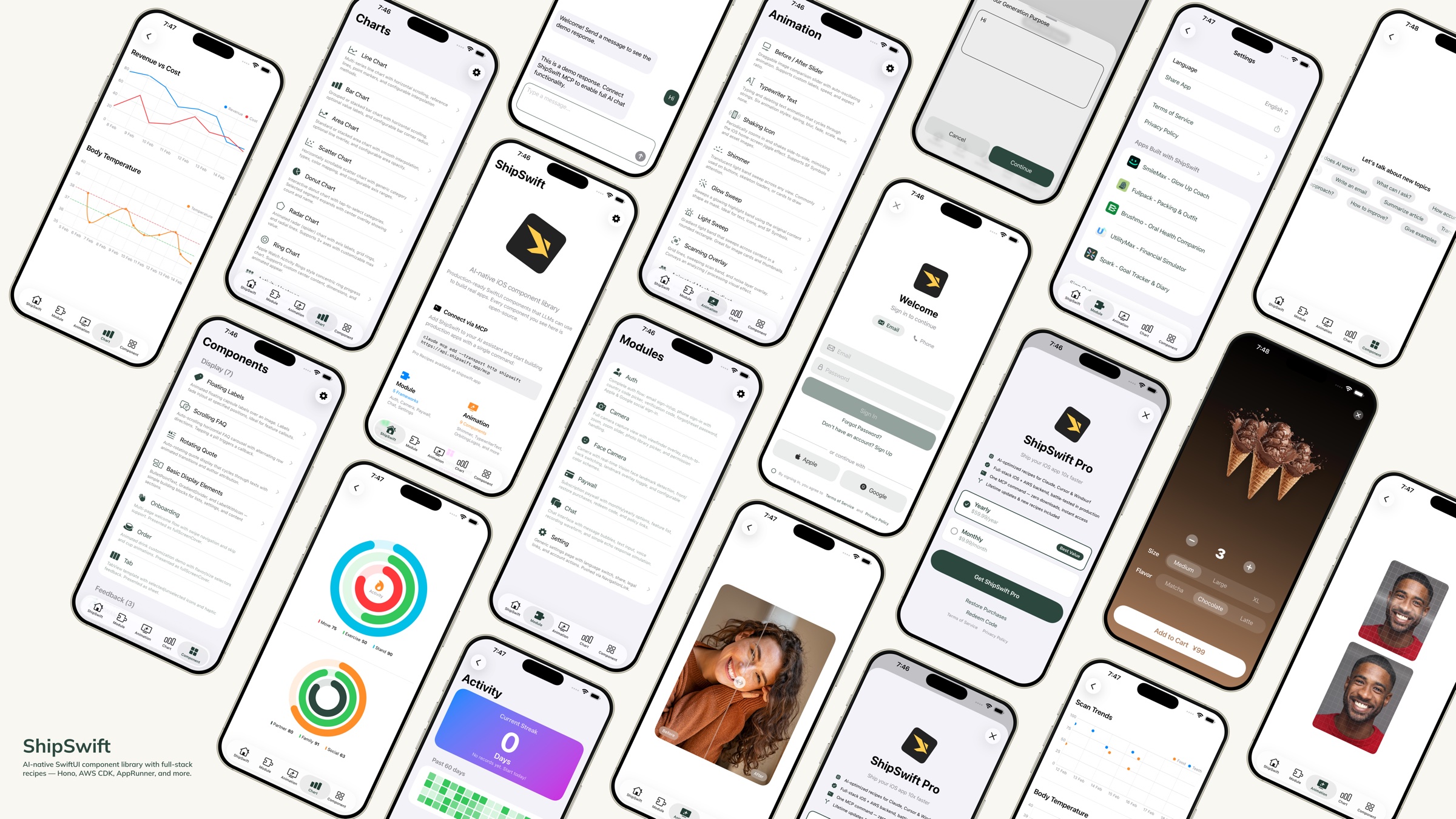
KI-native SwiftUI-Komponentenbibliothek – produktionsreifer Code, den LLMs nutzen können, um echte Apps zu erstellen.





Schnellstart · Komponenten · Verzeichnisstruktur · Rezepte · Mitwirken
Was ist ShipSwift?
Ein Befehl gibt Ihrer KI alles, was sie braucht – produktionsreife SwiftUI-Komponenten, Full-Stack-Rezepte und den Kontext, um echte Apps ohne Rätselraten zu erstellen. Weitere MCP-Rezepte finden Sie hier.
Laden Sie die Showcase-App herunter, um jede Komponente auf Ihrem Gerät zu testen.
Related MCP server: axint
Schnellstart
Option 1: Skills + Rezept-Server (Empfohlen)
Schritt 1 — Installieren Sie ShipSwift Skills:
npx skills add signerlabs/shipswift-skills
Schritt 2 — Verbinden Sie den Rezept-Server, damit Ihre KI Rezepte abrufen kann:
# Claude Code
claude mcp add --transport http shipswift https://api.shipswift.app/mcp

# Gemini CLI
gemini mcp add --transport http shipswift https://api.shipswift.app/mcp
Für Cursor, VS Code Copilot, Windsurf und andere Tools finden Sie Informationen zur MCP-Einrichtung im Skills-Repo.
Schritt 3 — Fragen Sie Ihre KI:
"Füge eine Shimmer-Ladeanimation hinzu"
"Erstelle einen Authentifizierungs-Flow mit Cognito"
"Zeige mir alle Diagramm-Komponenten"
Option 2: Lokale Skills (Kein MCP erforderlich)
Installieren Sie Skills, die Quellcodedateien direkt aus diesem Repo lesen – funktioniert offline, kein Server erforderlich:
npx skills add signerlabs/ShipSwift
Ihre KI kann dann den Komponentenkatalog durchsuchen und Quellcode lokal lesen. Versuchen Sie:
"Erkunde ShipSwift-Rezepte"
"Füge eine Shimmer-Animation hinzu"
"Erstelle eine Chat-Funktion"
Tipp: Wenn Sie zusätzlich den MCP-Server verbinden (Option 1), erhält Ihre KI Zugriff auf zusätzliche Pro-Rezepte (Backend-Anleitungen, Compliance-Vorlagen, Dokumentation zu Fallstricken).
Option 3: Dateikopie
Klonen Sie dieses Repository
Kopieren Sie die benötigten Dateien aus ShipSwift/SWPackage/ in Ihr Xcode-Projekt
Jede Komponente in SWAnimation/, SWChart/ und SWComponent/ ist in sich geschlossen – kopieren Sie einfach die Datei und bei Bedarf SWUtil/
Die Showcase-App ausführen
git clone https://github.com/signerlabs/ShipSwift.git
cd ShipSwift
open ShipSwift.xcodeproj
Wählen Sie einen Simulator oder ein Gerät aus und drücken Sie Cmd+R, um das Projekt zu erstellen und auszuführen.
Komponenten
SWAnimation — Animationskomponenten
BeforeAfterSlider · TypewriterText · ShakingIcon · Shimmer · GlowSweep · LightSweep · ScanningOverlay · AnimatedMeshGradient · OrbitingLogos
SWChart — Diagrammkomponenten
LineChart · BarChart · AreaChart · DonutChart · RingChart · RadarChart · ScatterChart · ActivityHeatmap
SWComponent — UI-Komponenten
Anzeige: FloatingLabels · ScrollingFAQ · RotatingQuote · BulletPointText · GradientDivider · Label · MarkdownText · OnboardingView · OrderView · RootTabView · VideoPlayer
Feedback: Alert · Loading · ThinkingIndicator
Eingabe: TabButton · Stepper · AddSheet · SearchBar
SWModule — Multi-File-Frameworks
SWAuth — Benutzerauthentifizierung (Amplify/Cognito, Social Login, E-Mail/Passwort, Telefon-Anmeldung mit Ländercode-Auswahl)
SWCamera — Kameraaufnahme mit Sucher, Zoom, Fotoauswahl und Gesichtserkennung mit Vision-Landmark-Tracking
SWPaywall — Abonnement-Paywall mit StoreKit 2 – iOS-Client kostenlos enthalten. Full-Stack-Rezept (Backend + Compliance + Fallstricke) → Pro
SWChat — All-in-One-Chat-Ansicht mit Nachrichtenliste, Texteingabe und optionaler Spracherkennung (VolcEngine ASR)
SWSetting — Einstellungsseiten-Vorlage mit Sprachumschalter, Teilen-Funktion, rechtlichen Links, empfohlenen Apps
SWSubjectLifting — Hintergrundentfernung mit VisionKit ImageAnalysis
SWTikTokTracking — TikTok Events API-Integration für Attributions-Tracking – iOS-Client kostenlos enthalten. Full-Stack-Rezept (Backend + Compliance + Fallstricke) → Pro
SWUtil — Gemeinsame Hilfsprogramme
DebugLog · String/Date/View-Erweiterungen · LocationManager
Verzeichnisstruktur
ShipSwift/
├── SWPackage/
│   ├── SWAnimation/          # Animation components
│   ├── SWChart/              # Chart components
│   ├── SWComponent/          # UI components
│   │   ├── Display/          #   Display components
│   │   ├── Feedback/         #   Feedback components
│   │   └── Input/            #   Input components
│   ├── SWModule/             # Multi-file frameworks
│   │   ├── SWAuth/           #   Authentication
│   │   ├── SWCamera/         #   Camera + face detection
│   │   ├── SWPaywall/        #   Subscription paywall
│   │   ├── SWChat/           #   Chat + voice input
│   │   ├── SWSetting/        #   Settings page
│   │   ├── SWSubjectLifting/ #   Background removal
│   │   └── SWTikTokTracking/ #   TikTok attribution
│   └── SWUtil/               # Shared utilities
├── View/                     # Showcase app views
├── Service/                  # App services
└── Component/                # Shared app components
Namenskonvention
Alle Typen verwenden das Präfix SW (z. B. SWAlertManager, SWStoreManager).
View-Modifikatoren verwenden das kleingeschriebene Präfix .sw (z. B. .swAlert(), .swPageLoading(), .swPrimary).
Abhängigkeitsregeln
SWUtil        ← no dependencies on other SWPackage directories
SWAnimation   ← may depend on SWUtil only
SWChart       ← may depend on SWUtil only
SWComponent   ← may depend on SWUtil only
SWModule      ← may depend on SWUtil and SWComponent
Rezepte
ShipSwift bietet kostenlose und Pro-Rezepte über Skills an – jedes Rezept enthält vollständigen SwiftUI-Quellcode, Implementierungsschritte und Best Practices. Ihr KI-Assistent kann jedes Rezept bei Bedarf abrufen.
Kategorie | Beispiele |
Animation | Shimmer, Typewriter, Orbiting Logos |
Diagramm | Line, Bar, Donut, Radar, Heatmap |
Komponente | Alert, Onboarding, Stepper, FAQ |
Modul | Auth, Camera, Chat, Setting, Infra CDK, Subscription*, TikTok Tracking*, Export & Share* |
* Pro-Rezepte – inklusive vollständigem Backend, Compliance-Vorlagen und Leitfäden zu Fallstricken. Demnächst verfügbar: Push-Benachrichtigungen, Analyse-Dashboard.
Es stehen drei Tools zur Verfügung: listRecipes, getRecipe, searchRecipes.
Erfahren Sie mehr unter shipswift.app · Skills-Repo: signerlabs/shipswift-skills
Kostenlos vs. Pro
Der gesamte iOS-Client-Code ist unter der MIT-Lizenz Open Source. Pro-Rezepte ergänzen alles, was Sie benötigen, um vom Prototyp zur Produktion zu gelangen.
| Kostenlos (Open Source) | Pro-Rezept |
iOS-Client-Code | Vollständiger Quellcode | Erweiterte Version |
Backend-Implementierung | — | Hono-Routen, DB-Schema, Webhooks |
Integrationsanleitungen | — | End-to-End-Einrichtungs-Checklisten |
Compliance-Vorlagen | — | Datenschutz-Manifest, App Store-Labels |
Bekannte Fallstricke | — | 10+ praxiserprobte Tipps pro Rezept |
Weitere Pro-Rezepte folgen in Kürze: Push-Benachrichtigungen, Analyse-Dashboard.
Siehe Preise für Details.
Tech-Stack
SwiftUI + Swift
StoreKit 2
Amplify SDK (Cognito)
AVFoundation + Vision
SpriteKit
VolcEngine ASR
Mitwirken
Beiträge sind willkommen! Bitte befolgen Sie diese Schritte:
Forken Sie das Repository
Erstellen Sie einen Feature-Branch (git checkout -b feature/amazing-feature)
Committen Sie Ihre Änderungen (git commit -m 'Add amazing feature')
Pushen Sie auf den Branch (git push origin feature/amazing-feature)
Öffnen Sie einen Pull Request
Code-Stil
Alle Kommentare und Dokumentationen auf Englisch
Alle Typen verwenden das Präfix SW
Jede Datei in SWAnimation/, SWChart/ und SWComponent/ muss in sich geschlossen sein
Befolgen Sie bestehende Codemuster und Namenskonventionen
Lizenz
Dieses Projekt ist unter der MIT-Lizenz lizenziert – siehe die Datei LICENSE für Details.
Star-Verlauf
Hergestellt mit ❤️ von SignerLabs


