ShipSwift
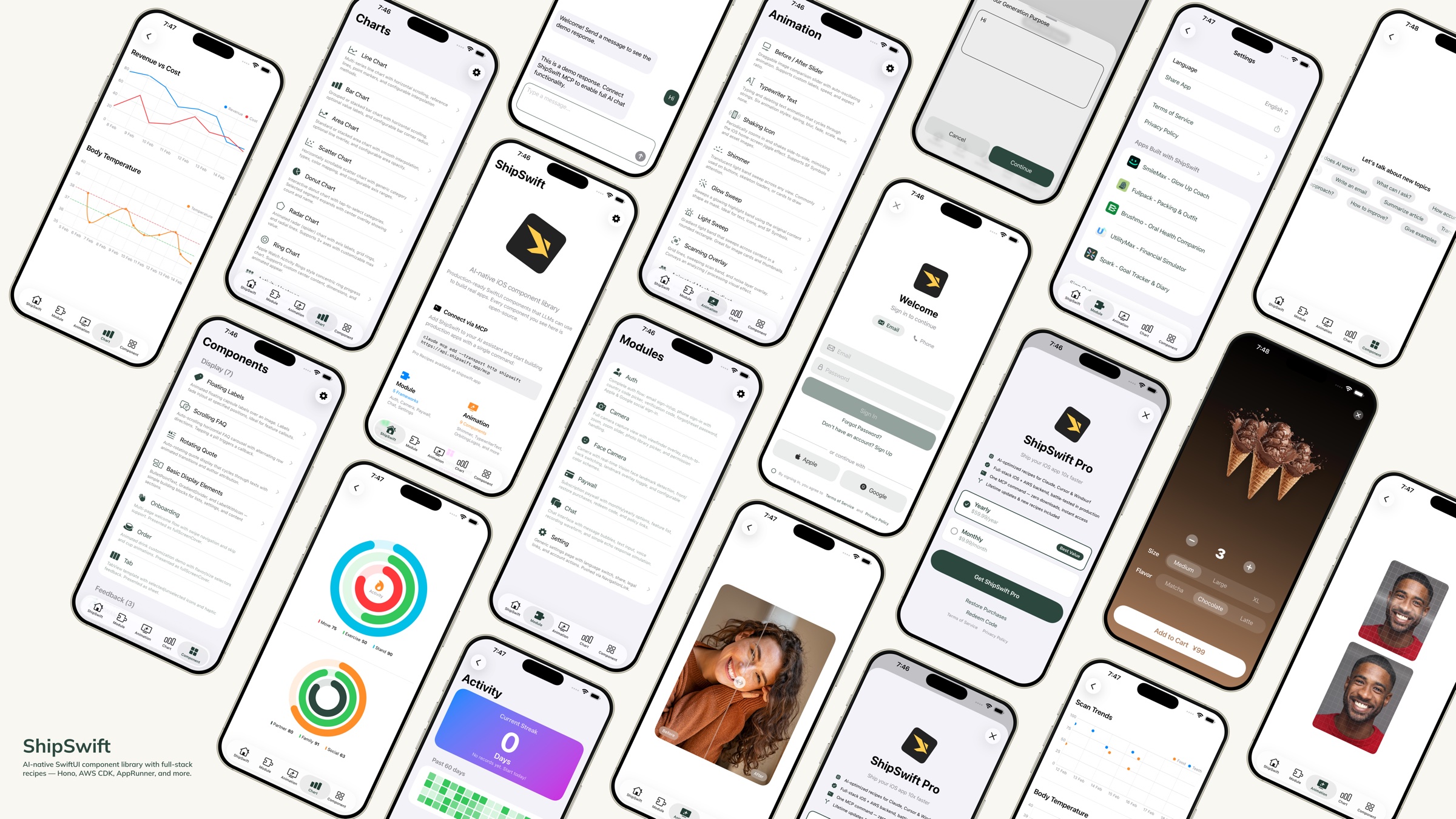
AI 네이티브 SwiftUI 컴포넌트 라이브러리 — LLM이 실제 앱을 구축하는 데 사용할 수 있는 프로덕션 준비 완료 코드입니다.





빠른 시작 · 컴포넌트 · 디렉토리 구조 · 레시피 · 기여하기
ShipSwift란 무엇인가요?
단 하나의 명령어로 AI에게 필요한 모든 것(프로덕션 준비가 완료된 SwiftUI 컴포넌트, 풀스택 레시피, 실제 앱 구축을 위한 컨텍스트)을 제공합니다. 더 많은 MCP 레시피를 확인하세요.
쇼케이스 앱을 다운로드하여 기기에서 모든 컴포넌트를 미리 확인해 보세요.
Related MCP server: axint
빠른 시작
옵션 1: 스킬 + 레시피 서버 (권장)
1단계 — ShipSwift 스킬 설치:
npx skills add signerlabs/shipswift-skills
2단계 — AI가 레시피를 가져올 수 있도록 레시피 서버 연결:
# Claude Code
claude mcp add --transport http shipswift https://api.shipswift.app/mcp

# Gemini CLI
gemini mcp add --transport http shipswift https://api.shipswift.app/mcp
Cursor, VS Code Copilot, Windsurf 및 기타 도구의 경우, MCP 설정은 스킬 저장소를 참조하세요.
3단계 — AI에게 요청하기:
옵션 2: 로컬 스킬 (MCP 불필요)
이 저장소에서 직접 소스 파일을 읽는 스킬을 설치하세요. 서버 없이 오프라인에서도 작동합니다:
npx skills add signerlabs/ShipSwift
이제 AI가 컴포넌트 카탈로그를 탐색하고 로컬에서 소스 코드를 읽을 수 있습니다. 다음을 시도해 보세요:
"ShipSwift 레시피 탐색"
"쉬머 애니메이션 추가"
"채팅 기능 구축"
팁: MCP 서버(옵션 1)를 함께 연결하면 AI가 추가적인 프로 레시피(백엔드 가이드, 규정 준수 템플릿, 주의사항 문서)에 액세스할 수 있습니다.
옵션 3: 파일 복사
이 저장소를 복제합니다.
필요한 파일을 ShipSwift/SWPackage/에서 Xcode 프로젝트로 복사합니다.
SWAnimation/, SWChart/, SWComponent/의 각 컴포넌트는 독립적입니다. 필요한 경우 파일과 SWUtil/만 복사하세요.
쇼케이스 앱 실행
git clone https://github.com/signerlabs/ShipSwift.git
cd ShipSwift
open ShipSwift.xcodeproj
시뮬레이터나 기기를 선택한 후 Cmd+R을 눌러 빌드하고 실행하세요.
컴포넌트
SWAnimation — 애니메이션 컴포넌트
BeforeAfterSlider · TypewriterText · ShakingIcon · Shimmer · GlowSweep · LightSweep · ScanningOverlay · AnimatedMeshGradient · OrbitingLogos
SWChart — 차트 컴포넌트
LineChart · BarChart · AreaChart · DonutChart · RingChart · RadarChart · ScatterChart · ActivityHeatmap
SWComponent — UI 컴포넌트
디스플레이: FloatingLabels · ScrollingFAQ · RotatingQuote · BulletPointText · GradientDivider · Label · MarkdownText · OnboardingView · OrderView · RootTabView · VideoPlayer
피드백: Alert · Loading · ThinkingIndicator
입력: TabButton · Stepper · AddSheet · SearchBar
SWModule — 다중 파일 프레임워크
SWAuth — 사용자 인증 (Amplify/Cognito, 소셜 로그인, 이메일/비밀번호, 국가 코드 선택기가 포함된 전화번호 로그인)
SWCamera — 뷰파인더, 줌, 사진 선택기, Vision 랜드마크 추적을 통한 얼굴 감지가 포함된 카메라 캡처
SWPaywall — StoreKit 2를 사용한 구독 페이월 — iOS 클라이언트 무료 포함. 풀스택 레시피(백엔드 + 규정 준수 + 주의사항) → Pro
SWChat — 메시지 목록, 텍스트 입력, 선택적 음성 인식(VolcEngine ASR)이 포함된 올인원 채팅 뷰
SWSetting — 언어 전환, 공유, 법적 고지 링크, 추천 앱이 포함된 설정 페이지 템플릿
SWSubjectLifting — VisionKit ImageAnalysis를 사용한 배경 제거
SWTikTokTracking — 기여 추적을 위한 TikTok 이벤트 API 통합 — iOS 클라이언트 무료 포함. 풀스택 레시피(백엔드 + 규정 준수 + 주의사항) → Pro
SWUtil — 공유 유틸리티
DebugLog · String/Date/View 확장 · LocationManager
디렉토리 구조
ShipSwift/
├── SWPackage/
│   ├── SWAnimation/          # Animation components
│   ├── SWChart/              # Chart components
│   ├── SWComponent/          # UI components
│   │   ├── Display/          #   Display components
│   │   ├── Feedback/         #   Feedback components
│   │   └── Input/            #   Input components
│   ├── SWModule/             # Multi-file frameworks
│   │   ├── SWAuth/           #   Authentication
│   │   ├── SWCamera/         #   Camera + face detection
│   │   ├── SWPaywall/        #   Subscription paywall
│   │   ├── SWChat/           #   Chat + voice input
│   │   ├── SWSetting/        #   Settings page
│   │   ├── SWSubjectLifting/ #   Background removal
│   │   └── SWTikTokTracking/ #   TikTok attribution
│   └── SWUtil/               # Shared utilities
├── View/                     # Showcase app views
├── Service/                  # App services
└── Component/                # Shared app components
명명 규칙
모든 타입은 SW 접두사를 사용합니다 (예: SWAlertManager, SWStoreManager).
뷰 수정자는 .sw 소문자 접두사를 사용합니다 (예: .swAlert(), .swPageLoading(), .swPrimary).
의존성 규칙
SWUtil        ← no dependencies on other SWPackage directories
SWAnimation   ← may depend on SWUtil only
SWChart       ← may depend on SWUtil only
SWComponent   ← may depend on SWUtil only
SWModule      ← may depend on SWUtil and SWComponent
레시피
ShipSwift는 스킬을 통해 무료 및 프로 레시피를 제공합니다. 각 레시피에는 완전한 SwiftUI 소스 코드, 구현 단계 및 모범 사례가 포함되어 있습니다. AI 어시스턴트는 필요할 때마다 레시피를 검색할 수 있습니다.
카테고리 | 예시 |
애니메이션 | Shimmer, Typewriter, Orbiting Logos |
차트 | Line, Bar, Donut, Radar, Heatmap |
컴포넌트 | Alert, Onboarding, Stepper, FAQ |
모듈 | Auth, Camera, Chat, Setting, Infra CDK, Subscription*, TikTok Tracking*, Export & Share* |
* 프로 레시피 — 전체 백엔드, 규정 준수 템플릿 및 주의사항 가이드 포함. 출시 예정: 푸시 알림, 분석 대시보드.
listRecipes, getRecipe, searchRecipes 세 가지 도구를 사용할 수 있습니다.
자세한 내용은 shipswift.app 및 스킬 저장소 signerlabs/shipswift-skills를 참조하세요.
무료 vs 프로
모든 iOS 클라이언트 코드는 MIT 라이선스에 따라 오픈 소스로 제공됩니다. 프로 레시피는 프로토타입에서 프로덕션으로 전환하는 데 필요한 모든 것을 추가합니다.
| 무료 (오픈 소스) | 프로 레시피 |
iOS 클라이언트 코드 | 전체 소스 | 향상된 버전 |
백엔드 구현 | — | Hono 라우트, DB 스키마, 웹훅 |
통합 가이드 | — | 엔드투엔드 설정 체크리스트 |
규정 준수 템플릿 | — | 개인정보 처리방침 매니페스트, 앱 스토어 라벨 |
알려진 주의사항 | — | 레시피당 10개 이상의 검증된 팁 |
더 많은 프로 레시피가 곧 출시됩니다: 푸시 알림, 분석 대시보드.
자세한 내용은 가격 페이지를 참조하세요.
기술 스택
SwiftUI + Swift
StoreKit 2
Amplify SDK (Cognito)
AVFoundation + Vision
SpriteKit
VolcEngine ASR
기여하기
기여를 환영합니다! 다음 단계를 따라주세요:
저장소를 포크합니다.
기능 브랜치를 생성합니다 (git checkout -b feature/amazing-feature).
변경 사항을 커밋합니다 (git commit -m 'Add amazing feature').
브랜치에 푸시합니다 (git push origin feature/amazing-feature).
풀 리퀘스트를 엽니다.
코드 스타일
라이선스
이 프로젝트는 MIT 라이선스에 따라 라이선스가 부여됩니다. 자세한 내용은 LICENSE 파일을 참조하세요.
스타 히스토리
Made with ❤️ by SignerLabs


