ShipSwift
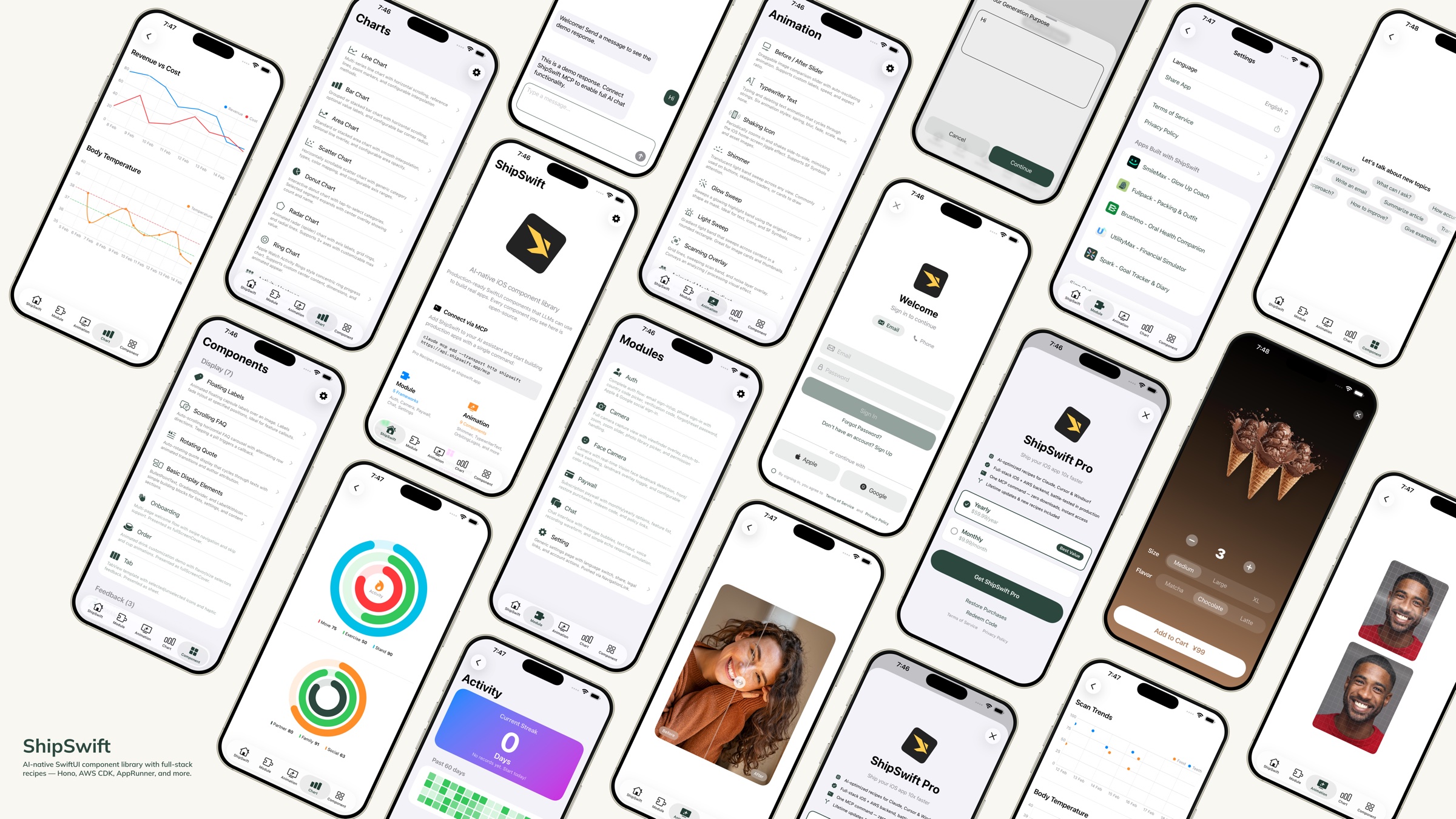
AIネイティブなSwiftUIコンポーネントライブラリ — LLMが実際のアプリを構築するために使用できる、本番環境対応のコード。





クイックスタート · コンポーネント · ディレクトリ構造 · レシピ · コントリビューション
ShipSwiftとは?
コマンド一つで、AIが必要とするすべて(本番環境対応のSwiftUIコンポーネント、フルスタックレシピ、実際のアプリを構築するためのコンテキスト)を提供します。その他のMCPレシピもご確認ください。
ショーケースアプリをダウンロードして、すべてのコンポーネントをデバイス上でプレビューしてください。
Related MCP server: axint
クイックスタート
オプション1: スキル + レシピサーバー(推奨)
ステップ1 — ShipSwiftスキルをインストール:
npx skills add signerlabs/shipswift-skills
ステップ2 — AIがレシピを取得できるようにレシピサーバーを接続:
# Claude Code
claude mcp add --transport http shipswift https://api.shipswift.app/mcp

# Gemini CLI
gemini mcp add --transport http shipswift https://api.shipswift.app/mcp
Cursor、VS Code Copilot、Windsurf、その他のツールについては、SkillsリポジトリのMCPセットアップ手順を参照してください。
ステップ3 — AIに依頼:
「シマーローディングアニメーションを追加して」
「Cognitoを使用した認証フローを構築して」
「すべてのチャートコンポーネントを表示して」
オプション2: ローカルスキル(MCP不要)
このリポジトリから直接ソースファイルを読み込むスキルをインストールします。サーバー不要でオフラインでも動作します:
npx skills add signerlabs/ShipSwift
AIはコンポーネントカタログをブラウズし、ローカルでソースコードを読み取ることができます。以下を試してみてください:
「ShipSwiftのレシピを探索して」
「シマーアニメーションを追加して」
「チャット機能を構築して」
ヒント: MCPサーバー(オプション1)も接続すると、AIは追加のProレシピ(バックエンドガイド、コンプライアンステンプレート、注意点ドキュメント)にアクセスできるようになります。
オプション3: ファイルコピー
このリポジトリをクローン
必要なファイルを ShipSwift/SWPackage/ からXcodeプロジェクトにコピー
SWAnimation/、SWChart/、SWComponent/ 内の各コンポーネントは自己完結型です。必要に応じてファイルと SWUtil/ をコピーしてください
ショーケースアプリの実行
git clone https://github.com/signerlabs/ShipSwift.git
cd ShipSwift
open ShipSwift.xcodeproj
シミュレーターまたはデバイスを選択し、Cmd+Rを押してビルドおよび実行します。
コンポーネント
SWAnimation — アニメーションコンポーネント
BeforeAfterSlider · TypewriterText · ShakingIcon · Shimmer · GlowSweep · LightSweep · ScanningOverlay · AnimatedMeshGradient · OrbitingLogos
SWChart — チャートコンポーネント
LineChart · BarChart · AreaChart · DonutChart · RingChart · RadarChart · ScatterChart · ActivityHeatmap
SWComponent — UIコンポーネント
表示: FloatingLabels · ScrollingFAQ · RotatingQuote · BulletPointText · GradientDivider · Label · MarkdownText · OnboardingView · OrderView · RootTabView · VideoPlayer
フィードバック: Alert · Loading · ThinkingIndicator
入力: TabButton · Stepper · AddSheet · SearchBar
SWModule — マルチファイルフレームワーク
SWAuth — ユーザー認証(Amplify/Cognito、ソーシャルログイン、メール/パスワード、国コードピッカー付き電話番号サインイン)
SWCamera — ビューファインダー、ズーム、写真ピッカー、Visionランドマークトラッキングによる顔検出を備えたカメラキャプチャ
SWPaywall — StoreKit 2を使用したサブスクリプションペイウォール — iOSクライアントは無料。フルスタックレシピ(バックエンド + コンプライアンス + 注意点) → Pro
SWChat — メッセージリスト、テキスト入力、オプションの音声認識(VolcEngine ASR)を備えたオールインワンチャットビュー
SWSetting — 言語切り替え、共有、法的リンク、おすすめアプリを備えた設定ページテンプレート
SWSubjectLifting — VisionKit ImageAnalysisを使用した背景削除
SWTikTokTracking — アトリビューショントラッキングのためのTikTok Events API統合 — iOSクライアントは無料。フルスタックレシピ(バックエンド + コンプライアンス + 注意点) → Pro
SWUtil — 共有ユーティリティ
DebugLog · String/Date/View拡張 · LocationManager
ディレクトリ構造
ShipSwift/
├── SWPackage/
│   ├── SWAnimation/          # Animation components
│   ├── SWChart/              # Chart components
│   ├── SWComponent/          # UI components
│   │   ├── Display/          #   Display components
│   │   ├── Feedback/         #   Feedback components
│   │   └── Input/            #   Input components
│   ├── SWModule/             # Multi-file frameworks
│   │   ├── SWAuth/           #   Authentication
│   │   ├── SWCamera/         #   Camera + face detection
│   │   ├── SWPaywall/        #   Subscription paywall
│   │   ├── SWChat/           #   Chat + voice input
│   │   ├── SWSetting/        #   Settings page
│   │   ├── SWSubjectLifting/ #   Background removal
│   │   └── SWTikTokTracking/ #   TikTok attribution
│   └── SWUtil/               # Shared utilities
├── View/                     # Showcase app views
├── Service/                  # App services
└── Component/                # Shared app components
命名規則
すべての型は SW プレフィックスを使用します(例: SWAlertManager, SWStoreManager)。
ビューモディファイアは .sw 小文字プレフィックスを使用します(例: .swAlert(), .swPageLoading(), .swPrimary)。
依存関係ルール
SWUtil        ← no dependencies on other SWPackage directories
SWAnimation   ← may depend on SWUtil only
SWChart       ← may depend on SWUtil only
SWComponent   ← may depend on SWUtil only
SWModule      ← may depend on SWUtil and SWComponent
レシピ
ShipSwiftはスキルを通じて無料およびProのレシピを提供します。各レシピには、完全なSwiftUIソースコード、実装手順、ベストプラクティスが含まれています。AIアシスタントは必要に応じて任意のレシピを取得できます。
カテゴリ | 例 |
アニメーション | Shimmer, Typewriter, Orbiting Logos |
チャート | Line, Bar, Donut, Radar, Heatmap |
コンポーネント | Alert, Onboarding, Stepper, FAQ |
モジュール | Auth, Camera, Chat, Setting, Infra CDK, Subscription*, TikTok Tracking*, Export & Share* |
* Proレシピ — 完全なバックエンド、コンプライアンステンプレート、注意点ガイドが含まれます。近日公開: プッシュ通知、分析ダッシュボード。
listRecipes, getRecipe, searchRecipes の3つのツールが利用可能です。
詳細は shipswift.app を参照してください。スキルリポジトリ: signerlabs/shipswift-skills
無料版 vs Pro版
すべてのiOSクライアントコードはMITライセンスの下でオープンソース化されています。Proレシピは、プロトタイプから本番環境へ移行するために必要なすべてを追加します。
| 無料版 (オープンソース) | Proレシピ |
iOSクライアントコード | 完全なソース | 拡張バージョン |
バックエンド実装 | — | Honoルート, DBスキーマ, Webhook |
統合ガイド | — | エンドツーエンドのセットアップチェックリスト |
コンプライアンステンプレート | — | プライバシーマニフェスト, App Storeラベル |
既知の注意点 | — | レシピごとに10以上の実戦的なヒント |
Proレシピは近日追加予定: プッシュ通知, 分析ダッシュボード。
詳細は 価格ページ を参照してください。
技術スタック
SwiftUI + Swift
StoreKit 2
Amplify SDK (Cognito)
AVFoundation + Vision
SpriteKit
VolcEngine ASR
コントリビューション
コントリビューションを歓迎します!以下の手順に従ってください:
リポジトリをフォーク
フィーチャーブランチを作成 (git checkout -b feature/amazing-feature)
変更をコミット (git commit -m 'Add amazing feature')
ブランチにプッシュ (git push origin feature/amazing-feature)
プルリクエストを作成
コードスタイル
ライセンス
このプロジェクトはMITライセンスの下でライセンスされています。詳細は LICENSE ファイルを参照してください。
スターの推移
Made with ❤️ by SignerLabs


