ShipSwift
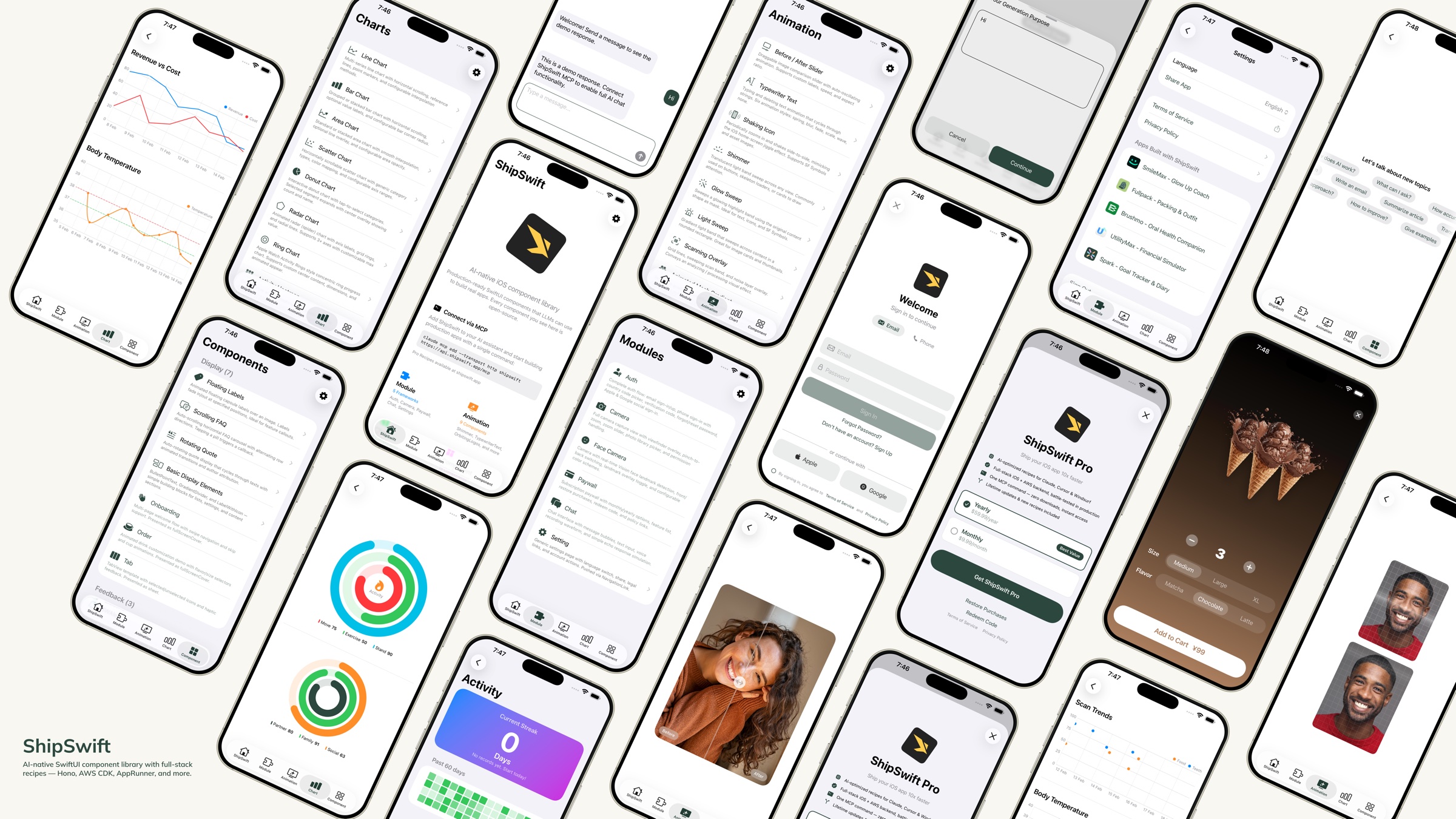
AI-native SwiftUI component library — production-ready code that LLMs can use to build real apps.


Quick Start · Components · Custom Dev — $5K, 4 weeks · Skills
What is ShipSwift?
One command gives your AI everything it needs — production-ready SwiftUI components, full-stack skills, and the context to build real apps without guessing.
Browse every skill live at shipswift.app — searchable catalog, copy-paste source, live previews.
Download the Showcase App to preview every component on your device.
Related MCP server: axint
Need a custom app built? We do that too.
ShipSwift gets your AI 80% of the way. If you need the last 20% — your unique features, your brand, your backend — wired up by the people who wrote the skills, we ship it for you.
| |
⚡ 48-hour demo | Working prototype on your TestFlight within 2 days of brief |
🚀 4-week delivery | Production-ready iOS app, App Store-submission ready |
💵 From $5,000 | Fixed price, milestone-billed, no hourly surprises |
Built on the same component library you see in this repo, so you keep ownership and can extend forever.
Get a quote: wei@signerlabs.com · shipswift.app
Quick Start
Option 1: Skills + MCP Server (Recommended)
Step 1 — Install ShipSwift Skills:
npx skills add signerlabs/shipswift-skills
Step 2 — Connect the MCP server so your AI can fetch skills:
# Claude Code
claude mcp add --transport http shipswift https://api.shipswift.app/mcp

# Gemini CLI
gemini mcp add --transport http shipswift https://api.shipswift.app/mcp
For Cursor, VS Code Copilot, Windsurf, and other tools, see the Skills repo for MCP setup.
Step 3 — Ask your AI:
"Add a shimmer loading animation"
"Build an authentication flow with Cognito"
"Show me all chart components"
Option 2: Local Skills (No MCP Required)
Install skills that read source files directly from this repo — works offline, no server needed:
npx skills add signerlabs/ShipSwift
Your AI can then browse the component catalog and read source code locally. Try:
Tip: If you also connect the MCP server (Option 1), your AI gets access to additional Pro skills (backend guides, compliance templates, pitfall docs).
Option 3: File Copy
Clone this repository
Copy the files you need from ShipSwift/SWPackage/ into your Xcode project
Each component in SWAnimation/, SWChart/, and SWComponent/ is self-contained — just copy the file and SWUtil/ if needed
Run the Showcase App
git clone https://github.com/signerlabs/ShipSwift.git
cd ShipSwift
open ShipSwift.xcodeproj
Select a simulator or device, then press Cmd+R to build and run.
Components
SWAnimation — Animation Components
SwiftUI animations: Shimmer · TypewriterText · ShakingIcon · GlowSweep · LightSweep · ScanningOverlay · AnimatedMeshGradient · BeforeAfterSlider · OrbitingLogos · FullScreenButton
Canvas-rendered 3D: DotSphere · CharSphere
Metal-shader procedural backgrounds: Dots · Starfield · FractalClouds · InkSmoke · LiquidChrome · Plasma · AnimatedLoop
Metal-shader backgrounds: Metaballs · Halftone · Water · LiquidMetal · NeuroNoise · DotOrbit · Voronoi · SimplexNoise · ColorPanels · SmokeRing · Swirl
30 animation components total — see the Showcase App for live previews.
SWChart — Chart Components
LineChart · BarChart · AreaChart · DonutChart · RingChart · RadarChart · ScatterChart · ActivityHeatmap
SWComponent — UI Components
Display: FloatingLabels · ScrollingFAQ · RotatingQuote · BulletPointText · GradientDivider · Label · MarkdownText · OnboardingView · OrderView · RootTabView · VideoPlayer
Feedback: Alert · Loading · ThinkingIndicator
Input: TabButton · Stepper · AddSheet · SearchBar
SWModule — Multi-File Frameworks
SWAuth — User authentication (Amplify/Cognito, social login, email/password, phone sign-in with country code picker)
SWCamera — Camera capture with viewfinder, zoom, photo picker, and face detection with Vision landmark tracking
SWPaywall — Subscription paywall using StoreKit 2 — iOS client included free. Full-stack skill (backend + compliance + pitfalls) → Pro
SWChat — All-in-one chat view with message list, text input, and optional voice recognition (VolcEngine ASR)
SWSetting — Settings page template with language switch, share, legal links, recommended apps
SWSubjectLifting — Background removal using VisionKit ImageAnalysis
SWTikTokTracking — TikTok Events API integration for attribution tracking — iOS client included free. Full-stack skill (backend + compliance + pitfalls) → Pro
SWUtil — Shared Utilities
DebugLog · String/Date/View extensions · LocationManager
Directory Structure
ShipSwift/
├── SWPackage/
│   ├── SWAnimation/          # Animation components
│   ├── SWChart/              # Chart components
│   ├── SWComponent/          # UI components
│   │   ├── Display/          #   Display components
│   │   ├── Feedback/         #   Feedback components
│   │   └── Input/            #   Input components
│   ├── SWModule/             # Multi-file frameworks
│   │   ├── SWAuth/           #   Authentication
│   │   ├── SWCamera/         #   Camera + face detection
│   │   ├── SWPaywall/        #   Subscription paywall
│   │   ├── SWChat/           #   Chat + voice input
│   │   ├── SWSetting/        #   Settings page
│   │   ├── SWSubjectLifting/ #   Background removal
│   │   └── SWTikTokTracking/ #   TikTok attribution
│   └── SWUtil/               # Shared utilities
├── View/                     # Showcase app views
├── Service/                  # App services
└── Component/                # Shared app components
Naming Convention
All types use the SW prefix (e.g., SWAlertManager, SWStoreManager).
View modifiers use .sw lowercase prefix (e.g., .swAlert(), .swPageLoading(), .swPrimary).
Dependency Rules
SWUtil        ← no dependencies on other SWPackage directories
SWAnimation   ← may depend on SWUtil only
SWChart       ← may depend on SWUtil only
SWComponent   ← may depend on SWUtil only
SWModule      ← may depend on SWUtil and SWComponent
Skills
ShipSwift provides free and Pro skills — each skill includes complete SwiftUI source code, implementation steps, and best practices. Your AI assistant can retrieve any skill on demand.
Category | Examples |
Animation | Shimmer, Typewriter, Orbiting Logos |
Chart | Line, Bar, Donut, Radar, Heatmap |
Component | Alert, Onboarding, Stepper, FAQ |
Module | Auth, Camera, Chat, Setting, Infra CDK, Subscription*, TikTok Tracking*, Export & Share* |
* Pro skills — include full backend, compliance templates, and pitfall guides. Coming soon: Push Notifications, Analytics Dashboard.
Three tools are available: listSkills, getSkill, searchSkills.
Learn more at shipswift.app · Skills repo: signerlabs/shipswift-skills
Free vs Pro
All iOS client code is open-source under the MIT license. Pro skills add everything you need to go from prototype to production.
| Free (Open Source) | Pro Skill |
iOS client code | Full source | Enhanced version |
Backend implementation | — | Hono routes, DB schema, webhooks |
Integration guides | — | End-to-end setup checklists |
Compliance templates | — | Privacy manifest, App Store labels |
Known pitfalls | — | 10+ battle-tested tips per skill |
See pricing for details.
Tech Stack
SwiftUI + Swift
StoreKit 2
Amplify SDK (Cognito)
AVFoundation + Vision
SpriteKit
VolcEngine ASR
Contributing
Contributions are welcome! Please follow these steps:
Fork the repository
Create a feature branch (git checkout -b feature/amazing-feature)
Commit your changes (git commit -m 'Add amazing feature')
Push to the branch (git push origin feature/amazing-feature)
Open a Pull Request
Code Style
All comments and documentation in English
Follow the naming conventions, dependency rules, and self-containment described above
License
This project is licensed under the MIT License — see the LICENSE file for details.


