
F
licenseA
qualityB
maintenanceNode.js server implementing Model Context Protocol (MCP) for filesystem operations.
70
14
1,222,611 npm
92,139
-

使用 Node.js 构建的实验模型上下文协议服务器,提供对Autodesk 平台服务API 的访问,并使用新的安全服务帐户功能进行细粒度的访问控制。
APS 应用程序凭据(必须是服务器到服务器应用程序类型)
克隆此存储库
安装依赖项: yarn install
构建 TypeScript 代码: yarn run build
在该项目的根文件夹中创建一个*.env*文件,并添加您的 APS 凭据:
APS_CLIENT_ID - 您的 APS 应用程序客户端 ID
APS_CLIENT_SECRET - 您的 APS 应用程序客户端机密
创建一个新的服务帐户: npx create-service-account ssa-test-user John Doe
该脚本将输出新创建的服务帐户的电子邮件,以及一堆环境变量
在*.env*文件中添加或覆盖新的环境变量
APS_SA_ID - 您的服务帐户 ID
APS_SA_EMAIL - 您的服务帐户电子邮件
APS_SA_KEY_ID - 您的服务帐户密钥 ID
APS_SA_PRIVATE_KEY - 您的服务帐户私钥
邀请服务帐户电子邮件作为新成员加入您的 ACC 项目
运行模型上下文协议检查器: yarn run inspect
点击Connect以启动此 MCP 服务器并连接到它
确保已安装Claude Desktop
如果您还没有 Claude Desktop 配置文件,请创建一个:
在 macOS 上: ~/Library/Application Support/Claude/claude_desktop_config.json
在 Windows 上: %APPDATA%\Claude\claude_desktop_config.json
将此 MCP 服务器添加到配置中,使用系统上build/server.js文件的绝对路径,例如:
{
    "mcpServers": {
        "autodesk-platform-services": {
            "command": "node",
            "args": [
                "/absolute/path/to/aps-mcp-server/build/server.js"
            ]
        }
    }
}
打开 Claude Desktop,并尝试以下一些测试提示:
我可以访问哪些 ACC 项目?
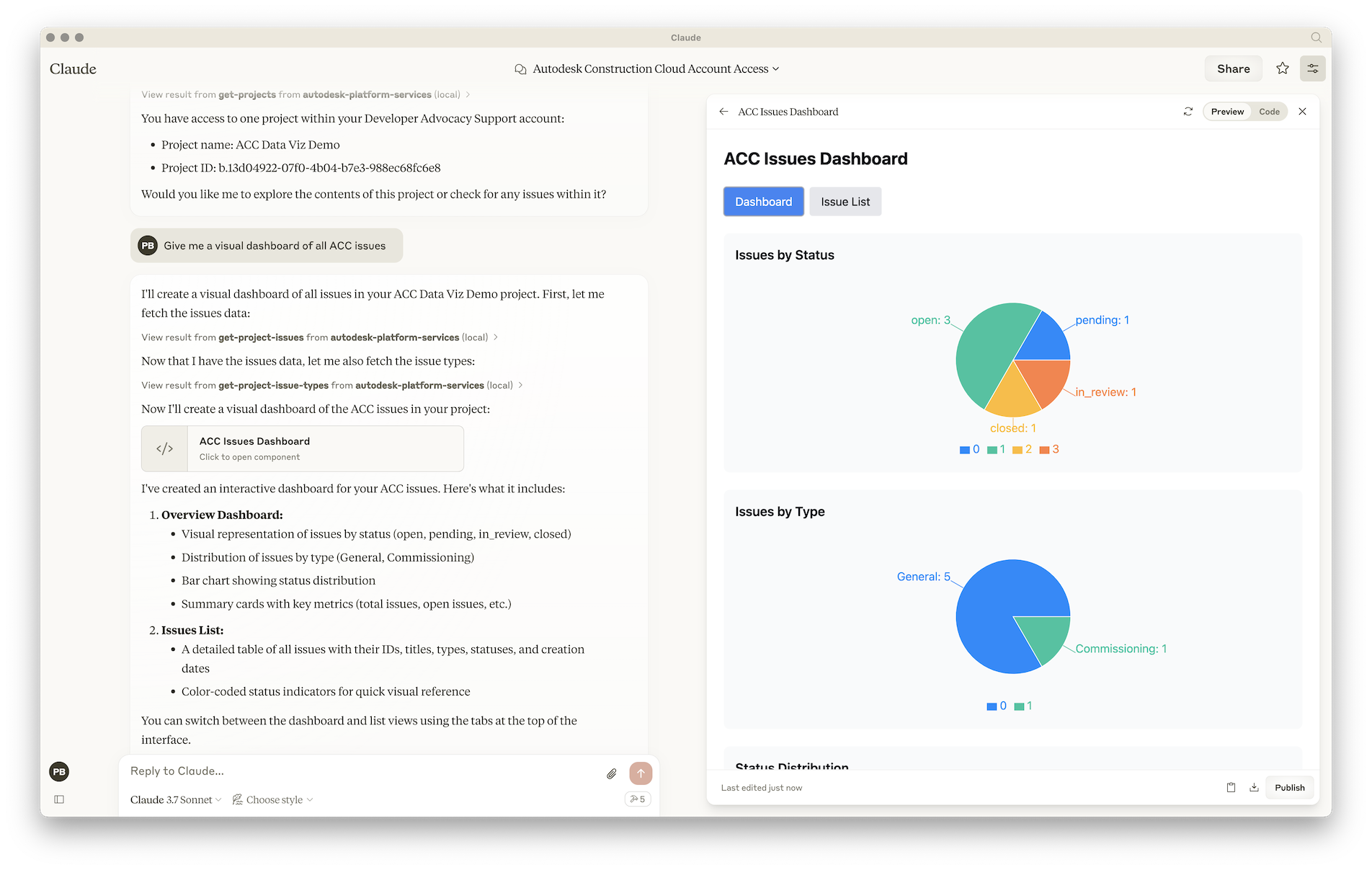
为我提供 XYZ 项目所有问题的可视化仪表板
有关如何将 MCP 服务器添加到 Claude Desktop 的更多详细信息,请参阅官方文档。
List all available Autodesk Construction Cloud accounts
Inputs: no named parameters.
List contents of a project or a specific subfolder in Autodesk Construction Cloud
Inputs: accountId (required), projectId (required), folderId.
Retrieves a list of comments associated with an issue in Autodesk Construction Cloud.
Inputs: projectId (required), issueId (required).
Retrieves a list of supported root cause categories and root causes that you can allocate to an issue in Autodesk Construction Cloud.
Inputs: projectId (required).
List all available projects in an Autodesk Construction Cloud account
Inputs: projectId (required).
List all issue types in an Autodesk Construction Cloud project
Inputs: projectId (required).
List all versions of a document in Autodesk Construction Cloud
Inputs: projectId (required), itemId (required).
List all available projects in an Autodesk Construction Cloud account
Inputs: accountId (required).
Recent tool additions, removals, and schema changes observed during successful MCP inspections.
Loading tool schema changelog…
Scored across 8 tools
Multiple tools have unclear boundaries and overlapping purposes. 'get-issues' and 'get-projects' appear to have conflicting descriptions (both mention listing projects), and several tools like 'get-accounts', 'get-projects', and 'get-issues' seem to retrieve similar high-level resource lists. The descriptions don't clearly differentiate when to use each tool, leading to potential misselection.
All tools follow a consistent 'get-noun' pattern with hyphen-separated words, making them predictable and readable. The naming convention is uniform across all eight tools, with no deviations in style or structure.
Eight tools is a reasonable count for an Autodesk Construction Cloud server, slightly on the lower side but well-scoped for basic operations. It covers accounts, projects, issues, folders, and documents, though it might benefit from a few more tools for a more comprehensive surface.
The tool set is severely incomplete for the domain, focusing only on read operations ('get-') with no create, update, or delete capabilities. This creates significant gaps for managing resources like issues, projects, or documents, limiting agents to listing and retrieving without supporting full lifecycle workflows.
Model Context Protocol server for Studex tools, notifications, and profile integrations
Model Context Protocol server for the Apideck Unified API. Connect any MCP-compatible agent framework to 100+ accounting systems, HRIS platforms, file storage providers, and more through one integration. More information https://www.apideck.com/mcp-server
A Model Context Protocol server for Wix AI tools
MCP server for mandates, delegation, policy-gated execution, credential grants, and audit.