
F
licenseA
qualityA
maintenanceNode.js server implementing Model Context Protocol (MCP) for filesystem operations.
52
14
1,299,946 npm
91,812
-

The APS MCP Server provides access to Autodesk Construction Cloud (ACC) data via the Model Context Protocol, enabling users to query and manage construction project information with fine-grained access control. With this server, you can:
List available ACC accounts
Browse projects within a specific ACC account
Navigate folders and subfolders within projects
List and manage issues within projects
Retrieve issue comments, types, and root causes
Access document versions
Enables access to Autodesk Platform Services (APS) API with fine-grained access control, allowing users to view ACC projects, manage issues, and interact with BIM360 data through secure service accounts.
Supports installation and configuration on macOS systems, with specific paths for Claude Desktop configuration.
Built with Node.js to provide a Model Context Protocol server for accessing and interacting with Autodesk Platform Services API.
Implements the MCP server using TypeScript, requiring build steps before running the server.
Click on "Deploy Server".
Wait a few minutes for the server to deploy. Once ready, it will show a "Started" state.
In the chat, type @ followed by the MCP server name and your instructions, e.g., "@APS MCP Server list my ACC projects"
That's it! The server will respond to your query, and you can continue using it as needed.
Here is a step-by-step guide with screenshots.
IMPORTANT: This project has been moved to https://github.com/autodesk-platform-services/aps-mcp-server-nodejs.
Experimental Model Context Protocol server build with Node.js, providing access to Autodesk Platform Services API, with fine-grained access control using the new Secure Service Accounts feature.
APS app credentials (must be a Server-to-Server application type)
Clone this repository
Install dependencies: yarn install
Build the TypeScript code: yarn run build
Create a .env file in the root folder of this project, and add your APS credentials:
APS_CLIENT_ID - your APS application client ID
APS_CLIENT_SECRET - your APS application client secret
Create a new service account: npx create-service-account <username> <first name> <last name>, for example, npx create-service-account ssa-test-user John Doe
This script will output a bunch of environment variables with information about the new account:
APS_SA_ID - your service account ID
APS_SA_EMAIL - your service account email
APS_SA_KEY_ID - your service account key ID
APS_SA_PRIVATE_KEY - your service account private key
Add these environment variables to your .env file
Register your APS application client ID as a custom integration
Invite the service account email as a new member to your ACC project(s)
Run the Model Context Protocol Inspector: yarn run inspect
Hit Connect to start this MCP server and connect to it
Make sure you have Claude Desktop installed
Create a Claude Desktop config file if you don't have one yet:
On macOS: ~/Library/Application Support/Claude/claude_desktop_config.json
On Windows: %APPDATA%\Claude\claude_desktop_config.json
Add this MCP server to the config, using the absolute path of the build/server.js file on your system, for example:
{
    "mcpServers": {
        "autodesk-platform-services": {
            "command": "node",
            "args": [
                "/absolute/path/to/aps-mcp-server/build/server.js"
            ]
        }
    }
}
Open Claude Desktop, and try some of the following test prompt:
What ACC projects do I have access to?
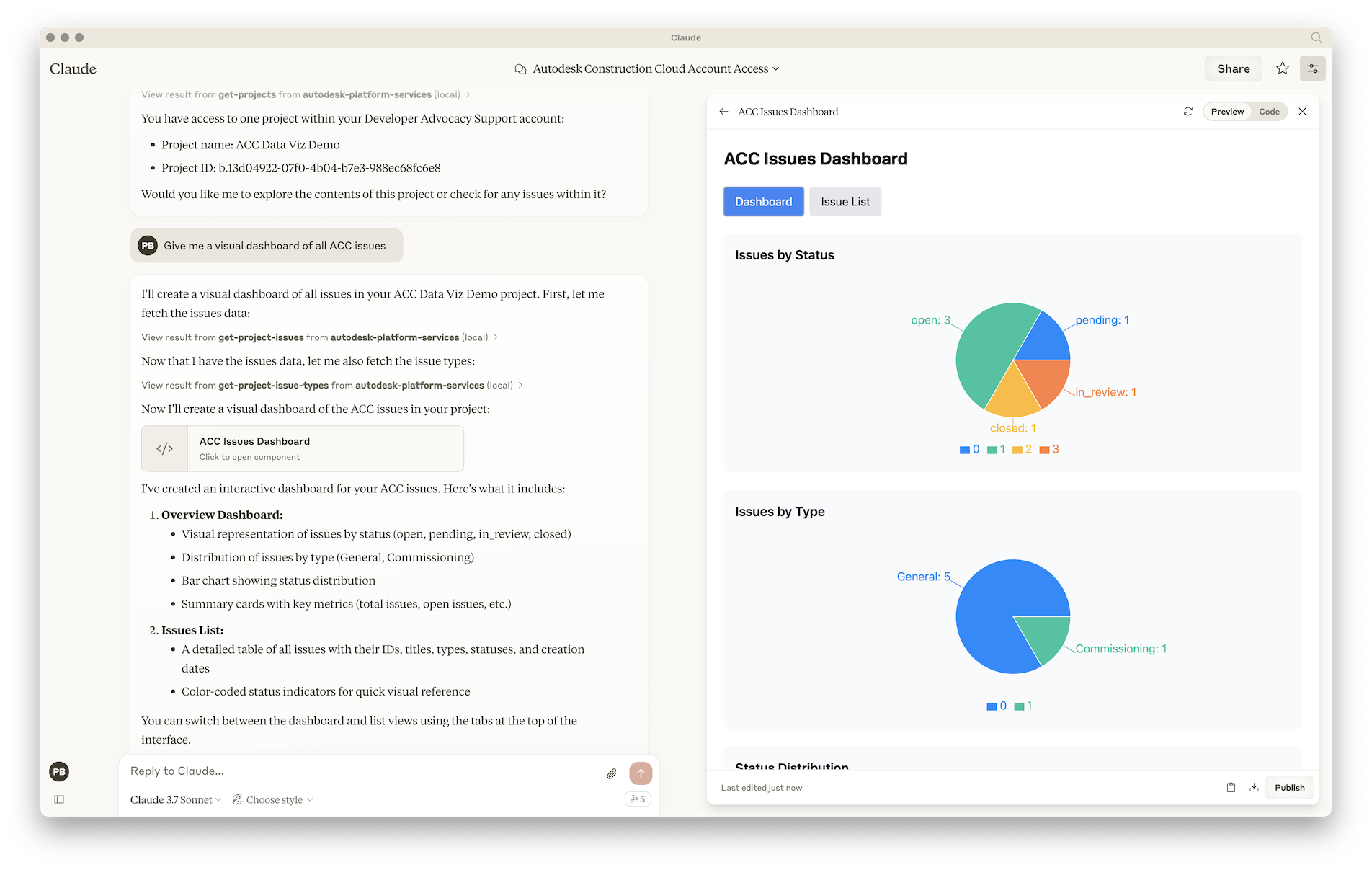
Give me a visual dashboard of all issues in project XYZ
For more details on how to add MCP servers to Claude Desktop, see the official documentation.
Make sure you have enabled MCP servers in Visual Studio Code
Create .vscode/mcp.json file in your workspace, and add the following JSON to it:
{
    "servers": {
        "Autodesk Platform Services": {
            "type": "stdio",
            "command": "node",
            "args": [
                "/absolute/path/to/aps-mcp-server/build/server.js"
            ]
        }
    }
}
For more details on how to add MCP servers to Visual Studio Code, see the documentation
Create .cursor/mcp.json file in your workspace, and add the following JSON to it:
{
  "mcpServers": {
    "Autodesk Platform Services": {
      "command": "node",
      "args": [
        "/Users/brozp/Code/Temp/aps-mcp-server-node/build/server.js"
      ]
    }
  }
}
For more details on how to add MCP servers to Cursor, see the documentation
List all available Autodesk Construction Cloud accounts
| Name | Required | Description | Default |
|---|---|---|---|
No parameters | |||
Does the description disclose side effects, auth requirements, rate limits, or destructive behavior?
With no annotations provided, the description carries the full burden of behavioral disclosure. It states a read operation ('List') but lacks details on permissions, rate limits, pagination, or return format. This is a significant gap for a tool with zero annotation coverage.
Agents need to know what a tool does to the world before calling it. Descriptions should go beyond structured annotations to explain consequences.
Is the description appropriately sized, front-loaded, and free of redundancy?
The description is a single, efficient sentence that directly states the tool's purpose without any wasted words. It is front-loaded and appropriately sized for a simple list operation.
Shorter descriptions cost fewer tokens and are easier for agents to parse. Every sentence should earn its place.
Given the tool's complexity, does the description cover enough for an agent to succeed on first attempt?
Given the lack of annotations and output schema, the description is incomplete. It does not explain what 'accounts' entail (e.g., user accounts, project accounts), the return format, or any behavioral traits, making it inadequate for a tool that might have complexity in data retrieval.
Complex tools with many parameters or behaviors need more documentation. Simple tools need less. This dimension scales expectations accordingly.
Does the description clarify parameter syntax, constraints, interactions, or defaults beyond what the schema provides?
The tool has 0 parameters, and schema description coverage is 100%, so no parameter information is needed. The description appropriately does not discuss parameters, earning a baseline score of 4 for not adding unnecessary details beyond the schema.
Input schemas describe structure but not intent. Descriptions should explain non-obvious parameter relationships and valid value ranges.
Does the description clearly state what the tool does and how it differs from similar tools?
The description clearly states the verb ('List') and resource ('Autodesk Construction Cloud accounts'), making the purpose evident. However, it does not differentiate from sibling tools like 'get-projects' or 'get-issues', which also list resources but target different entities, so it lacks explicit sibling distinction.
Agents choose between tools based on descriptions. A clear purpose with a specific verb and resource helps agents select the right tool.
Does the description explain when to use this tool, when not to, or what alternatives exist?
The description provides no guidance on when to use this tool versus alternatives. It does not mention context, prerequisites, or exclusions, such as whether it's for initial setup or general account management, leaving usage unclear relative to siblings like 'get-projects'.
Agents often have multiple tools that could apply. Explicit usage guidance like "use X instead of Y when Z" prevents misuse.
List contents of a project or a specific subfolder in Autodesk Construction Cloud
| Name | Required | Description | Default |
|---|---|---|---|
| accountId | Yes | ||
| projectId | Yes | ||
| folderId | No |
Does the description disclose side effects, auth requirements, rate limits, or destructive behavior?
With no annotations provided, the description carries the full burden of behavioral disclosure but offers minimal information. It implies a read-only operation ('List contents'), but doesn't specify whether it's paginated, what format the contents are returned in, or any rate limits or authentication requirements, which are critical for a tool with multiple required parameters.
Agents need to know what a tool does to the world before calling it. Descriptions should go beyond structured annotations to explain consequences.
Is the description appropriately sized, front-loaded, and free of redundancy?
The description is a single, efficient sentence that front-loads the core purpose without unnecessary words. Every part of it contributes directly to understanding the tool's function, making it highly concise and well-structured.
Shorter descriptions cost fewer tokens and are easier for agents to parse. Every sentence should earn its place.
Given the tool's complexity, does the description cover enough for an agent to succeed on first attempt?
Given the complexity (3 parameters, 2 required, no output schema, and no annotations), the description is inadequate. It doesn't explain the return values, error conditions, or how parameters interact (e.g., that 'folderId' is optional for listing root contents), leaving significant gaps for the agent to operate effectively.
Complex tools with many parameters or behaviors need more documentation. Simple tools need less. This dimension scales expectations accordingly.
Does the description clarify parameter syntax, constraints, interactions, or defaults beyond what the schema provides?
The schema description coverage is 0%, so the description must compensate but fails to do so. It mentions 'project or a specific subfolder' which hints at the use of 'projectId' and optional 'folderId', but doesn't explain what 'accountId' is for, the relationships between parameters, or any constraints beyond what the schema minimally defines (like string types).
Input schemas describe structure but not intent. Descriptions should explain non-obvious parameter relationships and valid value ranges.
Does the description clearly state what the tool does and how it differs from similar tools?
The description clearly states the action ('List contents') and resource ('project or a specific subfolder in Autodesk Construction Cloud'), making the purpose immediately understandable. However, it doesn't differentiate this tool from potential siblings that might also list contents in different contexts or with different scopes, which prevents a perfect score.
Agents choose between tools based on descriptions. A clear purpose with a specific verb and resource helps agents select the right tool.
Does the description explain when to use this tool, when not to, or what alternatives exist?
The description provides no guidance on when to use this tool versus alternatives. It doesn't mention prerequisites (like needing account and project IDs), exclusions, or how it relates to sibling tools like 'get-projects' or 'get-item-versions', leaving the agent to infer usage context.
Agents often have multiple tools that could apply. Explicit usage guidance like "use X instead of Y when Z" prevents misuse.
Retrieves a list of comments associated with an issue in Autodesk Construction Cloud.
| Name | Required | Description | Default |
|---|---|---|---|
| projectId | Yes | ||
| issueId | Yes |
Does the description disclose side effects, auth requirements, rate limits, or destructive behavior?
With no annotations provided, the description carries the full burden of behavioral disclosure. It states this is a retrieval operation, implying it's likely read-only and non-destructive, but doesn't confirm this explicitly. It lacks details on permissions, rate limits, pagination, or error handling. For a tool with zero annotation coverage, this is a significant gap in transparency.
Agents need to know what a tool does to the world before calling it. Descriptions should go beyond structured annotations to explain consequences.
Is the description appropriately sized, front-loaded, and free of redundancy?
The description is a single, efficient sentence that front-loads the core purpose without unnecessary words. It could be slightly more structured by separating context, but it avoids redundancy and stays focused. Every part of the sentence contributes to understanding the tool's scope.
Shorter descriptions cost fewer tokens and are easier for agents to parse. Every sentence should earn its place.
Given the tool's complexity, does the description cover enough for an agent to succeed on first attempt?
Given the tool's moderate complexity (2 required parameters), lack of annotations, and no output schema, the description is incomplete. It doesn't cover parameter meanings, behavioral traits, or return values, leaving critical gaps for an AI agent to use the tool effectively. The description alone is insufficient for reliable operation.
Complex tools with many parameters or behaviors need more documentation. Simple tools need less. This dimension scales expectations accordingly.
Does the description clarify parameter syntax, constraints, interactions, or defaults beyond what the schema provides?
Schema description coverage is 0%, meaning the input schema provides no descriptions for the two parameters. The tool description doesn't compensate by explaining what 'projectId' and 'issueId' represent, their format, or how to obtain them. This leaves parameters semantically undefined, hindering correct invocation.
Input schemas describe structure but not intent. Descriptions should explain non-obvious parameter relationships and valid value ranges.
Does the description clearly state what the tool does and how it differs from similar tools?
The description clearly states the verb ('retrieves') and resource ('list of comments associated with an issue'), making the purpose unambiguous. It specifies the context ('in Autodesk Construction Cloud'), which helps distinguish it from generic comment-fetching tools. However, it doesn't explicitly differentiate from sibling tools like 'get-issues' or 'get-issue-root-causes', which prevents a perfect score.
Agents choose between tools based on descriptions. A clear purpose with a specific verb and resource helps agents select the right tool.
Does the description explain when to use this tool, when not to, or what alternatives exist?
The description provides no guidance on when to use this tool versus alternatives. It doesn't mention prerequisites (e.g., needing an existing issue), compare it to sibling tools (e.g., 'get-issues' for issue details vs. this for comments), or specify use cases (e.g., for reviewing discussion threads). This leaves the agent with minimal context for tool selection.
Agents often have multiple tools that could apply. Explicit usage guidance like "use X instead of Y when Z" prevents misuse.
Retrieves a list of supported root cause categories and root causes that you can allocate to an issue in Autodesk Construction Cloud.
| Name | Required | Description | Default |
|---|---|---|---|
| projectId | Yes |
Does the description disclose side effects, auth requirements, rate limits, or destructive behavior?
No annotations are provided, so the description carries the full burden of behavioral disclosure. It states the tool retrieves a list, implying a read-only operation, but doesn't cover aspects like permissions required, response format, pagination, rate limits, or error handling. The description adds minimal behavioral context beyond the basic action.
Agents need to know what a tool does to the world before calling it. Descriptions should go beyond structured annotations to explain consequences.
Is the description appropriately sized, front-loaded, and free of redundancy?
The description is a single, efficient sentence that front-loads the key action and resource. There is no wasted language, and it directly communicates the tool's purpose without unnecessary details.
Shorter descriptions cost fewer tokens and are easier for agents to parse. Every sentence should earn its place.
Given the tool's complexity, does the description cover enough for an agent to succeed on first attempt?
Given the lack of annotations, no output schema, and low schema description coverage, the description is incomplete. It covers the basic purpose but omits critical details like parameter meaning, behavioral traits, and return values, making it insufficient for a tool with one required parameter in a complex domain like construction cloud issues.
Complex tools with many parameters or behaviors need more documentation. Simple tools need less. This dimension scales expectations accordingly.
Does the description clarify parameter syntax, constraints, interactions, or defaults beyond what the schema provides?
The input schema has 1 parameter with 0% description coverage, so the description must compensate. It doesn't mention the 'projectId' parameter at all, failing to explain its role or format. However, with only one parameter, the baseline is higher, but the description adds no value beyond what the schema provides, resulting in an average score.
Input schemas describe structure but not intent. Descriptions should explain non-obvious parameter relationships and valid value ranges.
Does the description clearly state what the tool does and how it differs from similar tools?
The description clearly states the action ('Retrieves a list') and the resource ('supported root cause categories and root causes'), specifying they are for allocating to issues in Autodesk Construction Cloud. It distinguishes from siblings like 'get-issues' or 'get-issue-comments' by focusing on root cause metadata rather than issues themselves, though it doesn't explicitly name alternatives.
Agents choose between tools based on descriptions. A clear purpose with a specific verb and resource helps agents select the right tool.
Does the description explain when to use this tool, when not to, or what alternatives exist?
The description implies usage when allocating root causes to issues, providing some context, but lacks explicit guidance on when to use this tool versus alternatives (e.g., 'get-issue-types' for issue metadata) or any prerequisites. It doesn't specify exclusions or detailed scenarios.
Agents often have multiple tools that could apply. Explicit usage guidance like "use X instead of Y when Z" prevents misuse.
List all available projects in an Autodesk Construction Cloud account
| Name | Required | Description | Default |
|---|---|---|---|
| projectId | Yes |
Does the description disclose side effects, auth requirements, rate limits, or destructive behavior?
No annotations are provided, so the description carries full burden. It mentions listing projects, which implies a read-only operation, but doesn't disclose any behavioral traits like permissions needed, rate limits, or response format. The description adds minimal value beyond the implied action.
Agents need to know what a tool does to the world before calling it. Descriptions should go beyond structured annotations to explain consequences.
Is the description appropriately sized, front-loaded, and free of redundancy?
The description is a single, clear sentence, but it's front-loaded with incorrect information. While concise, the structural issue of misalignment with the tool name undermines its effectiveness. It earns some credit for brevity but loses points for accuracy.
Shorter descriptions cost fewer tokens and are easier for agents to parse. Every sentence should earn its place.
Given the tool's complexity, does the description cover enough for an agent to succeed on first attempt?
Given no annotations, 0% schema coverage, and no output schema, the description is incomplete. It doesn't explain the tool's actual function, parameters, or return values. The mismatch with the tool name makes it inadequate for a tool with one required parameter and complex sibling context.
Complex tools with many parameters or behaviors need more documentation. Simple tools need less. This dimension scales expectations accordingly.
Does the description clarify parameter syntax, constraints, interactions, or defaults beyond what the schema provides?
Schema description coverage is 0%, so the description must compensate. It mentions 'Autodesk Construction Cloud account' but doesn't explain the 'projectId' parameter or its role. The description fails to add any meaning beyond the schema, leaving the parameter undocumented and confusing given the tool's stated purpose.
Input schemas describe structure but not intent. Descriptions should explain non-obvious parameter relationships and valid value ranges.
Does the description clearly state what the tool does and how it differs from similar tools?
The description states 'List all available projects' but the tool name is 'get-issues', creating a direct contradiction. This is misleading as it suggests the tool retrieves projects rather than issues. The description fails to state what the tool actually does and misaligns with the tool name.
Agents choose between tools based on descriptions. A clear purpose with a specific verb and resource helps agents select the right tool.
Does the description explain when to use this tool, when not to, or what alternatives exist?
No guidance is provided on when to use this tool versus alternatives. With sibling tools like 'get-projects' and 'get-issue-comments', the description offers no context for differentiation. The mismatch between name and description further confuses usage scenarios.
Agents often have multiple tools that could apply. Explicit usage guidance like "use X instead of Y when Z" prevents misuse.
List all issue types in an Autodesk Construction Cloud project
| Name | Required | Description | Default |
|---|---|---|---|
| projectId | Yes |
Does the description disclose side effects, auth requirements, rate limits, or destructive behavior?
With no annotations provided, the description carries the full burden of behavioral disclosure. It states this is a list operation, implying it's likely read-only and non-destructive, but doesn't confirm this or address other behavioral aspects like rate limits, authentication needs, pagination, or response format. For a tool with zero annotation coverage, this is insufficient.
Agents need to know what a tool does to the world before calling it. Descriptions should go beyond structured annotations to explain consequences.
Is the description appropriately sized, front-loaded, and free of redundancy?
The description is a single, clear sentence that efficiently conveys the core purpose without unnecessary words. It's front-loaded with the key action and resource, making it easy to parse quickly.
Shorter descriptions cost fewer tokens and are easier for agents to parse. Every sentence should earn its place.
Given the tool's complexity, does the description cover enough for an agent to succeed on first attempt?
Given the lack of annotations and output schema, the description is incomplete for a tool that likely returns a list of issue types. It doesn't explain what an 'issue type' entails, the format of the return data, or any limitations (e.g., pagination). For a read operation with no structured support, more context is needed.
Complex tools with many parameters or behaviors need more documentation. Simple tools need less. This dimension scales expectations accordingly.
Does the description clarify parameter syntax, constraints, interactions, or defaults beyond what the schema provides?
The schema has 0% description coverage for its single parameter 'projectId', and the description doesn't add any parameter-specific information beyond implying it's needed for the Autodesk Construction Cloud project context. This meets the baseline of 3 since the description doesn't compensate for the schema gap but doesn't actively mislead about parameters.
Input schemas describe structure but not intent. Descriptions should explain non-obvious parameter relationships and valid value ranges.
Does the description clearly state what the tool does and how it differs from similar tools?
The description clearly states the action ('List all') and resource ('issue types in an Autodesk Construction Cloud project'), making the tool's purpose immediately understandable. However, it doesn't differentiate from sibling tools like 'get-issues' or 'get-issue-root-causes' beyond the specific resource type, which prevents a perfect score.
Agents choose between tools based on descriptions. A clear purpose with a specific verb and resource helps agents select the right tool.
Does the description explain when to use this tool, when not to, or what alternatives exist?
The description provides no guidance on when to use this tool versus alternatives like 'get-issues' or 'get-issue-root-causes'. It doesn't mention prerequisites, exclusions, or specific contexts where this tool is preferred, leaving the agent to infer usage from the name alone.
Agents often have multiple tools that could apply. Explicit usage guidance like "use X instead of Y when Z" prevents misuse.
List all versions of a document in Autodesk Construction Cloud
| Name | Required | Description | Default |
|---|---|---|---|
| projectId | Yes | ||
| itemId | Yes |
Does the description disclose side effects, auth requirements, rate limits, or destructive behavior?
With no annotations provided, the description carries the full burden of behavioral disclosure. It states this is a list operation, implying read-only behavior, but doesn't cover critical aspects like authentication requirements, rate limits, pagination, error handling, or what 'versions' includes (e.g., metadata, timestamps). For a tool with zero annotation coverage, this leaves significant gaps.
Agents need to know what a tool does to the world before calling it. Descriptions should go beyond structured annotations to explain consequences.
Is the description appropriately sized, front-loaded, and free of redundancy?
The description is a single, clear sentence with zero wasted words. It's front-loaded with the core action and resource, making it easy to parse quickly. Every word earns its place by conveying essential information without redundancy.
Shorter descriptions cost fewer tokens and are easier for agents to parse. Every sentence should earn its place.
Given the tool's complexity, does the description cover enough for an agent to succeed on first attempt?
Given the tool's complexity (listing versions of a document), lack of annotations, and no output schema, the description is incomplete. It doesn't explain what 'versions' entail, how results are structured, or any behavioral constraints. For a tool with 2 parameters and no structured support, more detail is needed to guide effective use.
Complex tools with many parameters or behaviors need more documentation. Simple tools need less. This dimension scales expectations accordingly.
Does the description clarify parameter syntax, constraints, interactions, or defaults beyond what the schema provides?
The description doesn't explicitly mention parameters, but it implies the need for a document (via 'itemId') and context (via 'Autodesk Construction Cloud', loosely hinting at 'projectId'). With 0% schema description coverage and 2 parameters, this adds minimal value beyond what the schema names suggest. The baseline is 3 since the schema provides parameter names and types, but the description doesn't compensate for the coverage gap.
Input schemas describe structure but not intent. Descriptions should explain non-obvious parameter relationships and valid value ranges.
Does the description clearly state what the tool does and how it differs from similar tools?
The description clearly states the action ('List all versions') and resource ('of a document in Autodesk Construction Cloud'), making the purpose immediately understandable. It doesn't distinguish from sibling tools (which focus on accounts, folders, issues, etc.), but the verb+resource combination is specific enough for basic understanding.
Agents choose between tools based on descriptions. A clear purpose with a specific verb and resource helps agents select the right tool.
Does the description explain when to use this tool, when not to, or what alternatives exist?
No guidance is provided on when to use this tool versus alternatives. The description doesn't mention prerequisites (e.g., needing a valid project and item), exclusions, or related tools for different operations. It's a standalone statement with no contextual framing.
Agents often have multiple tools that could apply. Explicit usage guidance like "use X instead of Y when Z" prevents misuse.
List all available projects in an Autodesk Construction Cloud account
| Name | Required | Description | Default |
|---|---|---|---|
| accountId | Yes |
Does the description disclose side effects, auth requirements, rate limits, or destructive behavior?
With no annotations provided, the description carries full burden but only states it lists projects without behavioral details. It doesn't disclose if this is a read-only operation, what permissions are needed, how results are returned (e.g., pagination, sorting), or any rate limits. The description is minimal and lacks critical context for safe invocation.
Agents need to know what a tool does to the world before calling it. Descriptions should go beyond structured annotations to explain consequences.
Is the description appropriately sized, front-loaded, and free of redundancy?
The description is a single, clear sentence with no wasted words. It's front-loaded with the core action and resource, making it efficient and easy to parse. Every part of the sentence contributes to understanding the tool's purpose.
Shorter descriptions cost fewer tokens and are easier for agents to parse. Every sentence should earn its place.
Given the tool's complexity, does the description cover enough for an agent to succeed on first attempt?
Given the tool has no annotations, no output schema, and low schema coverage, the description is incomplete. It covers the basic purpose but misses behavioral traits, parameter details, and output expectations. For a tool with one required parameter and no structured support, more context is needed for effective use.
Complex tools with many parameters or behaviors need more documentation. Simple tools need less. This dimension scales expectations accordingly.
Does the description clarify parameter syntax, constraints, interactions, or defaults beyond what the schema provides?
Schema description coverage is 0%, so the description must compensate but adds no parameter information. It doesn't explain what 'accountId' is, how to obtain it, or its format. With 1 required parameter undocumented, the description fails to provide meaningful semantics beyond the schema.
Input schemas describe structure but not intent. Descriptions should explain non-obvious parameter relationships and valid value ranges.
Does the description clearly state what the tool does and how it differs from similar tools?
The description clearly states the verb ('List') and resource ('projects'), specifying the scope as 'all available projects in an Autodesk Construction Cloud account'. It distinguishes from siblings like get-accounts or get-issues by focusing on projects, but doesn't explicitly differentiate from potential overlapping tools beyond the resource type.
Agents choose between tools based on descriptions. A clear purpose with a specific verb and resource helps agents select the right tool.
Does the description explain when to use this tool, when not to, or what alternatives exist?
No guidance is provided on when to use this tool versus alternatives. The description doesn't mention prerequisites like needing an accountId, nor does it compare with other project-related tools that might exist (though none are listed in siblings). Usage is implied by the action but not explicitly framed.
Agents often have multiple tools that could apply. Explicit usage guidance like "use X instead of Y when Z" prevents misuse.
Recent tool additions, removals, and schema changes observed during successful MCP inspections.
v1.0.0get-accounts1 field changedInput schema / additionalPropertiesRemoved value: -falseget-accountsget-folder-contentsget-issue-commentsget-issue-root-causesget-issue-typesget-issuesget-item-versionsget-projectsScored across 8 tools
Multiple tools have unclear boundaries and overlapping purposes. 'get-issues' and 'get-projects' appear to have conflicting descriptions (both mention listing projects), and several tools like 'get-accounts', 'get-projects', and 'get-issues' seem to retrieve similar high-level resource lists. The descriptions don't clearly differentiate when to use each tool, leading to potential misselection.
All tools follow a consistent 'get-noun' pattern with hyphen-separated words, making them predictable and readable. The naming convention is uniform across all eight tools, with no deviations in style or structure.
Eight tools is a reasonable count for an Autodesk Construction Cloud server, slightly on the lower side but well-scoped for basic operations. It covers accounts, projects, issues, folders, and documents, though it might benefit from a few more tools for a more comprehensive surface.
The tool set is severely incomplete for the domain, focusing only on read operations ('get-') with no create, update, or delete capabilities. This creates significant gaps for managing resources like issues, projects, or documents, limiting agents to listing and retrieving without supporting full lifecycle workflows.
Model Context Protocol server for Studex tools, notifications, and profile integrations
Model Context Protocol server for the Apideck Unified API. Connect any MCP-compatible agent framework to 100+ accounting systems, HRIS platforms, file storage providers, and more through one integration. More information https://www.apideck.com/mcp-server
A Model Context Protocol server for Wix AI tools
MCP server for mandates, delegation, policy-gated execution, credential grants, and audit.