
F
licenseA
qualityB
maintenanceNode.js server implementing Model Context Protocol (MCP) for filesystem operations.
70
14
1,222,611 npm
92,139
-

Node.js で構築された実験的なモデル コンテキスト プロトコルサーバーは、新しいセキュア サービス アカウント機能を使用したきめ細かなアクセス制御により、 Autodesk プラットフォーム サービスAPI へのアクセスを提供します。
APS アプリの資格情報(サーバー間アプリケーション タイプである必要があります)
このリポジトリをクローンする
依存関係をインストール: yarn install
TypeScriptコードをビルドする: yarn run build
このプロジェクトのルート フォルダーに*.env*ファイルを作成し、APS 資格情報を追加します。
APS_CLIENT_ID - APSアプリケーションクライアントID
APS_CLIENT_SECRET - APSアプリケーションクライアントシークレット
新しいサービスアカウントを作成します: npx create-service-account ssa-test-user John Doe
このスクリプトは、新しく作成されたサービスアカウントのメールと環境変数を出力します。
.envファイルに新しい環境変数を追加または上書きします
APS_SA_ID - サービスアカウントID
APS_SA_EMAIL - サービスアカウントのメールアドレス
APS_SA_KEY_ID - サービスアカウントキーID
APS_SA_PRIVATE_KEY - サービスアカウントの秘密鍵
サービス アカウントのメールを ACC プロジェクトに新しいメンバーとして招待します
モデルコンテキストプロトコルインスペクターを実行する: yarn run inspect
http://localhost:5173を開きます。
このMCPサーバーを起動して接続するには、 Connectクリックします。
Claude Desktopがインストールされていることを確認してください
Claude Desktop 構成ファイルがまだない場合は作成します。
macOSの場合: ~/Library/Application Support/Claude/claude_desktop_config.json
Windows の場合: %APPDATA%\Claude\claude_desktop_config.json
システム上のbuild/server.jsファイルの絶対パスを使用して、この MCP サーバーを構成に追加します。例:
{
    "mcpServers": {
        "autodesk-platform-services": {
            "command": "node",
            "args": [
                "/absolute/path/to/aps-mcp-server/build/server.js"
            ]
        }
    }
}
Claude Desktop を開き、次のテスト プロンプトのいくつかを試してください。
どのような ACC プロジェクトにアクセスできますか?
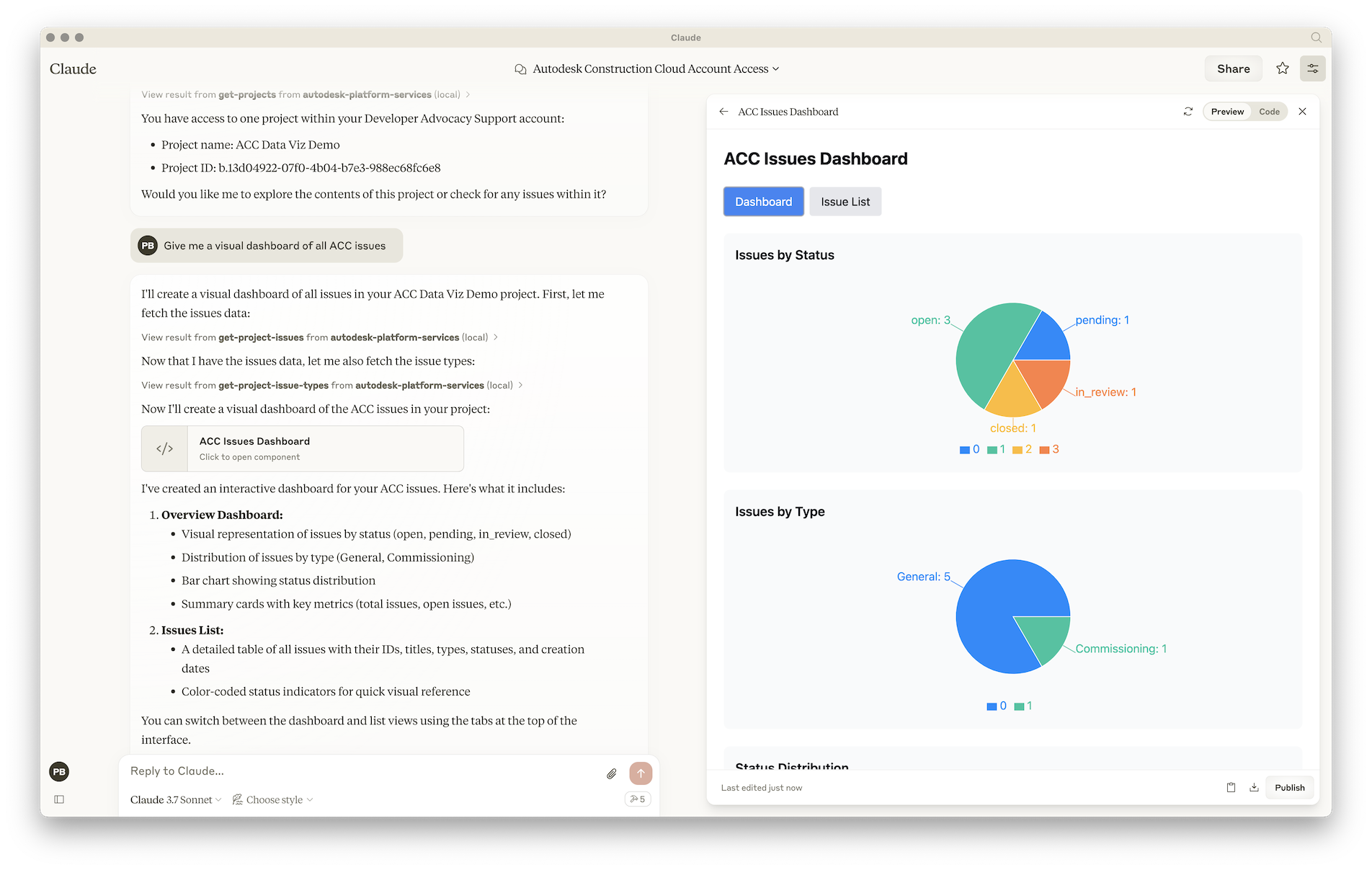
プロジェクトXYZのすべての問題を視覚的に表示するダッシュボードを作成してください
Claude Desktop に MCP サーバーを追加する方法の詳細については、公式ドキュメントを参照してください。
List all available Autodesk Construction Cloud accounts
Inputs: no named parameters.
List contents of a project or a specific subfolder in Autodesk Construction Cloud
Inputs: accountId (required), projectId (required), folderId.
Retrieves a list of comments associated with an issue in Autodesk Construction Cloud.
Inputs: projectId (required), issueId (required).
Retrieves a list of supported root cause categories and root causes that you can allocate to an issue in Autodesk Construction Cloud.
Inputs: projectId (required).
List all available projects in an Autodesk Construction Cloud account
Inputs: projectId (required).
List all issue types in an Autodesk Construction Cloud project
Inputs: projectId (required).
List all versions of a document in Autodesk Construction Cloud
Inputs: projectId (required), itemId (required).
List all available projects in an Autodesk Construction Cloud account
Inputs: accountId (required).
Recent tool additions, removals, and schema changes observed during successful MCP inspections.
Loading tool schema changelog…
Scored across 8 tools
Multiple tools have unclear boundaries and overlapping purposes. 'get-issues' and 'get-projects' appear to have conflicting descriptions (both mention listing projects), and several tools like 'get-accounts', 'get-projects', and 'get-issues' seem to retrieve similar high-level resource lists. The descriptions don't clearly differentiate when to use each tool, leading to potential misselection.
All tools follow a consistent 'get-noun' pattern with hyphen-separated words, making them predictable and readable. The naming convention is uniform across all eight tools, with no deviations in style or structure.
Eight tools is a reasonable count for an Autodesk Construction Cloud server, slightly on the lower side but well-scoped for basic operations. It covers accounts, projects, issues, folders, and documents, though it might benefit from a few more tools for a more comprehensive surface.
The tool set is severely incomplete for the domain, focusing only on read operations ('get-') with no create, update, or delete capabilities. This creates significant gaps for managing resources like issues, projects, or documents, limiting agents to listing and retrieving without supporting full lifecycle workflows.
Model Context Protocol server for Studex tools, notifications, and profile integrations
Model Context Protocol server for the Apideck Unified API. Connect any MCP-compatible agent framework to 100+ accounting systems, HRIS platforms, file storage providers, and more through one integration. More information https://www.apideck.com/mcp-server
A Model Context Protocol server for Wix AI tools
MCP server for mandates, delegation, policy-gated execution, credential grants, and audit.