
F
licenseA
qualityB
maintenanceNode.js server implementing Model Context Protocol (MCP) for filesystem operations.
70
14
1,222,611 npm
92,139
-

Node.js로 구축된 실험적 모델 컨텍스트 프로토콜 서버는 새로운 보안 서비스 계정 기능을 사용하여 세분화된 액세스 제어를 통해 Autodesk Platform Services API에 대한 액세스를 제공합니다.
APS 앱 자격 증명 ( 서버 간 애플리케이션 유형이어야 함)
이 저장소를 복제하세요
종속성 설치: yarn install
TypeScript 코드 빌드: yarn run build
이 프로젝트의 루트 폴더에 .env 파일을 만들고 APS 자격 증명을 추가합니다.
APS_CLIENT_ID - APS 애플리케이션 클라이언트 ID
APS_CLIENT_SECRET - APS 애플리케이션 클라이언트 비밀번호
새 서비스 계정을 만듭니다: npx create-service-account ssa-test-user John Doe
이 스크립트는 새로 생성된 서비스 계정의 이메일과 여러 환경 변수를 출력합니다.
.env 파일에 새 환경 변수를 추가하거나 덮어씁니다.
APS_SA_ID - 서비스 계정 ID
APS_SA_EMAIL - 서비스 계정 이메일
APS_SA_KEY_ID - 서비스 계정 키 ID
APS_SA_PRIVATE_KEY - 서비스 계정 개인 키
ACC 프로젝트에 새 멤버로 서비스 계정 이메일을 초대하세요.
모델 컨텍스트 프로토콜 검사기 실행: yarn run inspect
Connect 눌러 이 MCP 서버를 시작하고 연결하세요.
Claude Desktop이 설치되어 있는지 확인하세요
아직 Claude Desktop 구성 파일이 없다면 만드세요.
macOS의 경우: ~/Library/Application Support/Claude/claude_desktop_config.json
Windows의 경우: %APPDATA%\Claude\claude_desktop_config.json
예를 들어, 시스템의 build/server.js 파일의 절대 경로를 사용하여 이 MCP 서버를 구성에 추가합니다.
지엑스피1
Claude Desktop을 열고 다음 테스트 프롬프트 중 일부를 시도해 보세요.
어떤 ACC 프로젝트에 참여할 수 있나요?
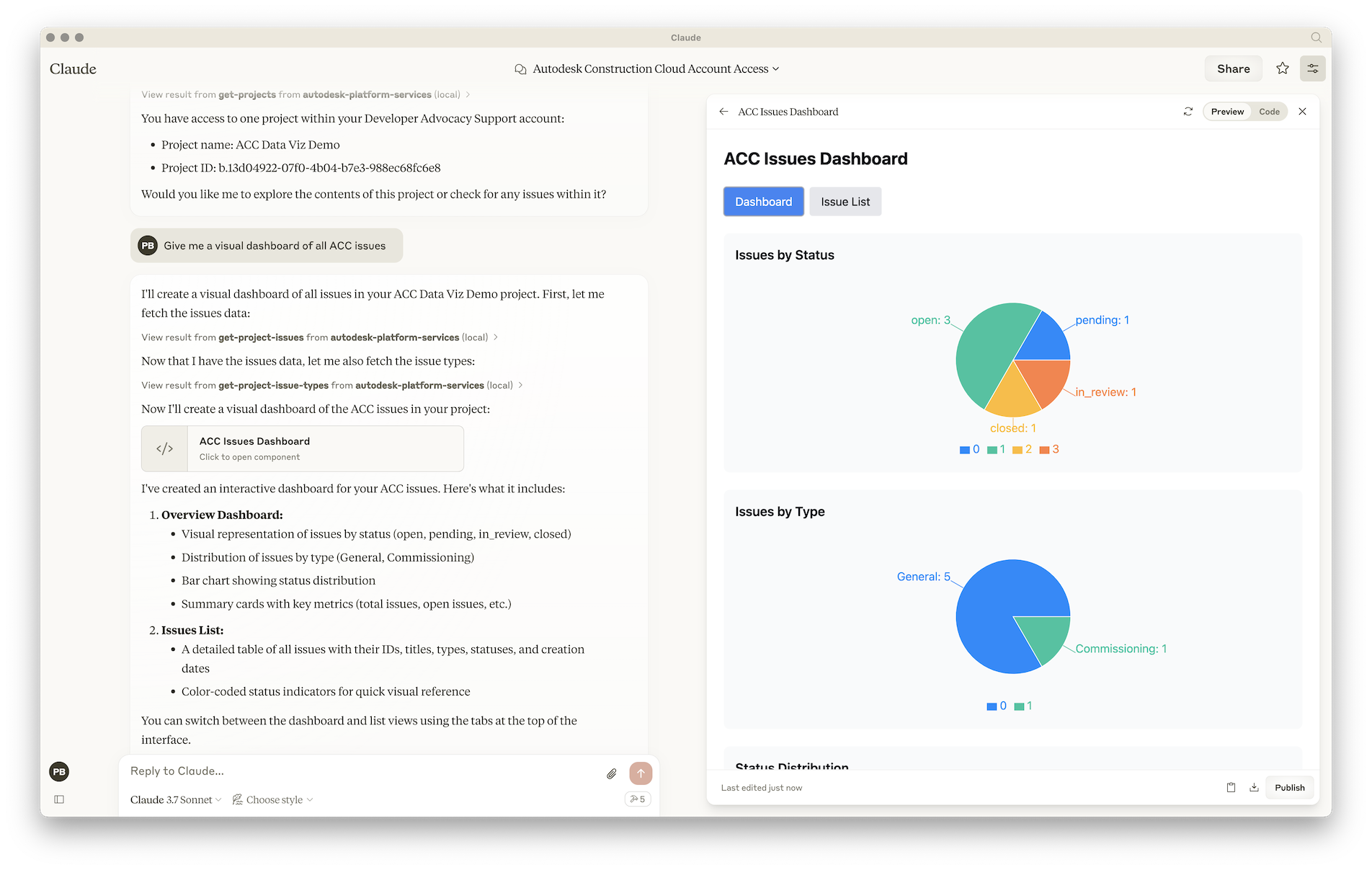
XYZ 프로젝트의 모든 문제에 대한 시각적 대시보드를 제공해 주세요.
Claude Desktop에 MCP 서버를 추가하는 방법에 대한 자세한 내용은 공식 문서를 참조하세요.
List all available Autodesk Construction Cloud accounts
Inputs: no named parameters.
List contents of a project or a specific subfolder in Autodesk Construction Cloud
Inputs: accountId (required), projectId (required), folderId.
Retrieves a list of comments associated with an issue in Autodesk Construction Cloud.
Inputs: projectId (required), issueId (required).
Retrieves a list of supported root cause categories and root causes that you can allocate to an issue in Autodesk Construction Cloud.
Inputs: projectId (required).
List all available projects in an Autodesk Construction Cloud account
Inputs: projectId (required).
List all issue types in an Autodesk Construction Cloud project
Inputs: projectId (required).
List all versions of a document in Autodesk Construction Cloud
Inputs: projectId (required), itemId (required).
List all available projects in an Autodesk Construction Cloud account
Inputs: accountId (required).
Recent tool additions, removals, and schema changes observed during successful MCP inspections.
Loading tool schema changelog…
Scored across 8 tools
Multiple tools have unclear boundaries and overlapping purposes. 'get-issues' and 'get-projects' appear to have conflicting descriptions (both mention listing projects), and several tools like 'get-accounts', 'get-projects', and 'get-issues' seem to retrieve similar high-level resource lists. The descriptions don't clearly differentiate when to use each tool, leading to potential misselection.
All tools follow a consistent 'get-noun' pattern with hyphen-separated words, making them predictable and readable. The naming convention is uniform across all eight tools, with no deviations in style or structure.
Eight tools is a reasonable count for an Autodesk Construction Cloud server, slightly on the lower side but well-scoped for basic operations. It covers accounts, projects, issues, folders, and documents, though it might benefit from a few more tools for a more comprehensive surface.
The tool set is severely incomplete for the domain, focusing only on read operations ('get-') with no create, update, or delete capabilities. This creates significant gaps for managing resources like issues, projects, or documents, limiting agents to listing and retrieving without supporting full lifecycle workflows.
Model Context Protocol server for Studex tools, notifications, and profile integrations
Model Context Protocol server for the Apideck Unified API. Connect any MCP-compatible agent framework to 100+ accounting systems, HRIS platforms, file storage providers, and more through one integration. More information https://www.apideck.com/mcp-server
A Model Context Protocol server for Wix AI tools
MCP server for mandates, delegation, policy-gated execution, credential grants, and audit.