


A
licenseB
qualityA
maintenanceAn AI-powered tool that generates modern UI components from natural language descriptions, integrating with popular IDEs to streamline UI development workflow.
4
12,175 npm
5,996
ISC

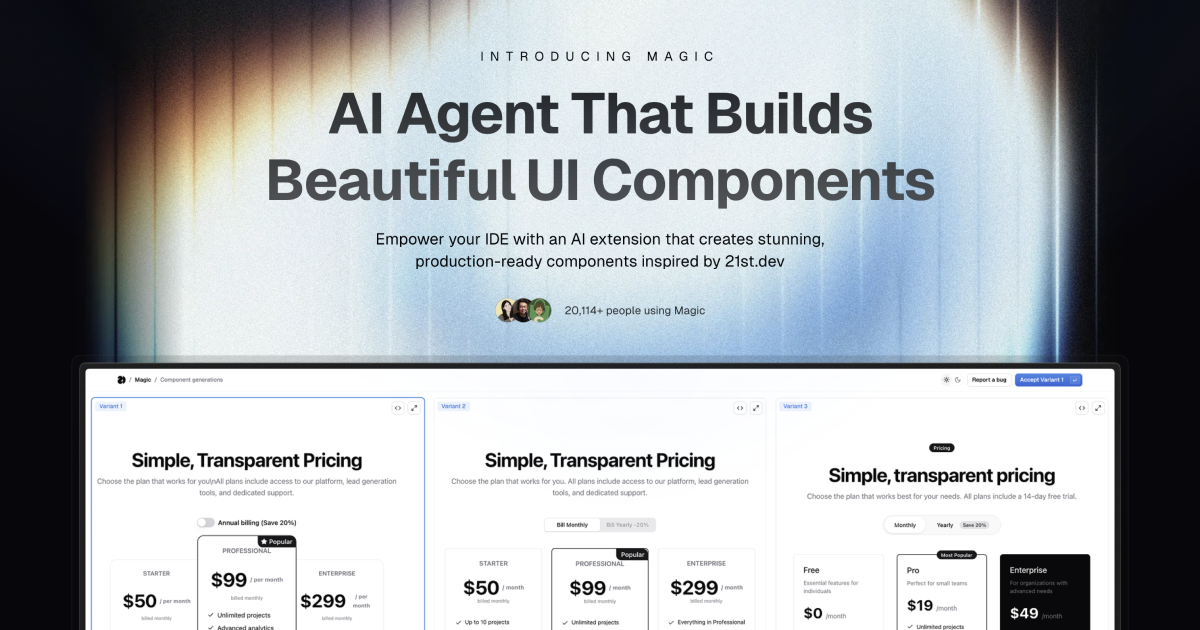
Magic Component Platform(MCP)은 개발자가 자연어 설명을 통해 아름답고 현대적인 UI 컴포넌트를 즉시 제작할 수 있도록 지원하는 강력한 AI 기반 도구입니다. 널리 사용되는 IDE와 완벽하게 통합되며 UI 개발을 위한 간소화된 워크플로를 제공합니다.
AI 기반 UI 생성 : 자연어로 설명하여 UI 구성 요소를 생성합니다.
다중 IDE 지원 :
커서 IDE 통합
윈드서핑 지원
VSCode + Cline 통합(베타)
최신 구성 요소 라이브러리 : 21st.dev 에서 영감을 받아 미리 구축되고 사용자 정의가 가능한 광범위한 구성 요소 컬렉션에 액세스
실시간 미리보기 : 구성 요소를 만들 때 즉시 구성 요소를 볼 수 있습니다.
TypeScript 지원 : 유형 안전 개발을 위한 전체 TypeScript 지원
SVGL 통합 : 광범위한 전문 브랜드 자산 및 로고 컬렉션에 액세스
구성 요소 향상 : 고급 기능 및 애니메이션으로 기존 구성 요소를 개선합니다(곧 출시)
Related MCP server: 21st.dev Magic AI Agent
에이전트에게 필요한 것을 알려주세요
AI 에이전트의 채팅에서 /ui 입력하고 찾고 있는 구성 요소를 설명하세요.
예: /ui create a modern navigation bar with responsive design
마법이 그것을 창조하게 하세요
IDE에서 Magic을 사용하라는 메시지가 표시됩니다.
Magic은 세련된 UI 구성 요소를 즉시 구축합니다.
구성 요소는 21st.dev의 라이브러리에서 영감을 받았습니다.
원활한 통합
구성 요소는 프로젝트에 자동으로 추가됩니다.
새로운 UI 구성요소를 바로 사용해 보세요
모든 구성 요소는 완전히 사용자 정의 가능합니다.
Node.js(최신 LTS 버전 권장)
지원되는 IDE 중 하나:
커서
윈드서핑
VSCode(Cline 확장 포함)
API 키 생성
Magic 대시보드를 방문하세요
API 섹션으로 이동
새로운 API 키 생성
IDE 설정
지엑스피1
~/.codeium/windsurf/mcp_config.json 에 추가:
{
  "mcpServers": {
    "magic": {
      "command": "npx",
      "args": [
        "-y",
        "@smithery/cli@latest",
        "install",
        "@21st-dev/magic-mcp",
        "--client",
        "windsurf"
      ],
      "env": {
        "TWENTY_FIRST_API_KEY": "your-api-key"
      }
    }
  }
}Cline의 MCP 구성에 추가:
{
  "mcpServers": {
    "magic": {
      "command": "npx",
      "args": [
        "-y",
        "@smithery/cli@latest",
        "install",
        "@21st-dev/magic-mcp",
        "--client",
        "cline"
      ],
      "env": {
        "TWENTY_FIRST_API_KEY": "your-api-key"
      }
    }
  }
}Magic AI Agent는 생성하는 구성 요소와 관련된 파일만 작성하거나 수정합니다. 프로젝트의 코드 스타일과 구조를 따르며, 애플리케이션의 다른 부분에 영향을 주지 않고 기존 코드베이스와 완벽하게 통합됩니다.
네! 생성된 모든 컴포넌트는 완벽하게 편집 가능하며 잘 구성된 코드를 포함합니다. 코드베이스의 다른 React 컴포넌트와 마찬가지로 스타일, 기능 및 동작을 수정할 수 있습니다.
월별 생성 한도를 초과하면 플랜을 업그레이드하라는 메시지가 표시됩니다. 언제든지 업그레이드하여 구성 요소를 계속 생성할 수 있습니다. 기존 구성 요소는 그대로 작동합니다.
작성자는 언제든지 21st.dev에 컴포넌트를 게시할 수 있으며, Magic Agent는 해당 컴포넌트에 즉시 접근할 수 있습니다. 즉, 커뮤니티의 최신 컴포넌트와 디자인 패턴을 항상 이용할 수 있습니다.
Magic AI Agent는 간단한 버튼부터 복잡한 인터랙티브 양식까지 다양한 복잡성의 구성 요소를 처리할 수 있습니다. 하지만 최상의 결과를 얻으려면 매우 복잡한 UI를 작고 관리하기 쉬운 구성 요소로 나누는 것이 좋습니다.
mcp/
├── app/
│   └── components/     # Core UI components
├── types/             # TypeScript type definitions
├── lib/              # Utility functions
└── public/ # Static assetsIdeInstructions : 다양한 IDE에 대한 설정 지침
ApiKeySection : API 키 관리 인터페이스
WelcomeOnboarding : 신규 사용자를 위한 온보딩 흐름
여러분의 참여를 환영합니다! Discord 커뮤니티 에 가입하시고 Magic Agent 개선에 도움이 되는 피드백을 남겨주세요. 소스 코드는 GitHub 에서 확인하실 수 있습니다.
Discord 커뮤니티 - 활발한 커뮤니티에 참여하세요
Twitter - 최신 소식을 받아보려면 팔로우하세요
Magic Agent는 현재 베타 버전입니다. 이 기간 동안 모든 기능은 무료로 이용하실 수 있습니다. 플랫폼을 지속적으로 개선해 나가는 동안 여러분의 소중한 의견과 양해 부탁드립니다.
MIT 라이센스
베타 테스터와 커뮤니티 멤버들에게 감사드립니다.
Cursor, Windsurf 및 Cline 팀의 협력에 특별히 감사드립니다.
21st.dev 와의 통합을 통해 구성 요소에 대한 영감을 얻다
로고 및 브랜드 자산 통합을 위한 SVGL
자세한 내용을 알아보려면 Discord 커뮤니티 에 가입하거나 21st.dev/magic을 방문하세요.
"Use this tool when the user requests a new UI component—e.g., mentions /ui, /21 /21st, or asks for a button, input, dialog, table, form, banner, card, or other React component. This tool ONLY returns the text snippet for that UI component. After calling this tool, you must edit or add files to integrate the snippet into the codebase."
| Name | Required | Description | Default |
|---|---|---|---|
| message | Yes | Full users message | |
| searchQuery | Yes | Generate a search query for 21st.dev (library for searching UI components) to find a UI component that matches the user's message. Must be a two-four words max or phrase |
Does the description disclose side effects, auth requirements, rate limits, or destructive behavior?
With no annotations provided, the description carries the full burden of behavioral disclosure. It explains that the tool returns text snippets and requires manual integration afterward, which is useful context. However, it doesn't disclose important behavioral traits like whether this is a read-only operation, if it makes external API calls, potential rate limits, or error handling for invalid requests.
Agents need to know what a tool does to the world before calling it. Descriptions should go beyond structured annotations to explain consequences.
Is the description appropriately sized, front-loaded, and free of redundancy?
The description is extremely concise and well-structured with only three sentences, each serving a distinct purpose: trigger conditions, tool limitation, and required follow-up actions. There's zero wasted text, and the most important information (when to use the tool) is front-loaded.
Shorter descriptions cost fewer tokens and are easier for agents to parse. Every sentence should earn its place.
Given the tool's complexity, does the description cover enough for an agent to succeed on first attempt?
Given no annotations and no output schema, the description provides adequate context for a simple tool but has gaps. It explains the tool's purpose and usage well but doesn't describe what the output looks like (format, structure, or content of returned snippets) or address potential limitations or error conditions that would help an agent use it correctly.
Complex tools with many parameters or behaviors need more documentation. Simple tools need less. This dimension scales expectations accordingly.
Does the description clarify parameter syntax, constraints, interactions, or defaults beyond what the schema provides?
With 100% schema description coverage, the baseline is 3. The description doesn't add any parameter-specific information beyond what's already in the schema (message and searchQuery parameters are fully documented in the schema). No additional syntax, format, or usage details for parameters are provided in the description.
Input schemas describe structure but not intent. Descriptions should explain non-obvious parameter relationships and valid value ranges.
Does the description clearly state what the tool does and how it differs from similar tools?
The description clearly states the tool's purpose: 'returns the text snippet for that UI component' when users request new UI components. It specifies the exact trigger conditions (mentions of /ui, /21, /21st, or specific component types) and distinguishes it from sibling tools by focusing on returning component snippets rather than inspiration or logo searches.
Agents choose between tools based on descriptions. A clear purpose with a specific verb and resource helps agents select the right tool.
Does the description explain when to use this tool, when not to, or what alternatives exist?
The description provides explicit usage guidelines: 'Use this tool when the user requests a new UI component' with specific trigger examples, and distinguishes it from alternatives by stating 'This tool ONLY returns the text snippet' and requiring follow-up actions. It clearly defines when to use this tool versus other approaches.
Agents often have multiple tools that could apply. Explicit usage guidance like "use X instead of Y when Z" prevents misuse.
"Use this tool when the user wants to see component, get inspiration, or /21st fetch data and previews from 21st.dev. This tool returns the JSON data of matching components without generating new code. This tool ONLY returns the text snippet for that UI component. After calling this tool, you must edit or add files to integrate the snippet into the codebase."
| Name | Required | Description | Default |
|---|---|---|---|
| message | Yes | Full users message | |
| searchQuery | Yes | Search query for 21st.dev (library for searching UI components) to find a UI component that matches the user's message. Must be a two-four words max or phrase |
Does the description disclose side effects, auth requirements, rate limits, or destructive behavior?
With no annotations, the description carries the behavioral disclosure burden. It states that no code is generated, that only the text snippet is returned, and that the agent must edit or add files afterward. It does not cover authentication, limits, or exact return shape, but the key behavioral constraints are disclosed.
Agents need to know what a tool does to the world before calling it. Descriptions should go beyond structured annotations to explain consequences.
Is the description appropriately sized, front-loaded, and free of redundancy?
The description is short and front-loaded with the trigger conditions. There is some redundancy between 'returns the JSON data' and 'ONLY returns the text snippet', but the overall structure is efficient and the post-call instruction earns its place.
Shorter descriptions cost fewer tokens and are easier for agents to parse. Every sentence should earn its place.
Given the tool's complexity, does the description cover enough for an agent to succeed on first attempt?
For a two-parameter fetch-like tool with a rich schema and no output schema, this description provides sufficient context: when to use it, what it returns, what it does not do, and what the agent must do afterward. It could be slightly richer on output formatting, but it is largely complete.
Complex tools with many parameters or behaviors need more documentation. Simple tools need less. This dimension scales expectations accordingly.
Does the description clarify parameter syntax, constraints, interactions, or defaults beyond what the schema provides?
The input schema already documents both required parameters with 100% coverage, so the description adds limited semantic value beyond the schema. The description clarifies that searchQuery is for finding a matching UI component, but this is also reflected in the schema's parameter description.
Input schemas describe structure but not intent. Descriptions should explain non-obvious parameter relationships and valid value ranges.
Does the description clearly state what the tool does and how it differs from similar tools?
The description clearly identifies the action as fetching component data and previews from 21st.dev, and it contrasts itself with code generation by stating it does not generate new code. It does not explicitly distinguish itself from the refiner sibling, so it stops short of full differentiation.
Agents choose between tools based on descriptions. A clear purpose with a specific verb and resource helps agents select the right tool.
Does the description explain when to use this tool, when not to, or what alternatives exist?
The description opens with explicit trigger conditions: 'when the user wants to see component, get inspiration, or /21st'. It does not provide when-not guidance or name alternative tools, but the usage context is clear enough for an agent to select this tool appropriately.
Agents often have multiple tools that could apply. Explicit usage guidance like "use X instead of Y when Z" prevents misuse.
Search and return logos in specified format (JSX, TSX, SVG). Supports single and multiple logo searches with category filtering. Can return logos in different themes (light/dark) if available.
When to use this tool:
When user types "/logo" command (e.g., "/logo GitHub")
When user asks to add a company logo that's not in the local project
Example queries:
Single company: ["discord"]
Multiple companies: ["discord", "github", "slack"]
Specific brand: ["microsoft office"]
Command style: "/logo GitHub" -> ["github"]
Request style: "Add Discord logo to the project" -> ["discord"]
Format options:
TSX: Returns TypeScript React component
JSX: Returns JavaScript React component
SVG: Returns raw SVG markup
Each result includes:
Component name (e.g., DiscordIcon)
Component code
Import instructions
| Name | Required | Description | Default |
|---|---|---|---|
| format | Yes | Output format | |
| queries | Yes | List of company names to search for logos |
Does the description disclose side effects, auth requirements, rate limits, or destructive behavior?
With no annotations to lean on, the description carries the behavioral burden and does well by detailing supported formats, theme variations ('if available'), and the exact structure of results (component name, code, import instructions). It does not cover failure modes or no-result behavior, but the disclosed behavior is sufficient for the agent to anticipate what will happen.
Agents need to know what a tool does to the world before calling it. Descriptions should go beyond structured annotations to explain consequences.
Is the description appropriately sized, front-loaded, and free of redundancy?
The description is well-organized with clear sections for purpose, usage, examples, formats, and output structure. It is slightly longer than strictly necessary because example queries partially repeat the usage triggers, but each section earns its place and the key info is front-loaded in the first sentence.
Shorter descriptions cost fewer tokens and are easier for agents to parse. Every sentence should earn its place.
Given the tool's complexity, does the description cover enough for an agent to succeed on first attempt?
Given there is no output schema and no annotations, the description does a good job of explaining what the tool returns, including output format options and result fields. However, it mentions 'category filtering' even though the input schema has no category parameter, and it does not explain what happens when a logo is not found, leaving minor but real gaps.
Complex tools with many parameters or behaviors need more documentation. Simple tools need less. This dimension scales expectations accordingly.
Does the description clarify parameter syntax, constraints, interactions, or defaults beyond what the schema provides?
The schema already describes both parameters (format and queries), so the baseline is 3; the description adds significant value by defining what each format returns (TSX/JSX/SVG), providing concrete example query arrays, and showing how command-style inputs map to the queries parameter. This goes beyond the schema's minimal descriptions.
Input schemas describe structure but not intent. Descriptions should explain non-obvious parameter relationships and valid value ranges.
Does the description clearly state what the tool does and how it differs from similar tools?
The description opens with a precise verb and resource: 'Search and return logos in specified format (JSX, TSX, SVG).' It clearly distinguishes itself from sibling tools (which concern component inspiration, refining, and building) by focusing on logo lookup and output formats. The example queries and command styles reinforce exactly what the tool does.
Agents choose between tools based on descriptions. A clear purpose with a specific verb and resource helps agents select the right tool.
Does the description explain when to use this tool, when not to, or what alternatives exist?
The 'When to use this tool' section explicitly lists two concrete trigger conditions: user types '/logo' command or asks to add a company logo not in the local project. The phrase 'that's not in the local project' provides a clear when-not-to-use condition, effectively excluding cases where the logo is already available locally.
Agents often have multiple tools that could apply. Explicit usage guidance like "use X instead of Y when Z" prevents misuse.
Recent tool additions, removals, and schema changes observed during successful MCP inspections.
v1.0.021st_magic_component_builder21st_magic_component_inspirationlogo_searchScored across 3 tools
The first two tools have significant overlap in purpose and confusing descriptions. Both '21st_magic_component_builder' and '21st_magic_component_inspiration' claim to return UI component snippets and require integration into the codebase, making it unclear when to use one versus the other. The third tool 'logo_search' is clearly distinct for logo handling, but the ambiguity between the first two tools is problematic.
The naming is inconsistent with mixed conventions. The first two tools use a verbose '21st_magic_component_' prefix with different suffixes ('builder' vs 'inspiration'), while the third tool uses a simple 'logo_search' with underscore. There's no consistent verb_noun pattern, and the styles vary significantly across the set.
With only 3 tools, the count feels thin for a 'Magic Component Platform' that seems to handle UI components and logos. While 3 tools isn't inherently wrong, it suggests limited scope or incomplete coverage for what the server name implies. It's borderline but leans toward under-scoped.
For a component platform, there are significant gaps. The tools cover component building/inspiration and logo search, but lack essential operations like updating existing components, deleting components, managing component libraries, or handling component state/props systematically. The surface feels incomplete for proper component lifecycle management.
Build and manage your design system with AI: tokens, themes, components, icons, Figma and code.
UI design from prompts, screenshots, and URLs for AI coding agents and theme tokens.
The bug mediator for AI-built apps: plain-English diagnosis + a ready fix, in your editor.
AI-powered design and management for Webflow Sites