
F
licenseNot graded
qualityD
maintenanceThis server implements the Model Context Protocol to facilitate meaningful interaction and understanding development between humans and AI through structured tools and progressive interaction patterns.
57
-

The ESA MCP Server provides a convenient interface to manage Alibaba Cloud ESA services via the MCP protocol, primarily focusing on Edge Routines and related configurations.
Key capabilities include:
Manage Edge Routines: Create, delete, list, and get details of Edge Routines
Deploy Code: Commit and deploy code versions to staging or production environments, and delete deployments
Manage Routes: Create, update, delete, and list routes associated with Edge Routines or sites
Handle Records: Create, delete, and list records related to Edge Routines and sites
Manage Sites: List active sites, match sites based on criteria, and create DNS records
Canary Deployment: List available canary areas and deploy code with canary release options
Click on "Deploy Server".
Wait a few minutes for the server to deploy. Once ready, it will show a "Started" state.
In the chat, type @ followed by the MCP server name and your instructions, e.g., "@ESA MCP Server list all active sites in my Alibaba Cloud account"
That's it! The server will respond to your query, and you can continue using it as needed.
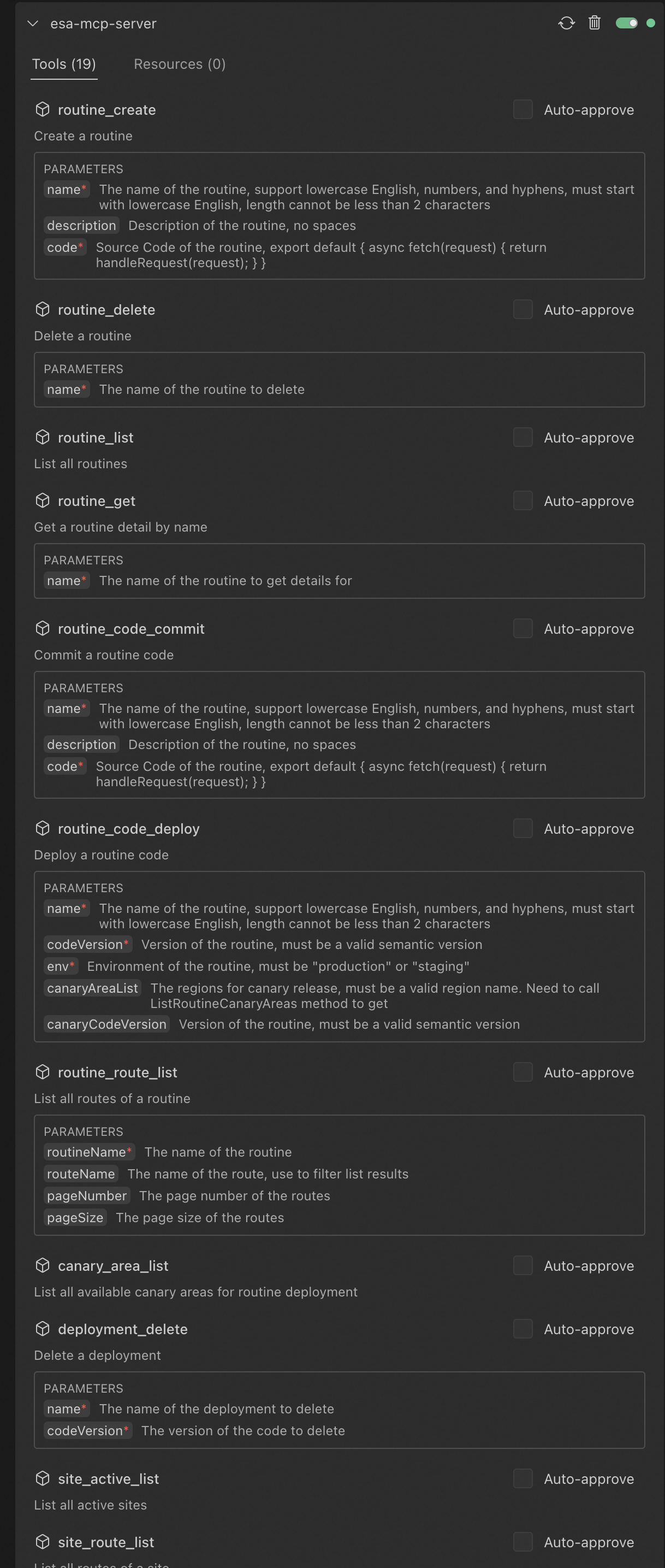
Here is a step-by-step guide with screenshots.


MCP server for Alibaba Cloud ESA — deploy to the edge, manage DNS, certificates, and Edge Routines, all from your AI-powered IDE.
🚀 Pages — One-command deploy HTML or static folders (dist/, build/) to the edge
⚡ Edge Routine — Full lifecycle management: create, commit, deploy, route, and tear down
🌐 Site — DNS records, SSL certificates, IPv6, managed transforms, and site configuration
🧩 Modular — Load all 40+ tools or pick only the module you need
🔌 Works everywhere — Cursor, Claude Desktop, Cline, and any MCP-compatible client
Related MCP server: MCP Server Demo
Get your AccessKey ID and Secret from the Alibaba Cloud AccessKey page
Enable the Edge Routine service
Add to your MCP client config (e.g., Cursor ~/.cursor/mcp.json, Claude Desktop, Cline):
Pages (recommended) — deploy static sites to the edge in seconds:
{
  "mcpServers": {
    "esa-pages": {
      "command": "npx",
      "args": ["-y", "-p", "mcp-server-esa", "mcp-server-esa-pages"],
      "env": {
        "ALIBABA_CLOUD_ACCESS_KEY_ID": "your AK",
        "ALIBABA_CLOUD_ACCESS_KEY_SECRET": "your SK"
      }
    }
  }
}
All-in-one — includes Pages, ER, and Site tools:
{
  "mcpServers": {
    "esa-mcp-server": {
      "command": "npx",
      "args": ["-y", "mcp-server-esa"],
      "env": {
        "ALIBABA_CLOUD_ACCESS_KEY_ID": "your AK",
        "ALIBABA_CLOUD_ACCESS_KEY_SECRET": "your SK",
        "ALIBABA_CLOUD_SECURITY_TOKEN": "optional, required when using STS Token"
      }
    }
  }
}
Modular — load only what you need:
Module | Binary | Best for |
Pages |
| Frontend devs — deploy HTML/static files to the edge |
ER |
| Edge developers — full Edge Routine lifecycle |
Site |
| DevOps / SREs — DNS, certificates, IPv6, site config |
Run a specific module:
npx -p mcp-server-esa <binary>Pin a version:npx -p mcp-server-esa@1.1.0 <binary>
Edge Routine — full lifecycle management for serverless edge functions:
{
  "mcpServers": {
    "esa-er": {
      "command": "npx",
      "args": ["-y", "-p", "mcp-server-esa", "mcp-server-esa-er"],
      "env": {
        "ALIBABA_CLOUD_ACCESS_KEY_ID": "your AK",
        "ALIBABA_CLOUD_ACCESS_KEY_SECRET": "your SK"
      }
    }
  }
}
Site — DNS, certificates, IPv6, and site configuration:
{
  "mcpServers": {
    "esa-site": {
      "command": "npx",
      "args": ["-y", "-p", "mcp-server-esa", "mcp-server-esa-site"],
      "env": {
        "ALIBABA_CLOUD_ACCESS_KEY_ID": "your AK",
        "ALIBABA_CLOUD_ACCESS_KEY_SECRET": "your SK"
      }
    }
  }
}
Multiple modules:
{
  "mcpServers": {
    "esa-pages": {
      "command": "npx",
      "args": ["-y", "-p", "mcp-server-esa", "mcp-server-esa-pages"],
      "env": {
        "ALIBABA_CLOUD_ACCESS_KEY_ID": "your AK",
        "ALIBABA_CLOUD_ACCESS_KEY_SECRET": "your SK"
      }
    },
    "esa-site": {
      "command": "npx",
      "args": ["-y", "-p", "mcp-server-esa", "mcp-server-esa-site"],
      "env": {
        "ALIBABA_CLOUD_ACCESS_KEY_ID": "your AK",
        "ALIBABA_CLOUD_ACCESS_KEY_SECRET": "your SK"
      }
    }
  }
}Claude Desktop
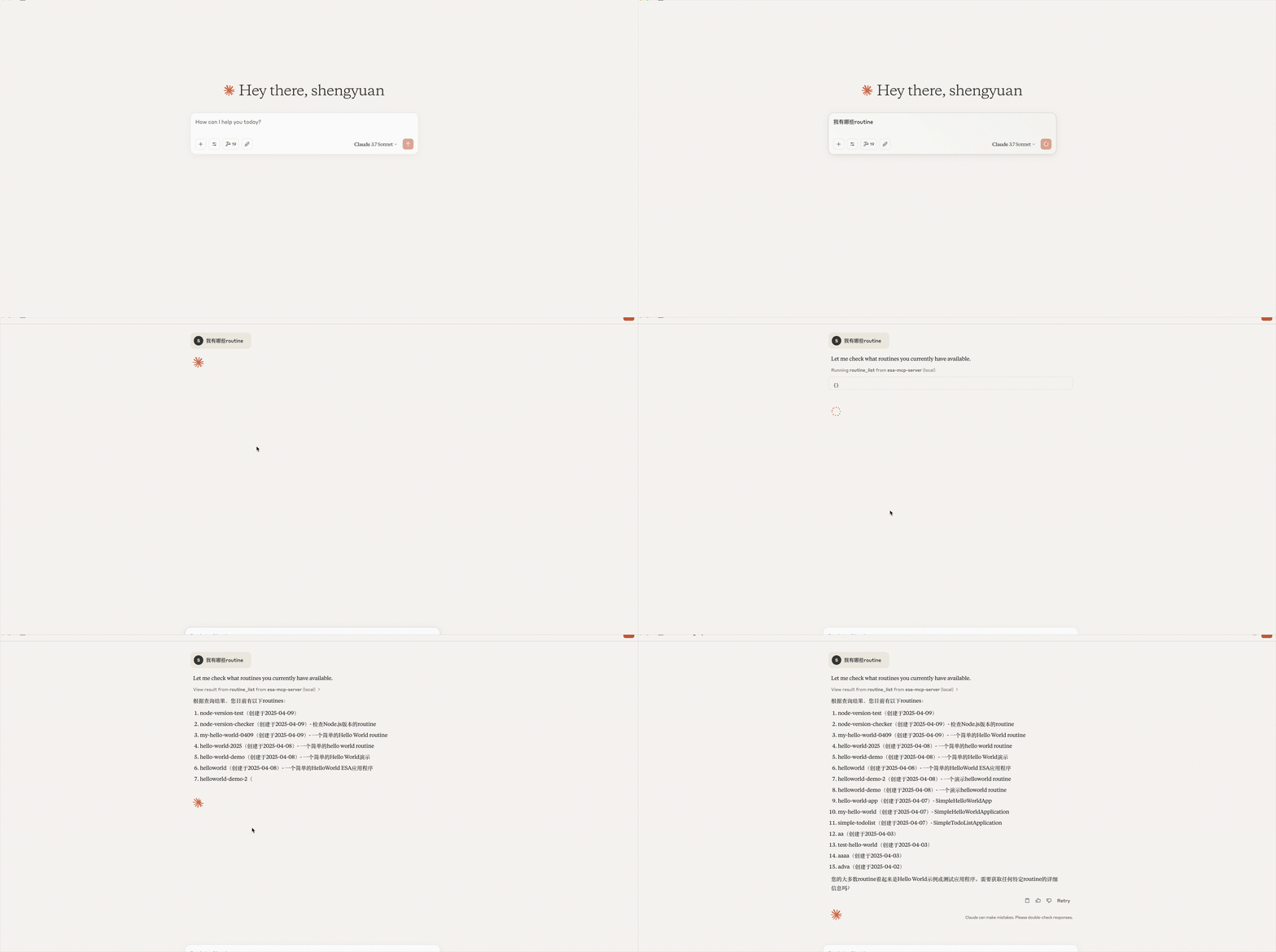
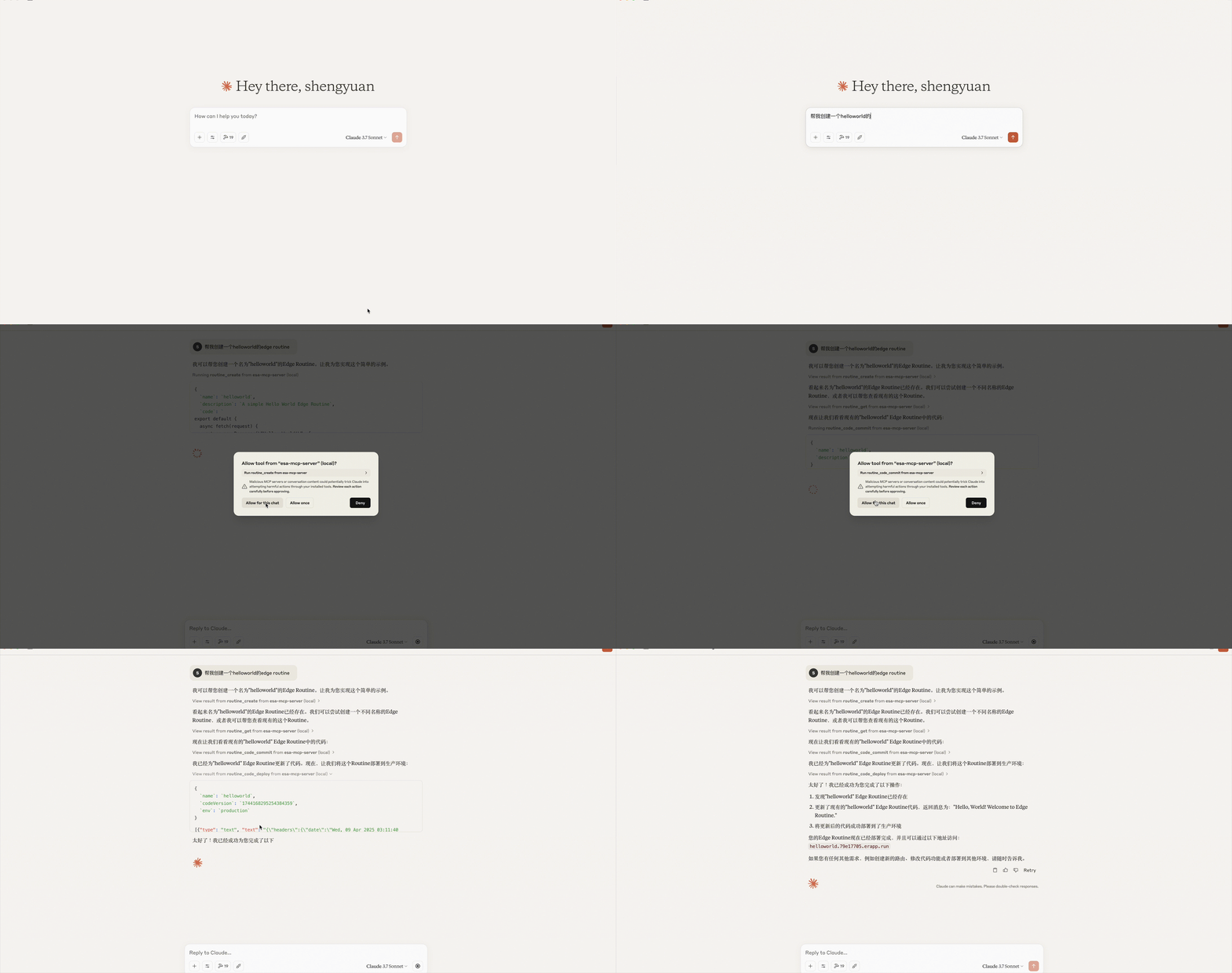
Cline
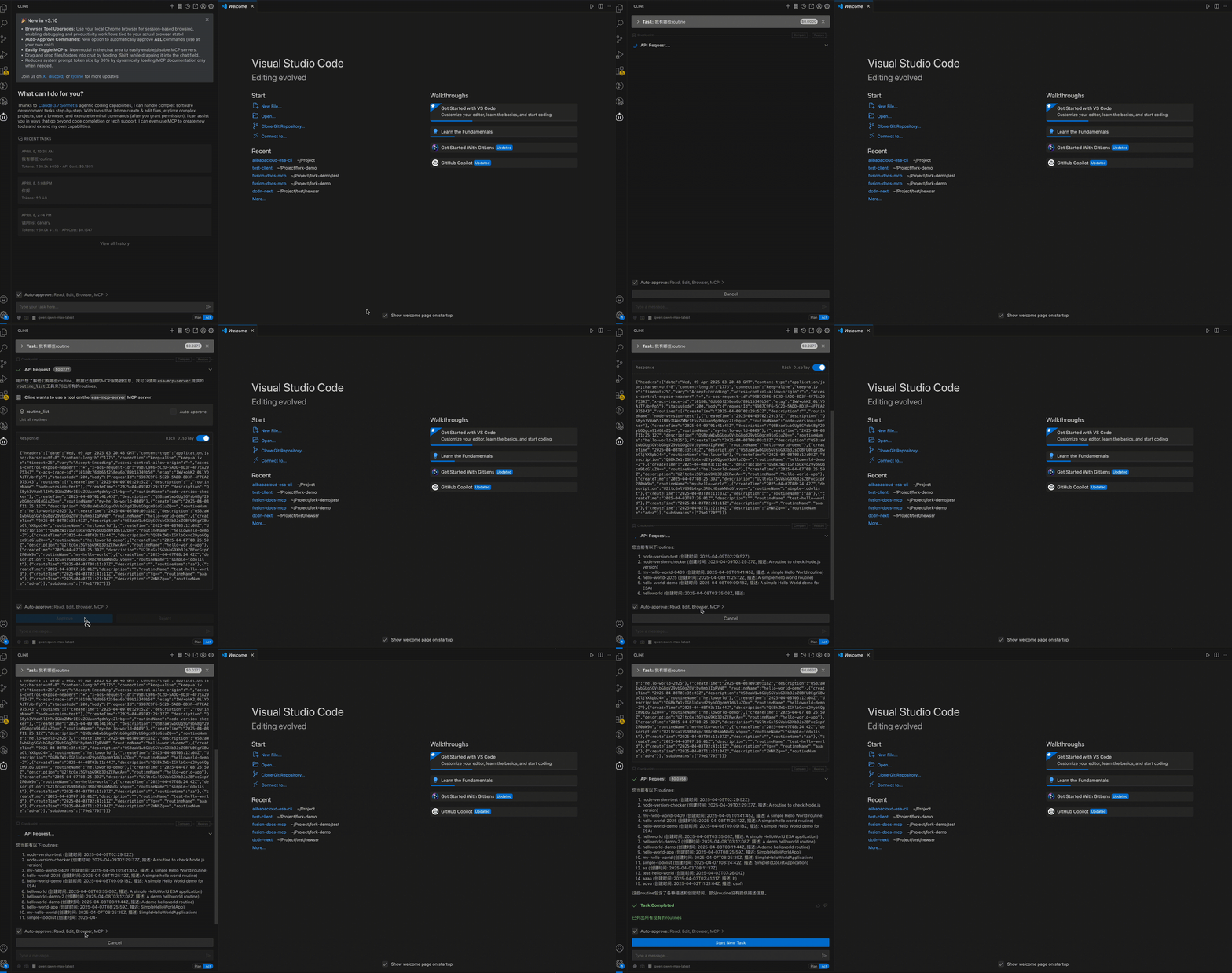
Cline configured successfully:
Claude Desktop configured successfully:
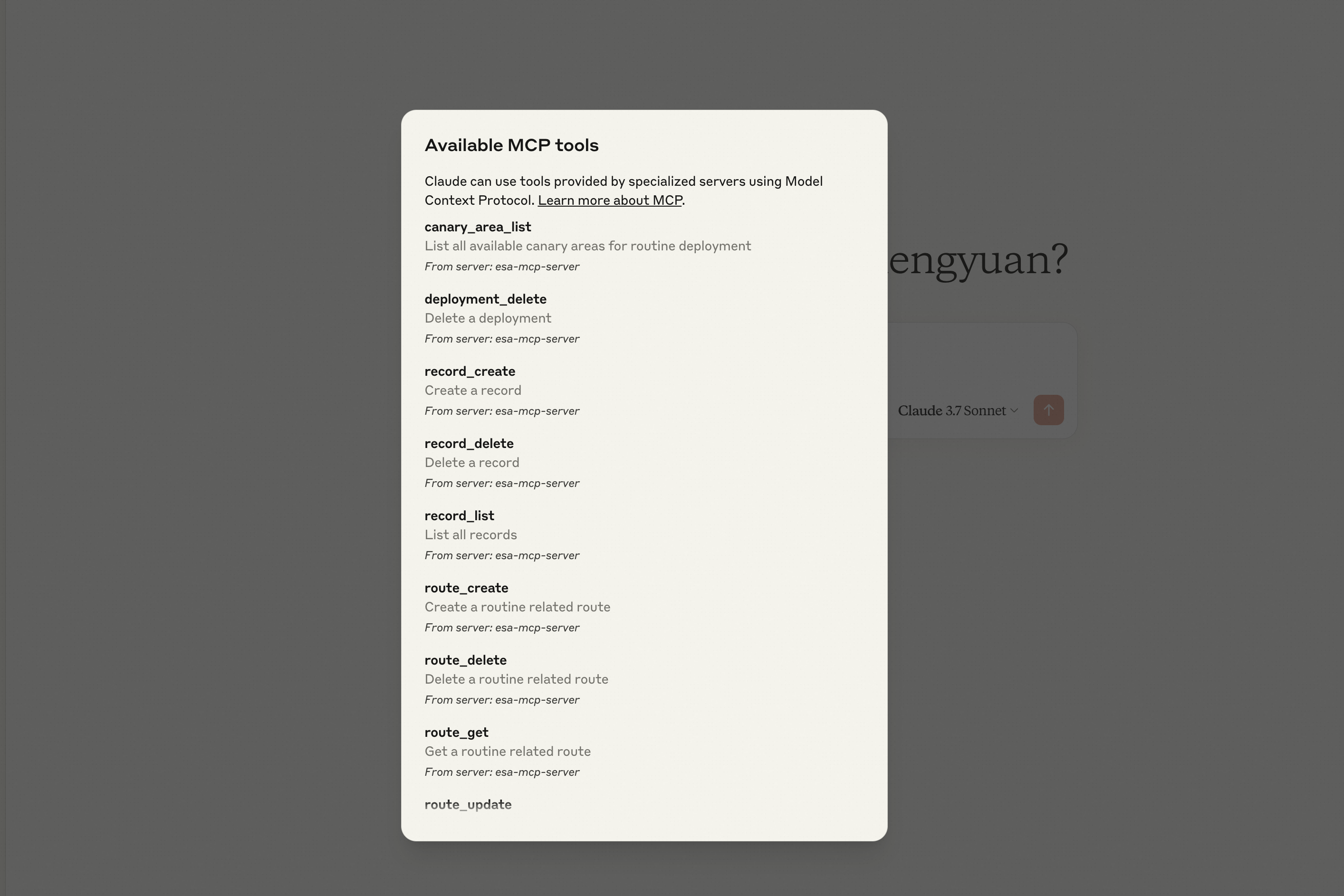
Tool | Description |
| Deploy an HTML page to ESA Pages, returns a default access URL |
| Deploy a local folder of static files (HTML/CSS/JS/images) to ESA Pages, auto-packaged |
Category | Tool | Description |
Routines |
| Create a new Edge Routine |
| Delete an Edge Routine | |
| List all Edge Routines | |
| Get Edge Routine details | |
Deployments |
| Save a code version for an Edge Routine |
| Deploy a code version to staging or production | |
| Delete a code version | |
Routes |
| Create a route for an Edge Routine |
| Update a route configuration | |
| Delete a route | |
| Get route details | |
| List routes for an Edge Routine | |
| List routes for a site | |
Records |
| Create a record for an Edge Routine |
| Delete a record | |
| List records for an Edge Routine |
Category | Tool | Description |
Sites |
| List all sites |
| List active sites | |
| Find a site matching given criteria | |
| Create a new site | |
| Query ESA proxy configuration | |
| Update ESA proxy configuration | |
DNS |
| List DNS records for a site |
| Create an A/AAAA record | |
| Create a CNAME record | |
| Create a TXT record | |
| Create an NS record | |
| Create an MX record | |
| Update a DNS record | |
| Get a DNS record | |
| List DNS records | |
| Delete a DNS record | |
IPv6 |
| Update IPv6 configuration |
| Query IPv6 configuration | |
Transform |
| Update managed transform configuration |
| Query managed transform configuration | |
Certificate |
| Enable/update certificate for a site |
| Apply for a free SSL certificate | |
| Get certificate details | |
| Delete a certificate | |
| List certificates for a site | |
| Query certificate quota and usage |
Write a 2048 game and deploy it on Edge Routine, show me the access URL.
Deploy the ./dist folder to ESA Pages.
List all Edge Routines under my account.
Delete Edge Routines created after May 2025.
What is the default access URL for my Edge Routine "hello-world"?
Create a CNAME record for test.example.com pointing to example2.com.
Create an A record for test.example.com with value 1.1.1.1.
Apply a free SSL certificate for my site example.com.
Show me the IPv6 configuration for my site.MIT
Applies for a free SSL certificate.
Inputs: siteId (required), domains (required), type (required).
Adds a website. Make sure that you have an available plan before you add a website. Make sure that your website domain name has an ICP filing if the location you want to specify covers the Chinese mainland.
Inputs: siteName (required), coverage (required), accessType (required), instanceId (required), +1 more.
Creates a DNS record for a specific website. Only A/AAAA records are supported.
Inputs: siteId (required), recordName (required), data (required), proxied, +3 more.
Creates a DNS record for a specific website. Only supports records with type=CNAME and sourceType=Domain.
Inputs: siteId (required), recordName (required), data (required), sourceType, +4 more.
Creates a DNS record for a specific website. Only MX records are supported.
Inputs: siteId (required), recordName (required), data (required), bizName, +2 more.
Creates a DNS record for a specific website. Only NS records are supported.
Inputs: siteId, recordName, ttl, data, +3 more.
Creates a DNS record for a specific website. Only TXT records are supported.
Inputs: siteId (required), recordName (required), data (required), ttl, +1 more.
Deletes a certificate for a website.
Inputs: siteId (required), id (required).
Deletes a DNS record of a website based on the specified RecordId.
Inputs: recordId (required).
Delete a specified code version associated with an Edge Routine (ER).
Inputs: name (required), codeVersion (required).
Create a new record associated with an Edge Routine (ER)
Inputs: name (required), siteId (required), recordName (required).
Delete a specified record associated with an Edge Routine (ER).
Inputs: name (required), siteId (required), recordName (required), recordId.
List all records associated with a specific Edge Routine (ER).
Inputs: Name (required), PageNumber, PageSize, SearchKeyWord.
Retrieve the certificate, private key, and certificate information
Inputs: siteId (required), id (required).
Query certificate quota and usage.
Inputs: siteId (required), type (required).
Queries the IPv6 configuration of a website.
Inputs: siteId (required).
Query Managed Transform Configuration.
Inputs: siteId (required), siteVersion.
Queries the configuration of a single DNS record, such as the record value, priority, and origin authentication setting (exclusive to CNAME records).
Inputs: recordId (required).
Queries the ESA proxy configuration of a website.
Inputs: siteId (required).
Quickly deploy an HTML page to ESA Edge Routine (ER) and return a default access URL to the user.
Inputs: name (required), html (required).
Lists certificates of a website.
Inputs: siteId (required), keyword, validOnly, pageNumber, +1 more.
Queries a list of Domain Name System (DNS) records of a website, including the record value, priority, and authentication configurations. Supports filtering by specifying parameters such as RecordName and RecordMatchType.
Inputs: siteId (required), recordName, recordMatchType, pageNumber, +5 more.
用于查询当前用户下的站点列表 ,包括站点的名称、状态、配置等信息。
Inputs: siteName, siteSearchType, pageNumber, pageSize, +8 more.
Create a new route associated with an Edge Routine (ER).
Inputs: siteId (required), mode (required), rule (required), routineName (required), +5 more.
Delete a specified route associated with an Edge Routine (ER).
Inputs: siteId (required), configId (required).
Get details of a specific route associated with an Edge Routine (ER).
Inputs: siteId (required), configId (required).
Modify the configuration of an existing Edge Routine route.
Inputs: siteId (required), configId (required), routeName (required), routeEnable (required), +4 more.
Save a code version for future modifications or release within an Edge Routine (ER).
Inputs: name (required), code (required), description.
Deploy a selected code version to the staging or production environment. If version is not exist, should call routine_code_commit first
Inputs: name (required), codeVersion (required), env (required).
Create a new Edge Routine (ER) in your Alibaba Cloud account.
Inputs: name (required), description.
Delete an existing Edge Routine (ER) from your Alibaba Cloud account.
Inputs: name (required).
Get a the details of a Edge Routine (ER).
Inputs: name (required).
List all Edge Routines (ERs) in your Alibaba Cloud account.
Inputs: no named parameters.
List all routes associated with a specific Edge Routine (ER).
Inputs: routineName (required), routeName, pageNumber, pageSize.
Configures whether to enable certificates and update certificate information for a website.
Inputs: siteId (required), type (required), name, casId, +4 more.
List all active sites
Inputs: no named parameters.
Identify which site in the account matches the provided input criteria.
Inputs: recordName (required).
List all routes associated with a specific site.
Inputs: siteId (required), routeName, pageNumber, pageSize.
Modifies the IPv6 configuration of a website.
Inputs: siteId (required), enable (required), region.
Modifies the configuration of managed transforms for your website.
Inputs: siteId (required), addClientGeolocationHeader, siteVersion, addRealClientIpHeader, +1 more.
This operation allows you to update multiple types of DNS records, including but not limited to A/AAAA, CNAME, NS, MX, TXT, CAA, SRV, and URI. You can modify the record content by providing the necessary fields such as Value, Priority, and Flag. For origins added in CNAME records such as OSS and S3, the API enables you to configure authentication details to ensure secure access. Usage notes: The record value (Value) must match the record type. For example, the CNAME record should correspond to the target domain name. You must specify a priority (Priority) for some record types, such as MX and SRV. You must specify specific fields such as Flag and Tag for CAA records. When you update security records such as CERT and SSHFP, you must accurately set fields such as Type and Algorithm.If your origin type is OSS or S3, configure the authentication details in AuthConf based on the permissions.
Inputs: recordId (required), data (required), ttl, proxied, +6 more.
Modifies the ESA proxy configuration of a website.
Inputs: siteId (required), paused (required).
Recent tool additions, removals, and schema changes observed during successful MCP inspections.
Loading tool schema changelog…
Scored across 42 tools
Most tools have distinct purposes, but there is some overlap in DNS record creation tools (e.g., create_site_a_or_aaaa_record, create_site_cname_record, etc.), which could cause confusion as they all create DNS records but for different types. The descriptions help differentiate them, but the naming doesn't clearly indicate the record type in all cases.
The naming is mixed with some consistency within groups (e.g., create_site_*_record for DNS, er_record_* for Edge Routine records), but there are deviations like html_deploy, site_active_list, and site_match that don't follow a clear pattern. Overall, it's readable but lacks a uniform convention across all tools.
With 42 tools, the count is too high for the apparent scope of managing websites, DNS, certificates, and Edge Routines. This many tools can overwhelm agents and suggests fragmentation, such as separate tools for each DNS record type instead of a unified create_record with parameters.
The tool set provides comprehensive coverage for the domain, including site management (create, list, pause), DNS operations (create, get, list, update, delete for various record types), certificate handling (apply, get, set, delete, list), and Edge Routine lifecycle (create, get, list, delete, code commit/deploy, route management). No obvious gaps are present for core workflows.
A Model Context Protocol server for Wix AI tools
Model Context Protocol server for the Apideck Unified API. Connect any MCP-compatible agent framework to 100+ accounting systems, HRIS platforms, file storage providers, and more through one integration. More information https://www.apideck.com/mcp-server
A comprehensive Model Context Protocol (MCP) server that enables AI assistants to interact with yo…
Enable secure connectivity between Sentry issues and debugging data, and LLM clients, using a Model Context Protocol (MCP) server.