
F
licenseNot graded
qualityD
maintenanceThis server implements the Model Context Protocol to facilitate meaningful interaction and understanding development between humans and AI through structured tools and progressive interaction patterns.
57
-

다양한 Alibaba Cloud ESA 서비스를 편리하게 이용할 수 있는 MCP 서버입니다.
Accesskey 페이지에서 Alibaba Cloud의 AK 및 SK를 신청하세요.
https://ram.console.aliyun.com/profile/액세스키
Edge Routine 서비스 활성화
https://esa.console.aliyun.com/edge/function/list
MCP 지원 클라이언트 구성에서 다음을 구성합니다.
지엑스피1
Related MCP server: MCP Server Demo
클로드 데모
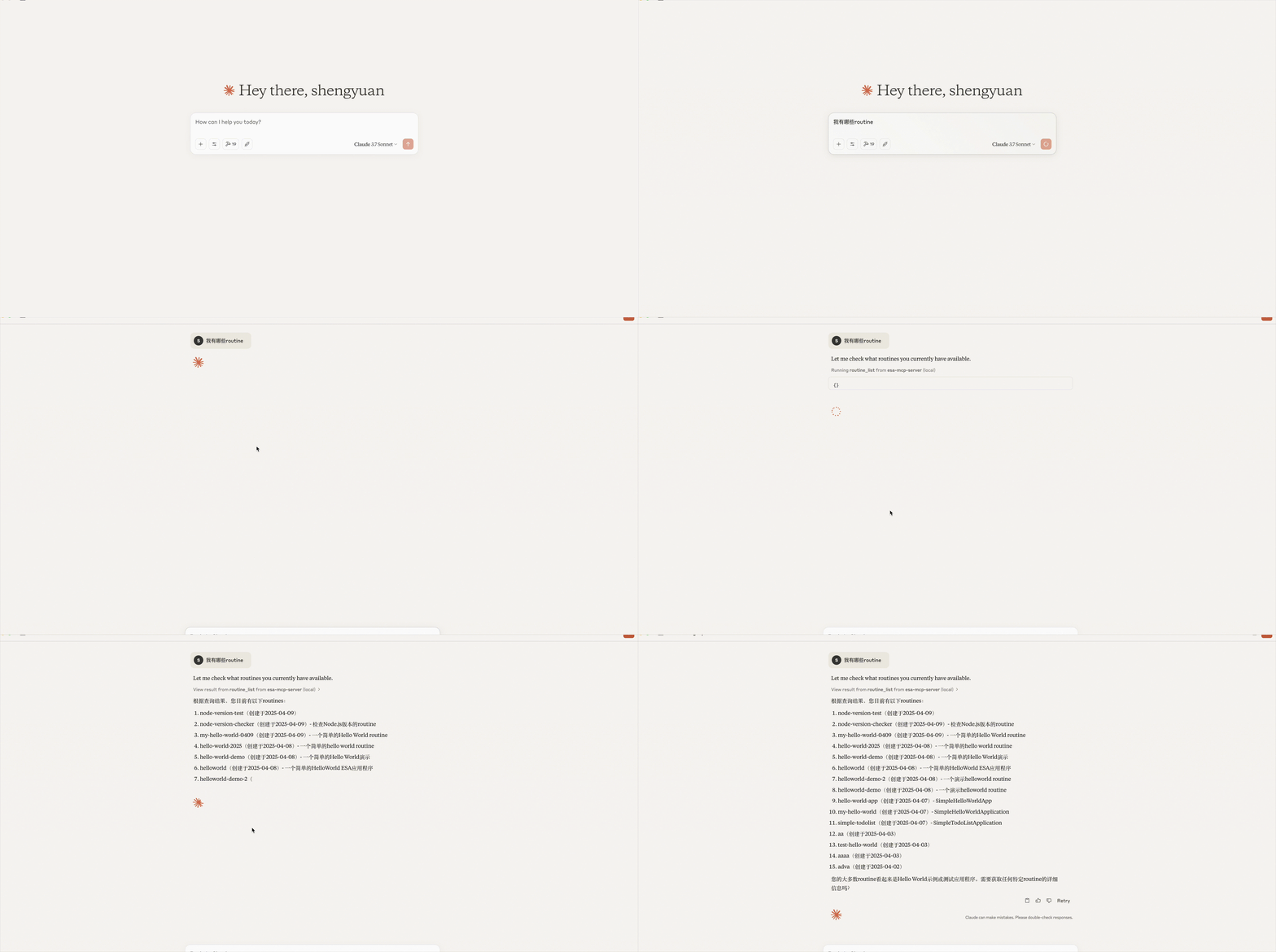
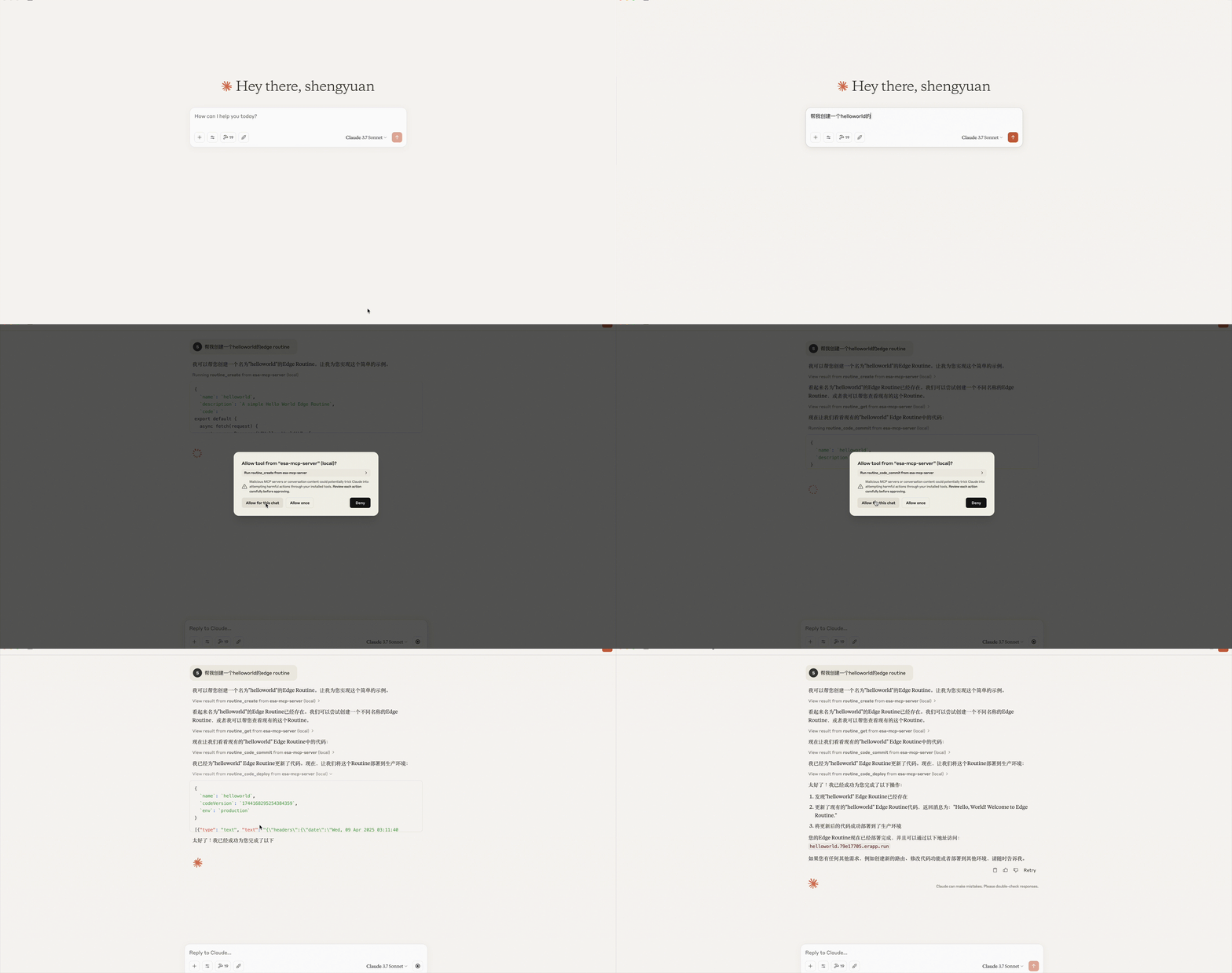
클라인 데모
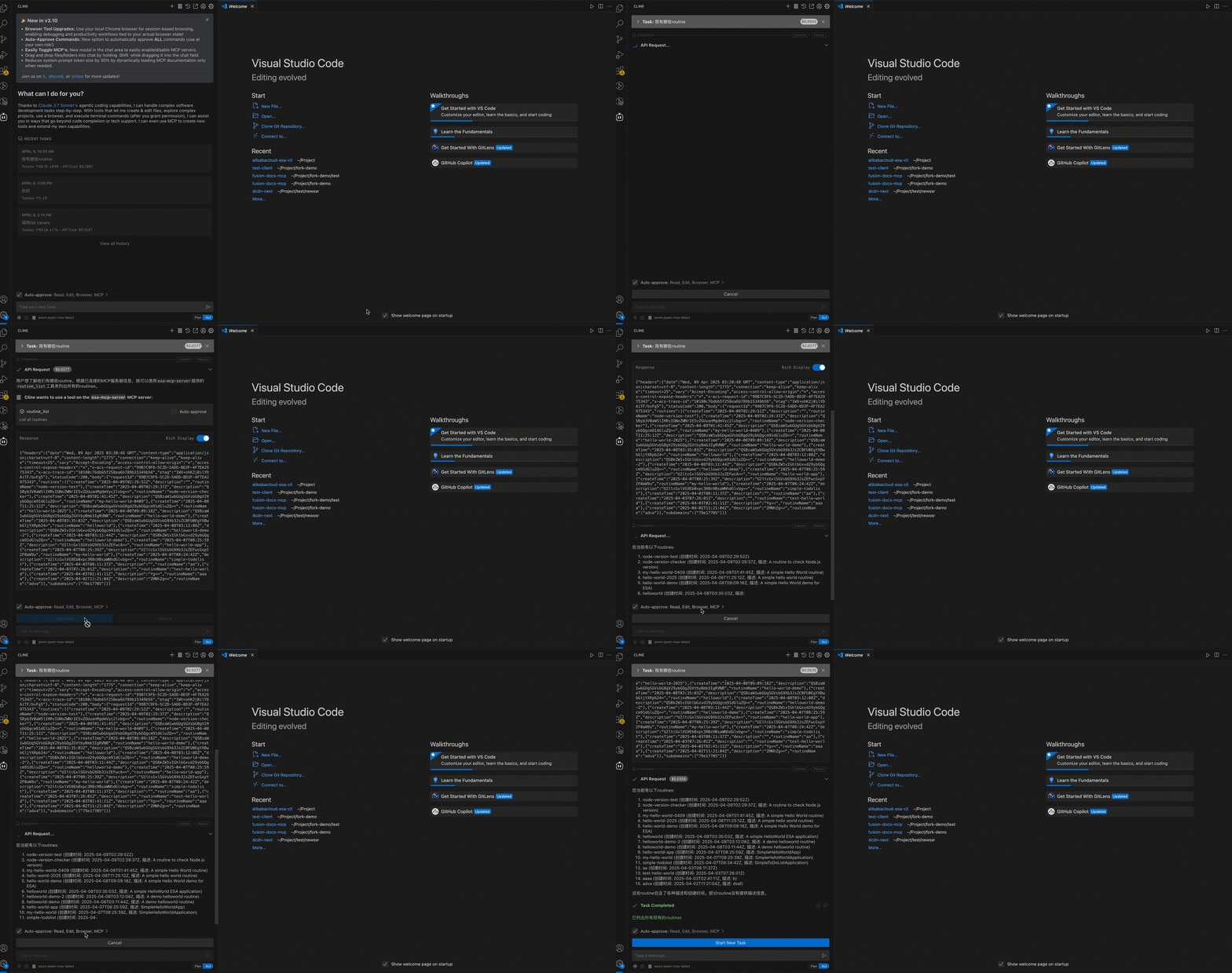
Cline이 성공적으로 구성되었습니다:
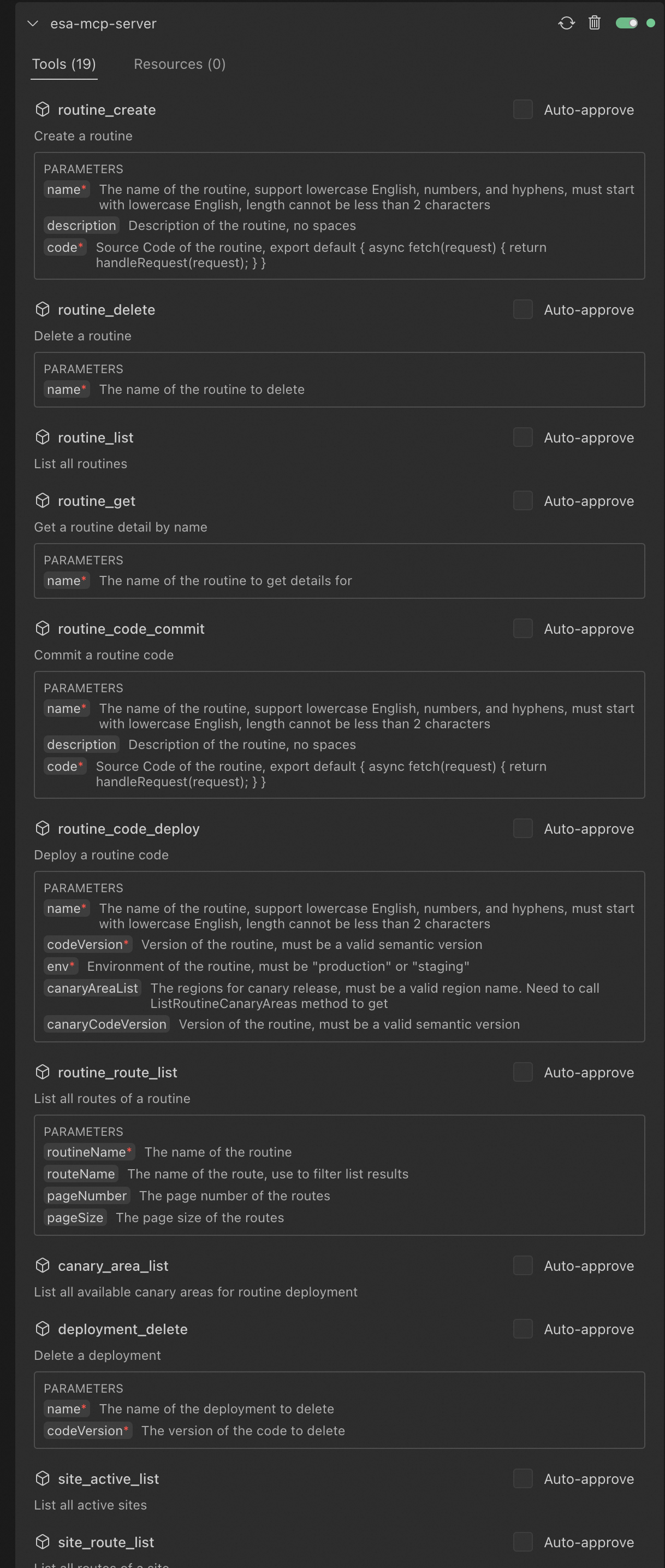
Claude가 성공적으로 구성되었습니다:
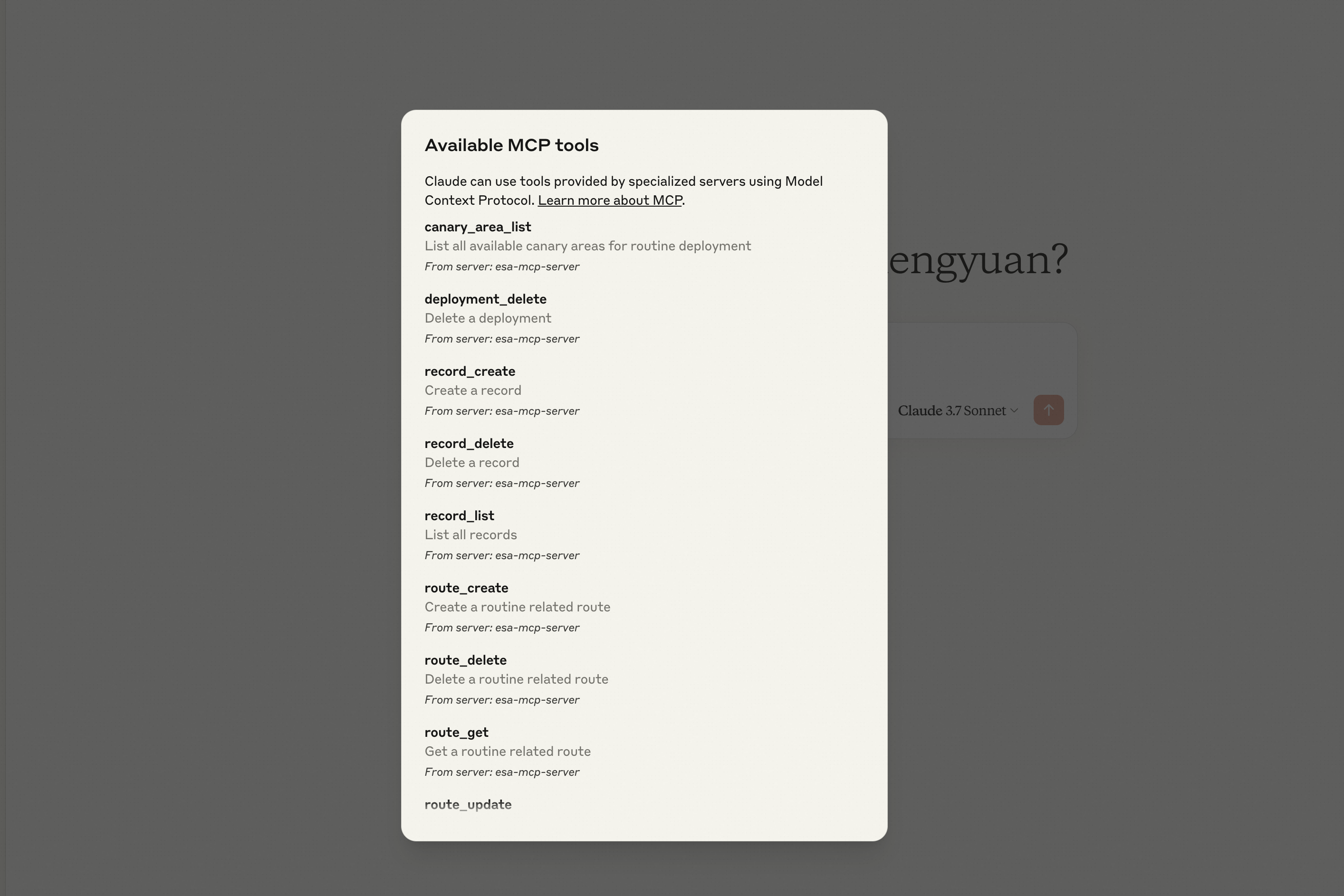
서버는 MCP 프로토콜을 통해 호출 가능한 다음 ESA 도구를 제공합니다.
범주 | 도구 | 설명 |
루틴 | 루틴 생성 | Alibaba Cloud 계정에서 새로운 Edge Routine(ER)을 생성하세요. |
루틴 삭제 | Alibaba Cloud 계정에서 기존 Edge Routine(ER)을 삭제합니다. | |
루틴_리스트 | Alibaba Cloud 계정의 모든 Edge Routines(ER)을 나열합니다. | |
루틴_겟 | ER(Edge Routine)에 대한 자세한 내용을 알아보세요. | |
배포 | 루틴_코드_커밋 | 나중에 수정하거나 Edge Routine(ER) 내에서 릴리스할 수 있도록 코드 버전을 저장합니다. |
루틴_코드_배포 | 선택한 코드 버전을 스테이징 또는 프로덕션 환경에 배포합니다. | |
배포 삭제 | Edge Routine(ER)과 관련된 지정된 코드 버전을 삭제합니다. | |
경로 | 경로 생성 | Edge Routine(ER)과 연관된 새로운 경로를 만듭니다. |
경로 업데이트 | 기존 Edge 루틴 경로의 구성을 수정합니다. | |
경로 삭제 | Edge Routine(ER)과 연관된 지정된 경로를 삭제합니다. | |
경로_get | Edge Routine(ER)과 관련된 특정 경로에 대한 세부 정보를 얻으세요. | |
루틴_경로_목록 | 특정 Edge Routine(ER)과 관련된 모든 경로를 나열합니다. | |
사이트 경로 목록 | 특정 사이트와 관련된 모든 경로를 나열합니다. | |
기록 | er_record_create | Edge Routine(ER)과 관련된 새로운 레코드를 만듭니다. |
er_record_delete | ER(Edge Routine)과 관련된 지정된 레코드를 삭제합니다. | |
er_record_list | 특정 Edge Routine(ER)과 관련된 모든 레코드를 나열합니다. | |
사이트 | 사이트 활성 목록 | Alibaba Cloud 계정에 등록된 모든 활성 사이트를 나열합니다. |
사이트 매치 | 제공된 입력 기준과 일치하는 계정의 어느 사이트를 식별합니다. | |
사이트_DNS_CNAME_레코드_생성 | 지정된 사이트에 대한 CNAME DNS 레코드를 만듭니다. | |
사이트_dns_a_record_create | 지정된 사이트에 대한 A DNS 레코드를 만듭니다. | |
사이트_레코드_목록 | 특정 사이트와 관련된 DNS 레코드를 나열합니다. |
2048 게임을 작성하여 Edge Routine에 배포하고, Edge Routine에서 제공하는 기본 액세스 URL을 표시합니다.
2025년 5월 이후에 생성된 Edge 루틴을 삭제하세요.
내 계정에 있는 모든 Edge 루틴을 나열합니다.
"hello-world"라는 이름의 Edge 루틴에 대한 기본 액세스 주소는 무엇입니까?
값을 example2.com 으로 설정하여 test.example.com 에 대한 CNAME 레코드를 만듭니다.
값을 1.1.1.1 로 설정하여 test.example.com 에 대한 A 레코드를 만듭니다.
MIT
Applies for a free SSL certificate.
Inputs: siteId (required), domains (required), type (required).
Adds a website. Make sure that you have an available plan before you add a website. Make sure that your website domain name has an ICP filing if the location you want to specify covers the Chinese mainland.
Inputs: siteName (required), coverage (required), accessType (required), instanceId (required), +1 more.
Creates a DNS record for a specific website. Only A/AAAA records are supported.
Inputs: siteId (required), recordName (required), data (required), proxied, +3 more.
Creates a DNS record for a specific website. Only supports records with type=CNAME and sourceType=Domain.
Inputs: siteId (required), recordName (required), data (required), sourceType, +4 more.
Creates a DNS record for a specific website. Only MX records are supported.
Inputs: siteId (required), recordName (required), data (required), bizName, +2 more.
Creates a DNS record for a specific website. Only NS records are supported.
Inputs: siteId, recordName, ttl, data, +3 more.
Creates a DNS record for a specific website. Only TXT records are supported.
Inputs: siteId (required), recordName (required), data (required), ttl, +1 more.
Deletes a certificate for a website.
Inputs: siteId (required), id (required).
Deletes a DNS record of a website based on the specified RecordId.
Inputs: recordId (required).
Delete a specified code version associated with an Edge Routine (ER).
Inputs: name (required), codeVersion (required).
Create a new record associated with an Edge Routine (ER)
Inputs: name (required), siteId (required), recordName (required).
Delete a specified record associated with an Edge Routine (ER).
Inputs: name (required), siteId (required), recordName (required), recordId.
List all records associated with a specific Edge Routine (ER).
Inputs: Name (required), PageNumber, PageSize, SearchKeyWord.
Retrieve the certificate, private key, and certificate information
Inputs: siteId (required), id (required).
Query certificate quota and usage.
Inputs: siteId (required), type (required).
Queries the IPv6 configuration of a website.
Inputs: siteId (required).
Query Managed Transform Configuration.
Inputs: siteId (required), siteVersion.
Queries the configuration of a single DNS record, such as the record value, priority, and origin authentication setting (exclusive to CNAME records).
Inputs: recordId (required).
Queries the ESA proxy configuration of a website.
Inputs: siteId (required).
Quickly deploy an HTML page to ESA Edge Routine (ER) and return a default access URL to the user.
Inputs: name (required), html (required).
Lists certificates of a website.
Inputs: siteId (required), keyword, validOnly, pageNumber, +1 more.
Queries a list of Domain Name System (DNS) records of a website, including the record value, priority, and authentication configurations. Supports filtering by specifying parameters such as RecordName and RecordMatchType.
Inputs: siteId (required), recordName, recordMatchType, pageNumber, +5 more.
用于查询当前用户下的站点列表 ,包括站点的名称、状态、配置等信息。
Inputs: siteName, siteSearchType, pageNumber, pageSize, +8 more.
Create a new route associated with an Edge Routine (ER).
Inputs: siteId (required), mode (required), rule (required), routineName (required), +5 more.
Delete a specified route associated with an Edge Routine (ER).
Inputs: siteId (required), configId (required).
Get details of a specific route associated with an Edge Routine (ER).
Inputs: siteId (required), configId (required).
Modify the configuration of an existing Edge Routine route.
Inputs: siteId (required), configId (required), routeName (required), routeEnable (required), +4 more.
Save a code version for future modifications or release within an Edge Routine (ER).
Inputs: name (required), code (required), description.
Deploy a selected code version to the staging or production environment. If version is not exist, should call routine_code_commit first
Inputs: name (required), codeVersion (required), env (required).
Create a new Edge Routine (ER) in your Alibaba Cloud account.
Inputs: name (required), description.
Delete an existing Edge Routine (ER) from your Alibaba Cloud account.
Inputs: name (required).
Get a the details of a Edge Routine (ER).
Inputs: name (required).
List all Edge Routines (ERs) in your Alibaba Cloud account.
Inputs: no named parameters.
List all routes associated with a specific Edge Routine (ER).
Inputs: routineName (required), routeName, pageNumber, pageSize.
Configures whether to enable certificates and update certificate information for a website.
Inputs: siteId (required), type (required), name, casId, +4 more.
List all active sites
Inputs: no named parameters.
Identify which site in the account matches the provided input criteria.
Inputs: recordName (required).
List all routes associated with a specific site.
Inputs: siteId (required), routeName, pageNumber, pageSize.
Modifies the IPv6 configuration of a website.
Inputs: siteId (required), enable (required), region.
Modifies the configuration of managed transforms for your website.
Inputs: siteId (required), addClientGeolocationHeader, siteVersion, addRealClientIpHeader, +1 more.
This operation allows you to update multiple types of DNS records, including but not limited to A/AAAA, CNAME, NS, MX, TXT, CAA, SRV, and URI. You can modify the record content by providing the necessary fields such as Value, Priority, and Flag. For origins added in CNAME records such as OSS and S3, the API enables you to configure authentication details to ensure secure access. Usage notes: The record value (Value) must match the record type. For example, the CNAME record should correspond to the target domain name. You must specify a priority (Priority) for some record types, such as MX and SRV. You must specify specific fields such as Flag and Tag for CAA records. When you update security records such as CERT and SSHFP, you must accurately set fields such as Type and Algorithm.If your origin type is OSS or S3, configure the authentication details in AuthConf based on the permissions.
Inputs: recordId (required), data (required), ttl, proxied, +6 more.
Modifies the ESA proxy configuration of a website.
Inputs: siteId (required), paused (required).
Recent tool additions, removals, and schema changes observed during successful MCP inspections.
Loading tool schema changelog…
Scored across 42 tools
Most tools have distinct purposes, but there is some overlap in DNS record creation tools (e.g., create_site_a_or_aaaa_record, create_site_cname_record, etc.), which could cause confusion as they all create DNS records but for different types. The descriptions help differentiate them, but the naming doesn't clearly indicate the record type in all cases.
The naming is mixed with some consistency within groups (e.g., create_site_*_record for DNS, er_record_* for Edge Routine records), but there are deviations like html_deploy, site_active_list, and site_match that don't follow a clear pattern. Overall, it's readable but lacks a uniform convention across all tools.
With 42 tools, the count is too high for the apparent scope of managing websites, DNS, certificates, and Edge Routines. This many tools can overwhelm agents and suggests fragmentation, such as separate tools for each DNS record type instead of a unified create_record with parameters.
The tool set provides comprehensive coverage for the domain, including site management (create, list, pause), DNS operations (create, get, list, update, delete for various record types), certificate handling (apply, get, set, delete, list), and Edge Routine lifecycle (create, get, list, delete, code commit/deploy, route management). No obvious gaps are present for core workflows.
A Model Context Protocol server for Wix AI tools
Model Context Protocol server for the Apideck Unified API. Connect any MCP-compatible agent framework to 100+ accounting systems, HRIS platforms, file storage providers, and more through one integration. More information https://www.apideck.com/mcp-server
A comprehensive Model Context Protocol (MCP) server that enables AI assistants to interact with yo…
Enable secure connectivity between Sentry issues and debugging data, and LLM clients, using a Model Context Protocol (MCP) server.