Glama
nasoma

Africa's Talking Airtime MCP

by nasoma

アフリカのトーキングエアタイムMCP

鍛冶屋のバッジ

このプロジェクトは**、Africa's Talking APIを用いて通話時間取引を管理するためのモデルコンテキストプロトコル(MCP)サーバー**を実装します。アカウント残高の確認、通話時間の送信、最近のトップアップ取引の表示、最近のトップアップ金額の合計、特定の電話番号のトップアップ回数のカウントなど、一連のツールを提供します。このアプリケーションはSQLiteを使用して取引データを保存し、Africa's Talking Airtime Service がサポートするアフリカ諸国の電話番号を適切な形式でサポートします。

説明

Africa's Talking Airtime MCPサーバーは、 Africa's Talking Airtime APIと統合されており、通話時間の転送を容易にします。主な機能は以下のとおりです。

  • 指定された電話番号に通話時間を送信します。

  • トランザクションの詳細を SQLite データベースに保存します。

  • 取引履歴の取得と要約。

  • Africa's Talking のアカウント残高を確認します。

このアプリケーションは、アフリカの Talking Airtime サービスがサポートされている国をサポートしています。

Related MCP server: mpesa-mcp

インストール

Smithery経由でインストール

Smithery経由で Claude Desktop に Africa's Talking Airtime Server を自動的にインストールするには:

npx -y @smithery/cli install @nasoma/africastalking-airtime-mcp --client claude

前提条件

  1. Python 3.10以上

  2. uvをインストールする

curl -LsSf https://astral.sh/uv/install.sh | sh

プロジェクトをローカルでセットアップして実行するには、次の手順に従います。

  1. リポジトリをクローンします。

git clone https://github.com/nasoma/africastalking-airtime-mcp.git
cd africastalking-airtime-mcp
  1. 次のコマンドを実行して仮想環境をセットアップし、依存関係をインストールします。

uv sync 
  1. 準備完了です!

AIツールと併用する

クロード・デスクトップ

これをclaude_desktop_config.jsonに追加します:

{
  "mcpServers": {
    "Airtime Server": {
      "command": "{{PATH_TO_UV}}", // Run `which uv` and place the output here
      "args": [
        "--directory",
        "{{PATH_TO_PROJECT}}", // cd into the repo, run `pwd` and enter the output here
        "run",
        "main.py"
      ],
      "env": {
        "username": "your_africastalking_username",
        "api_key": "your_africastalking_api_key",
        "country":"your_country", # e.g kenya, uganda, dr congo, rwanda, south africa
        "currency_code":"currency-code"  # e.g. KES, UGX, NGN
      }
    }
  }
}

ガチョウと

好みの LLM を使用し、API キーを提供する場合は、 Gooseが適切なオプションです。

  • Goose をインストールします。

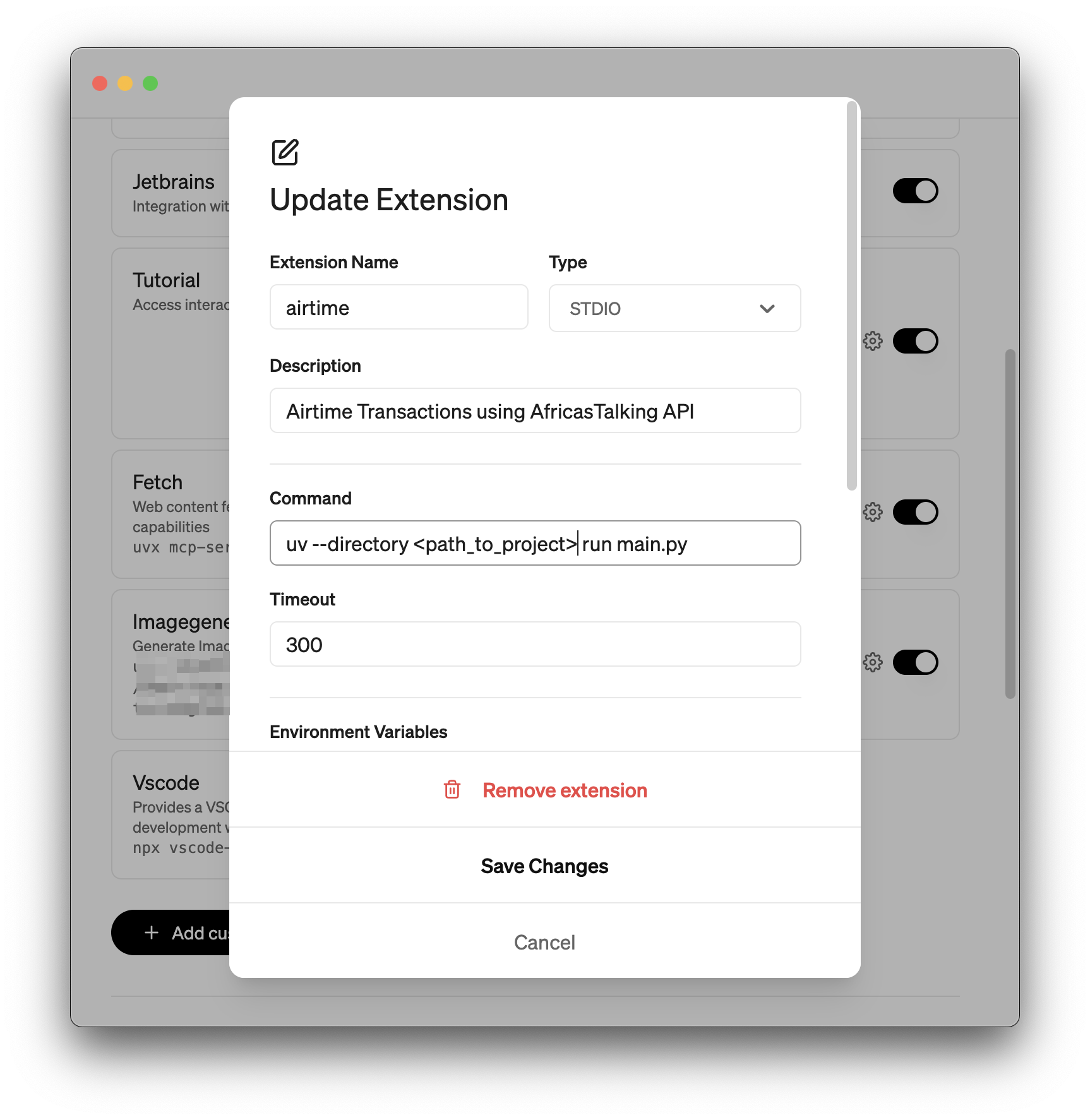
  • 設定パネルを開き、カスタム拡張機能 (MCP サーバー) を追加します。

  • 拡張機能に名前を付けます。タイプは STDIO です。

  • コマンドを追加します。変更を保存します。グースデモ

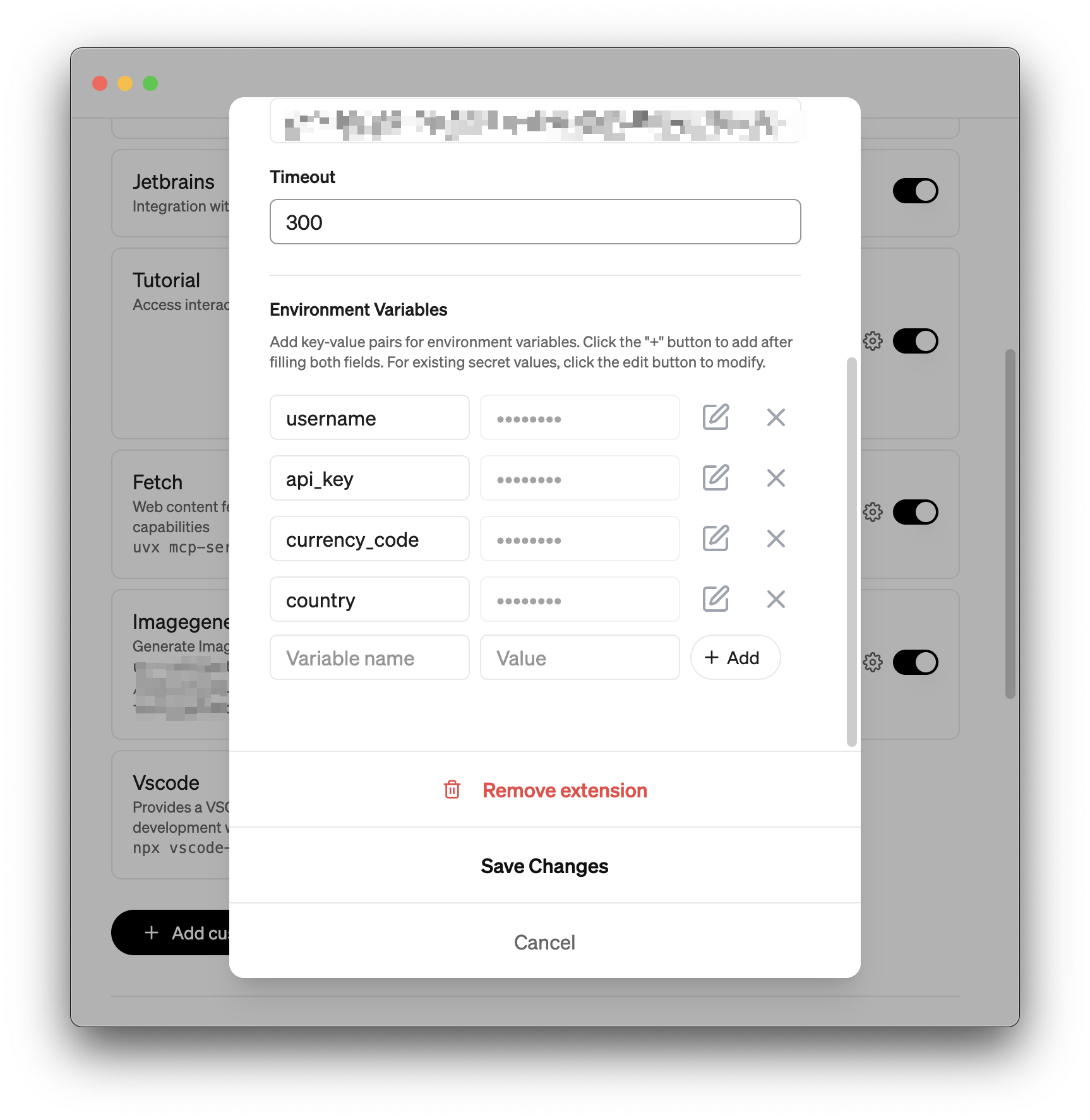
  • 環境変数を追加します: usernameapi_keycurrency_codecountry

  • 変更を保存します。

グースデモ2

ツールの説明

MCP は、通話時間トランザクションを管理するための次のツールを提供します。

  1. 残高確認:

    • 説明: Africa's Talking アカウントの現在の通話時間残高を取得します。

    • 使用法: check_balance()

    • 出力: アカウント残高 (例: 「アカウント残高: KES 1234.00」) を返します。残高を取得できない場合はエラー メッセージを返します。

  2. ロードエアタイム:

    • 説明: 指定された電話番号に通話時間を送信し、トランザクションをデータベースに保存します。

    • パラメータ:

      • phone_number : 受信者の電話番号(例:「0712345678」または「+254712345678」)。

      • amount : 送信する通信時間の量 (例: 100)。

      • currency_code : 通貨コード (例: "KES")。

    • 使用方法: load_airtime("0712345678", 100.00, "KES")

    • 出力: 成功を確認します (例: 「KES 100.00 の通話時間を +254712345678 に正常に送信しました」)、またはエラーを報告します。

  3. get_last_topups :

    • 説明: データベースから最後のN通話時間トップアップ取引を取得します。

    • パラメータ:

      • limit : 取得するトランザクションの数 (デフォルト: 3)。

    • 使用法: get_last_topups(3)

    • 出力: 最近のトランザクション (例: 「最後の 3 つのトップアップ トランザクション: ...」) を一覧表示するか、トランザクションが見つからないことを示します。

  4. 最後のn個のトップアップの合計:

    • 説明: 同じ通貨が使用されていることを確認しながら、最後のN回の成功したトップアップの合計金額を計算します。

    • パラメータ:

      • n : 合計するトランザクションの数 (デフォルト: 3)。

    • 使用法: sum_last_n_topups(3)

    • 出力: 合計を返します (例: 「過去 3 回の成功したトップアップの合計: KES 300.00」)。通貨が異なる場合はエラーを返します。

  5. カウントトップアップ数:

    • 説明: 特定の電話番号への成功したトップアップの数をカウントします。

    • パラメータ:

      • phone_number : 照会する電話番号 (例: 「0712345678」)。

    • 使用方法: count_topups_by_number("0712345678")

    • 出力: カウント (例: 「+254712345678 への成功したトップアップの数: 5」) またはエラーを返します。

プロンプトの例

以下は、利用可能なツールに基づいて、ユーザーが AI に Africa's Talking Airtime MCP と対話するために尋ねることができる質問またはコマンドの例です。

口座残高を確認する

  • 私のAfrica's Talkingアカウントの残高はいくらですか?

  • 現在の残高を見せてもらえますか?

  • 通話時間の残高を確認してください。

エアタイムを送信

  • 100 KES の通話時間を 0712345678 に送信します。

  • 0712345678 に 60 をチャージします。

  • +2348012345678 に 50 NGN をチャージします。

  • 0755123456に200UGXをチャージできますか?

最近のトップアップを表示

  • 過去 3 件の通話時間取引を表示してください。

  • 最近のトップアップは何ですか?

  • 過去 5 回の通話時間のトップアップを一覧表示します。

最近のトップアップの合計

  • 過去 3 回のトップアップの合計はいくらですか?

  • 過去 4 回の通話時間取引の金額を合計します。

  • 過去 5 回のトップアップでいくら送金しましたか?

電話番号によるトップアップのカウント

  • 0712345678 に何回チャージしましたか?

  • +254712345678 までのトップアップを数えます。

  • 0755123456 へのトップアップが何回成功したか教えてください。

注記

  • 通話時間を送信するには、Africa's Talking アカウントに資金があることを確認してください。

  • 電話番号は、クライアントまたはclaude_desktop_config.jsonで設定されたcountry変数に基づいて自動的にフォーマットされます。

  • 初期化時に、SQLite データベース ( airtime_transactions.db ) がプロジェクト ディレクトリに作成されます。

  • ツール呼び出しをサポートするモデル(例: Claude 3.7 Sonnetに最適です。価格を重視する場合は、Gooseなどのクライアントと併用すると、 GPT-4.1 Nano安価で優れた選択肢となります。

🙏 クレジット

Install Server
A
license - permissive license
A
quality
D
maintenance

Maintenance

Maintainers
Response time
Release cycle
Releases (12mo)
Commit activity

Resources

Unclaimed servers have limited discoverability.

Looking for Admin?

If you are the server author, to access and configure the admin panel.

Related MCP Servers

  • A
    license
    -
    quality
    D
    maintenance
    A unified interface for major African payment providers including M-Pesa, Paystack, and MTN MoMo. It enables users to process payments, request funds, and manage transactions across the continent using natural language commands.
    9
    MIT
  • A
    license
    A
    quality
    C
    maintenance
    MCP server for East African fintech APIs — trigger M-Pesa STK Push payments, check transaction status, send SMS to 20+ African networks, and top up airtime via Africa's Talking.
    5
    4
    MIT
  • A
    license
    A
    quality
    D
    maintenance
    Enables AI agents to call x402-gated APIs using a central credit balance, abstracting away blockchain complexity and payment proofs. It provides tools to fetch data from payment-required endpoints, check usage balances, and simulate transaction costs.
    6
    70
    2
    Inno Setup
  • -
    license
    -
    quality
    -
    maintenance
    Field operations agent API for task management, geo-tracking, and team coordination. Built for African logistics, delivery, and field service teams.

View all related MCP servers

Related MCP Connectors

  • Connect your Rede Celcoin account to AI via Brazil's Open Finance: balances, statements, cards, inve

  • Communication stack for AI agents: SMS, AI voice calls, phone numbers, and account events.

  • Track, analyze, and act on your streaming and SaaS subscriptions from any AI agent.

View all MCP Connectors

Latest Blog Posts

MCP directory API

We provide all the information about MCP servers via our MCP API.

curl -X GET 'https://glama.ai/api/mcp/v1/servers/nasoma/africastalking-airtime-mcp'

If you have feedback or need assistance with the MCP directory API, please join our Discord server